tow HONDA CIVIC HATCHBACK 2017 10.G Owner's Manual
[x] Cancel search | Manufacturer: HONDA, Model Year: 2017, Model line: CIVIC HATCHBACK, Model: HONDA CIVIC HATCHBACK 2017 10.GPages: 641
Page 538 of 641
537
uuMaintenance Under the Hood uOpening the Hood
Maintenance
Opening the Hood
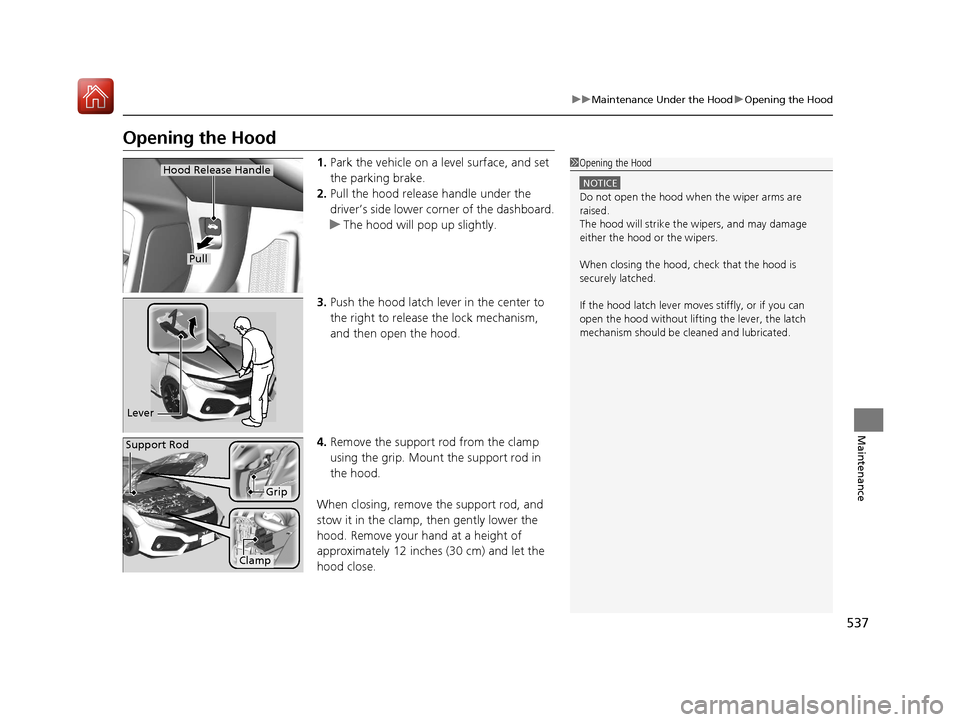
1. Park the vehicle on a level surface, and set
the parking brake.
2. Pull the hood release handle under the
driver’s side lower corner of the dashboard.
u The hood will pop up slightly.
3. Push the hood latch lever in the center to
the right to release the lock mechanism,
and then open the hood.
4. Remove the support rod from the clamp
using the grip. Mount the support rod in
the hood.
When closing, remove the support rod, and
stow it in the clamp, then gently lower the
hood. Remove your hand at a height of
approximately 12 inches (30 cm) and let the
hood close.1 Opening the Hood
NOTICE
Do not open the hood when the wiper arms are
raised.
The hood will strike the wipers, and may damage
either the hood or the wipers.
When closing the hood, check that the hood is
securely latched.
If the hood latch lever moves stiffly, or if you can
open the hood without lifti ng the lever, the latch
mechanism should be cleaned and lubricated.
Hood Release Handle
Pull
Lever
Support Rod
Grip
Clamp
17 CIVIC 5D (KA KC KL)-31TGG6000.book 537 ページ 2016年6月8日 水曜日 午 後2時8分
Page 540 of 641
539
uuMaintenance Under the Hood uOil Check
Maintenance
Oil Check
We recommend that you check the engi ne oil level every time you refuel.
Park the vehicle on level ground.
Wait approximately three minutes after turn ing the engine off before you check the
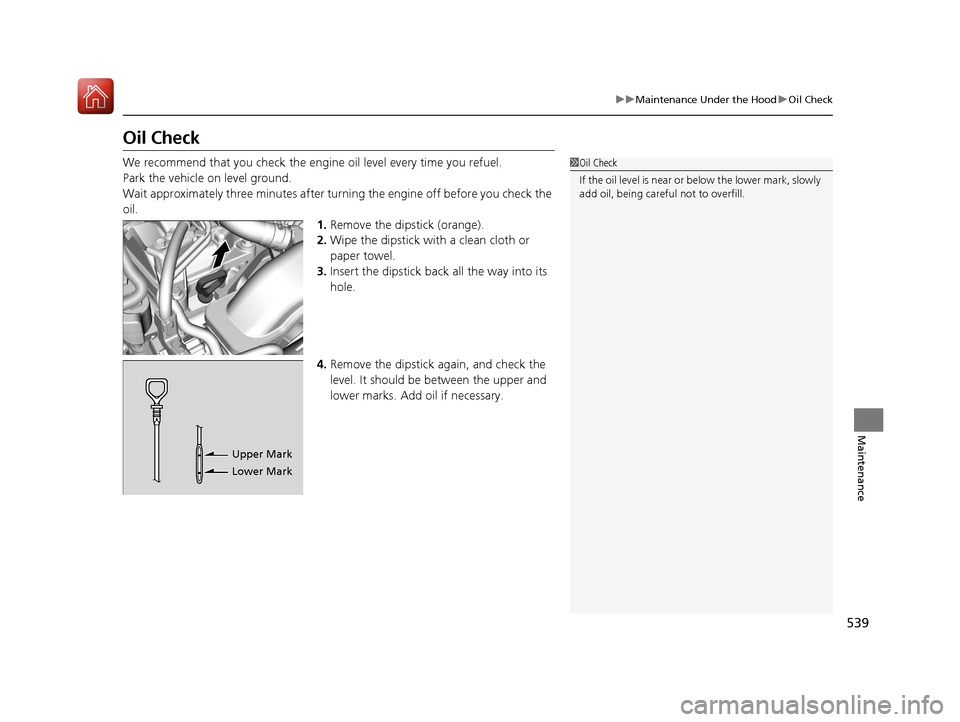
oil. 1.Remove the dipstick (orange).
2. Wipe the dipstick with a clean cloth or
paper towel.
3. Insert the dipstick back all the way into its
hole.
4. Remove the dipstick again, and check the
level. It should be between the upper and
lower marks. Add oil if necessary.1Oil Check
If the oil level is near or below the lower mark, slowly
add oil, being careful not to overfill.
Upper Mark
Lower Mark
17 CIVIC 5D (KA KC KL)-31TGG6000.book 539 ページ 2016年6月8日 水曜日 午 後2時8分
Page 573 of 641
572
uuBattery uCharging the Battery
Maintenance
Charging the Battery
Disconnect both battery cables to prevent da maging your vehicle’s electrical system.
Always disconnect the negative (–) cable first, and reconnect it last.
*1: Models with the smart entry system have an ENGINE START/STOP button instead of an
ignition switch.
1 Battery
When you find corrosion, cl ean the battery terminals
by applying a baking powder and water solution.
Clean the terminals with a damp towel. Cloth/towel
dry the battery. Coat the terminals with grease to
help prevent future corrosion.
When replacing the battery, the replacement must be
of the same specifications.
Consult a dealer for more information.
The VSA ® system, VSA ® OFF, low tire pressure/TPMS
*
and CMBSTM * indicators may come on when your
turn the ignition switch to ON ( w*1 after re-
connecting a battery.
Drive straight for a short distance at more than 12
mph (20 km/h). Each indicato r should go off. If none
of them do, have your ve hicle checked by a dealer.
* Not available on all models
17 CIVIC 5D (KA KC KL)-31TGG6000.book 572 ページ 2016年6月8日 水曜日 午 後2時8分
Page 584 of 641
583
Handling the Unexpected
This chapter explains how to handle unexpected troubles.
ToolsTypes of Tools .................................. 584
If a Tire Goes Flat
Changing a Flat Tire ......................... 585
Engine Does Not Start Checking the Engine ........................ 593
If the Smart Entry Remote Battery is Weak .......................................... 594
Emergency Engine Stop ................... 595
Jump Starting .................................... 596
Shift Lever Does Not Move .............. 599
Overheating
How to Handle Overheating ............. 600 Indicator, Coming On/Blinking
If the Low Oil Pressure Indicator Comes
On ............................................. 602
If the Charging System Indicator Comes
On ................................................. 602
If the Malfunction Indicator Lamp Comes
On or Blinks ................................... 603
If the Brake System Indicator (Red) Comes On or Blinks ................................... 604
If the Brake System Indicator (Red) Comes On or Blinks at the Same Time When the
Brake System Indicator (Amber) Comes
On ................................................. 605 If the Electric Power Steering (EPS) System
Indicator Comes On ....................... 606
If the Low Tire Pressure/TPMS Indicator Comes On or Blinks ....................... 607
Fuses Fuse Locations ................................. 608
Inspecting and Changing Fuses ........ 611
Emergency Towing ........................... 612
When You Cannot Unlock the Fuel Fill Door ................................................. 613
When You Cannot Open the Hatch.....614
Refueling ........................................... 615
17 CIVIC 5D (KA KC KL)-31TGG6000.book 583 ページ 2016年6月8日 水曜日 午 後2時8分
Page 586 of 641
585Continued
Handling the Unexpected
If a Tire Goes Flat
Changing a Flat Tire
If a tire goes flat while driving, grasp the steering wheel firmly, and brake gradually
to reduce speed. Then, stop in a safe plac e. Replace the flat tire with a compact
spare tire. Go to a dealer as soon as possib le to have the full-size tire repaired or
replaced.
1. Park the vehicle on firm, level, and non- slippery surface, and apply the parking
brake.
2. Move the shift lever to
(P.
2. Move the shift lever to
(R.
3. Turn on the hazard warning lights an d turn the ignition switch to LOCK
(0*1.
*1: Models with the smart entry system have an ENGINE START/STOP button instead of an
ignition switch.
1 Changing a Flat Tire
Follow compact spare precautions:
Periodically check the tire pressure of the compact
spare. It should be set to the specified pressure.
Specified Pressure: 60 psi (420 kPa, 4.2 kgf/cm
2)
When driving with the compact spare tire, keep the
vehicle speed under 50 mph (80 km/h). Replace with
a full-size tire as soon as possible.
The compact spare tire and wheel in your vehicle are
specifically for this model. Do not use them with
another vehicle. Do not us e another type of compact
spare tire or wheel with your vehicle.
Do not mount tire chains on a compact spare tire.
If a chain-mounted front tire goes flat, remove one of
the full-size rear tires and replace it with the compact
spare tire. Remove the flat front tire and replace it
with the full-size tire that was removed from the rear.
Mount the tire chains on the front tire.
NOTICE
Do not use the jack if it doesn’t work properly. Call
your dealer or a prof essional towing service.
The subwoofer
* is located on the rear right side. Do
not store anything in th is area. Doing so may
compromise vehicle audio performance.
Continuously variable transmission models
Manual transmission models
All models
* Not available on all models
17 CIVIC 5D (KA KC KL)-31TGG6000.book 585 ページ 2016年6月8日 水曜日 午 後2時8分
Page 594 of 641
593
Handling the Unexpected
Engine Does Not Start
Checking the Engine
If the engine does not start, check the starter.
Starter conditionChecklist
Starter doesn’t turn or turns
over slowly.
The battery may be dead. Check
each of the items on the right and
respond accordingly.
Check for a message on the driver information interface.●If the To Start, Hold Remote Near Start Button message appears2If the Smart Entry Remote Battery is Weak P. 594
uMake sure the smart entry remote is in its operating range.2 ENGINE START/STOP Button Operating Range P. 166
Check the brightness of the interior lights.
Turn on the interior lights and check the brightness.
●If the interior lights are dim or do not come on at all2 Battery P. 571●If the interior lights come on normally2 Fuses P. 608
The starter turns over normally
but the engine doesn’t start.
There may be a problem with the
fuse. Check each of the items on
the right and respond accordingly. Review the engine start procedure.
Follow its instructions, and try
to start the engine again.
2 Starting the Engine P. 422
Check the immobilize r system indicator.
When the immobilizer system indicator is blinking, the engine cannot be started.
2 Immobilizer System P. 157
Check the fuel level.
There should be enough fuel in the tank.
2 Fuel Gauge P. 114
Check the fuse.
Check all fuses, or have the vehicle checked by a dealer.
2Inspecting and Changing Fuses P. 611
If the problem continues:2Emergency Towing P. 612
1Checking the Engine
If you must start the vehi cle immediately, use an
assisting vehicle to jump start it.
2 Jump Starting P. 596
Models with smart entry system
17 CIVIC 5D (KA KC KL)-31TGG6000.book 593 ページ 2016年6月8日 水曜日 午 後2時8分
Page 613 of 641
612
Handling the Unexpected
Emergency Towing
Call a professional towing service if you need to tow your vehicle.
■Flat bed equipment
The operator loads your vehicle on the back of a truck.
This is the best way to transport your vehicle.
■Wheel lift equipment
The tow truck uses two pivoti ng arms that go under the front tires and lift them off
the ground. The rear tires remain on the ground. This is an acceptable way to
tow your vehicle.
1 Emergency Towing
NOTICE
Trying to lift or tow your vehicle by the bumpers will
cause serious damage to the vehicle. The bumpers
are not designed to suppor t the vehicle's weight.
NOTICE
Improper towing such as towing behind a
motorhome or other motor vehicle can damage the
transmission.
Never tow your vehicle with just a rope or chain.
It is very dangerous, since ropes or chains may shift
from side to side or break.
Make sure the parking brake is released. If you
cannot release the parking brake, your vehicle must
be transported with flat bed equipment.
2 Parking Brake P. 497
17 CIVIC 5D (KA KC KL)-31TGG6000.book 612 ページ 2016年6月8日 水曜日 午 後2時8分
Page 614 of 641
613
Handling the Unexpected
When You Cannot Unlock the Fuel Fill Door
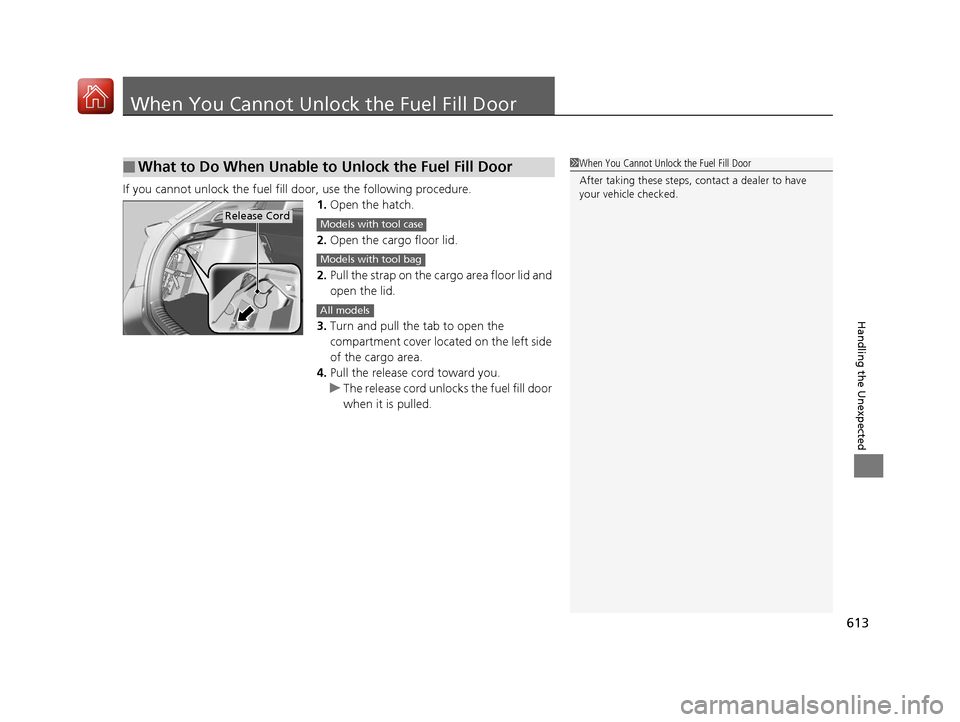
If you cannot unlock the fuel fill door, use the following procedure.
1.Open the hatch.
2. Open the cargo floor lid.
2. Pull the strap on the cargo area floor lid and
open the lid.
3. Turn and pull the tab to open the
compartment cover located on the left side
of the cargo area.
4. Pull the release cord toward you.
u The release cord unlocks the fuel fill door
when it is pulled.
■What to Do When Unable to Unlock the Fuel Fill Door1When You Cannot Unlo ck the Fuel Fill Door
After taking these steps, contact a dealer to have
your vehicle checked.
Release CordModels with tool case
Models with tool bag
All models
17 CIVIC 5D (KA KC KL)-31TGG6000.book 613 ページ 2016年6月8日 水曜日 午 後2時8分
Page 638 of 641
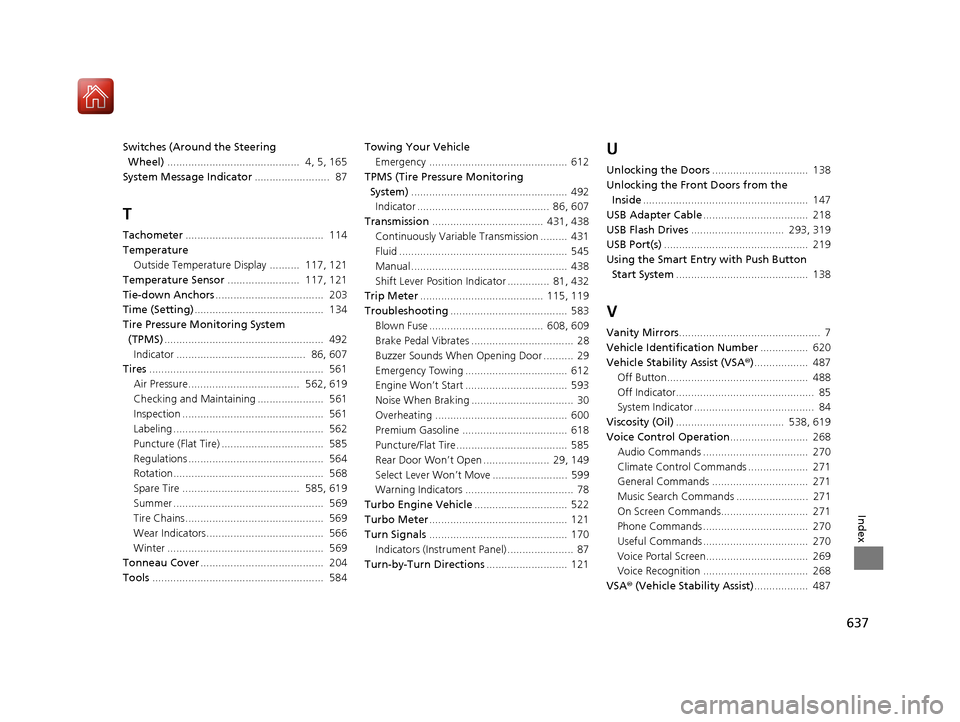
637
Index
Switches (Around the Steering Wheel) ............................................ 4, 5, 165
System Message Indicator ......................... 87
T
Tachometer.............................................. 114
Temperature Outside Temperature Display .......... 117, 121
Temperature Sensor ........................ 117, 121
Tie-down Anchors .................................... 203
Time (Setting) ........................................... 134
Tire Pressure Monitoring System
(TPMS) ..................................................... 492
Indicator ........................................... 86, 607
Tires .......................................................... 561
Air Pressure..................................... 562, 619
Checking and Maintaining ...................... 561
Inspection ............................................... 561
Labeling .................................................. 562
Puncture (Flat Tire) .................................. 585
Regulations ............................................. 564
Rotation.................................................. 568
Spare Tire ....................................... 585, 619
Summer .................................................. 569
Tire Chains.............................................. 569
Wear Indicators....................................... 566
Winter .................................................... 569
Tonneau Cover ......................................... 204
Tools ......................................................... 584 Towing Your Vehicle
Emergency .............................................. 612
TPMS (Tire Pressure Monitoring System) .................................................... 492
Indicator ............................................ 86, 607
Transmission ..................................... 431, 438
Continuously Variable Transmission ......... 431
Fluid ........................................................ 545
Manual .................................................... 438
Shift Lever Position Indicator .............. 81, 432
Trip Meter ......................................... 115, 119
Troubleshooting ....................................... 583
Blown Fuse ...................................... 608, 609
Brake Pedal Vibrates .................................. 28
Buzzer Sounds When Opening Door .......... 29
Emergency Towing .................................. 612
Engine Won’t Start .................................. 593
Noise When Braking .................................. 30
Overheating ............................................ 600
Premium Gasoline ................................... 618
Puncture/Flat Tire ..................................... 585
Rear Door Won’t Open ...................... 29, 149
Select Lever Won’t Move ......................... 599
Warning Indicators .................................... 78
Turbo Engine Vehicle ............................... 522
Turbo Meter .............................................. 121
Turn Signals .............................................. 170
Indicators (Instrument Panel) ...................... 87
Turn-by-Turn Directions ........................... 121
U
Unlocking the Doors................................ 138
Unlocking the Fron t Doors from the
Inside ....................................................... 147
USB Adapter Cable ................................... 218
USB Flash Drives ............................... 293, 319
USB Port(s) ................................................ 219
Using the Smart Entr y with Push Button
Start System ............................................ 138
V
Vanity Mirrors ............................................... 7
Vehicle Identification Number ................ 620
Vehicle Stability Assist (VSA ®).................. 487
Off Button............................................... 488
Off Indicator.............................................. 85
System Indicator ........................................ 84
Viscosity (Oil) .................................... 538, 619
Voice Control Operation .......................... 268
Audio Commands ................................... 270
Climate Control Commands .................... 271
General Commands ................................ 271
Music Search Commands ........................ 271
On Screen Commands............................. 271
Phone Commands ................................... 270
Useful Commands ................................... 270
Voice Portal Screen.................................. 269
Voice Recognition ................................... 268
VSA ® (Vehicle Stability Assist) .................. 487
17 CIVIC 5D (KA KC KL)-31TGG6000.book 637 ページ 2016年6月8日 水曜日 午 後2時8分