remote control HONDA CIVIC HATCHBACK 2017 10.G Owner's Guide
[x] Cancel search | Manufacturer: HONDA, Model Year: 2017, Model line: CIVIC HATCHBACK, Model: HONDA CIVIC HATCHBACK 2017 10.GPages: 641
Page 226 of 641
225
Features
Audio System Basic Operation
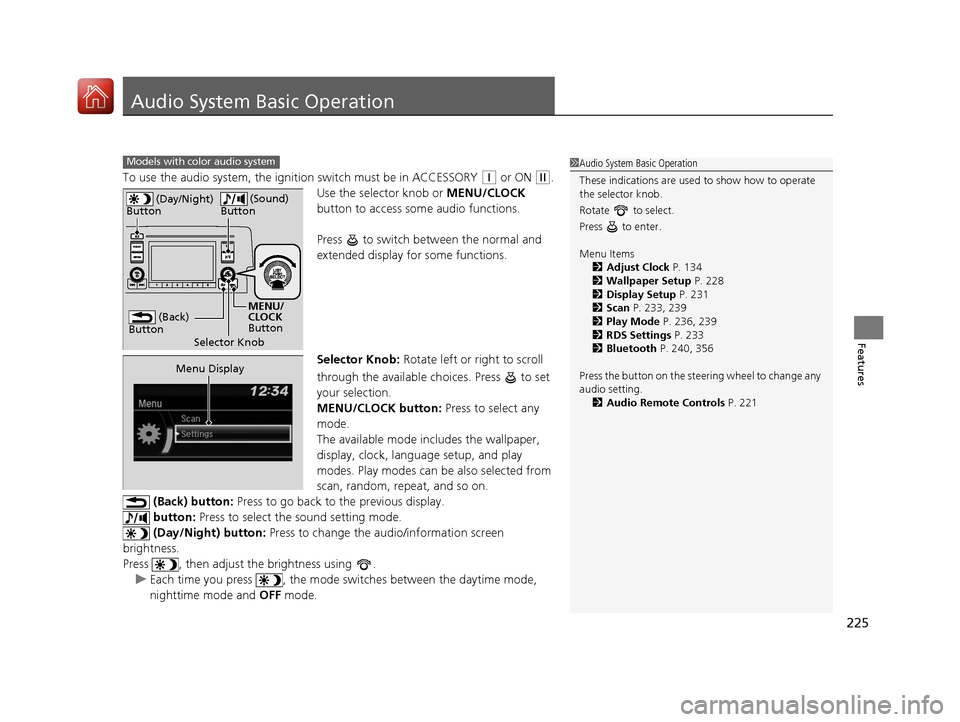
To use the audio system, the ignition switch must be in ACCESSORY (q or ON (w.
Use the selector knob or MENU/CLOCK
button to access some audio functions.
Press to switch between the normal and
extended display fo r some functions.
Selector Knob: Rotate left or right to scroll
through the available ch oices. Press to set
your selection.
MENU/CLOCK button: Press to select any
mode.
The available mode in cludes the wallpaper,
display, clock, language setup, and play
modes. Play modes can be also selected from
scan, random, repeat, and so on.
(Back) button: Press to go back to the previous display.
button: Press to select the sound setting mode.
(Day/Night) button: Press to change the audio/information screen
brightness.
Press , then adjust the brightness using . u Each time you press , the mode sw itches between the daytime mode,
nighttime mode and OFF mode.
Models with color audio system1Audio System Basic Operation
These indications are used to show how to operate
the selector knob.
Rotate to select.
Press to enter.
Menu Items 2 Adjust Clock P. 134
2 Wallpaper Setup P. 228
2 Display Setup P. 231
2 Scan P. 233, 239
2 Play Mode P. 236, 239
2 RDS Settings P. 233
2 Bluetooth P. 240, 356
Press the button on the stee ring wheel to change any
audio setting.
2 Audio Remote Controls P. 221
(Back)
Button
Selector Knob MENU/
CLOCK
Button
(Day/Night)
Button
(Sound)
Button
Menu Display
17 CIVIC 5D (KA KC KL)-31TGG6000.book 225 ページ 2016年6月8日 水曜日 午 後2時8分
Page 234 of 641
233
uuAudio System Basic Operation uPlaying the AM/FM Radio
Features
Provides text data information related to your selected RDS capable FM station.
■To find an RDS station from Station List
1. Press while listening to an FM station.
2. Rotate to select the station, then press .
■Update List
Updates your available st ation list at any time.
1. Press while listening to an FM station.
2. Rotate to select Update List, then press .
■Radio text
Displays the radio text informat ion of the selected RDS station.
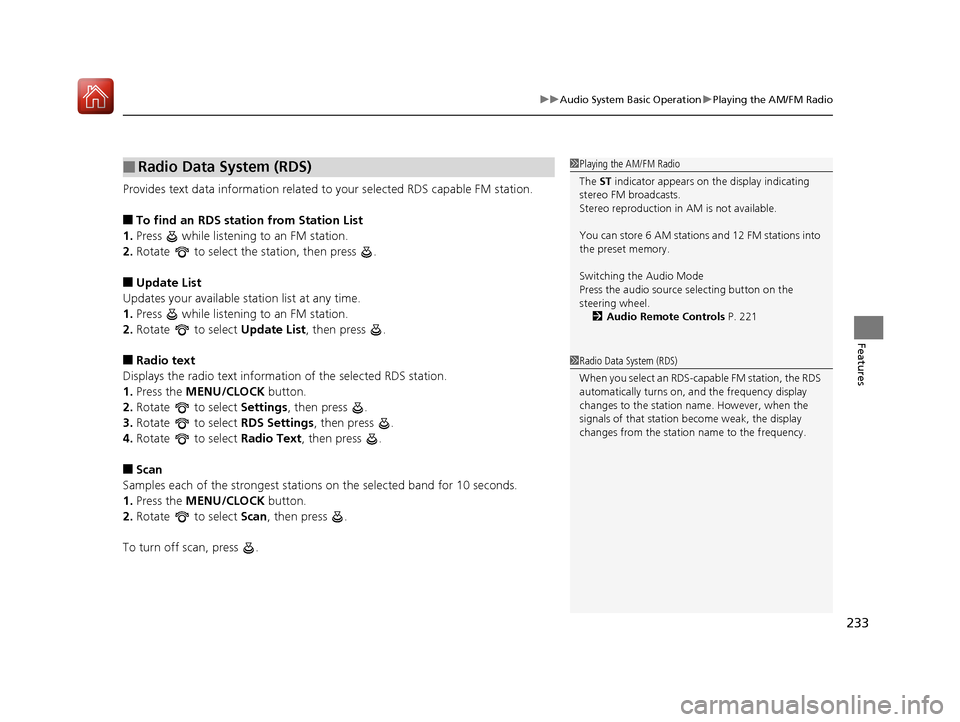
1. Press the MENU/CLOCK button.
2. Rotate to select Settings, then press .
3. Rotate to select RDS Settings, then press .
4. Rotate to select Radio Text, then press .
■Scan
Samples each of the strongest stations on the selected band for 10 seconds.
1. Press the MENU/CLOCK button.
2. Rotate to select Scan, then press .
To turn off scan, press .
■Radio Data System (RDS)1 Playing the AM/FM Radio
The ST indicator appears on the display indicating
stereo FM broadcasts.
Stereo reproduction in AM is not available.
You can store 6 AM stations and 12 FM stations into
the preset memory.
Switching the Audio Mode
Press the audio source selecting button on the
steering wheel.
2 Audio Remote Controls P. 221
1Radio Data System (RDS)
When you select an RDS-capable FM station, the RDS
automatically turns on, and the frequency display
changes to the station name. However, when the
signals of that station become weak, the display
changes from the statio n name to the frequency.
17 CIVIC 5D (KA KC KL)-31TGG6000.book 233 ページ 2016年6月8日 水曜日 午 後2時8分
Page 274 of 641
Continued273
uuAudio System Basic Operation uPlaying AM/FM Radio
Features
To store a station:
1. Tune to the selected station.
2. Select and hold the preset number for the station you want to store.
You can also store a preset station by the following procedure.
1. Tune to the selected station.
2. Select the open/close icon to display a list.
3. Select the Preset tab.
4. Select and hold the preset number for the station you want to store.
Lists the strongest stations on the selected band.
1. Select the open/close icon to display a list.
2. Select the Station List tab.
3. Select the station.
■Manual update
Updates your available st ation list at any time.
1. Select the open/close icon to display a list.
2. Select the Station List tab.
3. Select Refresh .
■Preset Memory
■Station List
1Playing AM/FM Radio
The ST indicator appears on the display indicating
stereo FM broadcasts.
Stereo reproduction in AM is not available.
Switching the Audio Mode
Press the or button on the steering wheel or
select SOURCE on the screen.
2 Audio Remote Controls P. 221
You can store 6 AM stations and 12 FM stations into
preset memory.
HD Radio Technology manufactured under license
from iBiquity Digital Cor poration. U.S. and Foreign
Patents. HD Radio
TM and the HD, HD Radio, and
“Arc” logos are proprietary trademarks of iBiquity
Digital Corp.
HD Radio
TM stations not availabl e in all locations in
Canada.
34
Models with HD RadioTM feature
17 CIVIC 5D (KA KC KL)-31TGG6000.book 273 ページ 2016年6月8日 水曜日 午 後2時8分
Page 278 of 641
Continued277
uuAudio System Basic Operation uPlaying SiriusXM ® Radio*
Features
1. Select .
2. Select Tune Mode .
3. Select Channel Mode or Category Mode .
■To Change the Tune Mode1Playing SiriusXM ® Radio*
In the channel mode, all available channels are
selectable. In the categor y mode, you can select a
channel within a ca tegory (Jazz, Rock, Classical, etc.).
There may be instances when SiriusXM ® Radio does
not broadcast all the data fi elds (artist name, title).
This does not indicate a problem with your audio
system.
SiriusXM ® Radio stations load in ascending order,
which can take about a minute. Once they have
loaded you will be able to scroll up or down to make
your selections.
Switching the Audio Mode
Press the or button on the steering wheel or
select SOURCE on the screen.
2 Audio Remote Controls P. 221
Tune Start:
When you change to a preset channel, a song being
played on that channel restarts from the beginning
with this function. This can be turned on or off from
the Audio settings screen.
2 Customized Features P. 324
34
* Not available on all models
17 CIVIC 5D (KA KC KL)-31TGG6000.book 277 ページ 2016年6月8日 水曜日 午 後2時8分
Page 350 of 641
349
uuCustomized Features u
Continued
Features
*1:Default Setting
*2:Models with the smart entry system have an ENGINE START/STOP button instead of an ignition switch.
*3:Does not appear when you chan ge the screen interface design.
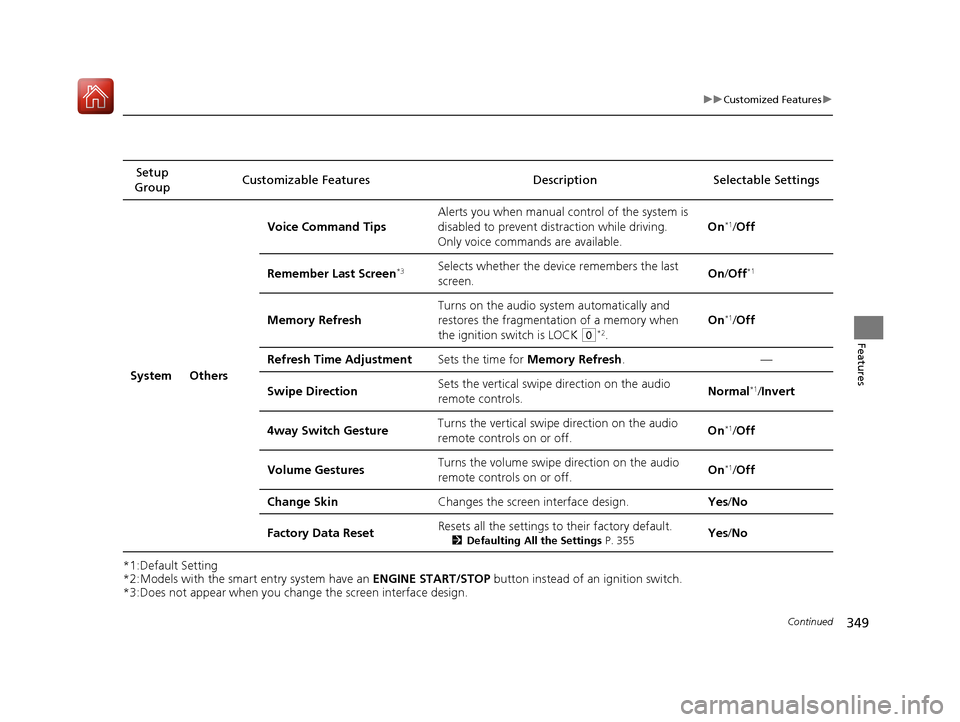
Setup
Group Customizable Features Description
Selectable Settings
System Others Voice Command Tips
Alerts you when manual c
ontrol of the system is
disabled to prevent distraction while driving.
Only voice comman ds are available. On
*1/
Off
Remember Last Screen
*3Selects whether the device remembers the last
screen. On
/Off*1
Memory Refresh Turns on the audio system automatically and
restores the fragmentation of a memory when
the ignition switch is LOCK
(0*2.On
*1/
Off
Refresh Time Adjustment Sets the time for Memory Refresh . —
Swipe Direction Sets the vertical swipe direction on the audio
remote controls. Normal
*1/
Invert
4way Switch Gesture Turns the vertical swipe
direction on the audio
remote controls on or off. On
*1/
Off
Volume Gestures Turns the volume swipe
direction on the audio
remote controls on or off. On
*1/
Off
Change Skin Changes the screen interface design. Yes/No
Factory Data Reset Resets all the settings to their factory default.
2
Defaulting All the Settings P. 355Yes/No
17 CIVIC 5D (KA KC KL)-31TGG6000.book 349 ページ 2016年6月8日 水曜日 午 後2時8分
Page 357 of 641
356
Features
Bluetooth® HandsFreeLink ®*
Bluetooth® HandsFreeLink ® (HFL) allows you to place and receive phone calls using
your vehicle's audio system, without handling your cell phone.
Using HFL
*1 : Models with driver information interface
*2 : Models with information display
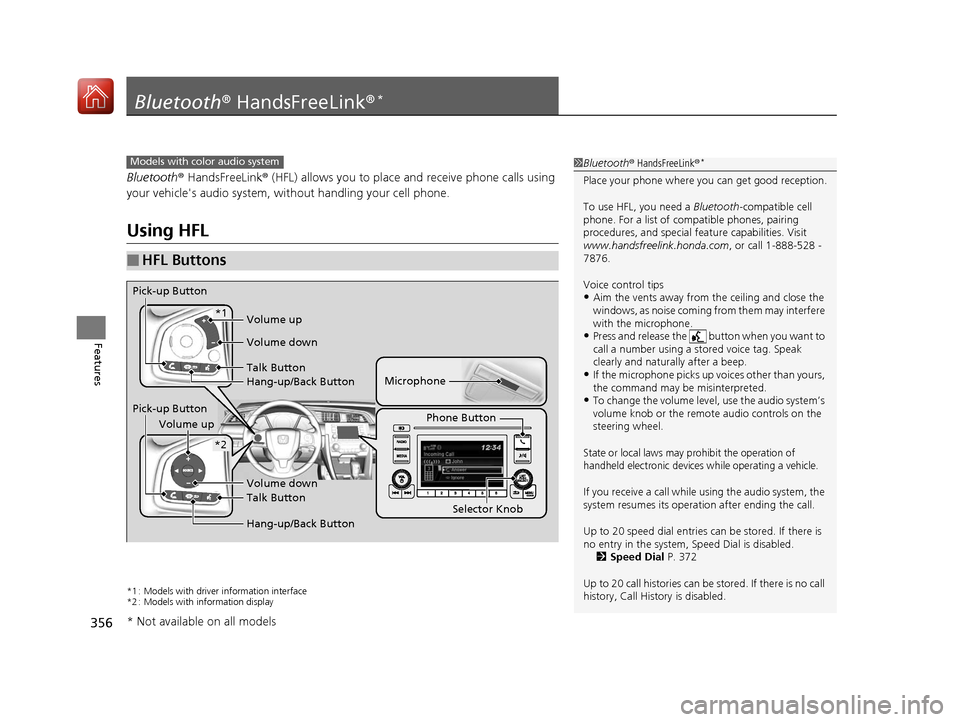
■HFL Buttons
1 Bluetooth ® HandsFreeLink ®*
Place your phone where y ou can get good reception.
To use HFL, you need a Bluetooth-compatible cell
phone. For a list of compatible phones, pairing
procedures, and special fe ature capabilities. Visit
www.handsfreelink.honda.com , or call 1-888-528 -
7876.
Voice control tips
•Aim the vents away from the ceiling and close the
windows, as noise coming fr om them may interfere
with the microphone.
•Press and release the button when you want to
call a number using a st ored voice tag. Speak
clearly and naturally after a beep.
•If the microphone picks up vo ices other than yours,
the command may be misinterpreted.
•To change the volume level, use the audio system’s
volume knob or the remote audio controls on the
steering wheel.
State or local laws may pr ohibit the operation of
handheld electronic devices while operating a vehicle.
If you receive a call while using the audio system, the
system resumes its operati on after ending the call.
Up to 20 speed dial entries can be stored. If there is
no entry in the system, Speed Dial is disabled. 2 Speed Dial P. 372
Up to 20 call histories can be stored. If there is no call
history, Call History is disabled.
Models with color audio system
Microphone
Pick-up Button
Phone Button
Volume up
Volume down
Talk Button
Hang-up/Back Button
Pick-up Button Volume up
Volume down
Talk Button
Hang-up/Back Button
*1
*2
Selector Knob
* Not available on all models
17 CIVIC 5D (KA KC KL)-31TGG6000.book 356 ページ 2016年6月8日 水曜日 午 後2時8分
Page 383 of 641
382
Features
Bluetooth® HandsFreeLink ®*
Bluetooth® HandsFreeLink ® (HFL) allows you to place and receive phone calls using
your vehicle’s audio system, without handling your cell phone.
Using HFL
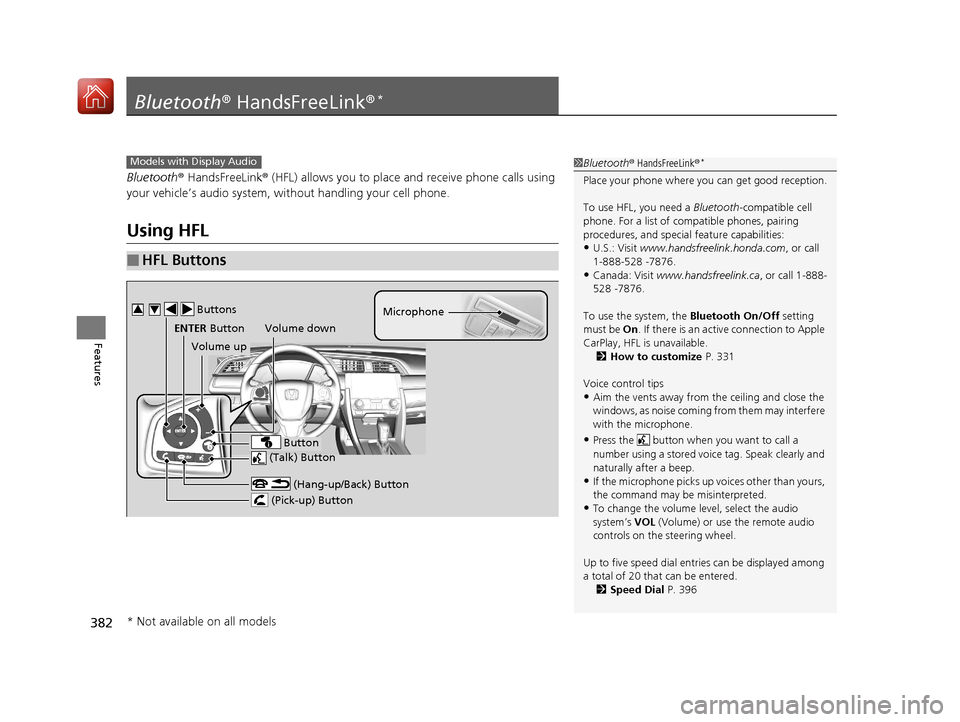
■HFL Buttons
1 Bluetooth ® HandsFreeLink ®*
Place your phone where y ou can get good reception.
To use HFL, you need a Bluetooth-compatible cell
phone. For a list of compatible phones, pairing
procedures, and special feature capabilities:
•U.S.: Visit www.handsfreelink.honda.com , or call
1-888-528 -7876.
•Canada: Visit www.handsfreelink.ca , or call 1-888-
528 -7876.
To use the system, the Bluetooth On/Off setting
must be On . If there is an acti ve connection to Apple
CarPlay, HFL is unavailable. 2 How to customize P. 331
Voice control tips
•Aim the vents away from the ceiling and close the
windows, as noise coming fr om them may interfere
with the microphone.
•Press the button when you want to call a
number using a stored voic e tag. Speak clearly and
naturally after a beep.
•If the microphone picks up vo ices other than yours,
the command may be misinterpreted.
•To change the volume level, select the audio
system’s VOL (Volume) or use the remote audio
controls on the steering wheel.
Up to five speed dial entries can be displayed among
a total of 20 that can be entered. 2 Speed Dial P. 396
Models with Display Audio
(Talk) Button
Volume up Microphone
(Hang-up/Back) Button
(Pick-up) Button
ENTER Button
Button
Buttons34
Volume down
* Not available on all models
17 CIVIC 5D (KA KC KL)-31TGG6000.book 382 ページ 2016年6月8日 水曜日 午 後2時8分
Page 405 of 641
uuBluetooth ® HandsFreeLink ®*uHFL Menus
404
Features
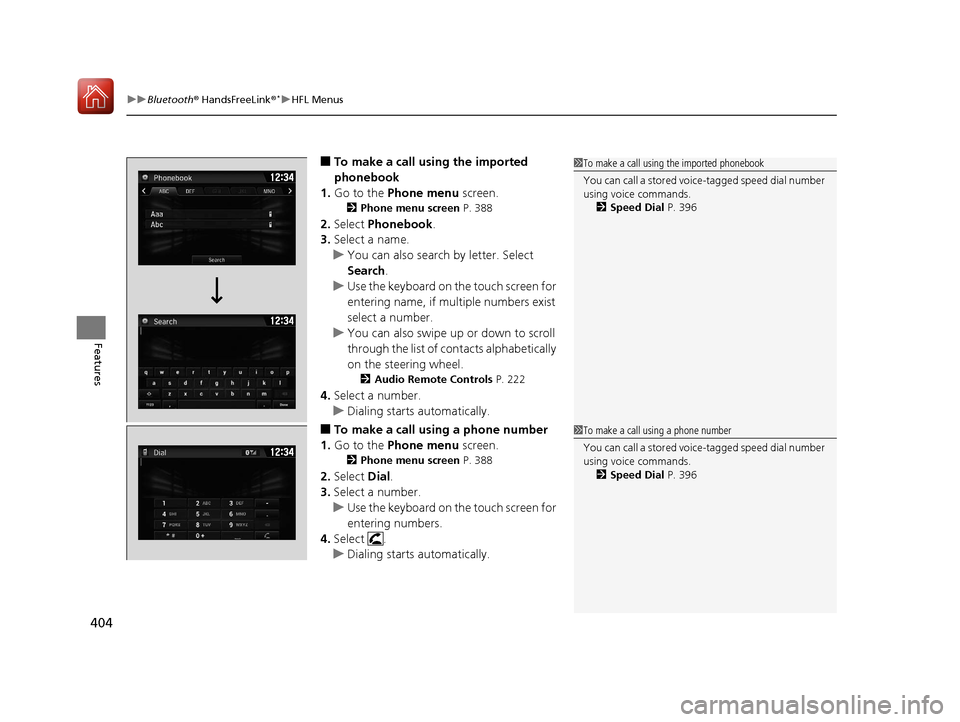
■To make a call using the imported
phonebook
1. Go to the Phone menu screen.
2Phone menu screen P. 388
2.Select Phonebook .
3. Select a name.
u You can also search by letter. Select
Search .
u Use the keyboard on the touch screen for
entering name, if multiple numbers exist
select a number.
u You can also swipe up or down to scroll
through the list of co ntacts alphabetically
on the steering wheel.
2 Audio Remote Controls P. 222
4.Select a number.
u Dialing starts automatically.
■To make a call using a phone number
1. Go to the Phone menu screen.
2Phone menu screen P. 388
2.Select Dial.
3. Select a number.
u Use the keyboard on the touch screen for
entering numbers.
4. Select .
u Dialing starts automatically.
1To make a call using the imported phonebook
You can call a stored voic e-tagged speed dial number
using voice commands.
2 Speed Dial P. 396
1To make a call using a phone number
You can call a stored voic e-tagged speed dial number
using voice commands.
2 Speed Dial P. 396
17 CIVIC 5D (KA KC KL)-31TGG6000.book 404 ページ 2016年6月8日 水曜日 午 後2時8分
Page 428 of 641
Continued427
uuWhen Driving uStarting the Engine
Driving
■To stop the engine1Remote Engine Start with Vehicle Feedback*
•You have already used the remote twice to start
the engine.
•Another registered smart entry remote is in the
vehicle.
•There is an antenna failure.
•Door is unlocked with the built-in key.
•The engine oil pressure is low.•The engine coolant temper ature is extremely high.
•The security system alarm is not set.
While the engine is running, the vehicle will
automatically activate climate control with a preset
temperature of 72°F (22°C).
When it is warm outside:
•The air conditioning is acti vated in recirculation
mode.
When it is cold outside:
•The defroster is activated at a moderately warm
temperature.
•The rear defogger and door mirror heaters are
activated.
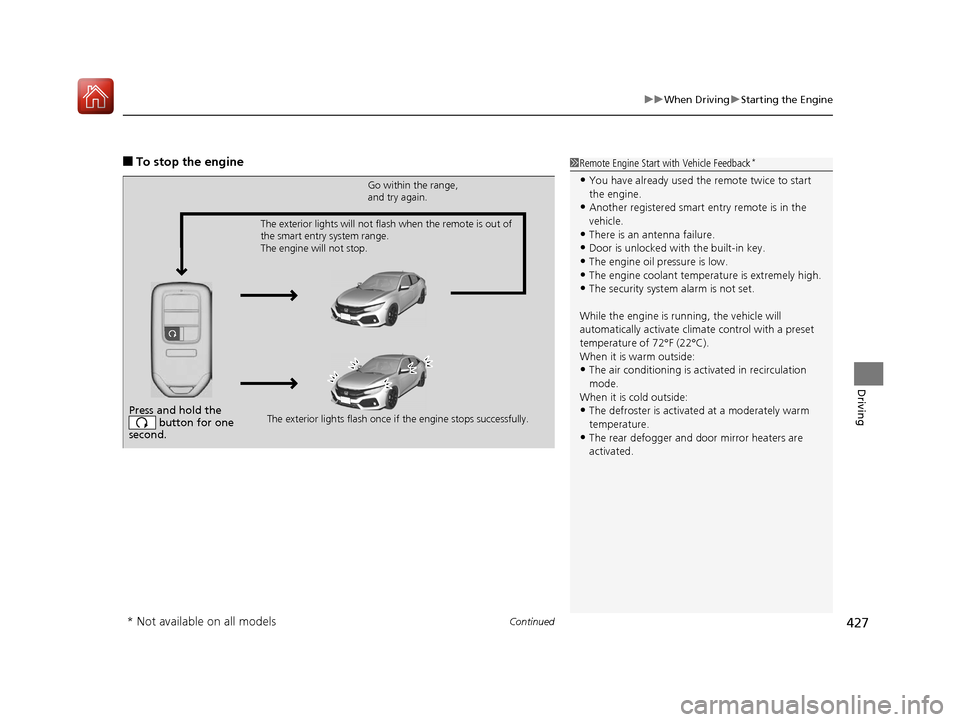
Press and hold the button for one
second.
Go within the range,
and try again.
The exterior lights flash once if the engine stops successfully.
The exterior lights will not flash when the remote is out of
the smart entry system range.
The engine will not stop.
* Not available on all models
17 CIVIC 5D (KA KC KL)-31TGG6000.book 427 ページ 2016年6月8日 水曜日 午
後2時8分
Page 524 of 641
523
Maintenance
This chapter discusses basic maintenance.
Before Performing MaintenanceInspection and Maintenance ............ 524
Safety When Performing Maintenance .... 525Parts and Fluids Used in Maintenance Service ........................................... 526
Maintenance Minder
TM..................... 527
Maintenance Under the Hood
Maintenance Items Un der the Hood .... 536Opening the Hood ........................... 537
Recommended Engine Oil ................ 538
Oil Check ......................................... 539
Adding Engine Oil ............................ 540
Changing the Engine Oil and Oil Filter..... 541
Engine Coolant ................................ 543
Transmission Fluid ............................ 545
Brake/Clutch
* Fluid .......................... 546
Refilling Window Washer Fluid......... 547
Replacing Light Bulbs ....................... 548
Checking and Maintaining Wiper
Blades .......................................... 556
Checking and Maintaining Tires
Checking Tires ................................. 561
Tire and Loading Information Label ..... 562Tire Labeling .................................... 562DOT Tire Quality Grading (U.S. Vehicles) ...... 564Wear Indicators................................ 566 Tire Service Life ................................ 566
Tire and Wheel Replacement ........... 567
Tire Rotation .................................... 568
Winter Tires ..................................... 569
Battery ............................................... 571
Remote Transmitter Care
Replacing the Button Battery ........... 573
Climate Control System Maintenance .. 575Cleaning
Interior Care .................................... 576
Exterior Care.................................... 579
Accessories and Modifications ........ 582
* Not available on all models
17 CIVIC 5D (KA KC KL)-31TGG6000.book 523 ページ 2016年6月8日 水曜日 午 後2時8分