remote control HONDA CIVIC HATCHBACK 2017 10.G Owner's Manual
[x] Cancel search | Manufacturer: HONDA, Model Year: 2017, Model line: CIVIC HATCHBACK, Model: HONDA CIVIC HATCHBACK 2017 10.GPages: 641
Page 167 of 641
166
uuOperating the Switches Around the Steering Wheel uENGINE START/STOP Button*
Controls
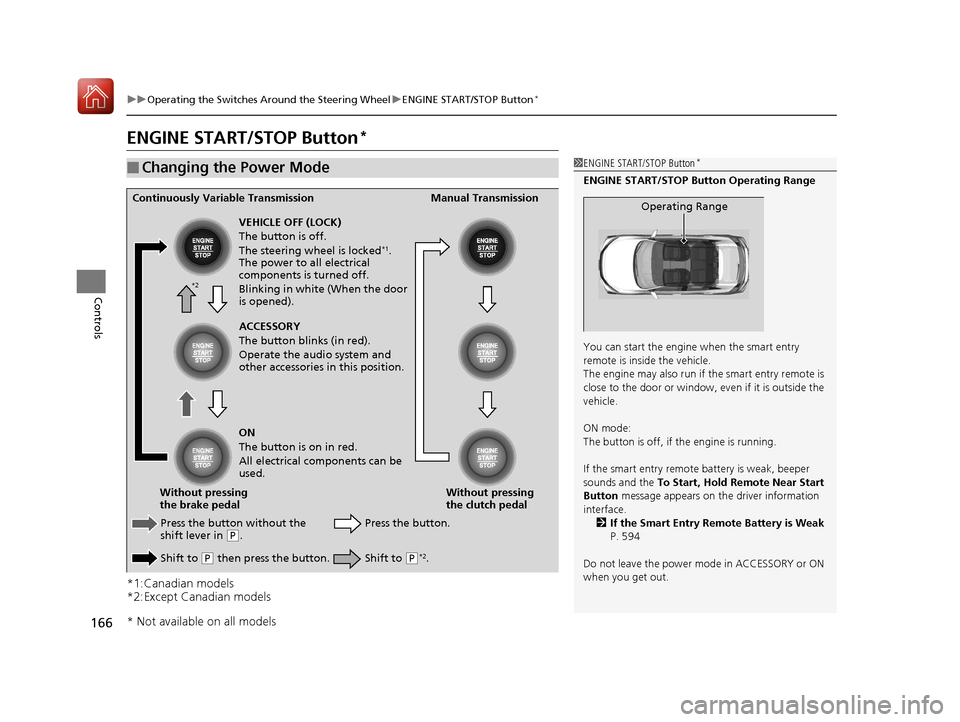
ENGINE START/STOP Button*
*1:Canadian models
*2:Except Canadian models
■Changing the Power Mode1ENGINE START/STOP Button*
ENGINE START/STOP Button Operating Range
You can start the engine when the smart entry
remote is inside the vehicle.
The engine may also run if the smart entry remote is
close to the door or window, ev en if it is outside the
vehicle.
ON mode:
The button is off, if the engine is running.
If the smart entry remote battery is weak, beeper
sounds and the To Start, Hold Remote Near Start
Button message appears on th e driver information
interface. 2 If the Smart Entry Remote Battery is Weak
P. 594
Do not leave the power mode in ACCESSORY or ON
when you get out.
Operating RangeContinuously Variable Transmission Manual Transmission
VEHICLE OFF (LOCK)
The button is off.
The steering wheel is locked
*1.
The power to all electrical
components is turned off.
Blinking in white (When the door
is opened).
Press the button without the
shift lever in
( P.
Shift to
( P then press the button. Press the button.
Without pressing
the clutch pedal
Without pressing
the brake pedal ACCESSORY
The button blinks (in red).
Operate the audio system and
other accessories in this position.
ON
The button is on in red.
All electrical components can be
used.
Shift to (P*2.
*2
* Not available on all models
17 CIVIC 5D (KA KC KL)-31TGG6000.book 166 ページ 2016年6月8日 水曜日 午 後2時8分
Page 168 of 641
167
uuOperating the Switches Around the Steering Wheel uENGINE START/STOP Button*
Continued
Controls
If you leave the vehicle for 30 to 60 minutes with the shift lever in (P*1 and the
power mode in ACCESSORY, the vehicle automa tically goes into the mode similar to
VEHICLE OFF (LOCK) to avoid draining the battery.
When in this mode:
The steering wheel does not lock.
You cannot lock or unlock doors with th e remote transmitter or the smart entry
system.
Press the ENGINE START/STOP button twice to switch the mode to VEHICLE OFF
(LOCK).
*1: Continuously variab le transmission models
■Automatic Power Off
Canadian models
17 CIVIC 5D (KA KC KL)-31TGG6000.book 167 ページ 2016年6月8日 水曜日 午 後2時8分
Page 169 of 641
uuOperating the Switches Around the Steering Wheel uENGINE START/STOP Button*
168
Controls
If you open the driver’s doo r when the power mode is set to ACCESSORY, a warning
beep sounds.
Warning buzzers may sound from inside and/
or outside the vehicle to remind you that the
smart entry remote is out of the vehicle. If the
buzzer continues even after the remote is put
back inside, place it to be within its
operational range.
■When the power mode is in ON
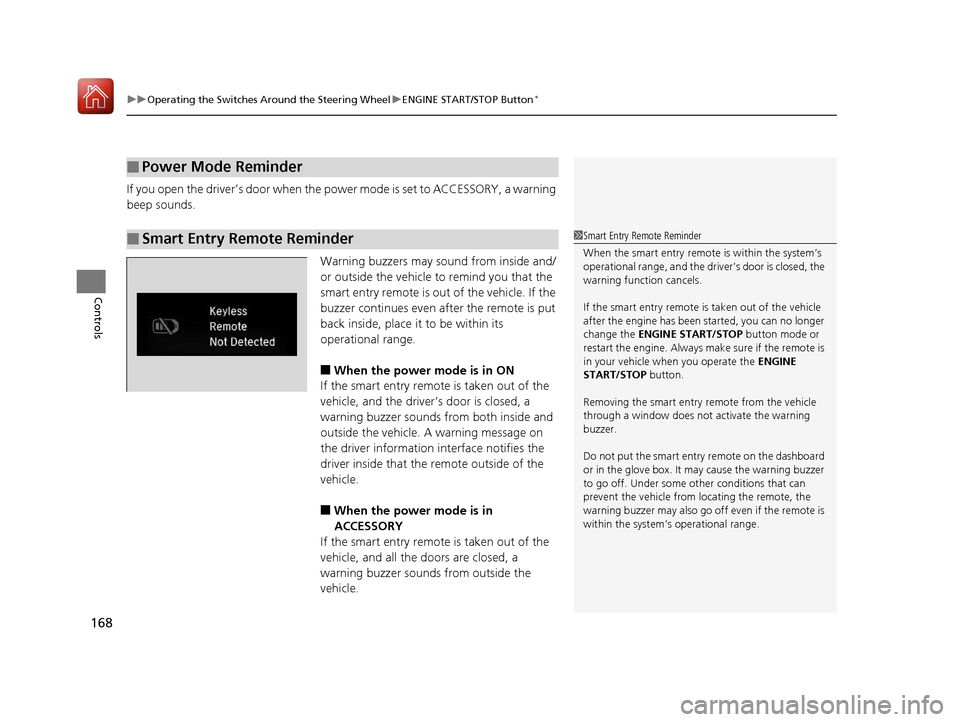
If the smart entry remote is taken out of the
vehicle, and the driver’s door is closed, a
warning buzzer sounds from both inside and
outside the vehicle. A warning message on
the driver information interface notifies the
driver inside that the remote outside of the
vehicle.
■When the power mode is in
ACCESSORY
If the smart entry remote is taken out of the
vehicle, and all the doors are closed, a
warning buzzer sounds from outside the
vehicle.
■Power Mode Reminder
■Smart Entry Remote Reminder1 Smart Entry Remote Reminder
When the smart entry remote is within the system’s
operational range, and the driv er’s door is closed, the
warning function cancels.
If the smart entry remote is taken out of the vehicle
after the engine has been started, you can no longer
change the ENGINE START/STOP button mode or
restart the engine. Always make sure if the remote is
in your vehicle when you operate the ENGINE
START/STOP button.
Removing the smart entry remote from the vehicle
through a window does not activate the warning
buzzer.
Do not put the smart entr y remote on the dashboard
or in the glove box. It may cause the warning buzzer
to go off. Under some other conditions that can
prevent the vehicle from locating the remote, the
warning buzzer may al so go off even if the remote is
within the system’s operational range.
17 CIVIC 5D (KA KC KL)-31TGG6000.book 168 ページ 2016年6月8日 水曜日 午 後2時8分
Page 173 of 641
uuOperating the Switches Around the Steering Wheel uLight Switches
172
Controls
The headlights automatically co me on when the wipers are used several times within
a certain number of intervals wi th the headlight switch in AUTO.
The headlights automatically go off a few minutes later if the wipers are stopped.
The headlights, all other exterior lights, an d the instrument panel lights turn off 15
seconds after you remove the key or set the power mode to VEHICLE OFF (LOCK),
take the remote with you, and close the driver’s door.
If you turn the igniti on switch to LOCK
(0*1 with the headlight switch on, but do
not open the door, the lights turn off after 10 minutes (3 minutes, if the switch is in
the AUTO position).
The lights turn on again when you unlock or open the driver’s door. If you unlock
the door, but do not open it within 15 seconds, the lights go off. If you open the
driver’s door, you will hear a lights on reminder chime.
*1: Models with the smart entry system have an ENGINE START/STOP button instead of an
ignition switch.
■Headlight Integration with Wipers
■Automatic Lighting Off Feature
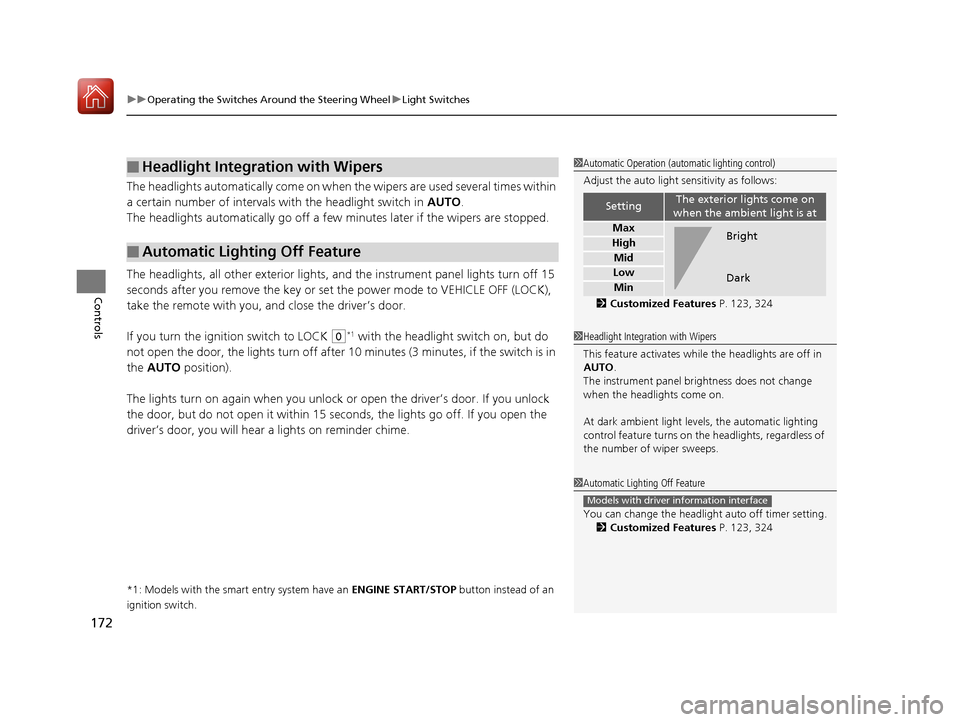
1 Automatic Operation (aut omatic lighting control)
Adjust the auto light sensitivity as follows:
2 Customized Features P. 123, 324
SettingThe exterior lights come on
when the ambient light is at
Max
High
Mid
Low
Min
Bright
Dark
1 Headlight Integration with Wipers
This feature activates while the headlights are off in
AUTO .
The instrument panel br ightness does not change
when the headlights come on.
At dark ambient light levels, the automatic lighting
control feature turns on the headlights, regardless of
the number of wiper sweeps.
1 Automatic Lighting Off Feature
You can change the headlight auto off timer setting.
2 Customized Features P. 123, 324
Models with driver information interface
17 CIVIC 5D (KA KC KL)-31TGG6000.book 172 ページ 2016年6月8日 水曜日 午 後2時8分
Page 218 of 641
217
Features
This chapter describes how to operate technology features.
Audio SystemAbout Your Audio System ................ 218
USB Port(s) ....................................... 219
Audio System Theft Protection ......... 220
Audio Remote Controls .................... 221
Audio System Basic Operation ........ 225
Audio/Information Screen ................ 226
Adjusting the Sound ........................ 230
Display Setup ................................... 231
Playing the AM/FM Radio ................. 232
Playing an iPod ................................ 234
Playing a USB Flash Drive ................. 237
Models with color audio system
Playing Bluetooth ® Audio................. 240
Audio System Basic Operation ........ 243
Audio/Information Screen ................ 244
Adjusting the Sound ........................ 265
Display Setup ................................... 266
Voice Control Operation .................. 268
Playing AM/FM Radio ....................... 272
Playing SiriusXM ® Radio
*................. 276
Playing an iPod ................................ 284
Song By Voice
TM (SBV) ...................... 287
Playing Pandora ®............................. 291
Playing a USB Flash Drive ................. 293
Models with Display AudioPlaying Bluetooth ® Audio ................ 296
HondaLink ®..................................... 298
Wi-Fi Connection ............................. 303
Siri Eyes Free .................................... 305
Apple CarPlay .................................. 306
Android Auto .................................. 309
Audio Error Messages ...................... 313
General Information on the Audio System ............................................. 317
Customized Features ........................ 324
Bluetooth ® HandsFreeLink®
*... 356, 382
* Not available on all models
17 CIVIC 5D (KA KC KL)-31TGG6000.book 217 ページ 2016年6月8日 水曜日 午 後2時8分
Page 219 of 641
218
Features
Audio System
About Your Audio System
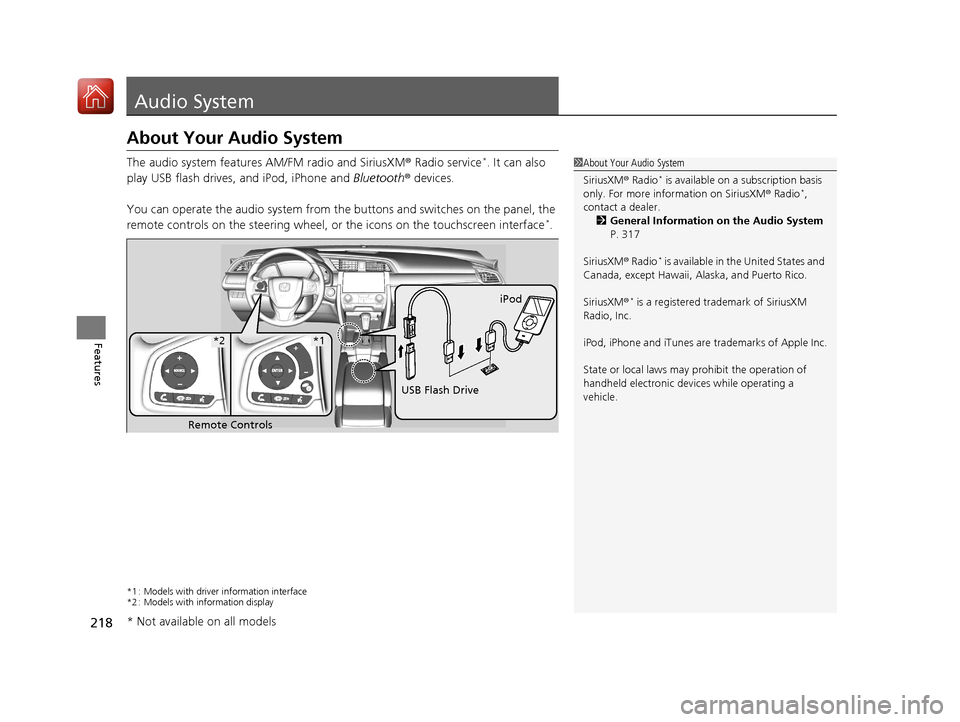
The audio system features AM/FM radio and SiriusXM ® Radio service*. It can also
play USB flash drives, and iPod, iPhone and Bluetooth® devices.
You can operate the audio system from the buttons and switches on the panel, the
remote controls on the steering wheel, or the icons on the touchscreen interface
*.
*1 : Models with driver information interface
*2 : Models with information display
1About Your Audio System
SiriusXM ® Radio
* is available on a subscription basis
only. For more information on SiriusXM ® Radio*,
contact a dealer.
2 General Information on the Audio System
P. 317
SiriusXM ® Radio
* is available in the United States and
Canada, except Ha waii, Alaska, and Puerto Rico.
SiriusXM ®
* is a registered trademark of SiriusXM
Radio, Inc.
iPod, iPhone and iTunes are trademarks of Apple Inc.
State or local laws may pr ohibit the operation of
handheld electronic devi ces while operating a
vehicle.
Remote Controls iPod
USB Flash Drive
*2*1
* Not available on all models
17 CIVIC 5D (KA KC KL)-31TGG6000.book 218 ページ 2016年6月8日 水曜日 午 後2時8分
Page 222 of 641
221
uuAudio System uAudio Remote Controls
Continued
Features
Audio Remote Controls
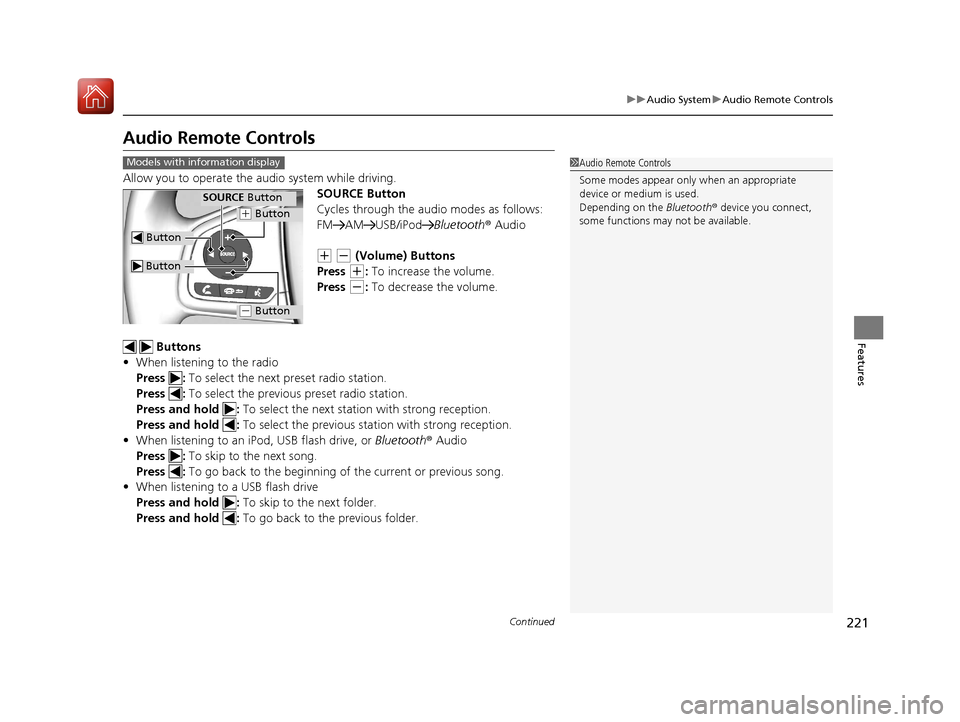
Allow you to operate the au dio system while driving.
SOURCE Button
Cycles through the audio modes as follows:
FM AM USB/iPod Bluetooth® Audio
(+ (- (Volume) Buttons
Press
(+: To increase the volume.
Press
(-: To decrease the volume.
Buttons
• When listening to the radio
Press : To select the next preset radio station.
Press : To select the previous preset radio station.
Press and hold : To select the next statio n with strong reception.
Press and hold : To select the previous station with strong reception.
• When listening to an iPod, USB flash drive, or Bluetooth® Audio
Press : To skip to the next song.
Press : To go back to the beginning of the current or previous song.
• When listening to a USB flash drive
Press and hold : To skip to the next folder.
Press and hold : To go back to the previous folder.
1Audio Remote Controls
Some modes appear only when an appropriate
device or medium is used.
Depending on the Bluetooth® device you connect,
some functions may not be available.Models with information display
Button
SOURCE Button
Button
(+ Button
(- Button
17 CIVIC 5D (KA KC KL)-31TGG6000.book 221 ページ 2016年6月8日 水曜日 午 後2時8分
Page 223 of 641
uuAudio System uAudio Remote Controls
222
Features
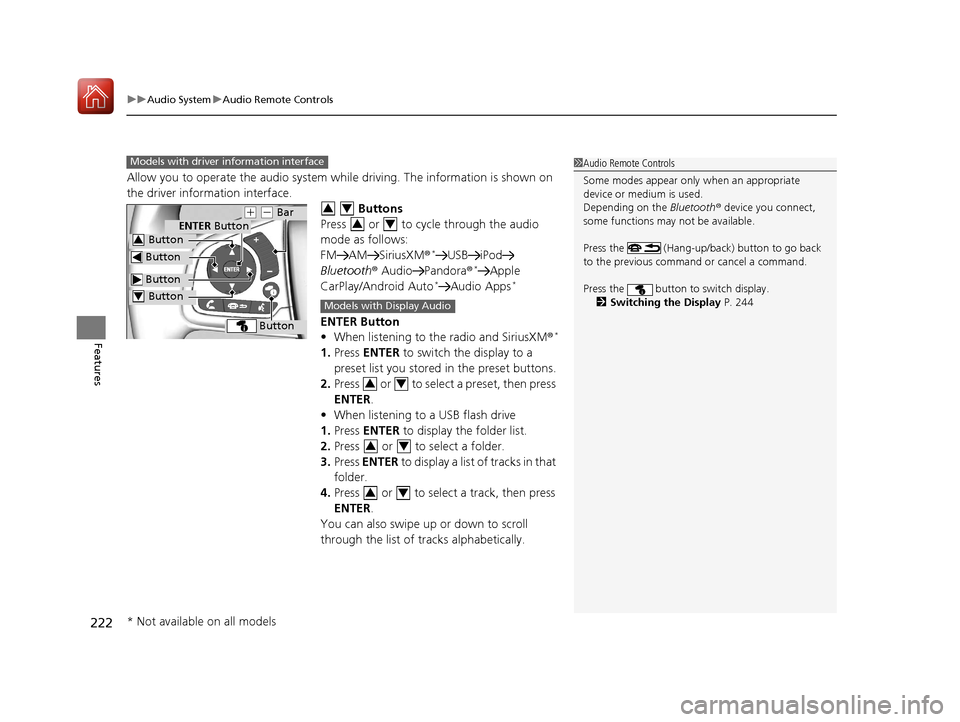
Allow you to operate the audio system while driving. The information is shown on
the driver information interface.
Buttons
Press or to cycle through the audio
mode as follows:
FM AM SiriusXM®
*USB iPod
Bluetooth ® Audio Pandora ®*Apple
CarPlay/Android Auto*Audio Apps*
ENTER Button
• When listening to the radio and SiriusXM ®*
1.Press ENTER to switch the display to a
preset list you stored in the preset buttons.
2. Press or to select a preset, then press
ENTER .
• When listening to a USB flash drive
1. Press ENTER to display the folder list.
2. Press or to select a folder.
3. Press ENTER to display a list of tracks in that
folder.
4. Press or to select a track, then press
ENTER .
You can also swipe up or down to scroll
through the list of tracks alphabetically.
1 Audio Remote Controls
Some modes appear only when an appropriate
device or medium is used.
Depending on the Bluetooth® device you connect,
some functions may not be available.
Press the (Hang-up/back) button to go back
to the previous command or cancel a command.
Press the button to switch display. 2 Switching the Display P. 244Models with driver information interface
Button
ENTER Button
Button
(+ (- Bar
Button
Button3
Button4
34
34
Models with Display Audio
34
34
34
* Not available on all models
17 CIVIC 5D (KA KC KL)-31TGG6000.book 222 ページ 2016年6月8日 水曜日 午 後2時8分
Page 224 of 641
223
uuAudio System uAudio Remote Controls
Continued
Features
• When listening to an iPod
1. Press ENTER to display the iPod music list.
2. Press or to select a category.
3. Press ENTER to display a list of items in the
category.
4. Press or to select an item, then press
ENTER .
u Press ENTER and press or
repeatedly until the desired mode you
want to listen to is displayed.
u You can also swipe up or down to scroll
through the list of tracks alphabetically.
• When listening to Internet Radio
*
1.Press ENTER to display the station list.
2. Press or to select an item, then press
ENTER .
• When listening to Bluetooth®Audio
1. Press ENTER to display the track list.
2. Press or to select a track, then press
ENTER .
34
34
34
34
34
* Not available on all models
17 CIVIC 5D (KA KC KL)-31TGG6000.book 223 ページ 2016年6月8日 水曜日 午 後2時8分
Page 225 of 641
224
uuAudio System uAudio Remote Controls
Features
(+ (- (Volume) Bar
Press
(+: To increase the volume.
Press
(-: To decrease the volume.
Slide your finger up or down to incr ease or decrease the volume, respectively.
Swipe down quickly to mute the volu me and swipe up to cancel the mute.
Buttons
• When listening to the radio
Press : To select the next preset radio station.
Press : To select the previous preset radio station.
Press and hold : To select the next strong station.
Press and hold : To select the previous strong station.
• When listening to an iPod, USB flash drive, or Bluetooth ® Audio
Press : To skip to the next song.
Press : To go back to the beginning of the current or previous song.
• When listening to a USB flash drive
Press and hold : To skip to the next folder.
Press and hold : To go back to the previous folder.
• When listening to Internet radio
*
Press : To skip to the next song.
Press and hold : To select the next station.
Press and hold : To select the previous station.
Models with Display Audio
* Not available on all models
17 CIVIC 5D (KA KC KL)-31TGG6000.book 224 ページ 2016年6月8日 水曜日 午 後2時8分