belt HONDA CIVIC HATCHBACK 2017 10.G Service Manual
[x] Cancel search | Manufacturer: HONDA, Model Year: 2017, Model line: CIVIC HATCHBACK, Model: HONDA CIVIC HATCHBACK 2017 10.GPages: 641
Page 85 of 641
84
uuIndicators u
Instrument Panel
*1:Models with the smart entry system have an ENGINE START/STOP button instead of an ignition switch.
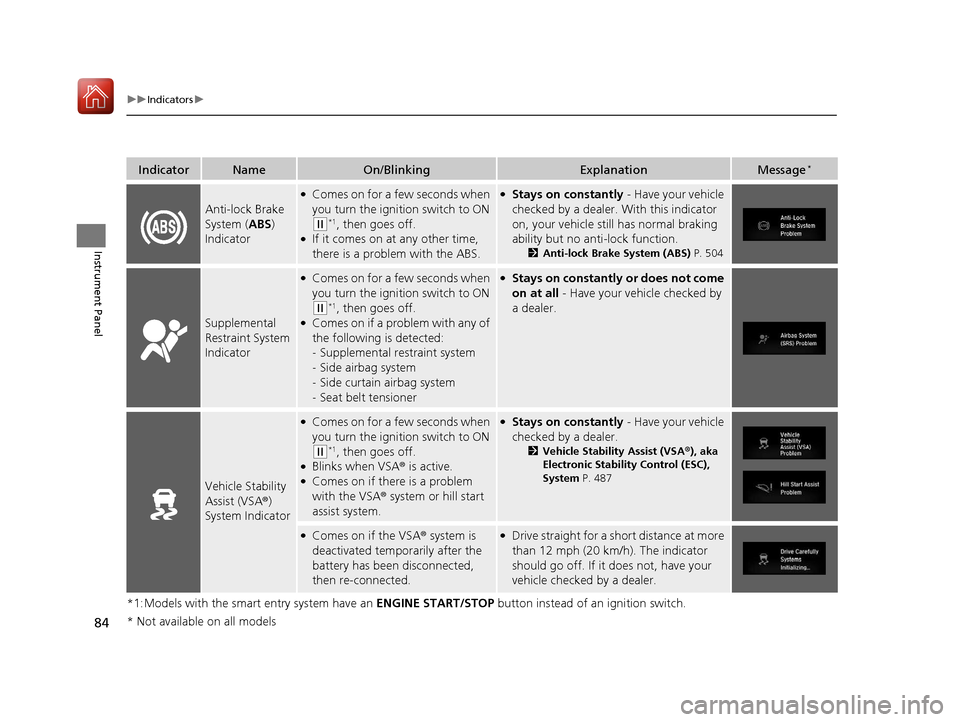
IndicatorNameOn/BlinkingExplanationMessage*
Anti-lock Brake
System (ABS)
Indicator
●Comes on for a few seconds when
you turn the ignition switch to ON
(w*1, then goes off.●If it comes on at any other time,
there is a problem with the ABS.
●Stays on constantly - Have your vehicle
checked by a dealer. With this indicator
on, your vehicle still has normal braking
ability but no an ti-lock function.
2Anti-lock Brake System (ABS) P. 504
Supplemental
Restraint System
Indicator
●Comes on for a few seconds when
you turn the ignition switch to ON
(w*1, then goes off.●Comes on if a problem with any of
the following is detected:
-Supplemental restraint system
- Side airbag system
- Side curtain airbag system
- Seat belt tensioner
●Stays on constantly or does not come
on at all - Have your vehicle checked by
a dealer.
Vehicle Stability
Assist (VSA ®)
System Indicator
●Comes on for a few seconds when
you turn the ignition switch to ON
(w*1, then goes off.●Blinks when VSA ® is active.●Comes on if there is a problem
with the VSA® system or hill start
assist system.
●Stays on constantly - Have your vehicle
checked by a dealer.
2 Vehicle Stability Assist (VSA ®), aka
Electronic Stability Control (ESC),
System P. 487
●Comes on if the VSA ® system is
deactivated temporarily after the
battery has been disconnected,
then re-connected.●Drive straight for a short distance at more
than 12 mph (20 km/h). The indicator
should go off. If it does not, have your
vehicle checked by a dealer.
* Not available on all models
17 CIVIC 5D (KA KC KL)-31TGG6000.book 84 ページ 2016年6月8日 水曜日 午後 2時8分
Page 102 of 641
101
uuIndicators uDriver Information Interface Wa rning and Information Messages*
Continued
Instrument Panel
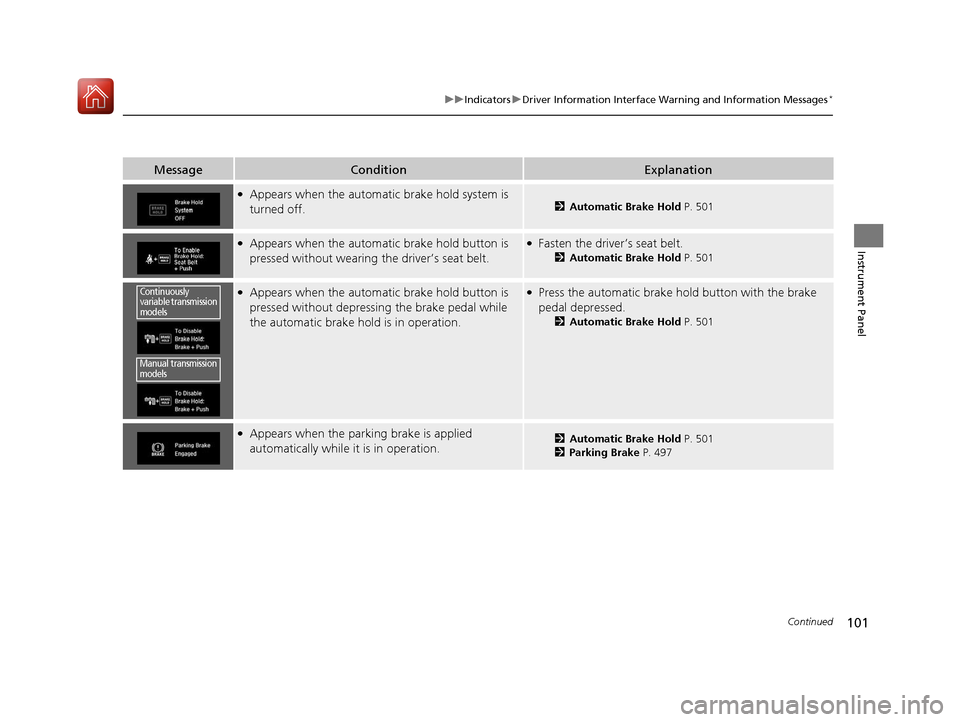
MessageConditionExplanation
●Appears when the automatic brake hold system is
turned off.2Automatic Brake Hold P. 501
●Appears when the automatic brake hold button is
pressed without wearing the driver’s seat belt.●Fasten the driver’s seat belt.
2Automatic Brake Hold P. 501
●Appears when the automatic brake hold button is
pressed without depressing the brake pedal while
the automatic brake hold is in operation.●Press the automatic brake hold button with the brake
pedal depressed.
2Automatic Brake Hold P. 501
●Appears when the parking brake is applied
automatically while it is in operation.2Automatic Brake Hold P. 501
2 Parking Brake P. 497
Continuously
variable transmission
models
Manual transmission
models
17 CIVIC 5D (KA KC KL)-31TGG6000.book 101 ページ 2016年6月8日 水曜日 午 後2時8分
Page 110 of 641
109
uuIndicators uDriver Information Interface Wa rning and Information Messages*
Continued
Instrument Panel
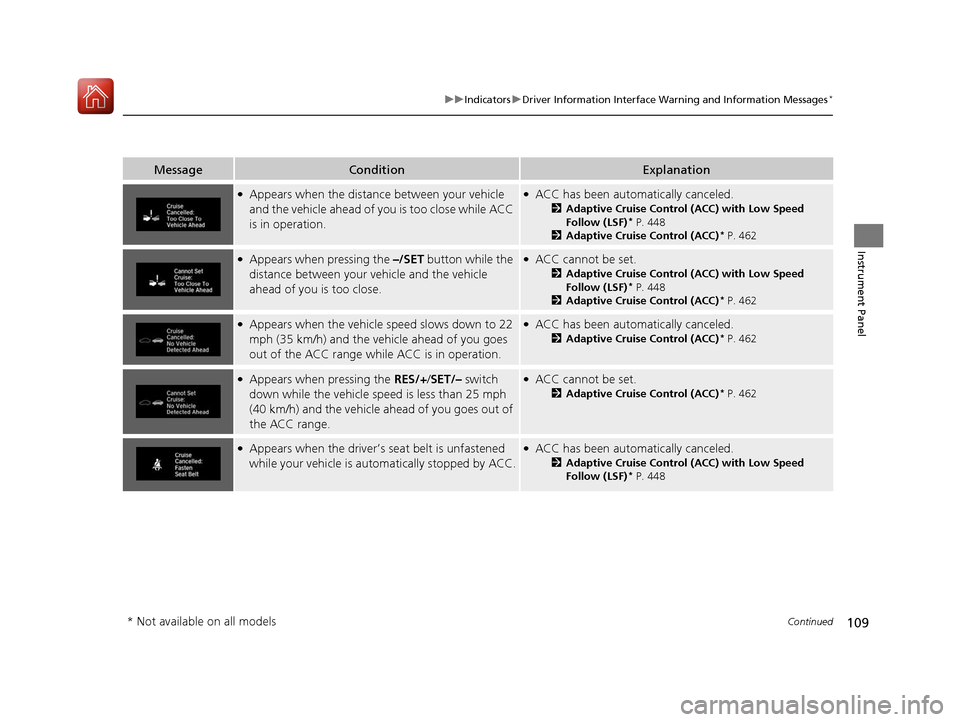
MessageConditionExplanation
●Appears when the distance between your vehicle
and the vehicle ahead of you is too close while ACC
is in operation.●ACC has been automatically canceled.
2Adaptive Cruise Control (ACC) with Low Speed
Follow (LSF)* P. 448
2 Adaptive Cruise Control (ACC)* P. 462
●Appears when pressing the –/SET button while the
distance between your vehicle and the vehicle
ahead of you is too close.●ACC cannot be set.
2 Adaptive Cruise Control (ACC) with Low Speed
Follow (LSF)* P. 448
2 Adaptive Cruise Control (ACC)* P. 462
●Appears when the vehicle speed slows down to 22
mph (35 km/h) and the vehicle ahead of you goes
out of the ACC range while ACC is in operation.●ACC has been automatically canceled.
2 Adaptive Cruise Control (ACC)* P. 462
●Appears when pressing the RES/+/SET/– switch
down while the vehicle speed is less than 25 mph
(40 km/h) and the vehicle ahead of you goes out of
the ACC range.●ACC cannot be set.
2 Adaptive Cruise Control (ACC)* P. 462
●Appears when the driver’s seat belt is unfastened
while your vehicl e is automatically stopped by ACC.●ACC has been automatically canceled.
2Adaptive Cruise Control (ACC) with Low Speed
Follow (LSF)* P. 448
* Not available on all models
17 CIVIC 5D (KA KC KL)-31TGG6000.book 109 ページ 2016年6月8日 水曜日 午 後2時8分
Page 111 of 641
110
uuIndicators uDriver Information Interface Wa rning and Information Messages*
Instrument Panel
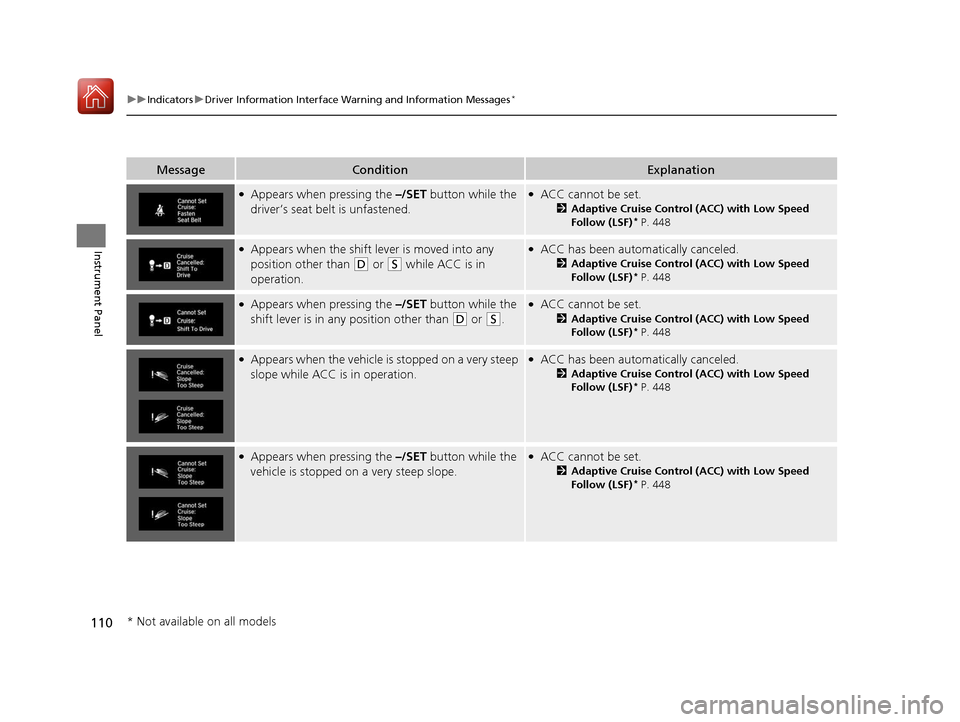
MessageConditionExplanation
●Appears when pressing the –/SET button while the
driver’s seat belt is unfastened.●ACC cannot be set.
2 Adaptive Cruise Control (ACC) with Low Speed
Follow (LSF)* P. 448
●Appears when the shift lever is moved into any
position other than
(D or (S while ACC is in
operation.
●ACC has been automatically canceled.
2 Adaptive Cruise Control (ACC) with Low Speed
Follow (LSF)* P. 448
●Appears when pressing the –/SET button while the
shift lever is in any position other than
(D or (S.
●ACC cannot be set.
2 Adaptive Cruise Control (ACC) with Low Speed
Follow (LSF)* P. 448
●Appears when the vehicle is stopped on a very steep
slope while ACC is in operation.●ACC has been automatically canceled.
2Adaptive Cruise Control (ACC) with Low Speed
Follow (LSF)* P. 448
●Appears when pressing the –/SET button while the
vehicle is stopped on a very steep slope.●ACC cannot be set.
2 Adaptive Cruise Control (ACC) with Low Speed
Follow (LSF)* P. 448
* Not available on all models
17 CIVIC 5D (KA KC KL)-31TGG6000.book 110 ページ 2016年6月8日 水曜日 午 後2時8分
Page 188 of 641
187
uuAdjusting the Seats uFront Seats
Controls
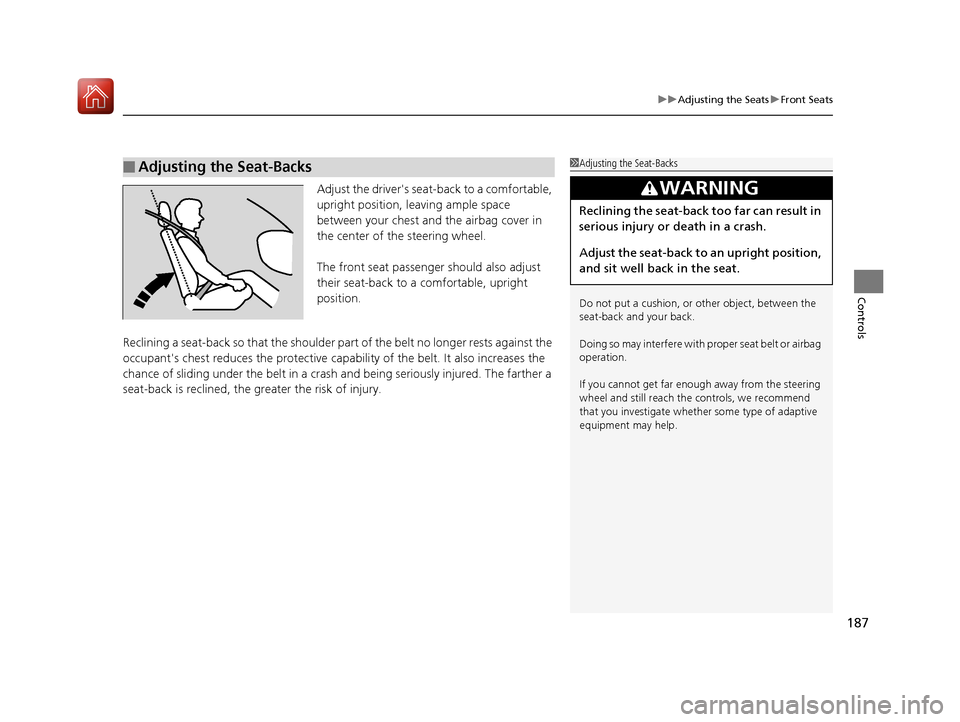
Adjust the driver's seat -back to a comfortable,
upright position, leaving ample space
between your chest and the airbag cover in
the center of the steering wheel.
The front seat passenger should also adjust
their seat-back to a comfortable, upright
position.
Reclining a seat-back so that the shoulder part of the belt no longer rests against the
occupant's chest reduces the protective capa bility of the belt. It also increases the
chance of sliding under the belt in a crash and being seriously injured. The farther a
seat-back is reclined, the gr eater the risk of injury.
■Adjusting the Seat-Backs1Adjusting the Seat-Backs
Do not put a cushion, or other object, between the
seat-back and your back.
Doing so may interfere with proper seat belt or airbag
operation.
If you cannot get far e nough away from the steering
wheel and still reach th e controls, we recommend
that you investigate whether some type of adaptive
equipment may help.
3WARNING
Reclining the seat-back too far can result in
serious injury or death in a crash.
Adjust the seat-back to an upright position,
and sit well back in the seat.
17 CIVIC 5D (KA KC KL)-31TGG6000.book 187 ページ 2016年6月8日 水曜日 午 後2時8分
Page 191 of 641
190
uuAdjusting the Seats uMaintain a Sitting Proper Position
Controls
Maintain a Sitti ng Proper Position
After all occupants have adjusted their seats and head restraints, and put on their
seat belts, it is very important that they continue to sit upright, well back in their
seats, with their feet on the floor, until the vehicle is safely parked and the engine is
off.
Sitting improperly can increase the chance of injury during a crash. For example, if
an occupant slouches, lies down, turns si deways, sits forward, leans forward or
sideways, or puts one or both feet up, the chance of injury during a crash is greatly
increased.
In addition, an occupant who is out of position in the front seat can be seriously or
fatally injured in a crash by striking interior parts of the vehicle or being struck by an
inflating front airbag.1 Maintain a Sitting Proper Position
3WARNING
Sitting improperly or out of position can
result in serious injury or death in a crash.
Always sit upright, well back in the seat,
with your feet on the floor.
17 CIVIC 5D (KA KC KL)-31TGG6000.book 190 ページ 2016年6月8日 水曜日 午 後2時8分
Page 196 of 641
195
uuInterior Lights/Interior Convenience Items uInterior Convenience Items
Continued
Controls
Interior Convenience Items
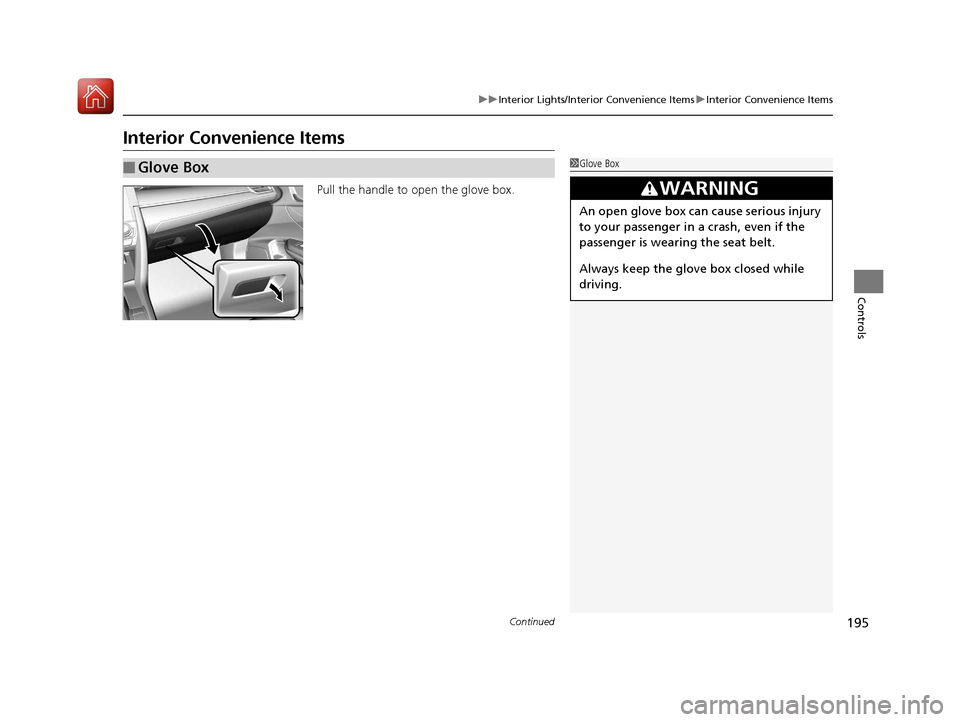
Pull the handle to open the glove box.
■Glove Box1Glove Box
3WARNING
An open glove box can cause serious injury
to your passenger in a crash, even if the
passenger is wearing the seat belt.
Always keep the glove box closed while
driving.
17 CIVIC 5D (KA KC KL)-31TGG6000.book 195 ページ 2016年6月8日 水曜日 午 後2時8分
Page 419 of 641
418
uuBefore Driving uDriving Preparation
Driving
• Be sure items placed on the floor behind the front seats cannot roll under the
seats.
u They can interfere with the driver's ability to operate the pedals, the operation
of the seats, or the operation of the sensors under the seats.
• Everyone in the vehicle must fasten their seat belt.
2Fastening a Seat Belt P. 42
•Make sure that the indicators in the ins trument panel come on when you start the
vehicle, and go off soon after.
u Always have a dealer check the vehicle if a problem is indicated.
2 Indicators P. 78
17 CIVIC 5D (KA KC KL)-31TGG6000.book 418 ページ 2016年6月8日 水曜日 午 後2時8分
Page 460 of 641
Continued459
uuWhen Driving uAdaptive Cruise Control (ACC) with Low Speed Follow (LSF)*
Driving
■Automatic ca ncellation
The beeper sounds and a message appears on the driver information interface when
ACC with LSF is automatically canceled. Any of these conditions may cause the ACC
with LSF to automatically cancel:
• Bad weather (rain, fog, snow, etc.)
• When the radar sensor in the lower bumper next to the fog light
* gets dirty.
• The vehicle ahead of yo u cannot be detected.
• An abnormal tire condition is de tected, or the tires are skidding.
• Driving on a mountainous road, or driving off road for extended periods.
• Abrupt steering wheel movement.
• When the ABS, VSA ® or CMBS
TM is activated.
• When the ABS or VSA ® system indicator comes on.
• When the vehicle is stopped on a very steep slope.
• When you manually apply the parking brake.
• When the detected vehicle within the AC C with LSF range is too close to your
vehicle.
• The camera behind the rearview mirror, or the area around the camera, including
the windshield, gets dirty.
The ACC with LSF automatic cancellation ca n be also triggered by the following
causes. In these cases, the parking brake will be automatically applied.
• The driver’s seat belt is unfastened when the vehicle is stationary.
• The vehicle stops for more than 10 minutes.
• The engine is turned off.
1Automatic cancellation
Even though ACC with LSF has been automatically
canceled, you can still resu me the prior set speed.
Wait until the condition that caused ACC with LSF to
cancel improves, then press the –/SET button.
* Not available on all models
17 CIVIC 5D (KA KC KL)-31TGG6000.book 459 ページ 2016年6月8日 水曜日 午 後2時8分
Page 498 of 641
497Continued
Driving
Braking
Brake System
Use the parking brake to keep the vehicle stationary when parked. You can
manually apply and release, or automatically release it.
■Manual operations
Use the electric parking brake switch to a pply or release the parking brake. Manually
releasing the parking brake using the swit ch helps your vehicle start slowly and
smoothly when facing down hill on steep hills.
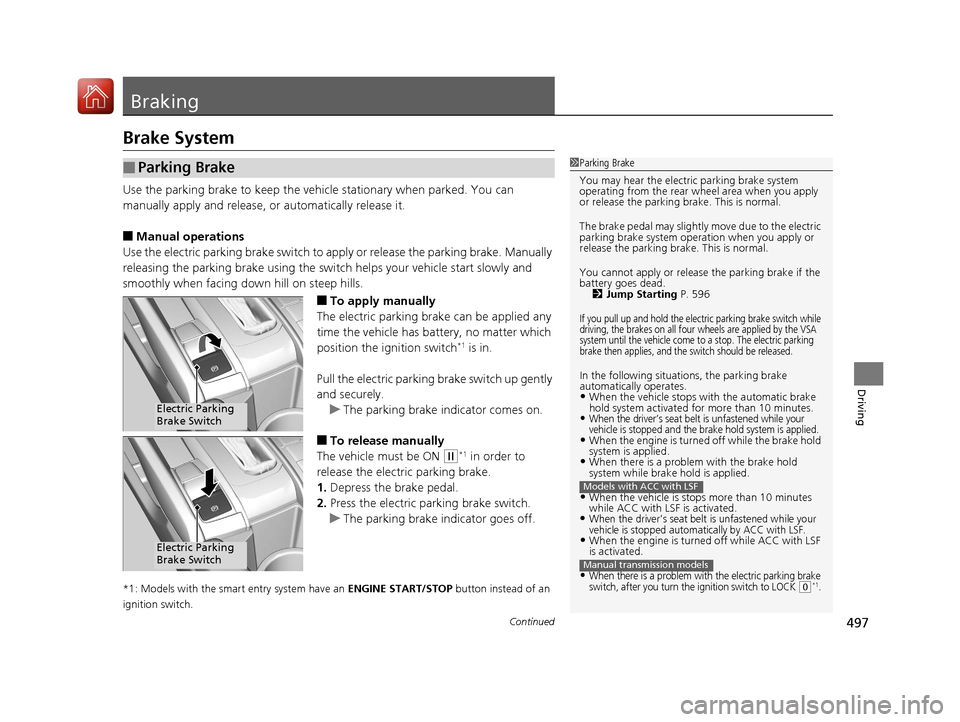
■To apply manually
The electric parking brake can be applied any
time the vehicle has battery, no matter which
position the ignition switch
*1 is in.
Pull the electric parking brake switch up gently
and securely. u The parking brake indicator comes on.
■To release manually
The vehicle must be ON
(w*1 in order to
release the electric parking brake.
1. Depress the brake pedal.
2. Press the electric parking brake switch.
u The parking brake indicator goes off.
*1: Models with the smart entry system have an ENGINE START/STOP button instead of an
ignition switch.
■Parking Brake1 Parking Brake
You may hear the electric parking brake system
operating from the rear wh eel area when you apply
or release the parking brake. This is normal.
The brake pedal may slightly move due to the electric
parking brake system opera tion when you apply or
release the parking br ake. This is normal.
You cannot apply or release the parking brake if the
battery goes dead.
2 Jump Starting P. 596
If you pull up and hold the electric parking brake switch while
driving, the brakes on all four wheels are applied by the VSA
system until the vehicle come to a stop. The electric parking
brake then applies, and the switch should be released.
In the following situations, the parking brake
automatically operates.
•When the vehicle stops with the automatic brake
hold system activated for more than 10 minutes.
•When the driver’s seat belt is unfastened while your
vehicle is stopped and the brake hold system is applied.
•When the engine is turned off while the brake hold
system is applied.
•When there is a problem with the brake hold
system while brake hold is applied.
•When the vehicle is stops more than 10 minutes
while ACC with LSF is activated.
•When the driver’s seat belt is unfastened while your
vehicle is stopped automatically by ACC with LSF.
•When the engine is turned off while ACC with LSF
is activated.
•When there is a problem with the electric parking brake
switch, after you turn the ignition switch to LOCK (0*1.
Models with ACC with LSF
Manual transmission models
Electric Parking
Brake Switch
Electric Parking
Brake Switch
17 CIVIC 5D (KA KC KL)-31TGG6000.book 497 ページ 2016年6月8日 水曜日 午 後2時8分