instrument panel HONDA CIVIC HATCHBACK 2017 10.G Workshop Manual
[x] Cancel search | Manufacturer: HONDA, Model Year: 2017, Model line: CIVIC HATCHBACK, Model: HONDA CIVIC HATCHBACK 2017 10.GPages: 641
Page 123 of 641
122
uuGauges and Displays uDriver Information Interface*
Instrument Panel
Shows the current audio information.
2 Audio System Basic Operation P. 225, 243
Shows the current mail information.
2Bluetooth® HandsFreeLink ®* P. 382
Shows the current phone information.
2Bluetooth® HandsFreeLink ®* P. 356, 382
■Audio*
■Mail*
■Phone*
* Not available on all models
17 CIVIC 5D (KA KC KL)-31TGG6000.book 122 ページ 2016年6月8日 水曜日 午 後2時8分
Page 124 of 641
Continued123
uuGauges and Displays uDriver Information Interface*
Instrument Panel
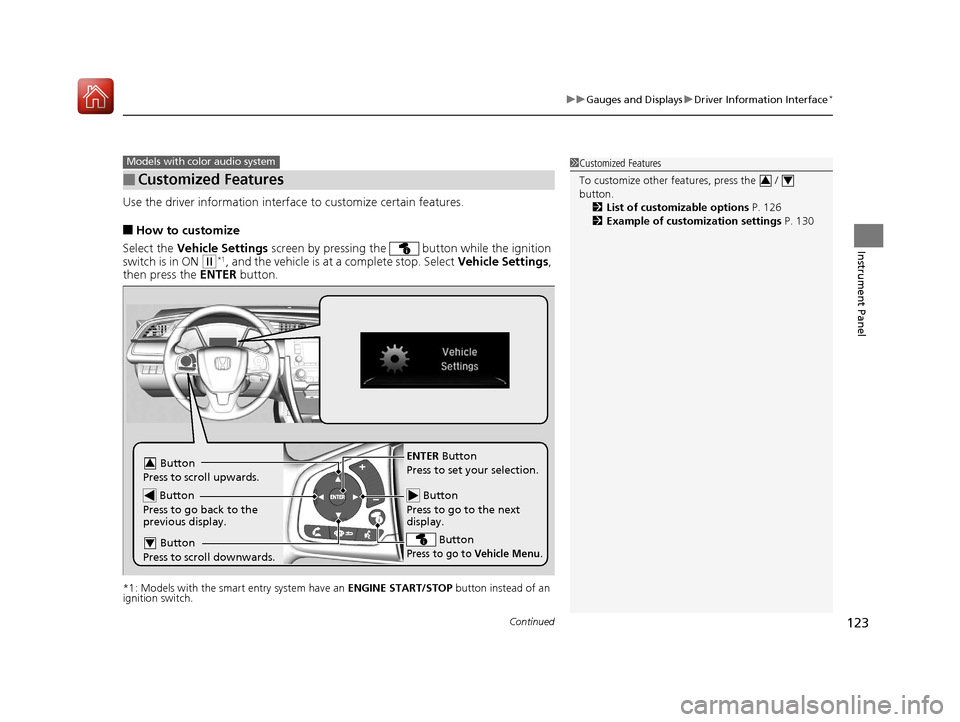
Use the driver information interface to customize certain features.
■How to customize
Select the Vehicle Settings screen by pressing the button while the ignition
switch is in ON
(w*1, and the vehicle is at a complete stop. Select Vehicle Settings,
then press the ENTER button.
*1: Models with the smart entry system have an ENGINE START/STOP button instead of an
ignition switch.
■Customized Features
Models with color audio system1 Customized Features
To customize other features, press the /
button.
2 List of customizable options P. 126
2 Example of customization settings P. 130
34
Button
Press to go to the next
display.
ENTER Button
Press to set your selection.
Button
Press to go to Vehicle Menu.
Button
Press to scroll upwards.3
Button
Press to go back to the
previous display.
Button
Press to scroll downwards.4
17 CIVIC 5D (KA KC KL)-31TGG6000.book 123 ページ 2016年6月8日 水曜日 午 後2時8分
Page 125 of 641
124
uuGauges and Displays uDriver Information Interface*
Instrument Panel
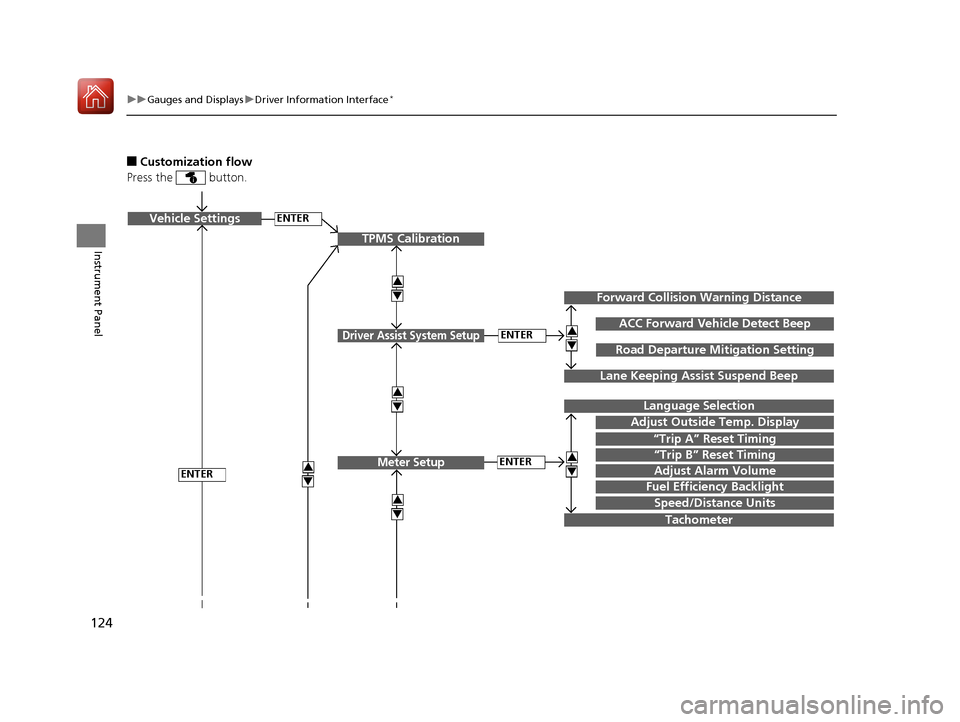
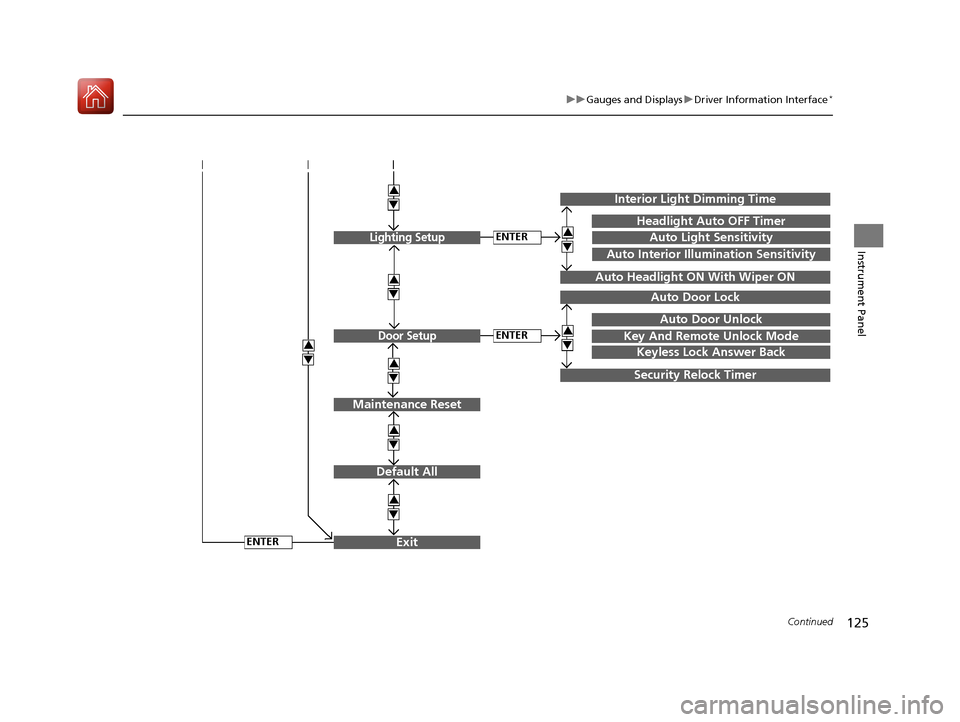
■Customization flow
Press the button.
ENTERVehicle Settings
“Trip A” Reset Timing
Language Selection
Adjust Outside Temp. Display
3
4
TPMS Calibration
ENTER
“Trip B” Reset Timing
Fuel Efficiency Backlight
3
4
ACC Forward Vehicle Detect Beep
3
4Tachometer
ENTER
Forward Collision Warning Distance
3
4
3
4
Lane Keeping Assist Suspend Beep
Road Departure Mi tigation Setting
Adjust Alarm Volume
Speed/Distance Units
3
4
ENTER
Driver Assist System Setup
Meter Setup
17 CIVIC 5D (KA KC KL)-31TGG6000.book 124 ページ 2016年6月8日 水曜日 午 後2時8分
Page 126 of 641
125
uuGauges and Displays uDriver Information Interface*
Continued
Instrument Panel
Exit
3
4
3
4
3
4
Maintenance Reset
Default All
3
4
ENTER
3
4
3
4
Key And Remote Unlock Mode
Auto Door Lock
Auto Door Unlock
Keyless Lock Answer Back
Security Relock Timer
Interior Light Dimming Time
Headlight Auto OFF Timer
Auto Light Sensitivity3
4
3
4
Auto Headlight ON With Wiper ON
ENTER
ENTER
Auto Interior Illumination Sensitivity
Lighting Setup
Door Setup
17 CIVIC 5D (KA KC KL)-31TGG6000.book 125 ページ 2016年6月8日 水曜日 午 後2時8分
Page 127 of 641
126
uuGauges and Displays uDriver Information Interface*
Instrument Panel
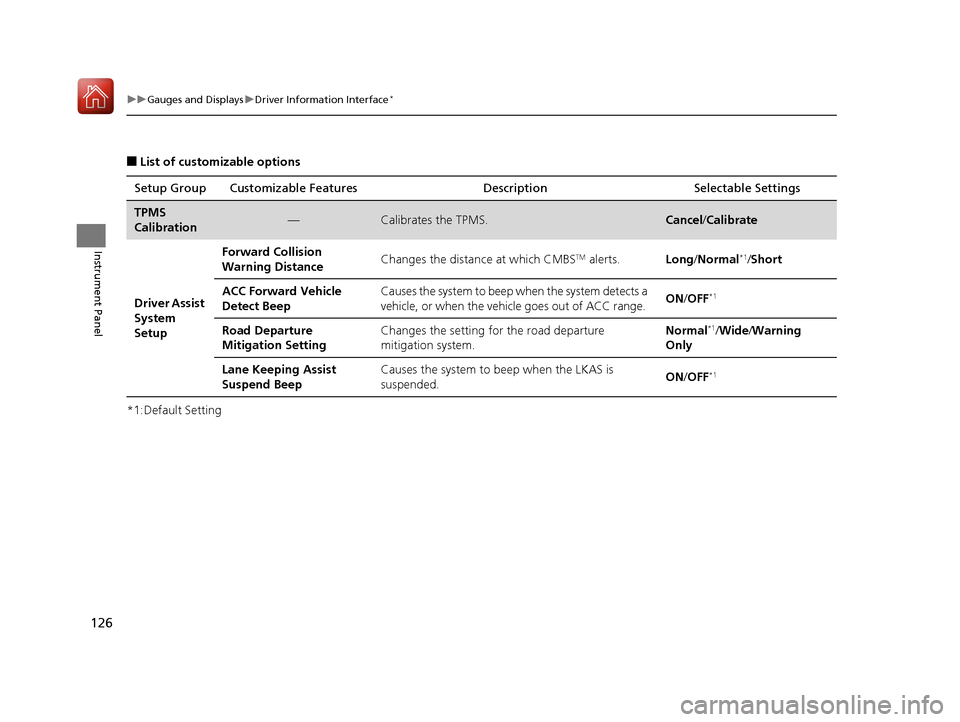
■List of customizable options
*1:Default Setting Setup Group Customizable Features Description Selectable Settings
TPMS
Calibration—Calibrates the TPMS.Cancel
/Calibrate
Driver Assist
System
Setup Forward Collision
Warning Distance
Changes the distance at which CMBS
TM alerts.
Long/Normal*1/Short
ACC Forward Vehicle
Detect Beep Causes the system to beep when the system detects a
vehicle, or when the vehicle goes out of ACC range.
ON
/OFF
*1
Road Departure
Mitigation Setting Changes the setting for the road departure
mitigation system. Normal*1/
Wide /Warning
Only
Lane Keeping Assist
Suspend Beep Causes the system to beep when the LKAS is
suspended.
ON
/OFF
*1
17 CIVIC 5D (KA KC KL)-31TGG6000.book 126 ページ 2016年6月8日 水曜日 午 後2時8分
Page 128 of 641
127
uuGauges and Displays uDriver Information Interface*
Continued
Instrument Panel
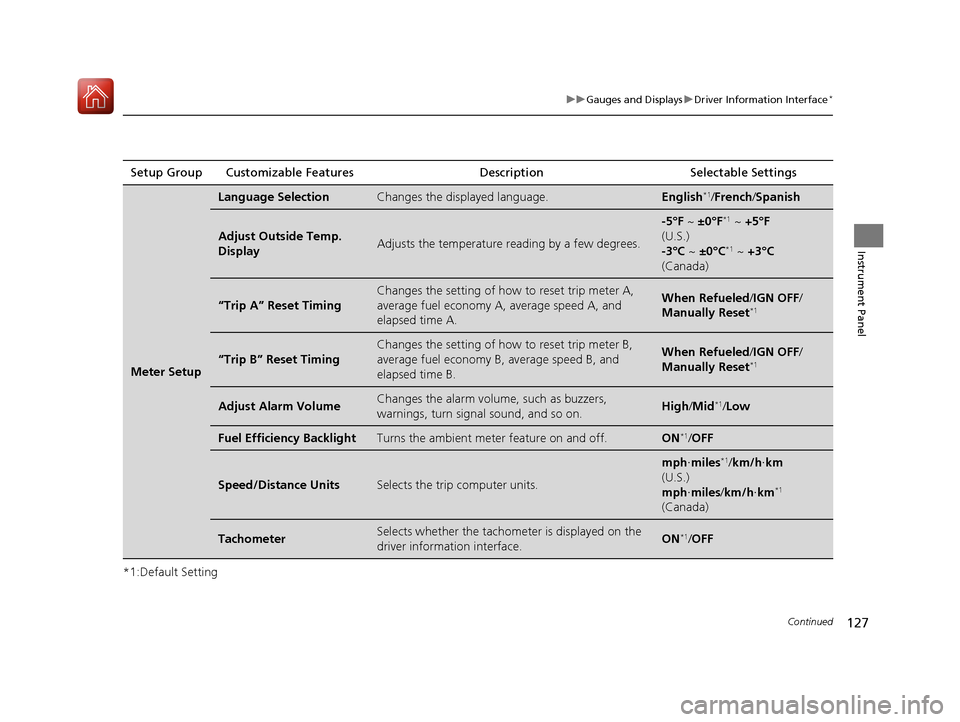
*1:Default SettingSetup Group Customizable Features
Description Selectable Settings
Meter Setup
Language SelectionChanges the displayed language.English*1/French /Spanish
Adjust Outside Temp.
DisplayAdjusts the temperature r eading by a few degrees.
-5°F ~ ±0°F*1 ~ +5°F
(U.S.)
-3°C ~ ±0°C
*1 ~ +3°C
(Canada)
“Trip A” Reset Timing
Changes the setting of how to reset trip meter A,
average fuel economy A, average speed A, and
elapsed time A.When Refueled /IGN OFF /
Manually Reset*1
“Trip B” Reset Timing
Changes the setting of ho w to reset trip meter B,
average fuel economy B, average speed B, and
elapsed time B.When Refueled /IGN OFF /
Manually Reset*1
Adjust Alarm VolumeChanges the alarm volu me, such as buzzers,
warnings, turn signal sound, and so on.High /Mid*1/Low
Fuel Efficiency BacklightTurns the ambient meter feature on and off.ON*1/OFF
Speed/Distance UnitsSelects the trip computer units.
mph ∙miles*1/km/h ∙km
(U.S.)
mph ∙miles /km/h ∙km
*1
(Canada)
TachometerSelects whether the tachom eter is displayed on the
driver information interface.ON*1/ OFF
17 CIVIC 5D (KA KC KL)-31TGG6000.book 127 ページ 2016年6月8日 水曜日 午 後2時8分
Page 129 of 641
128
uuGauges and Displays uDriver Information Interface*
Instrument Panel
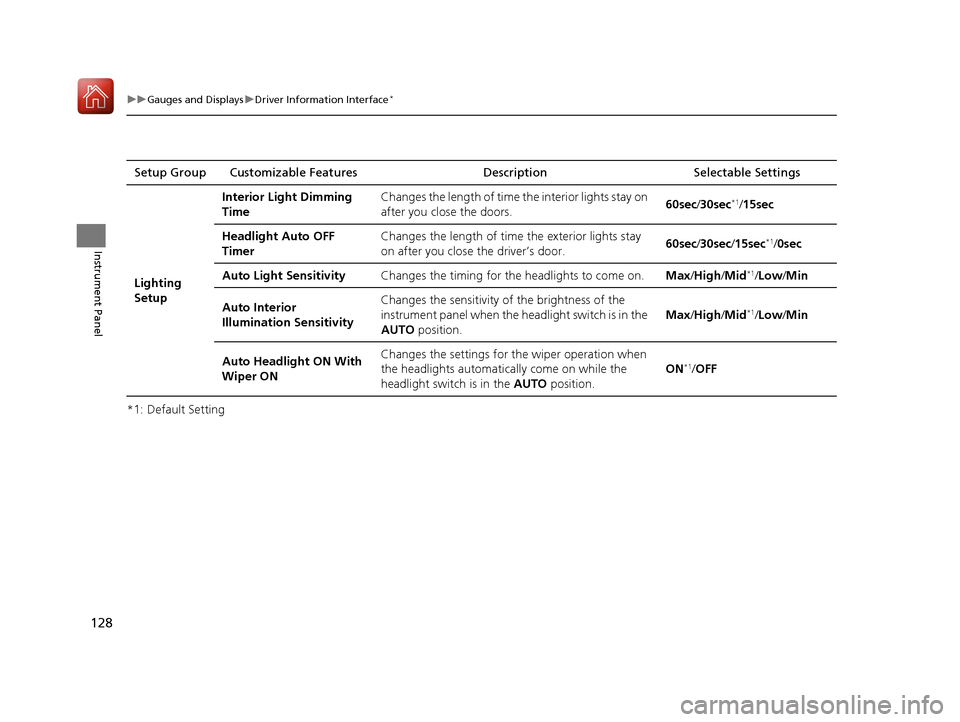
*1: Default SettingSetup Group Customizable Features Description Selectable Settings
Lighting
Setup Interior Light Dimming
Time
Changes the length of time
the interior lights stay on
after you close the doors. 60sec
/30sec
*1/15sec
Headlight Auto OFF
Timer Changes the length of time
the exterior lights stay
on after you close the driver’s door. 60sec
/30sec /15sec
*1/ 0sec
Auto Light Sensitivity Changes the timing for the headlights to come on.Max/High /Mid
*1/Low/ Min
Auto Interior
Illumination Sensitivity Changes the sensitivity of the brightness of the
instrument panel when the headlight switch is in the
AUTO
position. Max
/High /Mid
*1/Low/ Min
Auto Headlight ON With
Wiper ON Changes the settings for
the wiper operation when
the headlights automatically come on while the
headlight switch is in the AUTO position. ON
*1/
OFF
17 CIVIC 5D (KA KC KL)-31TGG6000.book 128 ページ 2016年6月8日 水曜日 午 後2時8分
Page 130 of 641
129
uuGauges and Displays uDriver Information Interface*
Continued
Instrument Panel
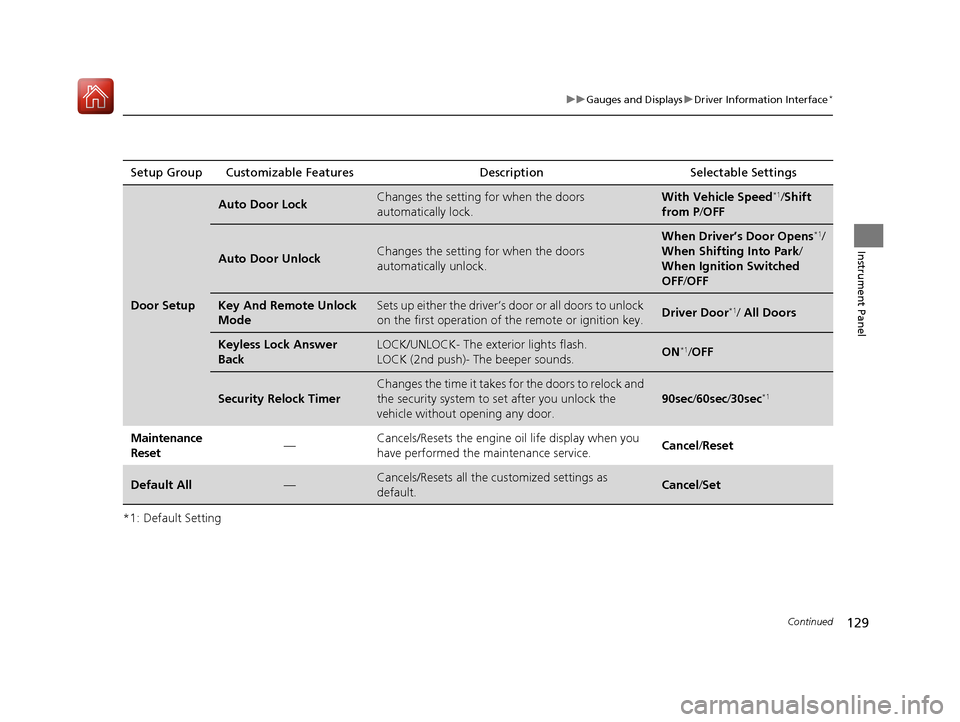
*1: Default SettingSetup Group Customizable Features
Description Selectable Settings
Door Setup
Auto Door LockChanges the setting for when the doors
automatically lock.With Vehicle Speed*1/Shift
from P /OFF
Auto Door UnlockChanges the setting for when the doors
automatically unlock.
When Driver’s Door Opens*1/
When Shifting Into Park /
When Ignition Switched
OFF /OFF
Key And Remote Unlock
ModeSets up either the driver’s door or all doors to unlock
on the first operation of the remote or ignition key.Driver Door*1/ All Doors
Keyless Lock Answer
BackLOCK/UNLOCK- The exterior lights flash.
LOCK (2nd push)- The beeper sounds.ON*1/OFF
Security Relock Timer
Changes the time it takes for the doors to relock and
the security system to set after you unlock the
vehicle without op ening any door.
90sec/60sec /30sec*1
Maintenance
Reset —Cancels/Resets the engine oil life display when you
have performed the maintenance service.
Cancel
/Reset
Default All—Cancels/Resets all the customized settings as
default.Cancel /Set
17 CIVIC 5D (KA KC KL)-31TGG6000.book 129 ページ 2016年6月8日 水曜日 午 後2時8分
Page 131 of 641
130
uuGauges and Displays uDriver Information Interface*
Instrument Panel
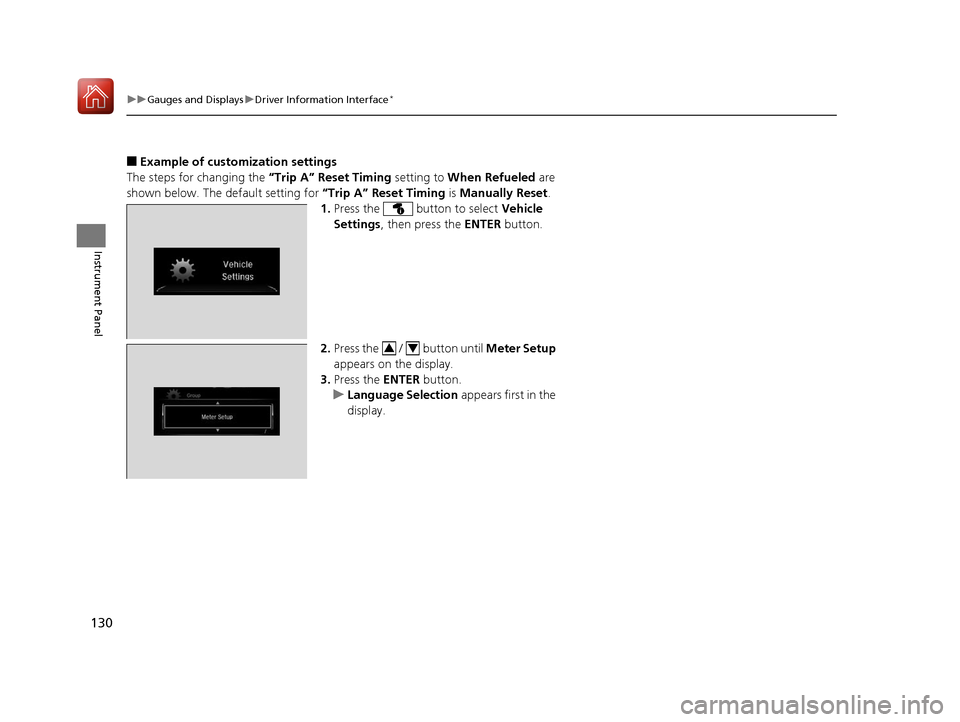
■Example of customization settings
The steps for changing the “Trip A” Reset Timing setting to When Refueled are
shown below. The default setting for “Trip A” Reset Timing is Manually Reset .
1. Press the button to select Vehicle
Settings , then press the ENTER button.
2. Press the / button until Meter Setup
appears on the display.
3. Press the ENTER button.
u Language Selection appears first in the
display.
34
17 CIVIC 5D (KA KC KL)-31TGG6000.book 130 ページ 2016年6月8日 水曜日 午 後2時8分
Page 132 of 641
131
uuGauges and Displays uDriver Information Interface*
Instrument Panel
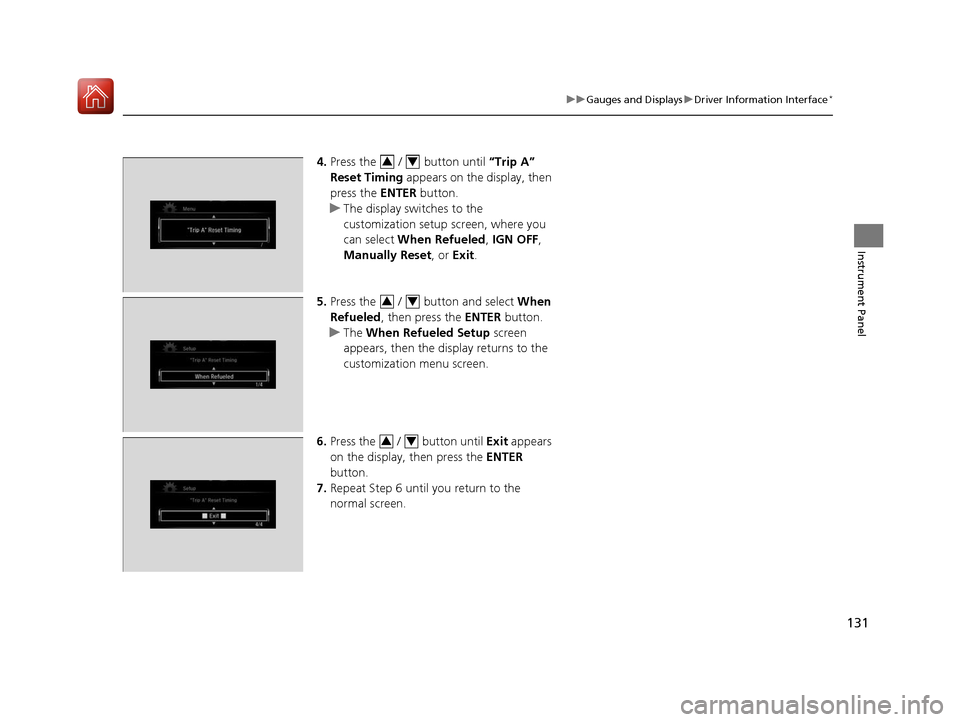
4. Press the / button until “Trip A”
Reset Timing appears on the display, then
press the ENTER button.
u The display swit ches to the
customization setup screen, where you
can select When Refueled , IGN OFF ,
Manually Reset , or Exit .
5. Press the / button and select When
Refueled , then press the ENTER button.
u The When Refueled Setup screen
appears, then the di splay returns to the
customization menu screen.
6. Press the / button until Exit appears
on the display, then press the ENTER
button.
7. Repeat Step 6 until you return to the
normal screen.34
34
34
17 CIVIC 5D (KA KC KL)-31TGG6000.book 131 ページ 2016年6月8日 水曜日 午 後2時8分