instrument panel HONDA CIVIC HATCHBACK 2017 10.G Manual PDF
[x] Cancel search | Manufacturer: HONDA, Model Year: 2017, Model line: CIVIC HATCHBACK, Model: HONDA CIVIC HATCHBACK 2017 10.GPages: 641
Page 259 of 641
uuAudio System Basic Operation uAudio/Information Screen
258
Features
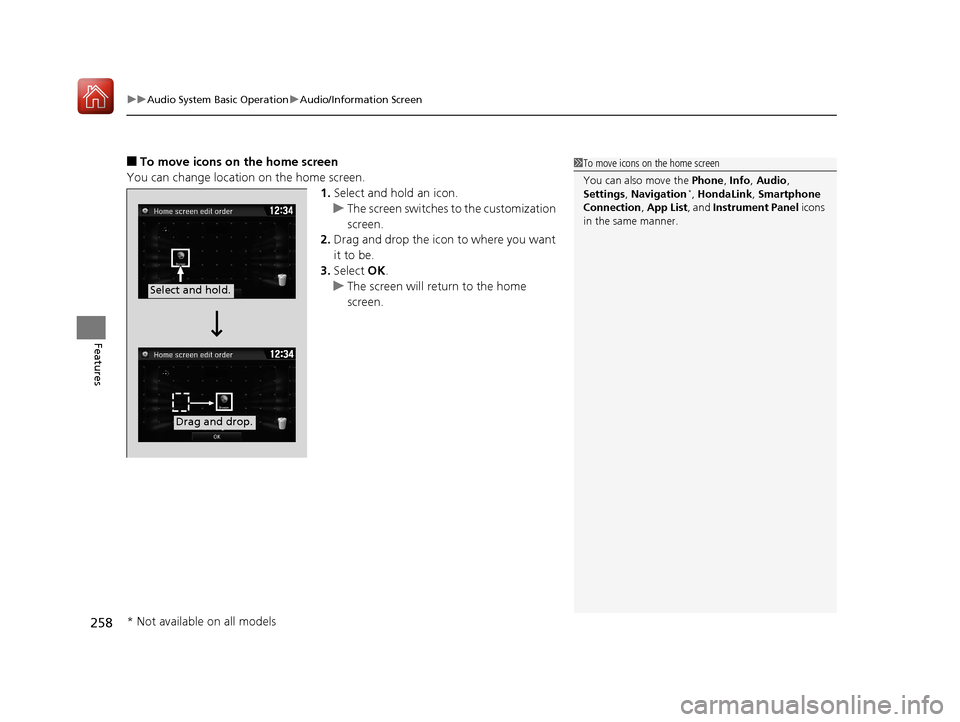
■To move icons on the home screen
You can change location on the home screen. 1.Select and hold an icon.
u The screen switches to the customization
screen.
2. Drag and drop the icon to where you want
it to be.
3. Select OK.
u The screen will return to the home
screen.1To move icons on the home screen
You can also move the Phone, Info, Audio ,
Settings , Navigation
*, HondaLink, Smartphone
Connection , App List , and Instrument Panel icons
in the same manner.
Select and hold.
Drag and drop.
* Not available on all models
17 CIVIC 5D (KA KC KL)-31TGG6000.book 258 ページ 2016年6月8日 水曜日 午 後2時8分
Page 260 of 641
Continued259
uuAudio System Basic Operation uAudio/Information Screen
Features
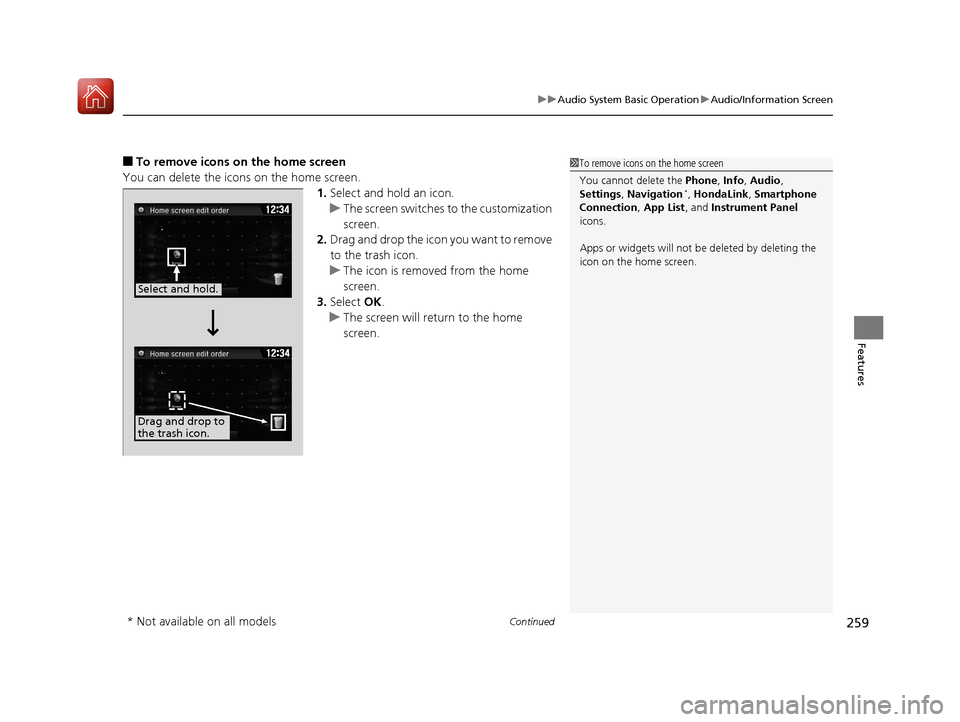
■To remove icons on the home screen
You can delete the icons on the home screen. 1.Select and hold an icon.
u The screen switches to the customization
screen.
2. Drag and drop the icon you want to remove
to the trash icon.
u The icon is removed from the home
screen.
3. Select OK.
u The screen will return to the home
screen.1To remove icons on the home screen
You cannot delete the Phone, Info, Audio ,
Settings , Navigation
*, HondaLink, Smartphone
Connection , App List, and Instrument Panel
icons.
Apps or widgets will not be deleted by deleting the
icon on the home screen.
Select and hold.
Drag and drop to
the trash icon.
* Not available on all models
17 CIVIC 5D (KA KC KL)-31TGG6000.book 259 ページ 2016年6月8日 水曜日 午 後2時8分
Page 335 of 641
334
uuCustomized Features u
Features
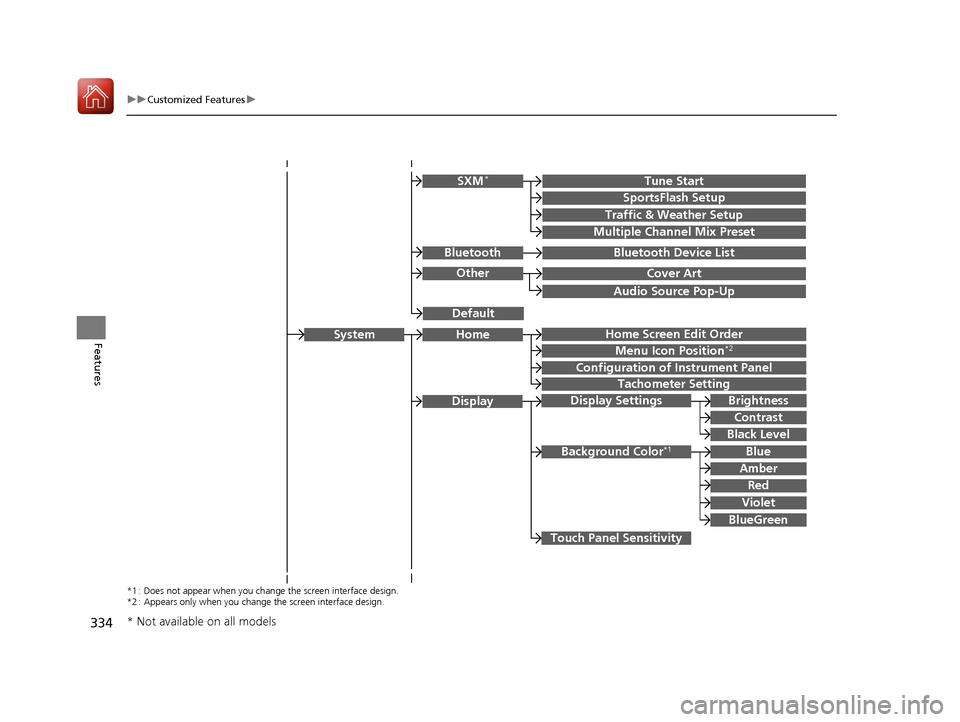
Audio Source Pop-Up
Cover Art
Tune Start
SportsFlash Setup
Traffic & Weather Setup
Other
SXM*
Default
Bluetooth Device ListBluetooth
Multiple Channel Mix Preset
Home Screen Edit Order
Configuration of Instrument Panel
Tachometer Setting
Display Settings
Background Color*1
Display
System
Touch Panel Sensitivity
Brightness
Contrast
Black Level
Blue
Amber
Red
Violet
BlueGreen
Home
Menu Icon Position*2
*1 : Does not appear when you chan ge the screen interface design.
*2 : Appears only when you change the screen interface design.
* Not available on all models
17 CIVIC 5D (KA KC KL)-31TGG6000.book 334 ページ 2016年6月8日 水曜日 午 後2時8分
Page 346 of 641
345
uuCustomized Features u
Continued
Features
*1:Default Setting
*2:Appears only when you change the screen interface design.
Setup
Group Customizable Features Description Selectable Settings
Audio
BluetoothBluetooth Device List
Pairs a new phone to HFL, edits or deletes a
paired phone.
2
Phone Setup P. 390
—
Other
[Your selected media]
Cover ArtTurns the cover art display on and off.On*1/Off
Audio Source Pop-Up
Selects whether the list of selectable audio source
comes on when Audio is selected on the home
screen.
On /Off*1
DefaultCancels/Resets all customized items in the Audio
settings group as default.Yes /No
System Home Home Screen Edit Order
Changes the HOME screen icon layout. —
Menu Icon Position
*2Changes the position of the menu icons on the
Audio , Phone, and Info screen. —
Configuration of
Instrument Panel Changes the
Instrument Panel screen icon
layout. —
Tachometer Setting Turns on and off the tachometer display. On
*1/Off
Bluetooth ® mode
iPod or USB mode
17 CIVIC 5D (KA KC KL)-31TGG6000.book 345 ページ 2016年6月8日 水曜日 午 後2時8分
Page 354 of 641
353
uuCustomized Features u
Continued
Features
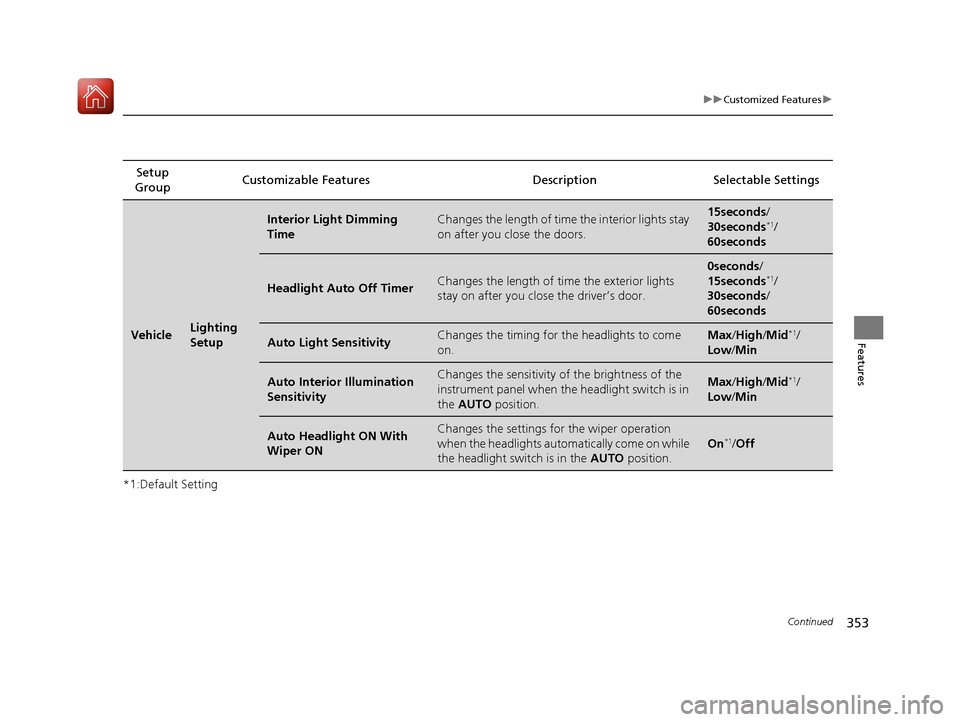
*1:Default SettingSetup
Group Customizable Features Desc
ription Selectable Settings
VehicleLighting
Setup
Interior Light Dimming
TimeChanges the length of time the interior lights stay
on after you close the doors.15seconds/
30seconds*1/
60seconds
Headlight Auto Off TimerChanges the length of time the exterior lights
stay on after you clos e the driver’s door.
0seconds/
15seconds*1/
30seconds /
60seconds
Auto Light SensitivityChanges the timing for th e headlights to come
on.Max /High /Mid*1/
Low/ Min
Auto Interior Illumination
SensitivityChanges the sensitivity of the brightness of the
instrument panel when the headlight switch is in
the AUTO position.Max/High /Mid*1/
Low/ Min
Auto Headlight ON With
Wiper ONChanges the settings for the wiper operation
when the headlights automa tically come on while
the headlight switch is in the AUTO position.
On*1/Off
17 CIVIC 5D (KA KC KL)-31TGG6000.book 353 ページ 2016年6月8日 水曜日 午 後2時8分
Page 443 of 641
442
uuWhen Driving uCruise Control*
Driving
Cruise Control*
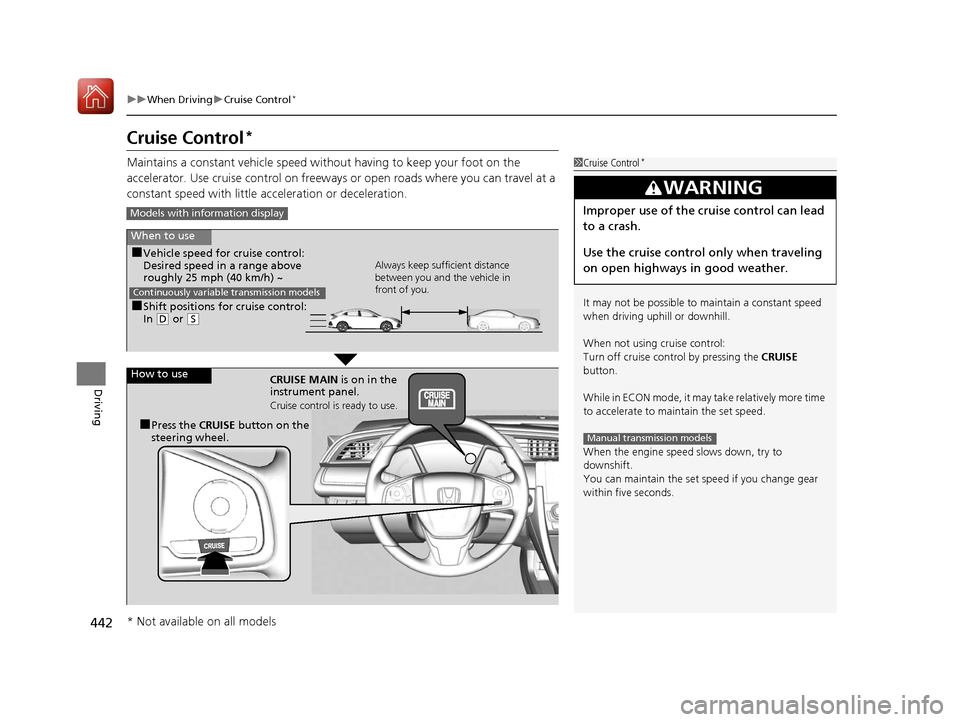
Maintains a constant vehicle speed without having to keep your foot on the
accelerator. Use cruise control on freeways or open roads where you can travel at a
constant speed with little acceleration or deceleration.1Cruise Control*
It may not be possible to maintain a constant speed
when driving uphill or downhill.
When not using cruise control:
Turn off cruise control by pressing the CRUISE
button.
While in ECON mode, it may take relatively more time
to accelerate to maintain the set speed.
When the engine speed slows down, try to
downshift.
You can maintain the set speed if you change gear
within five seconds.
3WARNING
Improper use of the cruise control can lead
to a crash.
Use the cruise control only when traveling
on open highways in good weather.
Manual transmission models
Models with info rmation display
When to use
■Shift positions for cruise control:
In (D or (S Always keep sufficient distance
between you and the vehicle in
front of you.
Continuously variable transmission models
■Vehicle speed for cruise control:
Desired speed in a range above
roughly 25 mph (40 km/h) ~
How to use CRUISE MAIN is on in the
instrument panel.
Cruise control is ready to use.
■Press the CRUISE button on the
steering wheel.
* Not available on all models
17 CIVIC 5D (KA KC KL)-31TGG6000.book 442 ページ 2016年6月8日 水曜日 午 後2時8分
Page 444 of 641
443
uuWhen Driving uCruise Control*
Continued
Driving
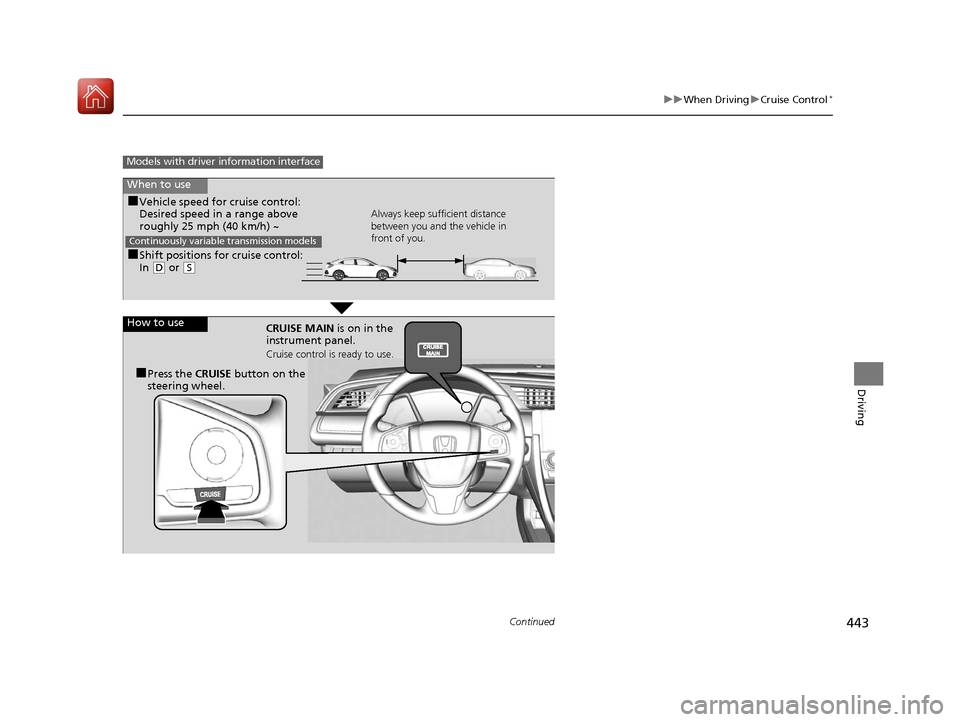
Models with driver information interface
When to use
■Shift positions for cruise control:
In (D or (S Always keep sufficient distance
between you and the vehicle in
front of you.
Continuously variable transmission models
■Vehicle speed for cruise control:
Desired speed in a range above
roughly 25 mph (40 km/h) ~
How to use CRUISE MAIN is on in the
instrument panel.
Cruise control is ready to use.
■Press the CRUISE button on the
steering wheel.
17 CIVIC 5D (KA KC KL)-31TGG6000.book 443 ページ 2016年6月8日 水曜日 午 後2時8分
Page 447 of 641
446
uuWhen Driving uFront Sensor Camera*
Driving
Front Sensor Camera*
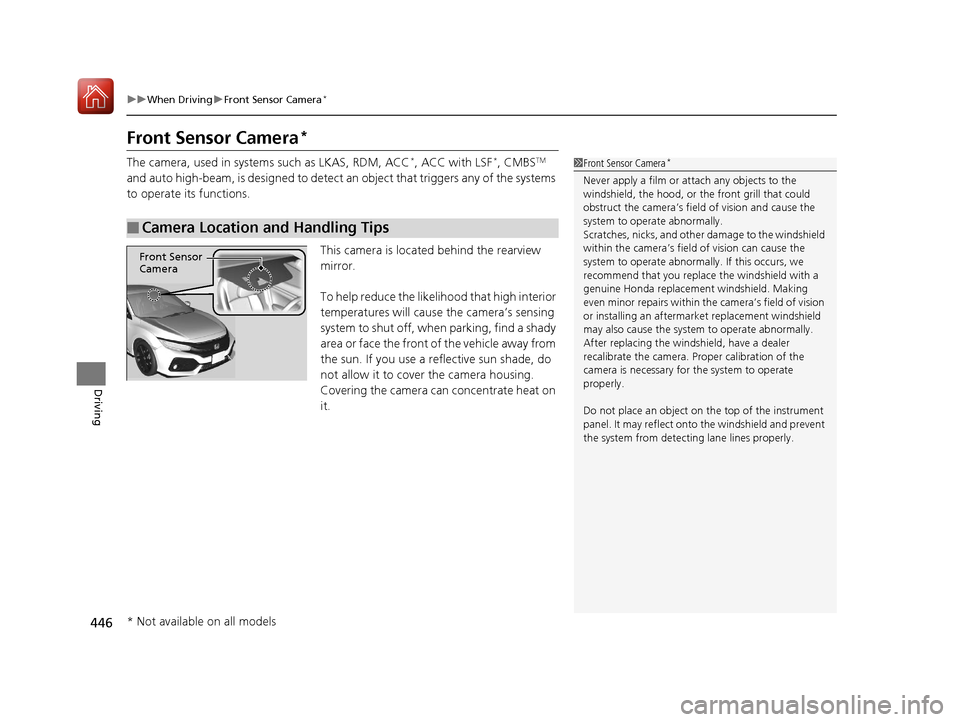
The camera, used in system s such as LKAS, RDM, ACC*, ACC with LSF*, CMBSTM
and auto high-beam, is designed to detect an object that triggers any of the systems
to operate its functions.
This camera is located behind the rearview
mirror.
To help reduce the likelihood that high interior
temperatures will cause the camera’s sensing
system to shut off, when parking, find a shady
area or face the front of the vehicle away from
the sun. If you use a re flective sun shade, do
not allow it to cover the camera housing.
Covering the camera can concentrate heat on
it.
■Camera Location and Handling Tips
1 Front Sensor Camera*
Never apply a film or attach any objects to the
windshield, the hood, or the front grill that could
obstruct the camera’s fiel d of vision and cause the
system to operate abnormally.
Scratches, nicks, and othe r damage to the windshield
within the camera’s fiel d of vision can cause the
system to operate abnormall y. If this occurs, we
recommend that you replac e the windshield with a
genuine Honda replacem ent windshield. Making
even minor repairs within th e camera’s field of vision
or installing an aftermarket replacement windshield
may also cause the system to operate abnormally.
After replacing the winds hield, have a dealer
recalibrate the camera. Pr oper calibration of the
camera is necessary for the system to operate
properly.
Do not place an object on the top of the instrument
panel. It may reflect onto the windshield and prevent
the system from detecting lane lines properly.
Front Sensor
Camera
* Not available on all models
17 CIVIC 5D (KA KC KL)-31TGG6000.book 446 ページ 2016年6月8日 水曜日 午 後2時8分
Page 450 of 641
Continued449
uuWhen Driving uAdaptive Cruise Control (ACC) with Low Speed Follow (LSF)*
Driving
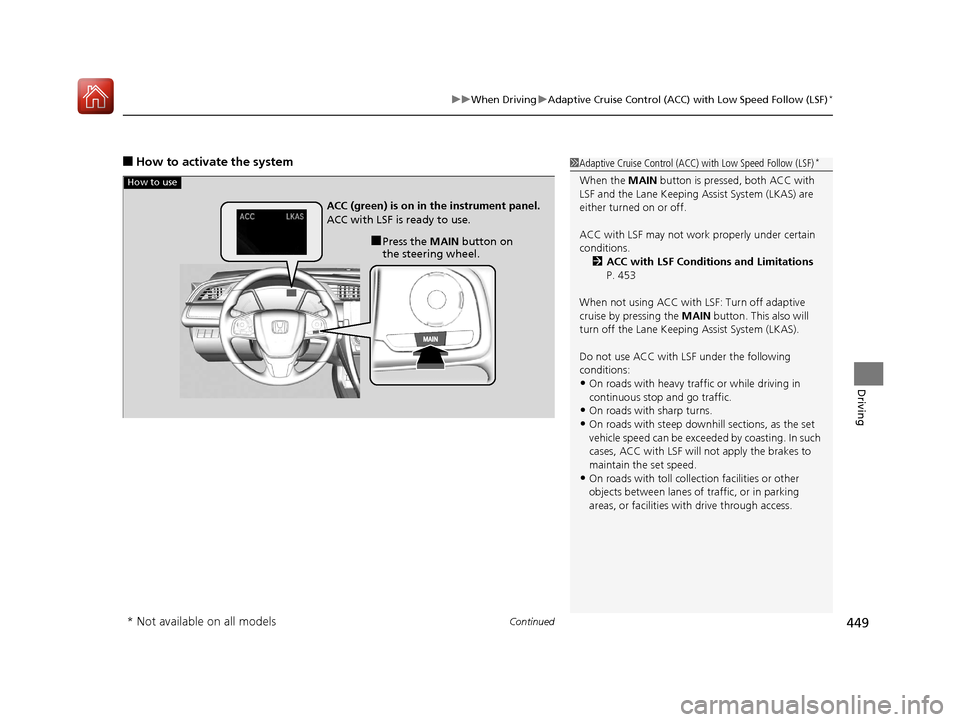
■How to activate the system1Adaptive Cruise Control (ACC) with Low Speed Follow (LSF)*
When the MAIN button is pressed, both ACC with
LSF and the Lane Keeping Assist System (LKAS) are
either turned on or off.
ACC with LSF may not work properly under certain
conditions. 2 ACC with LSF Conditions and Limitations
P. 453
When not using ACC with LSF: Turn off adaptive
cruise by pressing the MAIN button. This also will
turn off the Lane Keeping Assist System (LKAS).
Do not use ACC with LSF under the following
conditions:
•On roads with heavy traf fic or while driving in
continuous stop and go traffic.
•On roads with sharp turns.
•On roads with steep downhill sections, as the set
vehicle speed can be exceeded by coasting. In such
cases, ACC with LSF will not apply the brakes to
maintain the set speed.
•On roads with toll collection facilities or other
objects between lanes of traffic, or in parking
areas, or faci lities with driv e through access.
How to use
■Press the MAIN button on
the steering wheel.
ACC (green) is on in the instrument panel.
ACC with LSF is ready to use.
* Not available on all models
17 CIVIC 5D (KA KC KL)-31TGG6000.book 449 ページ 2016年6月8日 水曜日 午
後2時8分
Page 464 of 641
Continued463
uuWhen Driving uAdaptive Cruise Control (ACC)*
Driving
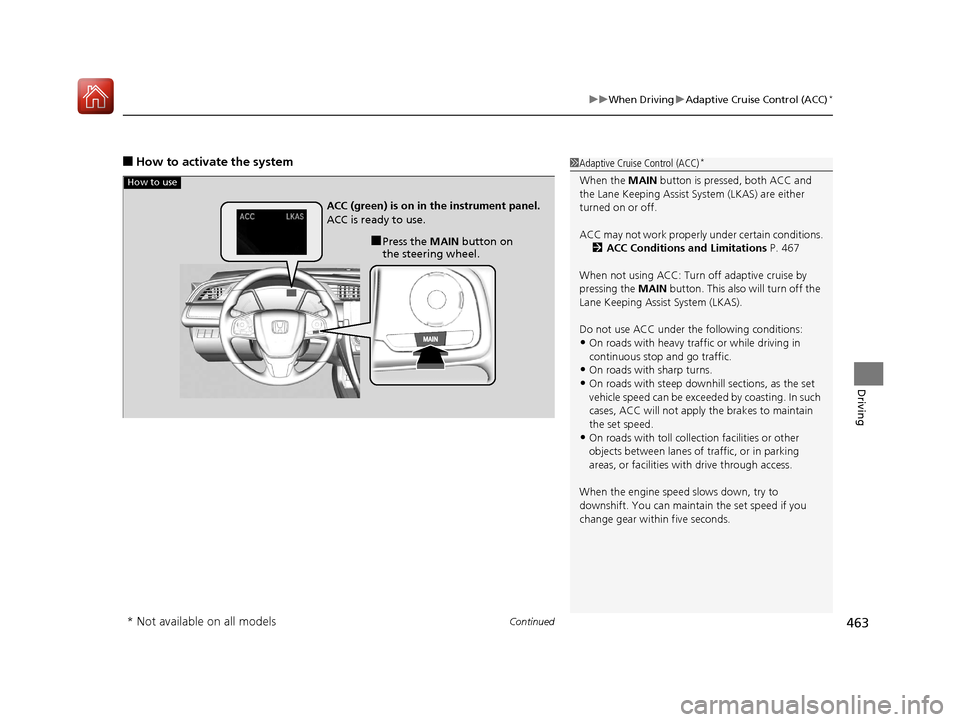
■How to activate the system1Adaptive Cruise Control (ACC)*
When the MAIN button is pressed, both ACC and
the Lane Keeping Assist System (LKAS) are either
turned on or off.
ACC may not work properly under certain conditions.
2 ACC Conditions and Limitations P. 467
When not using ACC: Turn off adaptive cruise by
pressing the MAIN button. This also will turn off the
Lane Keeping Assist System (LKAS).
Do not use ACC under the following conditions:
•On roads with heavy traf fic or while driving in
continuous stop and go traffic.
•On roads with sharp turns.
•On roads with steep downhill sections, as the set
vehicle speed can be exceeded by coasting. In such
cases, ACC will not apply the brakes to maintain
the set speed.
•On roads with toll collection facilities or other
objects between lanes of traffic, or in parking
areas, or faci lities with driv e through access.
When the engine speed slows down, try to
downshift. You can maintain the set speed if you
change gear within five seconds.
How to use
■Press the MAIN button on
the steering wheel.
ACC (green) is on in the instrument panel.
ACC is ready to use.
* Not available on all models
17 CIVIC 5D (KA KC KL)-31TGG6000.book 463 ページ 2016年6月8日 水曜日 午
後2時8分