start stop button HONDA CIVIC HATCHBACK 2017 10.G Manual PDF
[x] Cancel search | Manufacturer: HONDA, Model Year: 2017, Model line: CIVIC HATCHBACK, Model: HONDA CIVIC HATCHBACK 2017 10.GPages: 641
Page 498 of 641
497Continued
Driving
Braking
Brake System
Use the parking brake to keep the vehicle stationary when parked. You can
manually apply and release, or automatically release it.
■Manual operations
Use the electric parking brake switch to a pply or release the parking brake. Manually
releasing the parking brake using the swit ch helps your vehicle start slowly and
smoothly when facing down hill on steep hills.
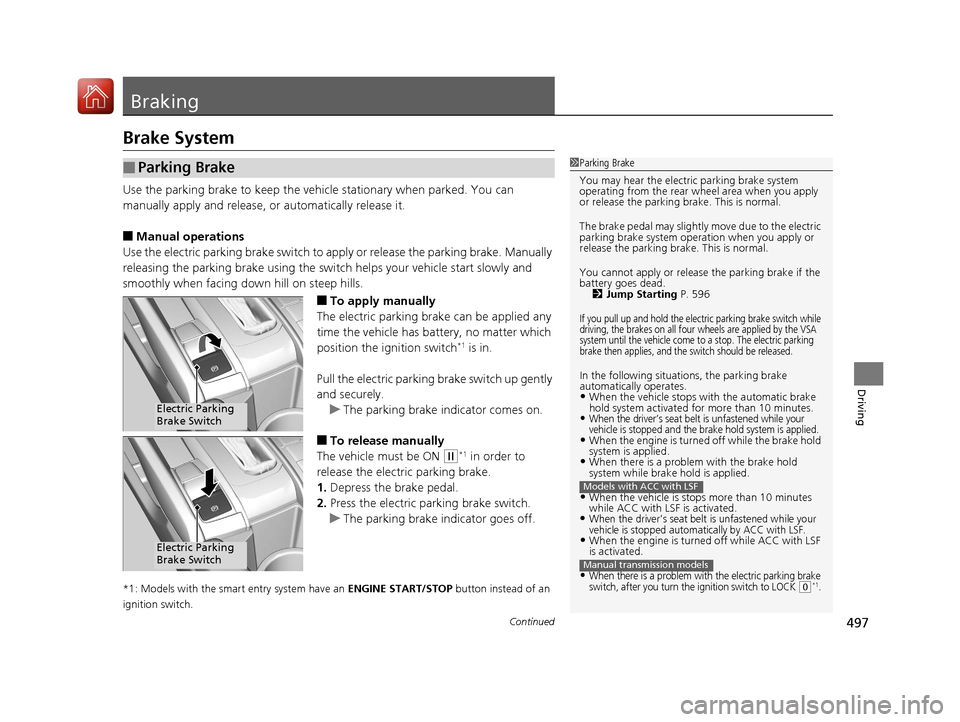
■To apply manually
The electric parking brake can be applied any
time the vehicle has battery, no matter which
position the ignition switch
*1 is in.
Pull the electric parking brake switch up gently
and securely. u The parking brake indicator comes on.
■To release manually
The vehicle must be ON
(w*1 in order to
release the electric parking brake.
1. Depress the brake pedal.
2. Press the electric parking brake switch.
u The parking brake indicator goes off.
*1: Models with the smart entry system have an ENGINE START/STOP button instead of an
ignition switch.
■Parking Brake1 Parking Brake
You may hear the electric parking brake system
operating from the rear wh eel area when you apply
or release the parking brake. This is normal.
The brake pedal may slightly move due to the electric
parking brake system opera tion when you apply or
release the parking br ake. This is normal.
You cannot apply or release the parking brake if the
battery goes dead.
2 Jump Starting P. 596
If you pull up and hold the electric parking brake switch while
driving, the brakes on all four wheels are applied by the VSA
system until the vehicle come to a stop. The electric parking
brake then applies, and the switch should be released.
In the following situations, the parking brake
automatically operates.
•When the vehicle stops with the automatic brake
hold system activated for more than 10 minutes.
•When the driver’s seat belt is unfastened while your
vehicle is stopped and the brake hold system is applied.
•When the engine is turned off while the brake hold
system is applied.
•When there is a problem with the brake hold
system while brake hold is applied.
•When the vehicle is stops more than 10 minutes
while ACC with LSF is activated.
•When the driver’s seat belt is unfastened while your
vehicle is stopped automatically by ACC with LSF.
•When the engine is turned off while ACC with LSF
is activated.
•When there is a problem with the electric parking brake
switch, after you turn the ignition switch to LOCK (0*1.
Models with ACC with LSF
Manual transmission models
Electric Parking
Brake Switch
Electric Parking
Brake Switch
17 CIVIC 5D (KA KC KL)-31TGG6000.book 497 ページ 2016年6月8日 水曜日 午 後2時8分
Page 502 of 641
Continued501
uuBraking uBrake System
Driving
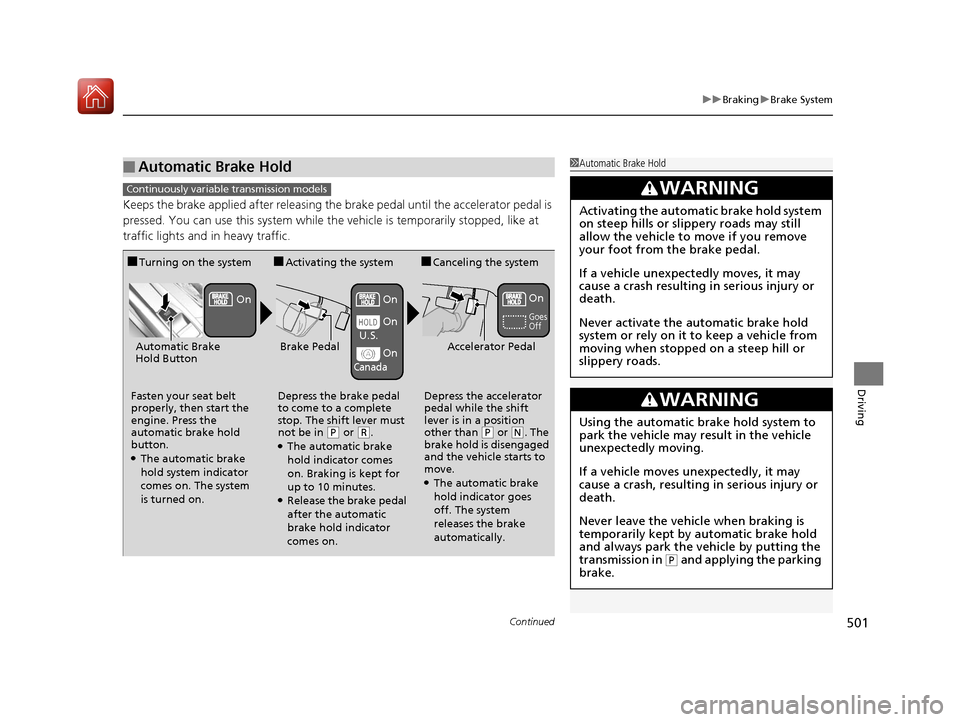
Keeps the brake applied after releasing the brake pedal until the accelerator pedal is
pressed. You can use this system while th e vehicle is temporarily stopped, like at
traffic lights and in heavy traffic.
■Automatic Brake Hold1 Automatic Brake Hold
3WARNING
Activating the automatic brake hold system
on steep hills or slippery roads may still
allow the vehicle to move if you remove
your foot from the brake pedal.
If a vehicle unexpectedly moves, it may
cause a crash resulting in serious injury or
death.
Never activate the automatic brake hold
system or rely on it to keep a vehicle from
moving when stopped on a steep hill or
slippery roads.
3WARNING
Using the automatic brake hold system to
park the vehicle may result in the vehicle
unexpectedly moving.
If a vehicle moves unexpectedly, it may
cause a crash, resulting in serious injury or
death.
Never leave the vehicle when braking is
temporarily kept by automatic brake hold
and always park the vehicle by putting the
transmission in
( P and applying the parking
brake.
Continuously variable transmission models
■Turning on the system
Fasten your seat belt
properly, then start the
engine. Press the
automatic brake hold
button.
●The automatic brake
hold system indicator
comes on. The system
is turned on.
■Activating the system
Depress the brake pedal
to come to a complete
stop. The shift lever must
not be in
( P or (R.●The automatic brake
hold indicator comes
on. Braking is kept for
up to 10 minutes.
●Release the brake pedal
after the automatic
brake hold indicator
comes on.
■Canceling the system
Depress the accelerator
pedal while the shift
lever is in a position
other than
( P or (N. The
brake hold is disengaged
and the vehicle starts to
move.
●The automatic brake
hold indicator goes
off. The system
releases the brake
automatically.
Accelerator PedalBrake PedalAutomatic Brake
Hold Button
Goes
Off
On OnOn
On
On
U.S.
Canada
17 CIVIC 5D (KA KC KL)-31TGG6000.book 501 ページ 2016年6月8日 水曜日 午
後2時8分
Page 503 of 641
502
uuBraking uBrake System
Driving
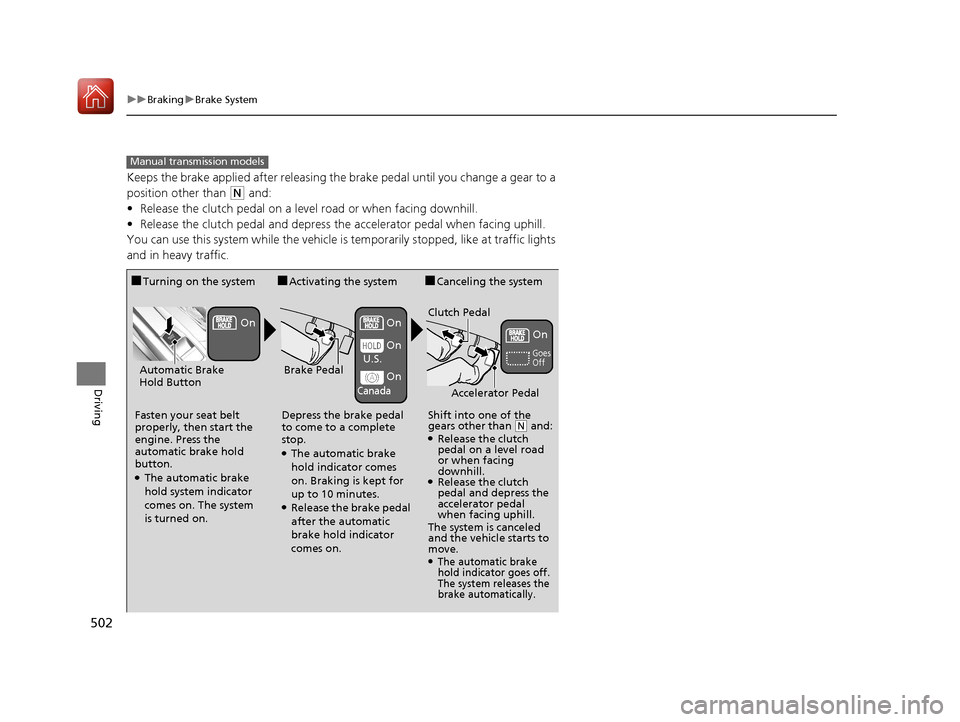
Keeps the brake applied after releasing the brake pedal until you change a gear to a
position other than
(N and:
• Release the clutch pedal on a level road or when facing downhill.
• Release the clutch pedal and depress the accelerator pedal when facing uphill.
You can use this system while the vehicle is temporarily stopped, like at traffic lights
and in heavy traffic.
Manual transmission models
■Turning on the system
Fasten your seat belt
properly, then start the
engine. Press the
automatic brake hold
button.
●The automatic brake
hold system indicator
comes on. The system
is turned on.
■Activating the system
Depress the brake pedal
to come to a complete
stop.
●The automatic brake
hold indicator comes
on. Braking is kept for
up to 10 minutes.
●Release the brake pedal
after the automatic
brake hold indicator
comes on.
■Canceling the system
Shift into one of the
gears other than
( N and: ●Release the clutch
pedal on a level road
or when facing
downhill.
●Release the clutch
pedal and depress the
accelerator pedal
when facing uphill.
The system is canceled
and the vehicle starts to
move.
●The automatic brake
hold indicator goes off.
The system releases the
brake automatically.
Accelerator Pedal
Brake PedalAutomatic Brake
Hold Button
Goes
Off
On On
On
On
On
U.S.
Canada
Clutch Pedal
17 CIVIC 5D (KA KC KL)-31TGG6000.book 502 ページ 2016年6月8日 水曜日 午
後2時8分
Page 517 of 641
uuMulti-View Rear Camera uAbout Your Multi-View Rear Camera
516
Driving
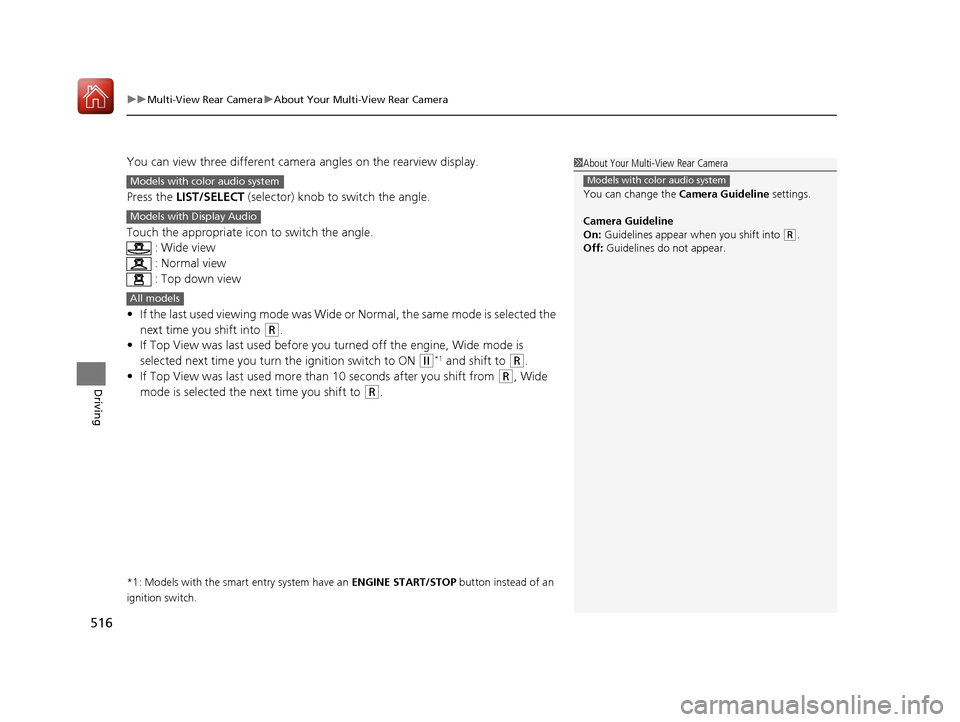
You can view three different camera angles on the rearview display.
Press the LIST/SELECT (selector) knob to switch the angle.
Touch the appropriate icon to switch the angle. : Wide view
: Normal view
: Top down view
• If the last used viewing mode was Wide or Normal, the same mode is selected the
next time you shift into
(R.
• If Top View was last used before you turned off the engine, Wide mode is
selected next time you turn the ignition switch to ON
(w*1 and shift to (R.
• If Top View was last used more th an 10 seconds after you shift from
(R, Wide
mode is selected the next time you shift to
(R.
*1: Models with the smart entry system have an ENGINE START/STOP button instead of an
ignition switch.
1 About Your Multi-View Rear Camera
You can change the Camera Guideline settings.
Camera Guideline
On: Guidelines appear when you shift into
(R.
Off: Guidelines do not appear.
Models with color audio systemModels with color audio system
Models with Display Audio
All models
17 CIVIC 5D (KA KC KL)-31TGG6000.book 516 ページ 2016年6月8日 水曜日 午 後2時8分
Page 528 of 641
527Continued
Maintenance
Maintenance MinderTM
Select the Maintenance Minder to see maintenance items that are due soon and to
see the percentage of life remaining in the engine oil.
When the engine oil life is less than 15%, a Maintenance Minder message will
appear every time you turn the ignition switch to ON
(w*1, reminding you to bring
your vehicle to a dealer for service.
To Use Maintenance MinderTM
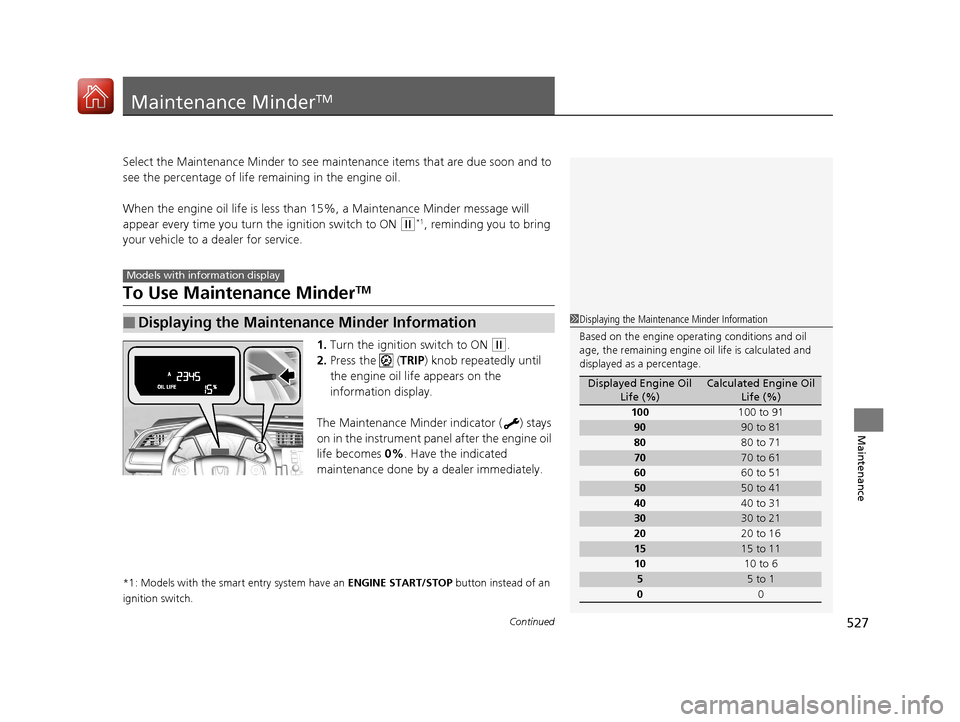
1. Turn the ignition switch to ON (w.
2. Press the ( TRIP) knob repeatedly until
the engine oil life appears on the
information display.
The Maintenance Minder indicator ( ) stays
on in the instrument panel after the engine oil
life becomes 0% . Have the indicated
maintenance done by a dealer immediately.
*1: Models with the smart entry system have an ENGINE START/STOP button instead of an
ignition switch.
■Displaying the Maintenance Minder Information
Models with info rmation display
1Displaying the Maintena nce Minder Information
Based on the engine opera ting conditions and oil
age, the remaining engine oi l life is calculated and
displayed as a percentage.
Displayed Engine Oil Life (%)Calculated Engine Oil Life (%)
100 100 to 91
9090 to 81
80 80 to 71
7070 to 61
60 60 to 51
5050 to 41
40 40 to 31
3030 to 21
20 20 to 16
1515 to 11
10 10 to 6
55 to 1
0 0
17 CIVIC 5D (KA KC KL)-31TGG6000.book 527 ページ 2016年6月8日 水曜日 午 後2時8分
Page 532 of 641
531
uuMaintenance MinderTMuTo Use Maintenance MinderTM
Continued
Maintenance
To Use Maintenance MinderTM
Certain maintenance items due soon, along with the estimated remaining oil life,
appear on the driver information interface.
You can view them on the Maintenance Minder screen at any time.
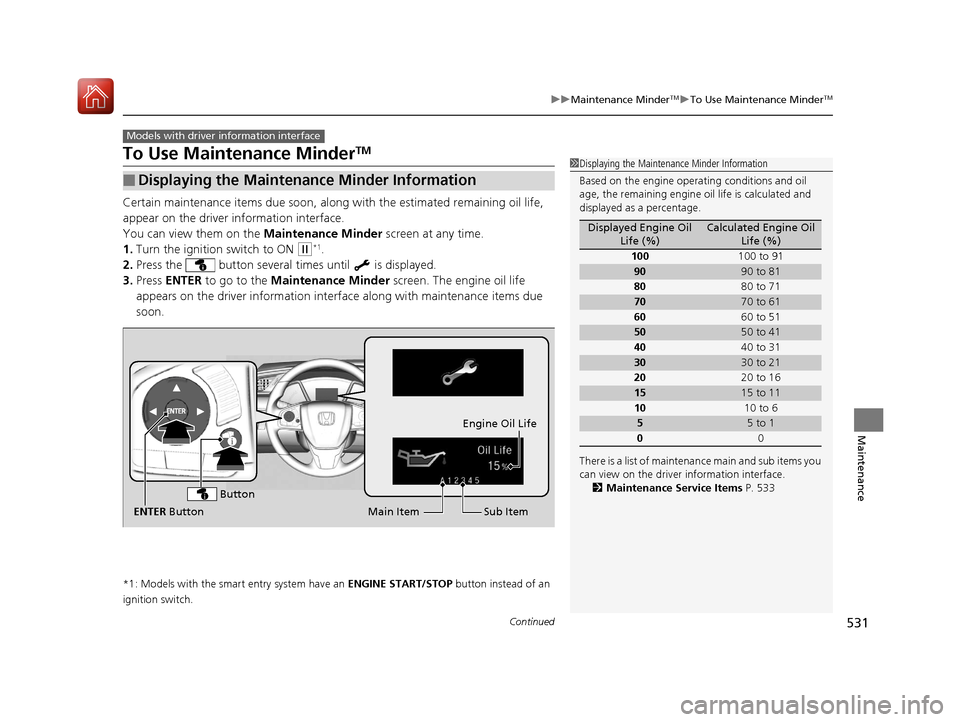
1. Turn the ignition switch to ON
(w*1.
2. Press the button several times until is displayed.
3. Press ENTER to go to the Maintenance Minder screen. The engine oil life
appears on the driver information inte rface along with maintenance items due
soon.
*1: Models with the smart entry system have an ENGINE START/STOP button instead of an
ignition switch.
■Displaying the Maintenance Minder Information
Models with driver information interface
1 Displaying the Maintena nce Minder Information
Based on the engine opera ting conditions and oil
age, the remaining engine oi l life is calculated and
displayed as a percentage.
There is a list of maintena nce main and sub items you
can view on the driver information interface.
2 Maintenance Service Items P. 533
Displayed Engine Oil
Life (%)Calculated Engine Oil Life (%)
100 100 to 91
9090 to 81
80 80 to 71
7070 to 61
60 60 to 51
5050 to 41
40 40 to 31
3030 to 21
20 20 to 16
1515 to 11
10 10 to 6
55 to 1
0 0
Sub Item
Engine Oil Life
Main Item
ENTER Button
Button
17 CIVIC 5D (KA KC KL)-31TGG6000.book 531 ページ 2016年6月8日 水曜日 午 後2時8分
Page 536 of 641
535
uuMaintenance MinderTMuTo Use Maintenance MinderTM
Maintenance
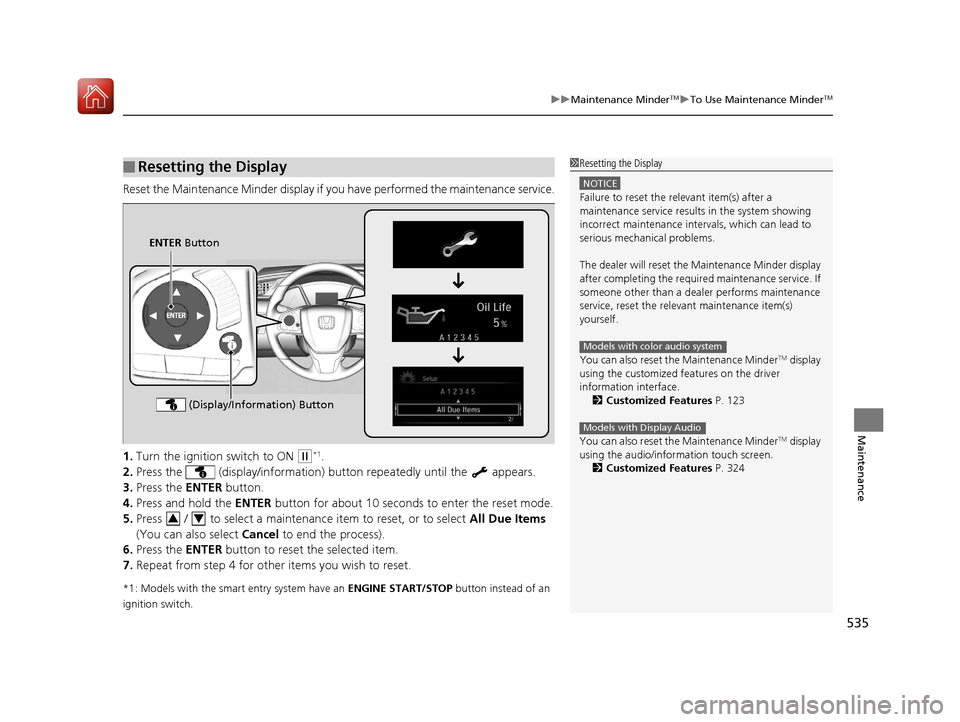
Reset the Maintenance Minder display if y ou have performed the maintenance service.
1. Turn the ignition switch to ON
(w*1.
2. Press the (display/information) bu tton repeatedly until the appears.
3. Press the ENTER button.
4. Press and hold the ENTER button for about 10 second s to enter the reset mode.
5. Press / to select a maintenance item to reset, or to select All Due Items
(You can also select Cancel to end the process).
6. Press the ENTER button to reset the selected item.
7. Repeat from step 4 for other items you wish to reset.
*1: Models with the smart entry system have an ENGINE START/STOP button instead of an
ignition switch.
■Resetting the Display1 Resetting the Display
NOTICE
Failure to reset the relevant item(s) after a
maintenance service results in the system showing
incorrect maintenance interv als, which can lead to
serious mechanical problems.
The dealer will reset the Maintenance Minder display
after completing the required maintenance service. If
someone other than a deal er performs maintenance
service, reset the relevant maintenance item(s)
yourself.
You can also reset the Maintenance Minder
TM display
using the customized features on the driver
information interface.
2 Customized Features P. 123
You can also reset the Maintenance Minder
TM display
using the audio/information touch screen.
2 Customized Features P. 324
Models with color audio system
Models with Display Audio
ENTER Button
(Display/Information) Button
34
17 CIVIC 5D (KA KC KL)-31TGG6000.book 535 ページ 2016年6月8日 水曜日 午 後2時8分
Page 557 of 641
556
Maintenance
Checking and Maintaining Wiper Blades
Checking Wiper Blades
If the wiper blade rubber has deteriorated, it will leave streaks and the hard surfaces
of the blade may scratch the window glass.
Changing the Front Wiper Blade Rubber
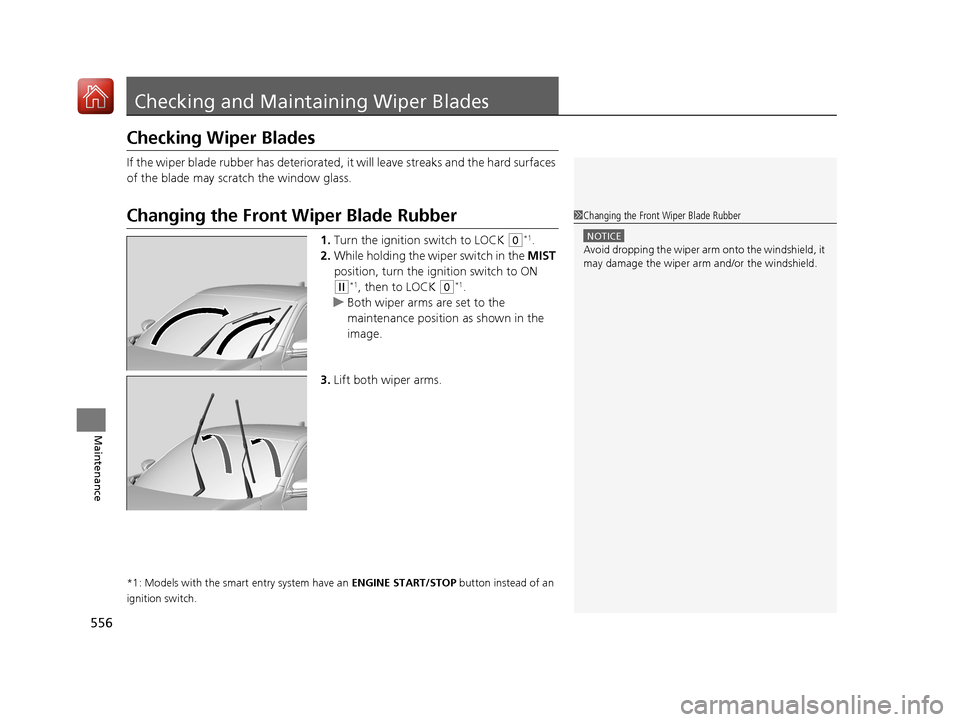
1. Turn the ignition switch to LOCK (0*1.
2. While holding the wiper switch in the MIST
position, turn the igni tion switch to ON
(w*1, then to LOCK (0*1.
u Both wiper arms are set to the
maintenance position as shown in the
image.
3. Lift both wiper arms.
*1: Models with the smart entry system have an ENGINE START/STOP button instead of an
ignition switch.
1 Changing the Front Wiper Blade Rubber
NOTICE
Avoid dropping the wiper arm onto the windshield, it
may damage the wiper arm and/or the windshield.
17 CIVIC 5D (KA KC KL)-31TGG6000.book 556 ページ 2016年6月8日 水曜日 午 後2時8分
Page 559 of 641
558
uuChecking and Maintaining Wiper Blades uChanging the Front Wiper Blade Rubber
Maintenance
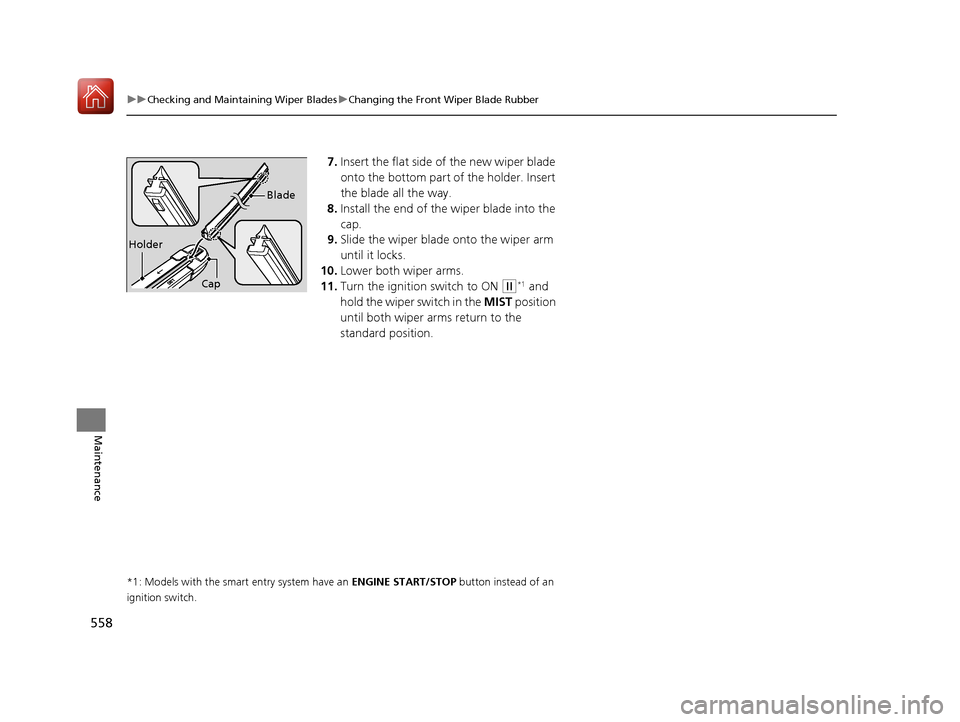
7. Insert the flat side of the new wiper blade
onto the bottom part of the holder. Insert
the blade all the way.
8. Install the end of the wiper blade into the
cap.
9. Slide the wiper blade onto the wiper arm
until it locks.
10. Lower both wiper arms.
11. Turn the ignition switch to ON
(w*1 and
hold the wiper switch in the MIST position
until both wiper arms return to the
standard position.
*1: Models with the smart entry system have an ENGINE START/STOP button instead of an
ignition switch.
Holder Blade
Cap
17 CIVIC 5D (KA KC KL)-31TGG6000.book 558 ページ 2016年6月8日 水曜日 午
後2時8分
Page 573 of 641
572
uuBattery uCharging the Battery
Maintenance
Charging the Battery
Disconnect both battery cables to prevent da maging your vehicle’s electrical system.
Always disconnect the negative (–) cable first, and reconnect it last.
*1: Models with the smart entry system have an ENGINE START/STOP button instead of an
ignition switch.
1 Battery
When you find corrosion, cl ean the battery terminals
by applying a baking powder and water solution.
Clean the terminals with a damp towel. Cloth/towel
dry the battery. Coat the terminals with grease to
help prevent future corrosion.
When replacing the battery, the replacement must be
of the same specifications.
Consult a dealer for more information.
The VSA ® system, VSA ® OFF, low tire pressure/TPMS
*
and CMBSTM * indicators may come on when your
turn the ignition switch to ON ( w*1 after re-
connecting a battery.
Drive straight for a short distance at more than 12
mph (20 km/h). Each indicato r should go off. If none
of them do, have your ve hicle checked by a dealer.
* Not available on all models
17 CIVIC 5D (KA KC KL)-31TGG6000.book 572 ページ 2016年6月8日 水曜日 午 後2時8分