lock HONDA CIVIC HATCHBACK 2018 Owner's Manual (in English)
[x] Cancel search | Manufacturer: HONDA, Model Year: 2018, Model line: CIVIC HATCHBACK, Model: HONDA CIVIC HATCHBACK 2018Pages: 703, PDF Size: 24.31 MB
Page 362 of 703
360
uuCustomized Features u
Features
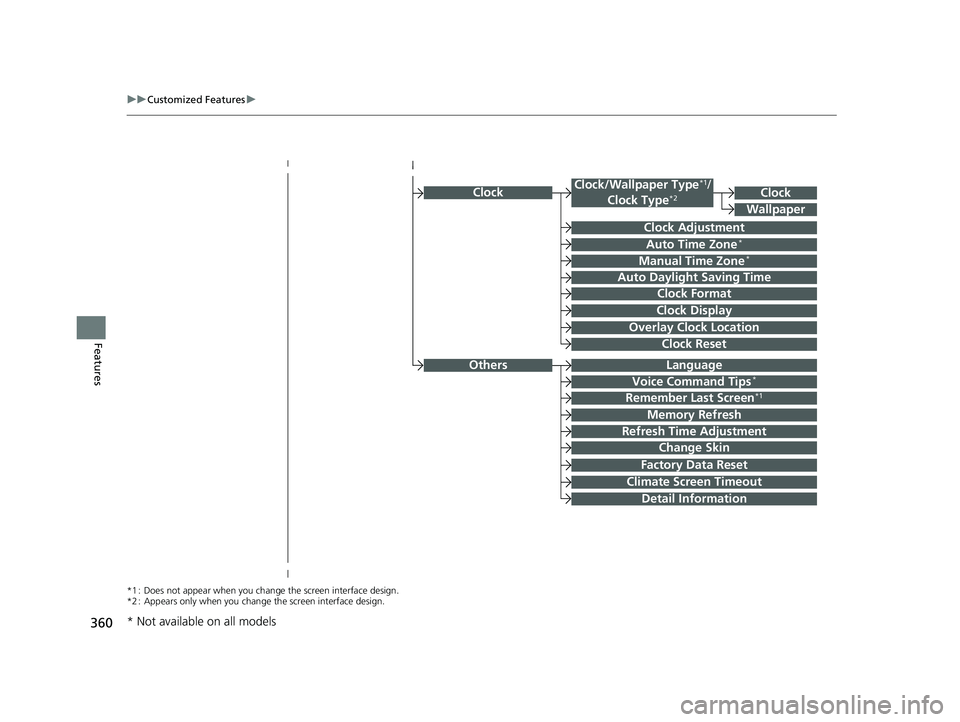
Clock
Clock Adjustment
Clock Format
Auto Time Zone*
Manual Time Zone*
Auto Daylight Saving Time
Clock Display
Overlay Clock Location
Clock Reset
Clock
Wallpaper
*1 : Does not appear when you chang e the screen interface design.
*2 : Appears only when you change the screen interface design.
OthersLanguage
Voice Command Tips*
Remember Last Screen*1
Memory Refresh
Refresh Time Adjustment
Change Skin
Factory Data Reset
Climate Screen Timeout
Detail Information
Clock/Wallpaper Type*1/
Clock Type*2
* Not available on all models
18 CIVIC 5D (KA KC KL)-31TGG6100.book 360 ページ 2017年12月27日 水曜日 午前11時2分
Page 364 of 703
362
uuCustomized Features u
Features
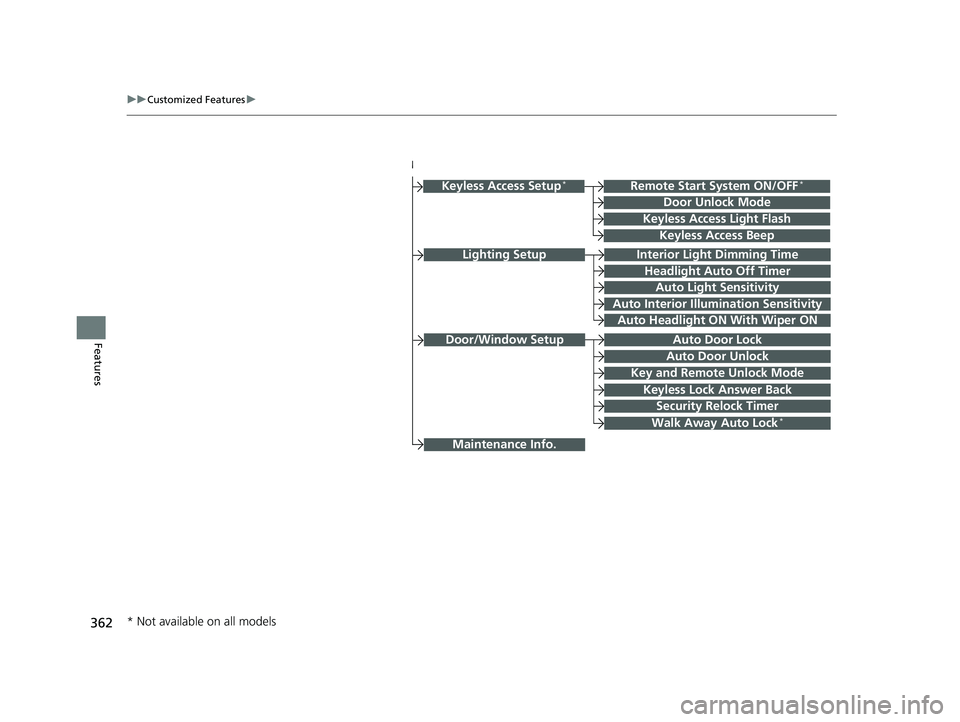
Lighting SetupInterior Light Dimming Time
Headlight Auto Off Timer
Auto Light Sensitivity
Auto Interior Illumination Sensitivity
Auto Door Lock
Key and Remote Unlock Mode
Door/Window Setup
Maintenance Info.
Auto Headlight ON With Wiper ON
Keyless Lock Answer Back
Security Relock Timer
Walk Away Auto Lock*
Keyless Access Setup*
Door Unlock Mode
Keyless Access Light Flash
Keyless Access Beep
Remote Start System ON/OFF*
Auto Door Unlock
* Not available on all models
18 CIVIC 5D (KA KC KL)-31TGG6100.book 362 ページ 2017年12月27日 水曜日 午前11時2分
Page 365 of 703
363
uuCustomized Features u
Continued
Features
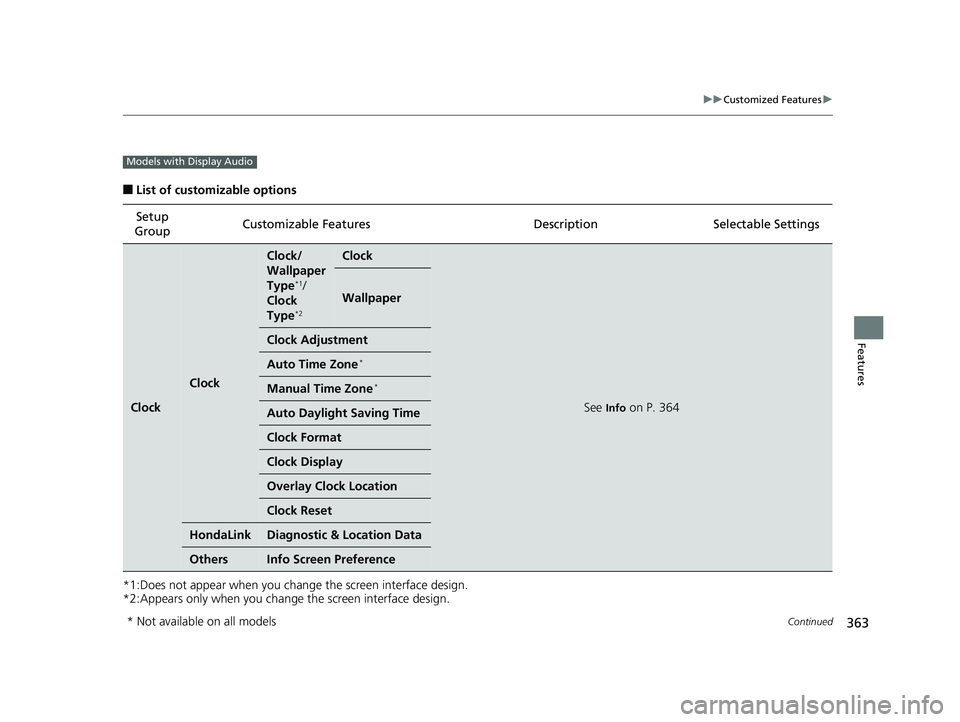
■List of customizable options
*1:Does not appear when you chan ge the screen interface design.
*2:Appears only when you change the screen interface design. Setup
Group Customizable Features Desc
ription Selectable Settings
Clock
Clock
Clock/
Wallpaper
Type
*1/
Clock
Type
*2
Clock
See Info on P. 364
Wallpaper
Clock Adjustment
Auto Time Zone*
Manual Time Zone*
Auto Daylight Saving Time
Clock Format
Clock Display
Overlay Clock Location
Clock Reset
HondaLinkDiagnostic & Location Data
OthersInfo Screen Preference
Models with Display Audio
* Not available on all models
18 CIVIC 5D (KA KC KL)-31TGG6100.book 363 ページ 2017年12月27日 水曜日 午前11時2分
Page 366 of 703
364
uuCustomized Features u
Features
*1:Default Setting
*2:Does not appear when you change the screen interface design.
*3:Appears only when you change the screen interface design.Setup
Group Customizable Features Desc
ription Selectable Settings
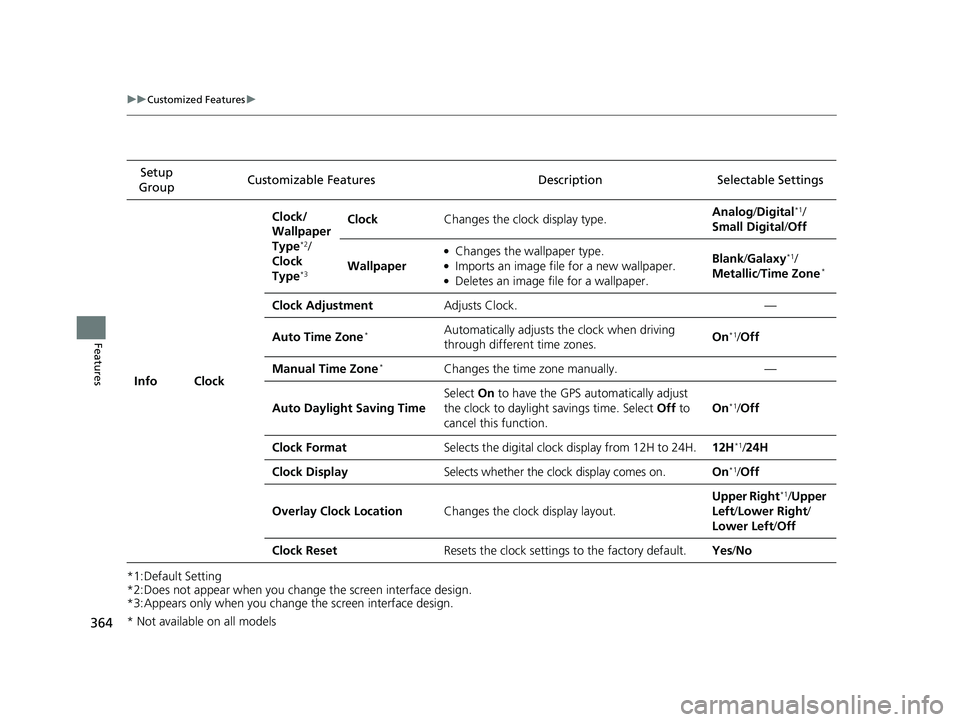
Info Clock Clock/
Wallpaper
Type
*2/
Clock
Type
*3
Clock Changes the clock display type. Analog
/Digital*1/
Small Digital /Off
Wallpaper
●Changes the wallpaper type.●Imports an image file for a new wallpaper.●Deletes an image file for a wallpaper. Blank
/Galaxy
*1/
Metallic /Time Zone*
Clock Adjustment Adjusts Clock. —
Auto Time Zone
*Automatically adjusts th e clock when driving
through different time zones. On*1/
Off
Manual Time Zone
*Changes the time zone manually. —
Auto Daylight Saving Time Select
On to have the GPS automatically adjust
the clock to daylight savings time. Select Off to
cancel this function. On
*1/
Off
Clock Format Selects the digital clock display from 12H to 24H. 12H
*1/24H
Clock Display Selects whether the clock display comes on. On
*1/Off
Overlay Clock Location Changes the clock display layout. Upper Right
*1/
Upper
Left/ Lower Right/
Lower Left /Off
Clock Reset Resets the clock settings to the factory default. Yes/No
* Not available on all models
18 CIVIC 5D (KA KC KL)-31TGG6100.book 364 ページ 2017年12月27日 水曜日 午前11時2分
Page 375 of 703
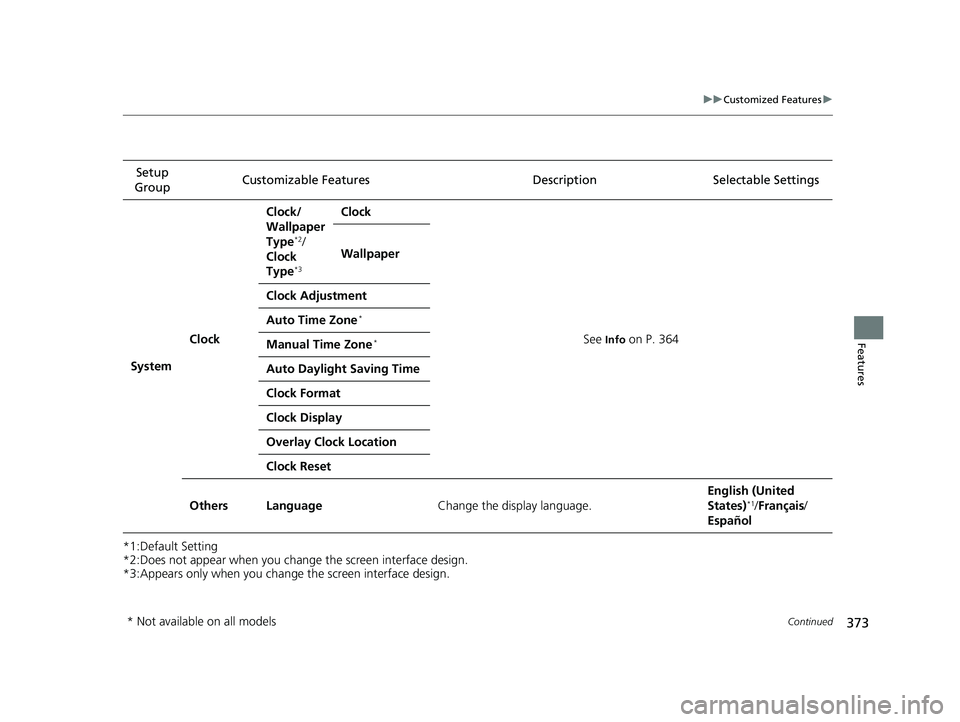
373
uuCustomized Features u
Continued
Features
*1:Default Setting
*2:Does not appear when you chan ge the screen interface design.
*3:Appears only when you change the screen interface design. Setup
Group Customizable Features
Description Selectable Settings
System Clock Clock/
Wallpaper
Type
*2/
Clock
Type
*3
Clock
See
Info on P. 364
Wallpaper
Clock Adjustment
Auto Time Zone
*
Manual Time Zone*
Auto Daylight Saving Time
Clock Format
Clock Display
Overlay Clock Location
Clock Reset
Others Language Change the display language. English (United
States)
*1/
Français /
Español
* Not available on all models
18 CIVIC 5D (KA KC KL)-31TGG6100.book 373 ページ 2017年12月27日 水曜日 午前11時2分
Page 376 of 703
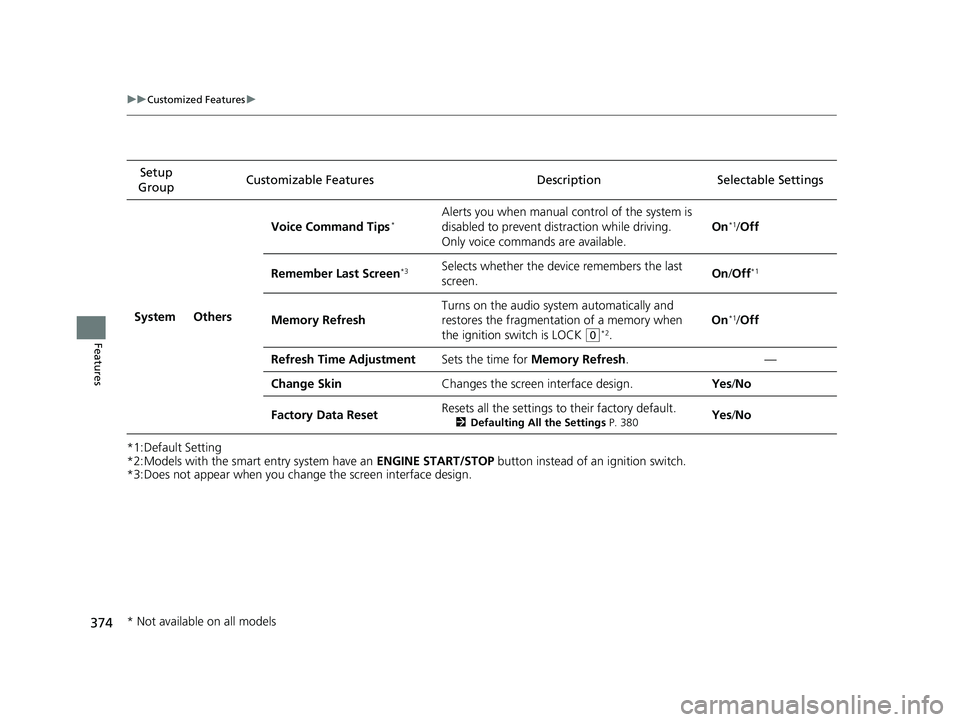
374
uuCustomized Features u
Features
*1:Default Setting
*2:Models with the smart entry system have an ENGINE START/STOP button instead of an ignition switch.
*3:Does not appear when you change the screen interface design. Setup
Group Customizable Featur
es Description Sel ectable Settings
System Others Voice Command Tips
*Alerts you when manual c
ontrol of the system is
disabled to prevent distraction while driving.
Only voice commands are available. On*1/
Off
Remember Last Screen
*3Selects whether the device remembers the last
screen. On
/Off*1
Memory Refresh Turns on the audio syst
em automatically and
restores the fragmentation of a memory when
the ignition switch is LOCK
(0*2. On
*1/
Off
Refresh Time Adjustment Sets the time for Memory Refresh . —
Change Skin Changes the screen interface design. Yes/No
Factory Data Reset Resets all the settings to their factory default.
2
Defaulting All the Settings P. 380Yes /No
* Not available on all models
18 CIVIC 5D (KA KC KL)-31TGG6100.book 374 ページ 2017年12月27日 水曜日 午前11時2分
Page 379 of 703
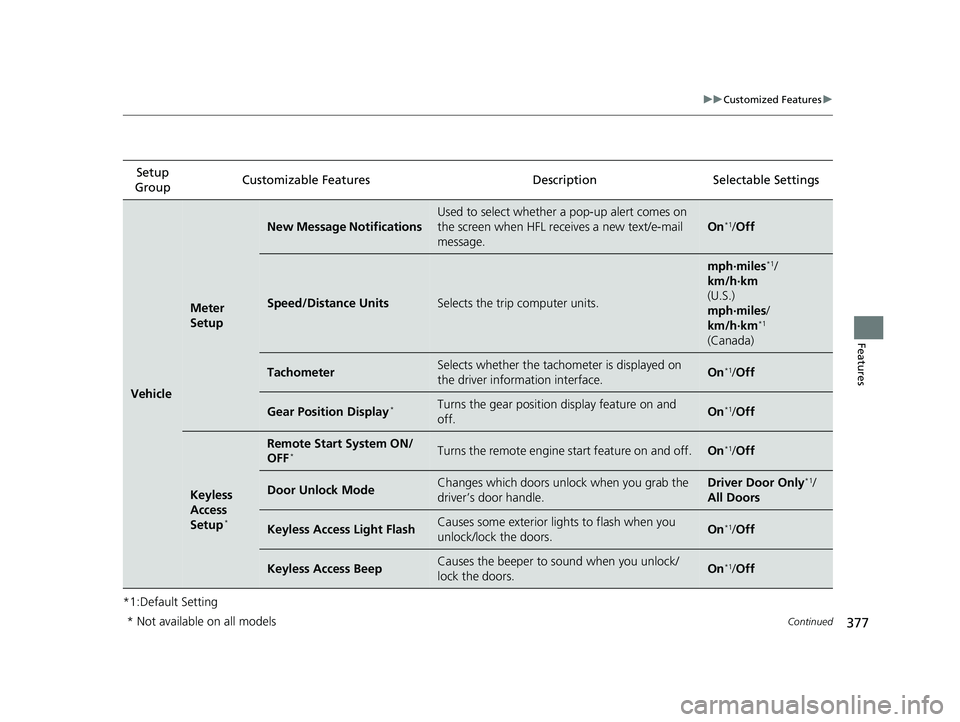
377
uuCustomized Features u
Continued
Features
*1:Default SettingSetup
Group Customizable Features Description Selectable Settings
Vehicle
Meter
Setup
New Message Notifications
Used to select whether a pop-up alert comes on
the screen when HFL receives a new text/e-mail
message.
On*1/
Off
Speed/Distance UnitsSelects the trip computer units.
mph∙miles*1/
km/h∙km
(U.S.)
mph∙miles /
km/h∙km
*1
(Canada)
TachometerSelects whether the tachometer is displayed on
the driver information interface.On*1/ Off
Gear Position Display*Turns the gear position display feature on and
off.On*1/Off
Keyless
Access
Setup
*
Remote Start System ON/
OFF*Turns the remote engine start feature on and off.On*1/Off
Door Unlock ModeChanges which doors unlock when you grab the
driver’s door handle.Driver Door Only*1/
All Doors
Keyless Access Light FlashCauses some exterior lights to flash when you
unlock/lock the doors.On*1/ Off
Keyless Access BeepCauses the beeper to sound when you unlock/
lock the doors.On*1/Off
* Not available on all models
18 CIVIC 5D (KA KC KL)-31TGG6100.book 377 ページ 2017年12月27日 水曜日 午前11時2分
Page 381 of 703
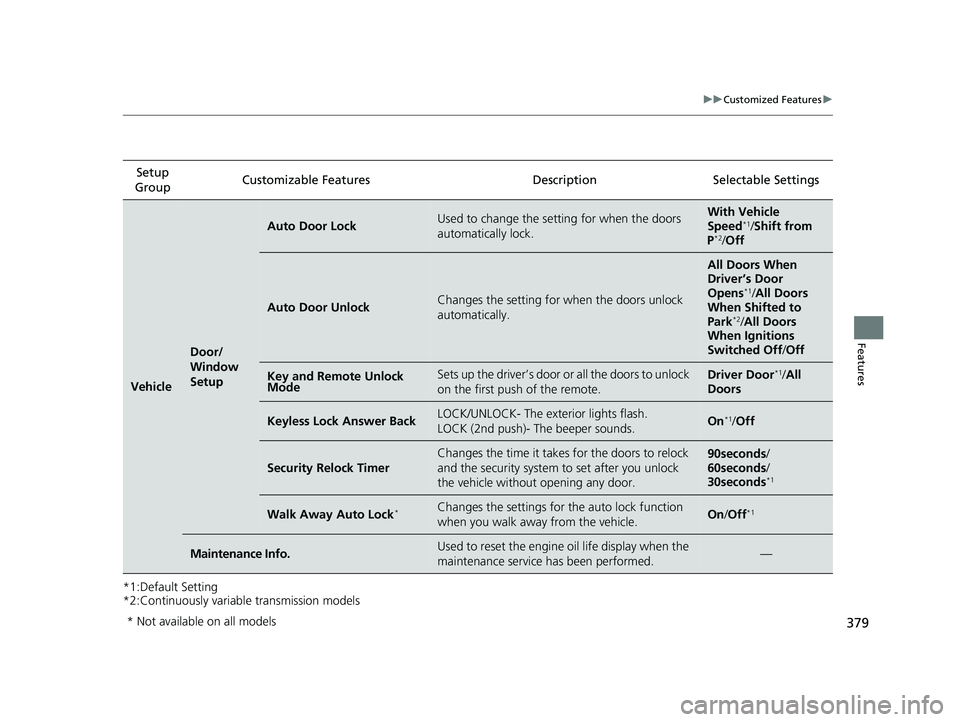
379
uuCustomized Features u
Features
*1:Default Setting
*2:Continuously variable transmission modelsSetup
Group Customizable Features Description Selectable Settings
Vehicle
Door/
Window
Setup
Auto Door LockUsed to change the sett
ing for when the doors
automatically lock.With Vehicle
Speed*1/ Shift from
P*2/ Off
Auto Door UnlockChanges the setting for when the doors unlock
automatically.
All Doors When
Driver’s Door
Opens
*1/ All Doors
When Shifted to
Park
*2/ All Doors
When Ignitions
Switched Off /Off
Key and Remote Unlock
ModeSets up the driver’s door or all the doors to unlock
on the first push of the remote.Driver Door*1/ All
Doors
Keyless Lock Answer BackLOCK/UNLOCK- The exterior lights flash.
LOCK (2nd push)- The beeper sounds.On*1/ Off
Security Relock Timer
Changes the time it takes for the doors to relock
and the security system to set after you unlock
the vehicle without opening any door.90seconds /
60seconds /
30seconds
*1
Walk Away Auto Lock*Changes the settings for the auto lock function
when you walk away from the vehicle.On /Off*1
Maintenance Info.Used to reset the engine oil life display when the
maintenance service has been performed.—
* Not available on all models
18 CIVIC 5D (KA KC KL)-31TGG6100.book 379 ページ 2017年12月27日 水曜日 午前11時2分
Page 443 of 703
441
Driving
This chapter discusses driving and refueling.
Before Driving
Towing a Trailer................................ 448
When Driving
Starting the Engine .................. 449, 452
Precautions While Driving................. 457
Continuously Variable Transmission
*... 458
Shifting ............................ 459, 461, 466
ECON Button
*................................. 470
Drive Mode Switch ........................... 471
Cruise Control
*................................ 473
Front Sensor Camera*...................... 477
Adaptive Cruise Control (ACC) with Low Speed Follow (LSF)
*........................ 479
Adaptive Cruise Control (ACC)*....... 495
2.0 L engine models
Road Departure Mitigation (RDM) System*..................................... 509Lane Keeping Assist System (LKAS)*.. 513Vehicle Stability Assist (VSA®), aka Electronic
Stability Control (ESC), System............. 520
Agile Handling Assist ....................... 523
Limited Slip Differential (LSD) ........... 524
LaneWatch
TM*.................................. 525Tire Pressure Monitoring System (TPMS)*...................................... 527Tire Pressure Monitoring System (TPMS) -
Required Federal Explanation*......... 530
Braking Brake System ................................... 532
2.0 L engine models
Anti-lock Brake System (ABS) ........... 539
Brake Assist System ......................... 540
Collision Mitigation Braking System
TM
(CMBSTM)*..................................... 541
Parking Your Vehicle
Multi-View Rear Camera .................. 551
Refueling Fuel Information .............................. 553
How to Refuel ................................. 554
Fuel Economy and CO
2 Emissions
Improving Fuel Economy and Reducing CO
2 Emissions ................................ 557
Turbo Engine Vehicle ....................... 558
* Not available on all models
18 CIVIC 5D (KA KC KL)-31TGG6100.book 441 ページ 2017年12月27日 水曜日 午前11時2分
Page 444 of 703
442
Driving
Before Driving
Driving Preparation
Check the following items before you start driving.
• Make sure there are no obstructions on the windows, door mirrors, exterior
lights, or other parts of the vehicle.
u Remove any frost, snow, or ice.
u Remove any snow on the roof, as this can slip down and obstruct your field of
vision while driving. If frozen solid , remove ice once it has softened.
u When removing ice from around the wheels, be sure not to damage the wheel
or wheel components.
• Make sure the hood is securely closed.
u If the hood opens while driving, your front view will be blocked.
• Make sure the tires are in good condition.
u Check air pressure, and check for damage and excessive wear.
2 Checking and Maintaining Tires P. 602
•Make sure there are no people or ob jects behind or around the vehicle.
u There are blind spots from the inside.
■Exterior Checks1Exterior Checks
NOTICE
When doors are frozen s hut, use warm water around
the door edges to melt any ice. Do not try to force
them open, as this can damage the rubber trim
around the doors. When done, wipe dry to avoid
further freezing.
Do not pour warm water into the key cylinder.
You will be unable to insert the key if the water
freezes in the hole.
Heat from the engine and exhaust can ignite
flammable material s left under the hood, causing a
fire. If you've parked y our vehicle for an extended
period, inspect and remove any debris that may have
collected, such as dried grass and leaves that have
fallen or have been carried in for use as a nest by a
small animal. Also check under the hood for leftover
flammable materials after you or someone else has
performed maintenance on your vehicle.
18 CIVIC 5D (KA KC KL)-31TGG6100.book 442 ページ 2017年12月27日 水曜日 午前11時2分