brake light HONDA CIVIC HATCHBACK 2018 (in English) Owner's Guide
[x] Cancel search | Manufacturer: HONDA, Model Year: 2018, Model line: CIVIC HATCHBACK, Model: HONDA CIVIC HATCHBACK 2018Pages: 703, PDF Size: 24.31 MB
Page 488 of 703
uuWhen Driving uAdaptive Cruise Control (ACC) with Low Speed Follow (LSF)*
486
Driving
The system may automatically shut off and the ACC indicator will come on under
certain conditions. Some examples of th ese conditions are listed below. Other
conditions may reduce some of the ACC functions.
2 Front Sensor Camera* P. 477
■Environmental conditions
Driving in bad weather (r ain, fog, snow, etc.).
■Roadway conditions
Driving on a snowy or wet roadway (obscure d lane marking, vehicle tracks, reflected
lights, road spray, high contrast).
■Vehicle conditions
• The outside of the windshie ld is blocked by dirt, mud, leaves, wet snow, etc.
• An abnormal tire or wheel condition (Wrong sized, varied size or construction,
improperly inflated, comp act spare tire, etc.).
• The camera temperature gets too high.
• The parking brake is applied.
• When the lower bumper next to the fog light
* is dirty.
• The vehicle is tilted due to a heav y load or suspension modifications.
• When tire chains are installed.
■ACC with LSF Conditions and Limitations1ACC with LSF Conditions and Limitations
The radar sensor for ACC with LSF is shared with the
collision mitigation braking system
TM (CMBSTM).
2 Collision Mitigation Braking SystemTM
(CMBSTM)* P. 541
You can read about handling information for the
camera equipped with this system. 2 Front Sensor Camera
* P. 477
Always keep the radar sensor cover clean.
Never use chemical solvents or polishing powder for
cleaning the sensor cover. Clean it with water or a
mild detergent.
Do not put a sticker on the radar sensor cover or
replace the radar sensor cover.
If you need the radar sensor to be repaired, or
removed, or the radar se nsor cover is strongly
impacted, turn off the system by pressing the MAIN
button and take your vehicle to a dealer.
Have your vehicle checked by a dealer if you find any
unusual behavior of the system (e.g., the warning
message appears too frequently).
* Not available on all models
18 CIVIC 5D (KA KC KL)-31TGG6100.book 486 ページ 2017年12月27日 水曜日 午前11時2分
Page 494 of 703
uuWhen Driving uAdaptive Cruise Control (ACC) with Low Speed Follow (LSF)*
492
Driving
■Automatic cancellation
The beeper sounds and a message appears on the driver information interface when
ACC with LSF is automatically canceled. An y of these conditions may cause the ACC
with LSF to automatically cancel:
• Bad weather (rain, fog, snow, etc.)
• When the radar sensor in the lower bumper next to the fog light
* gets dirty.
• The vehicle ahead of you cannot be detected.
• An abnormal tire condition is detected, or the tires are skidding.
• Driving on a mountainous road, or driving off road for extended periods.
• Abrupt steering wheel movement.
• When the ABS, VSA ® or CMBS
TM is activated.
• When the ABS or VSA ® system indicator comes on.
• When the vehicle is stopped on a very steep slope.
• When you manually apply the parking brake.
• When the detected vehicle within the ACC with LSF range is too close to your
vehicle.
• The camera behind the rearview mirror, or the area around the camera, including
the windshield, gets dirty.
• When the Maximum Load Limit is exceeded.
• When passing through an enclosed space, such as tunnel.
The ACC with LSF automatic cancellation can be also triggered by the following
causes. In these cases, the parking brake will be automatically applied.
• The driver’s seat belt is unfasten ed when the vehicle is stationary.
• The vehicle stops for mo re than 10 minutes.
• The engine is turned off.
1Automatic cancellation
Even though ACC with LSF has been automatically
canceled, you can still resu me the prior set speed.
Wait until the condition that caused ACC with LSF to
cancel improves, then press the –/SET button.
* Not available on all models
18 CIVIC 5D (KA KC KL)-31TGG6100.book 492 ページ 2017年12月27日 水曜日 午前11時2分
Page 497 of 703
495
uuWhen Driving uAdaptive Cruise Control (ACC)*
Continued
Driving
Adaptive Cruise Control (ACC)*
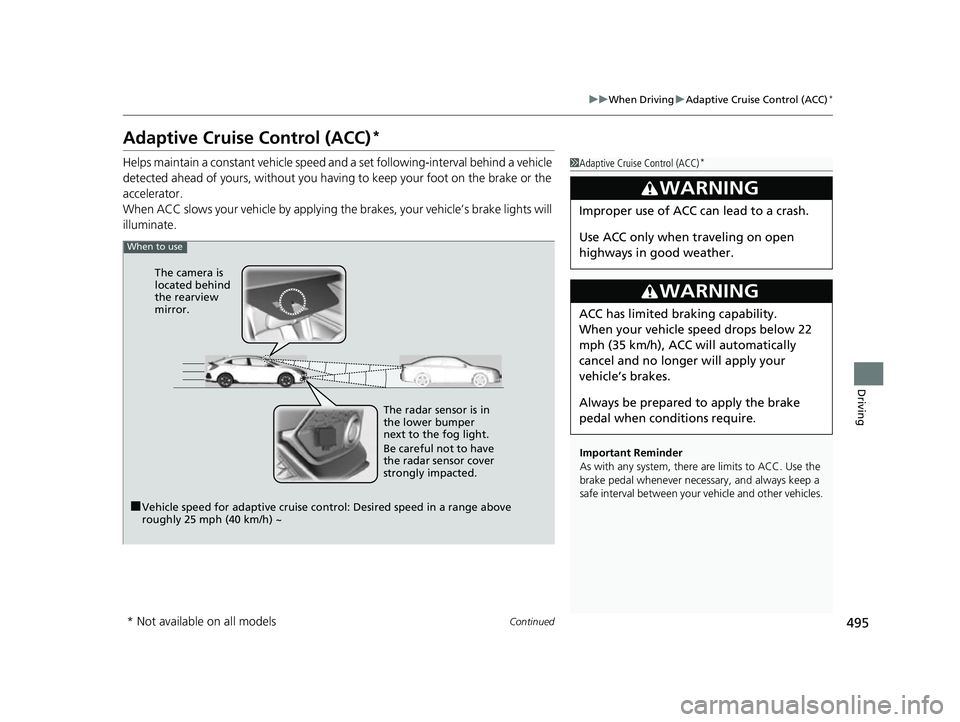
Helps maintain a constant vehicle speed an d a set following-interval behind a vehicle
detected ahead of yours, without you having to keep your foot on the brake or the
accelerator.
When ACC slows your vehicle by applying the brakes, your vehicle’s brake lights will
illuminate.1 Adaptive Cruise Control (ACC)*
Important Reminder
As with any system, there are limits to ACC. Use the
brake pedal whenever necessary, and always keep a
safe interval betw een your vehicle and other vehicles.
3WARNING
Improper use of ACC can lead to a crash.
Use ACC only when traveling on open
highways in good weather.
3WARNING
ACC has limited braking capability.
When your vehicle speed drops below 22
mph (35 km/h), ACC will automatically
cancel and no longer will apply your
vehicle’s brakes.
Always be prepared to apply the brake
pedal when conditions require.
When to use
■Vehicle speed for adaptive cruise c ontrol: Desired speed in a range above
roughly 25 mph (40 km/h) ~ The radar sensor is in
the lower bumper
next to the fog light.
Be careful not to have
the radar sensor cover
strongly impacted.
The camera is
located behind
the rearview
mirror.
* Not available on all models
18 CIVIC 5D (KA KC KL)-31TGG6100.book 495 ページ 2017年12月27日 水曜日 午前11時2分
Page 501 of 703
Continued499
uuWhen Driving uAdaptive Cruise Control (ACC)*
Driving
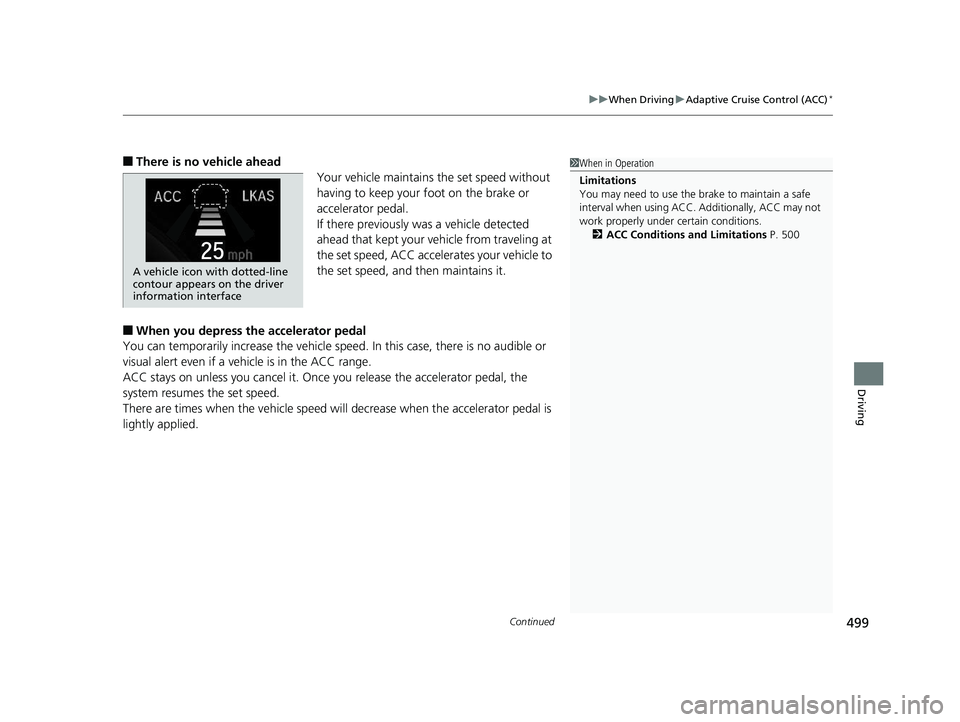
■There is no vehicle ahead
Your vehicle maintains the set speed without
having to keep your foot on the brake or
accelerator pedal.
If there previously was a vehicle detected
ahead that kept your ve hicle from traveling at
the set speed, ACC accelerates your vehicle to
the set speed, and then maintains it.
■When you depress the accelerator pedal
You can temporarily increase the vehicle speed . In this case, there is no audible or
visual alert even if a vehicle is in the ACC range.
ACC stays on unless you cancel it. Once you release the accelerator pedal, the
system resumes the set speed.
There are times when the vehicle speed will decrease when the accelerator pedal is
lightly applied.
1 When in Operation
Limitations
You may need to use the brake to maintain a safe
interval when using ACC. Additionally, ACC may not
work properly under certain conditions.
2 ACC Conditions and Limitations P. 500
25
A vehicle icon with dotted-line
contour appears on the driver
information interface
18 CIVIC 5D (KA KC KL)-31TGG6100.book 499 ページ 2017年12月27日 水曜日 午前11時2分
Page 502 of 703
uuWhen Driving uAdaptive Cruise Control (ACC)*
500
Driving
The system may automatically shut off and the ACC indicator will come on under
certain conditions. Some examples of th ese conditions are listed below. Other
conditions may reduce some of the ACC functions.
2 Front Sensor Camera* P. 477
■Environmental conditions
Driving in bad weather (r ain, fog, snow, etc.).
■Roadway conditions
Driving on a snowy or wet roadway (obscure d lane marking, vehicle tracks, reflected
lights, road spray, high contrast).
■Vehicle conditions
• The outside of the windshie ld is blocked by dirt, mud, leaves, wet snow, etc.
• An abnormal tire or wheel condition (Wrong sized, varied size or construction,
improperly inflated, comp act spare tire, etc.).
• The camera temperature gets too high.
• The parking brake is applied.
• When the lower bumper next to the fog light is dirty.
• The vehicle is tilted due to a heav y load or suspension modifications.
• When tire chains are installed.
■ACC Conditions and Limitations1ACC Conditions and Limitations
The radar sensor for ACC is shared with the collision
mitigation braking system
TM (CMBSTM).
2 Collision Mitigation Braking SystemTM
(CMBSTM)* P. 541
You can read about handling information for the
camera equipped with this system. 2 Front Sensor Camera
* P. 477
Always keep the radar sensor cover clean.
Never use chemical solvents or polishing powder for
cleaning the sensor cover. Clean it with water or a
mild detergent.
Do not put a sticker on the radar sensor cover or
replace the radar sensor cover.
If you need the radar sensor to be repaired, or
removed, or the radar se nsor cover is strongly
impacted, turn off the system by pressing the MAIN
button and take your vehicle to a dealer.
Have your vehicle checked by a dealer if you find any
unusual behavior of the system (e.g., the warning
message appears too frequently).
* Not available on all models
18 CIVIC 5D (KA KC KL)-31TGG6100.book 500 ページ 2017年12月27日 水曜日 午前11時2分
Page 508 of 703
uuWhen Driving uAdaptive Cruise Control (ACC)*
506
Driving
■Automatic cancellation
The beeper sounds and a message appears on the driver information interface when
ACC is automatically canceled. Any of these conditions may cause the ACC to
automatically cancel:
• Bad weather (rain, fog, snow, etc.)
• When the radar sensor in the lower bump er next to the fog light gets dirty.
• The vehicle ahead of you cannot be detected.
• An abnormal tire condition is detected, or the tires are skidding.
• Driving on a mountainous road, or driving off road for extended periods.
• Abrupt steering wheel movement.
• When the ABS, VSA ® or CMBS
TM is activated.
• When the ABS or VSA ® system indicator comes on.
• When you manually apply the parking brake.
• When the detected vehicle within the ACC range is too close to your vehicle.
• The camera behind the rearview mirror, or the area around the camera, including
the windshield, gets dirty.
• When the Maximum Load Limit is exceeded.
• When passing through an enclosed space, such as tunnel.
• Ignoring shift down indication shown in the tachometer display will cancel the
ACC after about 10 seconds.
• The engine speed goes into the tachometer’s red zone.
• The engine speed goes to below 1,000 rpm.
• You shift into neutral temporarily when shifting into a higher or lower gear.
1Automatic cancellation
Even though ACC has been automatically canceled,
you can still resume the prio r set speed. Wait until the
condition that caused ACC to cancel improves, then
press the –/SET button.
18 CIVIC 5D (KA KC KL)-31TGG6100.book 506 ページ 2017年12月27日 水曜日 午前11時2分
Page 512 of 703
uuWhen Driving uRoad Departure Mitigation (RDM) System*
510
Driving
The system becomes ready to start sear ching for lane markings when all the
following conditions are met:
• The vehicle is traveling between about 45 and 90 mph (72 and 145 km/h).
• The vehicle is on a straight or slightly curved road.
• The turn signals are off.
• The brake pedal is not depressed.
• The wipers are not in continuous operation.
• The vehicle is not accelerating or braking, and the steering wheel is not being
turned.
• The system makes a determination that th e driver is not actively accelerating,
braking or steering.
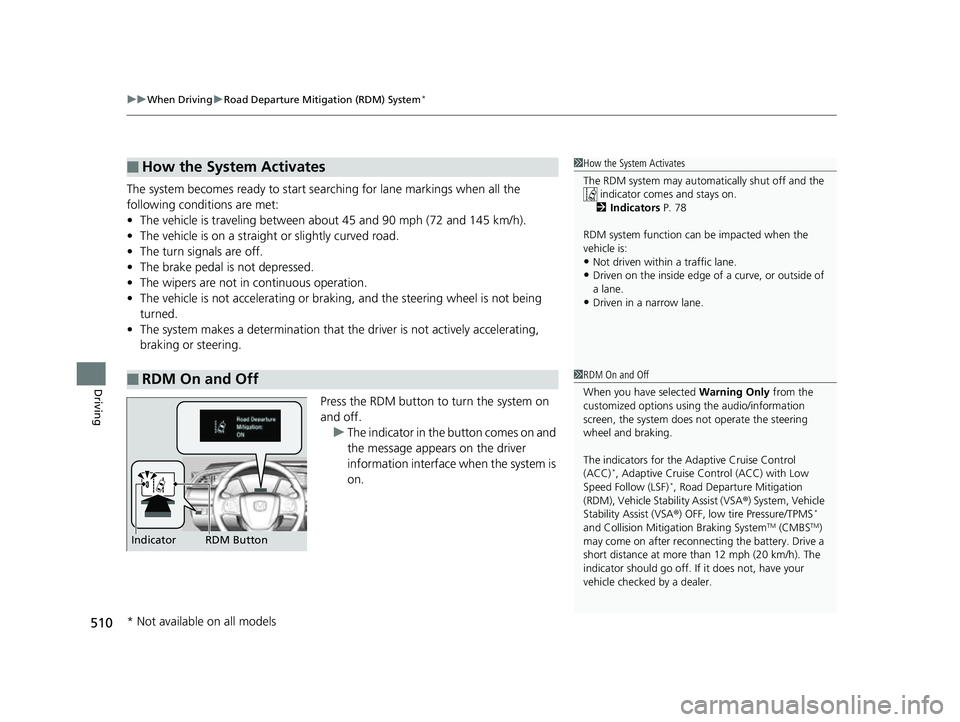
Press the RDM button to turn the system on
and off.u The indicator in the button comes on and
the message appears on the driver
information interface when the system is
on.
■How the System Activates
■RDM On and Off
1How the System Activates
The RDM system may automa tically shut off and the
indicator comes and stays on.
2 Indicators P. 78
RDM system function can be impacted when the
vehicle is:
•Not driven within a traffic lane.•Driven on the inside edge of a curve, or outside of
a lane.
•Driven in a narrow lane.
1 RDM On and Off
When you have selected Warning Only from the
customized options using the audio/information
screen, the system does not operate the steering
wheel and braking.
The indicators for the Adaptive Cruise Control
(ACC)
*, Adaptive Cruise Control (ACC) with Low
Speed Follow (LSF)*, Road Departur e Mitigation
(RDM), Vehicle Stability Assist (VSA ®) System, Vehicle
Stability Assist (VSA ®) OFF, low tire Pressure/TPMS
*
and Collision Mitiga tion Braking SystemTM (CMBSTM)
may come on after reconnect ing the battery. Drive a
short distance at more than 12 mph (20 km/h). The
indicator should go off. If it does not, have your
vehicle checked by a dealer.RDM Button
Indicator
* Not available on all models
18 CIVIC 5D (KA KC KL)-31TGG6100.book 510 ページ 2017年12月27日 水曜日 午前11時2分
Page 517 of 703
Continued515
uuWhen Driving uLane Keeping Assist System (LKAS)*
Driving
The system can be used when th e following conditions are met.
• The lane in which you are driving has detectable lane markers on both sides, and
your vehicle is in the center of the lane.
• The vehicle speed is between 45 and 90 mph (72 and 145 km/h).
• You are driving on a straight or slightly curved road.
• The turn signals are off.
• The brake pedal is not depressed.
• The wipers are not in continuous operation.
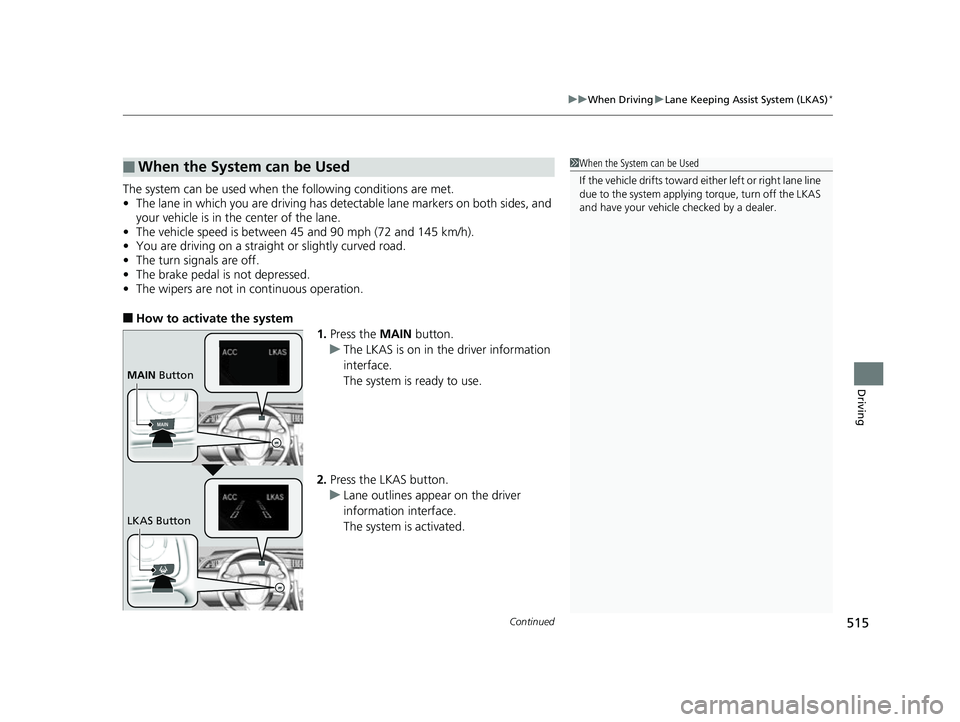
■How to activate the system
1.Press the MAIN button.
u The LKAS is on in the driver information
interface.
The system is ready to use.
2. Press the LKAS button.
u Lane outlines appear on the driver
information interface.
The system is activated.
■When the System can be Used1When the System can be Used
If the vehicle drifts toward ei ther left or right lane line
due to the system applying torque, turn off the LKAS
and have your vehicle checked by a dealer.
MAIN Button
LKAS Button
18 CIVIC 5D (KA KC KL)-31TGG6100.book 515 ページ 2017年12月27日 水曜日 午前11時2分
Page 525 of 703
523
uuWhen Driving uAgile Handling Assist
Driving
Agile Handling Assist
Lightly brakes the front wheels, as needed , when you turn the steering wheel, and
helps support the vehicle’s stability and performance during cornering.1 Agile Handling Assist
The agile handling assist ca nnot enhance stability in
all driving situations. You still need to drive and
corner at speeds appropriate for the conditions and
always leave a sufficient margin of safety.
When the VSA ® system indicator comes on and stays
on while driving, the agil e handling assist does not
activate.
You may hear a sound coming from the engine
compartment while the agile handling assist is
activated. This is normal.
18 CIVIC 5D (KA KC KL)-31TGG6100.book 523 ページ 2017年12月27日 水曜日 午前11時2分
Page 534 of 703
532
Driving
Braking
Brake System
Use the parking brake to keep the vehicle stationary when parked. When the
parking brake is applied, you can ma nually or automatically release it.
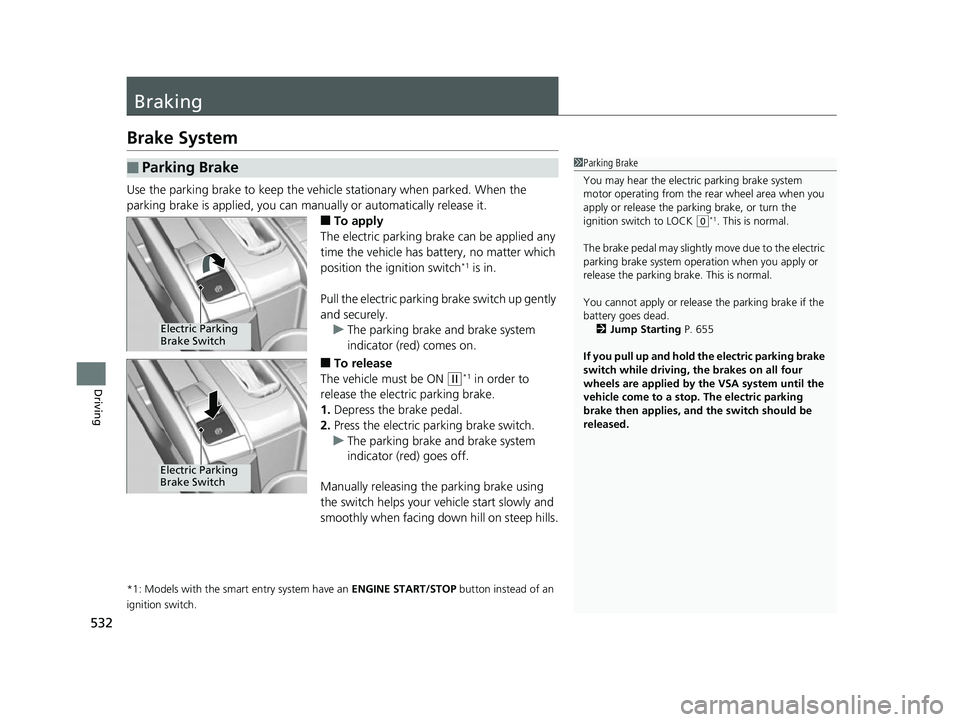
■To apply
The electric parking brake can be applied any
time the vehicle has battery, no matter which
position the ignition switch
*1 is in.
Pull the electric parkin g brake switch up gently
and securely. u The parking brake and brake system
indicator (red) comes on.
■To release
The vehicle must be ON
(w*1 in order to
release the electric parking brake.
1. Depress the brake pedal.
2. Press the electric parking brake switch.
u The parking brake and brake system
indicator (red) goes off.
Manually releasing the parking brake using
the switch helps your ve hicle start slowly and
smoothly when facing down hill on steep hills.
*1: Models with the smart entry system have an ENGINE START/STOP button instead of an
ignition switch.
■Parking Brake1 Parking Brake
You may hear the electric parking brake system
motor operating from the re ar wheel area when you
apply or release the parking brake, or turn the
ignition switch to LOCK
( 0*1. This is normal.
The brake pedal may slightly move due to the electric
parking brake system opera tion when you apply or
release the parking br ake. This is normal.
You cannot apply or release the parking brake if the
battery goes dead.
2 Jump Starting P. 655
If you pull up and hold the electric parking brake
switch while driving, the brakes on all four
wheels are applied by the VSA system until the
vehicle come to a stop. The electric parking
brake then applies, and the switch should be
released.
Electric Parking
Brake Switch
Electric Parking
Brake Switch
18 CIVIC 5D (KA KC KL)-31TGG6100.book 532 ページ 2017年12月27日 水曜日 午前11時2分