display HONDA CIVIC HATCHBACK 2018 (in English) Owner's Guide
[x] Cancel search | Manufacturer: HONDA, Model Year: 2018, Model line: CIVIC HATCHBACK, Model: HONDA CIVIC HATCHBACK 2018Pages: 703, PDF Size: 24.31 MB
Page 130 of 703
uuGauges and Displays uDriver Information Interface*
128
Instrument Panel
Shows the outside temperature in Fahr enheit (U.S.) or Celsius (Canada).
■Adjusting the outside temperature display
Adjust the temperature reading up to ±5°F or ±3°C if the temperature reading
seems incorrect.
Use the driver information interface’s customized features to correct the
temperature.
2 Customized Features P. 133
Shows the instant fuel economy as a bar graph in mpg or l/100 km.
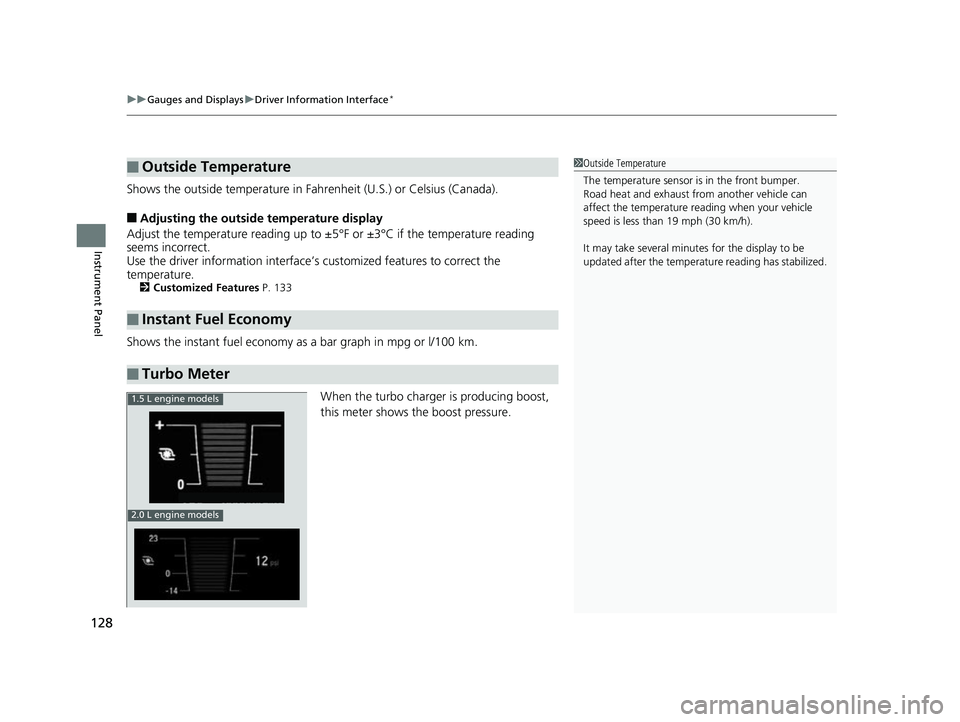
When the turbo charger is producing boost,
this meter shows th e boost pressure.
■Outside Temperature
■Instant Fuel Economy
■Turbo Meter
1Outside Temperature
The temperature sensor is in the front bumper.
Road heat and exhaust from another vehicle can
affect the temperature reading when your vehicle
speed is less than 19 mph (30 km/h).
It may take several minutes for the display to be
updated after the temperature reading has stabilized.
1.5 L engine models
2.0 L engine models
18 CIVIC 5D (KA KC KL)-31TGG6100.book 128 ページ 2017年12月27日 水曜日 午前11時2分
Page 131 of 703
Continued129
uuGauges and Displays uDriver Information Interface*
Instrument Panel
Shows you turn-by-turn driv ing directions to your destination linked with the
navigation system.
2 Refer to the Navigation System Manual
Shows the current audio information.
2Audio System Basic Operation P. 237, 255
Shows the current mail information.
2Bluetooth ® HandsFreeLink ®* P. 407
Shows the current phone information.
2Bluetooth ® HandsFreeLink ®* P. 381, 407
■Turn-by-Turn Directions*
■Audio*
■Mail*
■Phone*
1Turn-by-Turn Directions*
You can select whether th e turn-by-turn display
comes on or not during the route guidance.
2 Customized Features P. 133, 348
* Not available on all models
18 CIVIC 5D (KA KC KL)-31TGG6100.book 129 ページ 2017年12月27日 水曜日 午前11時2分
Page 132 of 703
130
uuGauges and Displays uDriver Information Interface*
Instrument Panel
Displays the strength (G) and direction of the load that is applied to the vehicle
during driving.
Displays the brake pressure in PSI when the brake is applied.
Displays the accelerator position in degrees of %.
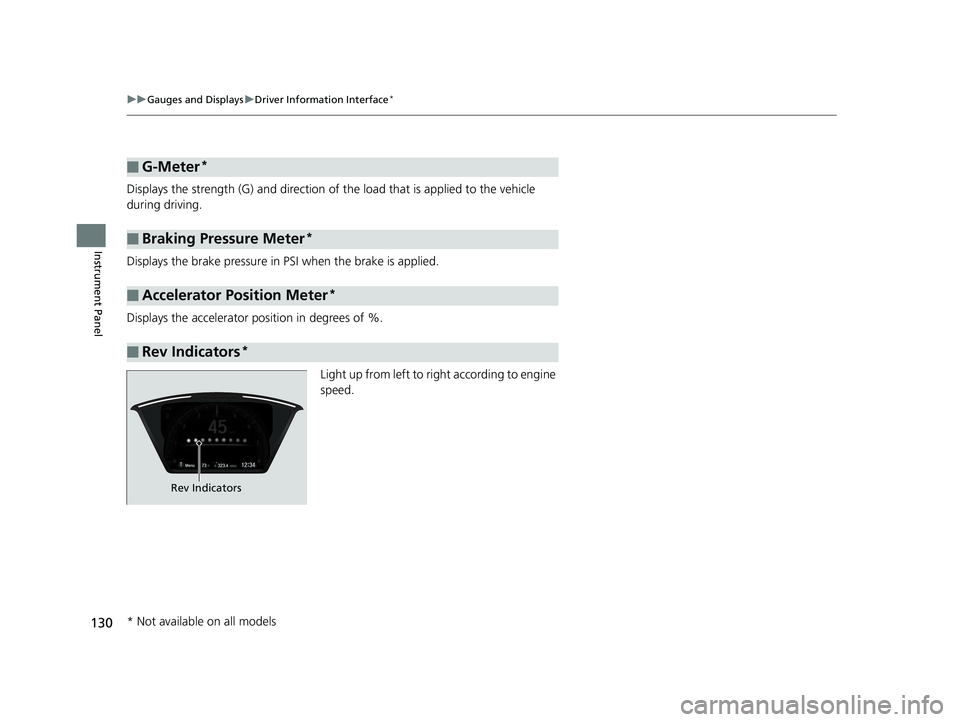
Light up from left to right according to engine
speed.
■G-Meter*
■Braking Pressure Meter*
■Accelerator Position Meter*
■Rev Indicators*
Rev Indicators
* Not available on all models
18 CIVIC 5D (KA KC KL)-31TGG6100.book 130 ページ 2017年12月27日 水曜日 午前11時2分
Page 133 of 703
Continued131
uuGauges and Displays uDriver Information Interface*
Instrument Panel
Measures the lap time, and displays the pr eviously measured times, split time and
the fastest lap time.
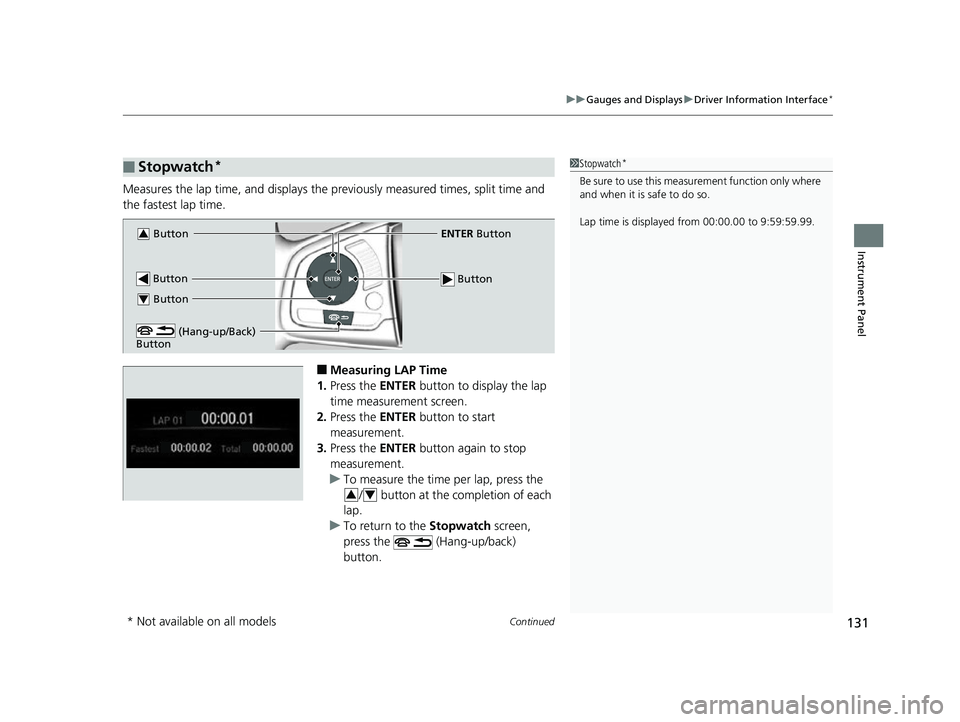
■Measuring LAP Time
1. Press the ENTER button to display the lap
time measurement screen.
2. Press the ENTER button to start
measurement.
3. Press the ENTER button again to stop
measurement.
u To measure the time per lap, press the
/ button at the completion of each
lap.
u To return to the Stopwatch screen,
press the (Hang-up/back)
button.
■Stopwatch*1 Stopwatch*
Be sure to use this measurement function only where
and when it is safe to do so.
Lap time is displayed from 00:00.00 to 9:59:59.99.
Button3ENTER Button
Button
Button
(Hang-up/Back)
Button
Button4
34
* Not available on all models
18 CIVIC 5D (KA KC KL)-31TGG6100.book 131 ページ 2017年12月27日 水曜日 午前11時2分
Page 134 of 703
132
uuGauges and Displays uDriver Information Interface*
Instrument Panel
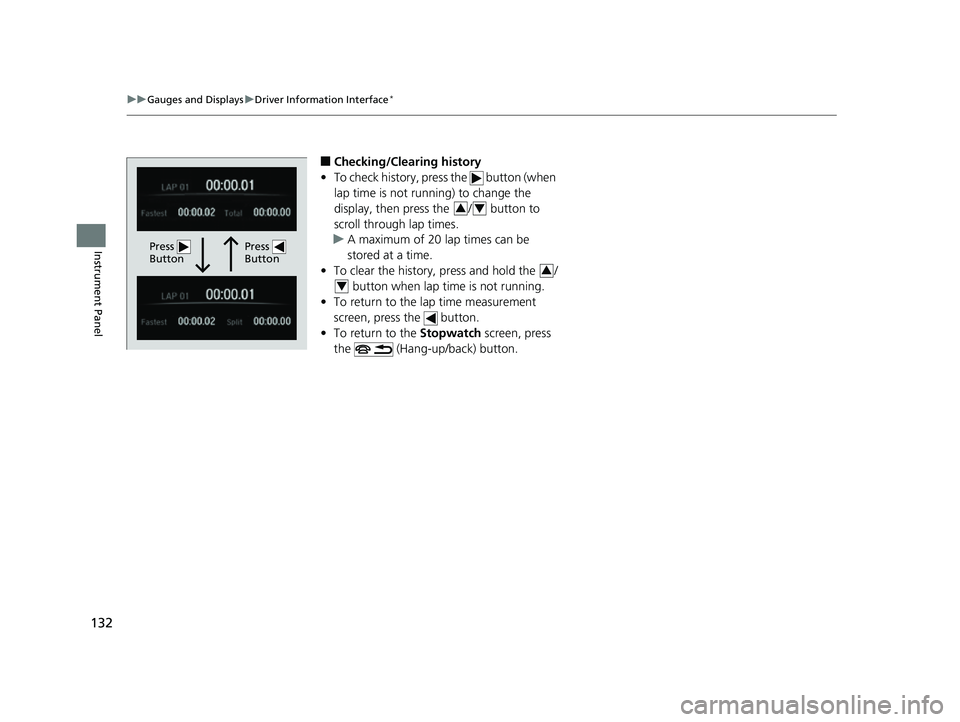
■Checking/Clearing history
• To check history, press the button (when
lap time is not running) to change the
display, then press the / button to
scroll through lap times.
u A maximum of 20 lap times can be
stored at a time.
• To clear the history, press and hold the /
button when lap time is not running.
• To return to the lap time measurement
screen, press the button.
• To return to the Stopwatch screen, press
the (Hang-up/back) button.
Press
ButtonPress
Button
34
3
4
18 CIVIC 5D (KA KC KL)-31TGG6100.book 132 ページ 2017年12月27日 水曜日 午前11時2分
Page 135 of 703
Continued133
uuGauges and Displays uDriver Information Interface*
Instrument Panel
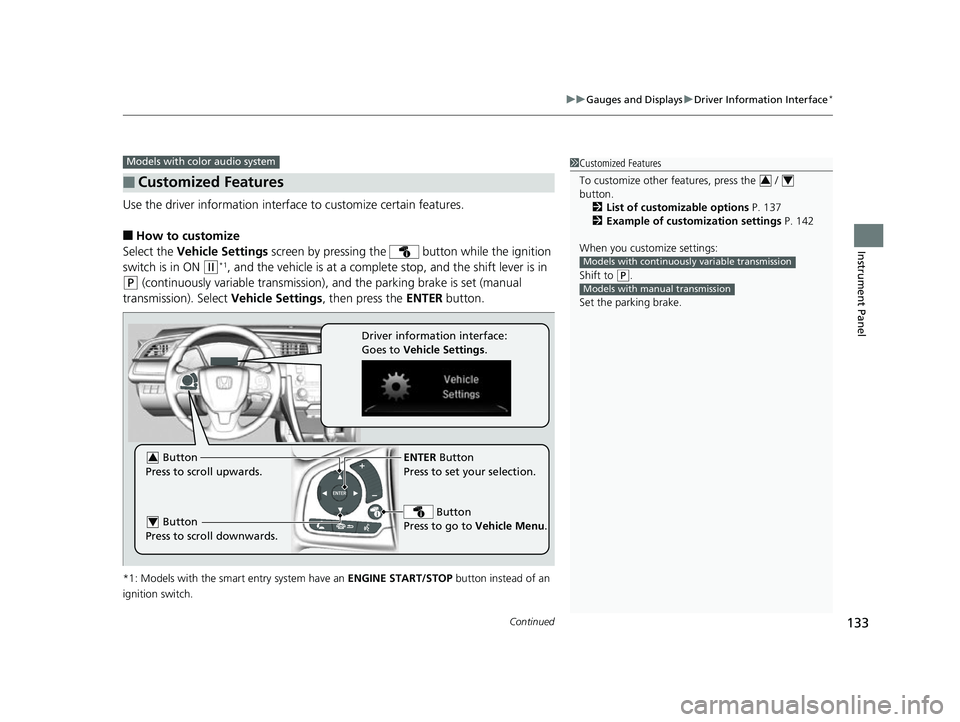
Use the driver information interface to customize certain features.
■How to customize
Select the Vehicle Settings screen by pressing the button while the ignition
switch is in ON
(w*1, and the vehicle is at a complete stop, and the shift lever is in
(P (continuously variable transmission), and the parking brake is set (manual
transmission). Select Vehicle Settings, then press the ENTER button.
*1: Models with the smart entry system have an ENGINE START/STOP button instead of an
ignition switch.
■Customized Features
Models with color audio system1 Customized Features
To customize other features, press the /
button.
2 List of customizable options P. 137
2 Example of customization settings P. 142
When you customize settings:
Shift to
( P.
Set the parking brake.
34
Models with continuousl y variable transmission
Models with manual transmission
ENTER Button
Press to set your selection.
Button
Press to go to Vehicle Menu . Button
Press to scroll upwards.3
Button
Press to scroll downwards.4
Driver information interface:
Goes to Vehicle Settings .
18 CIVIC 5D (KA KC KL)-31TGG6100.book 133 ページ 2017年12月27日 水曜日 午前11時2分
Page 136 of 703
134
uuGauges and Displays uDriver Information Interface*
Instrument Panel
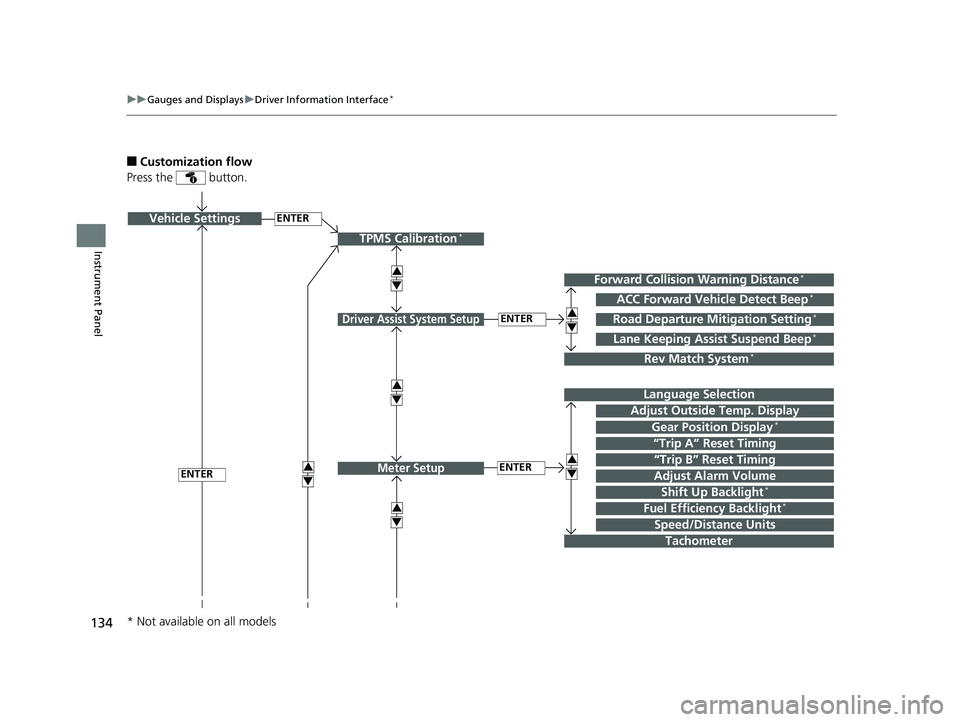
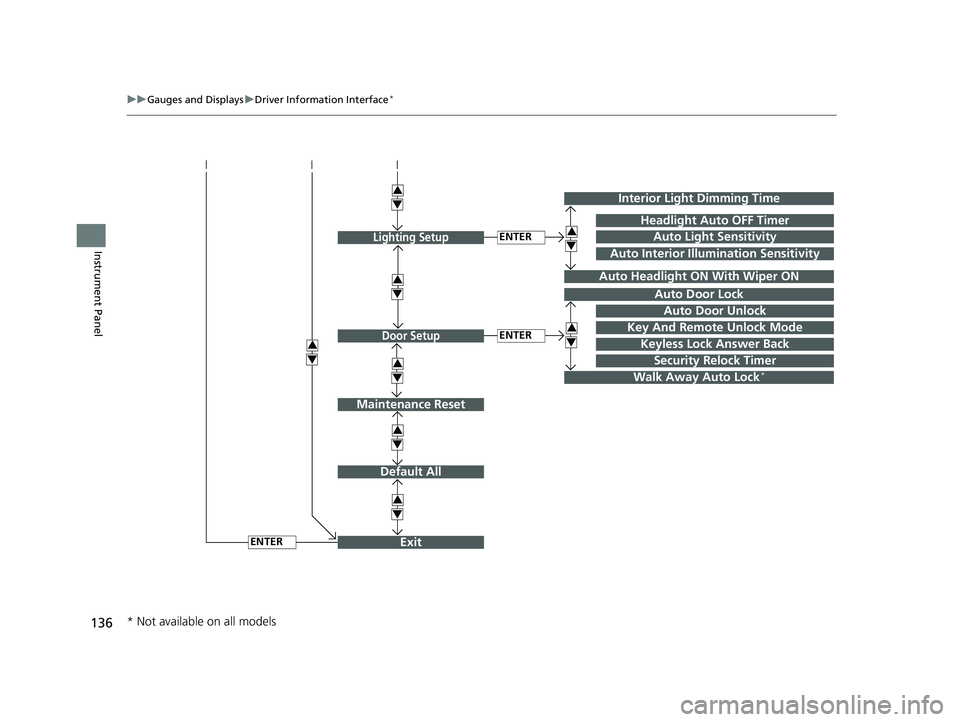
■Customization flow
Press the button.
ENTERVehicle Settings
“Trip A” Reset Timing
Language Selection
Adjust Outside Temp. Display
3
4
TPMS Calibration*
ENTER
“Trip B” Reset Timing
Fuel Efficiency Backlight*
3
4
ACC Forward Vehicle Detect Beep*
3
4
Tachometer
ENTER
Forward Collision Warning Distance*
3
4
3
4
Lane Keeping Assist Suspend Beep*
Road Departure Mitigation Setting*
Adjust Alarm Volume
Speed/Distance Units
3
4
ENTER
Driver Assist System Setup
Meter Setup
Rev Match System*
Shift Up Backlight*
Gear Position Display*
* Not available on all models
18 CIVIC 5D (KA KC KL)-31TGG6100.book 134 ページ 2017年12月27日 水曜日 午前11時2分
Page 137 of 703
135
uuGauges and Displays uDriver Information Interface*
Continued
Instrument PanelENTERKeyless Access Light Flash
Keyless Access Beep
3
4Door Unlock ModeKeyless Access Setup*
3
4
Remote Start System ON/OFF*
* Not available on all models
18 CIVIC 5D (KA KC KL)-31TGG6100.book 135 ページ 2017年12月27日 水曜日 午前11時2分
Page 138 of 703
136
uuGauges and Displays uDriver Information Interface*
Instrument Panel
Exit
3
4
3
4
3
4
Maintenance Reset
Default All
3
4
ENTER
3
4
3
4
Key And Remote Unlock Mode
Auto Door Lock
Auto Door Unlock
Keyless Lock Answer Back
Security Relock Timer
Interior Light Dimming Time
Headlight Auto OFF Timer
Auto Light Sensitivity3
4
3
4
Auto Headlight ON With Wiper ON
ENTER
ENTER
Auto Interior Illumination Sensitivity
Lighting Setup
Door Setup
Walk Away Auto Lock*
* Not available on all models
18 CIVIC 5D (KA KC KL)-31TGG6100.book 136 ページ 2017年12月27日 水曜日 午前11時2分
Page 139 of 703
137
uuGauges and Displays uDriver Information Interface*
Continued
Instrument Panel
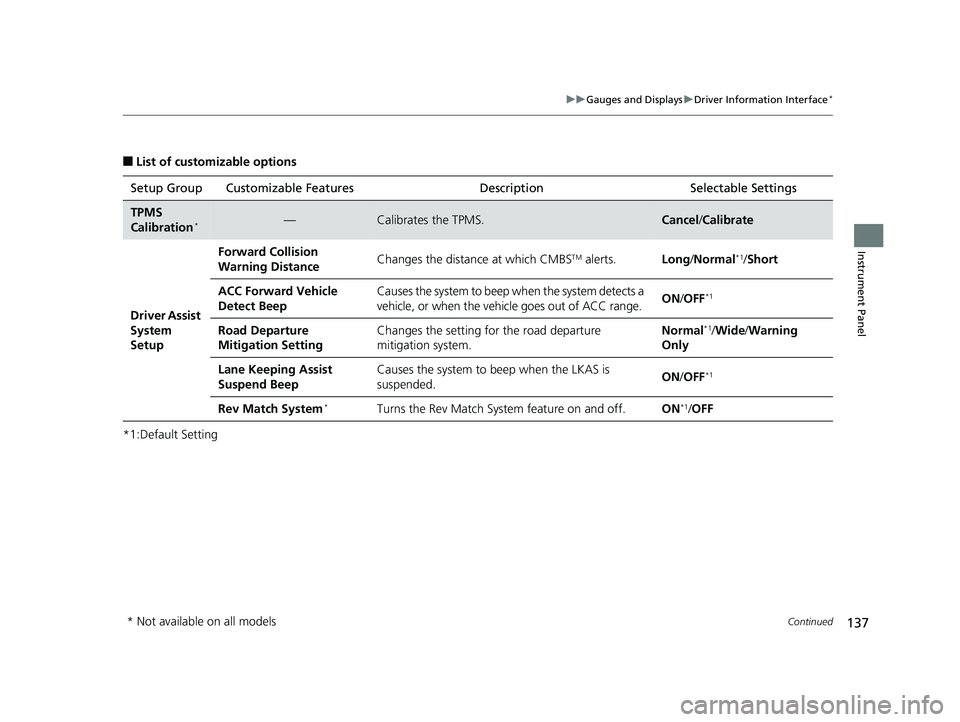
■List of customizable options
*1:Default Setting Setup Group Customizable Features
Description Selectable Settings
TPMS
Calibration*—Calibrates the TPMS.Cancel/Calibrate
Driver Assist
System
Setup Forward Collision
Warning Distance
Changes the distance at which CMBS
TM alerts.
Long/Normal*1/ Short
ACC Forward Vehicle
Detect Beep Causes the system to beep when the system detects a
vehicle, or when the vehicle goes out of ACC range.
ON
/OFF
*1
Road Departure
Mitigation Setting Changes the setting fo
r the road departure
mitigation system. Normal*1/
Wide /Warning
Only
Lane Keeping Assist
Suspend Beep Causes the system to b
eep when the LKAS is
suspended. ON
/OFF
*1
Rev Match System*Turns the Rev Match System feature on and off. ON*1/OFF
* Not available on all models
18 CIVIC 5D (KA KC KL)-31TGG6100.book 137 ページ 2017年12月27日 水曜日 午前11時2分