display HONDA CIVIC HATCHBACK 2018 (in English) Service Manual
[x] Cancel search | Manufacturer: HONDA, Model Year: 2018, Model line: CIVIC HATCHBACK, Model: HONDA CIVIC HATCHBACK 2018Pages: 703, PDF Size: 24.31 MB
Page 140 of 703
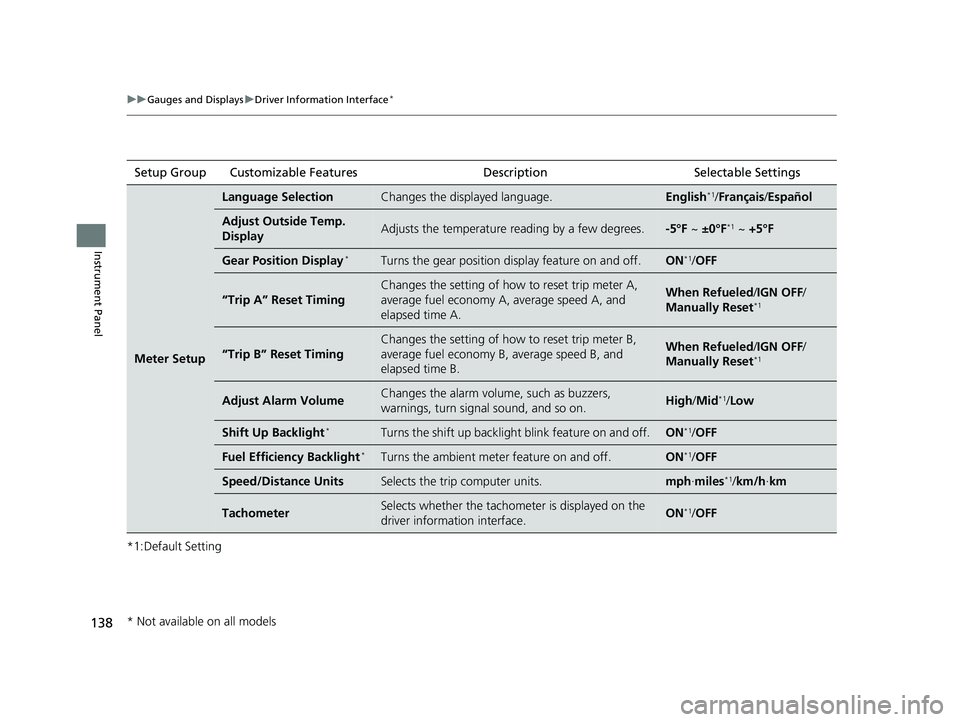
138
uuGauges and Displays uDriver Information Interface*
Instrument Panel
*1:Default SettingSetup Group Customizable Features Description Selectable Settings
Meter Setup
Language SelectionChanges the displayed language.English*1/
Français /Español
Adjust Outside Temp.
DisplayAdjusts the temperature reading by a few degrees.-5°F ~ ±0°F*1 ~ +5°F
Gear Position Display*Turns the gear position di splay feature on and off.ON*1/OFF
“Trip A” Reset Timing
Changes the setting of how to reset trip meter A,
average fuel economy A, average speed A, and
elapsed time A.When Refueled /IGN OFF /
Manually Reset*1
“Trip B” Reset Timing
Changes the setting of how to reset trip meter B,
average fuel economy B, average speed B, and
elapsed time B.When Refueled /IGN OFF /
Manually Reset*1
Adjust Alarm VolumeChanges the alarm volume, such as buzzers,
warnings, turn signal sound, and so on.High /Mid*1/Low
Shift Up Backlight*Turns the shift up backlight blink feature on and off.ON*1/OFF
Fuel Efficien cy Backlight*Turns the ambient meter feature on and off.ON*1/OFF
Speed/Distance UnitsSelects the trip computer units.mph ∙miles*1/ km/h ∙km
TachometerSelects whether the tachomet er is displayed on the
driver information interface.ON*1/ OFF
* Not available on all models
18 CIVIC 5D (KA KC KL)-31TGG6100.book 138 ページ 2017年12月27日 水曜日 午前11時2分
Page 141 of 703
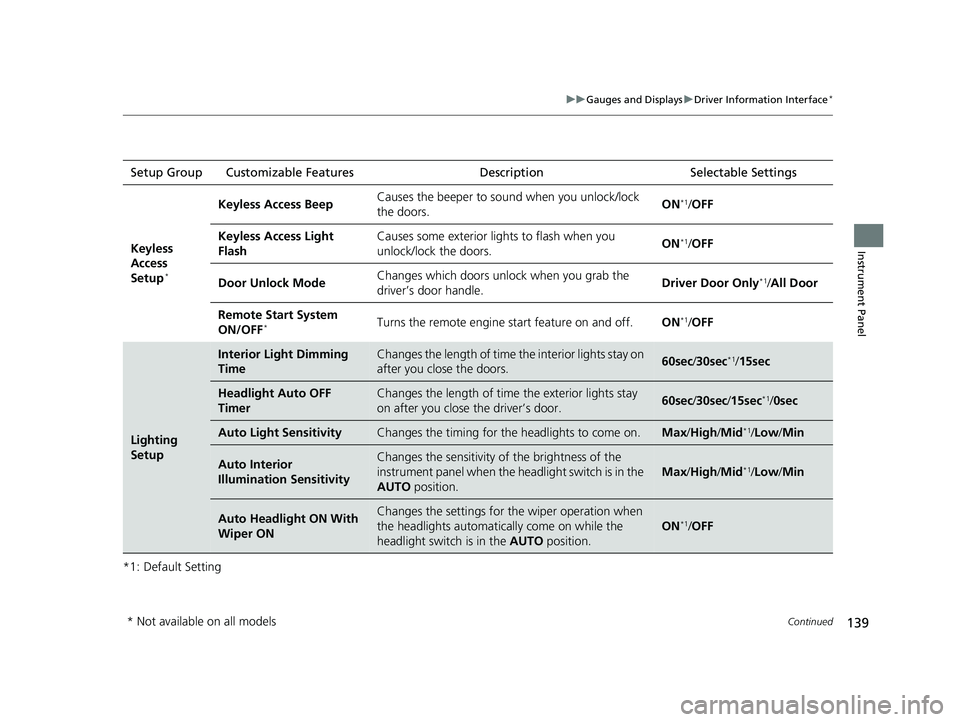
139
uuGauges and Displays uDriver Information Interface*
Continued
Instrument Panel
*1: Default SettingSetup Group Customizable Features
Description Selectable Settings
Keyless
Access
Setup
*
Keyless Access Beep Causes the beeper to sound when you unlock/lock
the doors. ON*1/
OFF
Keyless Access Light
Flash Causes some exterior li
ghts to flash when you
unlock/lock the doors. ON
*1/
OFF
Door Unlock Mode Changes which doors unlock when you grab the
driver’s door handle.
Driver Door Only
*1/
All Door
Remote Start System
ON/OFF
*Turns the remote engine start feature on and off. ON*1/OFF
Lighting
Setup
Interior Light Dimming
TimeChanges the length of time the interior lights stay on
after you close the doors.60sec /30sec*1/15sec
Headlight Auto OFF
TimerChanges the length of time the exterior lights stay
on after you close the driver’s door.60sec /30sec /15sec*1/ 0sec
Auto Light SensitivityChanges the timing for th e headlights to come on.Max/High /Mid*1/Low /Min
Auto Interior
Illumination SensitivityChanges the sensitivity of the brightness of the
instrument panel when the headlight switch is in the
AUTO position.
Max/High /Mid*1/Low /Min
Auto Headlight ON With
Wiper ONChanges the settings for th e wiper operation when
the headlights automatica lly come on while the
headlight switch is in the AUTO position.
ON*1/OFF
* Not available on all models
18 CIVIC 5D (KA KC KL)-31TGG6100.book 139 ページ 2017年12月27日 水曜日 午前11時2分
Page 142 of 703
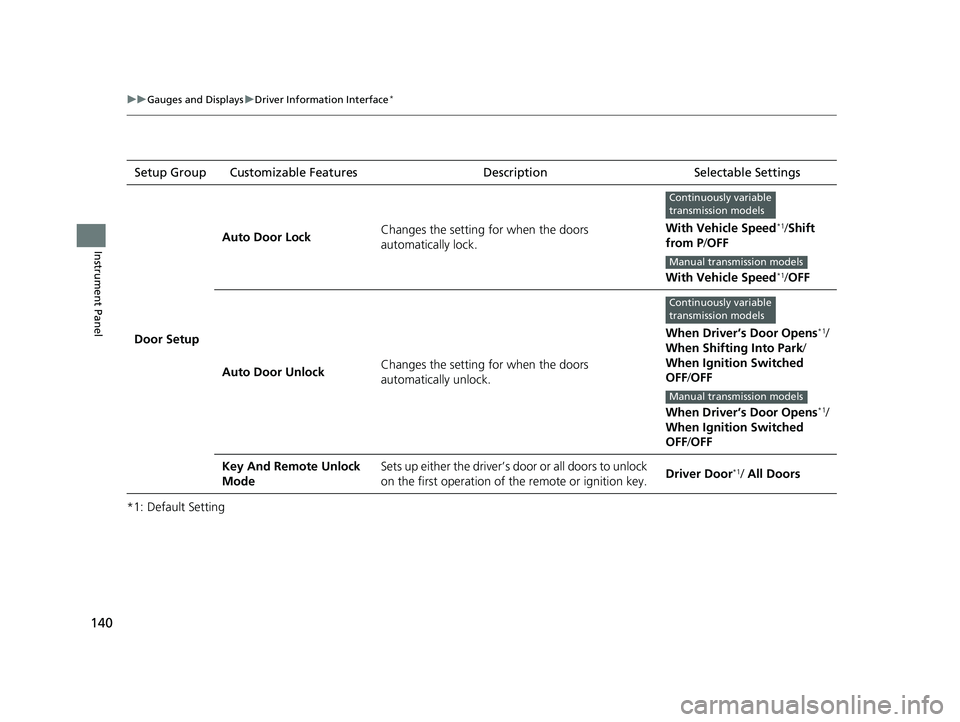
140
uuGauges and Displays uDriver Information Interface*
Instrument Panel
*1: Default SettingSetup Group Customizable Features Description Selectable Settings
Door Setup Auto Door Lock
Changes the setting for when the doors
automatically lock. With Vehicle Speed
*1/
Shift
from P /OFF
With Vehicle Speed
*1/ OFF
Auto Door Unlock Changes the setting for when the doors
automatically unlock. When Driver’s Door Opens
*1/
When Shifting Into Park/
When Ignition Switched
OFF /OFF
When Driver’s Door Opens
*1/
When Ignition Switched
OFF /OFF
Key And Remote Unlock
Mode Sets up either the driver’s door or all doors to unlock
on the first operation of the remote or ignition key.
Driver Door
*1/ All Doors
Continuously variable
transmission models
Manual transmission models
Continuously variable
transmission models
Manual transmission models
18 CIVIC 5D (KA KC KL)-31TGG6100.book 140 ページ 2017年12月27日 水曜日 午前11時2分
Page 143 of 703
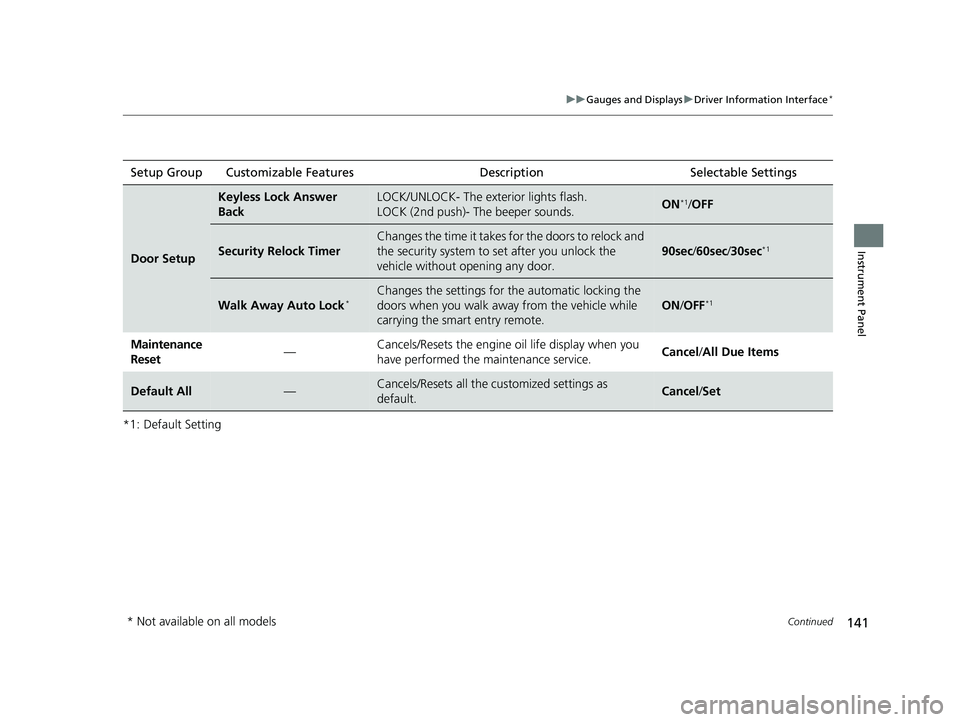
141
uuGauges and Displays uDriver Information Interface*
Continued
Instrument Panel
*1: Default SettingSetup Group Customizable Features
Description Selectable Settings
Door Setup
Keyless Lock Answer
BackLOCK/UNLOCK- The exterior lights flash.
LOCK (2nd push)- The beeper sounds.ON*1/OFF
Security Relock Timer
Changes the time it takes for the doors to relock and
the security system to set after you unlock the
vehicle without opening any door.
90sec /60sec /30sec*1
Walk Away Auto Lock*Changes the settings for th e automatic locking the
doors when you walk away from the vehicle while
carrying the smart entry remote.
ON /OFF*1
Maintenance
Reset —Cancels/Resets the engine oil life display when you
have performed the maintenance service.
Cancel
/All Due Items
Default All—Cancels/Resets all the customized settings as
default.Cancel /Set
* Not available on all models
18 CIVIC 5D (KA KC KL)-31TGG6100.book 141 ページ 2017年12月27日 水曜日 午前11時2分
Page 144 of 703
142
uuGauges and Displays uDriver Information Interface*
Instrument Panel
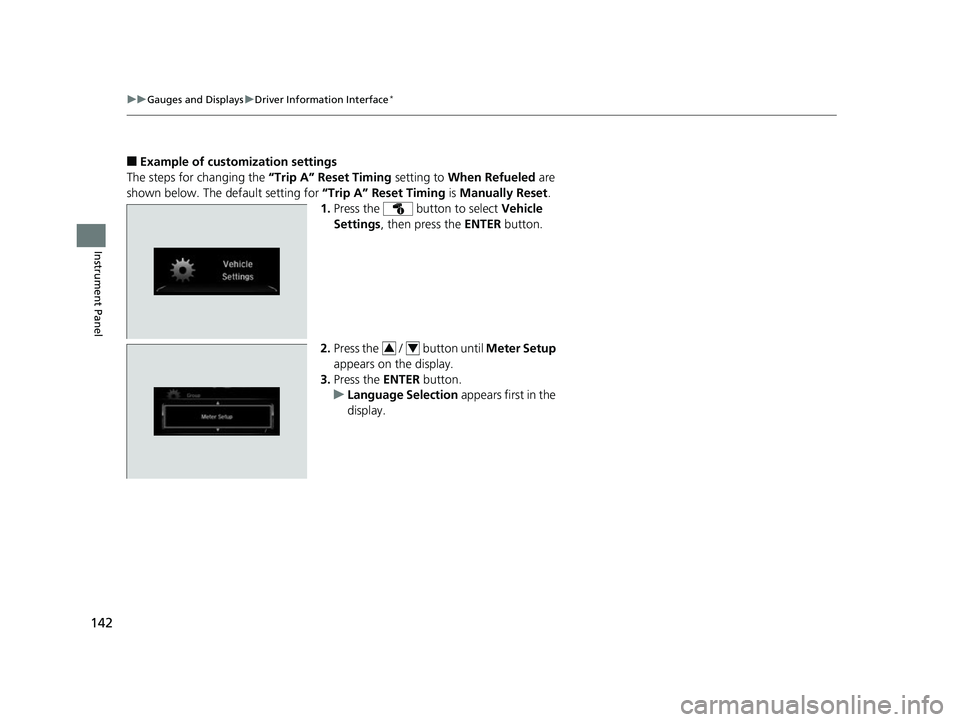
■Example of customization settings
The steps for changing the “Trip A” Reset Timing setting to When Refueled are
shown below. The default setting for “Trip A” Reset Timing is Manually Reset .
1. Press the button to select Vehicle
Settings , then press the ENTER button.
2. Press the / button until Meter Setup
appears on the display.
3. Press the ENTER button.
u Language Selection appears first in the
display.
34
18 CIVIC 5D (KA KC KL)-31TGG6100.book 142 ページ 2017年12月27日 水曜日 午前11時2分
Page 145 of 703
143
uuGauges and Displays uDriver Information Interface*
Instrument Panel
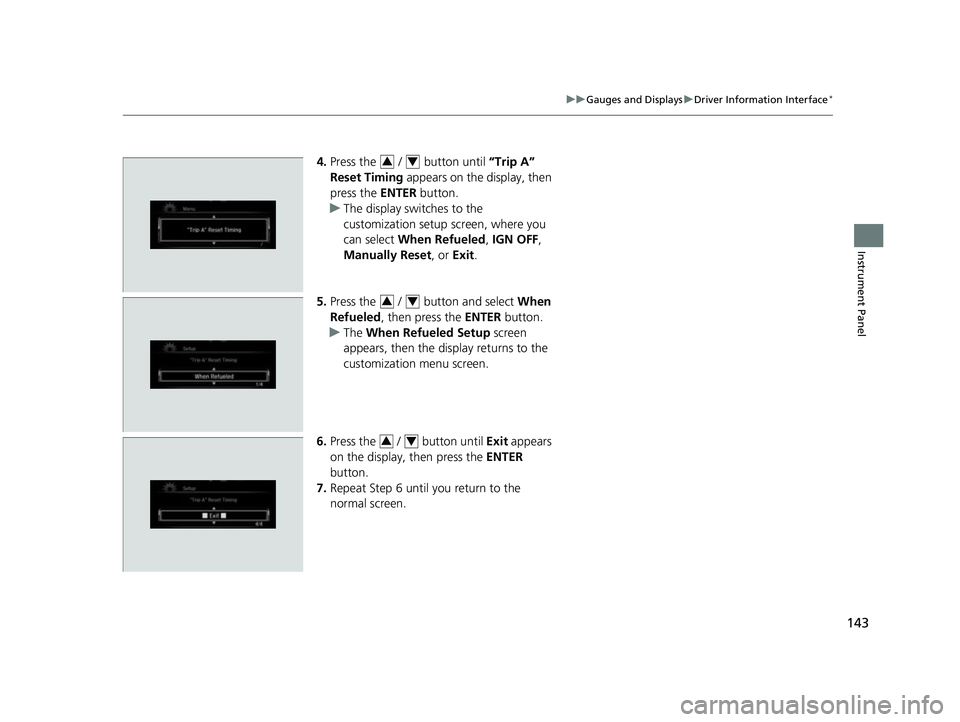
4. Press the / button until “Trip A”
Reset Timing appears on the display, then
press the ENTER button.
u The display swit ches to the
customization setup screen, where you
can select When Refueled , IGN OFF ,
Manually Reset , or Exit .
5. Press the / button and select When
Refueled , then press the ENTER button.
u The When Refueled Setup screen
appears, then the di splay returns to the
customization menu screen.
6. Press the / button until Exit appears
on the display, then press the ENTER
button.
7. Repeat Step 6 until you return to the
normal screen.34
34
34
18 CIVIC 5D (KA KC KL)-31TGG6100.book 143 ページ 2017年12月27日 水曜日 午前11時2分
Page 148 of 703
146
Controls
Clock
Adjusting the Clock
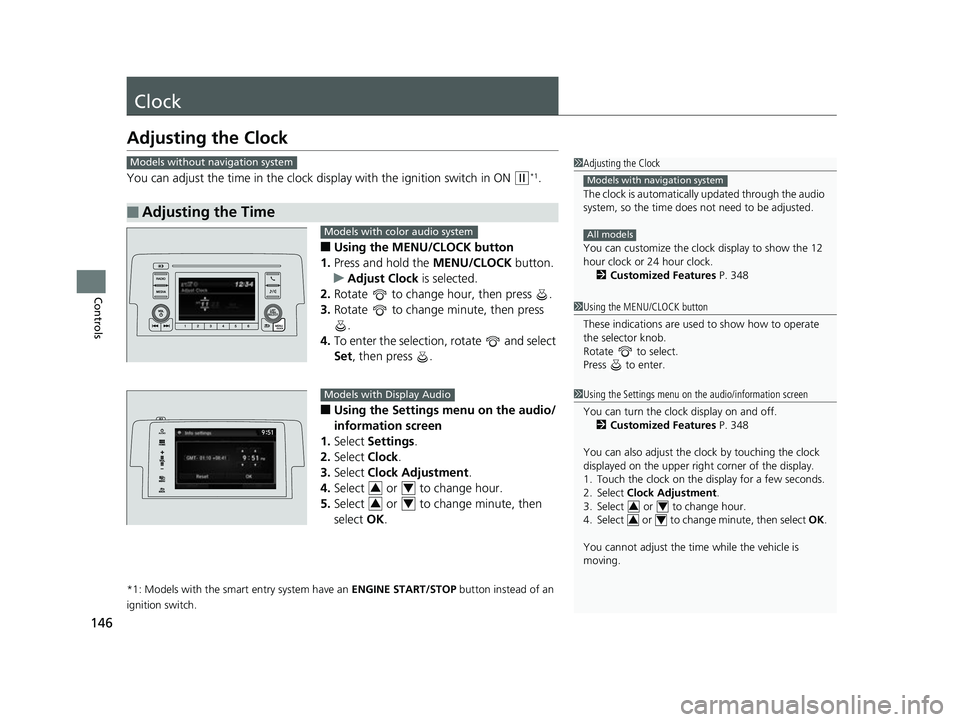
You can adjust the time in the clock display with the ignition switch in ON (w*1.
■Using the MENU/CLOCK button
1. Press and hold the MENU/CLOCK button.
u Adjust Clock is selected.
2. Rotate to change hour, then press .
3. Rotate to change minute, then press
.
4. To enter the selection, rotate and select
Set , then press .
■Using the Settings menu on the audio/
information screen
1. Select Settings .
2. Select Clock.
3. Select Clock Adjustment .
4. Select or to change hour.
5. Select or to change minute, then
select OK.
*1: Models with the smart entry system have an ENGINE START/STOP button instead of an
ignition switch.
■Adjusting the Time
1 Adjusting the Clock
The clock is automatically updated through the audio
system, so the time does not need to be adjusted.
You can customize the clock display to show the 12
hour clock or 24 hour clock.
2 Customized Features P. 348
Models with navigation system
All models
Models without navigation system
1Using the MENU/CLOCK button
These indications are used to show how to operate
the selector knob.
Rotate to select.
Press to enter.
1 Using the Settings menu on the audio/information screen
You can turn the clock display on and off.
2 Customized Features P. 348
You can also adjust the clock by touching the clock
displayed on the upper right corner of the display.
1. Touch the clock on the display for a few seconds.
2. Select Clock Adjustment .
3. Select or to change hour.
4. Select or to change minute, then select OK.
You cannot adjust the time while the vehicle is
moving.
3434
Models with color audio system
Models with Display Audio
34
34
18 CIVIC 5D (KA KC KL)-31TGG6100.book 146 ページ 2017年12月27日 水曜日 午前11時2分
Page 161 of 703
Continued159
uuLocking and Unlocking the Doors uLocking/Unlocking the Doors from the Inside
Controls
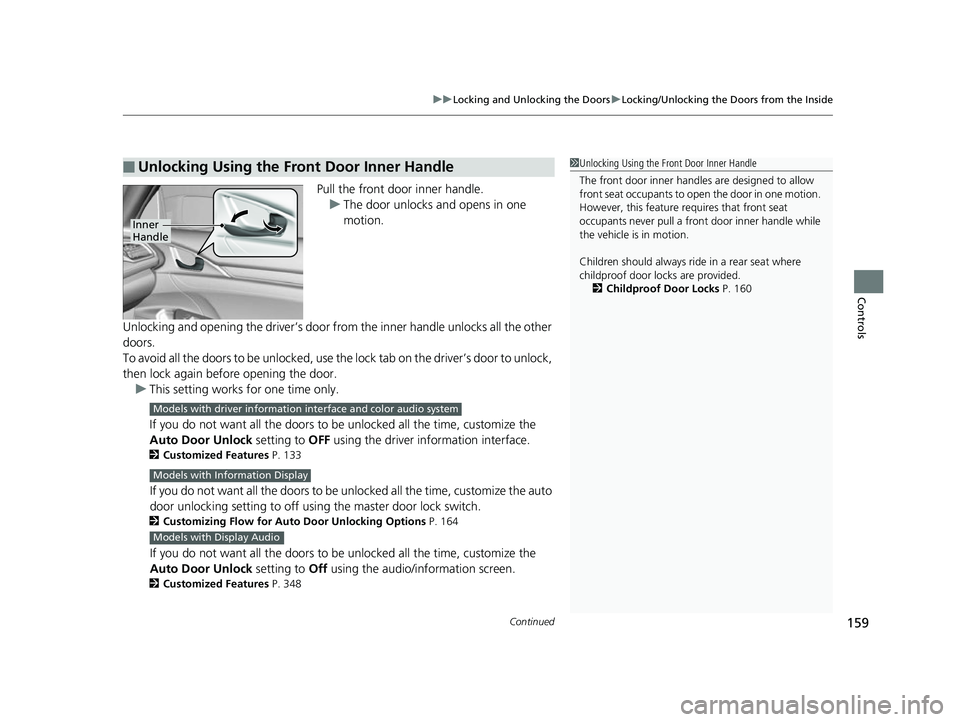
Pull the front door inner handle.
u The door unlocks and opens in one
motion.
Unlocking and opening the driver’s door from the inner handle unlocks all the other
doors.
To avoid all the doors to be unlocked, use the lock tab on the driver’s door to unlock,
then lock again before opening the door. u This setting works for one time only.
If you do not want all the doors to be unlocked all the time, customize the
Auto Door Unlock setting to OFF using the driver information interface.
2Customized Features P. 133
If you do not want all the doors to be unlocked all the time , customize the auto
door unlocking setting to off using the master door lock switch.
2 Customizing Flow for Auto Door Unlocking Options P. 164
If you do not want all the doors to be unlocked all the time, customize the
Auto Door Unlock setting to Off using the audio/information screen.
2Customized Features P. 348
■Unlocking Using the Front Door Inner Handle1Unlocking Using the Front Door Inner Handle
The front door inne r handles are designed to allow
front seat occupants to open the door in one motion.
However, this feature requires that front seat
occupants never pull a front door inner handle while
the vehicle is in motion.
Children should always ride in a rear seat where
childproof door locks are provided.
2 Childproof Door Locks P. 160
Inner
Handle
Models with driver information interface and color audio system
Models with Information Display
Models with Display Audio
18 CIVIC 5D (KA KC KL)-31TGG6100.book 159 ページ 2017年12月27日 水曜日 午前11時2分
Page 163 of 703
161
uuLocking and Unlocking the Doors uAuto Door Locking/Unlocking
Controls
Auto Door Locking/Unlocking
Your vehicle locks or unlocks all doors automatically when a certain condition is met.
■Drive lock mode
All doors and the hatch lock when the vehicle’s speed reaches about 10 mph (15
km/h).
■Driver’s door open mode
All doors and the hatch unlock when the driver’s door is opened.
■Auto Door Locking
■Auto Door Unlocking
1 Auto Door Locking/Unlocking
You can turn off or cha nge to another auto door
locking/unlocking setting us ing the master door lock
switch. 2 Customizing the Auto Door Locking/
Unlocking Setting
* P. 162
You can turn off or cha nge to another auto door
locking/unlocking sett ing using the driver
information interface. 2 Customized Features P. 133
You can turn off or cha nge to another auto door
locking/unlocking sett ing using the audio/
information screen. 2 Customized Features P. 348
Models with Information Display
Models with driver information interface and color
audio system
Models with Display Audio
* Not available on all models
18 CIVIC 5D (KA KC KL)-31TGG6100.book 161 ページ 2017年12月27日 水曜日 午前11時2分
Page 193 of 703
191
uuOperating the Switches Around the Steering Wheel uBrightness Control
Controls
Brightness Control
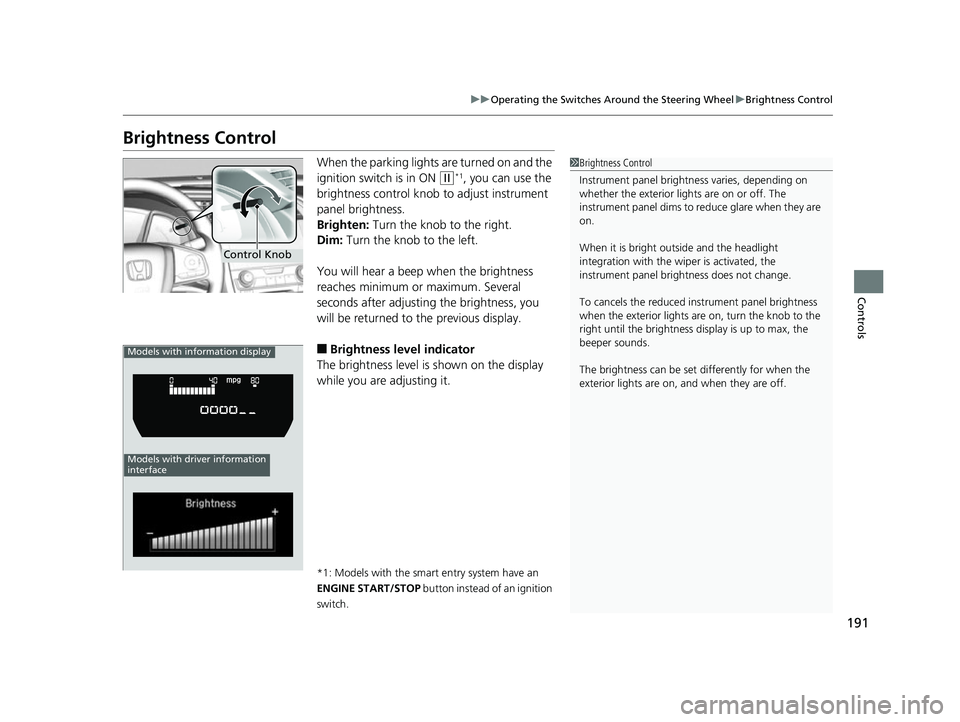
When the parking lights are turned on and the
ignition switch is in ON
(w*1, you can use the
brightness control knob to adjust instrument
panel brightness.
Brighten: Turn the knob to the right.
Dim: Turn the knob to the left.
You will hear a beep when the brightness
reaches minimum or maximum. Several
seconds after adjusting the brightness, you
will be returned to the previous display.
■Brightness level indicator
The brightness level is shown on the display
while you are adjusting it.
*1: Models with the smart entry system have an
ENGINE START/STOP button instead of an ignition
switch.
1 Brightness Control
Instrument panel brightne ss varies, depending on
whether the exterior lights are on or off. The
instrument panel dims to reduce glare when they are
on.
When it is bright out side and the headlight
integration with the wi per is activated, the
instrument panel bri ghtness does not change.
To cancels the reduced in strument panel brightness
when the exterior lights are on, turn the knob to the
right until the brightness display is up to max, the
beeper sounds.
The brightness can be set differently for when the
exterior lights are on, and when they are off.
Control Knob
Models with information display
Models with driver information
interface
18 CIVIC 5D (KA KC KL)-31TGG6100.book 191 ページ 2017年12月27日 水曜日 午前11時2分