USB port HONDA CIVIC HATCHBACK 2020 (in English) User Guide
[x] Cancel search | Manufacturer: HONDA, Model Year: 2020, Model line: CIVIC HATCHBACK, Model: HONDA CIVIC HATCHBACK 2020Pages: 704, PDF Size: 36.59 MB
Page 275 of 704
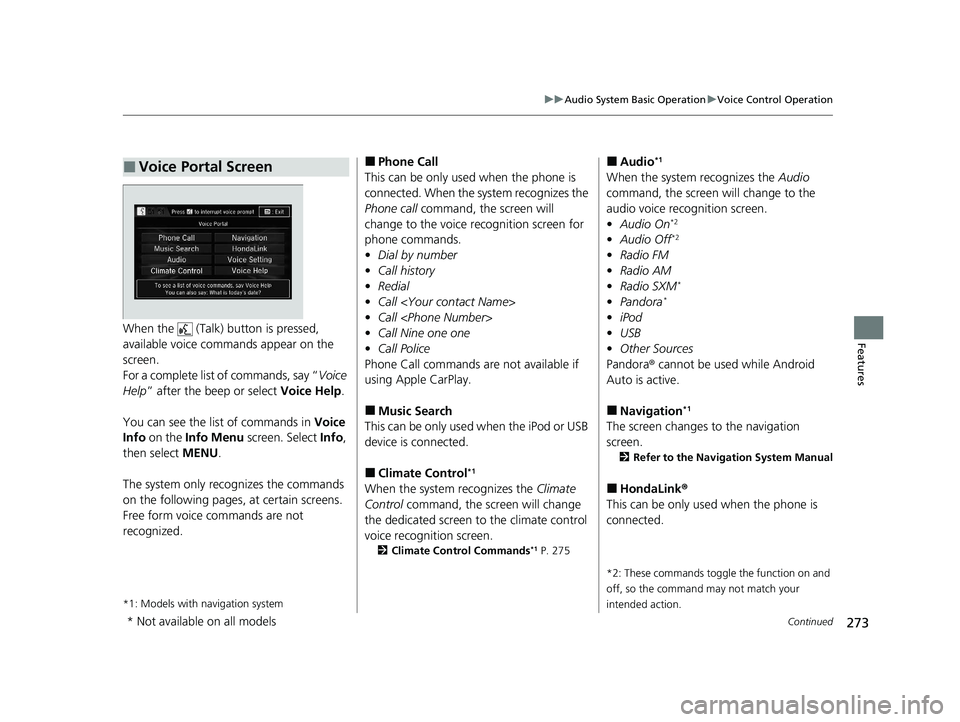
273
uuAudio System Basic Operation uVoice Control Operation
Continued
FeaturesWhen the (Talk) button is pressed,
available voice comma nds appear on the
screen.
For a complete list of commands, say “ Voice
Help ” after the beep or select Voice Help.
You can see the list of commands in Voice
Info on the Info Menu screen. Select Info,
then select MENU.
The system only recognizes the commands
on the following pages, at certain screens.
Free form voice commands are not
recognized.
*1: Models with navigation system
■Voice Portal Screen■Phone Call
This can be only used when the phone is
connected. When the sy stem recognizes the
Phone call command, the screen will
change to the voice re cognition screen for
phone commands.
• Dial by number
• Call history
• Redial
• Call
• Call
• Call Nine one one
• Call Police
Phone Call commands are not available if
using Apple CarPlay.
■Music Search
This can be only used when the iPod or USB
device is connected.
■Climate Control*1
When the system recognizes the Climate
Control command, the screen will change
the dedicated screen to the climate control
voice recognition screen.
2 Climate Control Commands*1 P. 275
■Audio*1
When the system recognizes the Audio
command, the screen will change to the
audio voice recognition screen.
• Audio On
*2
•Audio Off*2
•Radio FM
• Radio AM
• Radio SXM
*
•Pandora*
•iPod
• USB
• Other Sources
Pandora® cannot be used while Android
Auto is active.
■Navigation*1
The screen changes to the navigation
screen.
2 Refer to the Navigation System Manual
■HondaLink ®
This can be only used when the phone is
connected.
*2: These commands toggle the function on and
off, so the command may not match your
intended action.
* Not available on all models
20 CIVIC 5D HUM (KA KC KL)-31TGG6310.book 273 ページ 2019年11月11日 月曜日 午後2時50分
Page 276 of 704
274
uuAudio System Basic Operation uVoice Control Operation
Features
■Voice Setting
The screen changes to the Voice Recog.
tab on the System Settings screen.
■Voice Help
You can see a list of the available
commands on the screen.
• Useful Commands
*1
•Phone Commands
• Audio Commands*1
•On Screen Commands
• Music Search Commands
• General Commands
*1
•Climate Control Commands*1
The system accepts th ese commands on the
voice portal top screen.
• Call
• Call
• What time is it?
• What is today’s date?
*1: Models with navigation system
■Useful Commands*1
The system accepts these commands on the
dedicated screen for the voice recognition
of the phone.
• Call by number
• Call by name
• Call
• Call
The system accepts these commands on the
dedicated screen for the voice recognition
of the audio.
■Radio FM Commands
• Radio tune to <87.7-107.9> FM
• Radio tune to <87.7 -107.9> HD <1-8>
FM
• Radio FM preset <1-12>
■Radio AM Commands
• Radio tune to <530-1710> AM
• Radio AM preset <1-6>
■Radio SXM Commands*
•SXM channel <1-999>
• SXM channel
• Radio SXM preset <1-12>
■Phone Commands
■Audio Commands*1
■Pandora ® Commands*
• PANDORA play
■iPod Commands
• iPod play
• iPod play track <1-30>
• Music Search
• What album is this?
• What am I listening to?
■USB Commands
• USB play
• USB play track <1-30>
• Music Search
• What album is this?
• What am I listening to?
■Bluetooth ® audio Commands
• Bluetooth ® audio play
NOTE:
Bluetooth® Audio commands may not work
on some phones or Bluetooth ® Audio
devices.
* Not available on all models
20 CIVIC 5D HUM (KA KC KL)-31TGG6310.book 274 ページ 2019年11月11日 月曜日 午後2時50分
Page 289 of 704
287
uuAudio System Basic Operation uPlaying an iPod
Continued
Features
Playing an iPod
Connect the iPod using your USB connector to the USB port, then select the iPod
mode.
2 USB Port(s) P. 223
*1:Some or all of the lists may not be displayed.
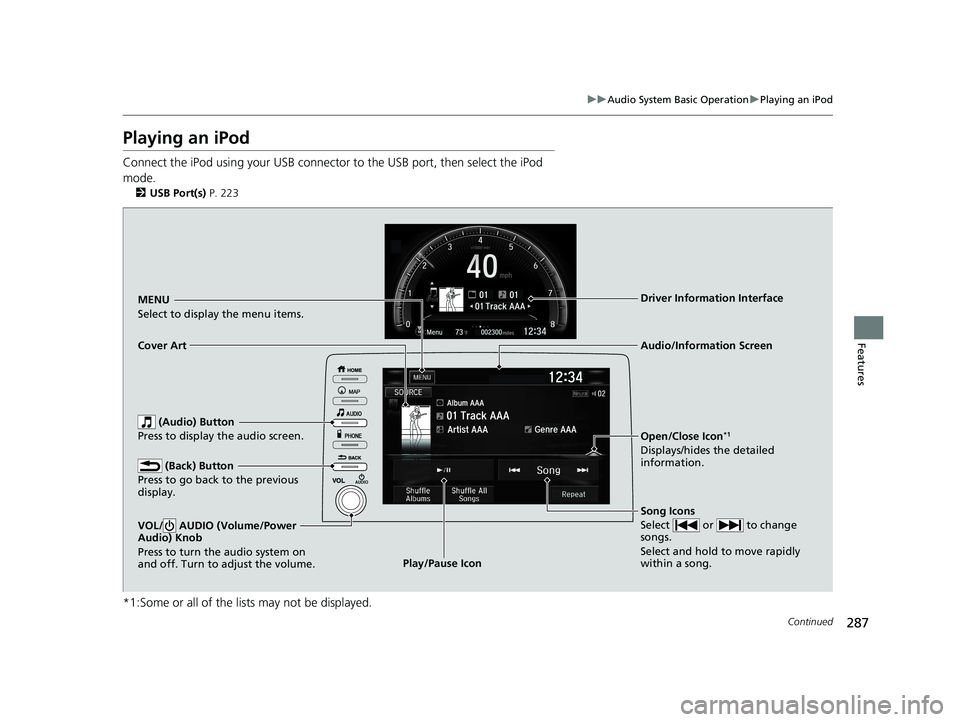
MENU
Select to display the menu items.
Song Icons
Select or to change
songs.
Select and hold to move rapidly
within a song.
Open/Close Icon*1
Displays/hides the detailed
information.
Cover Art
Audio/Information Screen
Play/Pause Icon
Driver Information Interface
(Audio) Button
Press to display the audio screen.
(Back) Button
Press to go back to the previous
display.
VOL/ AUDIO (Volume/Power
Audio) Knob
Press to turn the audio system on
and off. Turn to adjust the volume.
20 CIVIC 5D HUM (KA KC KL)-31TGG6310.book 287 ページ 2019年11月11日 月曜日 午後2時50分
Page 296 of 704
294
uuAudio System Basic Operation uPlaying Pandora ®*1
Features
Playing Pandora ®*1
Your audio system allows you to listen to music from the Pandora ® app on a
compatible smartphone.
This function is available when the phone is paired and connected to the vehicle’s
Bluetooth ® HandsFreeLink ® (HFL) system, or with an iPhone, you can connect using
your USB cable to the USB port.
2 Phone Setup P. 414
2 USB Port(s) P. 223
*1 : Available only on U.S. models.
1Playing Pandora ®*1
Pandora®, the Pandora logo, and the Pandora trade
dress are trademarks or registered trademarks of
Pandora Media, Inc., used with permission. Pandora
is only available in certai n countries. Visit the Pandora
website for more information.
To find out if your phone is compatible with this
feature, visit automobiles.honda.com /handsfreelink/,
or call 1-888-528-7876.
To use this service in your vehicle, the Pandora ® app
must first be installed on your phone. Visit
www.pandora.com . for more information.
Pandora ® is free, personalized radio that plays music
and comedy you’ll love. Just start with the name of
one of your favorite arti sts, tracks, comedians or
composers and Pandora ® will create a custom station
that plays similar tracks. Pandora ® also features
hundreds of genre stations ranging from Dubstep to
Smooth Jazz to Power Workout.
If you cannot operate Pandora ® through the audio
system, it may be streaming through Bluetooth®
Audio. Make sure Pandora ® mode on your audio
system is selected.
If your phone is connec ted to Android Auto,
Pandora ® is only available through the Android Auto
interface. Visit the Android Auto website to check
compatibility.
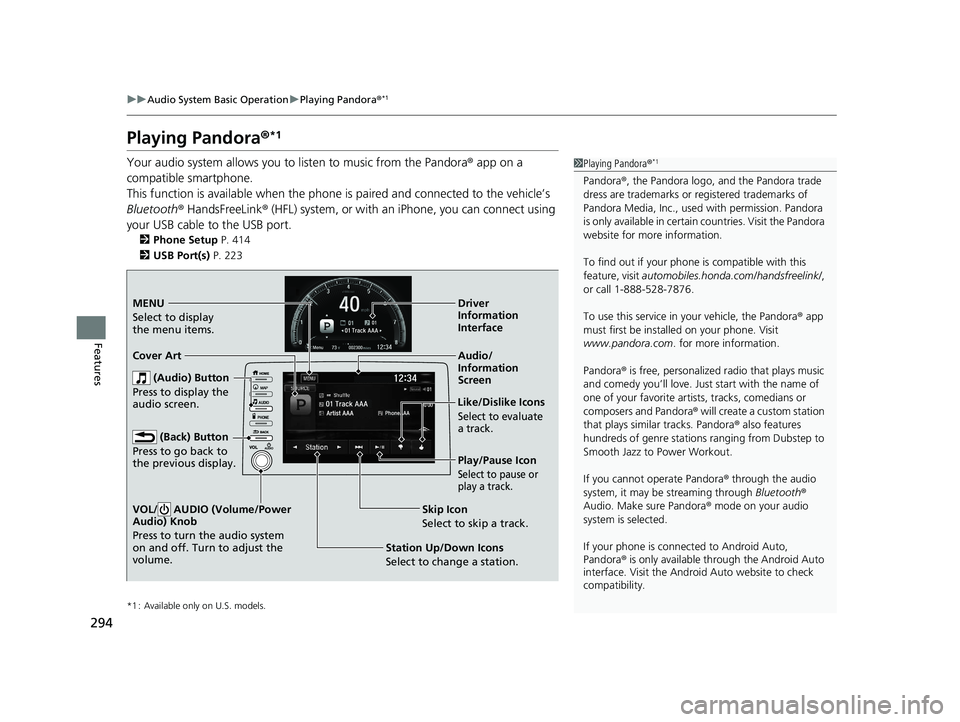
Audio/
Information
Screen
Cover Art
Station Up/Down Icons
Selec
t to change a station.Skip Icon
Select to skip a track. Like/Dislike Icons
Select to evaluate
a track.
Driver
Information
Interface
MENU
Select to
display
the menu items.
(Audio) Button
Press to display the
audio screen.
(Back) Button
Press to go back to
the previous display.
VOL/ AUDIO (Volume/Power
Audio) Knob
Press to turn the audio system
on and off. Turn to adjust the
volume.
Play/Pause Icon
Select to pause or
play a track.
20 CIVIC 5D HUM (KA KC KL)-31TGG6310.book 294 ページ 2019年11月11日 月曜日 午後2時50分
Page 298 of 704
296
uuAudio System Basic Operation uPlaying a USB Flash Drive
Features
Playing a USB Flash Drive
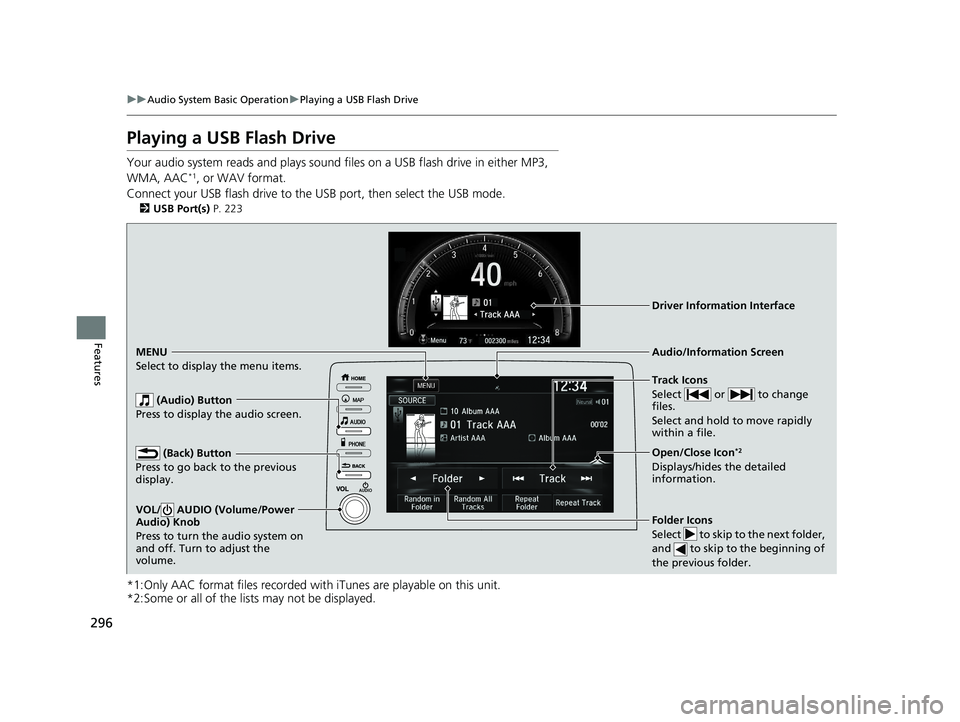
Your audio system reads and plays sound fi les on a USB flash drive in either MP3,
WMA, AAC*1, or WAV format.
Connect your USB flash drive to the USB port, then select the USB mode.
2USB Port(s) P. 223
*1:Only AAC format files recorded with iTunes are playable on this unit.
*2:Some or all of the lists may not be displayed.
Track Icons
Select or to change
files.
Select and hold to move rapidly
within a file.
Open/Close Icon*2
Displays/hides the detailed
information.
Folder Icons
Select to skip to the next folder,
and to skip to the beginning of
the previous folder.
Audio/Information Screen Driver Information Interface
MENU
Select to d isplay the menu items.
(Audio) Button
Press to display the audio screen.
(Back) Button
Press to go back to the previous
display.
VOL/ AUDIO (Volume/Power
Audio) Knob
Press to turn the audio system on
and off. Turn to adjust the
volume.
20 CIVIC 5D HUM (KA KC KL)-31TGG6310.book 296 ページ 2019年11月11日 月曜日 午後2時50分
Page 311 of 704
309
uuAudio System Basic Operation uApple CarPlay
Continued
Features
Apple CarPlay
If you connect an Apple CarPlay-compatible iPhone to the system via the 1.5A USB
port, you can use the audio/information scr een, instead of the iPhone display, to
make a phone call, listen to music, view maps (navigation), and access messages.
2USB Port(s) P. 223
■Phone
Access the contact list, make phone ca lls, or listen to voice mail.
■Messages
Check and reply to text messages, or have messages read to you.
■Music
Play music stored on your iPhone.
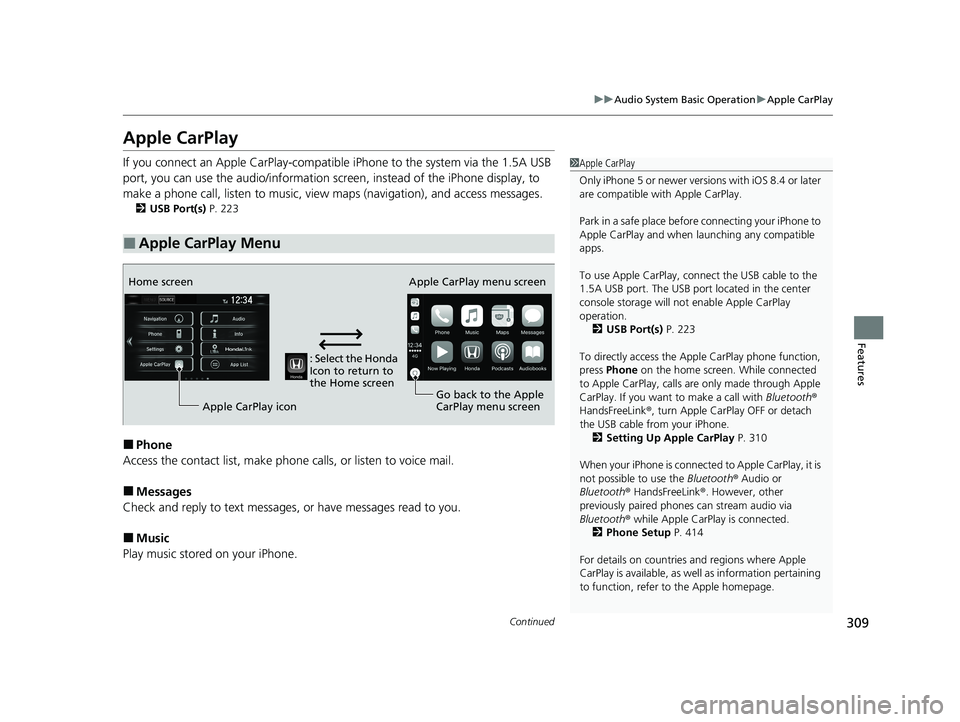
■Apple CarPlay Menu
1 Apple CarPlay
Only iPhone 5 or newer versi ons with iOS 8.4 or later
are compatible with Apple CarPlay.
Park in a safe place before connecting your iPhone to
Apple CarPlay and when launching any compatible
apps.
To use Apple CarPlay, connect the USB cable to the
1.5A USB port. The USB port located in the center
console storage will not enable Apple CarPlay
operation.
2 USB Port(s) P. 223
To directly access the Appl e CarPlay phone function,
press Phone on the home screen. While connected
to Apple CarPlay, calls are only made through Apple
CarPlay. If you want to make a call with Bluetooth®
HandsFreeLink ®, turn Apple CarPlay OFF or detach
the USB cable from your iPhone. 2 Setting Up Apple CarPlay P. 310
When your iPhone is connected to Apple CarPlay, it is
not possible to use the Bluetooth® Audio or
Bluetooth ® HandsFreeLink ®. However, other
previously paired phones can stream audio via
Bluetooth ® while Apple CarPlay is connected.
2 Phone Setup P. 414
For details on c ountries and regions where Apple
CarPlay is available, as well as information pertaining
to function, refer to the Apple homepage.
: Select the Honda
Icon to return to
the Home screen
Home screen
Apple CarPlay icon Apple CarPlay menu screen
Go back to the Apple
CarPlay menu screen
20 CIVIC 5D HUM (KA KC KL)-31TGG6310.book 309 ページ 2019年11月11日 月曜日 午後2時50分
Page 312 of 704
uuAudio System Basic Operation uApple CarPlay
310
Features
■Maps
Display Apple Maps and use the navigation function just as you would on your
iPhone.
Only one navigation system (pre-installed navigation or Apple CarPlay) can give
directions at a time. When you are using one system, directions to any prior
destination set on the other system wi ll be canceled, and the system you are
currently using will direct you to your destination.
After you have connected your iPhone to the system via the 1.5A USB port, use the
following procedure to set up Apple CarPlay. Use of Apple CarPlay will result in the
transmission of certain user and vehicle information (such as vehicle location, speed,
and status) to your iPhone to enhance th e Apple CarPlay experience. You will need
to consent to the sharing of this information on the Display Audio Screen.
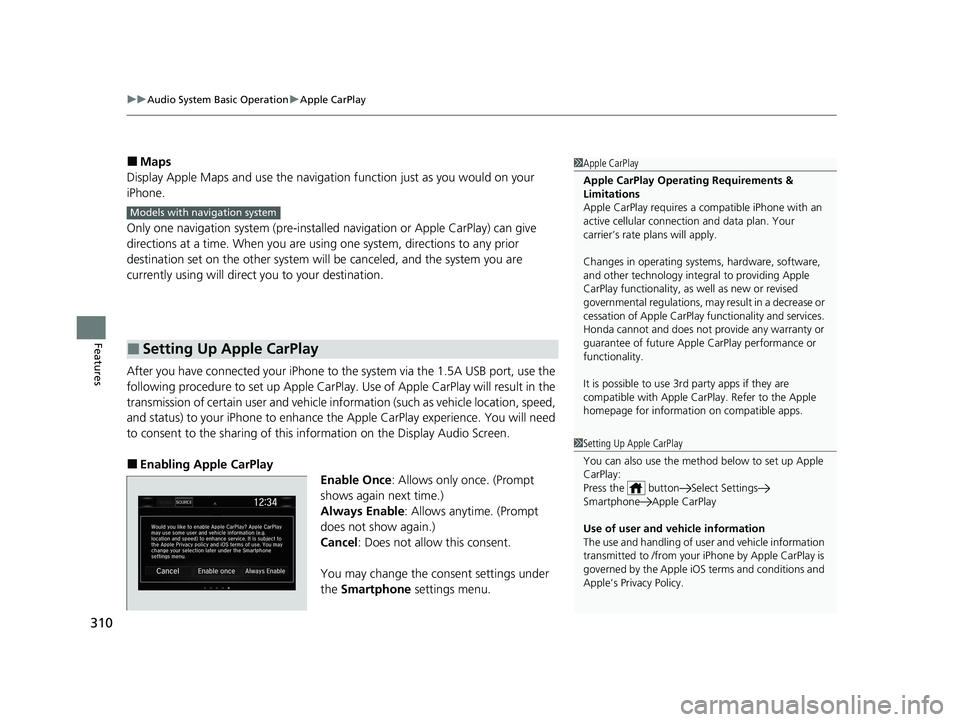
■Enabling Apple CarPlay
Enable Once: Allows only once. (Prompt
shows again next time.)
Always Enable : Allows anytime. (Prompt
does not show again.)
Cancel : Does not allow this consent.
You may change the consent settings under
the Smartphone settings menu.
■Setting Up Apple CarPlay
1Apple CarPlay
Apple CarPlay Operating Requirements &
Limitations
Apple CarPlay requi res a compatible iPhone with an
active cellular connecti on and data plan. Your
carrier’s rate plans will apply.
Changes in operating system s, hardware, software,
and other technology integral to providing Apple
CarPlay functionality, as well as new or revised
governmental regulations, may result in a decrease or
cessation of Apple CarPlay functionality and services.
Honda cannot and does not pr ovide any warranty or
guarantee of future Appl e CarPlay performance or
functionality.
It is possible to use 3r d party apps if they are
compatible with Apple CarPlay. Refer to the Apple
homepage for information on compatible apps.
Models with navigation system
1 Setting Up Apple CarPlay
You can also use the method below to set up Apple
CarPlay:
Press the button Select Settings
Smartphone Apple CarPlay
Use of user and vehicle information
The use and handling of user and vehicle information
transmitted to /from your iPhone by Apple CarPlay is
governed by the Apple iOS terms and conditions and
Apple’s Privacy Policy.
20 CIVIC 5D HUM (KA KC KL)-31TGG6310.book 310 ページ 2019年11月11日 月曜日 午後2時50分
Page 314 of 704
312
uuAudio System Basic Operation uAndroid Auto
Features
Android Auto
When you connect an Android phone to the Display Audio system via the 1.5A USB
port, Android Auto is automatically initiated. When connected via Android Auto,
you can use the audio/information screen to access the Phone, Google Maps
(Navigation), Google Play Music, and Google Now functions. When you first use
Android Auto, a tutorial w ill appear on the screen.
We recommend that you complete this tuto rial while safely parked before using
Android Auto.
2 USB Port(s) P. 223
2 Auto Pairing Connection P. 314
1Android Auto
To use Android Auto, you need to download the
Android Auto app from Google Play to your
smartphone.
Only Android 5.0 (Lollipop) or later versions are
compatible with Android Auto.
Bluetooth A2DP cannot be used with Android Auto
phone.
Park in a safe place befo re connecting your Android
phone to Android Auto and when launching any
compatible apps.
To use Android Auto, connect the USB cable to the
1.5A USB port. The USB port in the center console
storage will not enable Android Auto operation.
2 USB Port(s) P. 223
When your Android phone is connected to Android
Auto, it is not possible to use the Bluetooth® Audio.
However, other previously paired phones can stream
audio via Bluetooth ® while Android Auto is
connected.
2 Phone Setup P. 414
20 CIVIC 5D HUM (KA KC KL)-31TGG6310.book 312 ページ 2019年11月11日 月曜日 午後2時50分
Page 316 of 704
uuAudio System Basic Operation uAndroid Auto
314
Features
d Music and audio
Play Google Play Music and music apps that are compatible with Android Auto.
To switch between music apps, press this icon.
e Go back to the Home Screen.
f Voice
Operate Android Auto with your voice.
When you connect an Android phone to the unit via the 1.5A USB port, Android
Auto is automatically initiated.
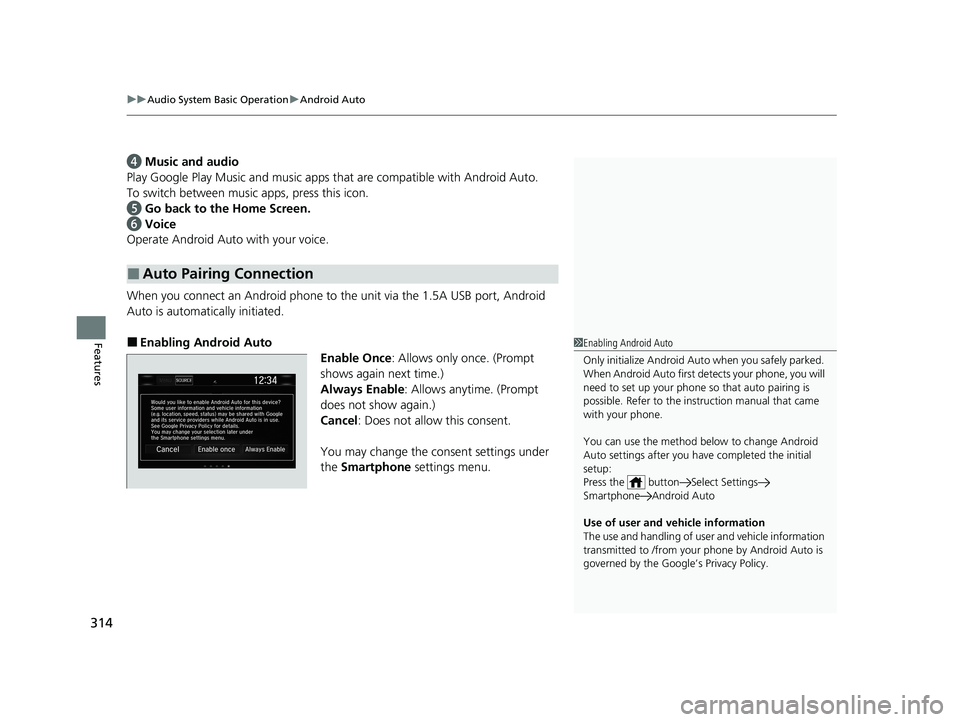
■Enabling Android Auto Enable Once: Allows only once. (Prompt
shows again next time.)
Always Enable : Allows anytime. (Prompt
does not show again.)
Cancel : Does not allow this consent.
You may change the consent settings under
the Smartphone settings menu.
■Auto Pairing Connection
1Enabling Android Auto
Only initialize Android Auto when you safely parked.
When Android Auto first detects your phone, you will
need to set up your phone so that auto pairing is
possible. Refer to the inst ruction manual that came
with your phone.
You can use the method below to change Android
Auto settings after you have completed the initial
setup:
Press the button Select Settings
Smartphone Android Auto
Use of user and vehicle information
The use and handling of user and vehicle information
transmitted to /from your phone by Android Auto is
governed by the Google’s Privacy Policy.
20 CIVIC 5D HUM (KA KC KL)-31TGG6310.book 314 ページ 2019年11月11日 月曜日 午後2時50分
Page 318 of 704
316
Features
Audio Error Messages
iPod/USB Flash Drive
If an error occurs while playing an iPod or USB flash driv e, you may see the following
error messages. If you cannot clear the error message, contact a dealer.
*1:Models with color audio system
*2:Models with Display Audio
Error MessageSolution
USB Error*1, *2Appears when there is a problem with th e audio system. Check if the device is
compatible with the audio system.
Bad USB Device
Please Check Owners Manual*1
A charging error ha s occurred with the
connected USB device. When safe please
check the compatibility of the device and
USB cable and try again.
*2
Appears when an incompatible device is connected. Disconnect the device. Then turn
the audio system off, and turn it on again. Do not reconnect the device that caused the
error.
Unsupported Ver*1
Unsupported Version*2Appears when an unsupported iPod is connect ed. If it appears when a supported iPod
is connected, update the iPod software to the newer version.
Retry Connection*1
Connect Retry*2Appears when the system does not ackn owledge the iPod. Reconnect the iPod.
Unplayable File*1, *2Appears when the files in the USB flash driv e are copyright protected or an unsupported
format. This error message appears for about three seconds, then plays the next song.
20 CIVIC 5D HUM (KA KC KL)-31TGG6310.book 316 ページ 2019年11月11日 月曜日 午後2時50分