park assist HONDA CIVIC HATCHBACK 2020 Owner's Manual (in English)
[x] Cancel search | Manufacturer: HONDA, Model Year: 2020, Model line: CIVIC HATCHBACK, Model: HONDA CIVIC HATCHBACK 2020Pages: 704, PDF Size: 36.59 MB
Page 13 of 704
11
Quick Reference Guide
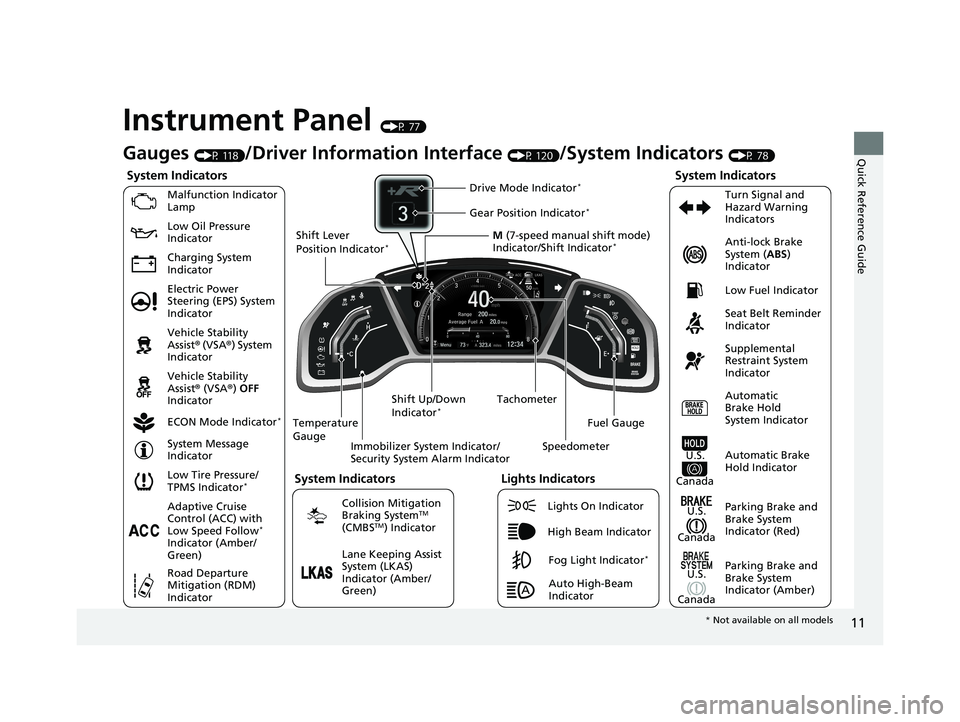
Instrument Panel (P 77)
System Indicators
Malfunction Indicator
Lamp
Charging System
IndicatorAnti-lock Brake
System (
ABS)
Indicator
Vehicle Stability
Assist® (VSA®) System
Indicator
Vehicle Stability
Assist® (VSA®) OFF
Indicator
Low Tire Pressure/
TPMS Indicator
*
Electric Power
Steering (EPS) System
Indicator Seat Belt Reminder
Indicator
System Indicators
Parking Brake and
Brake System
Indicator (Red) Supplemental
Restraint System
Indicator
Tachometer
Immobilizer System Indicator/
Security System Alarm Indicator
Shift Lever
Position Indicator
*
Low Fuel Indicator
ECON Mode Indicator
*
Turn Signal and
Hazard Warning
Indicators
Parking Brake and
Brake System
Indicator (Amber)
System Indicators
U.S.
Canada
U.S.
Canada Automatic
Brake Hold
System Indicator
Automatic Brake
Hold IndicatorU.S.
Canada
Temperature
Gauge
Lights Indicators
Lights On Indicator
High Beam Indicator
Fog Light Indicator*
Adaptive Cruise
Control (ACC) with
Low Speed Follow
*
Indicator (Amber/
Green)
System Message
Indicator
Collision Mitigation
Braking System
TM
(CMBSTM) Indicator
Road Departure
Mitigation (RDM)
Indicator
Lane Keeping Assist
System (LKAS)
Indicator (Amber/
Green) M
(7-speed manual shift mode)
Indicator/Shift Indicator
*
Auto High-Beam
Indicator
Shift Up/Down
Indicator
*
Drive Mode Indicator*
Speedometer
Fuel Gauge
Gear Position Indicator*
Gauges (P 118)/Driver Information Interface (P 120)/System Indicators (P 78)
Low Oil Pressure
Indicator
*
Not available on all models
20 CIVIC 5D HUM (KA KC KL)-31TGG6310.book 11 ページ 2019年11月11日 月曜日 午後2時50分
Page 181 of 704
179
uuOperating the Switches Around the Steering Wheel uAuto High-Beam
Controls
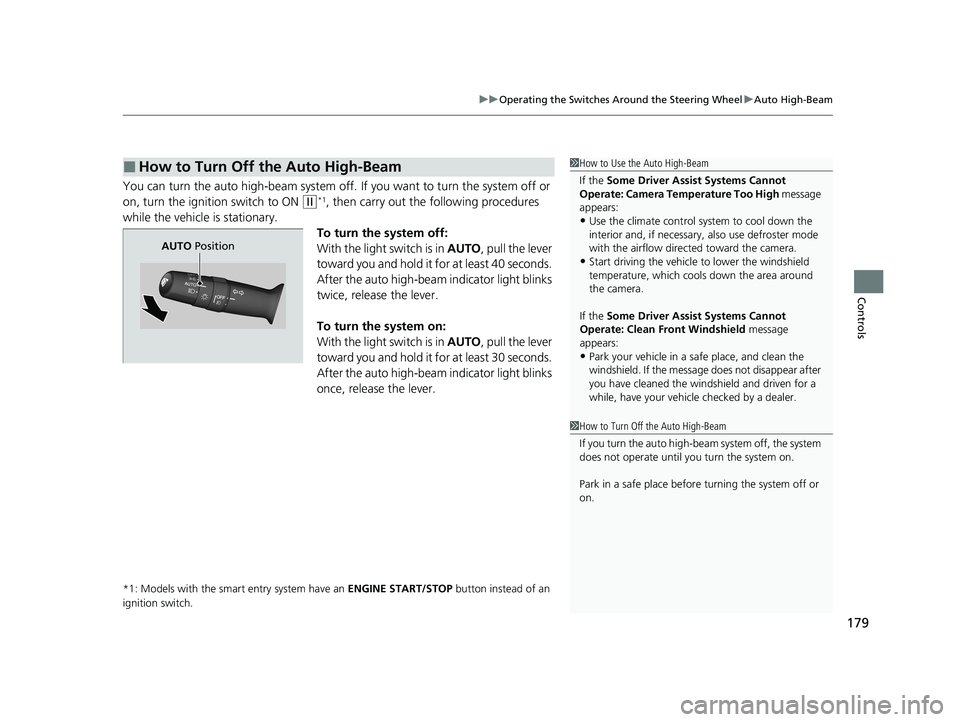
You can turn the auto high-beam system off. If you want to turn the system off or
on, turn the ignition switch to ON
(w*1, then carry out the following procedures
while the vehicle is stationary.
To turn the system off:
With the light switch is in AUTO, pull the lever
toward you and hold it for at least 40 seconds.
After the auto high-beam indicator light blinks
twice, release the lever.
To turn the system on:
With the light switch is in AUTO, pull the lever
toward you and hold it for at least 30 seconds.
After the auto high-beam indicator light blinks
once, release the lever.
*1: Models with the smart entry system have an ENGINE START/STOP button instead of an
ignition switch.
■How to Turn Off the Auto High-Beam1 How to Use the Auto High-Beam
If the Some Driver Assist Systems Cannot
Operate: Camera Temperature Too High message
appears:
•Use the climate control system to cool down the
interior and, if necessary, also use defroster mode
with the airflow directed toward the camera.
•Start driving the vehicle to lower the windshield
temperature, which cool s down the area around
the camera.
If the Some Driver Assist Systems Cannot
Operate: Clean Front Windshield message
appears:
•Park your vehicle in a sa fe place, and clean the
windshield. If the message does not disappear after
you have cleaned the winds hield and driven for a
while, have your vehicle checked by a dealer.
1 How to Turn Off the Auto High-Beam
If you turn the au to high-beam system off, the system
does not operate until you turn the system on.
Park in a safe place before turning the system off or
on.
AUTO Position
20 CIVIC 5D HUM (KA KC KL)-31TGG6310.book 179 ページ 2019年11月11日 月曜日 午後2時50分
Page 441 of 704
439
Driving
This chapter discusses driving and refueling.
Before Driving................................... 440
Towing a Trailer ................................ 446
When Driving
Starting the Engine .................. 447, 450
Precautions While Driving................. 455
Continuously Variable Transmission
*... 456
Shifting ............................ 457, 459, 464
ECON Mode
*................................... 468
Drive Mode Switch ........................... 469
Vehicle Stability Assist® (VSA®), aka Electronic
Stability Control (ESC), System ................ 471
Agile Handling Assist ....................... 474
Limited Slip Differe ntial (LSD) ........... 475
2.0 L engine models
2.0 L engine models
LaneWatchTM*.................................. 476Tire Pressure Monitoring System
(TPMS)*...................................... 478Tire Pressure Monitoring System (TPMS) -
Required Federal Explanation*......... 482
Honda Sensing ®................................ 484
Collision Mitigati on Braking System
TM
(CMBSTM) ....................................... 487
Adaptive Cruise Control (ACC) with Low
Speed Follow
*............................... 497
Adaptive Cruise Control (ACC)*....... 514
Lane Keeping Assist System (LKAS) .. 529
Road Departure Mitigation (RDM)
System ....................................... 537
Front Sensor Camera ....................... 542 Radar Sensor ................................... 544
Braking Brake System ................................... 545
Anti-lock Brake System (ABS) ........... 552
Brake Assist System ......................... 553
Parking Your Vehicle ........................ 554
Multi-View Rear Camera .................. 556
Refueling Fuel Information .............................. 558
How to Refuel ................................. 560
Fuel Economy and CO
2 Emissions
Improving Fuel Economy and Reducing
CO
2 Emissions ................................ 562
Turbo Engine Vehicle ....................... 563
* Not available on all models
20 CIVIC 5D HUM (KA KC KL)-31TGG6310.book 439 ページ 2019年11月11日 月曜日 午後2時50分
Page 451 of 704
449
uuWhen Driving uStarting the Engine
Driving
■Hill start assist system
Hill start assist keeps the brake engaged br iefly to help prevent the vehicle from
rolling on inclines as you move your foot from the brake pedal to the accelerator.
Put the transmission into
(D, (S, or (L* when facing uphill, or (R when facing
downhill, then release the brake pedal.
Depress the clutch pedal, and shift to on e of the forward gears when facing uphill,
or
(R when facing downhill, th en release the brake pedal.
Continuously variable transmission models
Manual transmission models
1Hill start assist system
Hill start assist may not prevent the vehicle from
rolling downhill on a very steep or slippe ry slope, and
will not operate on small inclines.
Hill start assist is not a replacement for the parking brake.
Hill start assist will operate even when VSA ® is
switched off.
* Not available on all models
20 CIVIC 5D HUM (KA KC KL)-31TGG6310.book 449 ページ 2019年11月11日 月曜日 午後2時50分
Page 456 of 704
uuWhen Driving uStarting the Engine
454
Driving
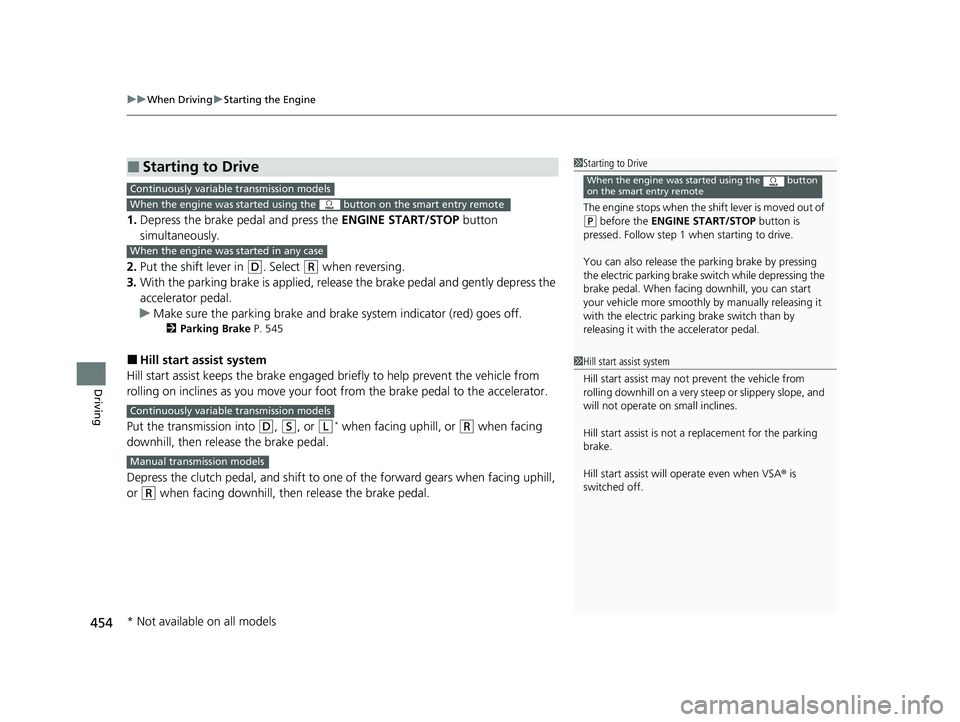
1. Depress the brake pedal and press the ENGINE START/STOP button
simultaneously.
2. Put the shift lever in
(D. Select (R when reversing.
3. With the parking brake is applied, releas e the brake pedal and gently depress the
accelerator pedal.
u Make sure the parking brake and brake system indicator (red) goes off.
2 Parking Brake P. 545
■Hill start assist system
Hill start assist keeps the brake engaged br iefly to help prevent the vehicle from
rolling on inclines as you move your fo ot from the brake pedal to the accelerator.
Put the transmission into
(D, (S, or (L* when facing uphill, or (R when facing
downhill, then release the brake pedal.
Depress the clutch pedal, and shift to on e of the forward gears when facing uphill,
or
(R when facing downhill, then release the brake pedal.
■Starting to Drive1 Starting to Drive
The engine stops when the sh ift lever is moved out of
(P before the ENGINE START/STOP button is
pressed. Follow step 1 when starting to drive.
You can also release the parking brake by pressing
the electric parking brake sw itch while depressing the
brake pedal. When facing downhill, you can start
your vehicle more smoothly by manually releasing it
with the electric parki ng brake switch than by
releasing it with th e accelerator pedal.
When the engine was started using the button
on the smart entry remoteContinuously variable transmission models
When the engine was started using the button on the smart entry remote
When the engine was started in any case
1Hill start assist system
Hill start assist may not prevent the vehicle from
rolling downhill on a very steep or slippe ry slope, and
will not operate on small inclines.
Hill start assist is not a replacement for the parking
brake.
Hill start assist will operate even when VSA ® is
switched off.
Continuously variable transmission models
Manual transmission models
* Not available on all models
20 CIVIC 5D HUM (KA KC KL)-31TGG6310.book 454 ページ 2019年11月11日 月曜日 午後2時50分
Page 501 of 704
Continued499
uuHonda Sensing ®u Adaptive Cruise Control (ACC) with Low Speed Follow*
Driving
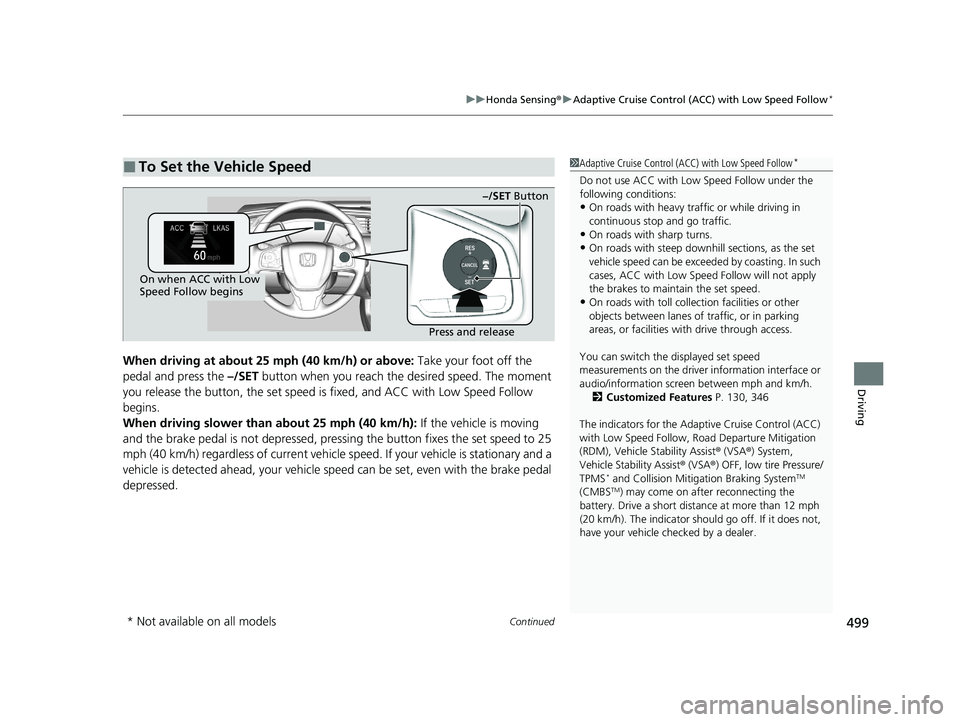
When driving at about 25 mph (40 km/h) or above: Take your foot off the
pedal and press the –/SET button when you reach the desired speed. The moment
you release the button, th e set speed is fixed, and ACC with Low Speed Follow
begins.
When driving slower than about 25 mph (40 km/h): If the vehicle is moving
and the brake pedal is not depressed, pressi ng the button fixes the set speed to 25
mph (40 km/h) regardless of current vehicle speed. If your vehicle is stationary and a
vehicle is detected ahead, your vehicle sp eed can be set, even with the brake pedal
depressed.
■To Set the Vehicle Speed1 Adaptive Cruise Control (ACC) with Low Speed Follow*
Do not use ACC with Low Speed Follow under the
following conditions:
•On roads with heavy traf fic or while driving in
continuous stop and go traffic.
•On roads with sharp turns.
•On roads with steep downhill sections, as the set
vehicle speed can be exceeded by coasting. In such
cases, ACC with Low Speed Follow will not apply
the brakes to maintain the set speed.
•On roads with toll collection facilities or other
objects between lanes of traffic, or in parking
areas, or faci lities with driv e through access.
You can switch the displayed set speed
measurements on the driver information interface or
audio/information screen between mph and km/h. 2 Customized Features P. 130, 346
The indicators for the Adaptive Cruise Control (ACC)
with Low Speed Follow, Road Departure Mitigation
(RDM), Vehicle Stability Assist ® (VSA ®) System,
Vehicle Stability Assist ® (VSA ®) OFF, low tire Pressure/
TPMS
* and Collision Mitigation Braking SystemTM
(CMBSTM) may come on afte r reconnecting the
battery. Drive a short distance at more than 12 mph
(20 km/h). The indicator shoul d go off. If it does not,
have your vehicle ch ecked by a dealer.
On when ACC with Low
Speed Follow begins
Press and release−/SET Button
* Not available on all models
20 CIVIC 5D HUM (KA KC KL)-31TGG6310.book 499 ページ 2019年11月11日
月曜日 午後2時50分
Page 517 of 704
Continued515
uuHonda Sensing ®u Adaptive Cruise Control (ACC)*
Driving
■How to activate the system1Adaptive Cruise Control (ACC)*
The radar sensor for ACC is shared with the collision
mitigation braking systemTM (CMBSTM).
2 Collision Mitigation Braking SystemTM
(CMBSTM) P. 487
ACC may not work properly under certain conditions.
2 ACC Conditions and Limitations P. 519
When the engine speed slows down, try to
downshift. You can maintain the set speed if you
change gear within five seconds.
When not using ACC: Turn off adaptive cruise by
pressing the MAIN button. This also will turn off the
Lane Keeping Assist System (LKAS).
When the MAIN button is pressed, both ACC and
the Lane Keeping Assist System (LKAS) are either
turned on or off.
Do not use ACC under the following conditions:
•On roads with heavy traf fic or while driving in
continuous stop and go traffic.
•On roads with sharp turns.
•On roads with steep downhill sections, as the set
vehicle speed can be exceeded by coasting. In such
cases, ACC will not apply the brakes to maintain
the set speed.
•On roads with toll collection facilities or other
objects between lanes of traffic, or in parking
areas, or faci lities with driv e through access.
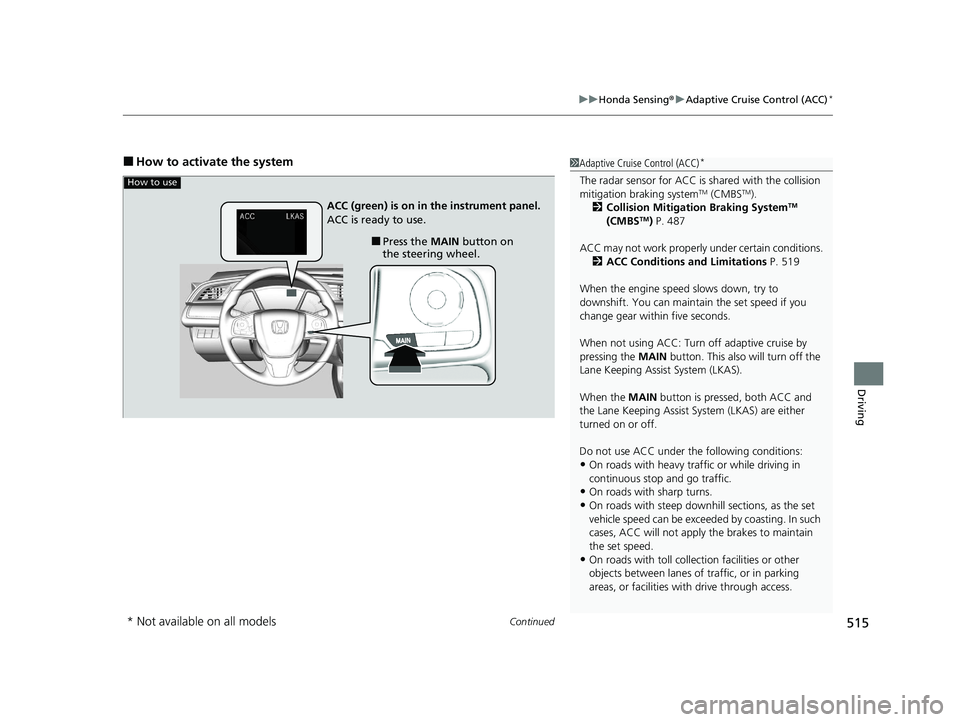
How to use
■Press the MAIN button on
the steering wheel.
ACC (green) is on in the instrument panel.
ACC is ready to use.
* Not available on all models
20 CIVIC 5D HUM (KA KC KL)-31TGG6310.book 515 ページ 2019年11月11日
月曜日 午後2時50分
Page 545 of 704
543
uuHonda Sensing ®u Front Sensor Camera
Driving
1Front Sensor Camera
If the Some Driver Assist Systems Cannot
Operate: Camera Temperature Too High message
appears:
•Use the climate control system to cool down the
interior and, if necessary, also use defroster mode
with the airflow directed towards the camera.
•Start driving the vehicle to lower the windshield
temperature, which cool s down the area around
the camera.
If the Some Driver Assist Systems Cannot
Operate: Clean Front Windshield message
appears:
•Park your vehicle in a sa fe place, and clean the
windshield. If the message does not disappear after
you have cleaned the winds hield and driven for a
while, have your vehicle checked by a dealer.
20 CIVIC 5D HUM (KA KC KL)-31TGG6310.book 543 ページ 2019年11月11日 月曜日 午後2時50分
Page 633 of 704
631Continued
Handling the Unexpected
If a Tire Goes Flat
Temporarily Repairing a Flat Tire
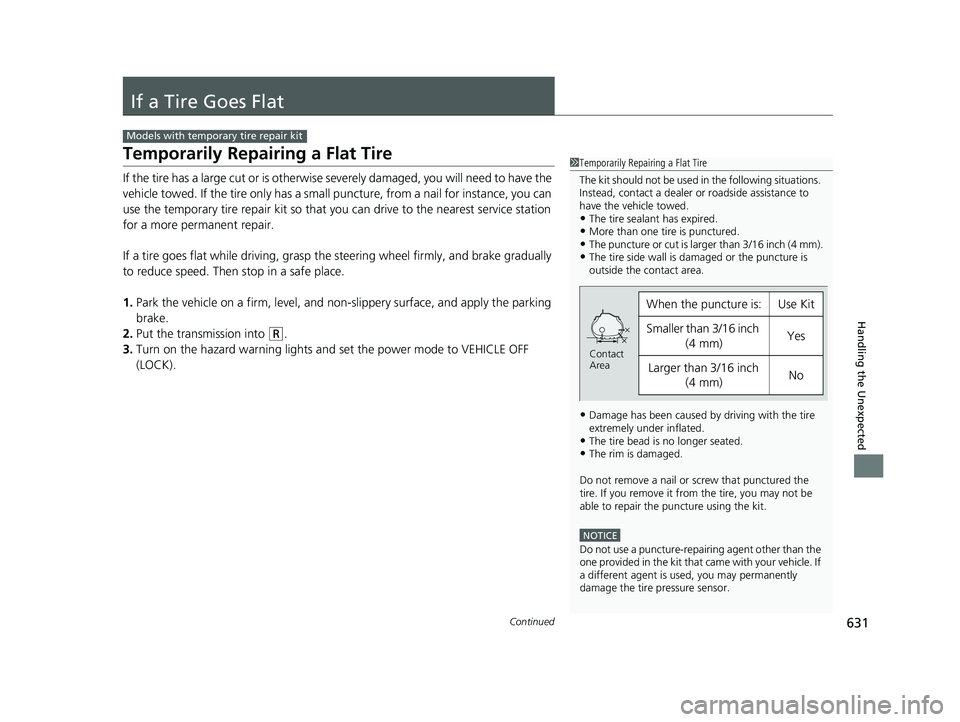
If the tire has a large cut or is otherwise severely damaged, you will need to have the
vehicle towed. If the tire only has a small puncture, from a nail for instance, you can
use the temporary tire repair kit so that you can drive to the nearest service station
for a more permanent repair.
If a tire goes flat while driving, grasp the steering wheel firmly, and brake gradually
to reduce speed. Then stop in a safe place.
1. Park the vehicle on a firm, level, and n on-slippery surface, and apply the parking
brake.
2. Put the transmission into
(R.
3. Turn on the hazard warning lights an d set the power mode to VEHICLE OFF
(LOCK).
Models with temporary tire repair kit
1 Temporarily Repairing a Flat Tire
The kit should not be used in the following situations.
Instead, contact a dealer or roadside assistance to
have the vehicle towed.
•The tire sealant has expired.•More than one tire is punctured.•The puncture or cut is larger than 3/16 inch (4 mm).•The tire side wall is da maged or the puncture is
outside the contact area.
•Damage has been caused by driving with the tire
extremely under inflated.
•The tire bead is no longer seated.•The rim is damaged.
Do not remove a nail or screw that punctured the
tire. If you remove it from the tire, you may not be
able to repair the puncture using the kit.
NOTICE
Do not use a puncture-repairing agent other than the
one provided in the kit that came with your vehicle. If
a different agent is used, you may permanently
damage the tire pressure sensor.
When the puncture is:Use Kit
Smaller than 3/16 inch
(4 mm)Yes
Larger than 3/16 inch (4 mm)No
Contact
Area
20 CIVIC 5D HUM (KA KC KL)-31TGG6310.book 631 ページ 2019年11月11日 月曜日 午後2時50分
Page 696 of 704
694
Index
Wi-Fi Connection ..................................... 306
Audio/Information Screen ................ 230, 248
Authorized Manuals ................................. 690
Auto Door Locking/Unlocking ................. 155
Customize ............................................... 136
Auto High-Beam ....................................... 177
Automatic Brake Hold .............................. 549
Indicator ............................................ 80, 549
Automatic Brake Hold System Indicator ............................................ 80, 549
Automatic Lighting .................................. 174
Average Fuel Economy ............................. 124
Average Speed .......................................... 124
B
Battery....................................................... 616
Charging System Indicator ................. 81, 664
Jump Starting .......................................... 658
Maintenance (Checking the Battery) ........ 616
Maintenance (Replacing).......................... 618
Belts (Seat) .................................................. 38
Beverage Holders ...................................... 201
Bluetooth ® Audio ..................................... 299
Bluetooth ® HandsFreeLink ®........... 379, 406
Booster Seats (For Children) ....................... 73
Brake System ............................................. 545
Anti-lock Brake System (ABS) ................... 552
Automatic Brake Hold.............................. 549
Brake Assist System ................................. 553
Fluid ........................................................ 588 Foot Brake............................................... 548
Indicator (Red) ........................... 78, 666, 667
Parking Brake .......................................... 545
Braking Pressure Meter ............................ 127
Brightness Control (Instrument Panel).... 183
Bulb Replacement .................................... 590
Brake Light, Rear Tu rn Signal Light and
Back-Up Light ........................................ 598
Fog Lights ............................................... 592
Front Side Marker Lights.......................... 595
Front Turn Signal Lights ........................... 594
Headlights ............................................... 590
High-Mount Brake Light .......................... 599
Parking/Daytime Running Lights .............. 597
Rear License Plate Light ........................... 599
Side Turn Signal/Emergency Indicator Lights .................................................... 597
Taillights.................................................. 599
Taillights/Rear Side Marker Lights ............ 599
Bulb Specifications ................................... 680
C
Carbon Monoxide Gas ............................... 74
Cargo Area Cover ..................................... 209
Cargo Hook ............................................... 208
Carrying Cargo ................................. 441, 443
Certification Label .................................... 682
Changing Bulbs ........................................ 590
Charging System Indicator ................. 81, 664Child Safety
................................................ 60
Childproof Door Locks ............................ 154
Child Seat ................................................... 60
Booster Seats ............................................ 73
Child Seat for Infants ................................ 62
Child Seat for Small Children .................... 63
Installing a Child Seat with a Lap/Shoulder
Seat Belt ................................................. 67
Larger Children ......................................... 72
Rear-facing Child Seat............................... 62
Selecting a Child Seat ............................... 64
Using a Tether .......................................... 69
Childproof Door Locks ............................. 154
Cleaning the Exterior ............................... 624
Cleaning the Interior ............................... 621
Climate Control System ........................... 213
Changing the Mode................................ 213
Defrosting the Windshield and Windows .............................................. 217
Dust and Pollen Filter .............................. 620
Recirculation/Fresh Air Mode................... 216
Sensors ................................................... 220
Using Automatic Climate Control............ 213
CMBSTM (Collision Mitigation Braking
SystemTM) ................................................ 487
Coat Hooks ............................................... 207
Collision Mitigation Braking System
TM
(CMBSTM) ................................................. 487
Compact Spare Tire .......................... 644, 681
Console Compartment ............................. 200
20 CIVIC 5D HUM (KA KC KL)-31TGG6310.book 694 ページ 2019年11月11日 月曜日 午後2時50分