lane assist HONDA CIVIC HATCHBACK 2021 (in English) User Guide
[x] Cancel search | Manufacturer: HONDA, Model Year: 2021, Model line: CIVIC HATCHBACK, Model: HONDA CIVIC HATCHBACK 2021Pages: 711, PDF Size: 37.1 MB
Page 479 of 711
477
uuWhen Driving uVehicle Stability AssistTM (VSA ®), aka Electronic Stability Control (ESC), System
Driving
■When the drive mode is in +R mode
To completely disable VSA®, the VSA® must be
in +R mode. Press and hold the VSA ® OFF
button until you hear a si ngle beep, then later
two more beeps.
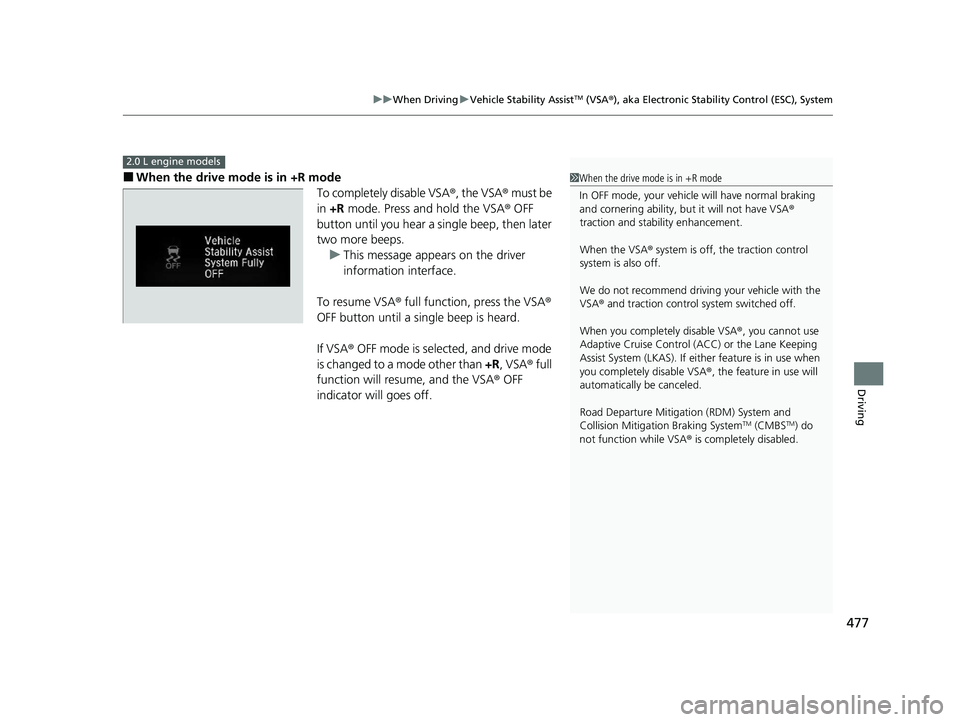
u This message appears on the driver
information interface.
To resume VSA® full function, press the VSA ®
OFF button until a single beep is heard.
If VSA ® OFF mode is selected, and drive mode
is changed to a mode other than +R, VSA ® full
function will resume, and the VSA ® OFF
indicator will goes off.
2.0 L engine models
1 When the drive mode is in +R mode
In OFF mode, your vehicle will have normal braking
and cornering ability, bu t it will not have VSA®
traction and stability enhancement.
When the VSA ® system is off, the traction control
system is also off.
We do not recommend driving your vehicle with the
VSA ® and traction control system switched off.
When you completely disable VSA® , you cannot use
Adaptive Cruise Control ( ACC) or the Lane Keeping
Assist System (LKAS). If either feature is in use when
you completely disable VSA ®, the feature in use will
automatically be canceled.
Road Departure Mitigati on (RDM) System and
Collision Mitigati on Braking System
TM (CMBSTM) do
not function while VSA ® is completely disabled.
21 CIVIC 5D HUM-31TGG6400_01.book 477 ページ 2020年8月28日 金曜日 午後1時 48分
Page 482 of 711
480
uuWhen Driving uLaneWatchTM*
Driving
LaneWatchTM*
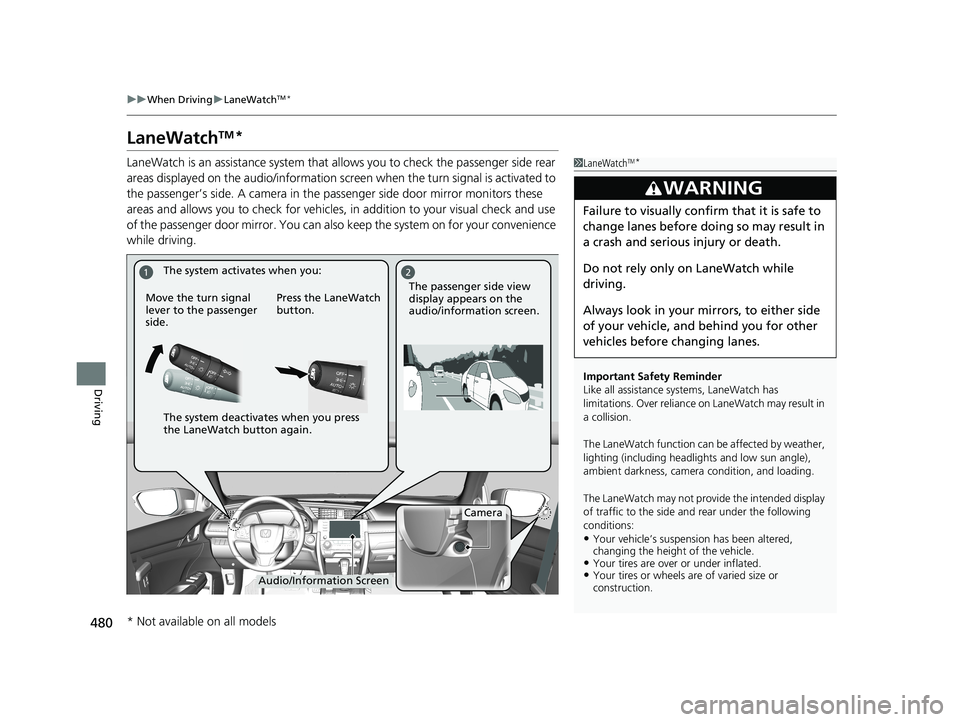
LaneWatch is an assistance system that allows you to check the passenger side rear
areas displayed on the audio/in formation screen when the turn signal is activated to
the passenger’s side. A camera in the passenger side door mirror monitors these
areas and allows you to check for vehicles, in addition to your visual check and use
of the passenger door mirror. You can also keep the system on for your convenience
while driving.1 LaneWatchTM*
Important Safety Reminder
Like all assistance systems, LaneWatch has
limitations. Over reliance on LaneWatch may result in
a collision.
The LaneWatch func tion can be affected by weather,
lighting (including headli ghts and low sun angle),
ambient darkness, camera condition, and loading.
The LaneWatch may not prov ide the intended display
of traffic to the side and rear under the following
conditions:
•Your vehicle’s suspension has been altered,
changing the height of the vehicle.
•Your tires are over or under inflated.•Your tires or wheels are of varied size or
construction.
3WARNING
Failure to visually confirm that it is safe to
change lanes before doing so may result in
a crash and serious injury or death.
Do not rely only on LaneWatch while
driving.
Always look in your mi rrors, to either side
of your vehicle, and behind you for other
vehicles before changing lanes.
12
Camera
Audio/Information Screen
Move the turn signal
lever to the passenger
side.
Press the LaneWatch
button.
The passenger side view
display appears on the
audio/information screen.
The system activates when you:
The system deactivates when you press
the LaneWatch button again.
* Not available on all models
21 CIVIC 5D HUM-31TGG6400_01.book 480 ページ 2020年8月28日 金曜日 午後1時
48分
Page 490 of 711
488
Driving
Honda Sensing®
Honda Sensing® is a driver support system which employs the use of two distinctly
different kinds of sensors: a radar sensor located in the lower bumper and a front
sensor camera mounted to th e interior side of the windshield, behind the rearview
mirror.
Honda Sensing® has following functions.
■The functions whic h do not require switch operations to activate
• Collision Mitigation Braking SystemTM (CMBSTM) 2 P. 491
• Road Departure Mitigation (RDM) System 2 P. 541
■The functions wh ich require switch op erations to activate
• Adaptive Cruise Control ( ACC) with Low Speed Follow* 2 P. 501
• Adaptive Cruise Control (ACC)* 2 P. 518
• Lane Keeping Assist System (LKAS) 2 P. 533
* Not available on all models
21 CIVIC 5D HUM-31TGG6400_01.book 488 ページ 2020年8月28日 金曜日 午後1時 48分
Page 504 of 711
uuHonda Sensing ®u Adaptive Cruise Control (ACC) with Low Speed Follow*
502
Driving
■How to activate the system1Adaptive Cruise Control (ACC) with Low Speed Follow*
You can read about handling information for the
camera equipped with this system.
2 Front Sensor Camera P. 546
The radar sensor for ACC with Low Speed Follow is
shared with the collision mitigation braking system
TM
(CMBSTM).
2 Collision Mitigation Braking SystemTM
(CMBSTM) P. 491
When the MAIN button is pressed, both ACC with
Low Speed Follow and the Lane Keeping Assist
System (LKAS) are either turned on or off.
ACC with Low Speed Follow may not work properly
under certain conditions.
2 ACC with Low Speed Follow Conditions
and Limitations P. 508
When not using ACC with Low Speed Follow: Turn
off adaptive cruise by pressing the MAIN button. This
also will turn off the Lane Keeping Assist System
(LKAS).
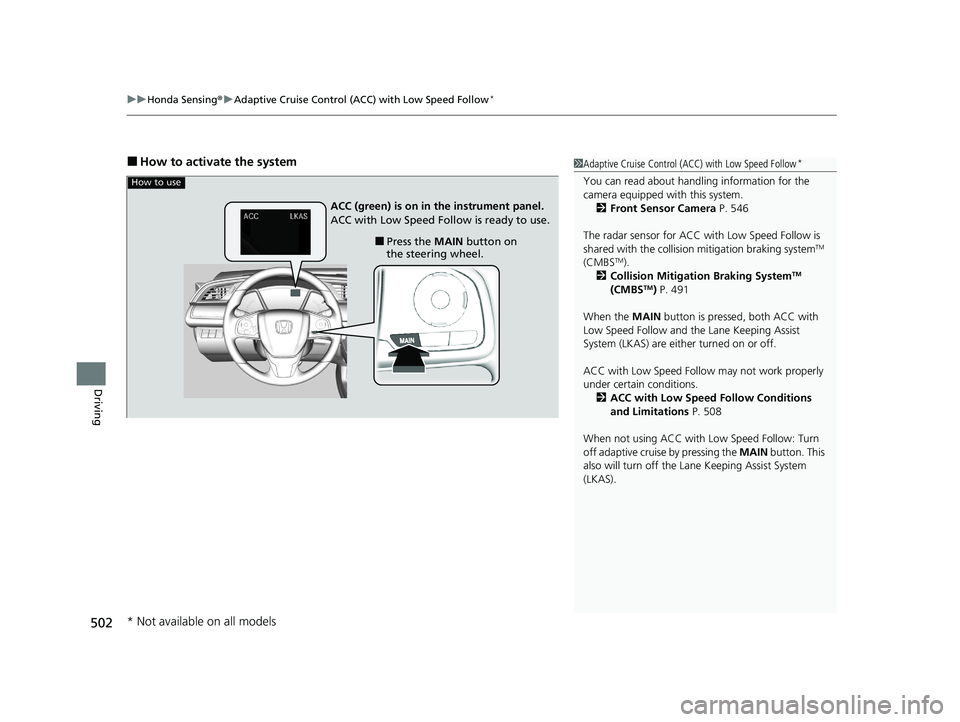
How to use
■Press the MAIN button on
the steering wheel.
ACC (green) is on in the instrument panel.
ACC with Low Speed Follow is ready to use.
* Not available on all models
21 CIVIC 5D HUM-31TGG6400_01.book 502 ページ 2020年8月28日 金曜日 午後1時
48分
Page 505 of 711
Continued503
uuHonda Sensing ®u Adaptive Cruise Control (ACC) with Low Speed Follow*
Driving
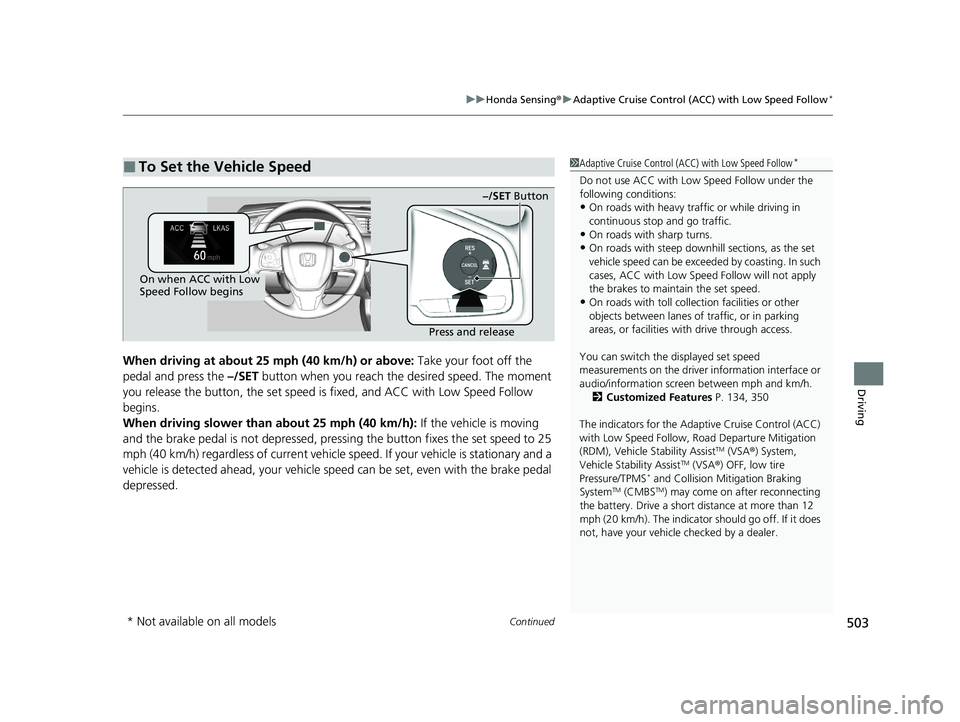
When driving at about 25 mph (40 km/h) or above: Take your foot off the
pedal and press the –/SET button when you reach the desired speed. The moment
you release the button, th e set speed is fixed, and ACC with Low Speed Follow
begins.
When driving slower than about 25 mph (40 km/h): If the vehicle is moving
and the brake pedal is not depressed, pressi ng the button fixes the set speed to 25
mph (40 km/h) regardless of current vehicle speed. If your vehicle is stationary and a
vehicle is detected ahead, your vehicle sp eed can be set, even with the brake pedal
depressed.
■To Set the Vehicle Speed1 Adaptive Cruise Control (ACC) with Low Speed Follow*
Do not use ACC with Low Speed Follow under the
following conditions:
•On roads with heavy traf fic or while driving in
continuous stop and go traffic.
•On roads with sharp turns.
•On roads with steep downhill sections, as the set
vehicle speed can be exceeded by coasting. In such
cases, ACC with Low Speed Follow will not apply
the brakes to maintain the set speed.
•On roads with toll collection facilities or other
objects between lanes of traffic, or in parking
areas, or faci lities with driv e through access.
You can switch the displayed set speed
measurements on the driver information interface or
audio/information screen between mph and km/h. 2 Customized Features P. 134, 350
The indicators for the Adaptive Cruise Control (ACC)
with Low Speed Follow, Road Departure Mitigation
(RDM), Vehicle Stability Assist
TM (VSA ®) System,
Vehicle Stability AssistTM (VSA ®) OFF, low tire
Pressure/TPMS* and Collision Mitigation Braking
SystemTM (CMBSTM) may come on after reconnecting
the battery. Drive a short distance at more than 12
mph (20 km/h). The indicator should go off. If it does
not, have your vehicle checked by a dealer.
On when ACC with Low
Speed Follow begins
Press and release−/SET Button
* Not available on all models
21 CIVIC 5D HUM-31TGG6400_01.book 503 ページ 2020年8月28日 金曜日 午後1時
48分
Page 521 of 711
Continued519
uuHonda Sensing ®u Adaptive Cruise Control (ACC)*
Driving
■How to activate the system1Adaptive Cruise Control (ACC)*
The radar sensor for ACC is shared with the collision
mitigation braking systemTM (CMBSTM).
2 Collision Mitigation Braking SystemTM
(CMBSTM) P. 491
ACC may not work properly under certain conditions.
2 ACC Conditions and Limitations P. 523
When the engine speed slows down, try to
downshift. You can maintain the set speed if you
change gear within five seconds.
When not using ACC: Turn off adaptive cruise by
pressing the MAIN button. This also will turn off the
Lane Keeping Assist System (LKAS).
When the MAIN button is pressed, both ACC and
the Lane Keeping Assist System (LKAS) are either
turned on or off.
Do not use ACC under the following conditions:
•On roads with heavy traf fic or while driving in
continuous stop and go traffic.
•On roads with sharp turns.
•On roads with steep downhill sections, as the set
vehicle speed can be exceeded by coasting. In such
cases, ACC will not apply the brakes to maintain
the set speed.
•On roads with toll collection facilities or other
objects between lanes of traffic, or in parking
areas, or faci lities with driv e through access.
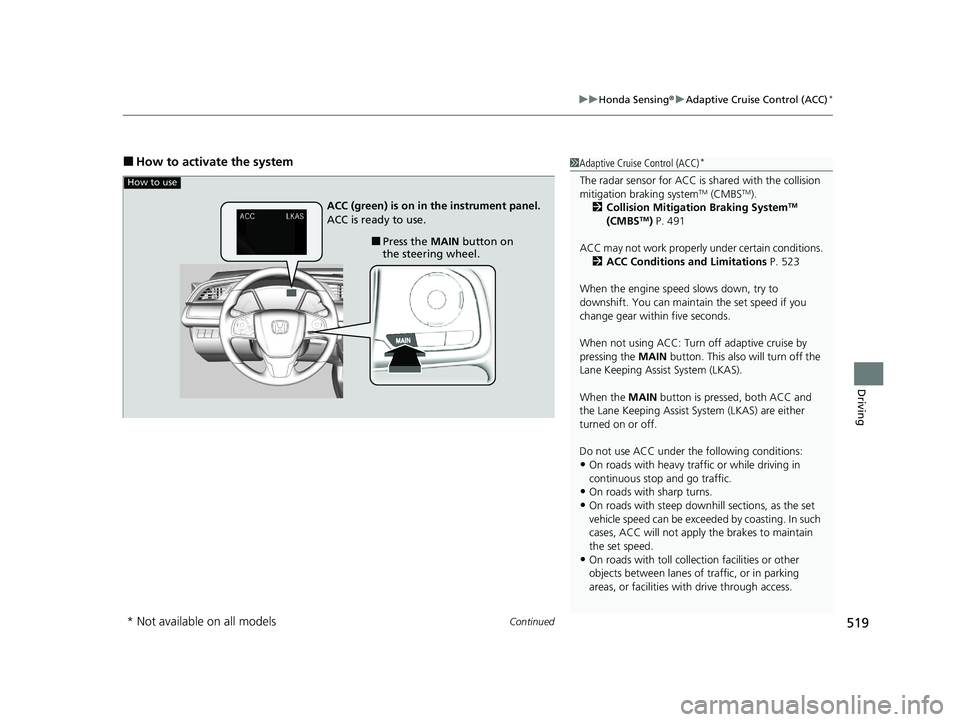
How to use
■Press the MAIN button on
the steering wheel.
ACC (green) is on in the instrument panel.
ACC is ready to use.
* Not available on all models
21 CIVIC 5D HUM-31TGG6400_01.book 519 ページ 2020年8月28日 金曜日 午後1時
48分
Page 535 of 711
533
uuHonda Sensing ®u Lane Keeping Assist System (LKAS)
Continued
Driving
Lane Keeping Assist System (LKAS)
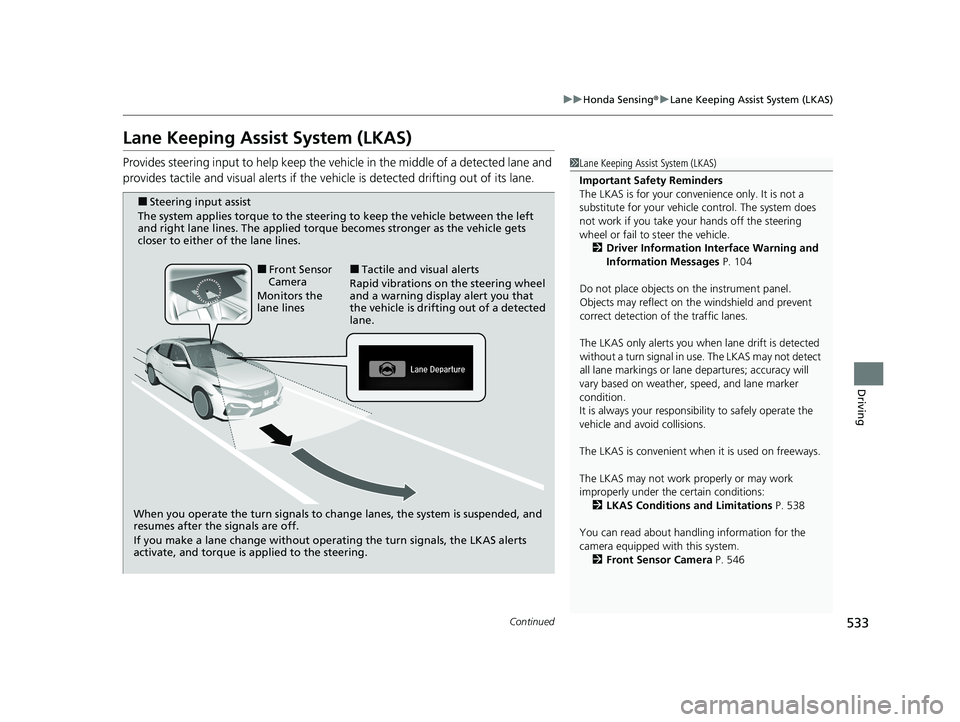
Provides steering input to help keep the vehicle in the middle of a detected lane and
provides tactile and visual al erts if the vehicle is detected drifting out of its lane.1Lane Keeping Assist System (LKAS)
Important Safety Reminders
The LKAS is for your convenience only. It is not a
substitute for your vehicl e control. The system does
not work if you take y our hands off the steering
wheel or fail to steer the vehicle.
2 Driver Information Interface Warning and
Information Messages P. 104
Do not place objects on the instrument panel.
Objects may reflect on th e windshield and prevent
correct detection of the traffic lanes.
The LKAS only alerts you when lane drift is detected
without a turn signal in use. The LKAS may not detect
all lane markings or lane departures; accuracy will
vary based on weather, speed, and lane marker
condition.
It is always your responsibility to safely operate the
vehicle and avoid collisions.
The LKAS is convenient when it is used on freeways.
The LKAS may not work properly or may work
improperly under the certain conditions:
2 LKAS Conditions and Limitations P. 538
You can read about handling information for the
camera equipped with this system. 2 Front Sensor Camera P. 546
When you operate the turn signals to chan ge lanes, the system is suspended, and
resumes after the signals are off.
If you make a lane change without operating the turn signals, the LKAS alerts
activate, and torque is applied to the steering.
■Front Sensor
Camera
Monitors the
lane lines■Tactile and visual alerts
Rapid vibrations on the steering wheel
and a warning display alert you that
the vehicle is drifting out of a detected
lane.
■Steering input assist
The system applies torque to the steering to keep the vehicle between the left
and right lane lines. The applied torque becomes stronger as the vehicle gets
closer to either of the lane lines.
21 CIVIC 5D HUM-31TGG6400_01.book 533 ページ 2020年8月28日 金曜日 午後1時 48分
Page 536 of 711
uuHonda Sensing ®u Lane Keeping Assist System (LKAS)
534
Driving
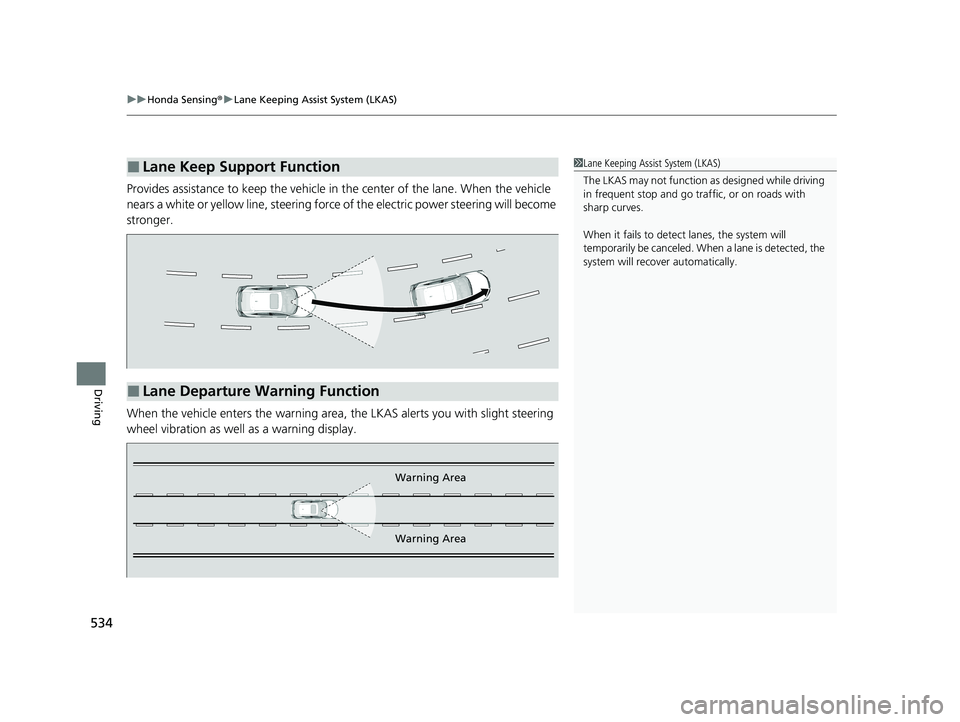
Provides assistance to keep the vehicle in the center of the lane. When the vehicle
nears a white or yellow line, steering force of the electric power steering will become
stronger.
When the vehicle enters the warning area, the LKAS alerts you with slight steering
wheel vibration as well as a warning display.
■Lane Keep Support Function1 Lane Keeping Assist System (LKAS)
The LKAS may not function as designed while driving
in frequent stop and go traf fic, or on roads with
sharp curves.
When it fails to detect lanes, the system will
temporarily be canceled. When a lane is detected, the
system will recover automatically.
■Lane Departure Warning Function
Warning Area
Warning Area
21 CIVIC 5D HUM-31TGG6400_01.book 534 ページ 2020年8月28日 金曜日 午後1時 48分
Page 537 of 711
Continued535
uuHonda Sensing ®u Lane Keeping Assist System (LKAS)
Driving
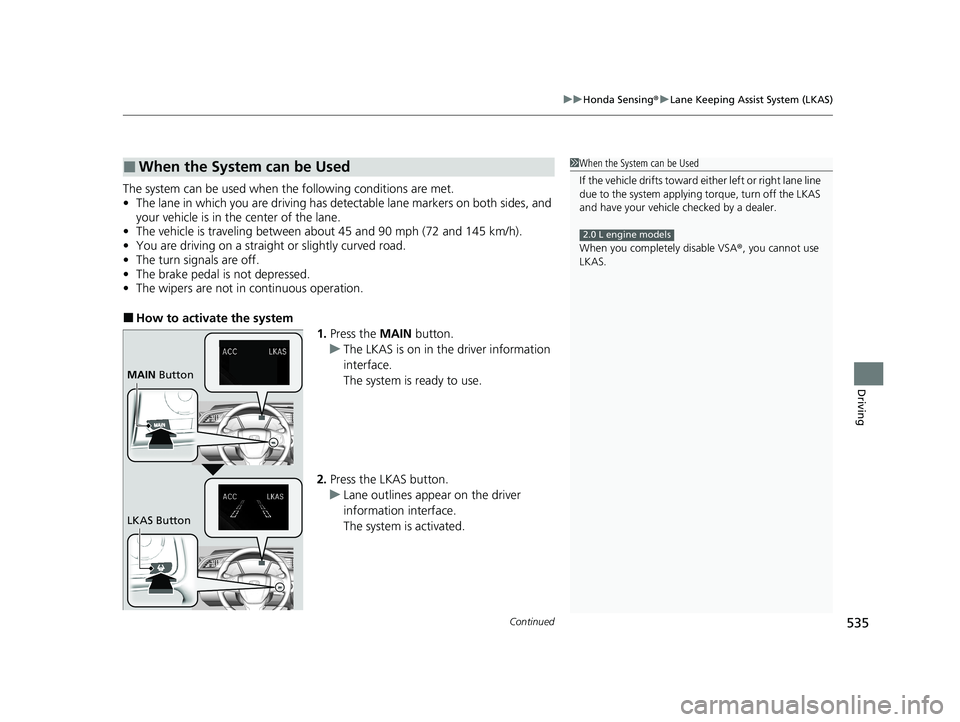
The system can be used when th e following conditions are met.
• The lane in which you are driving has detectable lane markers on both sides, and
your vehicle is in the center of the lane.
• The vehicle is traveling between about 45 and 90 mph (72 and 145 km/h).
• You are driving on a straight or slightly curved road.
• The turn signals are off.
• The brake pedal is not depressed.
• The wipers are not in continuous operation.
■How to activate the system
1.Press the MAIN button.
u The LKAS is on in the driver information
interface.
The system is ready to use.
2. Press the LKAS button.
u Lane outlines appear on the driver
information interface.
The system is activated.
■When the System can be Used1When the System can be Used
If the vehicle drifts toward ei ther left or right lane line
due to the system applying torque, turn off the LKAS
and have your vehicle checked by a dealer.
When you completely disable VSA® , you cannot use
LKAS.
2.0 L engine models
MAIN Button
LKAS Button
21 CIVIC 5D HUM-31TGG6400_01.book 535 ページ 2020年8月28日 金曜日 午後1時 48分
Page 538 of 711
uuHonda Sensing ®u Lane Keeping Assist System (LKAS)
536
Driving
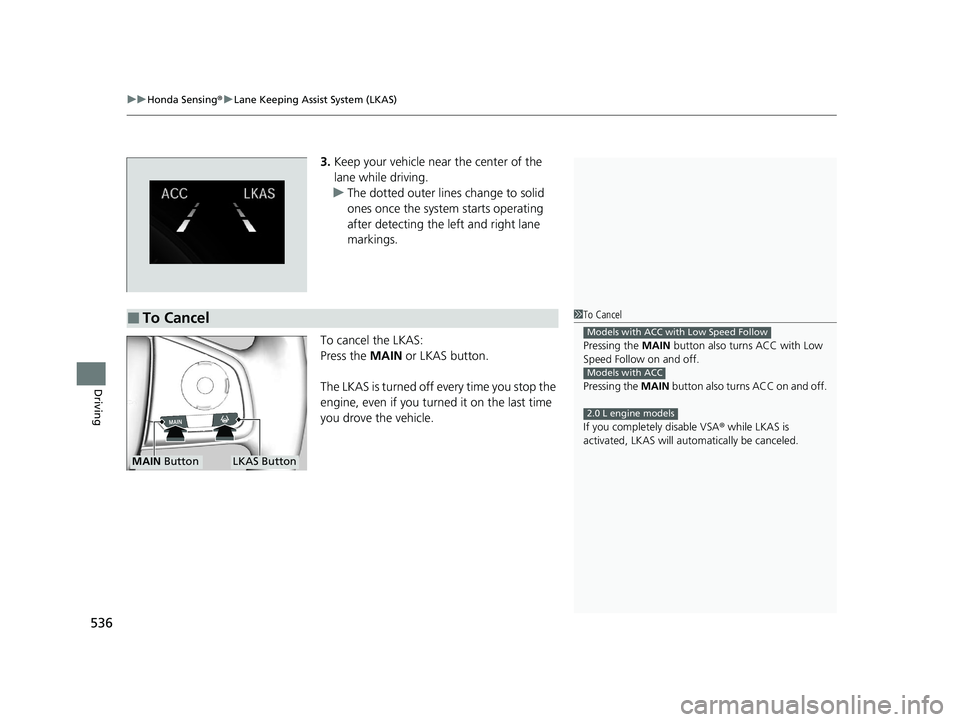
3. Keep your vehicle near the center of the
lane while driving.
u The dotted outer lines change to solid
ones once the system starts operating
after detecting the left and right lane
markings.
To cancel the LKAS:
Press the MAIN or LKAS button.
The LKAS is turned off every time you stop the
engine, even if you turned it on the last time
you drove the vehicle.
■To Cancel1 To Cancel
Pressing the MAIN button also turns ACC with Low
Speed Follow on and off.
Pressing the MAIN button also turns ACC on and off.
If you complete ly disable VSA® while LKAS is
activated, LKAS will au tomatically be canceled.
Models with ACC with Low Speed Follow
Models with ACC
2.0 L engine models
MAIN ButtonLKAS Button
21 CIVIC 5D HUM-31TGG6400_01.book 536 ページ 2020年8月28日 金曜日 午後1時 48分