lock HONDA CIVIC HATCHBACK 2021 Owner's Manual (in English)
[x] Cancel search | Manufacturer: HONDA, Model Year: 2021, Model line: CIVIC HATCHBACK, Model: HONDA CIVIC HATCHBACK 2021Pages: 711, PDF Size: 37.1 MB
Page 6 of 711
Contents
This owner’s manual should be considered a permanent part of the
vehicle and should remain with the vehicle when it is sold.
This owner’s manual covers all models of your vehicle. You may find
descriptions of equipment and features that are not on your
particular model.
Images throughout this owner’s manu al (including the front cover)
represent features and equipment that are available on some, but
not all, models. Your particular mo del may not have some of these
features.
This owner’s manual is for vehicles sold in the United States and
Canada.
The information and specifications in cluded in this publication were
in effect at the time of approval for printing. Honda Motor Co., Ltd.
reserves the right, however, to discontinue or change specifications
or design at any time without notice and without incurring any
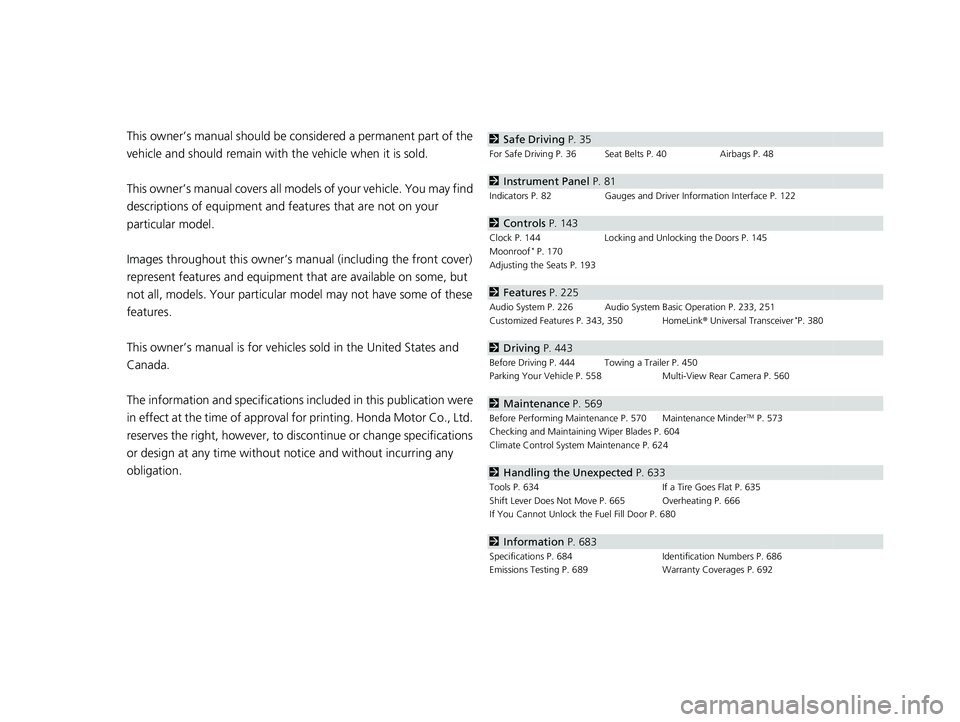
obligation.2 Safe Driving P. 35
For Safe Driving P. 36 Seat Belts P. 40 Airbags P. 48
2Instrument Panel P. 81
Indicators P. 82 Gauges and Driver Information Interface P. 122
2Controls P. 143
Clock P. 144 Locking and Unlocking the Doors P. 145
Moonroof* P. 170
Adjusting the Seats P. 193
2 Features P. 225
Audio System P. 226 Audio System Basic Operation P. 233, 251
Customized Features P. 343, 350 HomeLink ® Universal Transceiver*P. 380
2 Driving P. 443
Before Driving P. 444 Towing a Trailer P. 450
Parking Your Vehicle P. 558 Multi-View Rear Camera P. 560
2Maintenance P. 569
Before Performing Maintenance P. 570 Maintenance MinderTM P. 573
Checking and Maintaining Wiper Blades P. 604
Climate Control System Maintenance P. 624
2Handling the Unexpected P. 633
Tools P. 634 If a Tire Goes Flat P. 635
Shift Lever Does Not Move P. 665 Overheating P. 666
If You Cannot Unlock the Fuel Fill Door P. 680
2 Information P. 683
Specifications P. 684 Identification Numbers P. 686
Emissions Testing P. 689 Warranty Coverages P. 692
21 CIVIC 5D HUM-31TGG6400_01.book 4 ページ 2020年8月28日 金曜日 午後1時48分
Page 10 of 711
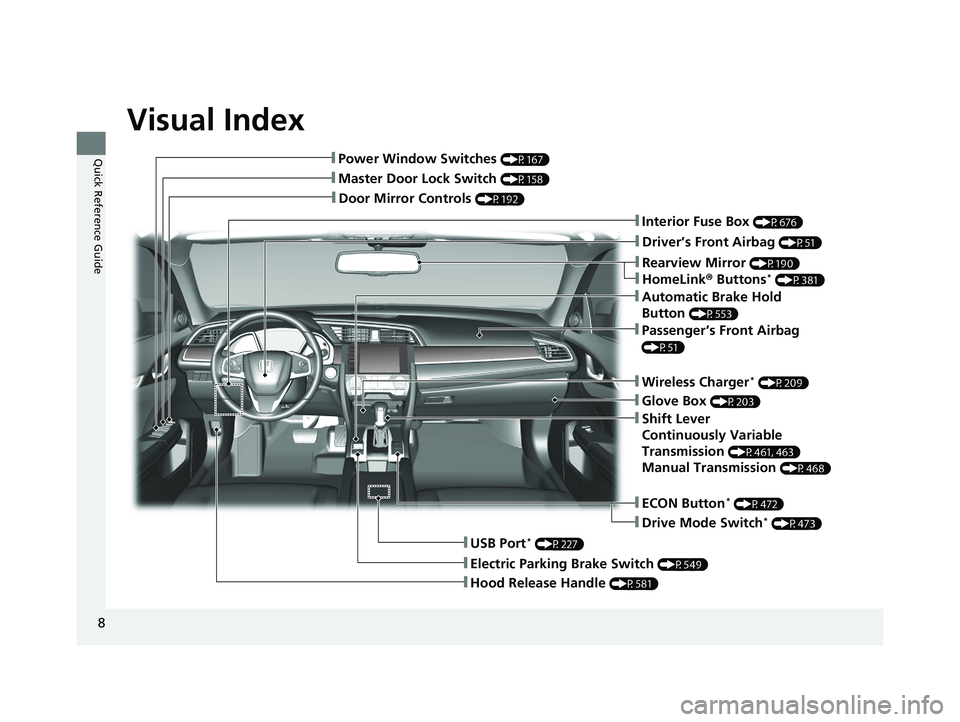
Visual Index
8
Quick Reference Guide
❚Door Mirror Controls (P192)
❚Glove Box (P203)
❚Rearview Mirror (P190)
❚Hood Release Handle (P581)
❚Master Door Lock Switch (P158)
❚Power Window Switches (P167)
❚Interior Fuse Box (P676)
❚Driver’s Front Airbag (P51)
❚Shift Lever
Continuously Variable
Transmission
(P461, 463)
Manual Transmission (P468)
❚Electric Parking Brake Switch (P549)
❚USB Port* (P227)
❚Wireless Charger* (P209)
❚Automatic Brake Hold
Button
(P553)
❚ECON Button* (P472)
❚Drive Mode Switch* (P473)
❚Passenger’s Front Airbag
(P51)
❚HomeLink® Buttons* (P381)
21 CIVIC 5D HUM-31TGG6400_01.book 8 ページ 2020年8月28日 金曜日 午後1時48分
Page 12 of 711
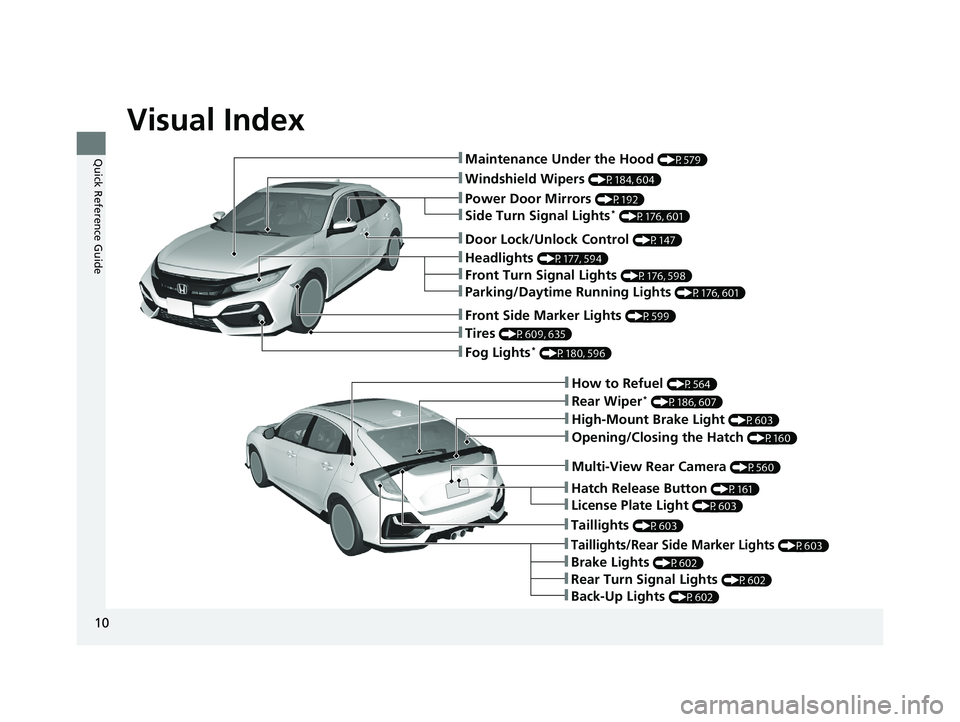
Visual Index
10
Quick Reference Guide❚Maintenance Under the Hood (P579)
❚Windshield Wipers (P184, 604)
❚Tires (P609, 635)
❚Fog Lights* (P180, 596)
❚Power Door Mirrors (P192)
❚How to Refuel (P564)
❚High-Mount Brake Light (P603)
❚Opening/Closing the Hatch (P160)
❚Multi-View Rear Camera (P560)
❚Door Lock/Unlock Control (P147)
❚Side Turn Signal Lights* (P176, 601)
❚Headlights (P177, 594)
❚Front Turn Signal Lights (P176, 598)
❚Parking/Daytime Running Lights (P176, 601)
❚Front Side Marker Lights (P599)
❚Taillights (P603)
❚Back-Up Lights (P602)
❚Brake Lights (P602)
❚Rear Turn Signal Lights (P602)
❚Taillights/Rear Side Marker Lights (P603)
❚Rear Wiper* (P186, 607)
❚Hatch Release Button (P161)
❚License Plate Light (P603)
21 CIVIC 5D HUM-31TGG6400_01.book 10 ページ 2020年8月28日 金曜日 午後1時48分
Page 15 of 711
13
Quick Reference Guide
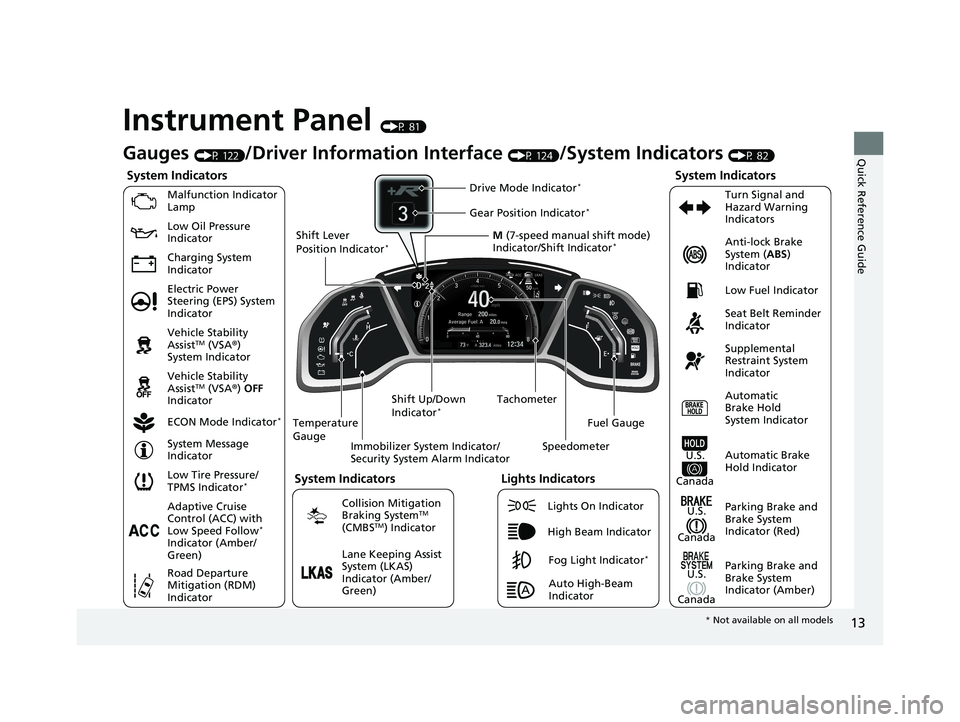
Instrument Panel (P 81)
System Indicators
Malfunction Indicator
Lamp
Charging System
IndicatorAnti-lock Brake
System (
ABS)
Indicator
Vehicle Stability
Assist
TM (VSA ®)
System Indicator
Vehicle Stability
Assist
TM (VSA ®) OFF
Indicator
Low Tire Pressure/
TPMS Indicator
*
Electric Power
Steering (EPS) System
Indicator Seat Belt Reminder
Indicator
System Indicators
Parking Brake and
Brake System
Indicator (Red) Supplemental
Restraint System
Indicator
Tachometer
Immobilizer System Indicator/
Security System Alarm Indicator
Shift Lever
Position Indicator
*
Low Fuel Indicator
ECON Mode Indicator
*
Turn Signal and
Hazard Warning
Indicators
Parking Brake and
Brake System
Indicator (Amber)
System Indicators
U.S.
Canada
U.S.
Canada Automatic
Brake Hold
System Indicator
Automatic Brake
Hold IndicatorU.S.
Canada
Temperature
Gauge
Lights Indicators
Lights On Indicator
High Beam Indicator
Fog Light Indicator*
Adaptive Cruise
Control (ACC) with
Low Speed Follow
*
Indicator (Amber/
Green)
System Message
Indicator
Collision Mitigation
Braking System
TM
(CMBSTM) Indicator
Road Departure
Mitigation (RDM)
Indicator
Lane Keeping Assist
System (LKAS)
Indicator (Amber/
Green) M
(7-speed manual shift mode)
Indicator/Shift Indicator
*
Auto High-Beam
Indicator
Shift Up/Down
Indicator
*
Drive Mode Indicator*
Speedometer
Fuel Gauge
Gear Position Indicator*
Gauges (P 122)/Driver Informat
ion Interface (P 124)/System Indicators (P 82)
Low Oil Pressure
Indicator
* Not available on all models
21 CIVIC 5D HUM-31TGG6400_01.book 13 ページ 2020年8月28日 金曜日 午後1時4 8分
Page 16 of 711
14
Quick Reference Guide
Controls (P 143)
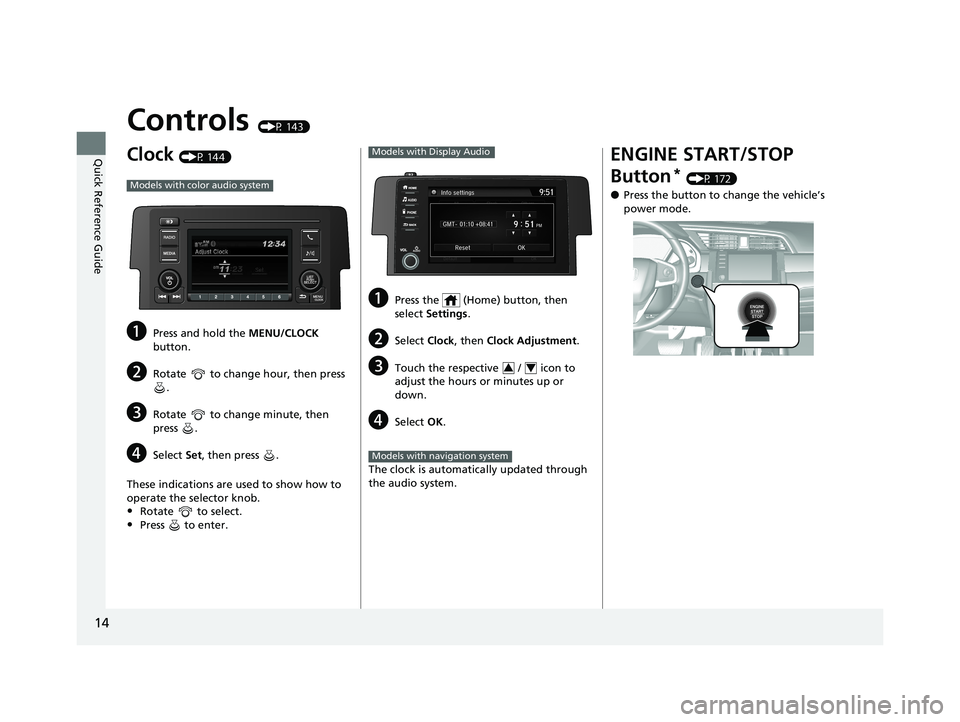
Clock (P 144)
aPress and hold the MENU/CLOCK
button.
bRotate to change hour, then press .
cRotate to change minute, then
press .
dSelect Set, then press .
These indications are used to show how to
operate the selector knob.
•Rotate to select.
•Press to enter.
Models with color audio system
aPress the (Home) button, then
select Settings .
bSelect Clock, then Clock Adjustment .
cTouch the respective / icon to
adjust the hours or minutes up or
down.
dSelect OK.
The clock is automatically updated through
the audio system.
Models with Display Audio
34
Models with navigation system
ENGINE START/STOP
Button
* (P 172)
●Press the button to ch ange the vehicle’s
power mode.
21 CIVIC 5D HUM-31TGG6400_01.book 14 ページ 2020年8月28日 金曜日 午後1時4 8分
Page 17 of 711
15
Quick Reference Guide
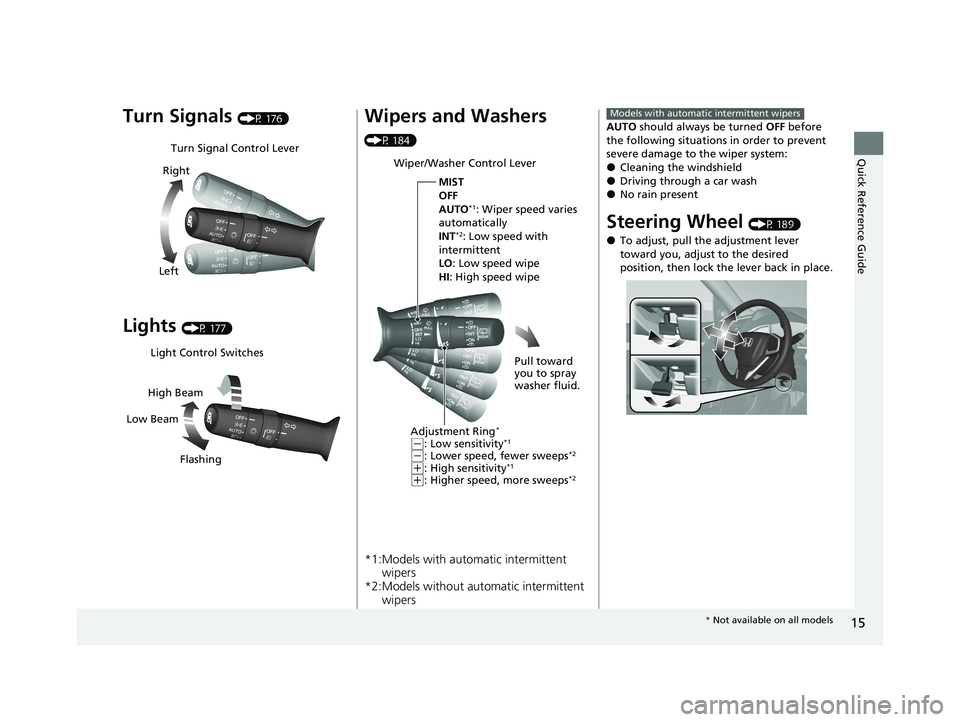
Turn Signals (P 176)
Lights (P 177)
Turn Signal Control Lever
Right
Left
Light Control Switches
Low Beam High Beam
Flashing
Wipers and Washers
(P 184)
*1:Models with automatic intermittent wipers
*2:Models without auto matic intermittent
wipers
Wiper/Washer Control Lever
Adjustment Ring
*
(-: Low sensitivity*1
(-: Lower speed, fewer sweeps*2
(+: High sensitivity*1
(+: Higher speed, more sweeps*2
MIST
OFF
AUTO
*1: Wiper speed varies
automatically
INT
*2: Low speed with
intermittent
LO : Low speed wipe
HI : High speed wipe
Pull toward
you to spray
washer fluid.
AUTO should always be turned OFF before
the following situations in order to prevent
severe damage to the wiper system:
●Cleaning the windshield●Driving through a car wash●No rain present
Steering Wheel (P 189)
●To adjust, pull the adjustment lever
toward you, adjust to the desired
position, then lock the lever back in place.
Models with automatic intermittent wipers
* Not available on all models
21 CIVIC 5D HUM-31TGG6400_01.book 15 ページ 2020年8月28日 金曜日 午後1時4 8分
Page 18 of 711
16
Quick Reference Guide
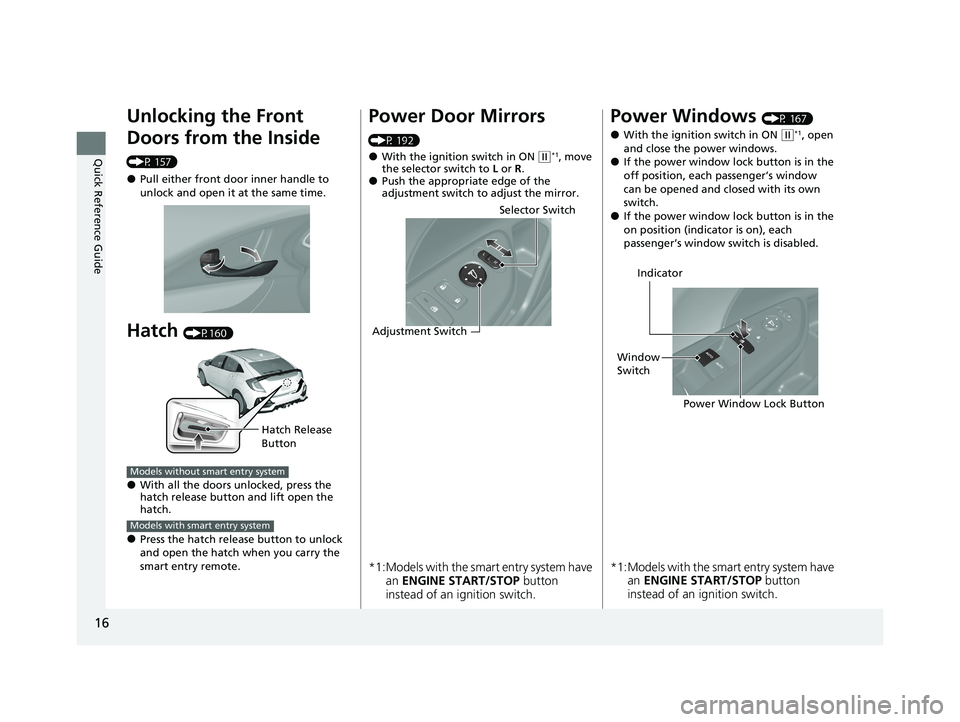
Unlocking the Front
Doors from the Inside
(P 157)
●Pull either front door inner handle to
unlock and open it at the same time.
Hatch (P160)
●With all the doors unlocked, press the
hatch release button and lift open the
hatch.
●Press the hatch release button to unlock
and open the hatch when you carry the
smart entry remote.
Hatch Release
Button
Models without smart entry system
Models with smart entry system
Power Door Mirrors
(P 192)
●With the ignition switch in ON ( w*1, move
the selector switch to L or R .
●Push the appropriate edge of the
adjustment switch to adjust the mirror.
*1:Models with the smart entry system have
an ENGINE START/STOP button
instead of an ignition switch.
Selector Switch
Adjustment Switch
Power Windows (P 167)
●With the ignition switch in ON ( w*1, open
and close the power windows.
●If the power window lock button is in the
off position, each passenger’s window
can be opened and closed with its own
switch.
●If the power window lock button is in the
on position (indicator is on), each
passenger’s window switch is disabled.
*1:Models with the sma rt entry system have
an ENGINE START/STOP button
instead of an ignition switch.
Power Window Lock Button
Window
Switch Indicator
21 CIVIC 5D HUM-31TGG6400_01.book 16 ページ 2020年8月28日 金曜日 午後1時4
8分
Page 24 of 711
22
Quick Reference Guide
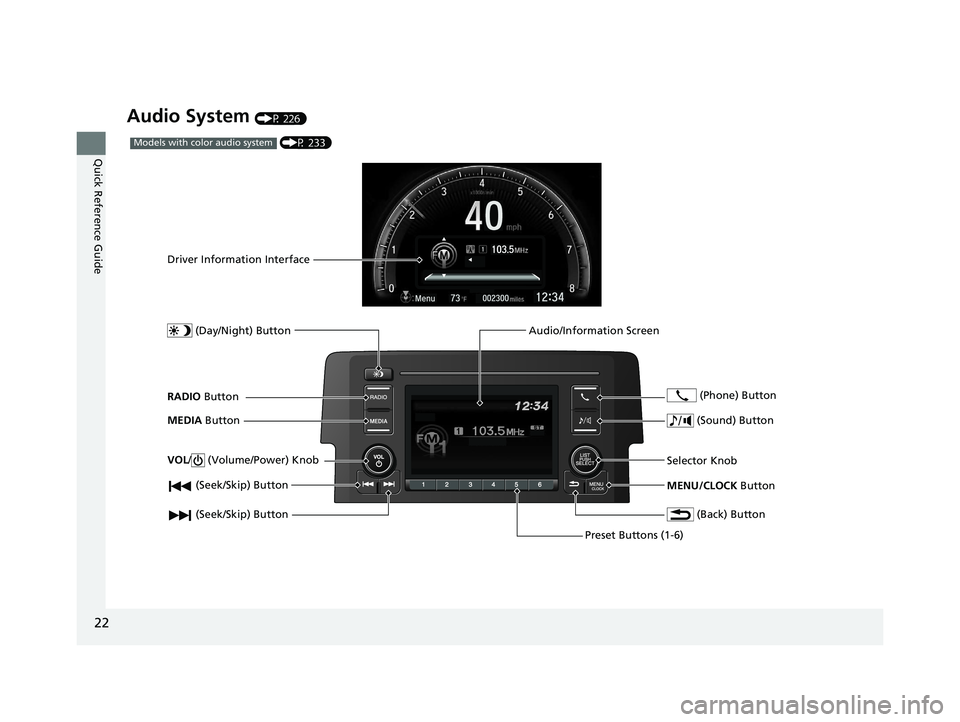
Audio System (P 226)
(P 233)Models with color audio system
(Seek/Skip) Button
RADIO Button
Driver Information Interface
(Day/Night) Button
MEDIA Button
Preset Buttons (1-6)
(Seek/Skip) Button
VOL
/ (Volume/Power) Knob
Audio/Information Screen
(Back) Button
(Sound) Button
MENU/CLOCK Button
Selector Knob (Phone) Button
21 CIVIC 5D HUM-31TGG6400_01.book 22 ページ 2020年8月28日 金曜日 午後1時4
8分
Page 26 of 711
24
Quick Reference Guide
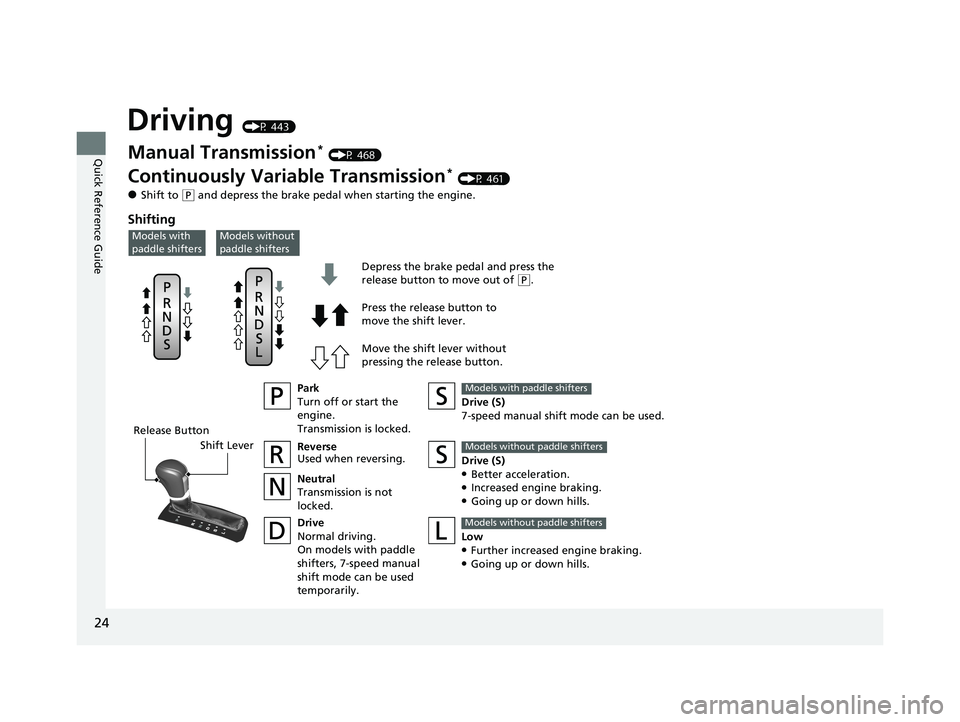
Driving (P 443)
Release ButtonShift Lever Depress the brake pedal and press the
release button to move out of
(
P.
Move the shift lever without
pressing the release button. Press the release button to
move the shift lever.
Manual Transmission* (P 468)
Continuously Variable Transmission* (P 461)
●Shift to ( P and depress the brake pedal when starting the engine.
Shifting
Park
Turn off or start the
engine.
Transmission is locked.
Reverse
Used when reversing.
Neutral
Transmission is not
locked.
Drive
Normal driving.
On models with paddle
shifters, 7-speed manual
shift mode can be used
temporarily. Drive (S)
7-speed manual shift mode can be used.Models with paddle shifters
Low●Further increased engine braking.●Going up or down hills.
Models without paddle shifters
Models without
paddle shiftersModels with
paddle shifters
Drive (S)●Better acceleration.●Increased engine braking.●Going up or down hills.
Models without paddle shifters
21 CIVIC 5D HUM-31TGG6400_01.book 24 ページ 2020年8月28日 金曜日 午後1時4
8分
Page 28 of 711
26
Quick Reference Guide
CMBSTM On and Off
(P 495)
●When a possible frontal collision is likely
unavoidable, the CMBSTM can help you to
reduce the vehicle sp eed and the severity
of the collision.
●The CMBSTM is turned on every time you
start the engine.
●To turn the CMBSTM on or off, press and
hold the button until you hear a beep.
VSA ® On and Off (P 476)
●The Vehicle Stability AssistTM (VSA ®)
system helps stabilize the vehicle during
cornering, and helps maintain traction
while accelerating on loose or slippery
road surfaces.
●VSA ® comes on automatically every time
you start the engine.
●To partially disable or fully restore VSA ®
function, press and ho ld the button until
you hear a beep.
Tire Pressure Monitoring
System (TPMS)
* (P 482)
●Detects a change in tire conditions and
overall dimensions due to decrease in tire
pressures.
●The TPMS is turned on automatically
every time you start the engine.
●A calibration procedure must be
performed when certain conditions arise.
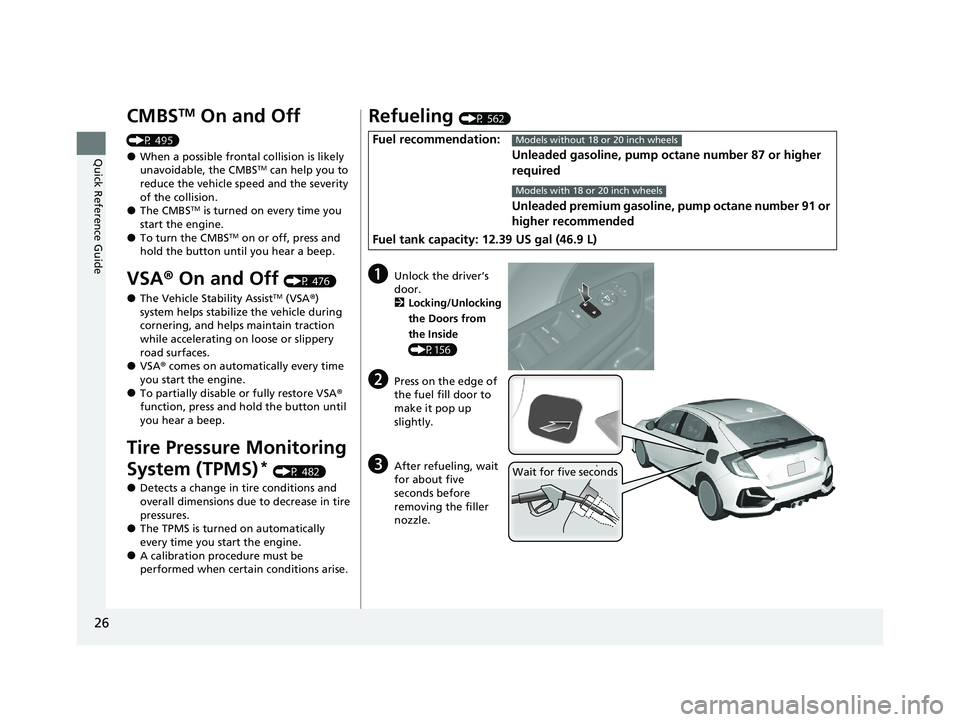
Refueling (P 562)
Fuel recommendation:
Unleaded gasoline, pump octane number 87 or higher
required
Unleaded premium gasoline, pump octane number 91 or
higher recommended
Fuel tank capacity: 12.39 US gal (46.9 L)Models without 18 or 20 inch wheels
Models with 18 or 20 inch wheels
aUnlock the driver’s
door. 2 Locking/Unlocking
the Doors from
the Inside
(P156)
bPress on the edge of
the fuel fill door to
make it pop up
slightly.
cAfter refueling, wait
for about five
seconds before
removing the filler
nozzle.Wait for five seconds
21 CIVIC 5D HUM-31TGG6400_01.book 26 ページ 2020年8月28日 金曜日 午後1時4 8分