change time HONDA CIVIC HYBRID 2010 8.G Navigation Manual
[x] Cancel search | Manufacturer: HONDA, Model Year: 2010, Model line: CIVIC HYBRID, Model: HONDA CIVIC HYBRID 2010 8.GPages: 155, PDF Size: 3.17 MB
Page 127 of 155
126Navigation System
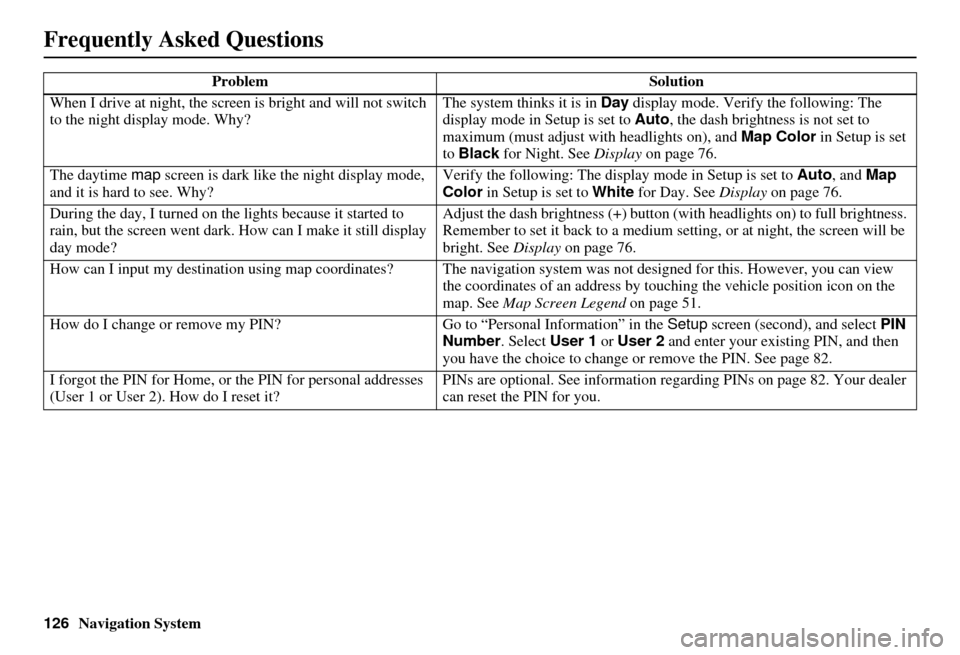
When I drive at night, the screen
is bright and will not switch
to the night display mode. Why? The system thinks it is in Day
display mode. Verify the following: The
display mode in Setup is set to Auto , the dash brightness is not set to
maximum (must adjust with headlights on), and Map Color in Setup is set
to Black for Night. See Display on page 76.
The daytime map screen is dark like the night display mode,
and it is hard to see. Why? Verify the following: The disp
lay mode in Setup is set to Auto, and Map
Color in Setup is set to White for Day. See Display on page 76.
During the day, I turned on the lights because it started to
rain, but the screen went dark. How can I make it still display
day mode? Adjust the dash brightness (+) button
(with headlights on) to full brightness.
Remember to set it back to a medium set ting, or at night, the screen will be
bright. See Display on page 76.
How can I input my destination using map coordinates? The navigation system was not designed for th is. However, you can view
the coordinates of an address by touching the vehicle position icon on the
map. See Map Screen Legend on page 51.
How do I change or remove my PIN? Go to “Personal Information” in the Setup screen (second), and select PIN
Number . Select User 1 or User 2 and enter your existing PIN, and then
you have the choice to change or remove the PIN. See page 82.
I forgot the PIN for Home, or the PIN for personal addresses
(User 1 or User 2). How do I reset it? PINs are optional. See information regarding PINs on page 82. Your dealer
can reset the PIN for you.
Problem
Solution
Frequently Asked Questions
Page 134 of 155

Navigation System133
Miscellaneous Other Questions
Problem Solution
My clock frequently changes forward and backward by one
hour. Why is this? The clock is being automatically set ba
sed on your GPS location. If you live
and work on the boundary between two time zones, you can turn off this
feature. See page 96.
When driving near a time zone border, the time changes even
though I am not near the time zone. Why is this? The time zone borders are only appr
oximated in the system. Depending on
the geography of the time zone boundary, the switch to a different zone can
be erratic. See page 96.
My state does not observe dayli ght saving time. How do I turn
off this feature? You can turn off this feature. See page 95.
Daylight saving time occurred, but the navigation system did
not change time even though Setup shows Auto Daylight
Saving Time is On . Go to the
Clock adjustment screen in Setup and select DST Selection.
Ensure that the correct DST schedule is selected. For more information, see
Clock Settings on page 95.
The navigation system automatic daylight time feature is not
switching the navigation system clock on the correct dates.
Why is this? 1) Go to the
Clock adjustment screen in Setup and ensure that Auto
Daylight Saving Time is On .
2) The navigation system is designed to switch to daylight saving time
according to the months selected in the DST schedule selection screen.
Ensure that the appropriate schedule is selected. For more information,
see Clock Settings on page 95.
The navigation system clock switched by one hour for no
apparent reason. Wh at can cause this? 1) You may be driving near
a time zone boundary (see Auto Time Zone by
GPS on page 96).
2) The navigation system does not switch between standard and daylight
saving time. Set Auto Daylight Saving Time to On on the Clock
adjustment screen in Setup, and ensure that the correct month switching
schedule is chosen on the DST schedule selection screen. See page 95
for more information.
Frequently Asked Questions
Page 139 of 155
138Navigation System
Glossary
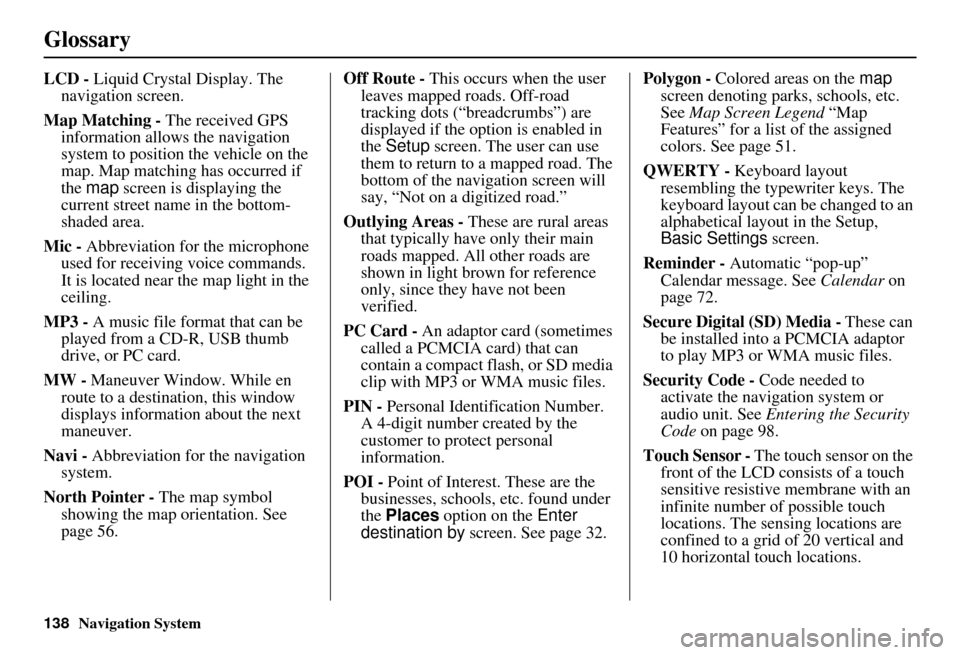
LCD - Liquid Crystal Display. The
navigation screen.
Map Matching - The received GPS information allows the navigation
system to position the vehicle on the
map. Map matching has occurred if
the map screen is displaying the
current street name in the bottom-
shaded area.
Mic - Abbreviation for the microphone
used for receiving voice commands.
It is located near the map light in the
ceiling.
MP3 - A music file format that can be played from a CD-R, USB thumb
drive, or PC card.
MW - Maneuver Window. While en
route to a destination, this window
displays informatio n about the next
maneuver.
Navi - Abbreviation for the navigation
system.
North Pointer - The map symbol showing the map orientation. See
page 56. Off Route -
This occurs when the user
leaves mapped roads. Off-road
tracking dots (“breadcrumbs”) are
displayed if the option is enabled in
the Setup screen. The user can use
them to return to a mapped road. The
bottom of the navigation screen will
say, “Not on a digitized road.”
Outlying Areas - These are rural areas
that typically have only their main
roads mapped. All other roads are
shown in light brown for reference
only, since they have not been
verified.
PC Card - An adaptor card (sometimes
called a PCMCIA card) that can
contain a compact flash, or SD media
clip with MP3 or WMA music files.
PIN - Personal Identification Number.
A 4-digit number created by the
customer to protect personal
information.
POI - Point of Interest. These are the
businesses, schools, etc. found under
the Places option on the Enter
destination by screen. See page 32. Polygon - Colored areas on the
map
screen denoting parks, schools, etc.
See Map Screen Legend “Map
Features” for a list of the assigned
colors. See page 51.
QWERTY - Keyboard layout
resembling the typewriter keys. The
keyboard layout can be changed to an
alphabetical layout in the Setup,
Basic Settings screen.
Reminder - Automatic “pop-up”
Calendar message. See Calendar on
page 72.
Secure Digital (SD) Media - These can
be installed into a PCMCIA adaptor
to play MP3 or WMA music files.
Security Code - Code needed to
activate the navigation system or
audio unit. See Entering the Security
Code on page 98.
Touch Sensor - The touch sensor on the
front of the LCD consists of a touch
sensitive resistive membrane with an
infinite number of possible touch
locations. The sensing locations are
confined to a grid of 20 vertical and
10 horizontal touch locations.
Page 141 of 155
140Navigation System
Voice Command Index
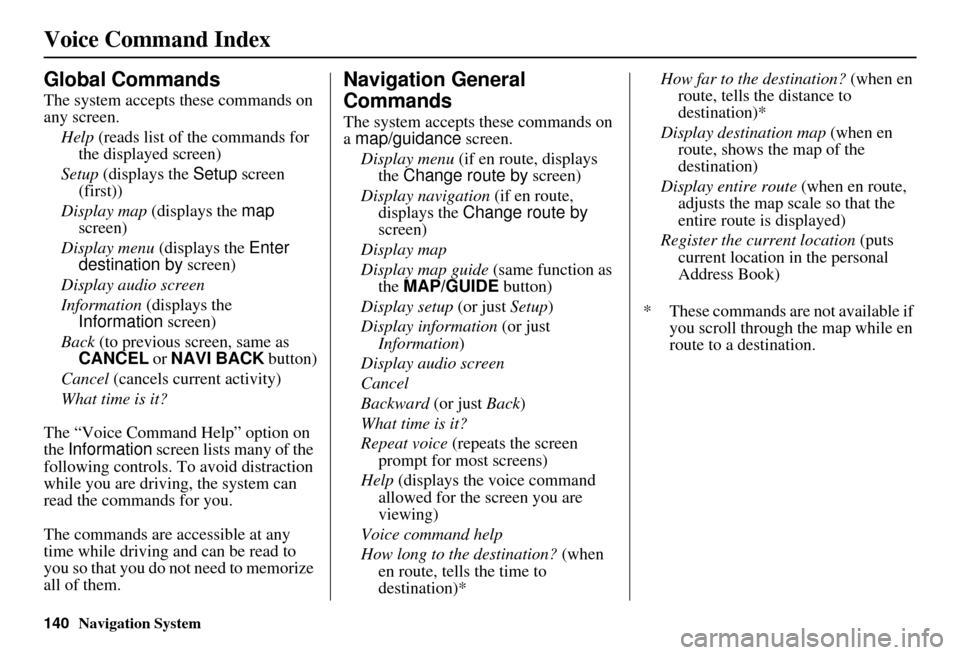
Global Commands
The system accepts these commands on
any screen.Help (reads list of the commands for
the displayed screen)
Setup (displays the Setup screen
(first))
Display map (displays the map
screen)
Display menu (displays the Enter
destination by screen)
Display audio screen
Information (displays the
Information screen)
Back (to previous screen, same as
CANCEL or NAVI BACK button)
Cancel (cancels current activity)
What time is it?
The “Voice Command Help” option on
the Information screen lists many of the
following controls. To avoid distraction
while you are driving, the system can
read the commands for you.
The commands are accessible at any
time while driving and can be read to
you so that you do not need to memorize
all of them.
Navigation General
Commands
The system accepts these commands on
a map/guidance screen.
Display menu (if en route, displays
the Change route by screen)
Display navigation (if en route,
displays the Change route by
screen)
Display map
Display map guide (same function as
the MAP/GUIDE button)
Display setup (or just Setup)
Display information (or just
Information )
Display audio screen
Cancel
Backward (or just Back)
What time is it?
Repeat voice (repeats the screen
prompt for most screens)
Help (displays the voice command allowed for the screen you are
viewing)
Voice command help
How long to the destination? (when
en route, tells the time to
destination)* How far to the destination?
(when en
route, tells th e distance to
destination)*
Display destination map (when en
route, shows the map of the
destination)
Display entire route (when en route,
adjusts the map scale so that the
entire route is displayed)
Register the current location (puts
current location in the personal
Address Book)
* These commands are not available if you scroll through the map while en
route to a destination.
Page 150 of 155
Navigation System149
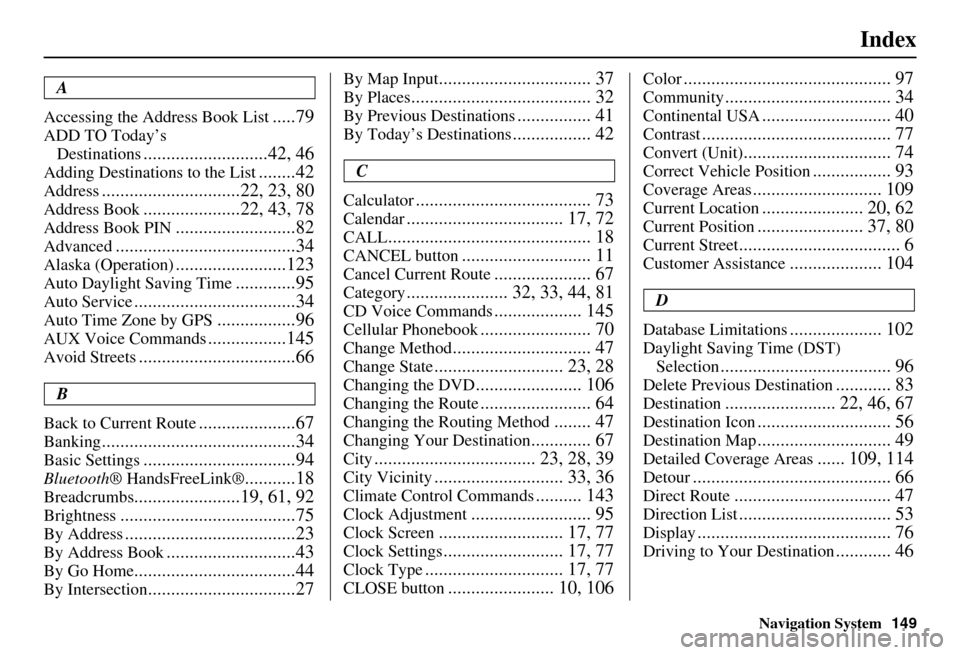
Index
A
Accessing the Address Book List
.....79
ADD TO Today’s Destinations
...........................42, 46
Adding Destinations to the List........42
Address..............................22, 23, 80
Address Book.....................22, 43, 78
Address Book PIN..........................82
Advanced.......................................34
Alaska (Operation)........................123
Auto Daylight Saving Time.............95
Auto Service...................................34
Auto Time Zone by GPS.................96
AUX Voice Commands.................145
Avoid Streets..................................66
B
Back to Current Route
.....................67
Banking..........................................34
Basic Settings.................................94
Bluetooth ® HandsFreeLink®...........18
Breadcrumbs.......................19, 61, 92
Brightness......................................75
By Address.....................................23
By Address Book............................43
By Go Home...................................44
By Intersection................................27
By Map Input................................. 37
By Places....................................... 32
By Previous Destinations................ 41
By Today’s Destinations................. 42
C
Calculator
...................................... 73
Calendar.................................. 17, 72
CALL............................................ 18
CANCEL button............................ 11
Cancel Current Route..................... 67
Category...................... 32, 33, 44, 81
CD Voice Commands................... 145
Cellular Phonebook........................ 70
Change Method.............................. 47
Change State............................ 23, 28
Changing the DVD....................... 106
Changing the Route........................ 64
Changing the Routing Method........ 47
Changing Your Destination............. 67
City................................... 23, 28, 39
City Vicinity............................ 33, 36
Climate Control Commands.......... 143
Clock Adjustment.......................... 95
Clock Screen........................... 17, 77
Clock Settings.......................... 17, 77
Clock Type.............................. 17, 77
CLOSE button....................... 10, 106
Color............................................. 97
Community.................................... 34
Continental USA............................ 40
Contrast......................................... 77
Convert (Unit)................................ 74
Correct Vehicle Position................. 93
Coverage Areas............................ 109
Current Location...................... 20, 62
Current Position....................... 37, 80
Current Street................................... 6
Customer Assistance.................... 104
D
Database Limitations
.................... 102
Daylight Saving Time (DST) Selection
..................................... 96
Delete Previous Destination............ 83
Destination........................ 22, 46, 67
Destination Icon............................. 56
Destination Map............................. 49
Detailed Coverage Areas...... 109, 114
Detour........................................... 66
Direct Route.................................. 47
Direction List................................. 53
Display.......................................... 76
Driving to Your Destination............ 46