display HONDA CIVIC HYBRID 2012 9.G Repair Manual
[x] Cancel search | Manufacturer: HONDA, Model Year: 2012, Model line: CIVIC HYBRID, Model: HONDA CIVIC HYBRID 2012 9.GPages: 313, PDF Size: 8.65 MB
Page 226 of 313
225
Driving
Fuel EconomyImproving Fuel EconomyFuel economy depends on several conditions, including driving conditions, your
driving habits, the condition of your vehicle, and loading. Depending on these and
other conditions, you may or may not achieve the rated fuel economy of this vehicle.
You can optimize your fuel economy with proper maintenance of your vehicle.
Always maintain your vehicle in accordance with the messages displayed on the
multi-information display.
• Use the recommended viscosity engine oil, displaying the API Certification Seal.
• Maintain the specified tire pressure.
• Do not load the vehicle with excess cargo.
• Keep your vehicle clean. A buildup of snow or mud on your vehicle's underside
adds weight and increases wind resistance.■
Maintenance and Fuel Economy
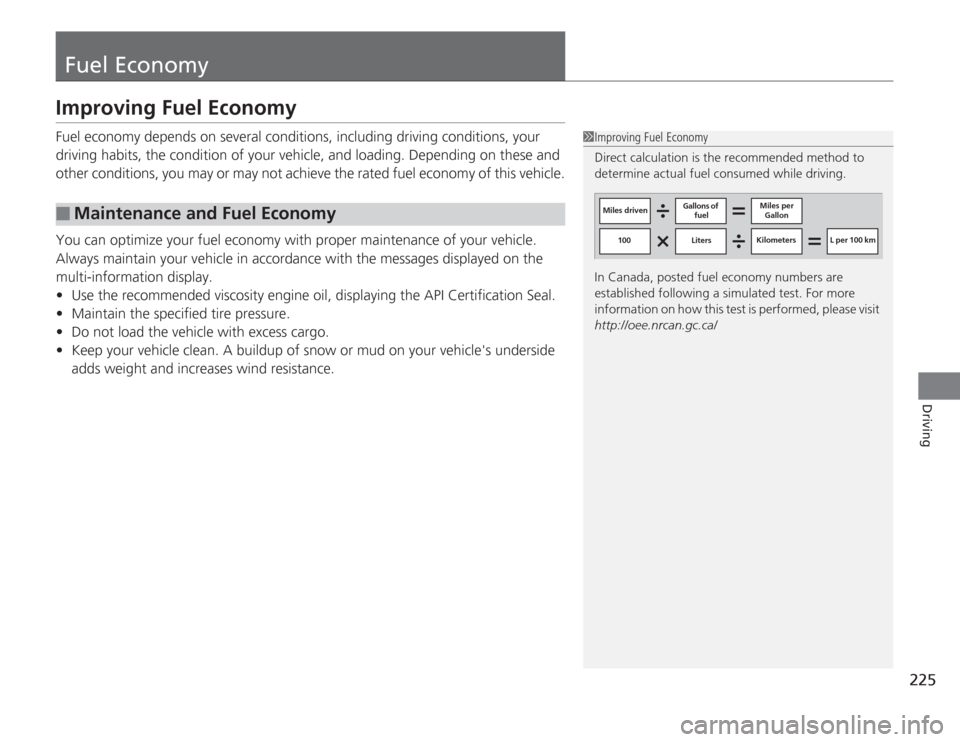
1Improving Fuel Economy
Direct calculation is the recommended method to
determine actual fuel consumed while driving.
In Canada, posted fuel economy numbers are
established following a simulated test. For more
information on how this test is performed, please visit
http://oee.nrcan.gc.ca/
Miles driven Gallons of
fuel Miles per
Gallon
100 Liters Kilometers L per 100 km
Page 229 of 313
228Maintenance
Before Performing MaintenanceInspection and MaintenanceFor your safety, perform all listed inspections and maintenance to keep your vehicle
in good condition. If you become aware of any abnormality (noise, smell, insufficient
brake fluid, oil residue on the ground, etc.), have your vehicle inspected by a dealer.
(Note, however, that service at a dealer is not mandatory to keep your \
warranties in
effect.) Refer to the separate maintenance booklet for detailed maintenance and
inspection information.■
Daily inspections
Perform inspections before long distance trips, when washing the vehicle, or when
refueling.
■
Periodic inspections
• Check the continuously variable transmission fluid level monthly.
2 Continuously Variable Transmission (CVT) Fluid P. 244
•Check the brake fluid level monthly.
2 Checking the Brake Fluid P. 245
•Check the tire pressure monthly. Examine the tread for wear and foreign objects.
2 Checking and Maintaining Tires P. 254
•Check the operation of the exterior lights monthly.
2 Replacing Light Bulbs P. 247
•Check the condition of the wiper blades at least every six months.
2Checking and Mainta ining Wiper Blades P. 252
■
Types of Inspection and Maintenance
1Inspection and Maintenance
Maintenance, replacement, or repair of
emissions control devices and systems may be
done by any automotive repair establishment or
individuals using parts that are "certified" to
EPA standards.
According to state and federal regulations, failure to
perform maintenance on the maintenance main
items marked with # will not void your emissions
warranties. However, all maintenance services should
be performed in accordance with the intervals
indicated by the multi-information display. 2 Maintenance Service Items P. 233
If you want to perform complex maintenance tasks
that require more skills and tools, you can purchase a
subscription to the Service Express website at
www.techinfo.honda.com .
2 Authorized Manuals P. 303
If you want to perform maintenance yourself, make
sure that you have the necessary tools and skills first.
After performing maintenance, update the records in
the separate maintenance booklet.
U.S. models
Page 232 of 313
231
Continued
Maintenance
Maintenance Minder™If the engine oil life is less than 15%, you will see the Maintenance Minder messages
appear on the multi-information display every time you turn the ignition switch to
ON
(w
. The messages notify you when to change the engine oil, or when to bring
your vehicle to a dealer for indicated maintenance services.
To Use Maintenance Minder
TM
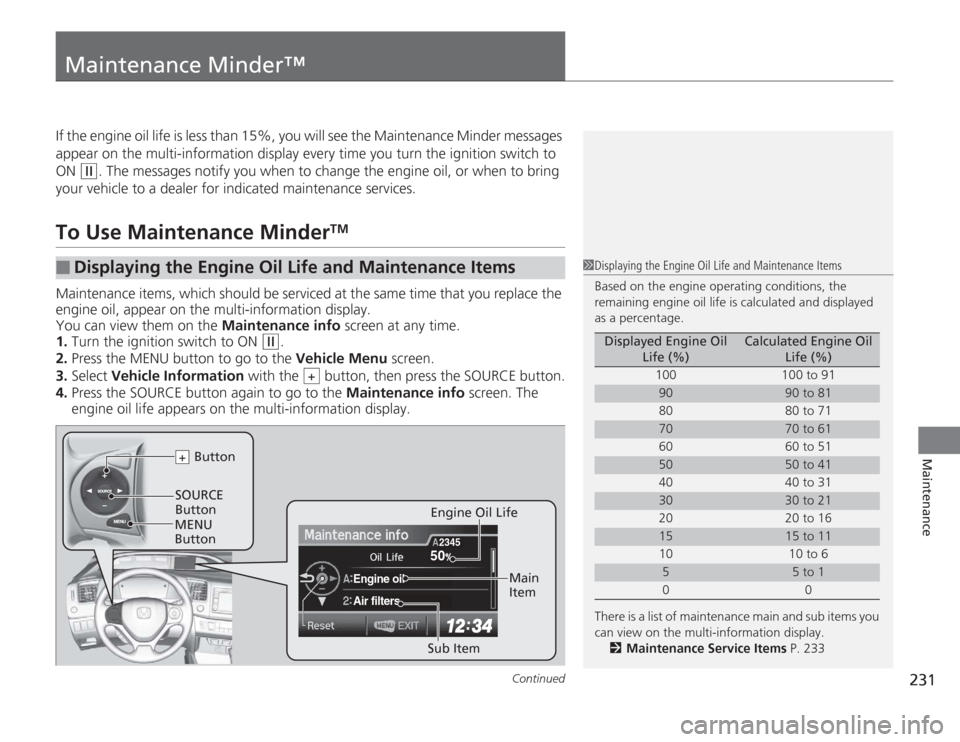
Maintenance items, which should be serviced at the same time that you replace the
engine oil, appear on the multi-information display.
You can view them on the Maintenance info screen at any time.
1. Turn the ignition switch to ON
(w
.
2. Press the MENU button to go to the Vehicle Menu screen.
3. Select Vehicle Information with the button, then press the SOURCE button.
4. Press the SOURCE button again to go to the Maintenance info screen. The
engine oil life appears on the multi-information display.
■
Displaying the Engine Oil Life and Maintenance Items
1 Displaying the Engine Oil Life and Maintenance Items
Based on the engine operating conditions, the
remaining engine oil life is calculated and displayed
as a percentage.
There is a list of maintenance main and sub items you
can view on the multi-information display.
2 Maintenance Service Items P. 233
Displayed Engine Oil
Life (%)
Calculated Engine Oil Life (%)
100 100 to 91
90
90 to 81
80 80 to 71
70
70 to 61
60 60 to 51
50
50 to 41
40 40 to 31
30
30 to 21
20 20 to 16
15
15 to 11
10 10 to 6
5
5 to 1
00
+
50
Engine oilAir filters
2345
SOURCE
Button Button+
Sub Item Main
Item
Engine Oil Life
MENU
Button
Page 233 of 313
232
uuMaintenance Minder™ uTo Use Maintenance Minder
TM
Maintenance
The system message indicator ( ) comes on along with the Maintenance Minder message.■
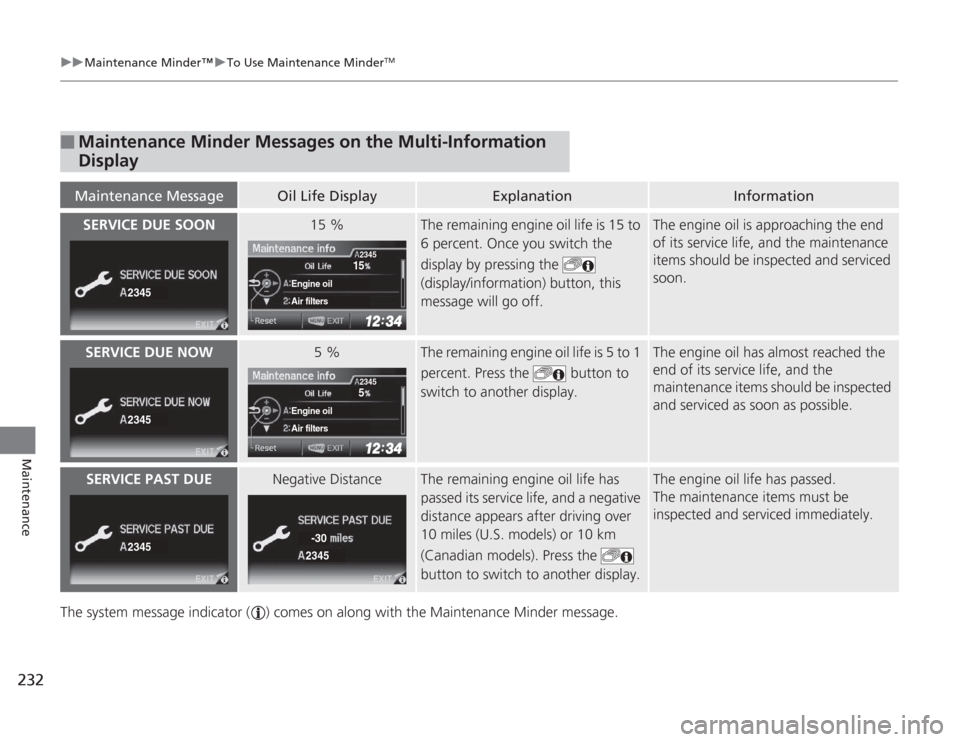
Maintenance Minder Messages on the Multi-Information
DisplayMaintenance Message
Oil Life Display
Explanation
Information
SERVICE DUE SOON
15 %
The remaining engine oil life is 15 to
6 percent. Once you switch the
display by pressing the
(display/information) button, this
message will go off.
The engine oil is approaching the end
of its service life, and the maintenance
items should be inspected and serviced
soon.
SERVICE DUE NOW
5 %
The remaining engine oil life is 5 to 1
percent. Press the button to
switch to another display.
The engine oil has almost reached the
end of its service life, and the
maintenance items should be inspected
and serviced as soon as possible.
SERVICE PAST DUE
Negative Distance
The remaining engine oil life has
passed its service life, and a negative
distance appears after driving over
10 miles (U.S. models) or 10 km
(Canadian models). Press the
button to switch to another display.
The engine oil life has passed.
The maintenance items must be
inspected and serviced immediately.
2345
15
Engine oilAir filters
2345
2345
5
Engine oilAir filters
2345
2345
2345-30
Page 234 of 313
233
uuMaintenance Minder™ uTo Use Maintenance Minder
TM
Continued
Maintenance
■
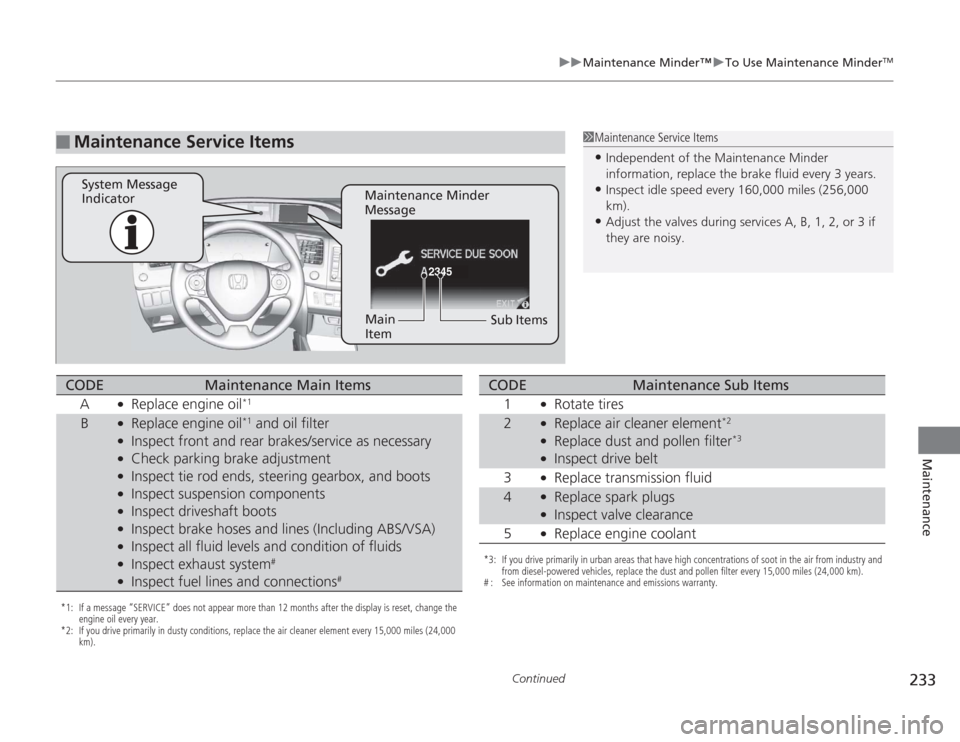
Maintenance Service Items
1Maintenance Service Items•Independent of the Maintenance Minder
information, replace the brake fluid every 3 years.•Inspect idle speed every 160,000 miles (256,000
km).•Adjust the valves during services A, B, 1, 2, or 3 if
they are noisy.
2345
Maintenance Minder
Message
System Message
Indicator
Sub Items
Main
Item
*1: If a message “SERVICE” does not appear more than 12 months after the display is reset, change the
engine oil every year.
*2: If you drive primarily in dusty conditions, replace the air cleaner element every 15,000 miles (24,000 km).CODE
Maintenance Main Items
A
●
Replace engine oil
*1
B
●
Replace engine oil
*1 and oil filter
●
Inspect front and rear brakes/service as necessary
●
Check parking brake adjustment
●
Inspect tie rod ends, steering gearbox, and boots
●
Inspect suspension components
●
Inspect driveshaft boots
●
Inspect brake hoses and lines (Including ABS/VSA)
●
Inspect all fluid levels and condition of fluids
●
Inspect exhaust system
#
●
Inspect fuel lines and connections
#
*3: If you drive primarily in urban areas that have high concentrations of soot in the air from industry and from diesel-powered vehicles, replace the dust and pollen filter every 15,000 miles (24,000 km).
# : See information on maintenance and emissions warranty.CODE
Maintenance Sub Items
1
●
Rotate tires
2
●
Replace air cleaner element
*2
●
Replace dust and pollen filter
*3
●
Inspect drive belt
3
●
Replace transmission fluid
4
●
Replace spark plugs
●
Inspect valve clearance
5
●
Replace engine coolant
Page 235 of 313
uuMaintenance Minder™ uTo Use Maintenance Minder
TM
234Maintenance
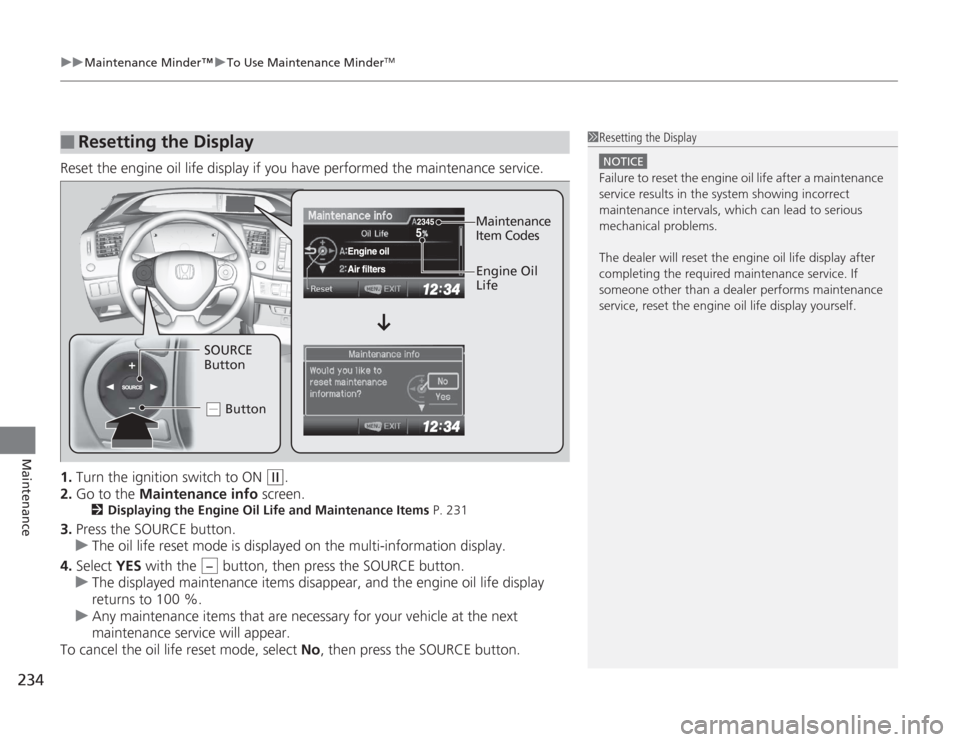
Reset the engine oil life display if you have performed the maintenance service.
1. Turn the ignition switch to ON
(w
.
2. Go to the Maintenance info screen.
2Displaying the Engine Oil Life and Maintenance Items P. 231
3.Press the SOURCE button.
u The oil life reset mode is displayed on the multi-information display.
4. Select YES with the button, then press the SOURCE button.
u The displayed maintenance items disappear, and the engine oil life display
returns to 100 %.
u Any maintenance items that are necessary for your vehicle at the next
maintenance service will appear.
To cancel the oil life reset mode, select No, then press the SOURCE button.■
Resetting the Display
1Resetting the Display
NOTICEFailure to reset the engine oil life after a maintenance
service results in the system showing incorrect
maintenance intervals, which can lead to serious
mechanical problems.
The dealer will reset th e engine oil life display after
completing the requi red maintenance service. If
someone other than a dealer performs maintenance
service, reset the engine oil life display yourself.
Engine Oil
Life
SOURCE
Button Button
.
Maintenance
Item Codes
−
Page 241 of 313
240
uuMaintenance Under the Hood uChanging the Engine Oil and Oil Filter
Maintenance
Changing the Engine Oil and Oil FilterYou must change the engine oil and oil filter regularly in order to maintain the
engine's lubrication. The engine may be da maged if they are not changed regularly.
Change the oil and filter in accordance with the maintenance message on the multi-
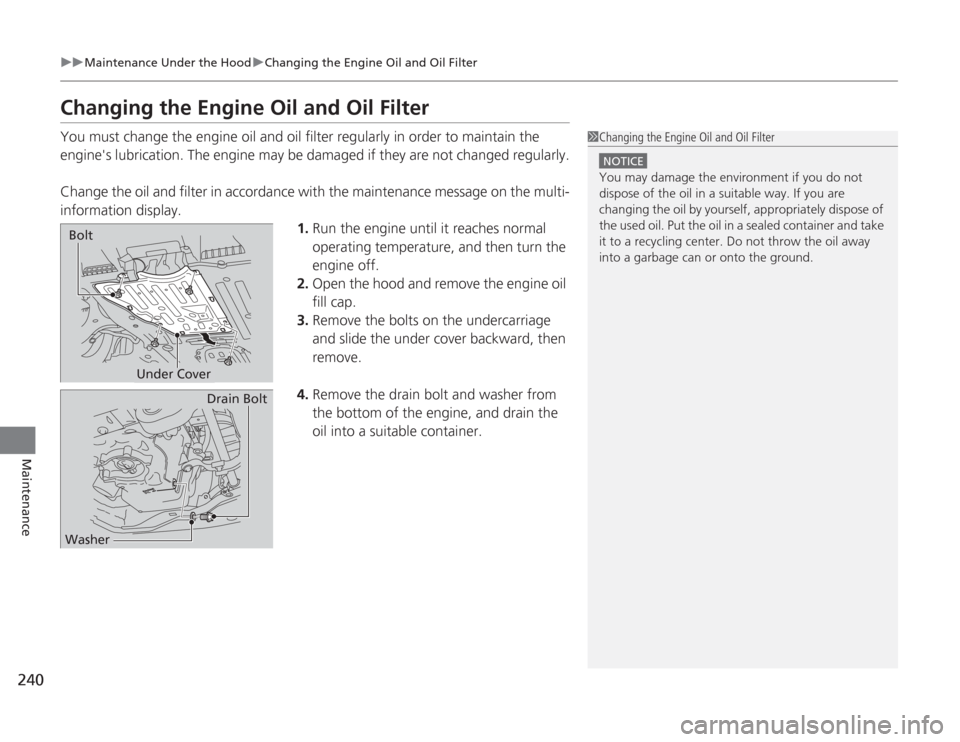
information display. 1.Run the engine until it reaches normal
operating temperature, and then turn the
engine off.
2. Open the hood and remove the engine oil
fill cap.
3. Remove the bolts on the undercarriage
and slide the under cover backward, then
remove.
4. Remove the drain bolt and washer from
the bottom of the engine, and drain the
oil into a suitable container.
1Changing the Engine Oil and Oil Filter
NOTICEYou may damage the environment if you do not
dispose of the oil in a suitable way. If you are
changing the oil by yourself, appropriately dispose of
the used oil. Put the oil in a sealed container and take
it to a recycling center. Do not throw the oil away
into a garbage can or onto the ground.
Under Cover
Bolt
Drain Bolt
Washer
Page 262 of 313
261
uuChecking and Maintaining Tires uTire Rotation
Maintenance
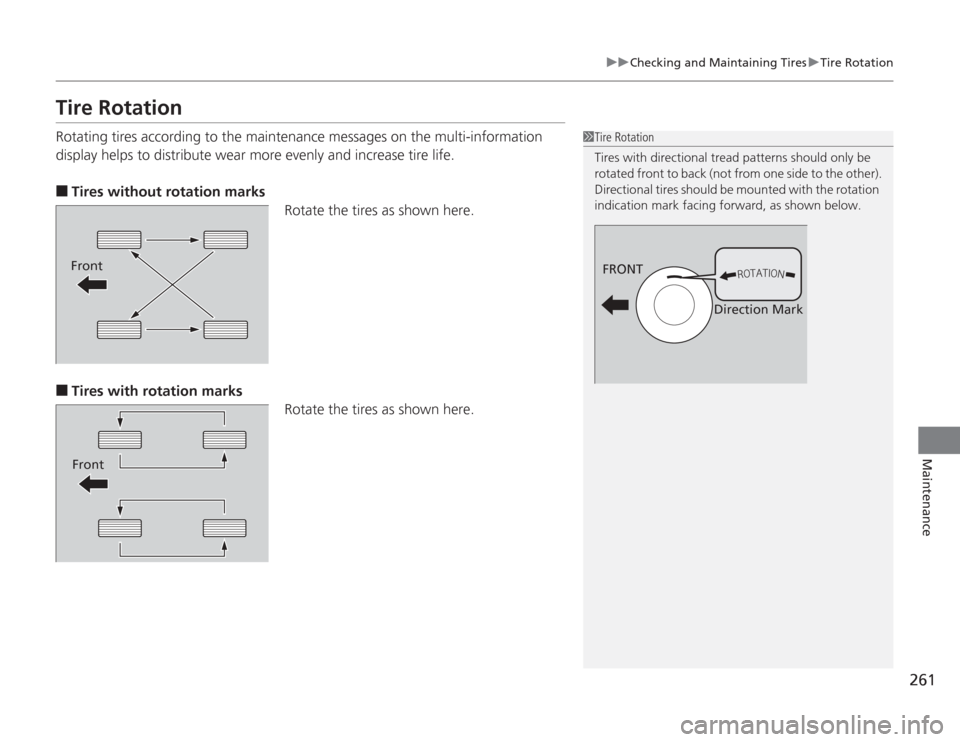
Tire RotationRotating tires according to the maintenance messages on the multi-information
display helps to distribute wear more evenly and increase tire life.■
Tires without rotation marks
Rotate the tires as shown here.
■
Tires with rotation marksRotate the tires as shown here.
1Tire Rotation
Tires with directional tread patterns should only be
rotated front to back (not from one side to the other).
Directional tires should be mounted with the rotation
indication mark facing forward, as shown below.
FRONT
Direction Mark
FrontFront
Page 279 of 313
uuIf a Tire Goes Flat uChanging a Flat Tire
278Handling the Unexpected
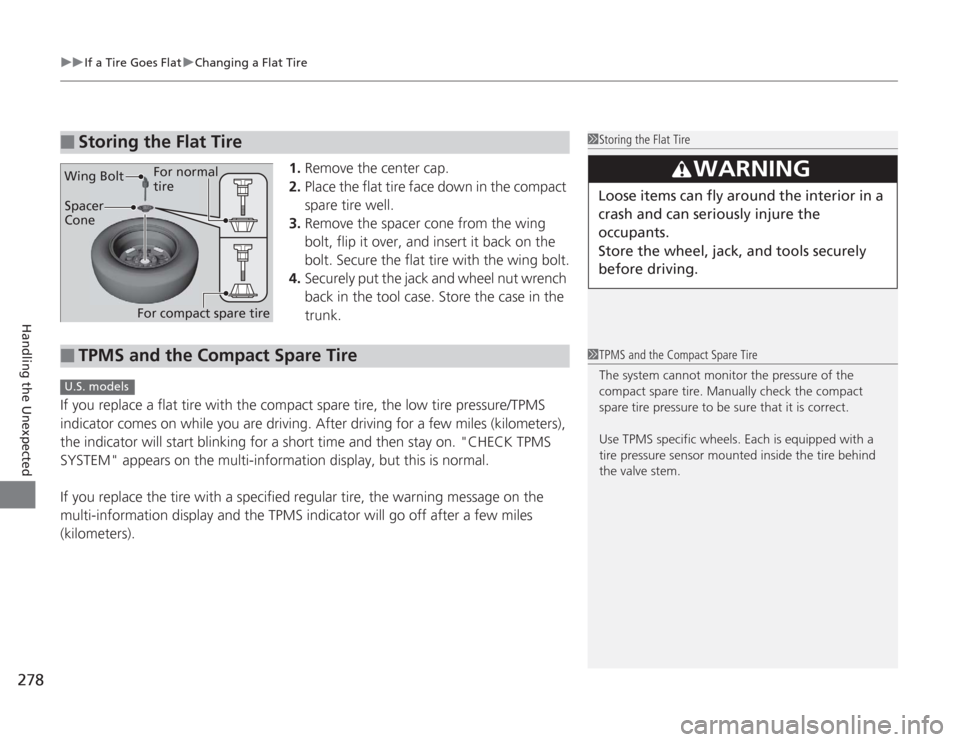
1. Remove the center cap.
2. Place the flat tire face down in the compact
spare tire well.
3. Remove the spacer cone from the wing
bolt, flip it over, and insert it back on the
bolt. Secure the flat tire with the wing bolt.
4. Securely put the jack and wheel nut wrench
back in the tool case. Store the case in the
trunk.
If you replace a flat tire with the compact spare tire, the low tire pressure/TPMS
indicator comes on while you are driving. After driving for a few miles (kilometers),
the indicator will start blinking for a short time and then stay on. "CHECK TPMS
SYSTEM" appears on the multi-information display, but this is normal.
If you replace the tire with a specified regular tire, the warning message on the
multi-information display and the TPMS indicator will go off after a few miles
(kilometers).
■
Storing the Flat Tire
1 Storing the Flat Tire
3
WARNING
Loose items can fly around the interior in a
crash and can seriously injure the
occupants.
Store the wheel, jack, and tools securely
before driving.
Spacer
Cone
Wing Bolt
For compact spare tire For normal
tire
■
TPMS and the Compact Spare Tire
1
TPMS and the Compact Spare Tire
The system cannot monitor the pressure of the
compact spare tire. Manually check the compact
spare tire pressure to be sure that it is correct.
Use TPMS specific wheels. Each is equipped with a
tire pressure sensor mounted inside the tire behind
the valve stem.
U.S. models
Page 307 of 313
306INDEX
Fluid ........................................................ 245
Foot Brake ............................................... 214
Indicator ............................................ 70, 287
Parking Brake .......................................... 213
Brightness Control (In strument Panel).... 122
Bulb Replacement ..................................... 247
Back-Up Light and Rear Turn Signal Light ...................................................... 250
Brake/Taillight and Rear Si de Marker
Bulbs ..................................................... 250
Bulb Specifications ................................... 294
Front Turn Signal/Parking/Side Marker Light ...................................................... 249
Headlights ............................................... 247
High-Mount Brake Light .......................... 251
Rear License Plate Light............................ 251
Side Turn Signal/Emergency Indicator....... 249
CCarbon Monoxide Gas ................................ 66
Carrying Cargo .................................. 193, 195
CD Player ................................................... 151
Certification Label .................................... 296
Changing Bulbs ......................................... 247
Charging System Indicator ................. 71, 285
Child Safety ................................................. 54
Childproof Door Locks ............................. 108
Emergency Trunk Opener ........................ 112
Child Seat .................................................... 54
Booster Seats ............................................. 65 Child Seat for Infants................................. 56
Child Seat for Small Children ..................... 57
Installing a Child Seat with a Lap/Shoulder
Seat Belt .................................................. 61
Larger Children ......................................... 64
Rear-facing Child Seat ............................... 56
Selecting a Child Seat ................................ 58
Using a Tether ........................................... 63
Childproof Door Locks ............................. 108
Cleaning the Exterior ............................... 268
Cleaning the Interior ................................ 266
Climate Control System ............................ 137
Changing the Mode ................................ 137
Defrosting the Windshield and
Windows ............................................... 138
Dust and Pollen Filter............................... 265
Recirculation and Fresh Air Mode ............ 137
Sensors ................................................... 139
Using Automatic Climate Control ............ 137
Clock .......................................................... 102
Coat Hook ................................................. 135
Compact Spare Tire .......................... 273, 295
Console Compartment ............................. 132
Controls ..................................................... 101
Coolant (Engine) ...................................... 242
Adding to the Radiator ............................ 243
Adding to the Reserve Tank..................... 242
High Temperature Indicator ....................... 78
Low Temperature Indicator........................ 78
Overheating ............................................ 283
Creep Aid System ..................................... 200 Creeping
................................................... 202
Cruise Control .......................................... 205
Indicator ................................................... 79
Cup Holders .............................................. 133
Customer Service Information ................ 304
Customized Features ................................. 90
DDaytime Running Lights .......................... 120
Dead Battery ............................................ 280
Defrosting the Windshield and Windows ................................................. 138
Devices that Emit Radio Waves ............... 297
Dimming Headlights .............................................. 118
Rearview Mirror ...................................... 125
Dipstick (Engine Oil) ................................ 238
Directional Signals (Turn Signal) ............. 118
Display/Information Button ...................... 83
Door Mirrors ............................................. 125
Doors ........................................................ 103
Auto Door Locking.................................. 109
Auto Door Unlocking .............................. 109
Door Open Indicator ........................... 31, 74
Keys........................................................ 103
Locking/Unlocking the Doors
from the Inside...................................... 107
Locking/Unlocking the Doors from the Outside................................... 105
Lockout prevention system...................... 106