ESP HONDA CIVIC HYBRID 2012 9.G Owners Manual
[x] Cancel search | Manufacturer: HONDA, Model Year: 2012, Model line: CIVIC HYBRID, Model: HONDA CIVIC HYBRID 2012 9.GPages: 313, PDF Size: 8.65 MB
Page 26 of 313
25Quick Reference Guide
A Few Words About SafetyYour safety, and the safety of others, is very important. And
operating this vehicle safely is an important responsibility.
To help you make informed decisions about safety, we have
provided operating procedures and other information on labels and
in this manual. This information alerts you to potential hazards that
could hurt you or others.
Of course, it is not practical or possible to warn you about all the
hazards associated with operating or maintaining your vehicle. You
must use your own good judgement.You will find this important safety information in a variety of forms,
including:
●
Safety Labels - on the vehicle.
● Safety Messages - preceded by a safety alert symbol
3
and
one of three signal words: DANGER, WARNING , or CAUTION .
These signal words mean:
● Safety Headings - such as Important Safety Precautions.
● Safety Section - such as Safe Driving.
● Instructions - how to use this vehicle correctly and safely.
This entire book is filled with important safety information - please
read it carefully.
3 DANGER
You WILL be KILLED or SERIOUSLY HURT if
you don't follow instructions.
3WARNING
You CAN be KILLED or SERIOUSLY HURT if
you don't follow instructions.
3CAUTION
You CAN be HURT if you don't follow
instructions.
Page 29 of 313
28Safe Driving
For Safe DrivingThe following pages explain your vehicle's safety features and how to use them
properly. The safety precautions below are ones that we consider to be among the
most important.Important Safety Precautions■
Always wear your seat belt
A seat belt is your best protection in all types of collisions. Airbags are designed to
supplement seat belts, not replace them. So even though your vehicle is equipped
with airbags, make sure you and your passengers always wear your seat belts, and
wear them properly.
■
Restrain all children
Children age 12 and under should ride properly restrained in a back seat, not the
front seat. Infants and small children should be restrained in a child seat. Larger
children should use a booster seat and a lap/shoulder seat belt until they can use the
belt properly without a booster seat.
■
Be aware of airbag hazards
While airbags can save lives, they can cause serious or fatal injuries to occupants
who sit too close to them, or are not properly restrained. Infants, young children,
and short adults are at the greatest risk. Be sure to follow all instructions and
warnings in this manual.
■
Don't drink and drive
Alcohol and driving don't mix. Even one drin k can reduce your ability to respond to
changing conditions, and your reaction time gets worse with every additional drink.
So don't drink and drive, and don't let your friends drink and drive, either.
1 Important Safety Precautions
Some states, provinces and territories prohibit the use
of cell phones other than hands-free devices by the
driver while driving.
Page 44 of 313
Continued
43
uuAirbags uFront Airbags (SRS)
Safe Driving
Front airbags are designed to inflate during moderate-to-severe frontal collisions.
When the vehicle decelerates suddenly, the sensors send information to the control
unit which signals one or both front airbags to inflate.
A frontal collision can be either head-on or angled between two vehicles, or when a
vehicle crashes into a stationary object, such as a concrete wall.
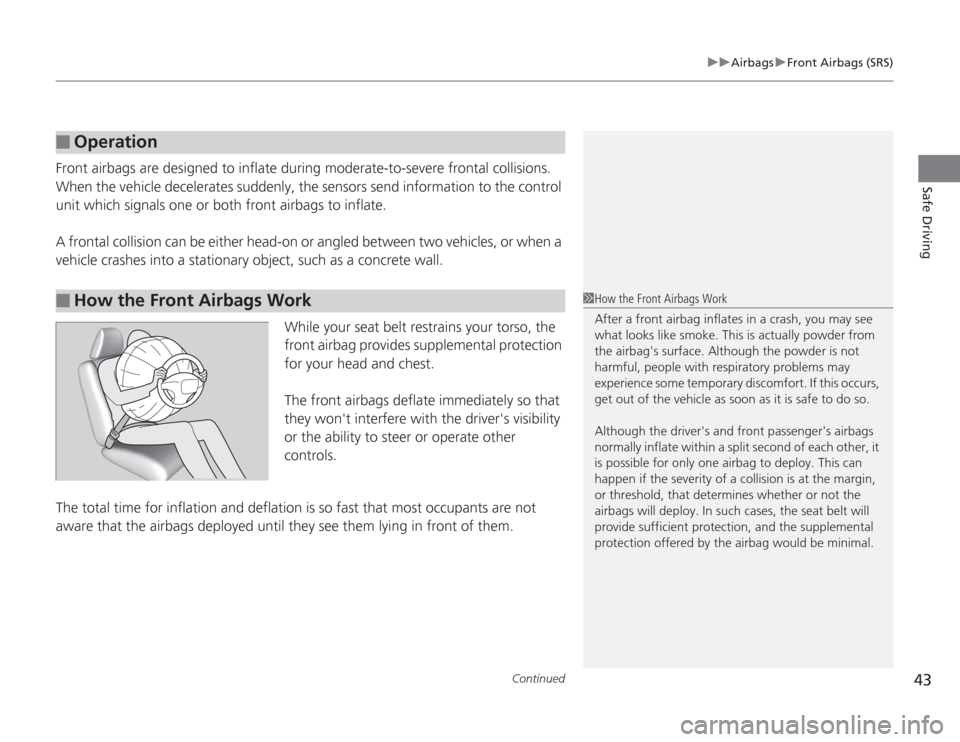
While your seat belt restrains your torso, the
front airbag provides supplemental protection
for your head and chest.
The front airbags deflate immediately so that
they won't interfere with the driver's visibility
or the ability to steer or operate other
controls.
The total time for inflation and deflation is so fast that most occupants are not
aware that the airbags deployed until they see them lying in front of them.■
Operation
■
How the Front Airbags Work
1 How the Front Airbags Work
After a front airbag inflat es in a crash, you may see
what looks like smoke. This is actually powder from
the airbag's surface. Although the powder is not
harmful, people with respiratory problems may
experience some temporary discomfort. If this occurs,
get out of the vehicle as soon as it is safe to do so.
Although the driver's and front passenger's airbags
normally inflate within a split second of each other, it
is possible for only one airbag to deploy. This can
happen if the severity of a collision is at the margin,
or threshold, that determines whether or not the
airbags will deploy. In such cases, the seat belt will
provide sufficient protection, and the supplemental
protection offered by the airbag would be minimal.
Page 56 of 313
55
uuChild Safety uProtecting Child Passengers
Safe Driving
• Any child who is too small to wear a seat belt correctly must be restrained in an
approved child seat that is properly secured to the vehicle using either the lap belt
portion of the lap/shoulder belt or the lower anchors of the LATCH system.
• Never hold a child on your lap because it is impossible to protect them in the
event of a collision.
• Never put a seat belt over yourself and a child. During a crash, the belt would
likely press deep into the child and cause serious or fatal injuries.
• Never let two children use the same seat belt. Both children could be very
seriously injured in a crash.
• Do not allow children to operate the doors, windows or seat adjustments.
• Do not leave children in the vehic le unattended, especially in hot weather when
the inside of the vehicle can get hot enou gh to kill them. They could also activate
vehicle controls causing it to move unexpectedly.
1 Protecting Child Passengers
To deactivate a lockable retractor, release the buckle
and allow the seat belt to wind up all the way.
To remind you of the passenger's front airbag
hazards and child safety, your vehicle has warning
labels on the dashboard (U.S. models) and on the
front visors. Please read and follow the instructions
on these labels.
2 Safety Labels P. 67
3
WARNING
Allowing a child to play with a seat belt or
wrap one around their neck can result in
serious injury or death.
Instruct children not to play with any seat
belt and make sure any unused seat belt a
child can reach is bu ckled, fully retracted,
and locked.
Page 89 of 313
uuGauges and Multi- Information Display uMulti-Information Display
88Instrument Panel
■
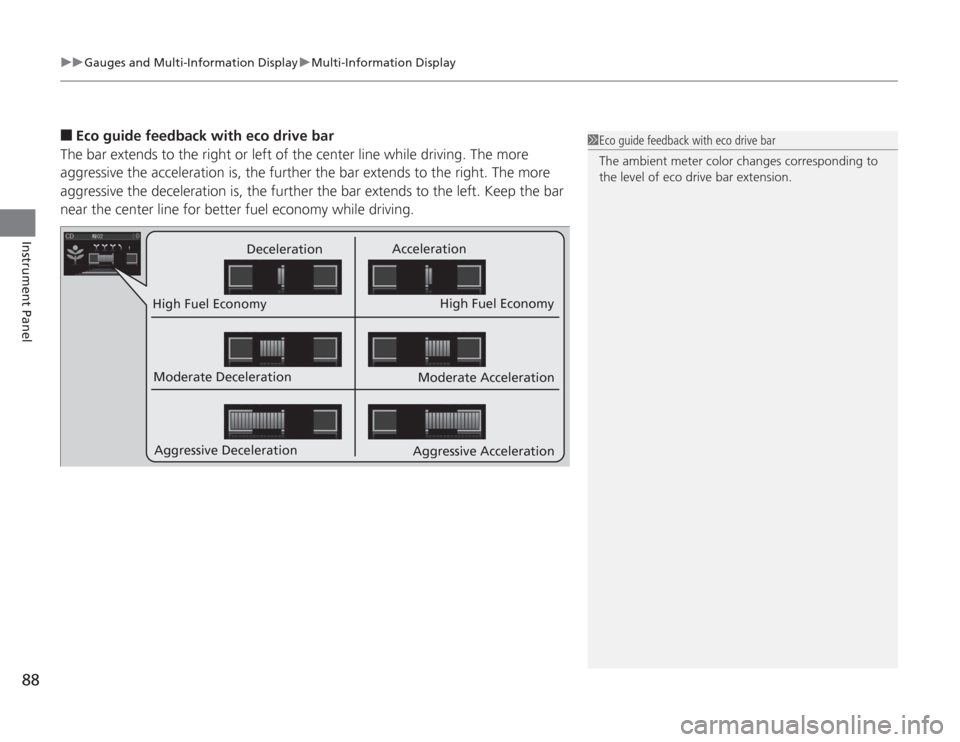
Eco guide feedback with eco drive bar
The bar extends to the right or left of the center line while driving. The more
aggressive the acceleration is, the further the bar extends to the right. The more
aggressive the deceleration is, the further the bar extends to the left. Keep the bar
near the center line for better fuel economy while driving.
Deceleration Acceleration
High Fuel Economy High Fuel Economy
Moderate Deceleration
Aggressive Deceleration Moderate Acceleration
Aggressive Acceleration
1 Eco guide feedback with eco drive bar
The ambient meter color changes corresponding to
the level of eco drive bar extension.
Page 95 of 313
94
uuGauges and Multi- Information Display uMulti-Information Display
Instrument Panel
*1: Not available on all models
*2: Default Setting
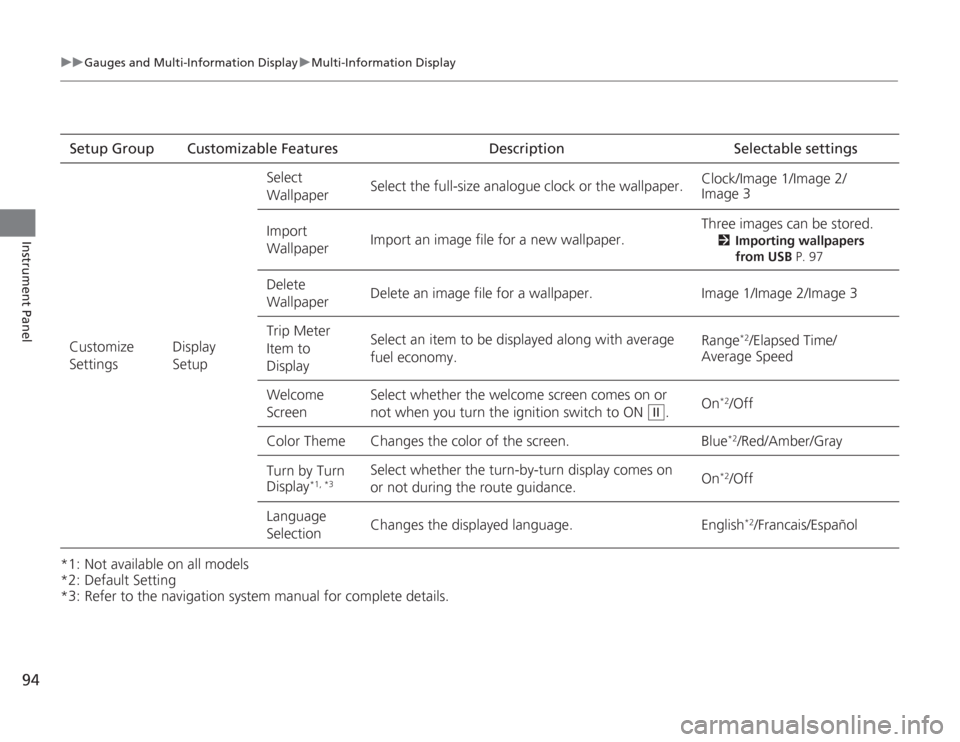
*3: Refer to the navigation system manual for complete details.Setup Group Customizable Features Description Selectable settings
Customize
Settings Display
SetupSelect
Wallpaper
Select the full-size analogue clock or the wallpaper.
Clock/Image 1/Image 2/
Image 3
Import
Wallpaper Import an image file for a new wallpaper. Three images can be stored.
2
Importing wallpapers
from USB P. 97
Delete
Wallpaper Delete an image file for a wallpaper. Image 1/Image 2/Image 3
Trip Meter
Item to
Display Select an item to be displayed along with average
fuel economy.
Range
*2/Elapsed Time/
Average Speed
Welcome
Screen Select whether the welcome screen comes on or
not when you
turn the ignition switch to ON . On
*2/Off
Color Theme Changes the color of the screen. Blue*2/Red/Amber/Gray
Turn by Turn
Display
*1, *3
Select whether the turn-by-turn display comes on
or not during the route guidance. On
*2/Off
Language
Selection Changes the displayed language. English
*2/Francais/Español
II
Page 134 of 313
Continued
133
uuInterior Lights/Interior Convenience Items uInterior Convenience Items
Controls
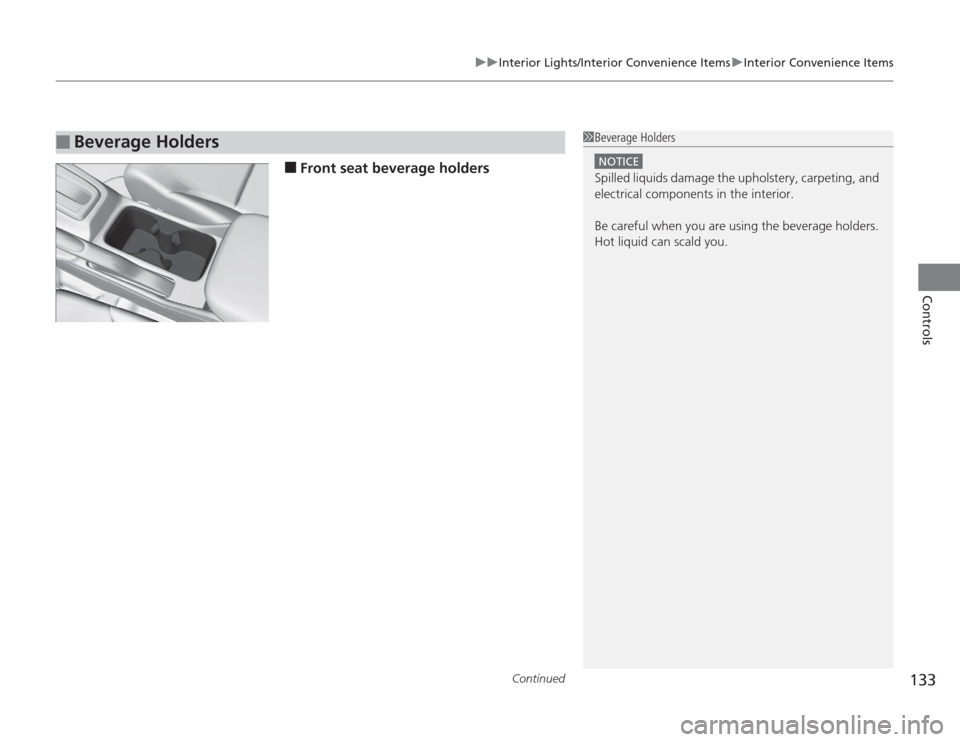
■
Front seat beverage holders
■
Beverage Holders
1Beverage Holders
NOTICESpilled liquids damage the upholstery, carpeting, and
electrical components in the interior.
Be careful when you are using the beverage holders.
Hot liquid can scald you.
Page 169 of 313
uuBluetooth
® HandsFreeLink
®uUsing HFL
168Features
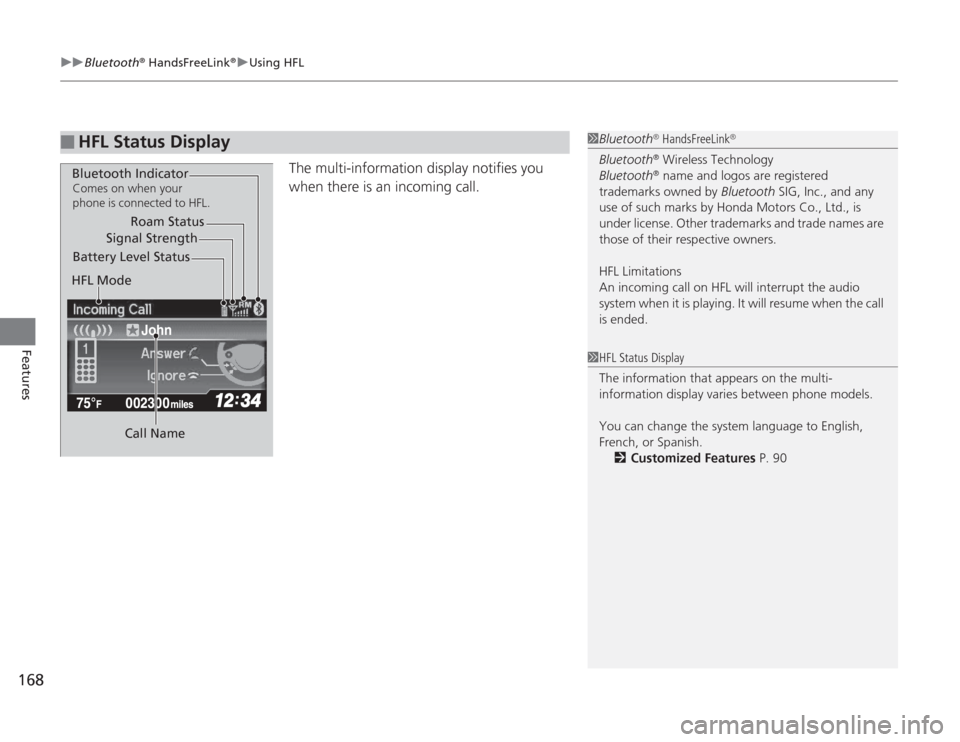
The multi-information display notifies you
when there is an incoming call.
■
HFL Status Display
1Bluetooth
® HandsFreeLink
®
Bluetooth
® Wireless Technology
Bluetooth® name and logos are registered
trademarks owned by Bluetooth SIG, Inc., and any
use of such marks by Honda Motors Co., Ltd., is
under license. Other trademarks and trade names are
those of their respective owners.
HFL Limitations
An incoming call on HFL will interrupt the audio
system when it is playing. It will resume when the call
is ended.
John
Signal Strength
HFL Mode Battery Level Status Roam Status
Call Name
Bluetooth IndicatorComes on when your
phone is connected to HFL.
1 HFL Status Display
The information that appears on the multi-
information display varies between phone models.
You can change the system language to English,
French, or Spanish.
2 Customized Features P. 90
Page 183 of 313
uuBluetooth
® HandsFreeLink
®uHFL Menus
182Features
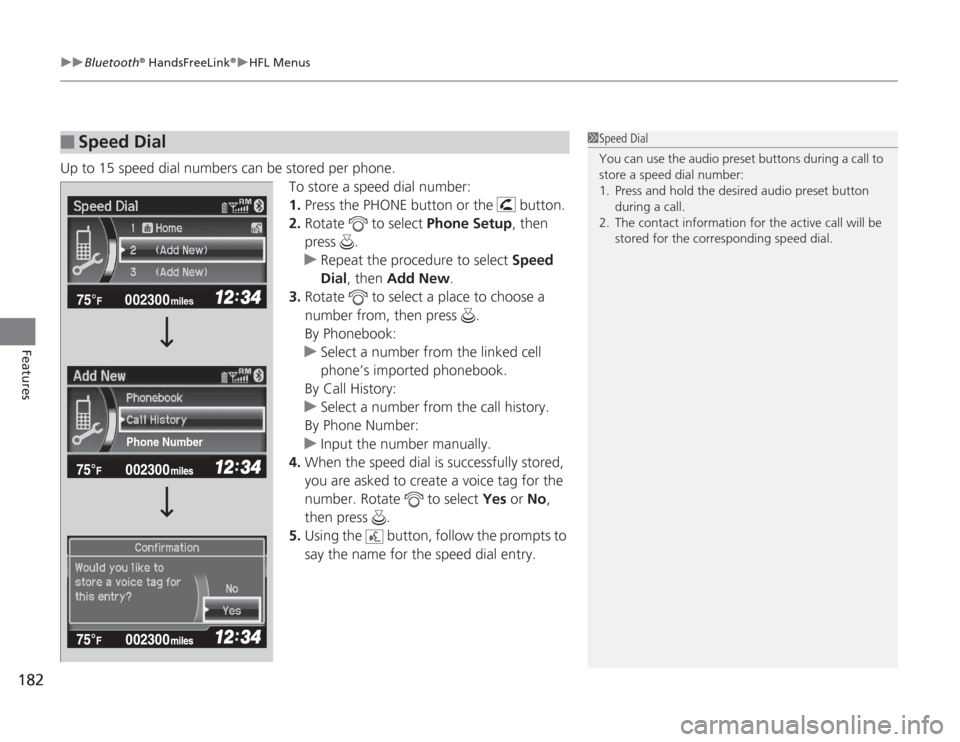
Up to 15 speed dial numbers can be stored per phone.
To store a speed dial number:
1.Press the PHONE button or the button.
2. Rotate to select Phone Setup, then
press .
u Repeat the procedure to select Speed
Dial, then Add New.
3. Rotate to select a place to choose a
number from, then press .
By Phonebook:
u Select a number from the linked cell
phone’s imported phonebook.
By Call History:
u Select a number from the call history.
By Phone Number:
u Input the number manually.
4. When the speed dial is successfully stored,
you are asked to create a voice tag for the
number. Rotate to select Yes or No,
then press .
5. Using the button, follow the prompts to
say the name for the speed dial entry.■
Speed Dial
1Speed Dial
You can use the audio preset buttons during a call to
store a speed dial number:
1. Press and hold the desired audio preset button
during a call.
2. The contact information for the active call will be stored for the corresponding speed dial.
002300
75°
F miles
Phone Number
Page 189 of 313
uuBluetooth
® HandsFreeLink
®uHFL Menus
188Features
■
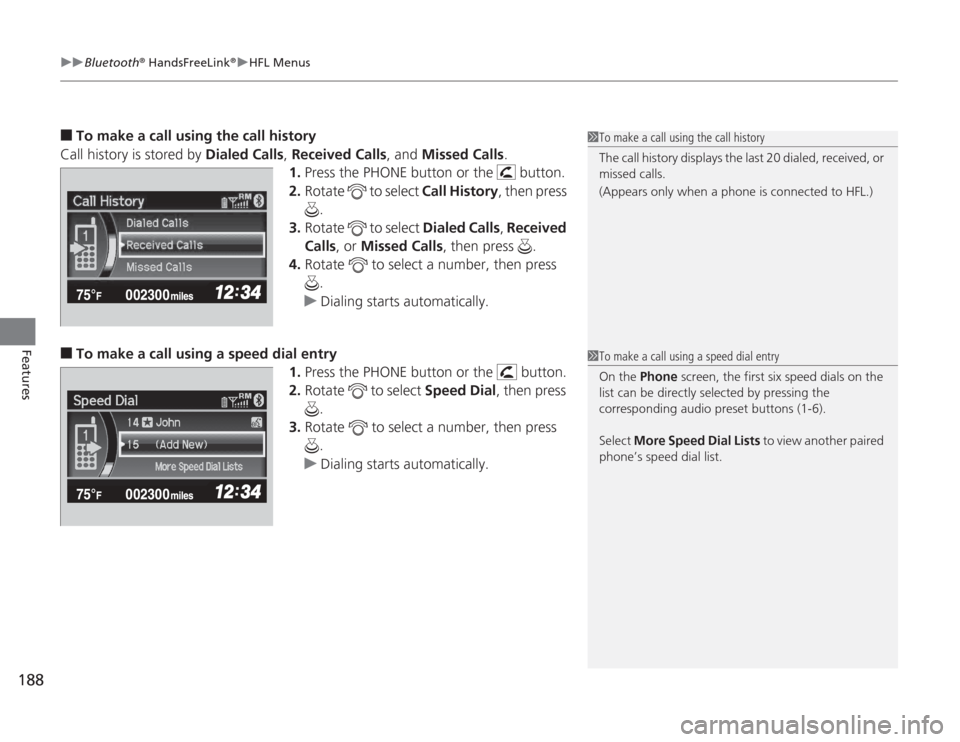
To make a call using the call history
Call history is stored by Dialed Calls, Received Calls , and Missed Calls .
1. Press the PHONE button or the button.
2. Rotate to select Call History, then press
.
3. Rotate to select Dialed Calls , Received
Calls , or Missed Calls, then press .
4. Rotate to select a number, then press
.
u Dialing starts automatically.
■
To make a call using a speed dial entry
1.Press the PHONE button or the button.
2. Rotate to select Speed Dial, then press
.
3. Rotate to select a number, then press
.
u Dialing starts automatically.
1To make a call using the call history
The call history displays the last 20 dialed, received, or
missed calls.
(Appears only when a phone is connected to HFL.)1To make a call using a speed dial entry
On the Phone screen, the first six speed dials on the
list can be directly selected by pressing the
corresponding audio preset buttons (1-6).
Select More Speed Dial Lists to view another paired
phone’s speed dial list.