clock HONDA CIVIC HYBRID 2012 9.G Owners Manual
[x] Cancel search | Manufacturer: HONDA, Model Year: 2012, Model line: CIVIC HYBRID, Model: HONDA CIVIC HYBRID 2012 9.GPages: 313, PDF Size: 8.65 MB
Page 1 of 313
Contents
This owner’s manual should be considered a permanent part of the
vehicle and should remain with the vehicle when it is sold.
This owner’s manual covers all models of the Civic Hybrid. You may
find descriptions of equipment and features that are not on your
particular model.
Images throughout this owner’s manual (including the front cover)
represent features and equipment that are available on some, but
not all, models. Your particular mo del may not have some of these
features.
This owner's manual is for vehicles sold in the United States and
Canada.
The information and specifications in cluded in this publication were
in effect at the time of approval for printing. Honda Motor Co., Ltd.
reserves the right, however, to discontinue or change specifications
or design at any time without notice and without incurring any
obligation.2 Safe Driving P. 27
For Safe Driving P. 28 Seat Belts P. 32 Airbags P. 39
2Instrument Panel P. 69
Indicators P. 70 Gauges and Multi-Information Display P. 82
2Controls P. 101
Setting the Clock P. 102 Locking and Unlocking the Doors P. 103
Operating the Switches Around the Steering Wheel P. 117
Interior Lights/Interior Convenience Items P. 131
2Features P. 141
Audio System P. 142 Audio System Basic Operation* P. 145
Bluetooth® HandsFreeLink® P. 167
2 Driving P. 191
Before Driving P. 192 Towing a Trailer P. 197
Refueling P. 222 Fuel Economy P. 225
2Maintenance P. 227
Before Performing Maintenance P. 228 Maintenance Minder™ P. 231
Checking and Maintaining Wiper Blades P. 252
Climate Control System Maintenance P. 265
2Handling the Unexpected P. 271
Tools P. 272 If a Tire Goes Flat P. 273
Overheating P. 283 Indicator, Coming On/Blinking P. 285
2Information P. 293
Specifications P. 294 Identification Numbers P. 296
Emissions Testing P. 299 Warranty Coverages P. 301
CIVIC IMA_KAKC-31TR2600.book 0 ページ 2011年2月15日 火曜日 午前9時24分
Page 4 of 313
3Quick Reference Guide
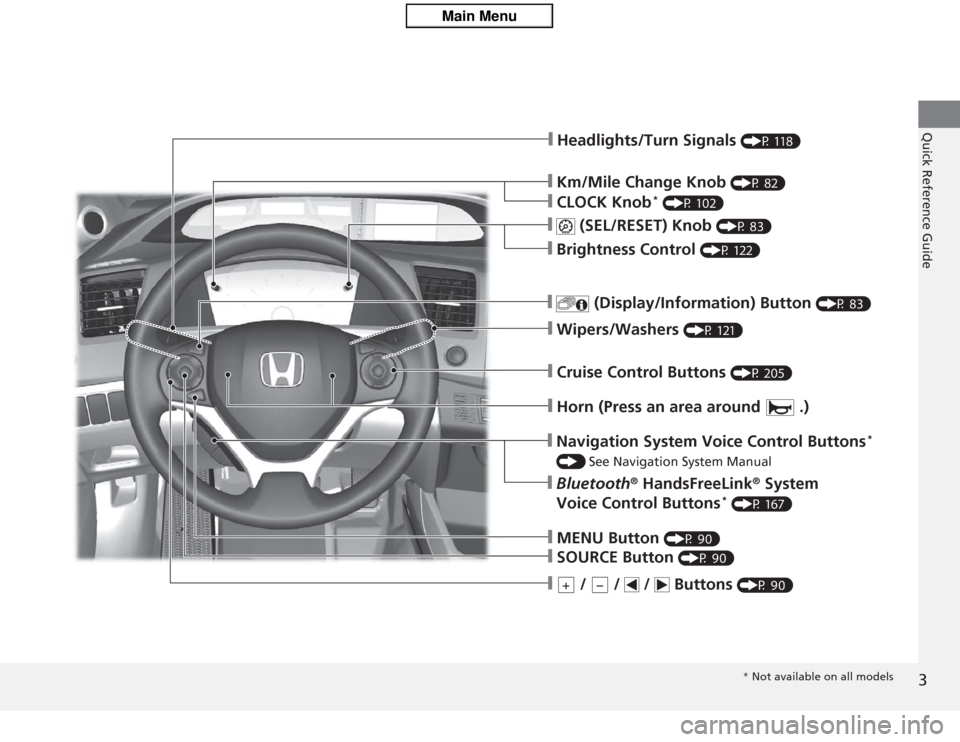
❙Km/Mile Change Knob
(P 82)
❙Headlights/Turn Signals
(P 118)
❙CLOCK Knob
* (P 102)
❙
(SEL/RESET) Knob
(P 83)
❙Brightness Control
(P 122)
❙
(Display/Information) Button
(P 83)
❙Wipers/Washers
(P 121)
❙Cruise Control Buttons
(P 205)
❙Horn (Press an area around .)❙MENU Button
(P 90)
❙SOURCE Button
(P 90)
❙
/ / / Buttons
(P 90)
+
−
❙Navigation System Voice Control Buttons
*
() See Navigation System Manual❙Bluetooth
® HandsFreeLink
® System
Voice Control Buttons
* (P 167)* Not available on all models
Page 17 of 313
16Quick Reference Guide
Climate Control System
(P137)
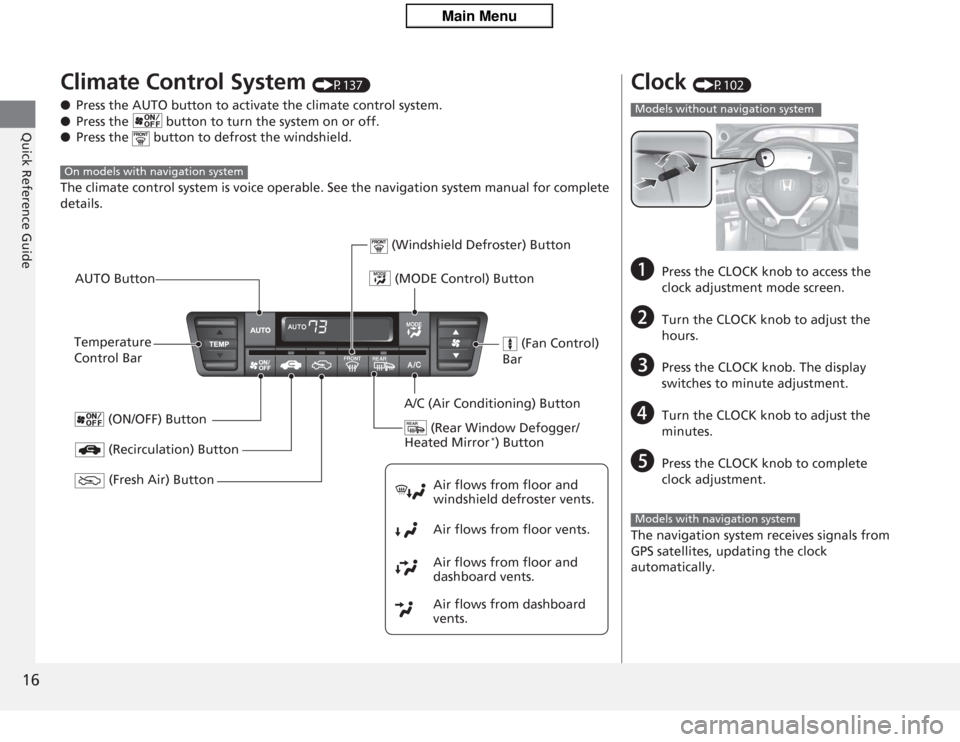
● Press the AUTO button to activate the climate control system.
● Press the button to turn the system on or off.
● Press the button to defrost the windshield.
The climate control system is voice operable. See the navigation system manual for complete
details.
On models with navigation system
(MODE Control) Button
(Rear Window Defogger/
Heated Mirror
*) Button
(Windshield Defroster) Button
A/C (Air Conditioning) Button
Air flows from floor and
windshield defroster vents.
Air flows from floor vents.
Air flows from floor and
dashboard vents.
Air flows from dashboard
vents.
(Recirculation) Button
Temperature
Control BarAUTO Button
(ON/OFF) Button
(Fresh Air) Button
(Fan Control)
Bar
Clock
(P102)
a
Press the CLOCK knob to access the
clock adjustment mode screen.
b
Turn the CLOCK knob to adjust the
hours.
c
Press the CLOCK knob. The display
switches to minute adjustment.
d
Turn the CLOCK knob to adjust the
minutes.
e
Press the CLOCK knob to complete
clock adjustment.
The navigation system receives signals from
GPS satellites, updating the clock
automatically.
Models without navigation systemModels with navigation system
Page 84 of 313
83
uuGauges and Multi-Information Display uMulti-Information Display
Continued
Instrument Panel
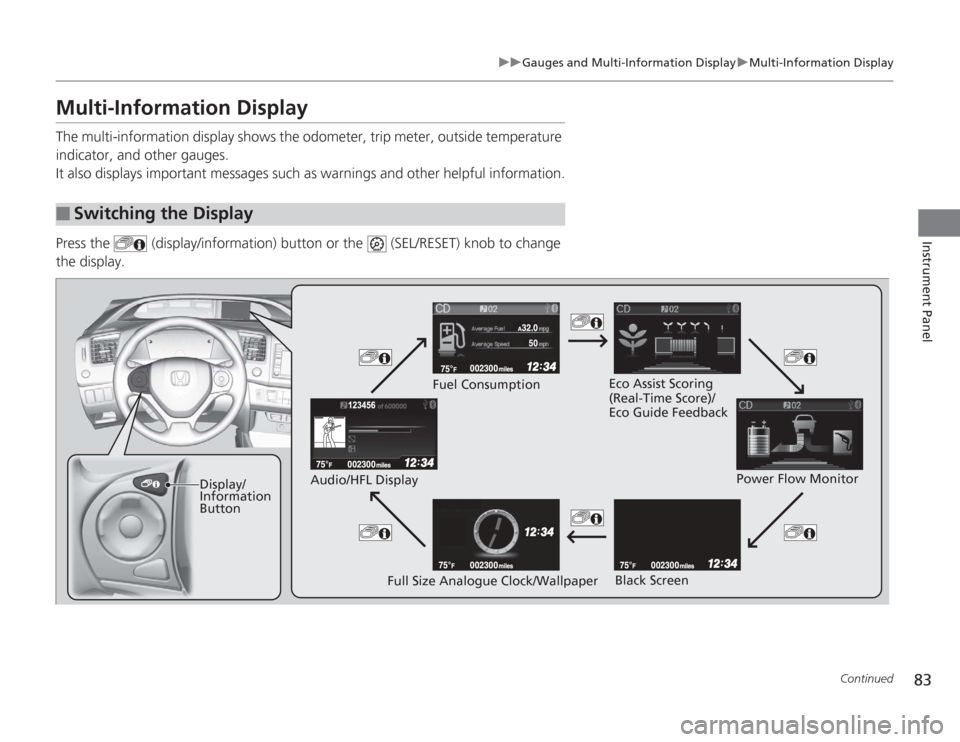
Multi-Information DisplayThe multi-information display shows the odometer, trip meter, outside temperature
indicator, and other gauges.
It also displays important messages such as warnings and other helpful information.
Press the (display/information) button or the (SEL/RESET) knob to change
the display.■
Switching the Display
Display/
Information
Button Fuel Consumption
Power Flow Monitor
Full Size Analogue Clock/Wallpaper
Audio/HFL Display
Black Screen
Eco Assist Scoring
(Real-Time Score)/
Eco Guide Feedback
Page 92 of 313
91
uuGauges and Multi-Information Display uMulti-Information Display
Continued
Instrument Panel
■
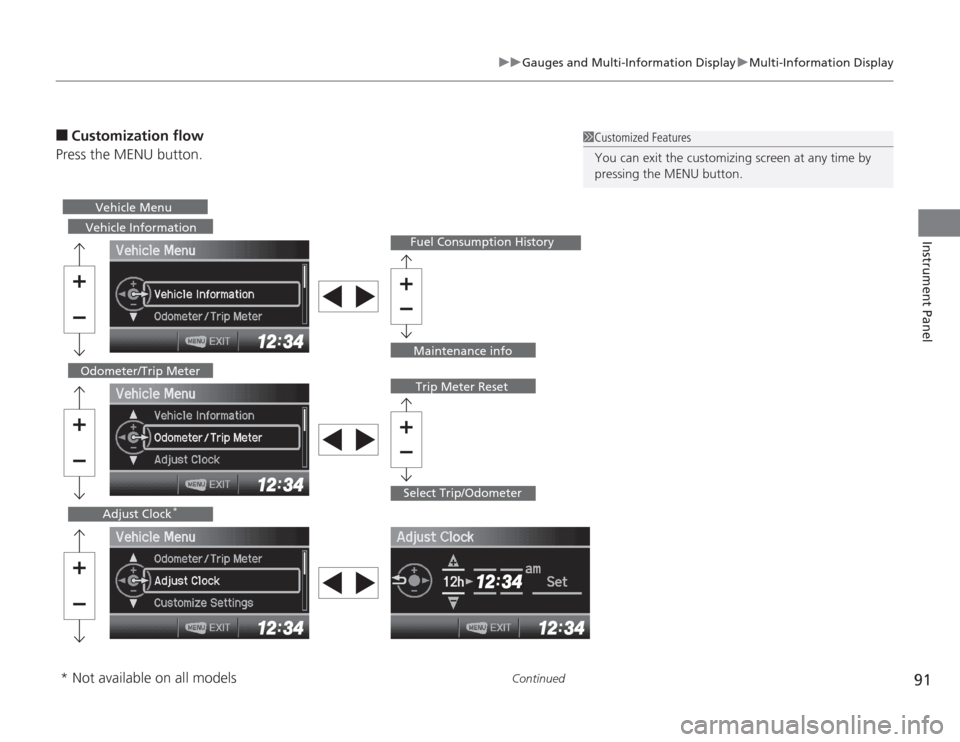
Customization flow
Press the MENU button.
1 Customized Features
You can exit the customizing screen at any time by
pressing the MENU button.
Vehicle Information
Fuel Consumption History
Select Trip/Odometer
Odometer/Trip Meter
Trip Meter Reset
Adjust Clock
*
Vehicle Menu
Maintenance info
* Not available on all models
Page 94 of 313
93
uuGauges and Multi-Information Display uMulti-Information Display
Continued
Instrument Panel
■
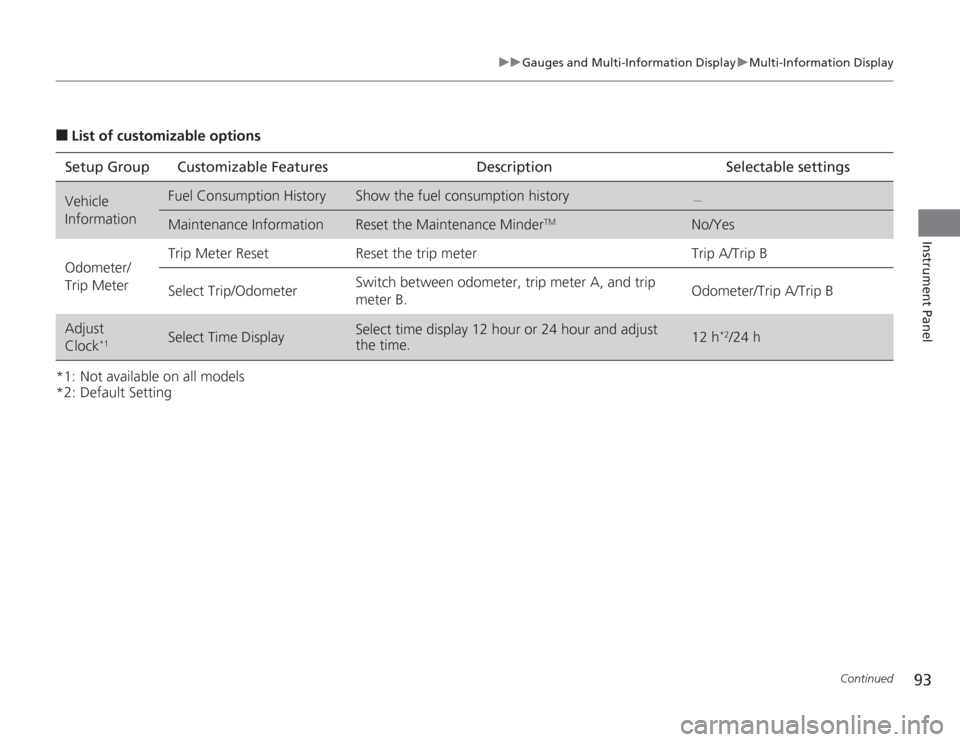
List of customizable options
*1: Not available on all models
*2: Default Setting Setup Group Customizable Features Description Selectable settingsVehicle
Information
Fuel Consumption History
Show the fuel consumption history
.
Maintenance Information
Reset the Maintenance Minder
TM
No/Yes
Odometer/
Trip Meter Trip Meter Reset Reset the trip meter Trip A/Trip B
Select Trip/Odometer
Switch between odometer, trip meter A, and trip
meter B.
Odometer/Trip A/Trip B
Adjust
Clock
*1
Select Time Display
Select time display 12 hour or 24 hour and adjust
the time.
12 h
*2/24 h
Page 95 of 313
94
uuGauges and Multi- Information Display uMulti-Information Display
Instrument Panel
*1: Not available on all models
*2: Default Setting
*3: Refer to the navigation system manual for complete details.Setup Group Customizable Features Description Selectable settings
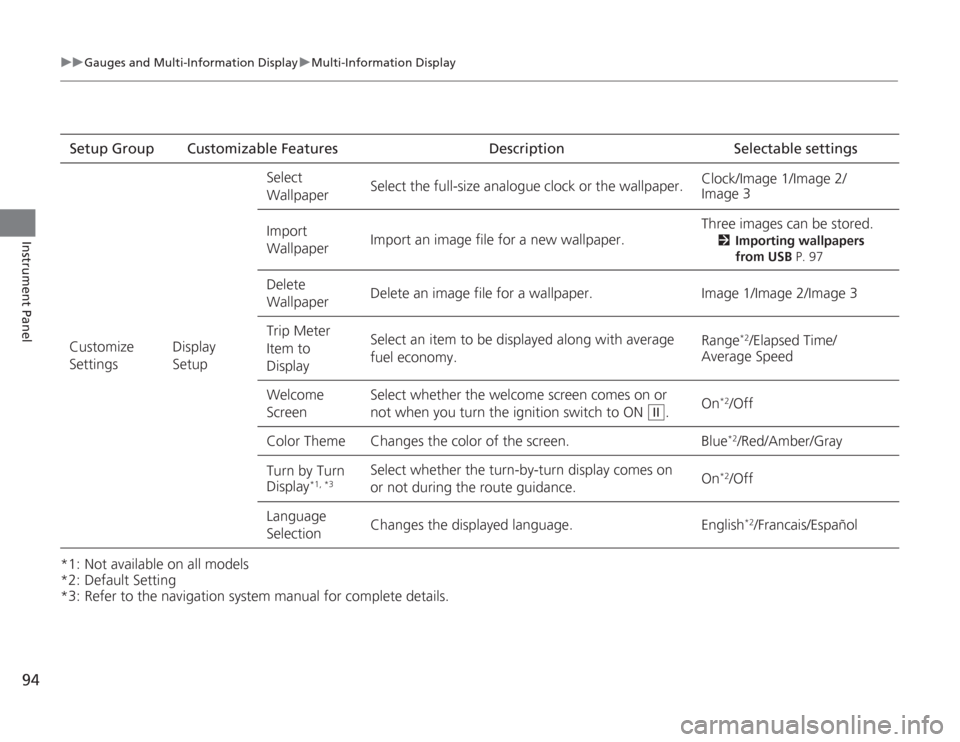
Customize
Settings Display
SetupSelect
Wallpaper
Select the full-size analogue clock or the wallpaper.
Clock/Image 1/Image 2/
Image 3
Import
Wallpaper Import an image file for a new wallpaper. Three images can be stored.
2
Importing wallpapers
from USB P. 97
Delete
Wallpaper Delete an image file for a wallpaper. Image 1/Image 2/Image 3
Trip Meter
Item to
Display Select an item to be displayed along with average
fuel economy.
Range
*2/Elapsed Time/
Average Speed
Welcome
Screen Select whether the welcome screen comes on or
not when you
turn the ignition switch to ON . On
*2/Off
Color Theme Changes the color of the screen. Blue*2/Red/Amber/Gray
Turn by Turn
Display
*1, *3
Select whether the turn-by-turn display comes on
or not during the route guidance. On
*2/Off
Language
Selection Changes the displayed language. English
*2/Francais/Español
II
Page 98 of 313
Continued
97
uuGauges and Multi-Information Display uMulti-Information Display
Instrument Panel
■
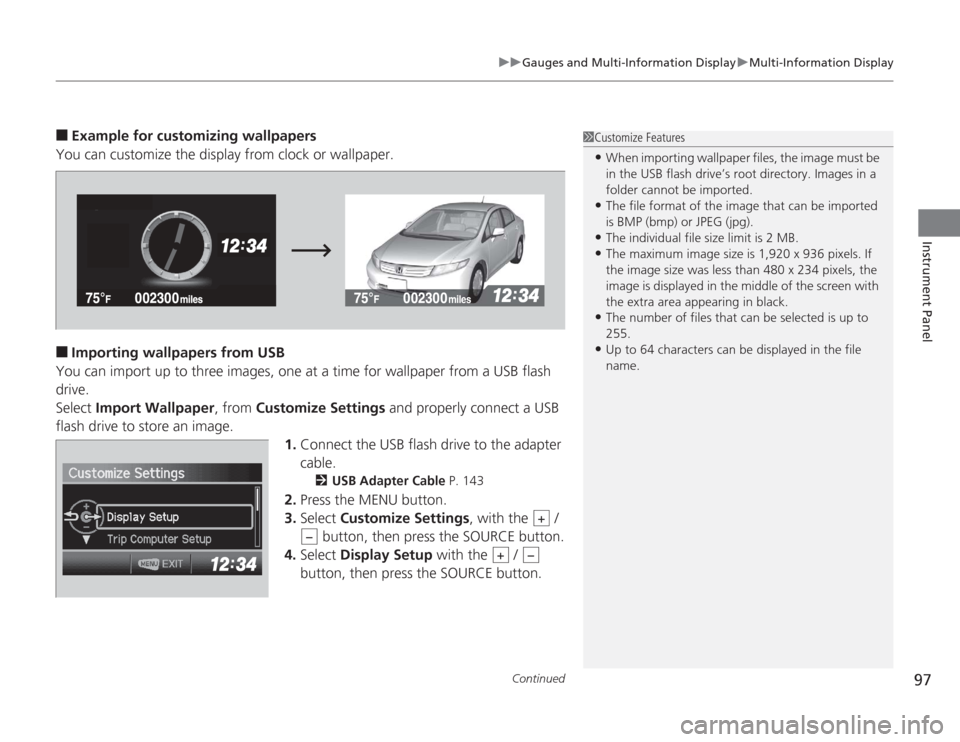
Example for customizing wallpapers
You can customize the display from clock or wallpaper.
■
Importing wallpapers from USB
You can import up to three images, one at a time for wallpaper from a USB flash
drive.
Select Import Wallpaper , from Customize Settings and properly connect a USB
flash drive to store an image. 1.Connect the USB flash drive to the adapter
cable.
2 USB Adapter Cable P. 143
2.Press the MENU button.
3. Select Customize Settings , with the /
button, then press the SOURCE button.
4. Select Display Setup with the /
button, then press the SOURCE button.
1 Customize Features•When importing wallpaper files, the image must be
in the USB flash drive’s root directory. Images in a
folder cannot be imported.•The file format of the image that can be imported
is BMP (bmp) or JPEG (jpg).•The individual file size limit is 2 MB.•The maximum image size is 1,920 x 936 pixels. If
the image size was less than 480 x 234 pixels, the
image is displayed in the middle of the screen with
the extra area appearing in black.•The number of files that can be selected is up to
255.•Up to 64 characters can be displayed in the file
name.
+
−
+
−
Page 102 of 313
101
Controls
This chapter explains how to operate the various controls necessary for driving.
Setting the Clock.............................. 102
Locking and Unlocking the Doors
Key Types and Functions .................. 103
Locking/Unlocking the Doors from the Outside .......................................... 105
Locking/Unlocking the Doors from the Inside ............................................. 107
Childproof Door Locks ..................... 108
Auto Door Locking/Unlocking .......... 109
Opening and Closing the Trunk ....... 110
Security System
Immobilizer System .......................... 113
Security System Alarm ...................... 113Opening and Closing the Windows ..... 115
Operating the Switches Around the
Steering Wheel
Ignition Switch ................................. 117
Turn Signals ..................................... 118
Light Switches.................................. 118
Daytime Running Lights ................... 120
Wipers and Washers ........................ 121
Brightness Control ........................... 122
Rear Defogger/Heated Door Mirror
*
Button ........................................... 123
ECON Button ................................... 123
Adjusting the Steering Wheel........... 124 Adjusting the Mirrors
Interior Rearview Mirror ................... 125
Door Mirrors .................................... 125
Adjusting the Seats Adjusting the Seat Positions ............. 126
Interior Lights/Interior Convenience ItemsInterior Lights .................................. 131
Interior Convenience Items .............. 132
Climate Control System Using Automatic Climate Control .... 137
Automatic Climate Control Sensors ...... 139
* Not available on all models
Page 103 of 313
102Controls
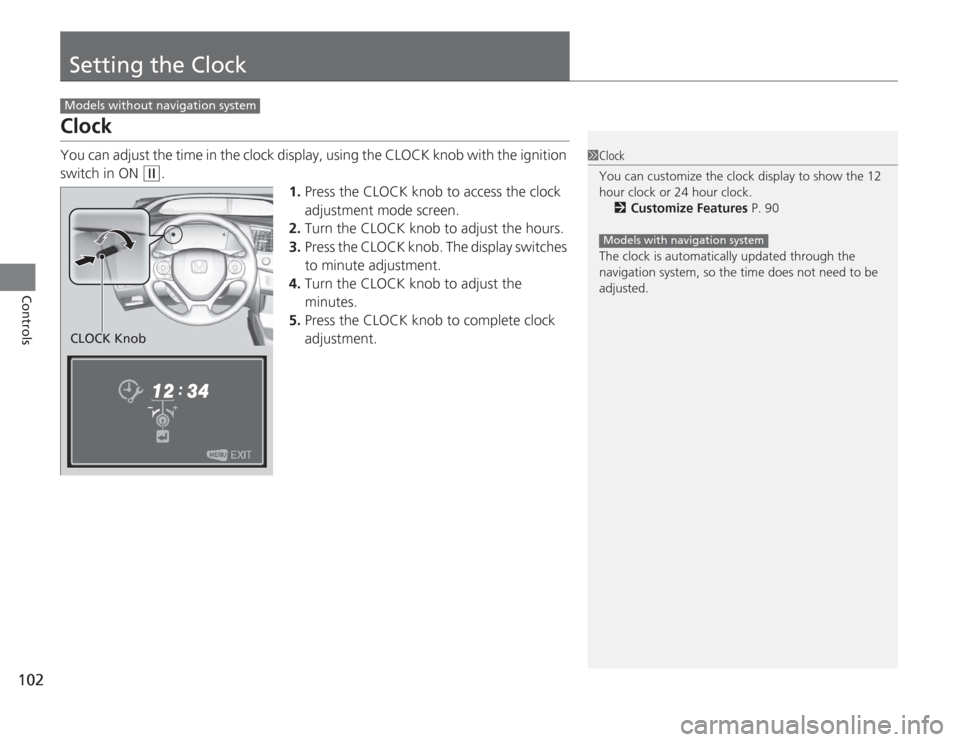
Setting the ClockClockYou can adjust the time in the clock display, using the CLOCK knob with the ignition
switch in ON
(w
.
1.Press the CLOCK knob to access the clock
adjustment mode screen.
2. Turn the CLOCK knob to adjust the hours.
3. Press the CLOCK knob. The display switches
to minute adjustment.
4. Turn the CLOCK knob to adjust the
minutes.
5. Press the CLOCK knob to complete clock
adjustment.
Models without navigation system
1Clock
You can customize the clock display to show the 12
hour clock or 24 hour clock.
2 Customize Features P. 90
The clock is automatically updated through the
navigation system, so the time does not need to be
adjusted.
Models with navigation system
CLOCK Knob