clock HONDA CIVIC HYBRID 2013 9.G User Guide
[x] Cancel search | Manufacturer: HONDA, Model Year: 2013, Model line: CIVIC HYBRID, Model: HONDA CIVIC HYBRID 2013 9.GPages: 346, PDF Size: 6.95 MB
Page 268 of 346
267
uuMaintenance Under the HooduEngine Coolant
Maintenance
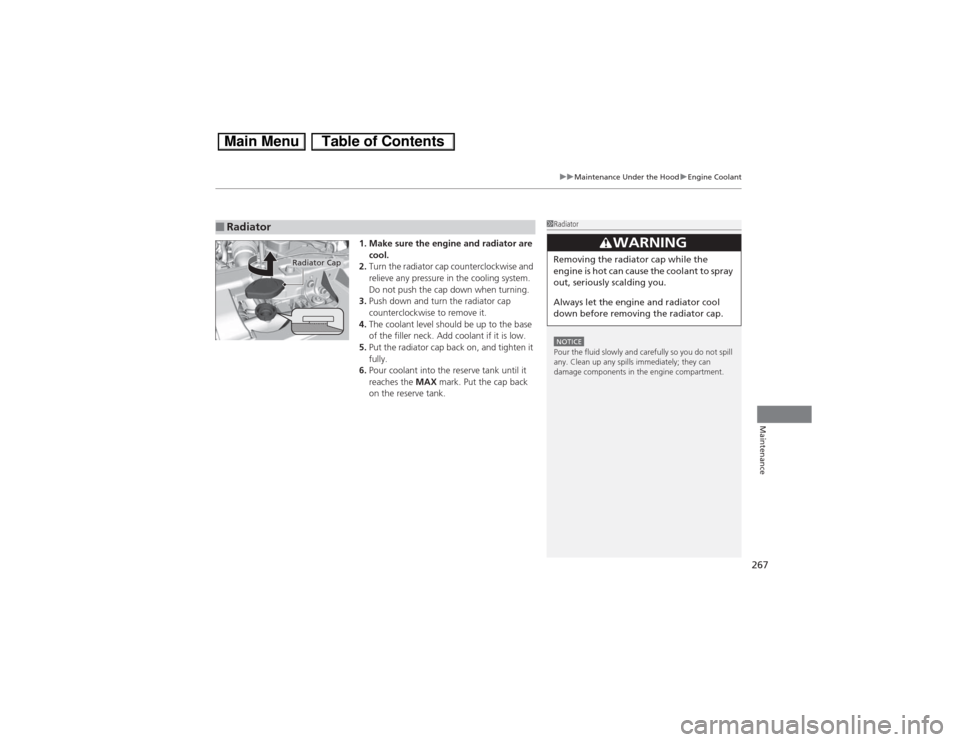
1. Make sure the engine and radiator are
cool.
2.Turn the radiator cap counterclockwise and
relieve any pressure in the cooling system.
Do not push the cap down when turning.
3.Push down and turn the radiator cap
counterclockwise to remove it.
4.The coolant level should be up to the base
of the filler neck. Add coolant if it is low.
5.Put the radiator cap back on, and tighten it
fully.
6.Pour coolant into the reserve tank until it
reaches the MAX mark. Put the cap back
on the reserve tank.
■Radiator
1RadiatorNOTICEPour the fluid slowly and carefully so you do not spill
any. Clean up any spills immediately; they can
damage components in the engine compartment.
3
WARNING
Removing the radiator cap while the
engine is hot can cause the coolant to spray
out, seriously scalding you.
Always let the engine and radiator cool
down before removing the radiator cap.
Radiator Cap
Page 289 of 346
288Maintenance
12 Volt BatteryChecking the 12 Volt BatteryCheck the battery condition monthly and check the terminals for corrosion.
If your vehicle’s battery is disconnected or goes dead:
•The audio system is disabled.
2Reactivating the audio system P. 146
•The clock resets.
2Setting the Clock P. 104
•The navigation system
* is disabled.
2Refer to the navigation system manual
Charging the BatteryDisconnect both battery cables to prevent damaging your vehicle’s electrical system.
Always disconnect the negative (-) cable first, and reconnect it last.
112 Volt BatteryWARNING: Battery post, terminals,
and related accessories contain lead
and lead compounds.
Wash your hands after handling.When you find corrosion, clean the battery terminals
by applying a baking powder and water solution.
Clean the terminals with a damp towel. Cloth/towel
dry the battery. Coat the terminals with grease to
help prevent future corrosion.
3
WARNING
The battery gives off explosive hydrogen
gas during normal operation.
A spark or flame can cause the battery to
explode with enough force to kill or
seriously hurt you.
When conducting any battery
maintenance, wear protective clothing and
a face shield, or have a skilled technician do
it.
* Not available on all models
Page 309 of 346
uuIf a Tire Goes FlatuChanging a Flat Tire
308Handling the Unexpected
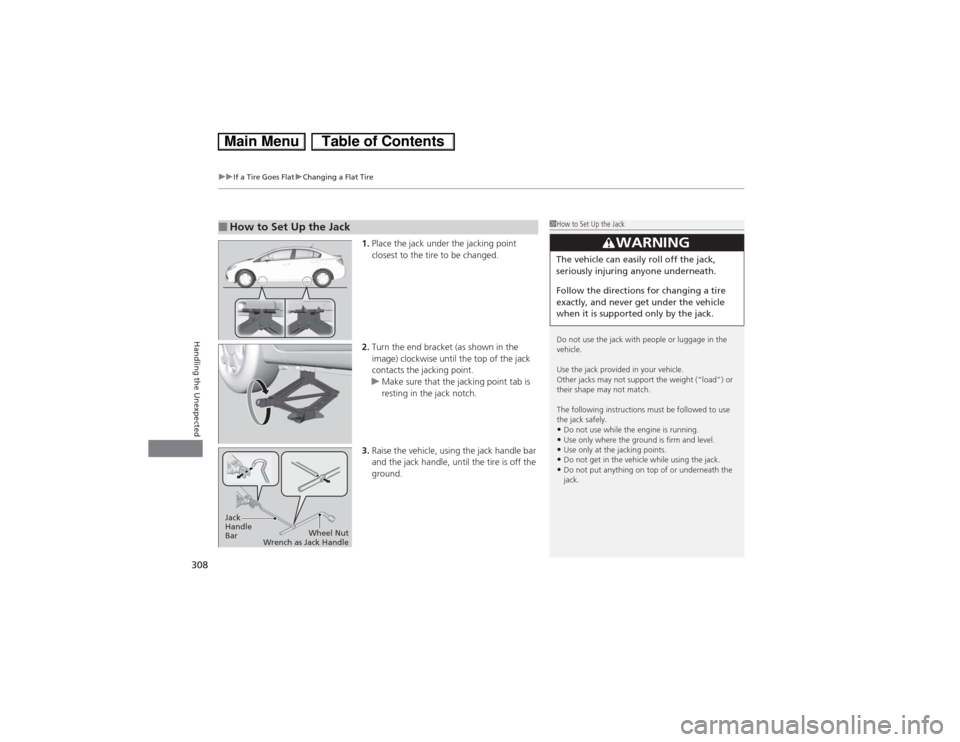
1.Place the jack under the jacking point
closest to the tire to be changed.
2.Turn the end bracket (as shown in the
image) clockwise until the top of the jack
contacts the jacking point.
uMake sure that the jacking point tab is
resting in the jack notch.
3.Raise the vehicle, using the jack handle bar
and the jack handle, until the tire is off the
ground.
■How to Set Up the Jack
1How to Set Up the Jack
Do not use the jack with people or luggage in the
vehicle.
Use the jack provided in your vehicle.
Other jacks may not support the weight (“load”) or
their shape may not match.
The following instructions must be followed to use
the jack safely.•Do not use while the engine is running.•Use only where the ground is firm and level.•Use only at the jacking points.•Do not get in the vehicle while using the jack.•Do not put anything on top of or underneath the
jack.
3
WARNING
The vehicle can easily roll off the jack,
seriously injuring anyone underneath.
Follow the directions for changing a tire
exactly, and never get under the vehicle
when it is supported only by the jack.
Jack
Handle
BarWheel Nut
Wrench as Jack Handle
Page 339 of 346
338Index
Brake System............................................. 240
Anti-lock Brake System (ABS) ................... 242
Brake Assist System ................................. 243
Brake System Indicator....................... 68, 319
Fluid ........................................................ 269
Foot Brake ............................................... 241
Indicator ............................................ 68, 319
Parking Brake .......................................... 240
Brightness Control (Instrument Panel).... 125
Bulb Replacement..................................... 271
Bulb Specifications ................................... 326
Front Turn Signal/Parking/Side Marker
Light ...................................................... 273
Headlights ............................................... 271
High-Mount Brake Light .......................... 276
Rear License Plate Light............................ 276
Side Turn Signal/Emergency Indicator....... 273CCarbon Monoxide Gas................................ 64
Carrying Cargo.................................. 209, 211
CD Player................................................... 155
Certification Label.................................... 328
Changing Bulbs......................................... 271
Charging System Indicator................. 69, 317
Child Safety................................................. 52
Childproof Door Locks ............................. 110
Emergency Trunk Opener ........................ 114
Child Seat.................................................... 52
Booster Seats ............................................. 63Child Seat for Infants................................. 54
Child Seat for Small Children ..................... 55
Installing a Child Seat with a Lap/Shoulder
Seat Belt .................................................. 59
Larger Children ......................................... 62
Rear-facing Child Seat ............................... 54
Selecting a Child Seat ................................ 56
Using a Tether ........................................... 61
Childproof Door Locks............................. 110
Cleaning the Exterior............................... 293
Cleaning the Interior................................ 291
Climate Control System............................ 140
Changing the Mode ................................ 140
Defrosting the Windshield and
Windows ............................................... 141
Dust and Pollen Filter............................... 290
Recirculation and Fresh Air Mode ............ 140
Sensors ................................................... 142
Using Automatic Climate Control ............ 140
Clock.......................................................... 104
Coat Hook................................................. 138
Compact Spare Tire.......................... 305, 327
Console Compartment............................. 135
Controls..................................................... 103
Coolant (Engine)...................................... 266
Adding to the Radiator ............................ 267
Adding to the Reserve Tank..................... 266
High Temperature Indicator ....................... 76
Low Temperature Indicator........................ 76
Overheating ............................................ 315
Creep Aid System..................................... 216Creeping................................................... 218
Cruise Control.......................................... 225
Indicator ................................................... 75
Cup Holders.............................................. 136
Customer Service Information................ 336
Customized Features................................. 91
DDaytime Running Lights.......................... 123
Dead Battery............................................ 312
Defrosting the Windshield and
Windows................................................. 141
Devices that Emit Radio Waves............... 329
Dimming
Headlights .............................................. 120
Rearview Mirror ...................................... 128
Dipstick (Engine Oil)................................ 262
Directional Signals (Turn Signal)............. 120
Display/Information Button...................... 83
Door Mirrors............................................. 128
Doors........................................................ 105
Auto Door Locking.................................. 111
Auto Door Unlocking .............................. 111
Door Open Indicator ........................... 31, 72
Keys........................................................ 105
Locking/Unlocking the Doors from the
Inside .................................................... 109
Locking/Unlocking the Doors from the
Outside ................................................. 107
Lockout prevention system ...................... 108
Page 344 of 346
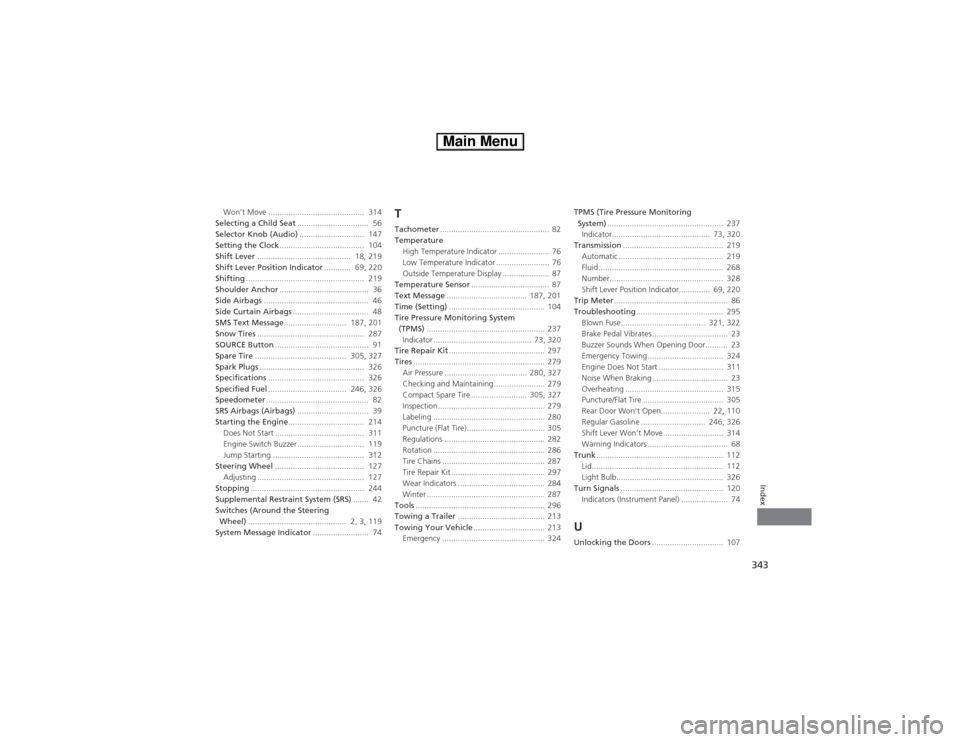
343Index
Won’t Move ........................................... 314
Selecting a Child Seat................................ 56
Selector Knob (Audio)............................. 147
Setting the Clock...................................... 104
Shift Lever.......................................... 18, 219
Shift Lever Position Indicator............ 69, 220
Shifting..................................................... 219
Shoulder Anchor........................................ 36
Side Airbags............................................... 46
Side Curtain Airbags.................................. 48
SMS Text Message............................ 187, 201
Snow Tires................................................ 287
SOURCE Button.......................................... 91
Spare Tire......................................... 305, 327
Spark Plugs............................................... 326
Specifications........................................... 326
Specified Fuel................................... 246, 326
Speedometer.............................................. 82
SRS Airbags (Airbags)................................ 39
Starting the Engine.................................. 214
Does Not Start ........................................ 311
Engine Switch Buzzer .............................. 119
Jump Starting ......................................... 312
Steering Wheel........................................ 127
Adjusting ................................................ 127
Stopping................................................... 244
Supplemental Restraint System (SRS)....... 42
Switches (Around the Steering
Wheel)............................................ 2, 3, 119
System Message Indicator......................... 74
TTachometer................................................. 82
Temperature
High Temperature Indicator ....................... 76
Low Temperature Indicator ........................ 76
Outside Temperature Display ..................... 87
Temperature Sensor................................... 87
Text Message.................................... 187, 201
Time (Setting)........................................... 104
Tire Pressure Monitoring System
(TPMS)..................................................... 237
Indicator ............................................ 73, 320
Tire Repair Kit........................................... 297
Tires........................................................... 279
Air Pressure ..................................... 280, 327
Checking and Maintaining....................... 279
Compact Spare Tire ......................... 305, 327
Inspection................................................ 279
Labeling .................................................. 280
Puncture (Flat Tire)................................... 305
Regulations ............................................. 282
Rotation .................................................. 286
Tire Chains .............................................. 287
Tire Repair Kit .......................................... 297
Wear Indicators ....................................... 284
Winter ..................................................... 287
Tools.......................................................... 296
Towing a Trailer....................................... 213
Towing Your Vehicle................................ 213
Emergency .............................................. 324TPMS (Tire Pressure Monitoring
System).................................................... 237
Indicator............................................ 73, 320
Transmission............................................. 219
Automatic ............................................... 219
Fluid ........................................................ 268
Number................................................... 328
Shift Lever Position Indicator.............. 69, 220
Trip Meter................................................... 86
Troubleshooting....................................... 295
Blown Fuse...................................... 321, 322
Brake Pedal Vibrates .................................. 23
Buzzer Sounds When Opening Door.......... 23
Emergency Towing .................................. 324
Engine Does Not Start ............................. 311
Noise When Braking .................................. 23
Overheating ............................................ 315
Puncture/Flat Tire .................................... 305
Rear Door Won’t Open...................... 22, 110
Regular Gasoline ............................. 246, 326
Shift Lever Won’t Move ........................... 314
Warning Indicators .................................... 68
Trunk......................................................... 112
Lid........................................................... 112
Light Bulb................................................ 326
Turn Signals.............................................. 120
Indicators (Instrument Panel) ..................... 74
UUnlocking the Doors................................ 107