door lock HONDA CIVIC HYBRID 2015 9.G Quick Guide
[x] Cancel search | Manufacturer: HONDA, Model Year: 2015, Model line: CIVIC HYBRID, Model: HONDA CIVIC HYBRID 2015 9.GPages: 65, PDF Size: 3.32 MB
Page 3 of 65

Honda Automobile Customer Service
Your authorized Honda dealer should be able to answer any questions you h\
ave
about your vehicle. However, if you are dissatisfi ed with the information you receive,
you can call Honda Automobile Customer Service (see page 113).
Honda Roadside Assistance
24-hour emergency road service is available to you in the United States \
and Canada
throughout your 3-year/36,000-mile warranty term. Services include jump \
starting,
fl at tire and lockout assistance, towing, and more (limitations apply). This Owner’s Guide is intended to help you quickly get acquainted with your 2015
Honda Civic Hybrid. It provides basic information and instructions on te\
chnology and
convenience features, as well as emergency procedures and how to get ass\
istance.
This guide is for vehicles sold in the United States and Canada. It cove\
rs all Civic
Hybrid models, so you may fi nd descriptions of features and equipment that are not
in your vehicle. Images throughout this guide are from U.S. vehicles and\
represent
features and equipment that are available on some, but not all, models.
This guide is not intended to be a substitute for the Owner’s Manual. The Owner
Information CD enclosed in your glove box kit includes the Owner’s Manual,
Navigation Manual, Consumer Information Book, and vehicle and tire warra\
nties in
electronic format. This information can be viewed on a computer (PC or \
Mac platform)
and saved or printed for your reference. You can also visit owners.honda.com (U.S.) or
myhonda.ca (Canada) to view the complete and most current information.
If you are the fi rst registered owner of your vehicle, you may request a complimentary
printed copy of the Owner’s Manual, Navigation Manual, Vehicle Warranty, or
Consumer Information Book within the fi rst six months of vehicle purchase. To request
a copy, visit owners.honda.com (U.S.) and create or log in to your account. In Canada,
please request a copy from your Honda dealer.
American Honda Motor Company strives to be proactive in protecting our
environment and natural resources. By using electronic delivery for a co\
nsiderable
portion of the information typically found in a vehicle owner’s manual, we are further
reducing our impact on the environment.
INTRODUCTION TABLE OF CONTENTS
Call (800) 999-1009 (U.S.) or (888) 946-6329 (Canada)
Call (866) 864-5211 (U.S.) or (800) 465-7587 (Canada)
*if equipped
VISUAL INDEX ................................... 1
Steering Wheel and Nearby
Controls ............................................... 1
Dashboard, Ceiling, and Other
Controls ............................................... 2
SAFETY INFORMATION .................... 3
Important Safety Information .......... 3
Seat Belts ........................................... 5
Airbags ................................................ 8
Child Safety ........................................ 14
Safety Label Locations ..................... 21
Reporting Safety Defects ................. 21
INSTRUMENT PANEL ....................... 22
Malfunction Indicators .................... 22
Condition Indicators ......................... 24
On/Off Indicators ............................... 25
Gauges ................................................ 25
Intelligent Multi-Information Display
(i-MID) ................................................. 26
VEHICLE CONTROLS ......................... 27
Using the Remote Transmitter ........ 27
Smart Entry System ........................... 28
Door Operation .................................. 29
Power Window Operation .............. 30
Interior and Exterior Lights ............. 31
One-Touch Turn Signal ..................... 32
Wiper Operation ................................ 32
Adjusting the Seats .......................... 33
Adjusting the Steering Wheel ........ 36
Adjusting the Mirrors ....................... 36
Climate Control System .................. 37
Seat Heaters* .................................... 37
Customized Features ........................ 38
AUDIO AND CONNECTIVITY ........... 40Basic Audio Operation ..................... 40
Touchscreen Operation ................... 42
HondaLink™ ...................................... 43
FM/AM Radio .................................... 44
SiriusXM
® Radio ............................... 45
Compact Disc (CD) ........................... 46
iPod
®.................................................... 47
USB Flash Drive ................................ 48
Bluetooth
® Audio .............................. 49
Pandora
® ............................................ 50
HDMI Video ........................................ 51
BLUETOOTH
® HANDSFREELINK®
(HFL) ..................................................... 52
Basic HFL Operation ......................... 52
Pairing a Phone ................................. 54
Making a Call .................................... 55
SMS Text Messaging and E-Mail* ... 57
HondaLink™ Assist .......................... 58
Siri™ Eyes Free ................................. 58
NAVIGATION* .................................... 59
Basic Navigation Operation ........... 59
Entering a Destination ..................... 62
Routing ................................................ 64
DRIVING .............................................. 66
Before Driving ................................... 66
Maximum Load Limit ........................ 68
Starting to Drive ................................ 70
Shifting ................................................ 71
Vehicle Stability Assist (VSA
®), aka
Electronic Stability Control (ESC)
System ................................................. 71
Braking ............................................... 72
Eco Assist System ............................. 73
Cruise Control .................................... 75
Page 5 of 65
2 || 3
SAFETY
VISUAL INDEX
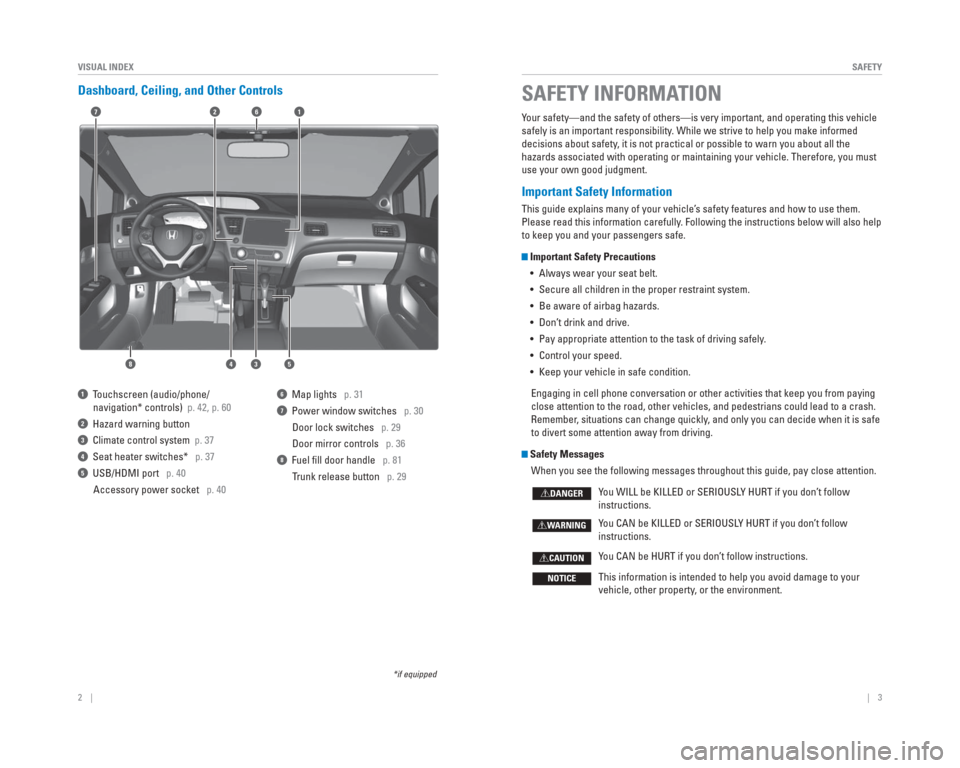
Dashboard, Ceiling, and Other Controls
2
53
71
8
6
4
1 Touchscreen (audio/phone/
navigation* controls) p. 42, p. 60
2 Hazard warning button
3 Climate control system p. 37
4 Seat heater switches* p. 37
5 USB/HDMI port p. 40
Accessory power socket p. 40
6 Map lights p. 31
7 Power window switches p. 30
Door lock switches p. 29
Door mirror controls p. 36
8 Fuel fi ll door handle p. 81
Trunk release button p. 29
*if equipped
Your safety—and the safety of others—is very important, and operati\
ng this vehicle
safely is an important responsibility. While we strive to help you make informed
decisions about safety, it is not practical or possible to warn you about all the
hazards associated with operating or maintaining your vehicle. Therefore\
, you must
use your own good judgment.
Important Safety Information
This guide explains many of your vehicle’s safety features and how to use them.
Please read this information carefully. Following the instructions below will also help
to keep you and your passengers safe.
Important Safety Precautions
• Always wear your seat belt.
• Secure all children in the proper restraint system.
• Be aware of airbag hazards.
• Don’t drink and drive.
• Pay appropriate attention to the task of driving safely.
• Control your speed.
• Keep your vehicle in safe condition.
Engaging in cell phone conversation or other activities that keep you fr\
om paying
close attention to the road, other vehicles, and pedestrians could lead \
to a crash.
Remember, situations can change quickly, and only you can decide when it is safe
to divert some attention away from driving.
Safety Messages When you see the following messages throughout this guide, pay close att\
ention.
You WILL be KILLED or SERIOUSLY HURT if you don’t follow
instructions.
You CAN be KILLED or SERIOUSLY HURT if you don’t follow
instructions.
You CAN be HURT if you don’t follow instructions.
This information is intended to help you avoid damage to your
vehicle, other property, or the environment.
DANGER
WARNING
CAUTION
NOTICE
SAFETY INFORMATION
Page 6 of 65

4 || 5
SAFETY
SAFETY
Carbon Monoxide Gas
The engine exhaust from this vehicle contains carbon monoxide, a colorle\
ss,
odorless, and highly toxic gas. As long as you properly maintain your ve\
hicle and
follow the instructions set forth below, you will not accumulate dangerous levels
of carbon monoxide gas in the vehicle interior.
Have the exhaust system inspected for leaks whenever:
• The exhaust system is making an unusual noise.
• The exhaust system may have been damaged.
• The vehicle is raised for an oil change. When you operate a vehicle with the trunk open, airfl ow can pull exhaust gas
into the interior and create a hazardous condition. If you must drive wi\
th the trunk
open, open all the windows and set the climate control system as shown b\
elow.
1. Select the fresh air mode.
2. Select the
mode.
3. Set the fan speed to high.
4. Set the temperature control to a comfortable setting.
Adjust the climate control system in the same manner if you sit in your \
parked
vehicle with the engine running.
An enclosed area such as a garage can quickly fi ll up with carbon monoxide gas.
Do not run the engine with the garage door closed. Even when the garage \
door is
open, drive out of the garage immediately after starting the engine. Carbon monoxide gas is toxic. Breathing it can cause unconsciousness and\
even kill you.
Avoid any enclosed areas or activities that expose you to carbon monoxide\
.
WARNING
Seat Belts
A seat belt is your best protection in all types of collisions. Airbags \
are designed to
supplement seat belts, not replace them. So even though your vehicle is \
equipped
with airbags, make sure you and your passengers always wear your seat be\
lts and
wear them properly.
Lap/Shoulder Seat Belts
All fi ve seating positions are equipped with lap/shoulder seat belts with
emergency locking retractors. In normal driving, the retractor lets you \
move
freely while keeping some tension on the belt. During a collision or sud\
den stop,
the retractor locks to restrain your body. The rear seat belts also have a lockable
retractor for use with child seats.
The front seats are equipped with automatic seat belt tensioners to enha\
nce
safety. The tensioners automatically tighten the front seat belts during a mod\
erate
to severe frontal collision, sometimes even if the collision is not seve\
re enough to
infl ate the front airbags.
Proper Use of Seat BeltsFollow these guidelines for proper use:
• All occupants should sit upright, well back in the seat, and remain in t\
hat position for the duration of the trip. Slouching and leaning reduces the\
effectiveness of the belt and can increase the chance of serious injury \
in a
crash.
• Never place the shoulder part of a lap/shoulder seat belt under your arm\
or behind your back. This could cause very serious injuries in a crash.
• Two people should never use the same seat belt. If they do, they could be\
very seriously injured in a crash.
• Do not put any accessories on the seat belts. Devices intended to improv\
e comfort or reposition the shoulder part of a seat belt can reduce the pr\
otective
capability and increase the chance of serious injury in a crash.
• No one should sit in a seat with an inoperative seat belt or one that do\
es not appear to be working correctly. Using a seat belt that is not working properly
may not protect the occupant in a crash. Have a dealer check the belt as\
soon
as possible.
Not wearing a seat belt properly increases the chance of a serious injur\
y or
death in a crash, even though your vehicle has airbags.
Be sure you and your passengers always wear seat belts and wear them
properly.
WARNING
Page 11 of 65

14 || 15
SAFETY
SAFETY
Child Safety
Each year, many children are injured or killed in vehicle crashes because they ar\
e
either unrestrained or not properly restrained. In fact, vehicle collisi\
ons are the
number one cause of death of children ages 12 and under.
The National Highway Traffi c Safety Administration and Transport Canada
recommend that all children ages 12 and under be properly restrained in \
a rear seat.
Some states or provinces/territories have laws restricting where childre\
n may ride.
To reduce the number of child deaths and injuries, every state, Canadian \
province
and territory requires that infants and children be properly restrained \
when they ride
in a vehicle.
Protecting Child Passengers
• An infl ating front or side airbag can injure or kill a child sitting in the fro\
nt seat.
• A child in the front seat is more likely to interfere with the driver’\
s ability to safely control the vehicle.
• Statistics show that children of all sizes and ages are safer when they \
are properly restrained in a rear seat.
• Any child who is too small to wear a seat belt correctly must be restrai\
ned in an approved child seat that is properly secured to the vehicle using either\
the lap
belt portion of the lap/shoulder belt or the lower anchors of the LATCH system.
• Never hold a child on your lap because it is impossible to protect them \
in the event of a collision.
• Never put a seat belt over yourself and a child. During a crash, the bel\
t would likely press deep into the child and cause serious or fatal injuries.
• Never let two children use the same seat belt. Both children could be ve\
ry seriously injured in a crash.
• Do not allow children to operate the doors, windows, or seat adjusters.
• Do not leave children in the vehicle unattended, especially in hot weath\
er when the inside of the vehicle can get hot enough to kill them. They could al\
so activate
vehicle controls, causing it to move unexpectedly.
Children who are unrestrained or improperly restrained can be seriously \
injured or killed in a crash.
Any child too small for a seat belt should be properly restrained in a c\
hild
seat. A larger child should be properly restrained with a seat belt, usi\
ng a
booster seat if necessary.
WARNING
Protecting Infants An infant must be properly restrained in a rear-facing, reclining child seat until the
infant reaches the seat maker’s weight or height limit for the seat, and the infant
is at least one year old. Many experts recommend use of a rear-facing seat for
a child up to two years old if the child’s height and weight are appropriate for a
rear-facing seat.
Child seats must be placed and secured in a rear
seating position. Rear-facing child seats should
never be installed in a forward-facing position.
When properly installed, a rear-facing child seat may prevent the driver or a front
passenger from moving their seat all the way back, or from locking their\
seat-back
in the desired position. If this occurs, we recommend that you install t\
he child
seat directly behind the front passenger’s seat, move the seat as far forward as
needed, and leave it unoccupied. Or, you may wish to get a smaller rear-facing
child seat.
Placing a rear-facing child seat in the front seat can result in serious injury or
death during a crash.
Always place a rear-facing child seat in the rear seat, not the front.
WARNING
Allowing a child to play with a seat belt or wrap one around their neck \
can
result in serious injury or death.
Instruct children not to play with any seat belt and make sure any unuse\
d seat
belt a child can reach is buckled, fully retracted, and locked.
WARNING
Page 17 of 65
26 || 27
VEHICLE CONTROLS
INSTRUMENT PANEL
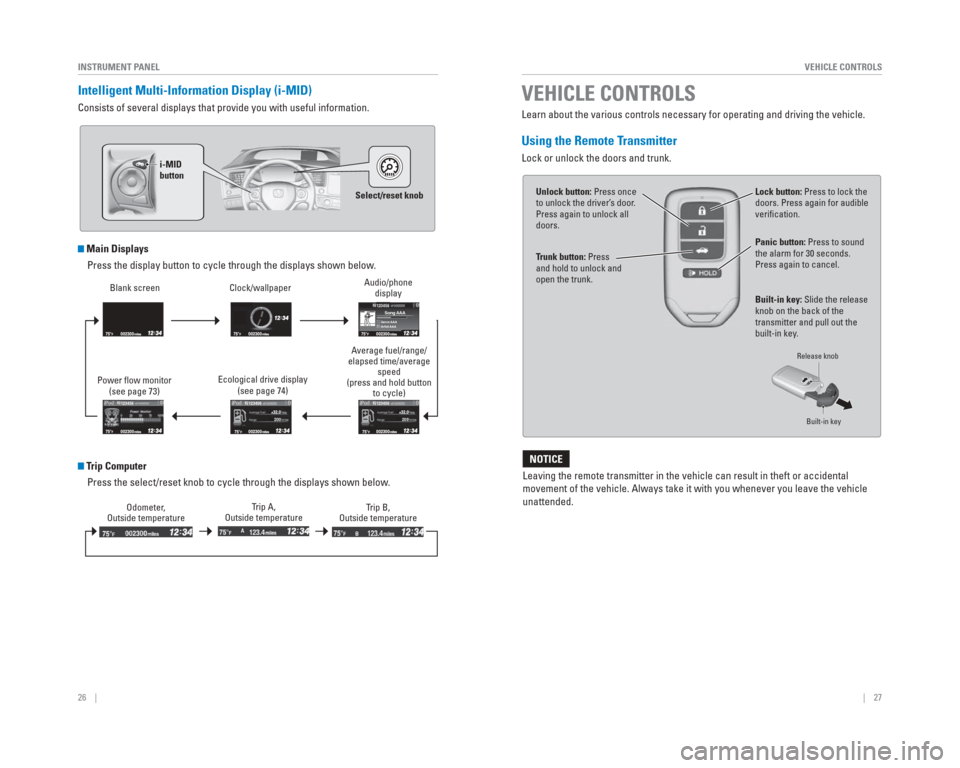
Intelligent Multi-Information Display ( i-MID)
Consists of several displays that provide you with useful information.
Main Displays
Press the display button to cycle through the displays shown below.
Trip ComputerPress the select/reset knob to cycle through the displays shown below.
Power fl ow monitor (see page 73) Clock/wallpaper
Blank screen
Average fuel/range/
elapsed time/average speed
(press and hold button to cycle)
Audio/phone
display
123456
20 0
123456
123456
Genr e AAASong AAA
Artist AAA
Odometer,
Outside temperature Trip A,
Outside temperature Trip B,
Outside temperature
Select/reset knob
i-MID
button
200
1
23456
Ecological drive display
(see page 74)
Learn about the various controls necessary for operating and driving the\
vehicle.
Using the Remote Transmitter
Lock or unlock the doors and trunk.
Leaving the remote transmitter in the vehicle can result in theft or acc\
idental
movement of the vehicle. Always take it with you whenever you leave the \
vehicle
unattended.
NOTICE
Unlock button: Press once
to unlock the driver’ s door.
Press again to unlock all
doors.
T runk button: Press
and hold to unlock and
open the trunk. Lock button: Press to lock the
doors. Press again for audible
verifi
cation.
Panic button: Press to sound
the alarm for 30 seconds.
Press again to cancel.
VEHICLE CONTROLS
Built-in key: Slide the release
knob on the back of the
transmitter and pull out the
built-in key .
Release knob
Built-in key
Page 18 of 65
 and it
is outside the vehicle and within range")
28 || 29
VEHICLE CONTROLS
VEHICLE CONTROLS
Smart Entry System
When you carry the remote transmitter (for example, in a pocket or purs\
e) and it
is outside the vehicle and within range (about 32 inches or 80 cm), yo\
u can lock or
unlock the doors and trunk without handling the transmitter.
Unlocking/Locking the Doors
To unlock: Grab the driver’s door handle when the
vehicle is off to unlock the driver’s door. Grab the
front passenger’s door handle to unlock all doors
and the trunk.
To lock: Press the door lock button on the front
door handle when the vehicle is off. If the remote
transmitter is inside the vehicle, the doors will not
lock.
Unlocking the TrunkPress the trunk release button to unlock and open
the trunk.
Door lock
button
T runk release button
Door Operation
Use several methods to lock or unlock the doors.
Using the Lock Tab
To unlock: When you unlock the door using the
lock tab on the driver’s door, only the driver’s door
unlocks.
To lock: When you lock the door using the lock tab
on the driver’s door, all the other doors lock at the
same time.
Using the Front Door Inner HandleWhen you pull either front door inner handle, the
door unlocks and opens. On vehicles with smart
entry, pulling the driver’s door inner handle unlocks
all other doors.
Using the Master Door Lock SwitchTo unlock: Press the unlock side of the switch to
unlock all doors.
To lock: Press the lock side of the switch to lock all
doors.
Childproof Door LocksThe childproof door locks prevent the rear doors
from being opened from the inside regardless of the
position of the lock tab.
Slide the lever in the rear door to the lock position,
and close the door.
Open the door using the outer door handle.
Using the Trunk Opener Pull the trunk release near the bottom of the driver’s
seat to unlock and open the trunk.
T o lockLock tab
To unlock
Inner
handle
To lock
To unlock
Master door
lock switch
Unlock
Lock
T runk
release
Page 19 of 65

30 || 31
VEHICLE CONTROLS
VEHICLE CONTROLS
Power Window Operation
The power windows can be opened and closed when the vehicle is on by usi\
ng the
switches on the doors. The switches on the driver’s side can be used to open and
close all the windows.
Automatic Operation
To open: Push the switch down fi rmly.
To close: Pull the switch up fi rmly.
The window opens or closes completely. To
stop the window at any time, push or pull the
switch again briefl y.
Manual OperationTo open: Push the switch down lightly.
To close: Pull the switch up lightly.
Release the switch when the windows reach the desired position.
Power Window LockPush in the power window lock button so only the driver’s window can be
operated. The driver can operate all other windows using the specifi c switches.
OFF
Power window
lock button
Driver’ s
window
switch
Front passenger’ s
window switch ON
Indicator
Closing a power window on someone’
s hands or fi ngers can cause serious
injury .
Make sure your passengers are away from the windows before closing them.\
W ARNING
Interior and Exterior Lights
Operate interior and exterior lights when the vehicle is on or off.
Brightness Control
Adjust instrument panel brightness when the
vehicle is on.
To brighten: Turn the knob to the right.
To dim: Turn the knob to the left.
A beep sounds when the brightness reaches
minimum or maximum.
Interior LightsChange the interior light settings using the switch
on the ceiling.
ON position: Interior lights remain on.
Door-activated position: Interior lights come on
when any of the doors are opened, the driver’s door
is unlocked, or the vehicle is turned off.
OFF position: Interior lights remain off.
Map LightsPress the map lights to turn on or off.
Exterior LightsRotate the switches on the headlight lever to operate the exterior light\
s.
OFF: All exterior lights are off.
: Turn on exterior lights except headlights.
AUTO*: Turn on the automatic lighting feature.
Headlights turn on or off depending on ambient
brightness when the vehicle is on. Headlights
automatically come on after the wipers are
engaged for a certain time.
: Turn on all exterior lights including headlights.
Control knob
High beams
Low beams Flashing the high beams
On
Door
-activated position
Off
*if equipped
Page 22 of 65

36 || 37
VEHICLE CONTROLS
VEHICLE CONTROLS
Adjusting the Steering Wheel
The steering wheel height and distance from your body can be adjusted so\
that you
can comfortably grip the steering wheel in an appropriate driving postur\
e.
1. Pull up the steering wheel adjustment lever.
2. Move the steering wheel up or down, and in
or out.
3. Push down the steering wheel adjustment lever to lock the steering wheel in position.
Adjusting the Mirrors
Adjust the angle of the mirrors for the best visibility when you are sit\
ting in the
correct driving position.
Rearview Mirror with Day/Night Positions
Manually adjust the position to reduce headlight
glare from vehicles behind you. Flip the tab to
switch between day and night positions.
Power Door MirrorsAdjust the power door mirrors when the vehicle is on.
L/R selector switch: Select the left or right mirror.
After adjusting the mirror, return the switch to the
center position.
Mirror position adjustment switch: Press the switch
left, right, up, or down to move the mirror.
T o adjust
To lock
Lever
Adjusting the steering wheel position while driving may cause you to los\
e
control of the vehicle and be seriously injured in a crash.
Adjust the steering wheel only when the vehicle is stopped.
WARNING
DownNight positionTa
b
Day
position
Up
Adjustment switchSelector
switch
Climate Control System
The automatic climate control system can maintain your preferred interio\
r
temperature by selecting the proper mix of heated or cooled air and fan \
speed. Use
the buttons on the dashboard to control the system.
*if equipped
AUTO button: Press, then
use the temperature
control dial to set your
preferred temperature.
T
emperature
control dial
A/C
buttonFan control
dial
Recirculation button:
Recirculation mode
(indicator on):
Recirculates air from the
vehicle’ s interior .
Fresh Air mode (indicator
off): Maintains outside
ventilation. Rear defogger/
heated door
mirrors button*
Windshield
defroster
button ON/OFF
button
Mode button:
Change airfl
ow
location.
Seat Heaters*
Quickly warm the front seats when the vehicle is on.
Press the seat heater switch in the front console to
the LO or HI position. An indicator appears for the
selected setting. Return the switch to the middle
position to turn off.
Heat-induced burns are possible when using seat heaters.
Persons with a diminished ability to sense temperature (e.g., persons w\
ith
diabetes, lower -limb nerve damage, or paralysis) or with sensitive skin should
not use the seat heaters.
W ARNING
Page 23 of 65
38 || 39
VEHICLE CONTROLS
VEHICLE CONTROLS
Customized Features
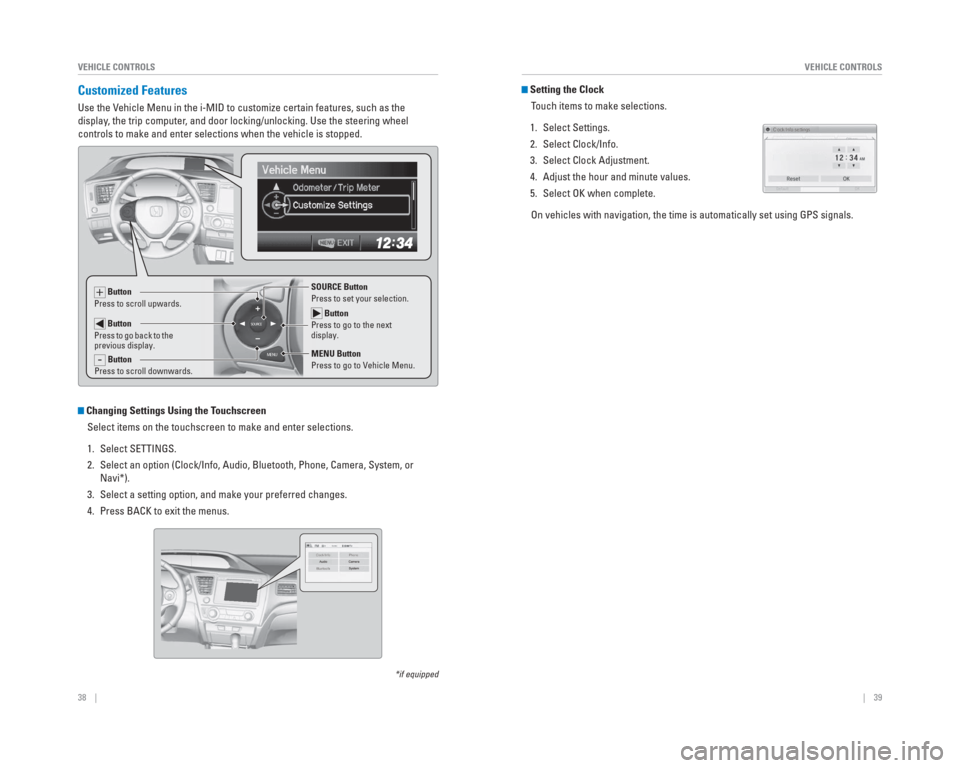
Use the Vehicle Menu in the i-MID to customize certain features, such as the
display, the trip computer, and door locking/unlocking. Use the steering wheel
controls to make and enter selections when the vehicle is stopped.
MENU
SOURCE Button
Press to go to the next
display.
SOURCE Button
Press to set your selection.
MENU Button
Press to go to Vehicle Menu. + Button
Press to scroll upwards.
Button
Press to go back to the
previous display.
- Button
Press to scroll downwards.
Setting the Clock
Touch items to make selections.
1. Select Settings.
2. Select Clock/Info.
3. Select Clock Adjustment.
4. Adjust the hour and minute values.
5. Select OK when complete. On vehicles with navigation, the time is automatically set using GPS sig\
nals.
Changing Settings Using the Touchscreen Select items on the touchscreen to make and enter selections.
1. Select SETTINGS.
2. Select an option (Clock/Info, Audio, Bluetooth, Phone, Camera, System, \
or Navi*).
3. Select a setting option, and make your preferred changes.
4. Press BACK to exit the menus.
*if equipped
Page 37 of 65
66 || 67
DRIVING
DRIVING
Learn about preparation for driving, as well as other features.
Before Driving
Check the following items before you begin driving.
Exterior Checks
• Make sure there are no obstructions on the windows, door mirrors, exteri\
or lights, or other parts of the vehicle.
• Remove any frost, snow, or ice.
• Make sure the hood is securely closed.
• Heat from the engine and exhaust can ignite fl ammable materials left under the hood, causing a fi re. If you’ve parked your vehicle for an extended period,
inspect and remove any debris that may have collected, such as dried gra\
ss
and leaves that have fallen or have been carried in for use as a nest by\
a small
animal. Also check under the hood for leftover fl ammable materials after you or
someone else has performed maintenance on your vehicle.
• Make sure the tires are in good condition.
• Make sure there are no people or objects behind or around the vehicle.
Interior Checks • Store or secure all items on board properly.
• Do not pile items higher than the seat height.
• Do not place anything in the front seat footwells. Make sure to secure t\
he fl oor mats.
• If you have any animals on board, do not let them move freely around in \
the vehicle.
• Securely close and lock all doors and the trunk.
• Adjust your seating position, mirrors, and steering wheel properly.
• Make sure items placed on the fl oor behind the front seats cannot roll under the seats.
• Everyone in the vehicle must fasten their seat belt.
• Make sure that the indicators in the instrument panel come on when you s\
tart the vehicle, and go off soon after.
If the doors are frozen shut, use warm water around the door edges to me\
lt any
ice. Do not try to force them open, as this can damage the rubber trim a\
round the
doors. When done, wipe dry to avoid further freezing.
NOTICE
DRIVINGIn addition:
• During the fi rst 600 miles (1,000 km) of operation, avoid sudden acceleration or full throttle operation so as not to damage the engine or powertrain.
• Avoid hard braking for the fi rst 200 miles (300 km). You should also follow this when the brake pads are replaced.
Improper accessories or modifi cations can affect your vehicle’s handling, and
stability, and performance, and cause a crash in which you can be seriously hurt \
or killed.
Follow all instructions in the vehicle owner’s guide regarding accessories and
modifi cations.
WARNING