auto drive HONDA CIVIC SEDAN 2012 (in English) User Guide
[x] Cancel search | Manufacturer: HONDA, Model Year: 2012, Model line: CIVIC SEDAN, Model: HONDA CIVIC SEDAN 2012Pages: 345, PDF Size: 53.95 MB
Page 106 of 345
105
uuLocking and Unlocking the Doors uAuto Door Locking/Unlocking*
Controls
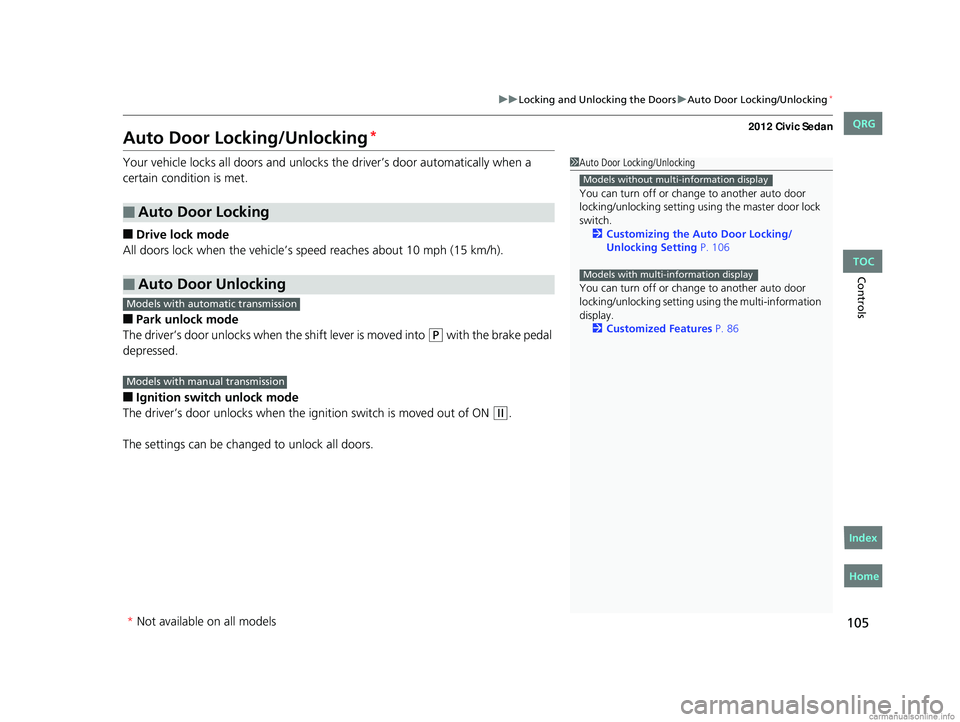
Auto Door Locking/Unlocking*
Your vehicle locks all doors and unlocks the driver’s door automatically when a
certain condition is met.
■Drive lock mode
All doors lock when the vehicle’s speed reaches about 10 mph (15 km/h).
■Park unlock mode
The driver’s door unlocks when the shift lever is moved into
(P with the brake pedal
depressed.
■Ignition switch unlock mode
The driver’s door unlocks when the ignition switch is moved out of ON
(w.
The settings can be changed to unlock all doors.
■Auto Door Locking
■Auto Door Unlocking
1 Auto Door Locking/Unlocking
You can turn off or cha nge to another auto door
locking/unlocking setting us ing the master door lock
switch. 2 Customizing the Auto Door Locking/
Unlocking Setting P. 106
You can turn off or cha nge to another auto door
locking/unlocking setting us ing the multi-information
display.
2 Customized Features P. 86
Models without multi-information display
Models with multi-information display
Models with automatic transmission
Models with manual transmission
* Not available on all models
CIVIC 4D-31TR3600.book 105 ページ 2011年2月14日 月曜日 午後2時51分
TOC
Home
QRG
Index
Page 107 of 345
106
uuLocking and Unlocking the Doors uCustomizing the Auto Door Locking/Unlocking Setting*
Controls
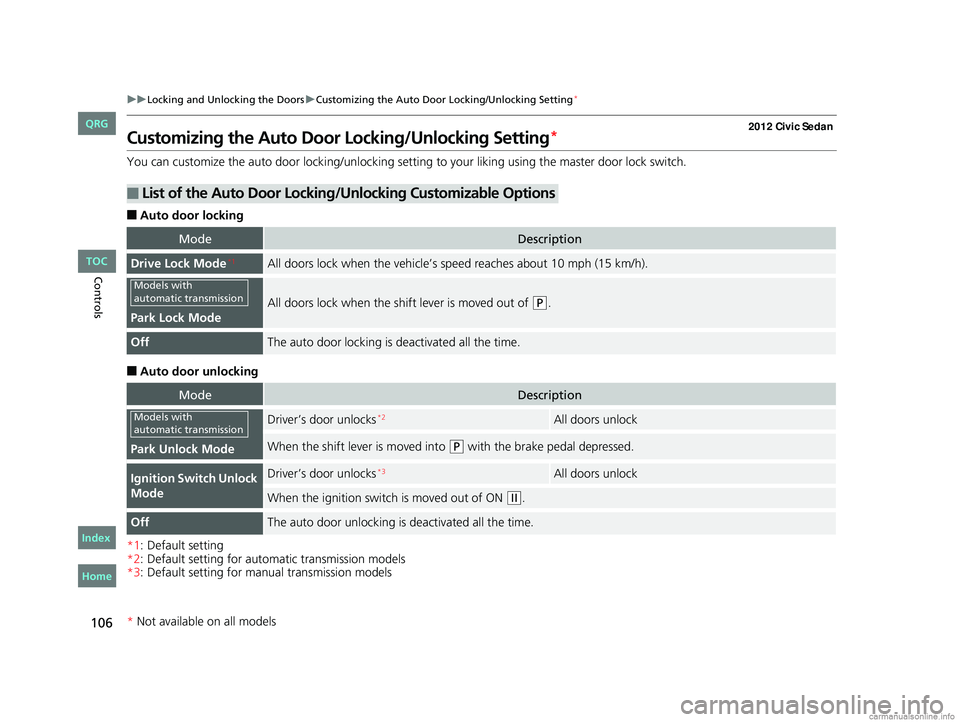
Customizing the Auto Door Locking/Unlocking Setting*
You can customize the auto door locking/unlocking setting to your liking using the master door lock switch.
■Auto door locking
■Auto door unlocking
*1: Default setting
*2: Default setting for automatic transmission models
*3: Default setting for manual transmission models
■List of the Auto Door Locking/Unlocking Customizable Options
ModeDescription
Drive Lock Mode*1All doors lock when the vehicle’s sp eed reaches about 10 mph (15 km/h).
Park Lock Mode
All doors lock when the shift lever is moved out of (P.
OffThe auto door locking is deactivated all the time.
ModeDescription
Park Unlock Mode
Driver’s door unlocks*2All doors unlock
When the shift lever is moved into (P with the brake pedal depressed.
Ignition Switch Unlock
ModeDriver’s door unlocks*3All doors unlock
When the ignition switch is moved out of ON (w.
OffThe auto door unlocking is deactivated all the time.
Models with
automatic transmission
Models with
automatic transmission
* Not available on all models
CIVIC 4D-31TR3600.book 106 ページ 2011年2月14日 月曜日 午後2時51分
TOC
Home
QRG
Index
Page 108 of 345
107
uuLocking and Unlocking the Doors uCustomizing the Auto Door Locking/Unlocking Setting*
Continued
Controls
*1: Default setting
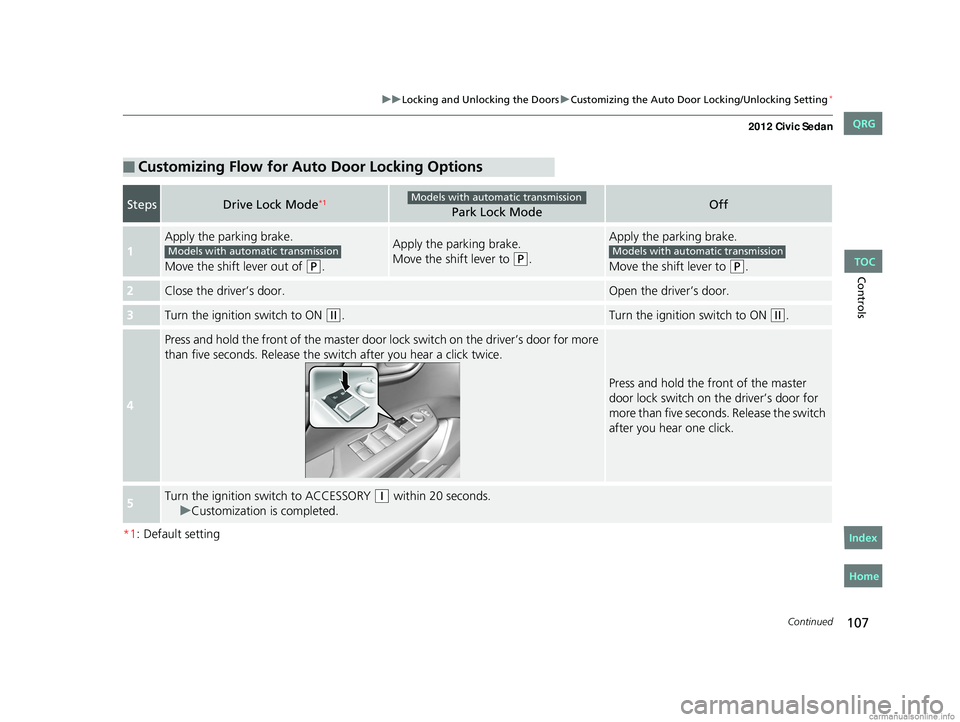
■Customizing Flow for Auto Door Locking Options
StepsDrive Lock Mode*1Park Lock ModeOff
1
Apply the parking brake.
Move the shift lever out of
(P.
Apply the parking brake.
Move the shift lever to
(P.
Apply the parking brake.
Move the shift lever to
(P.
2Close the driver’s door.Open the driver’s door.
3Turn the ignition switch to ON (w.Turn the ignition switch to ON (w.
4
Press and hold the front of the master door lo ck switch on the driver’s door for more
than five seconds. Release the switch after you hear a click twice.
Press and hold the front of the master
door lock switch on the driver’s door for
more than five seconds. Release the switch
after you hear one click.
5Turn the ignition sw itch to ACCESSORY (q within 20 seconds.
u Customization is completed.
Models with automatic transmission
Models with automatic transmissionModels with automatic transmission
CIVIC 4D-31TR3600.book 107 ページ 2011年2月14日 月曜日 午後2時51分
TOC
Home
QRG
Index
Page 109 of 345
108
uuLocking and Unlocking the Doors uCustomizing the Auto Door Locking/Unlocking Setting*
Controls
*1: Default setting for manual transmission models
*2: Default setting for automatic transmission models
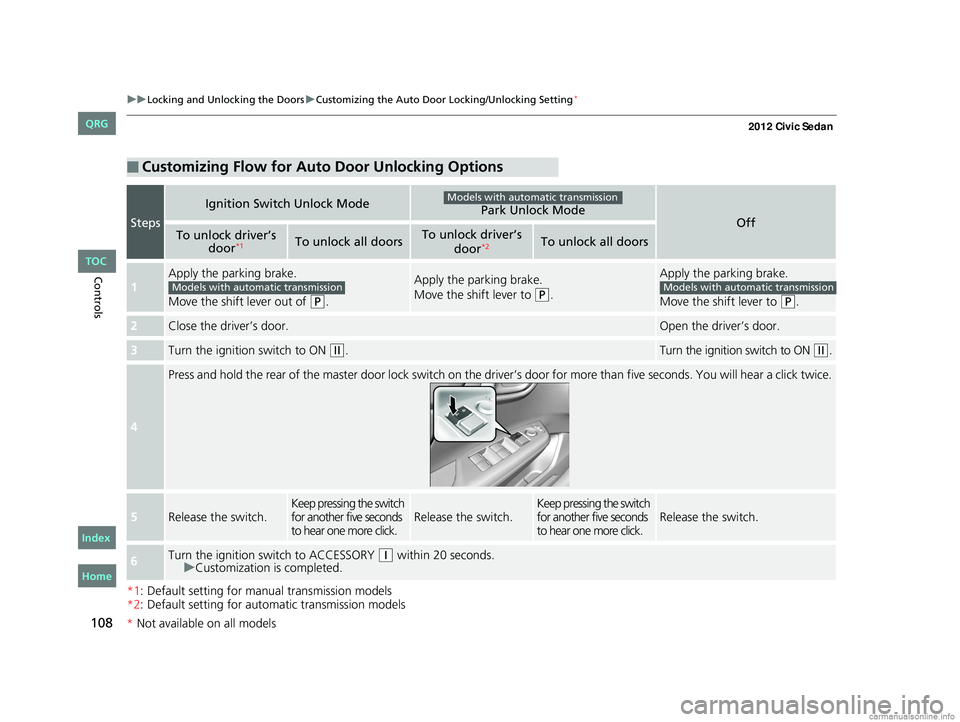
■Customizing Flow for Auto Door Unlocking Options
Steps
Ignition Switch Unlock ModePark Unlock ModeOffTo unlock driver’s
door*1To unlock all doorsTo unlock driver’s
door*2To unlock all doors
1
Apply the parking brake.
Move the shift lever out of
(P.
Apply the parking brake.
Move the shift lever to
(P.
Apply the parking brake.
Move the shift lever to
(P.
2Close the driver’s door.Open the driver’s door.
3Turn the ignition switch to ON (w.Turn the ignition switch to ON (w.
4
Press and hold the rear of the master door lock switch on the dr iver’s door for more than five seconds. You will hear a click t wice.
5Release the switch.Keep pressing the switch
for another five seconds
to hear one more click.Release the switch.Keep pressing the switch
for another five seconds
to hear one more click.Release the switch.
6Turn the ignition switch to ACCESSORY (q within 20 seconds.
u Customization is completed.
Models with automatic transmission
Models with automatic transmissionModels with automatic transmission
CIVIC 4D-31TR3600.book 108 ページ 2011年2月14日 月曜日 午後2時51分
*Not available on all models
TOC
Home
QRG
Index
Page 115 of 345
114
Controls
Opening and Closing the Windows
Opening/Closing the Power Windows
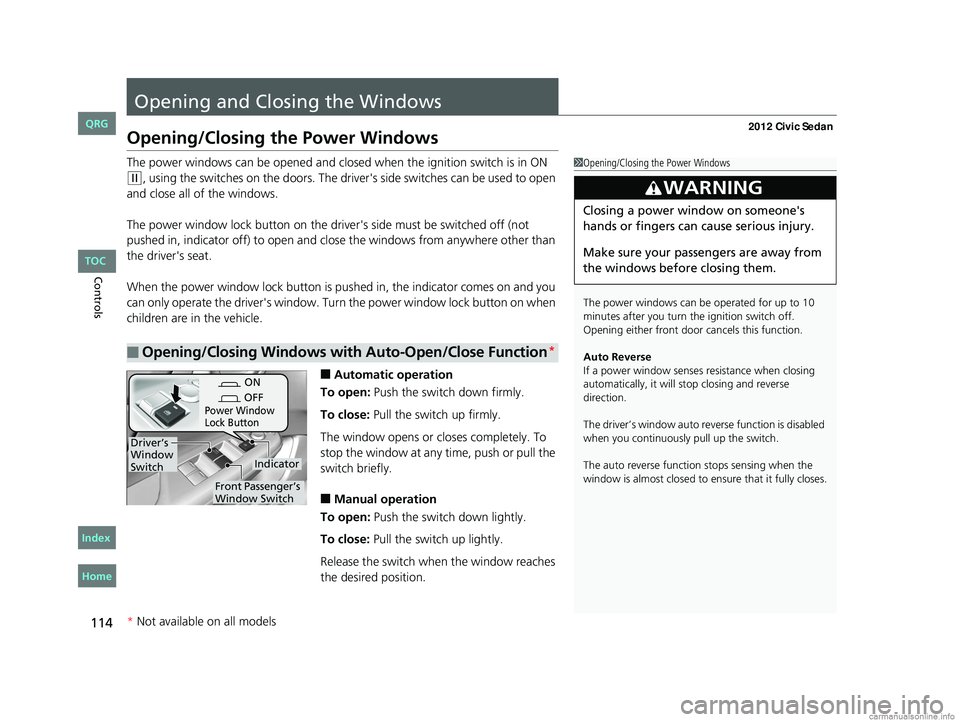
The power windows can be opened and closed when the ignition switch is in ON
(w, using the switches on the doors. The driver's side switches can be used to open
and close all of the windows.
The power window lock button on the driver's side must be switched off (not
pushed in, indicator off) to open and close the windows from anywhere other than
the driver's seat.
When the power window lock button is pu shed in, the indicator comes on and you
can only operate the driver's window. Turn the power window lock button on when
children are in the vehicle.
■Automatic operation
To open: Push the switch down firmly.
To close: Pull the switch up firmly.
The window opens or cl oses completely. To
stop the window at any time, push or pull the
switch briefly.
■Manual operation
To open: Push the switch down lightly.
To close: Pull the switch up lightly.
Release the switch wh en the window reaches
the desired position.
■Opening/Closing Windows with Auto-Open/Close Function*
1 Opening/Closing the Power Windows
The power windows can be operated for up to 10
minutes after you turn the ignition switch off.
Opening either front door cancels this function.
Auto Reverse
If a power window senses resistance when closing
automatically, it will stop closing and reverse
direction.
The driver’s window auto re verse function is disabled
when you continuously pull up the switch.
The auto reverse function stops sensing when the
window is almost closed to en sure that it fully closes.
3WARNING
Closing a power window on someone's
hands or fingers can cause serious injury.
Make sure your passengers are away from
the windows before closing them.
ON
OFF
Power Window
Lock Button
Indicator
Driver’s
Window
Switch
Front Passenger’s
Window Switch
* Not available on all models
CIVIC 4D-31TR3600.book 114 ページ 2011年2月14日 月曜日 午後2時51分
TOC
Home
QRG
Index
Page 118 of 345
117
Controls
Operating the Switches Around the Steering Wheel
Ignition Switch
1Ignition Switch
You cannot take the key out unless the shift lever is
in
( P.
If you open the driver's door when the key is in LOCK
(0 or ACCESSORY (q, a warning buzzer will sound
to remind you to take the key out.
When this happens, the following messages appear
on the multi-information display
*:
•In LOCK ( 0: "REMOVE KEY."
•In ACCESSORY (q: "RETURN IGNITION SWITCH
TO LOCK (0) POSITION" The buzzer will stop when
you take the key out.
If the key won't turn from LOCK
( 0 to ACCESSORY
(q, turn the key while moving the steering wheel left
and right. The steering wh eel will unlock, allowing
the key to turn.
3WARNING
Removing the key from the ignition switch
while driving locks the steering. This can
cause you to lose control of the vehicle.
Remove the key from the ignition switch
only when parked.
Manual transmission models
Automatic transmission models
All models
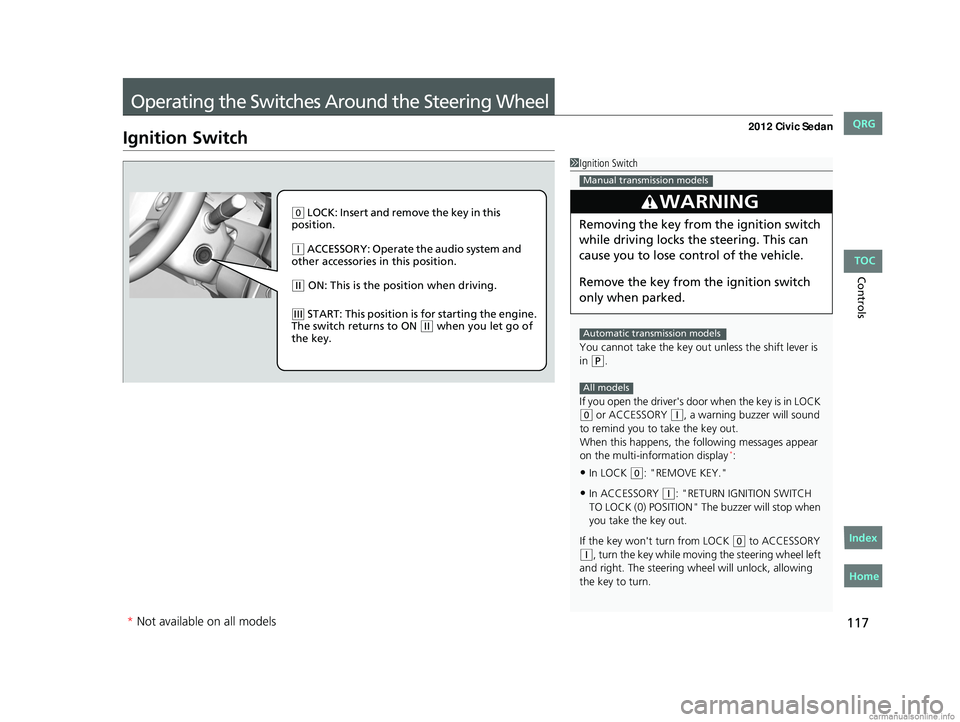
( 0 LOCK: Insert and remove the key in this
position.
( q ACCESSORY: Operate the audio system and
other accessories in this position.
( w ON: This is the position when driving.
(e START: This position is for starting the engine.
The switch returns to ON ( w when you let go of
the key.
* Not available on all models
CIVIC 4D-31TR3600.book 117 ページ 2011年2月14日 月曜日 午後2時51分
TOC
Home
QRG
Index
Page 120 of 345
119
uuOperating the Switches Around the Steering Wheel uLight Switches
Controls
Automatic lighting control can be used when
the ignition switch is in ON
(w.
When you turn the light switch to
#Y, the
headlights and other exterior lights will switch
on and off automatically depending on the
ambient brightness.
The headlights, all other exterior lights, and the instrument panel lights turn off
within 15 seconds after you remove the key and close the driver's door.
If you turn the ignition switch to LOCK
(0 with the headlight switch on, but do not
open the door, the lights turn off after 10 minu tes (3 minutes, if the switch is in the
#Y position).
The lights turn on again when you unlock or open the driver's door. If you unlock
the door, but do not open it within 15 seconds, the lights go off. If you open the
driver's door, you will hear a lights on reminder chime.
■Automatic Lighting Control*1 Automatic Lighting Control
We recommend that you turn on the lights manually
when driving at night, in a dense fog, or in dark areas
such as long tunnels or parking facilities.
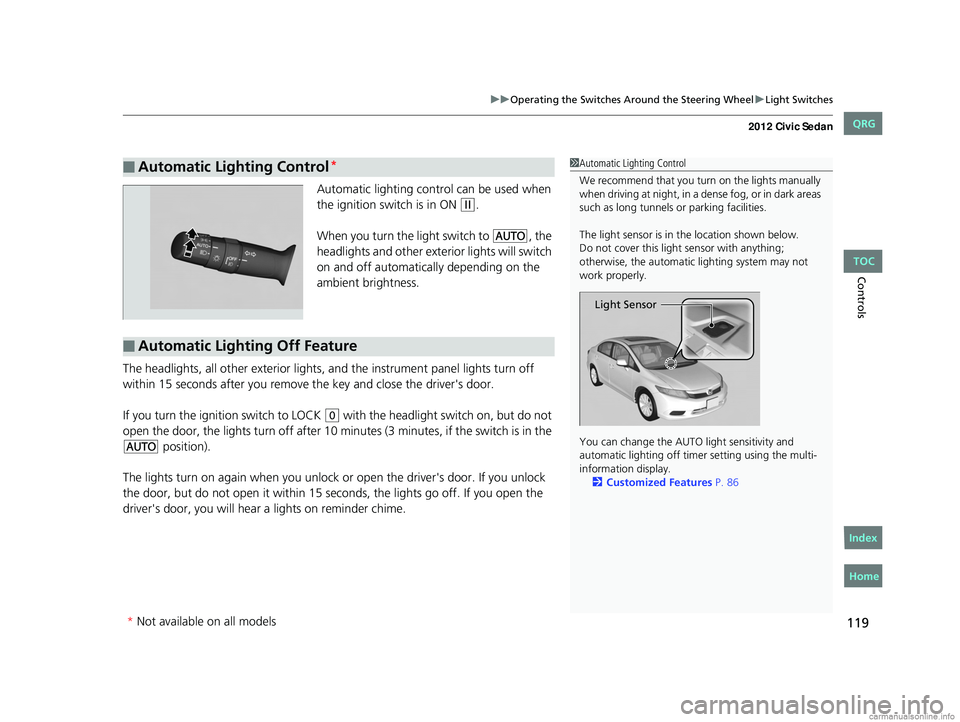
The light sensor is in the location shown below.
Do not cover this light sensor with anything;
otherwise, the automatic lighting system may not
work properly.
You can change the AUTO light sensitivity and
automatic lighting off time r setting using the multi-
information display. 2 Customized Features P. 86
Light Sensor
■Automatic Lighting Off Feature
* Not available on all models
CIVIC 4D-31TR3600.book 119 ページ 2011年2月14日 月曜日 午後2時51分
TOC
Home
QRG
Index
Page 146 of 345
145
uuAudio System*uUSB Adapter Cable*
Features
USB Adapter Cable*
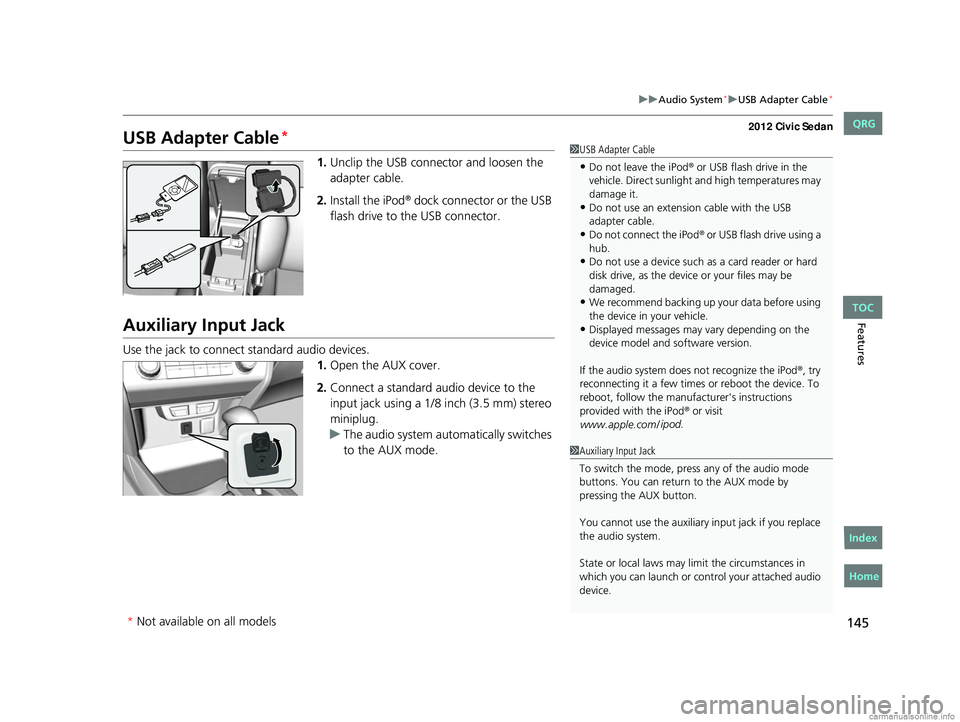
1. Unclip the USB connec tor and loosen the
adapter cable.
2. Install the iPod
® dock connector or the USB
flash drive to the USB connector.
Auxiliary Input Jack
Use the jack to connect standard audio devices. 1.Open the AUX cover.
2. Connect a standard audio device to the
input jack using a 1/8 inch (3.5 mm) stereo
miniplug.
u The audio system auto matically switches
to the AUX mode.
1 USB Adapter Cable
•Do not leave the iPod® or USB flash drive in the
vehicle. Direct sunlight and high temperatures may
damage it.
•Do not use an extension cable with the USB
adapter cable.
•Do not connect the iPod® or USB flash drive using a
hub.
•Do not use a device such as a card reader or hard
disk drive, as the device or your files may be
damaged.
•We recommend backing up yo ur data before using
the device in your vehicle.
•Displayed messages may vary depending on the
device model and software version.
If the audio system doe s not recognize the iPod
®, try
reconnecting it a few times or reboot the device. To
reboot, follow the manufac turer's instructions
provided with the iPod
® or visit
www.apple.com/ ipod
.
1Auxiliary Input Jack
To switch the mode, pres s any of the audio mode
buttons. You can return to the AUX mode by
pressing the AUX button.
You cannot use the auxiliary input jack if you replace
the audio system.
State or local laws may li mit the circumstances in
which you can launch or cont rol your attached audio
device.
* Not available on all models
CIVIC 4D-31TR3600.book 145 ページ 2011年2月14日 月曜日 午後2時51分
TOC
Home
QRG
Index
Page 210 of 345
209
uuTowing a Trailer uDriving Safely with a Trailer
Continued
Driving
Driving Safely with a Trailer
• Have the trailer properly servic ed and keep it in good condition.
• Make sure that all the weights and load in the vehicle and trailer are within limits.
2Towing Load Limits P. 207
•Securely attach the hitch, safety chains, and other necessary parts to the trailer.
• Securely store all the items in and on the tra iler so that they do not shift while
driving.
• Check if the lights and brakes on the trailer are working properly.
• Check the pressures of the traile r tires, including the spare.
• Drive slower than normal.
• Obey posted speed limits fo r vehicles with trailers.
• Use the
(D position when towing a trailer on level roads.
• Turn more slowly and with a wider turning arc than normal.
• Allow more time and distance for braking.
• Do not brake or turn suddenly.
■Things You Need To Know Before Towing a Trailer
■Towing Speeds and Gears
■Turning and Braking
1Driving Safely with a Trailer
Parking
In addition to the normal precautions, place wheel
chocks at each of the trailer's tires.
Automatic transmission models
CIVIC 4D-31TR3600.book 209 ページ 2011年2月14日 月曜日 午後2時51分
TOC
Home
QRG
Index
Page 213 of 345
uuWhen Driving uStarting the Engine
212
Driving
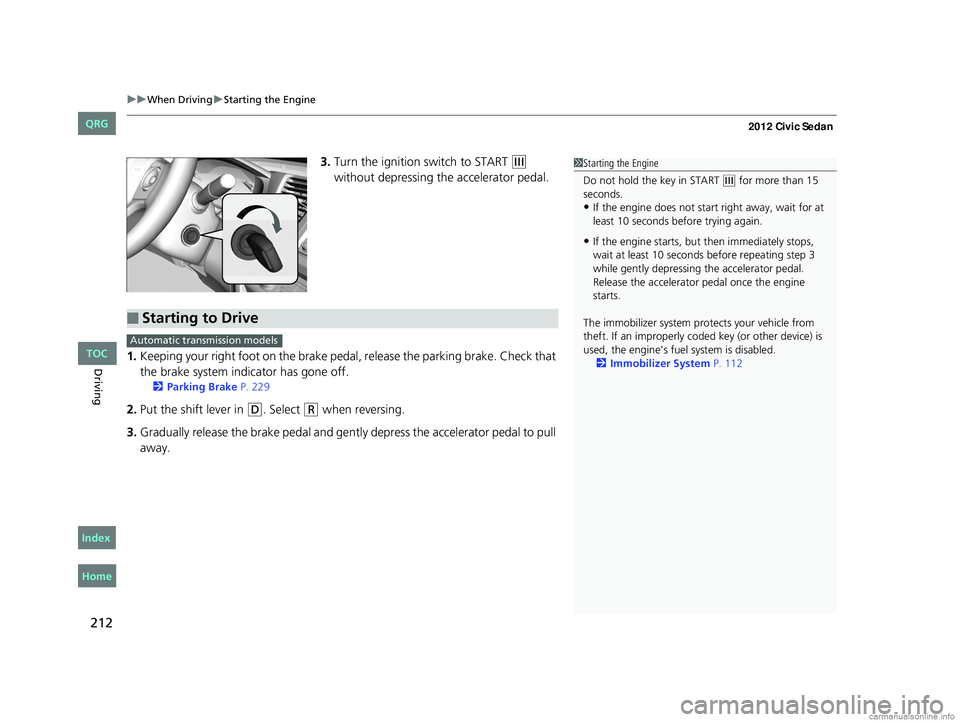
3. Turn the ignition switch to START (e
without depressing the accelerator pedal.
1. Keeping your right foot on the brake peda l, release the parking brake. Check that
the brake system indicator has gone off.
2 Parking Brake P. 229
2.Put the shift lever in (D. Select (R when reversing.
3. Gradually release the brake pedal and gently depress the accelerator pedal to pull
away.
1Starting the Engine
Do not hold the key in START
(e for more than 15
seconds.
•If the engine does not start right away, wait for at
least 10 seconds before trying again.
•If the engine starts, but then immediately stops,
wait at least 10 seconds before repeating step 3
while gently depressing the accelerator pedal.
Release the accelerator pedal once the engine
starts.
The immobilizer system pr otects your vehicle from
theft. If an improperly code d key (or other device) is
used, the engine's fuel system is disabled.
2 Immobilizer System P. 112
■Starting to Drive
Automatic transmission models
CIVIC 4D-31TR3600.book 212 ページ 2011年2月14日 月曜日 午後2時51分
TOC
Home
QRG
Index