Display panel HONDA CIVIC SEDAN 2012 (in English) Owner's Guide
[x] Cancel search | Manufacturer: HONDA, Model Year: 2012, Model line: CIVIC SEDAN, Model: HONDA CIVIC SEDAN 2012Pages: 345, PDF Size: 53.95 MB
Page 92 of 345
91
uuGauges and Displays uMulti-Information Display*
Continued
Instrument Panel
*1: Not available on all models
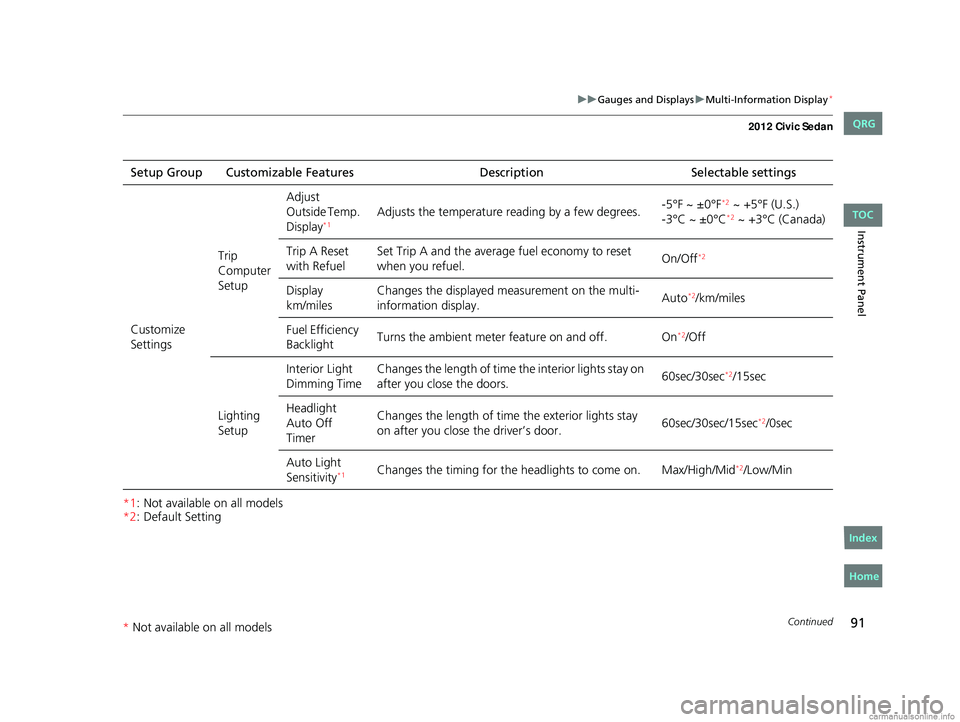
*2: Default SettingSetup Group Customizable Features
DescriptionSelectable settings
Customize
Settings Trip
Computer
SetupAdjust
Outside Temp.
Display
*1Adjusts the temperature r
eading by a few degrees. -5°F ~ ±0°F*2 ~ +5°F (U.S.)
-3°C ~ ±0°C*2 ~ +3°C (Canada)
Trip A Reset
with Refuel Set Trip A and the average fuel economy to reset
when you refuel.
On/Off
*2
Display
km/milesChanges the displayed m
easurement on the multi-
information display. Auto*2/km/miles
Fuel Efficiency
Backlight Turns the ambient meter feature on and off. On
*2/Off
Lighting
Setup Interior Light
Dimming Time
Changes the length of time the interior lights stay on
after you close the doors.
60sec/30sec
*2/15sec
Headlight
Auto Off
Timer Changes the length of time
the exterior lights stay
on after you close the driver’s door. 60sec/30sec/15sec
*2/0sec
Auto Light
Sensitivity
*1Changes the timing for the head lights to come on. Max/High/Mid*2/Low/Min
CIVIC 4D-31TR3600.book 91 ページ 2011年2月14日 月曜日 午後2時51分
TOC
Home
QRG
Index
* Not av ailable on all mo dels
Page 93 of 345
92
uuGauges and Displays uMulti-Information Display*
Instrument Panel
*1:Default Setting
*2:Default Setting for automatic transmission
*3:Default Setting for manual transmissionSetup Group Customizable Features
DescriptionSelectable settings
Customize
Settings Door
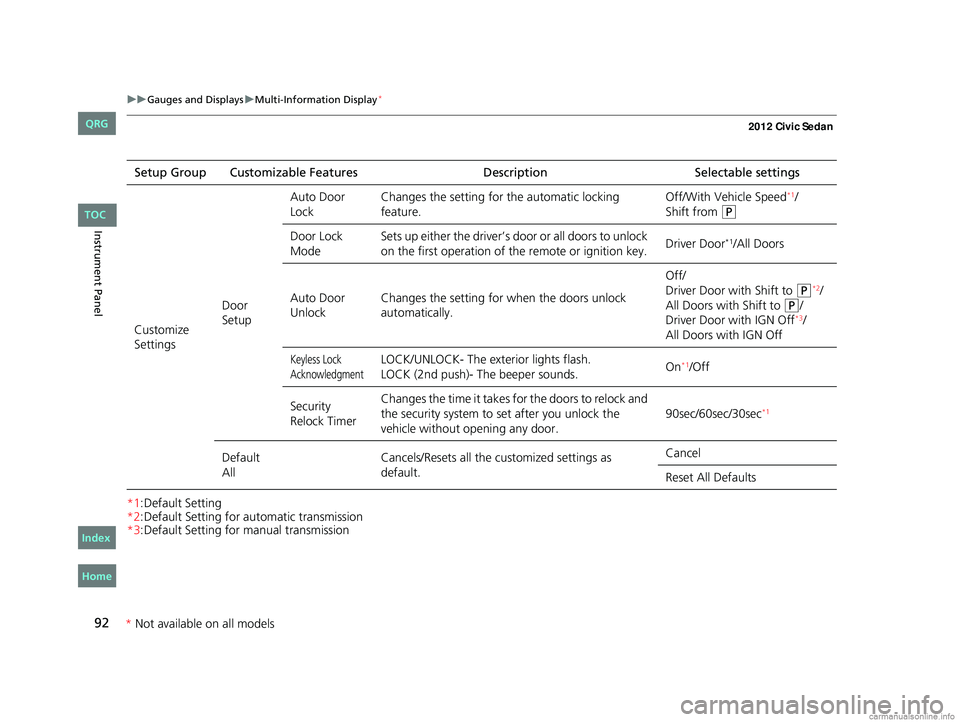
SetupAuto Door
Lock
Changes the setting for
the automatic locking
feature. Off/With Vehicle Speed
*1/
Shift from
(P
Door Lock
Mode Sets up either the driver’s door or all doors to unlock
on the first operation of the remote or ignition key.
Driver Door*1/All Doors
Auto Door
Unlock Changes the setting for
when the doors unlock
automatically. Off/
Driver Door with Shift to
(P*2/
All Doors with Shift to
(P/
Driver Door with IGN Off*3/
All Doors with IGN Off
Keyless Lock
AcknowledgmentLOCK/UNLOCK- The exterior lights flash.
LOCK (2nd push)- The beeper sounds. On*1/Off
Security
Relock Timer Changes the time it takes for the doors to relock and
the security system to set after you unlock the
vehicle without opening any door.
90sec/60sec/30sec
*1
Default
AllCancels/Resets all the customized settings as
default. Cancel
Reset All Defaults
CIVIC 4D-31TR3600.book 92 ページ 2011年2月14日 月曜日 午後2時51分
TOC
Home
QRG
Index
*
Not availabl eon allmo dels
Page 94 of 345
Continued93
uuGauges and Displays uMulti-Information Display*
Instrument Panel
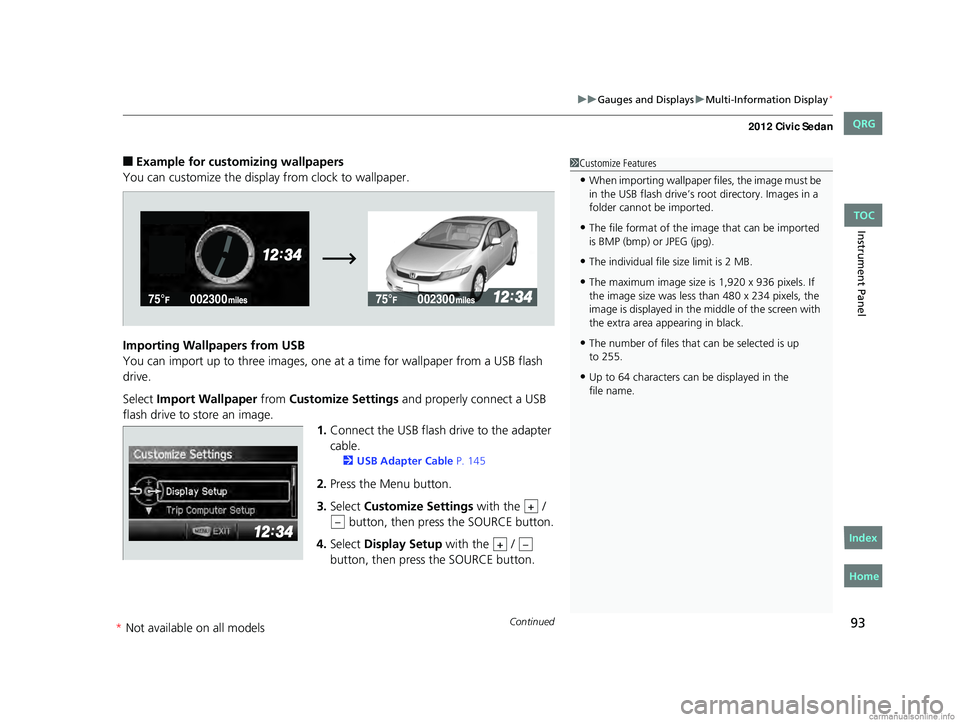
■Example for customizing wallpapers
You can customize the display from clock to wallpaper.
Importing Wallpapers from USB
You can import up to three images, one at a time for wallpaper from a USB flash
drive.
Select Import Wallpaper from Customize Settings and properly connect a USB
flash drive to store an image. 1.Connect the USB flash drive to the adapter
cable.
2 USB Adapter Cable P. 145
2.Press the Menu button.
3. Select Customize Settings with the /
button, then pres s the SOURCE button.
4. Select Display Setup with the /
button, then press the SOURCE button.
1 Customize Features
•When importing wallpaper files, the image must be
in the USB flash drive’s root directory. Images in a
folder cannot be imported.
•The file format of the im age that can be imported
is BMP (bmp) or JPEG (jpg).
•The individual file size limit is 2 MB.
•The maximum image size is 1,920 x 936 pixels. If
the image size was less than 480 x 234 pixels, the
image is displayed in the middle of the screen with
the extra area appearing in black.
•The number of files that can be selected is up
•Up to 64 characters can be displayed in the
+
–
+–
CIVIC 4D-31TR3600.book 93 ページ 2011年2月14日 月曜日 午後2時51分
TOC
Home
QRG
Index
to 255.
file name.
* Not availabl eon allmo dels
Page 95 of 345
94
uuGauges and Displays uMulti-Information Display*
Instrument Panel
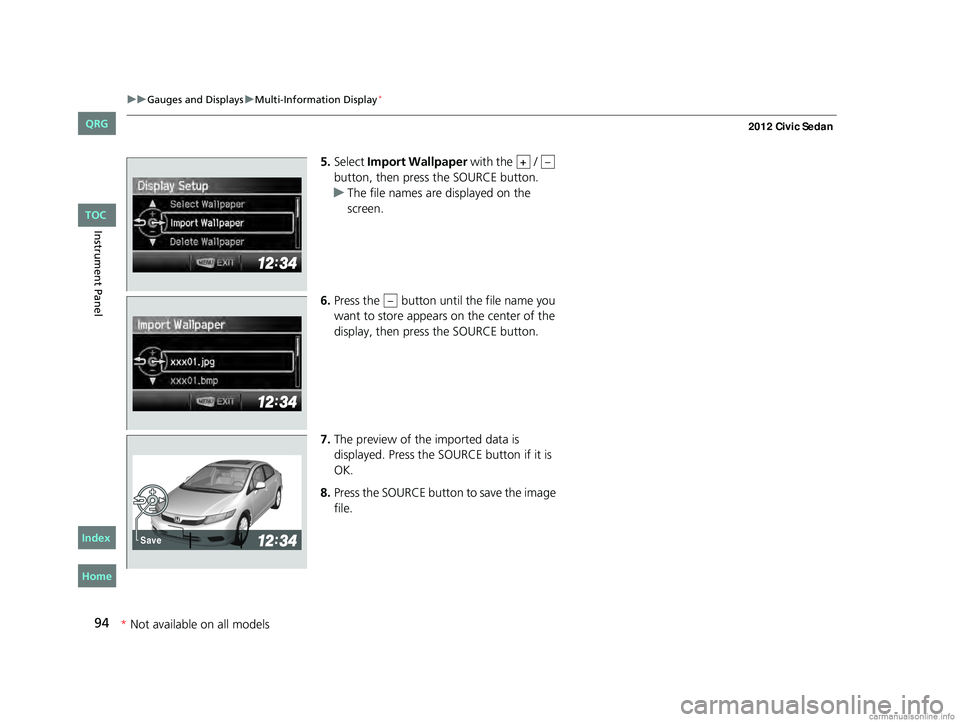
5. Select Import Wallpaper with the /
button, then press the SOURCE button.
u The file names are displayed on the
screen.
6. Press the button unt il the file name you
want to store appears on the center of the
display, then press the SOURCE button.
7. The preview of the imported data is
displayed. Press the SO URCE button if it is
OK.
8. Press the SOURCE button to save the image
file.+–
–
Save
CIVIC 4D-31TR3600.book 94 ページ 2011年2月14日 月曜日 午後2時51分
TOC
*Not availabl eon allmo dels
Home
QRG
Index
Page 96 of 345
95
uuGauges and Displays uMulti-Information Display*
Continued
Instrument Panel
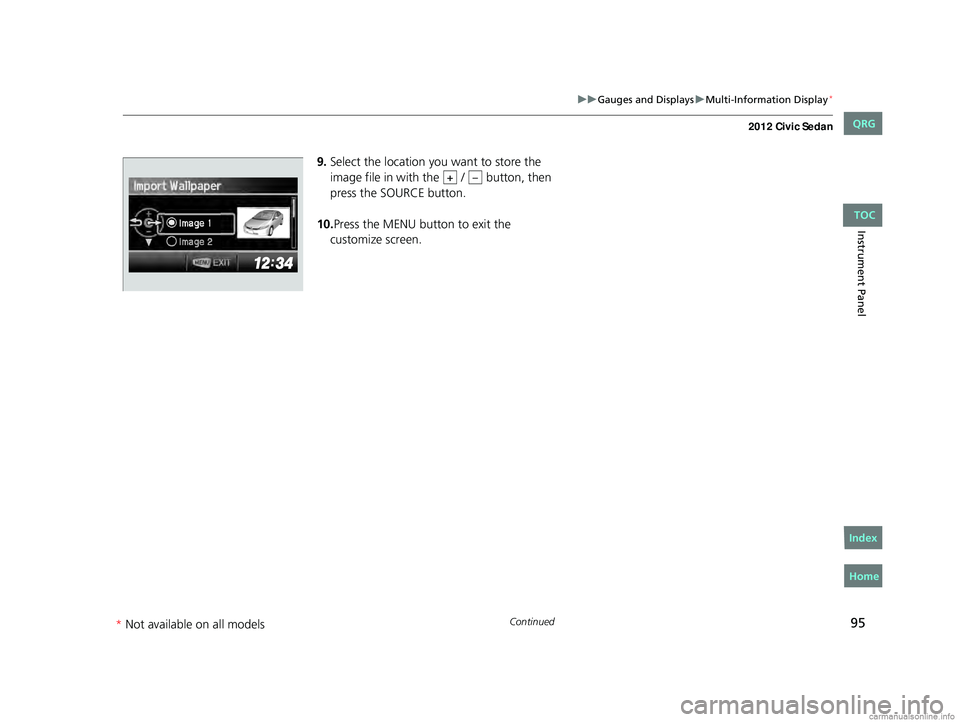
9. Select the location you want to store the
image file in with the / button, then
press the SOURCE button.
10. Press the MENU button to exit the
customize screen.
+–
CIVIC 4D-31TR3600.book 95 ページ 2011年2月14日 月曜日 午後2時51分
TOC
* Not availabl eon allmo dels
Home
QRG
Index
Page 97 of 345
96
uuGauges and Displays uMulti-Information Display*
Instrument Panel
Selecting a Wallpaper
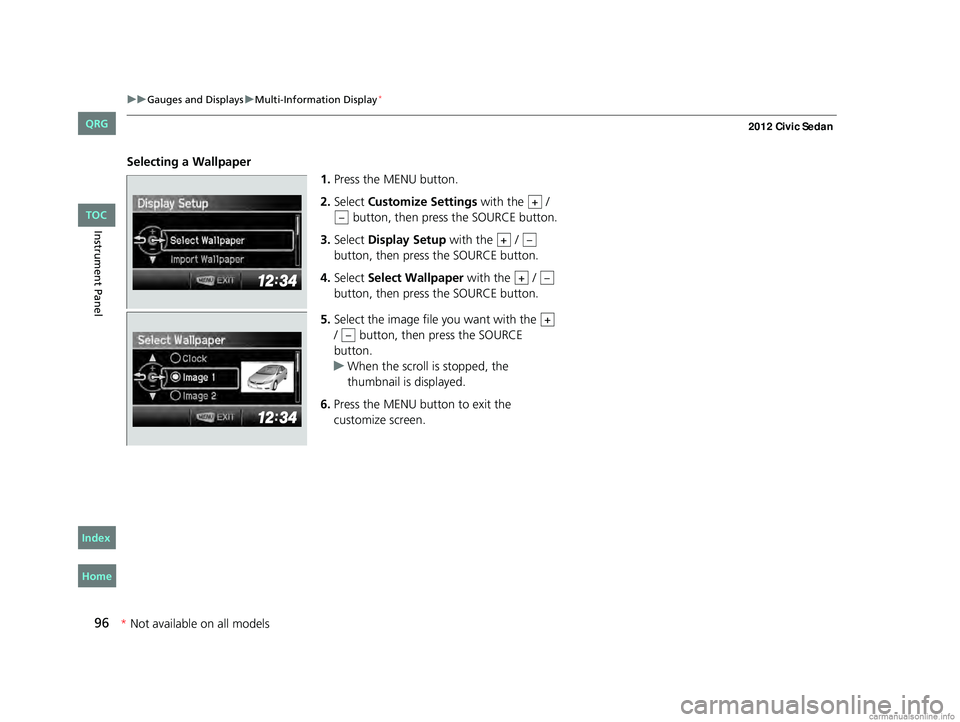
1.Press the MENU button.
2. Select Customize Settings with the /
button, then press the SOURCE button.
3. Select Display Setup with the /
button, then press the SOURCE button.
4. Select Select Wallpaper with the /
button, then press the SOURCE button.
5. Select the image file you want with the
/ button, then press the SOURCE
button.
u When the scroll is stopped, the
thumbnail is displayed.
6. Press the MENU button to exit the
customize screen.
+
–
+–
+–
+
–
CIVIC 4D-31TR3600.book 96 ページ 2011年2月14日 月曜日 午後2時51分
TOC
Home
QRG
Index
*Not availabl eon allmo dels
Page 120 of 345
119
uuOperating the Switches Around the Steering Wheel uLight Switches
Controls
Automatic lighting control can be used when
the ignition switch is in ON
(w.
When you turn the light switch to
#Y, the
headlights and other exterior lights will switch
on and off automatically depending on the
ambient brightness.
The headlights, all other exterior lights, and the instrument panel lights turn off
within 15 seconds after you remove the key and close the driver's door.
If you turn the ignition switch to LOCK
(0 with the headlight switch on, but do not
open the door, the lights turn off after 10 minu tes (3 minutes, if the switch is in the
#Y position).
The lights turn on again when you unlock or open the driver's door. If you unlock
the door, but do not open it within 15 seconds, the lights go off. If you open the
driver's door, you will hear a lights on reminder chime.
■Automatic Lighting Control*1 Automatic Lighting Control
We recommend that you turn on the lights manually
when driving at night, in a dense fog, or in dark areas
such as long tunnels or parking facilities.
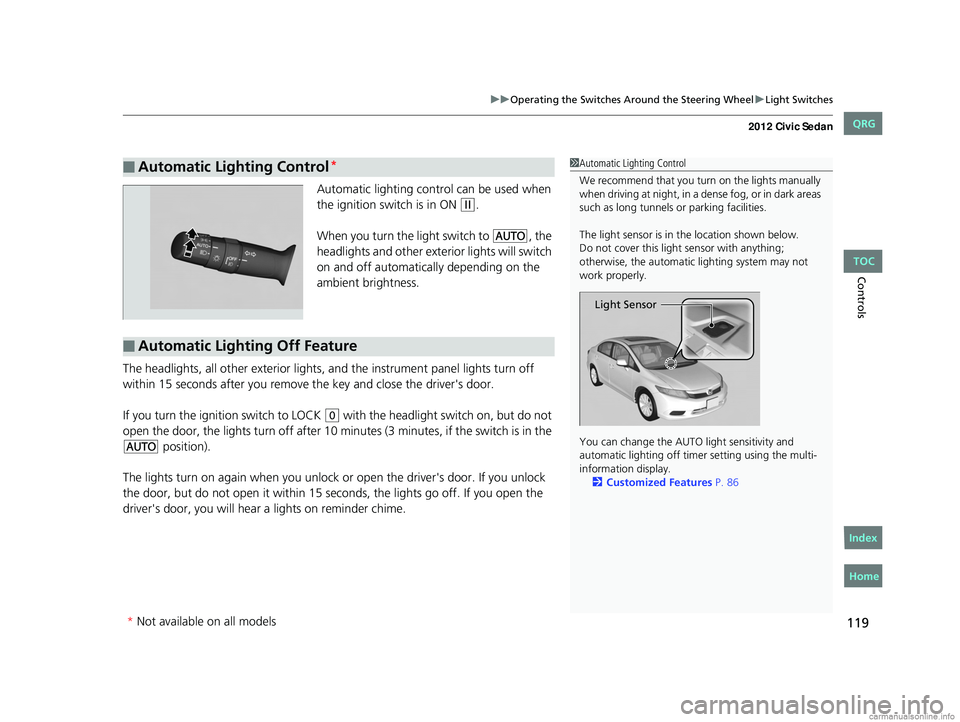
The light sensor is in the location shown below.
Do not cover this light sensor with anything;
otherwise, the automatic lighting system may not
work properly.
You can change the AUTO light sensitivity and
automatic lighting off time r setting using the multi-
information display. 2 Customized Features P. 86
Light Sensor
■Automatic Lighting Off Feature
* Not available on all models
CIVIC 4D-31TR3600.book 119 ページ 2011年2月14日 月曜日 午後2時51分
TOC
Home
QRG
Index
Page 123 of 345
122
uuOperating the Switches Around the Steering Wheel uBrightness Control
Controls
Brightness Control
When the parking lights are turned on and the
ignition switch is in ON
(w, you can use the
brightness control knob to adjust instrument
panel brightness.
Brighten: Turn the knob to the right.
Dim: Turn the knob to the left.
You will hear the beeper when the brightness
reaches minimum or maximum. The
information display
*/multi-information
display* will return to its original state several
seconds after you adjust the brightness.
■Brightness level indicator
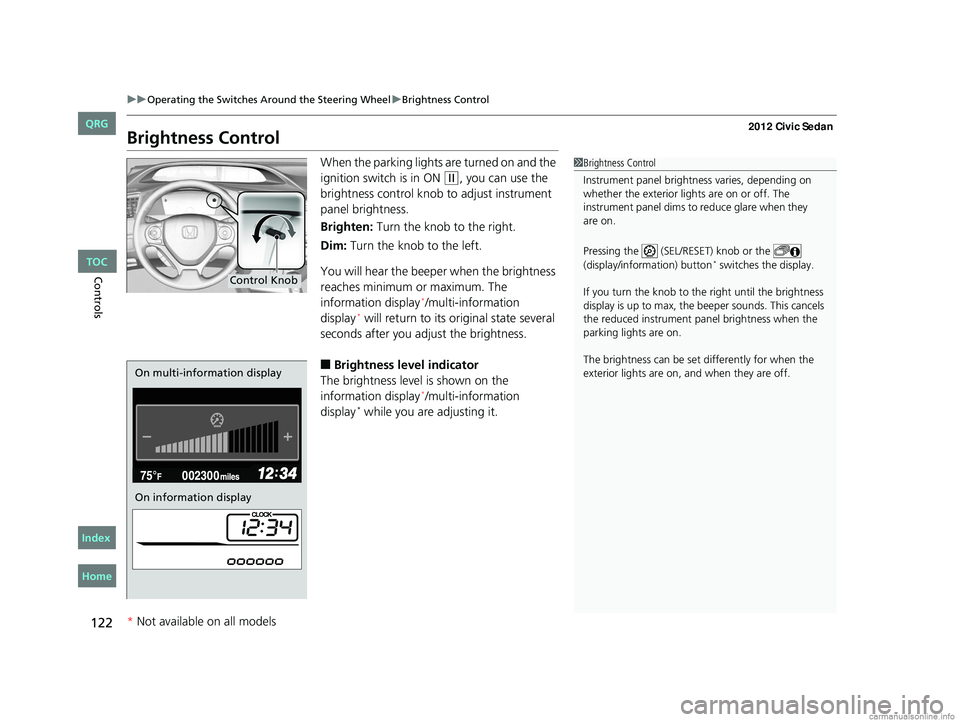
The brightness level is shown on the
information display
*/multi-information
display* while you are adjusting it.
1 Brightness Control
Instrument panel brightne ss varies, depending on
whether the exterior lights are on or off. The
instrument panel dims to reduce glare when they
Pressing the (SEL/RESET) knob or the
(display/information) button
* switches the display.
If you turn the knob to the right until the brightness
display is up to max, the beeper sounds. This cancels
the reduced instrument panel brightness when the
parking lights are on.
The brightness can be set differently for when the
exterior lights are on, and when they are off.
Control Knob
On multi-information display
On information display
* Not available on all models
CIVIC 4D-31TR3600.book 122 ページ 2011年2月14日 月曜日 午後2時51分
TOC
Home
QRG
Index
are on.
Page 145 of 345
144
Features
Audio System*
About Your Audio System
On models with navigation system, see the Navigation System Manual for operation
of the audio system, Bluetooth®HandsFreeLink®, and voice commands for these
features.
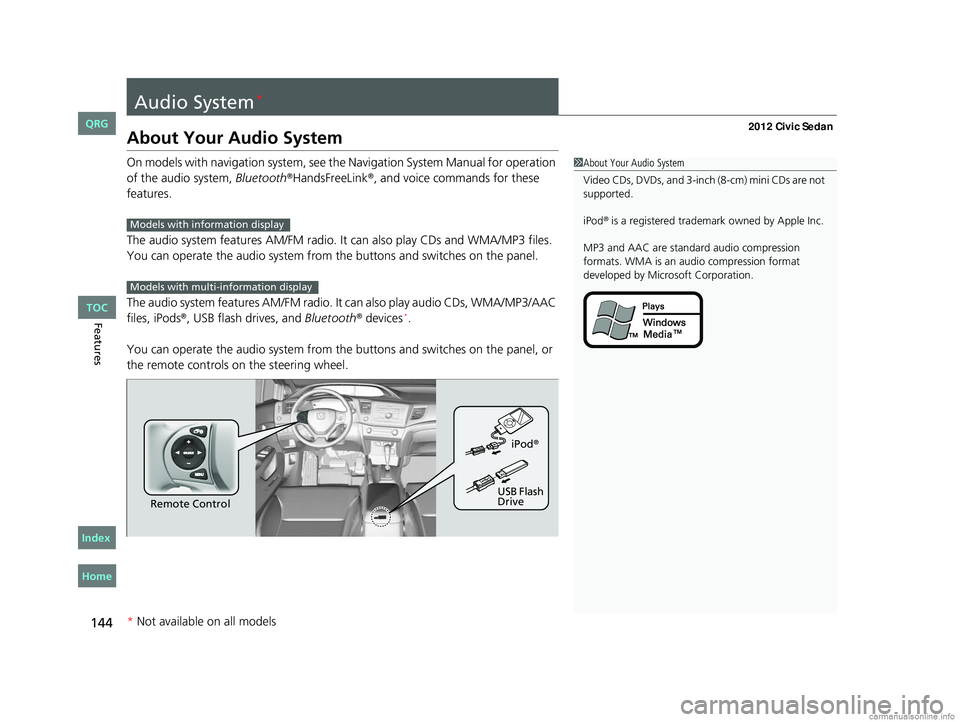
The audio system features AM /FM radio. It can also play CDs and WMA/MP3 files.
You can operate the audio system from the buttons and switches on the panel.
The audio system features AM/FM radio. It can also play audio CDs, WMA/MP3/AAC
files, iPods
®, USB flash drives, and Bluetooth® devices*.
You can operate the audio system from the buttons and switches on the panel, or
the remote controls on the steering wheel.
1About Your Audio System
Video CDs, DVDs, and 3-inch (8-cm) mini CDs are not
supported.
iPod
® is a registered trademark owned by Apple Inc.
MP3 and AAC are standard audio compression
formats. WMA is an audio compression format
developed by Micr osoft Corporation.Models with info rmation display
Models with multi- information display
Remote Control iPod
®
USB Flash
Drive
* Not available on all models
CIVIC 4D-31TR3600.book 144 ページ 2011年2月14日 月曜日 午後2時51分
TOC
Home
QRG
Index
Page 244 of 345
243Continued
Maintenance
Maintenance Minder™
If the engine oil life is less than 15%, you will see the Maintenance Minder messages
appear on the information display* or the multi-information display* every time you
turn the ignition switch to ON
(w. The messages notify you when to change the
engine oil, or when to bring your vehi cle to a dealer for indicated maintenance
services.
To Use Maintenance MinderTM
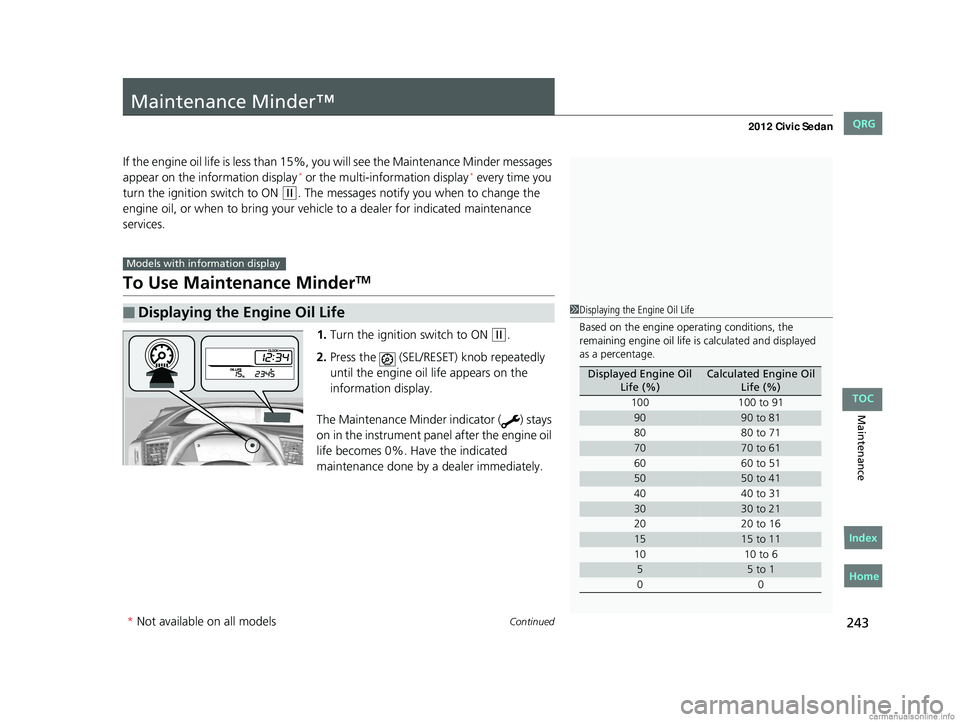
1. Turn the ignition switch to ON (w.
2. Press the (SEL/RESET) knob repeatedly
until the engine oil life appears on the
information display.
The Maintenance Minder indicator ( ) stays
on in the instrument panel after the engine oil
life becomes 0%. Have the indicated
maintenance done by a dealer immediately.
■Displaying the Engine Oil Life
Models with info rmation display
1Displaying the Engine Oil Life
Based on the engine ope rating conditions, the
remaining engine oi l life is calculated and displayed
as a percentage.
Displayed Engine Oil
Life (%)Calculated Engine Oil Life (%)
100 100 to 91
9090 to 81
80 80 to 71
7070 to 61
60 60 to 51
5050 to 41
40 40 to 31
3030 to 21
20 20 to 16
1515 to 11
10 10 to 6
55 to 1
00
* Not available on all models
CIVIC 4D-31TR3600.book 243 ページ 2011年2月14日 月曜日 午後2時51分
TOC
Home
QRG
Index