door lock HONDA CIVIC SEDAN 2012 (in English) Owner's Guide
[x] Cancel search | Manufacturer: HONDA, Model Year: 2012, Model line: CIVIC SEDAN, Model: HONDA CIVIC SEDAN 2012Pages: 345, PDF Size: 53.95 MB
Page 107 of 345
106
uuLocking and Unlocking the Doors uCustomizing the Auto Door Locking/Unlocking Setting*
Controls
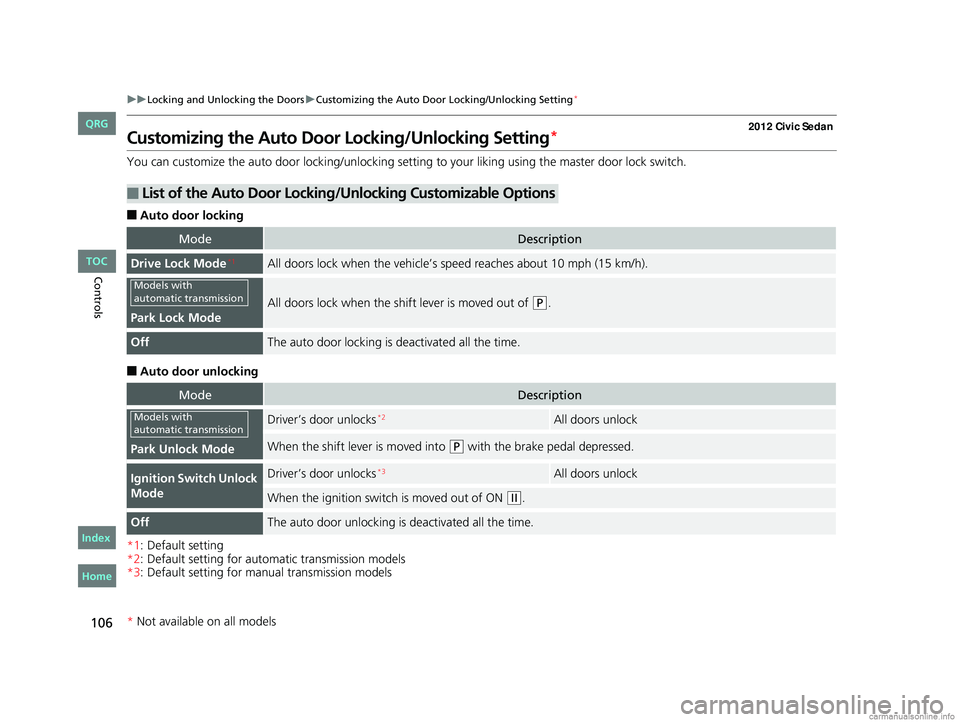
Customizing the Auto Door Locking/Unlocking Setting*
You can customize the auto door locking/unlocking setting to your liking using the master door lock switch.
■Auto door locking
■Auto door unlocking
*1: Default setting
*2: Default setting for automatic transmission models
*3: Default setting for manual transmission models
■List of the Auto Door Locking/Unlocking Customizable Options
ModeDescription
Drive Lock Mode*1All doors lock when the vehicle’s sp eed reaches about 10 mph (15 km/h).
Park Lock Mode
All doors lock when the shift lever is moved out of (P.
OffThe auto door locking is deactivated all the time.
ModeDescription
Park Unlock Mode
Driver’s door unlocks*2All doors unlock
When the shift lever is moved into (P with the brake pedal depressed.
Ignition Switch Unlock
ModeDriver’s door unlocks*3All doors unlock
When the ignition switch is moved out of ON (w.
OffThe auto door unlocking is deactivated all the time.
Models with
automatic transmission
Models with
automatic transmission
* Not available on all models
CIVIC 4D-31TR3600.book 106 ページ 2011年2月14日 月曜日 午後2時51分
TOC
Home
QRG
Index
Page 108 of 345
107
uuLocking and Unlocking the Doors uCustomizing the Auto Door Locking/Unlocking Setting*
Continued
Controls
*1: Default setting
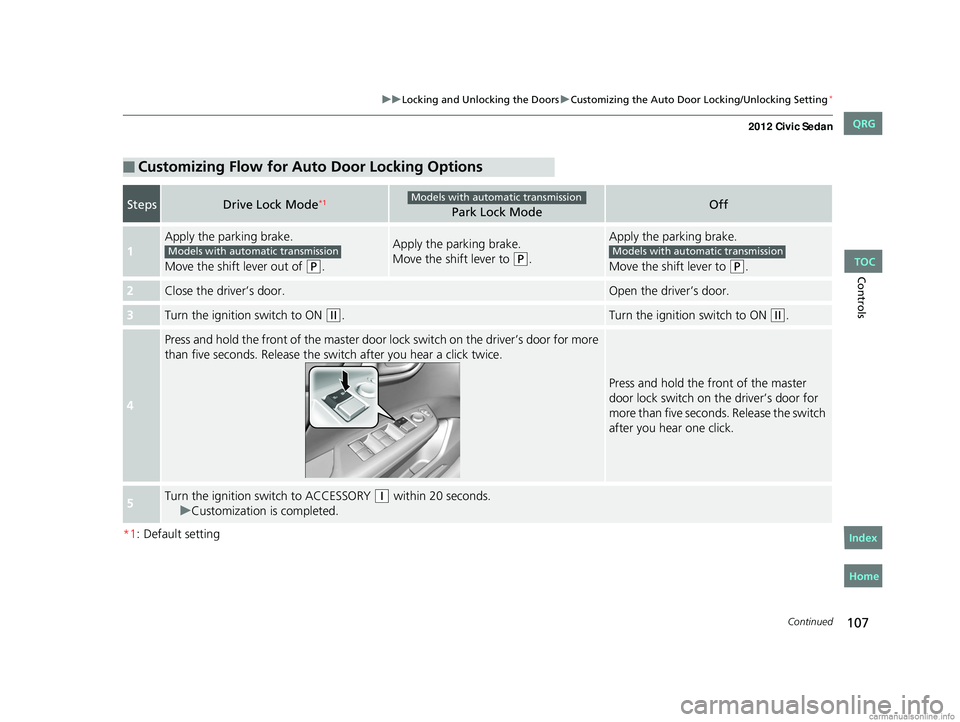
■Customizing Flow for Auto Door Locking Options
StepsDrive Lock Mode*1Park Lock ModeOff
1
Apply the parking brake.
Move the shift lever out of
(P.
Apply the parking brake.
Move the shift lever to
(P.
Apply the parking brake.
Move the shift lever to
(P.
2Close the driver’s door.Open the driver’s door.
3Turn the ignition switch to ON (w.Turn the ignition switch to ON (w.
4
Press and hold the front of the master door lo ck switch on the driver’s door for more
than five seconds. Release the switch after you hear a click twice.
Press and hold the front of the master
door lock switch on the driver’s door for
more than five seconds. Release the switch
after you hear one click.
5Turn the ignition sw itch to ACCESSORY (q within 20 seconds.
u Customization is completed.
Models with automatic transmission
Models with automatic transmissionModels with automatic transmission
CIVIC 4D-31TR3600.book 107 ページ 2011年2月14日 月曜日 午後2時51分
TOC
Home
QRG
Index
Page 109 of 345
108
uuLocking and Unlocking the Doors uCustomizing the Auto Door Locking/Unlocking Setting*
Controls
*1: Default setting for manual transmission models
*2: Default setting for automatic transmission models
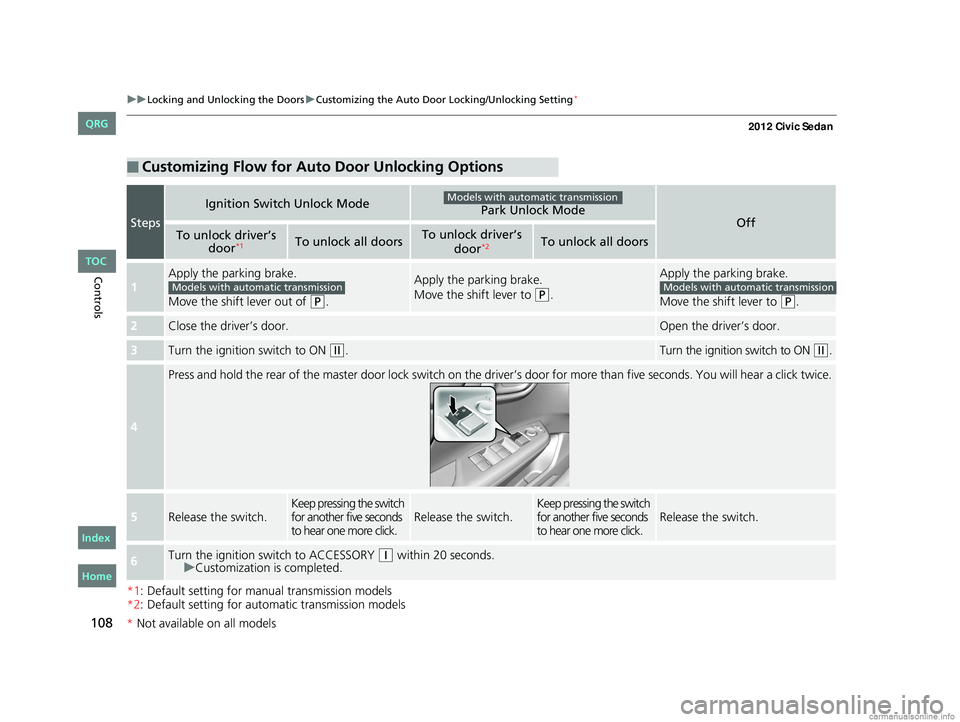
■Customizing Flow for Auto Door Unlocking Options
Steps
Ignition Switch Unlock ModePark Unlock ModeOffTo unlock driver’s
door*1To unlock all doorsTo unlock driver’s
door*2To unlock all doors
1
Apply the parking brake.
Move the shift lever out of
(P.
Apply the parking brake.
Move the shift lever to
(P.
Apply the parking brake.
Move the shift lever to
(P.
2Close the driver’s door.Open the driver’s door.
3Turn the ignition switch to ON (w.Turn the ignition switch to ON (w.
4
Press and hold the rear of the master door lock switch on the dr iver’s door for more than five seconds. You will hear a click t wice.
5Release the switch.Keep pressing the switch
for another five seconds
to hear one more click.Release the switch.Keep pressing the switch
for another five seconds
to hear one more click.Release the switch.
6Turn the ignition switch to ACCESSORY (q within 20 seconds.
u Customization is completed.
Models with automatic transmission
Models with automatic transmissionModels with automatic transmission
CIVIC 4D-31TR3600.book 108 ページ 2011年2月14日 月曜日 午後2時51分
*Not available on all models
TOC
Home
QRG
Index
Page 113 of 345
112
Controls
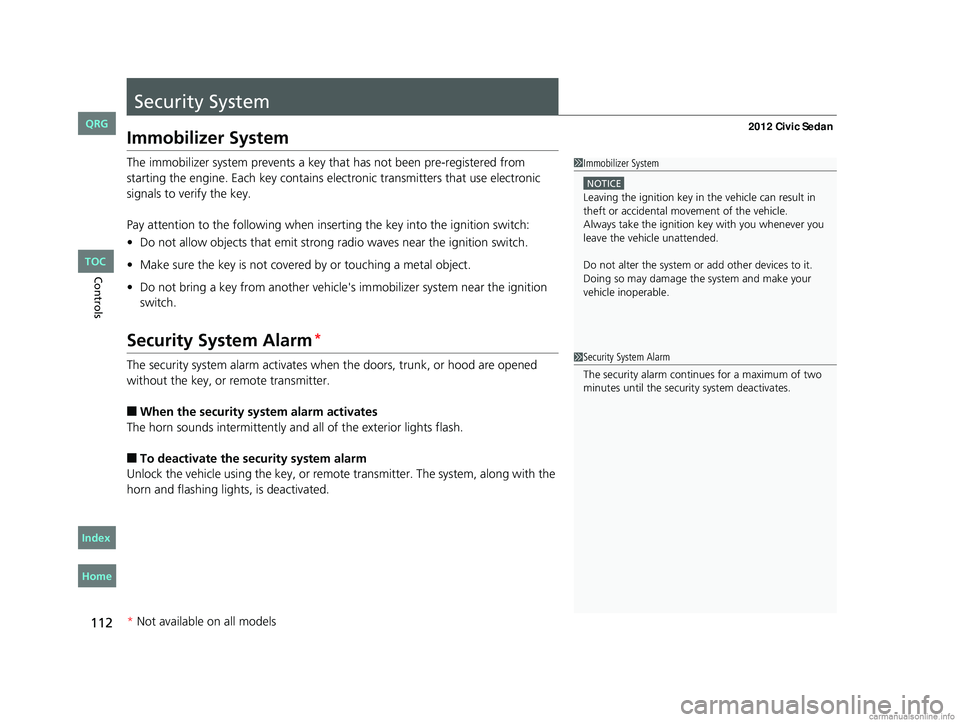
Security System
Immobilizer System
The immobilizer system prevents a key that has not been pre-registered from
starting the engine. Each key contains el ectronic transmitters that use electronic
signals to verify the key.
Pay attention to the following when inserting the key into th e ignition switch:
• Do not allow objects that emit strong radio waves near the ignition switch.
• Make sure the key is not covered by or touching a metal object.
• Do not bring a key from anot her vehicle's immobilizer system near the ignition
switch.
Security System Alarm*
The security system alarm activates when the doors, trunk, or hood are opened
without the key, or remote transmitter.
■When the security sy stem alarm activates
The horn sounds intermittently and all of the exterior lights flash.
■To deactivate the security system alarm
Unlock the vehicle using the key, or remote transmitter. The system, along with the
horn and flashing lights, is deactivated.
1 Immobilizer System
NOTICE
Leaving the ignition key in the vehicle can result in
theft or accidental move ment of the vehicle.
Always take the ignition key with you whenever you
leave the vehicle unattended.
Do not alter the system or add other devices to it.
Doing so may damage the system and make your
vehicle inoperable.
1 Security System Alarm
The security alarm continues for a maximum of two
minutes until the security system deactivates.
* Not available on all models
CIVIC 4D-31TR3600.book 112 ページ 2011年2月14日 月曜日 午後2時51分
TOC
Home
QRG
Index
Page 114 of 345
113
uuSecurity System uSecurity System Alarm*
Controls
■Setting the security system alarm
The security system alarm automatically sets when the following conditions have
been met:
• The ignition switch is in LOCK
(0, and the key has been removed from the
ignition switch.
• The hood and trunk are closed.
• All doors are locked with the key or the remote transmitter.
■When the security system alarm sets
The security system indicator in the in strument panel blinks. When the blinking
interval changes after about 15 seconds, the security system is set.
■To cancel the security system alarm
The security system is canceled when the ve hicle is unlocked using the key or remote
transmitter, or the ignition switch is turned to ON
(w. The security system indicator
goes off at the same time.
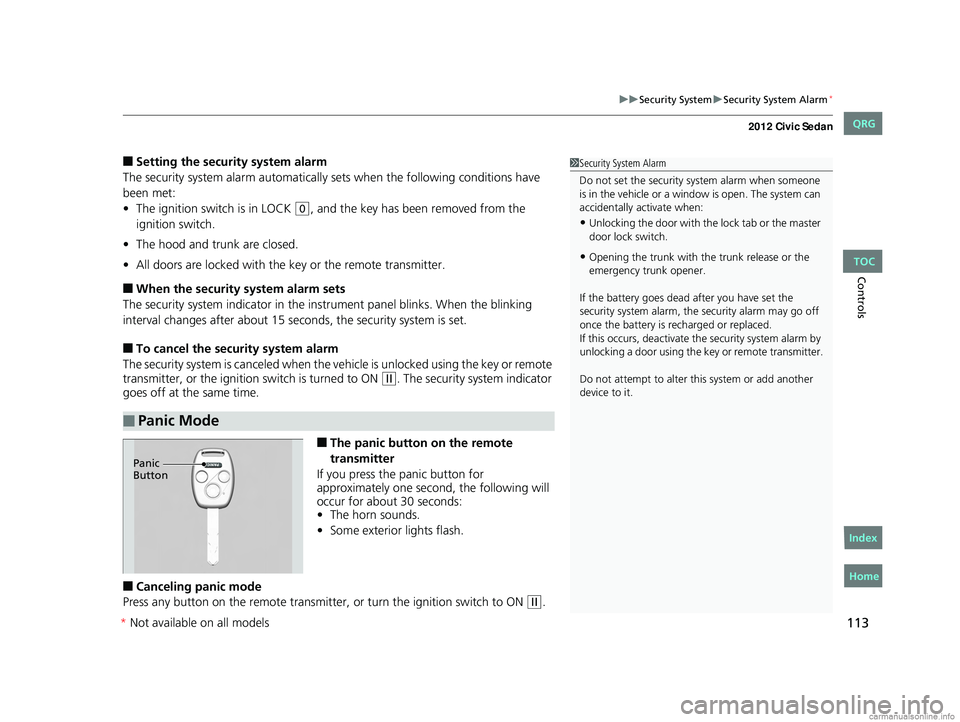
■The panic button on the remote
transmitter
If you press the panic button for
approximately one second, the following will
occur for about 30 seconds:
• The horn sounds.
• Some exterior lights flash.
■Canceling panic mode
Press any button on the remote transmitter, or turn the ignition switch to ON
(w.
■Panic Mode
1 Security System Alarm
Do not set the security system alarm when someone
is in the vehicle or a window is open. The system can
accidentally activate when:
•Unlocking the door with th e lock tab or the master
door lock switch.
•Opening the trunk with the trunk release or the
emergency trunk opener.
If the battery goes dead after you have set the
security system alarm, the security alarm may go off
once the battery is re charged or replaced.
If this occurs, deactivate the security system alarm by
unlocking a door using the ke y or remote transmitter.
Do not attempt to alter th is system or add another
device to it.
Panic
Button
CIVIC 4D-31TR3600.book 113 ページ 2011年2月14日 月曜日 午後2時51分
TOC
Home
QRG
Index
* Not av ailable on all mo dels
Page 115 of 345
114
Controls
Opening and Closing the Windows
Opening/Closing the Power Windows
The power windows can be opened and closed when the ignition switch is in ON
(w, using the switches on the doors. The driver's side switches can be used to open
and close all of the windows.
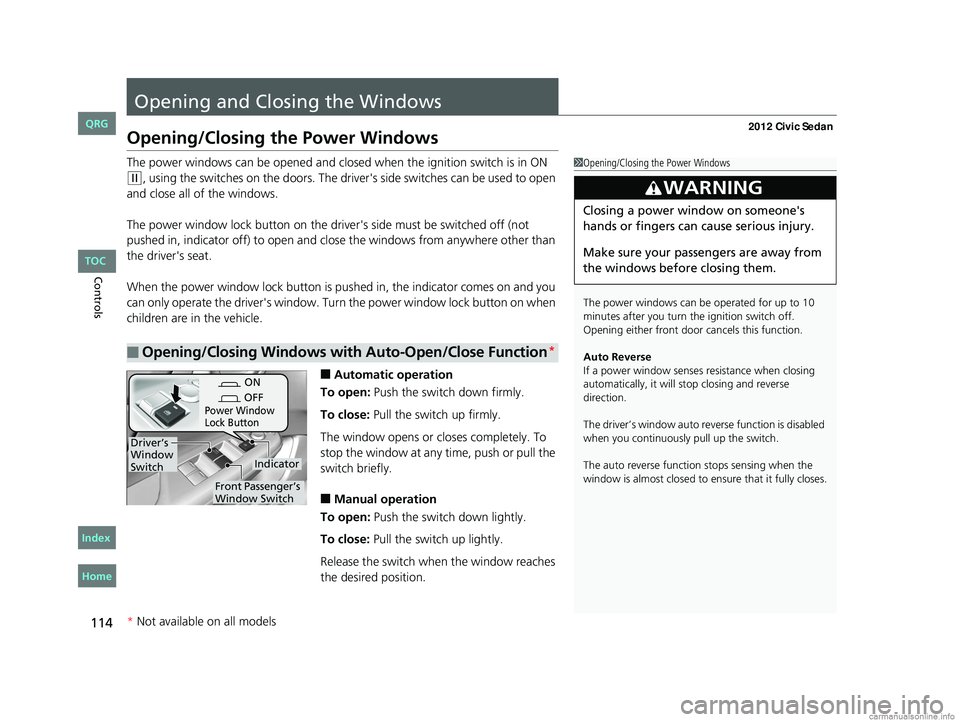
The power window lock button on the driver's side must be switched off (not
pushed in, indicator off) to open and close the windows from anywhere other than
the driver's seat.
When the power window lock button is pu shed in, the indicator comes on and you
can only operate the driver's window. Turn the power window lock button on when
children are in the vehicle.
■Automatic operation
To open: Push the switch down firmly.
To close: Pull the switch up firmly.
The window opens or cl oses completely. To
stop the window at any time, push or pull the
switch briefly.
■Manual operation
To open: Push the switch down lightly.
To close: Pull the switch up lightly.
Release the switch wh en the window reaches
the desired position.
■Opening/Closing Windows with Auto-Open/Close Function*
1 Opening/Closing the Power Windows
The power windows can be operated for up to 10
minutes after you turn the ignition switch off.
Opening either front door cancels this function.
Auto Reverse
If a power window senses resistance when closing
automatically, it will stop closing and reverse
direction.
The driver’s window auto re verse function is disabled
when you continuously pull up the switch.
The auto reverse function stops sensing when the
window is almost closed to en sure that it fully closes.
3WARNING
Closing a power window on someone's
hands or fingers can cause serious injury.
Make sure your passengers are away from
the windows before closing them.
ON
OFF
Power Window
Lock Button
Indicator
Driver’s
Window
Switch
Front Passenger’s
Window Switch
* Not available on all models
CIVIC 4D-31TR3600.book 114 ページ 2011年2月14日 月曜日 午後2時51分
TOC
Home
QRG
Index
Page 118 of 345
117
Controls
Operating the Switches Around the Steering Wheel
Ignition Switch
1Ignition Switch
You cannot take the key out unless the shift lever is
in
( P.
If you open the driver's door when the key is in LOCK
(0 or ACCESSORY (q, a warning buzzer will sound
to remind you to take the key out.
When this happens, the following messages appear
on the multi-information display
*:
•In LOCK ( 0: "REMOVE KEY."
•In ACCESSORY (q: "RETURN IGNITION SWITCH
TO LOCK (0) POSITION" The buzzer will stop when
you take the key out.
If the key won't turn from LOCK
( 0 to ACCESSORY
(q, turn the key while moving the steering wheel left
and right. The steering wh eel will unlock, allowing
the key to turn.
3WARNING
Removing the key from the ignition switch
while driving locks the steering. This can
cause you to lose control of the vehicle.
Remove the key from the ignition switch
only when parked.
Manual transmission models
Automatic transmission models
All models
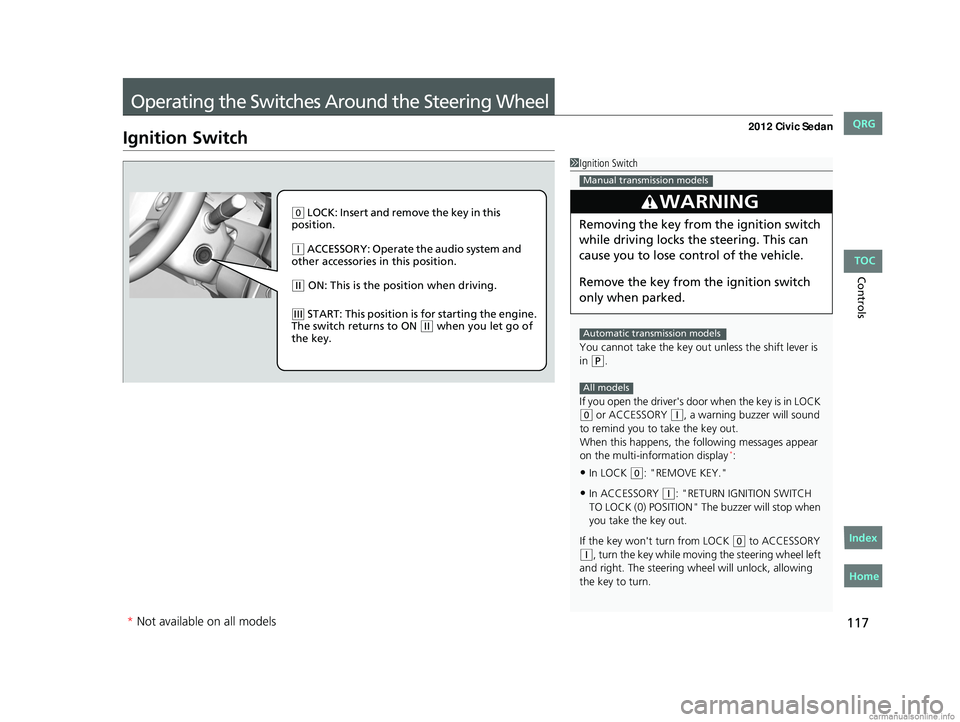
( 0 LOCK: Insert and remove the key in this
position.
( q ACCESSORY: Operate the audio system and
other accessories in this position.
( w ON: This is the position when driving.
(e START: This position is for starting the engine.
The switch returns to ON ( w when you let go of
the key.
* Not available on all models
CIVIC 4D-31TR3600.book 117 ページ 2011年2月14日 月曜日 午後2時51分
TOC
Home
QRG
Index
Page 120 of 345
119
uuOperating the Switches Around the Steering Wheel uLight Switches
Controls
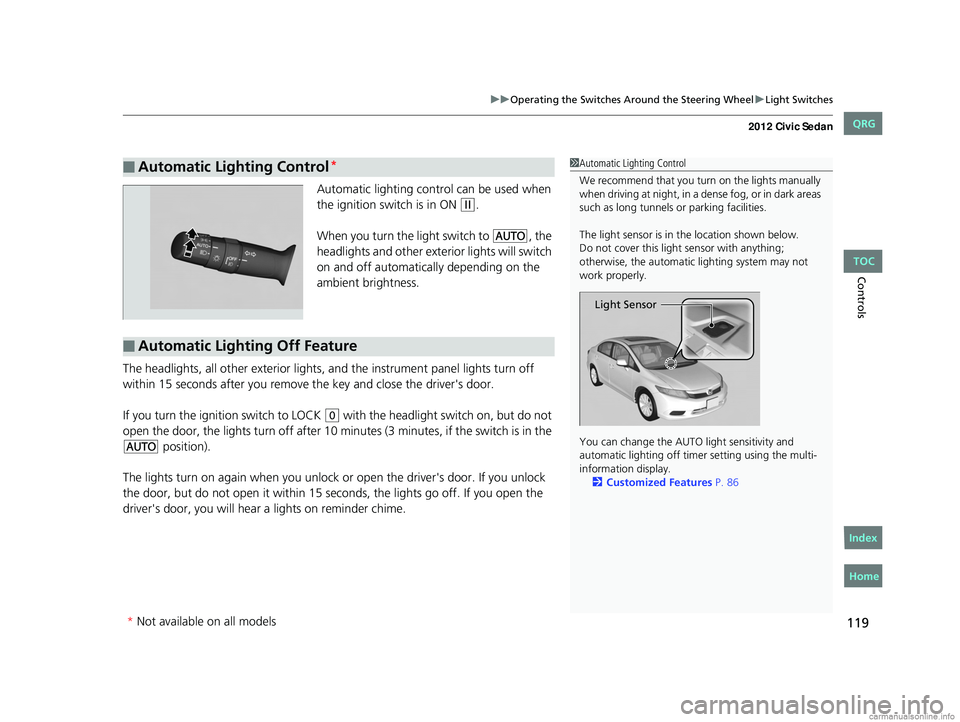
Automatic lighting control can be used when
the ignition switch is in ON
(w.
When you turn the light switch to
#Y, the
headlights and other exterior lights will switch
on and off automatically depending on the
ambient brightness.
The headlights, all other exterior lights, and the instrument panel lights turn off
within 15 seconds after you remove the key and close the driver's door.
If you turn the ignition switch to LOCK
(0 with the headlight switch on, but do not
open the door, the lights turn off after 10 minu tes (3 minutes, if the switch is in the
#Y position).
The lights turn on again when you unlock or open the driver's door. If you unlock
the door, but do not open it within 15 seconds, the lights go off. If you open the
driver's door, you will hear a lights on reminder chime.
■Automatic Lighting Control*1 Automatic Lighting Control
We recommend that you turn on the lights manually
when driving at night, in a dense fog, or in dark areas
such as long tunnels or parking facilities.
The light sensor is in the location shown below.
Do not cover this light sensor with anything;
otherwise, the automatic lighting system may not
work properly.
You can change the AUTO light sensitivity and
automatic lighting off time r setting using the multi-
information display. 2 Customized Features P. 86
Light Sensor
■Automatic Lighting Off Feature
* Not available on all models
CIVIC 4D-31TR3600.book 119 ページ 2011年2月14日 月曜日 午後2時51分
TOC
Home
QRG
Index
Page 135 of 345
134
Controls
Interior Lights/Interior Convenience Items
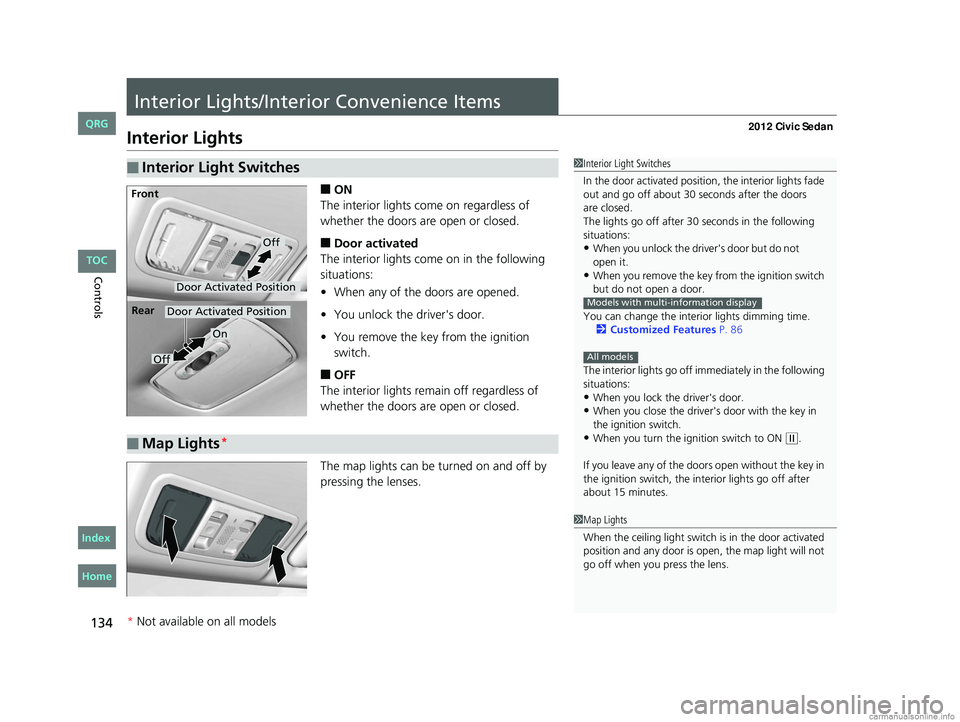
Interior Lights
■ON
The interior lights come on regardless of
whether the doors are open or closed.
■Door activated
The interior lights come on in the following
situations:
• When any of the doors are opened.
• You unlock the driver's door.
• You remove the key from the ignition
switch.
■OFF
The interior lights remain off regardless of
whether the doors are open or closed.
The map lights can be turned on and off by
pressing the lenses.
■Interior Light Switches1 Interior Light Switches
In the door activated position, the interior lights fade
out and go off about 30 seconds after the doors
The lights go off after 30 seconds in the following
situations:
•When you unlock the driver's door but do not
•When you remove the key from the ignition switch
but do not open a door.
You can change the interior lights dimming time. 2 Customized Features P. 86
The interior lights go off i mmediately in the following
situations:
•When you lock the driver's door.•When you close the driver's door with the key in
the ignition switch.
•When you turn the ignition switch to ON ( w.
If you leave any of the doors open without the key in
the ignition switch, the interior lights go off after
about 15 minutes.
Models with multi-information display
All models
Door Activated Position
Off
Front
Door Activated Position
On
Off
Rear
■Map Lights*
1
Map Lights
When the ceiling light switch is in the door activated
position and any door is open, the map light will not
go off when you press the lens.
* Not available on all models
CIVIC 4D-31TR3600.book 134 ページ 2011年2月14日 月曜日 午後2時51分
TOC
Home
QRG
Index
open i t.
are closed.
Page 203 of 345
202
Driving
Before Driving
Driving Preparation
Check the following items before you start driving.
• Make sure there are no obstructions on the windows, door mirrors, exterior
lights, or other parts of the vehicle.
u Remove any frost, snow, or ice.
u Remove any snow on the roof, as this can slip down and obstruct your field of
vision while driving. If frozen solid , remove ice once it has softened.
u When removing ice from around the wheels, be sure not to damage the wheel
or wheel components.
• Make sure the hood is securely closed.
u If the hood opens while driving, your front view will be blocked.
• Make sure the tires are in good condition.
u Check air pressure, check for damage and excessive wear.
2 Checking and Maintaining Tires P. 280
•Make sure there are no people or ob jects behind or around the vehicle.
u There are blind spots from the inside.
■Exterior Checks1Exterior Checks
NOTICE
When doors are frozen s hut, use warm water around
the door edges to melt any ice. Do not try to force
them open, as this can damage the rubber trim
around the doors. When done, wipe dry to avoid
further freezing.
Do not pour warm water into the key cylinder.
You will be unable to insert key if the water freezes in
the hole.
CIVIC 4D-31TR3600.book 202 ページ 2011年2月14日 月曜日 午後2時51分
TOC
Home
QRG
Index