ignition HONDA CIVIC SEDAN 2012 (in English) Owner's Guide
[x] Cancel search | Manufacturer: HONDA, Model Year: 2012, Model line: CIVIC SEDAN, Model: HONDA CIVIC SEDAN 2012Pages: 345, PDF Size: 53.95 MB
Page 87 of 345
uuGauges and Displays uMulti-Information Display*
86
Instrument Panel
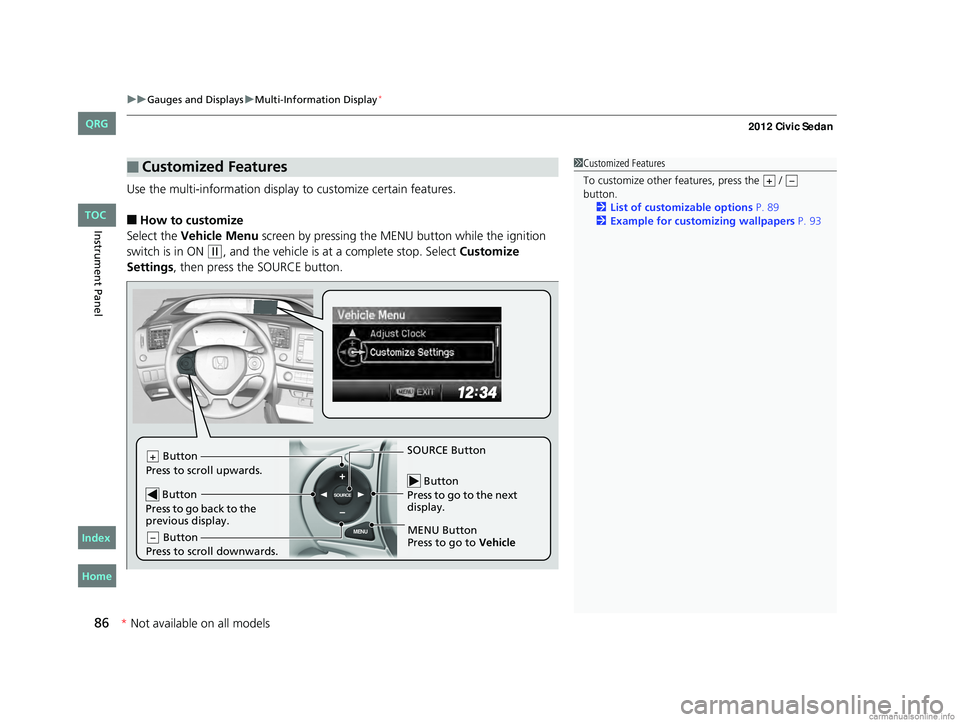
Use the multi-information display to customize certain features.
■How to customize
Select the Vehicle Menu screen by pressing the ME NU button while the ignition
switch is in ON
(w, and the vehicle is at a complete stop. Select Customize
Settings , then press the SOURCE button.
■Customized Features1Customized Features
To customize other features, press the /
button.
2 List of customizable options P. 89
2 Example for customizing wallpapers P. 93
+–
MENU
SOURCE Button
Press to go to the next
display.
SOURCE Button
MENU Button
Press to go to Vehicle
Button
Press to scroll upwards.+
Button
Press to go back to the
previous display.
Button
Press to scroll downwards.–
CIVIC 4D-31TR3600.book 86 ページ 2011年2月14日 月曜日 午後2時51分
TOC
* Not availabl eon allmo dels
Home
QRG
Index
Page 91 of 345
90
uuGauges and Displays uMulti-Information Display*
Instrument Panel
*1: Not available on all models
*2: Default Setting
*3: Default Setting for 1.8 ℓ engine models
*4: Default Setting for 2.4 ℓ engine models
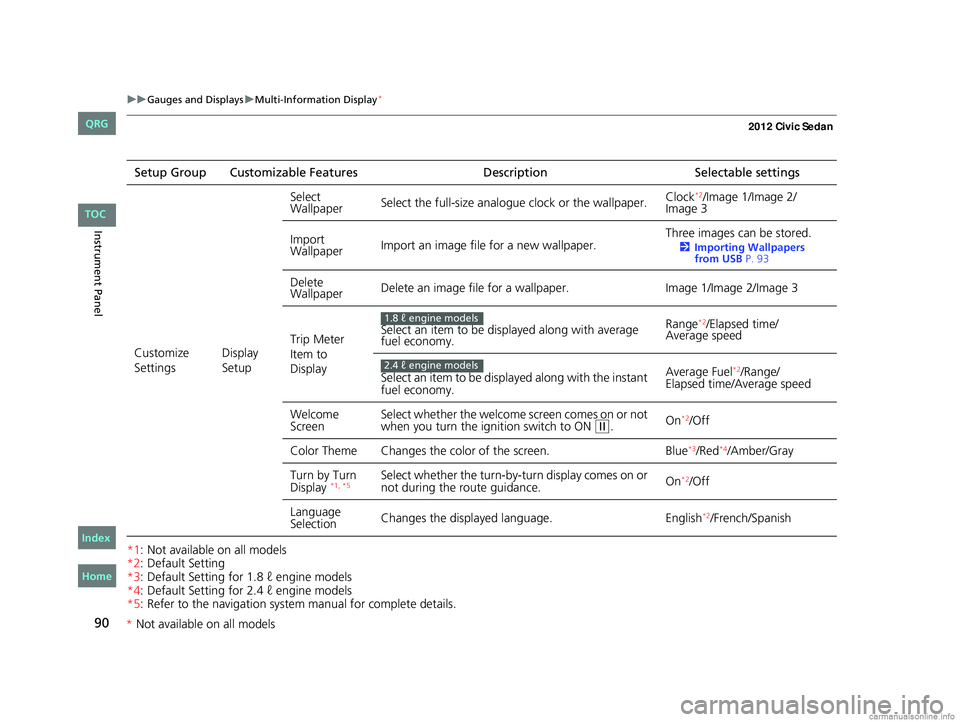
*5: Refer to the navigation system manual for complete details.Setup Group Customizable Features
DescriptionSelectable settings
Customize
Settings Display
SetupSelect
Wallpaper
Select the full-size analogue clock or the wallpaper. Clock
*2/Image 1/Image 2/
Image 3
Import
Wallpaper Import an image file for a new wallpaper. Three images can be stored.
2
Importing Wallpapers
from USB P. 93
Delete
Wallpaper Delete an image file for a wallpaper.
Image 1/Image 2/Image 3
Trip Meter
Item to
Display Select an item to be displayed along with average
fuel economy.
Range
*2/Elapsed time/
Average speed
Select an item to be displayed along with the instant
fuel economy. Average Fuel
*2/Range/
Elapsed time/Average speed
Welcome
Screen Select whether the welcome screen comes on or not
when you turn the ignition switch to ON
(w.
On*2/Off
Color Theme Changes the co lor of the screen. Blue
*3/Red*4/Amber/Gray
Turn by Turn
Display
*1, *5Select whether the turn-by-tu rn display comes on or
not during the route guidance. On*2/Off
Language
Selection Changes the displayed language.
English
*2/French/Spanish
1.8 ℓ engine models
2.4 ℓ engine models
CIVIC 4D-31TR3600.book 90 ページ 2011年2月14日 月曜日 午後2時51分
TOC
Home
QRG
Index
* Not av ailable on all mo dels
Page 93 of 345
92
uuGauges and Displays uMulti-Information Display*
Instrument Panel
*1:Default Setting
*2:Default Setting for automatic transmission
*3:Default Setting for manual transmissionSetup Group Customizable Features
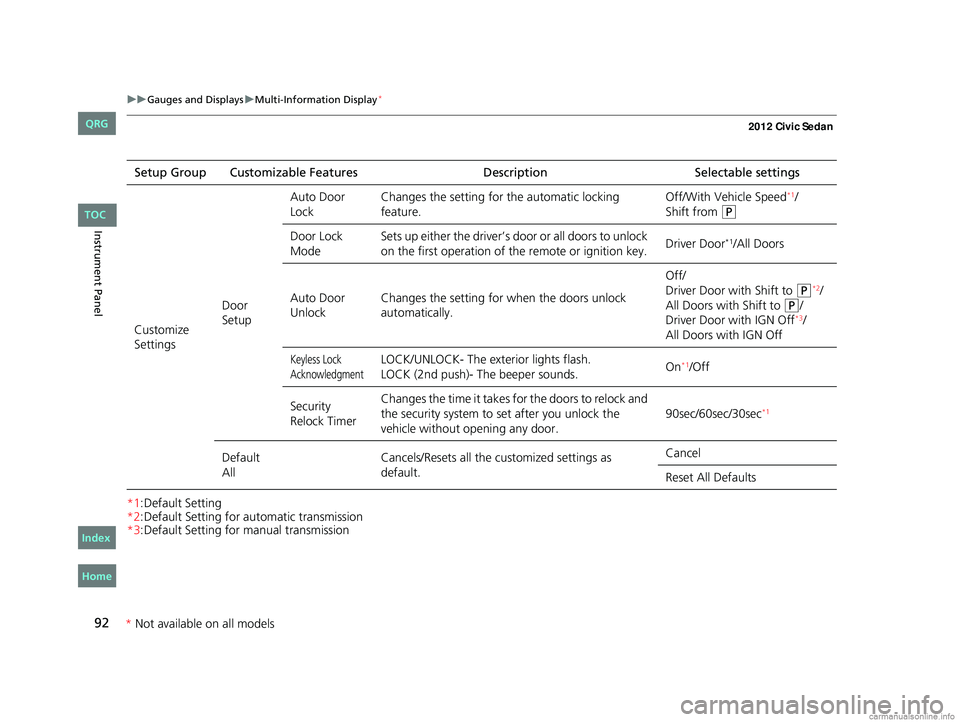
DescriptionSelectable settings
Customize
Settings Door
SetupAuto Door
Lock
Changes the setting for
the automatic locking
feature. Off/With Vehicle Speed
*1/
Shift from
(P
Door Lock
Mode Sets up either the driver’s door or all doors to unlock
on the first operation of the remote or ignition key.
Driver Door*1/All Doors
Auto Door
Unlock Changes the setting for
when the doors unlock
automatically. Off/
Driver Door with Shift to
(P*2/
All Doors with Shift to
(P/
Driver Door with IGN Off*3/
All Doors with IGN Off
Keyless Lock
AcknowledgmentLOCK/UNLOCK- The exterior lights flash.
LOCK (2nd push)- The beeper sounds. On*1/Off
Security
Relock Timer Changes the time it takes for the doors to relock and
the security system to set after you unlock the
vehicle without opening any door.
90sec/60sec/30sec
*1
Default
AllCancels/Resets all the customized settings as
default. Cancel
Reset All Defaults
CIVIC 4D-31TR3600.book 92 ページ 2011年2月14日 月曜日 午後2時51分
TOC
Home
QRG
Index
*
Not availabl eon allmo dels
Page 98 of 345
97
Controls
This chapter explains how to operate the various controls necessary for driving.
Setting the Clock................................ 98
Locking and Unlocking the Doors
Key Types and Functions .................... 99
Locking/Unlocking the Doors from the Outside .......................................... 101
Locking/Unlocking the Doors from the Inside ............................................. 103
Childproof Door Locks ..................... 104
Auto Door Locking/Unlocking
*........ 105
Opening and Closing the Trunk .......109
Security System ................................ 112
Immobilizer System .......................... 112
Security System Alarm
*.................... 112Opening and Closing the Windows .....114
Opening and Closing the Moonroof*...... 116Operating the Switches Around the
Steering Wheel
Ignition Switch ................................. 117
Turn Signals ..................................... 118
Light Switches.................................. 118
Fog Lights
*...................................... 120
Daytime Running Lights ................... 120
Wipers and Washers ........................ 121
Brightness Control ........................... 122
Rear Defogger/Heat ed Door Mirror
*
Button ........................................... 123
ECON Button
*................................. 123
Adjusting the Steering Wheel........... 124Adjusting the Mirrors
.......................125
Interior Rearview Mirror ................... 125
Power Door Mirrors
*....................... 125
Adjusting the Seats ..........................126
Adjusting the Seat Positions ............. 126
Interior Lights/Interior Convenience Items ................................................ 134
Interior Lights .................................. 134
Interior Convenience Items .............. 135
Heating and Cooling
*....................... 140
Using Vents, Heating and A/C*........ 140
* Not available on all models
CIVIC 4D-31TR3600.book 97 ページ 2011年2月14日 月曜日 午後2時51分
Home
QRG
Index 2012 Civic Sedan
Page 99 of 345
98
Controls
Setting the Clock
Clock
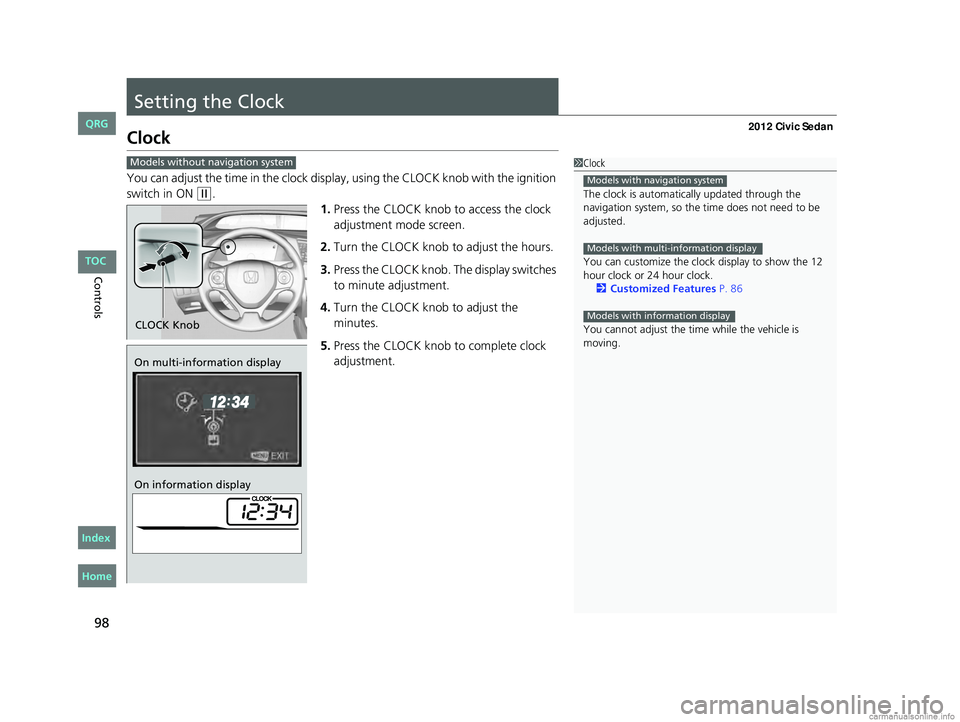
You can adjust the time in the clock display, using the CLOCK knob with the ignition
switch in ON
(w.
1.Press the CLOCK knob to access the clock
adjustment mode screen.
2. Turn the CLOCK knob to adjust the hours.
3. Press the CLOCK knob. The display switches
to minute adjustment.
4. Turn the CLOCK knob to adjust the
minutes.
5. Press the CLOCK knob to complete clock
adjustment.
1Clock
The clock is automatica lly updated through the
navigation system, so the ti me does not need to be
adjusted.
You can customize the clock display to show the 12
hour clock or 24 hour clock. 2 Customized Features P. 86
You cannot adjust the time while the vehicle is
moving.
Models with navigation system
Models with multi-information display
Models with information display
Models without navigation system
CLOCK Knob
On multi-information display
On information display
CIVIC 4D-31TR3600.book 98 ページ 2011年2月14日 月曜日 午後2時51分
Home
QRG
Index TOC
Page 103 of 345
uuLocking and Unlocking the Doors uLocking/Unlocking the Doors from the Outside
102
Controls
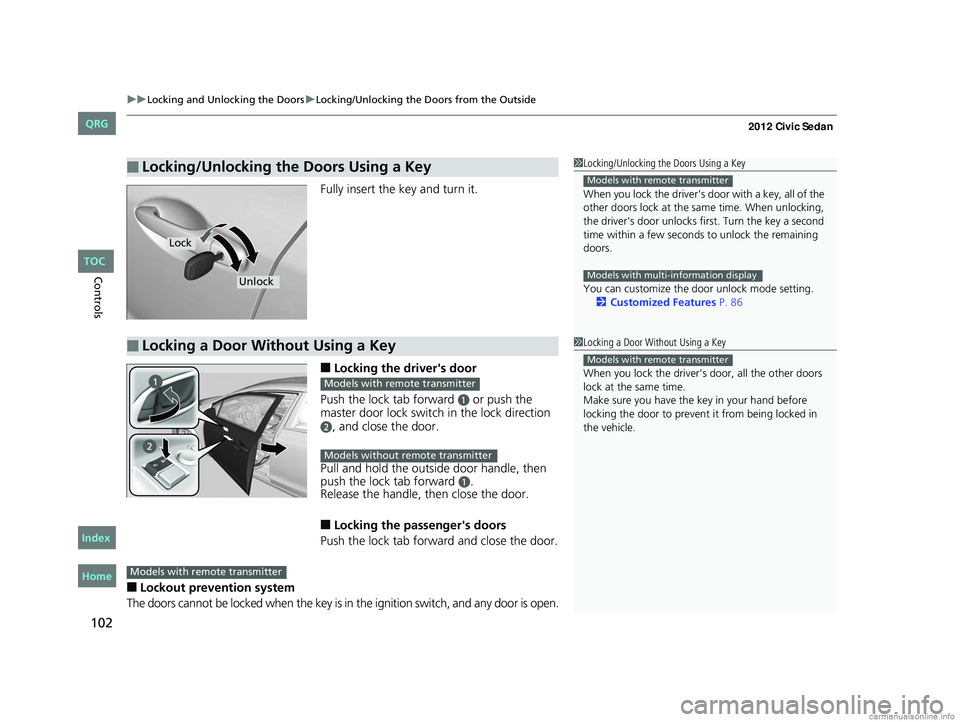
Fully insert the key and turn it.
■Locking the driver's door
Push the lock tab forward
a or push the
master door lock switch in the lock direction
b, and close the door.
Pull and hold the outside door handle, then
push the lock tab forward
a.
Release the handle, then close the door.
■Locking the passenger's doors
Push the lock tab forward and close the door.
■Lockout prevention system
The doors cannot be locked when the key is in the ignition switch, and any door is open.
■Locking/Unlocking the Doors Using a Key1 Locking/Unlocking the Doors Using a Key
When you lock the driver's door with a key, all of the
other doors lock at the sa me time. When unlocking,
the driver's door unlocks first. Turn the key a second
time within a few seconds to unlock the remaining
doors.
You can customize the door unlock mode setting. 2 Customized Features P. 86
Models with remote transmitter
Models with multi-information display
Lock
Unlock
■Locking a Door Without Using a Key1Locking a Door Without Using a Key
When you lock the driver's door, all the other doors
lock at the same time.
Make sure you have the key in your hand before
locking the door to prevent it from being locked in
the vehicle.
Models with remote transmitter
Models with remote transmitter
Models without remote transmitter
Models with remote transmitter
CIVIC 4D-31TR3600.book 102 ページ 2011年2月14日 月曜日 午後2時51分
TOC
Home
QRG
Index
Page 106 of 345
105
uuLocking and Unlocking the Doors uAuto Door Locking/Unlocking*
Controls
Auto Door Locking/Unlocking*
Your vehicle locks all doors and unlocks the driver’s door automatically when a
certain condition is met.
■Drive lock mode
All doors lock when the vehicle’s speed reaches about 10 mph (15 km/h).
■Park unlock mode
The driver’s door unlocks when the shift lever is moved into
(P with the brake pedal
depressed.
■Ignition switch unlock mode
The driver’s door unlocks when the ignition switch is moved out of ON
(w.
The settings can be changed to unlock all doors.
■Auto Door Locking
■Auto Door Unlocking
1 Auto Door Locking/Unlocking
You can turn off or cha nge to another auto door
locking/unlocking setting us ing the master door lock
switch. 2 Customizing the Auto Door Locking/
Unlocking Setting P. 106
You can turn off or cha nge to another auto door
locking/unlocking setting us ing the multi-information
display.
2 Customized Features P. 86
Models without multi-information display
Models with multi-information display
Models with automatic transmission
Models with manual transmission
* Not available on all models
CIVIC 4D-31TR3600.book 105 ページ 2011年2月14日 月曜日 午後2時51分
TOC
Home
QRG
Index
Page 107 of 345
106
uuLocking and Unlocking the Doors uCustomizing the Auto Door Locking/Unlocking Setting*
Controls
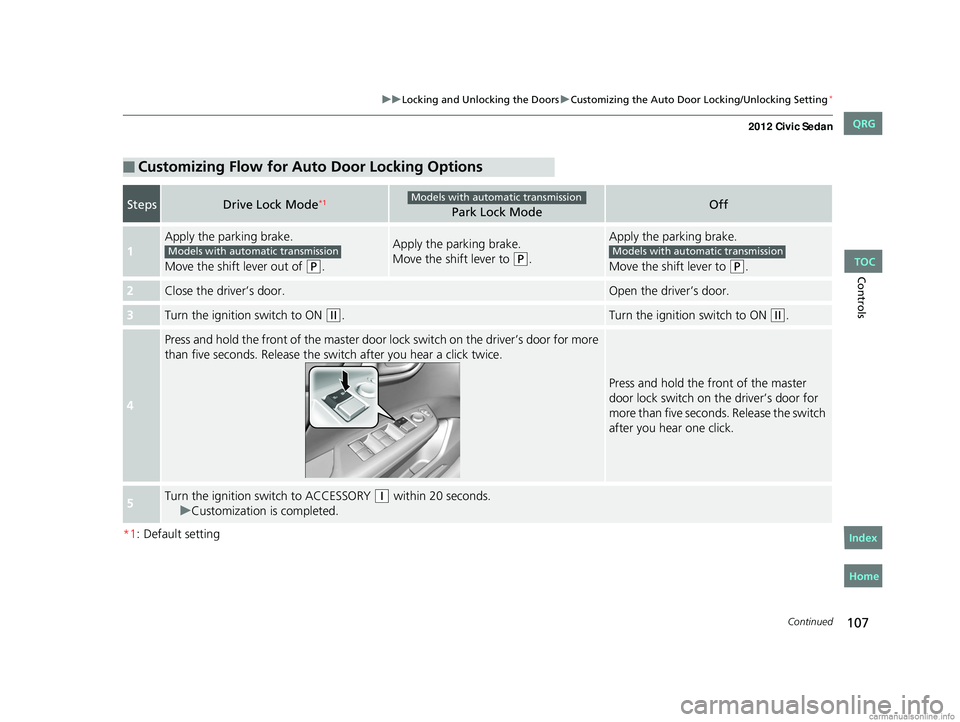
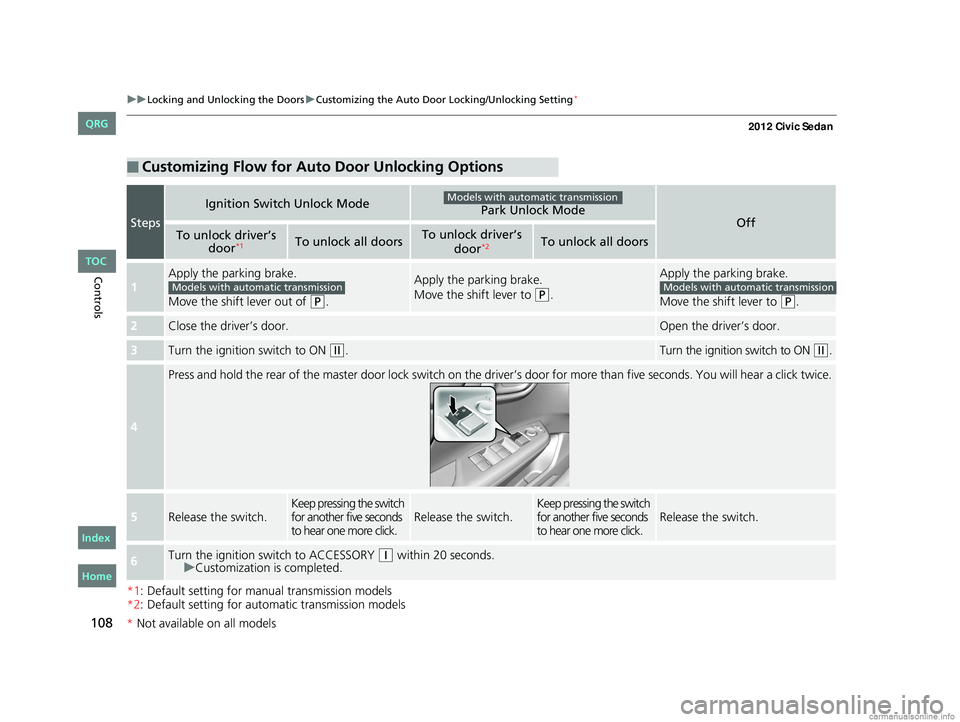
Customizing the Auto Door Locking/Unlocking Setting*
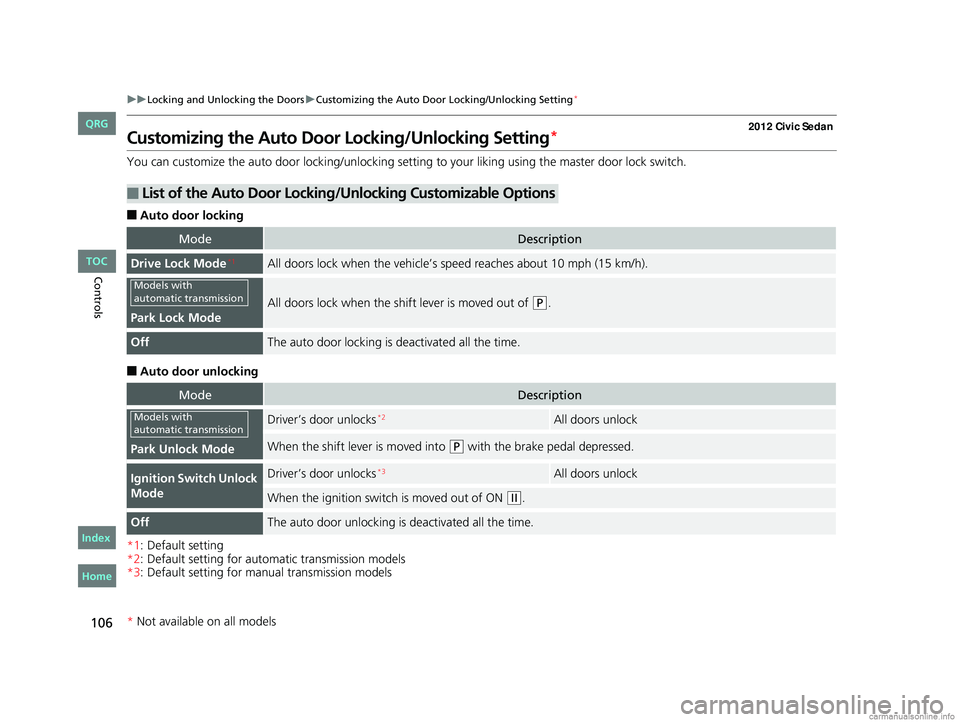
You can customize the auto door locking/unlocking setting to your liking using the master door lock switch.
■Auto door locking
■Auto door unlocking
*1: Default setting
*2: Default setting for automatic transmission models
*3: Default setting for manual transmission models
■List of the Auto Door Locking/Unlocking Customizable Options
ModeDescription
Drive Lock Mode*1All doors lock when the vehicle’s sp eed reaches about 10 mph (15 km/h).
Park Lock Mode
All doors lock when the shift lever is moved out of (P.
OffThe auto door locking is deactivated all the time.
ModeDescription
Park Unlock Mode
Driver’s door unlocks*2All doors unlock
When the shift lever is moved into (P with the brake pedal depressed.
Ignition Switch Unlock
ModeDriver’s door unlocks*3All doors unlock
When the ignition switch is moved out of ON (w.
OffThe auto door unlocking is deactivated all the time.
Models with
automatic transmission
Models with
automatic transmission
* Not available on all models
CIVIC 4D-31TR3600.book 106 ページ 2011年2月14日 月曜日 午後2時51分
TOC
Home
QRG
Index
Page 108 of 345
107
uuLocking and Unlocking the Doors uCustomizing the Auto Door Locking/Unlocking Setting*
Continued
Controls
*1: Default setting
■Customizing Flow for Auto Door Locking Options
StepsDrive Lock Mode*1Park Lock ModeOff
1
Apply the parking brake.
Move the shift lever out of
(P.
Apply the parking brake.
Move the shift lever to
(P.
Apply the parking brake.
Move the shift lever to
(P.
2Close the driver’s door.Open the driver’s door.
3Turn the ignition switch to ON (w.Turn the ignition switch to ON (w.
4
Press and hold the front of the master door lo ck switch on the driver’s door for more
than five seconds. Release the switch after you hear a click twice.
Press and hold the front of the master
door lock switch on the driver’s door for
more than five seconds. Release the switch
after you hear one click.
5Turn the ignition sw itch to ACCESSORY (q within 20 seconds.
u Customization is completed.
Models with automatic transmission
Models with automatic transmissionModels with automatic transmission
CIVIC 4D-31TR3600.book 107 ページ 2011年2月14日 月曜日 午後2時51分
TOC
Home
QRG
Index
Page 109 of 345
108
uuLocking and Unlocking the Doors uCustomizing the Auto Door Locking/Unlocking Setting*
Controls
*1: Default setting for manual transmission models
*2: Default setting for automatic transmission models
■Customizing Flow for Auto Door Unlocking Options
Steps
Ignition Switch Unlock ModePark Unlock ModeOffTo unlock driver’s
door*1To unlock all doorsTo unlock driver’s
door*2To unlock all doors
1
Apply the parking brake.
Move the shift lever out of
(P.
Apply the parking brake.
Move the shift lever to
(P.
Apply the parking brake.
Move the shift lever to
(P.
2Close the driver’s door.Open the driver’s door.
3Turn the ignition switch to ON (w.Turn the ignition switch to ON (w.
4
Press and hold the rear of the master door lock switch on the dr iver’s door for more than five seconds. You will hear a click t wice.
5Release the switch.Keep pressing the switch
for another five seconds
to hear one more click.Release the switch.Keep pressing the switch
for another five seconds
to hear one more click.Release the switch.
6Turn the ignition switch to ACCESSORY (q within 20 seconds.
u Customization is completed.
Models with automatic transmission
Models with automatic transmissionModels with automatic transmission
CIVIC 4D-31TR3600.book 108 ページ 2011年2月14日 月曜日 午後2時51分
*Not available on all models
TOC
Home
QRG
Index