ignition HONDA CIVIC SEDAN 2012 (in English) Service Manual
[x] Cancel search | Manufacturer: HONDA, Model Year: 2012, Model line: CIVIC SEDAN, Model: HONDA CIVIC SEDAN 2012Pages: 345, PDF Size: 53.95 MB
Page 124 of 345
123
uuOperating the Switches Around the Steering Wheel uRear Defogger/Heated Door Mirror* Button
Controls
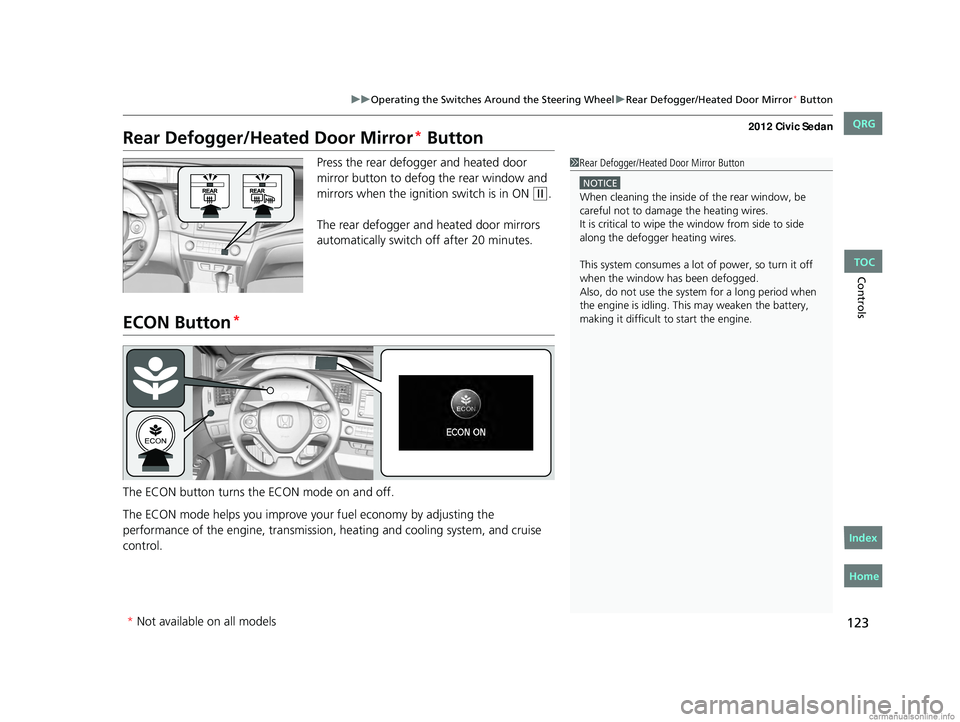
Rear Defogger/Heated Door Mirror* Button
Press the rear defogger and heated door
mirror button to defog the rear window and
mirrors when the ignition switch is in ON
(w.
The rear defogger and heated door mirrors
automatically switch off after 20 minutes.
ECON Button*
The ECON button turns the ECON mode on and off.
The ECON mode helps you improve yo ur fuel economy by adjusting the
performance of the engine, transmission, heating and cooling system, and cruise
control.
1 Rear Defogger/Heated Door Mirror Button
NOTICE
When cleaning the inside of the rear window, be
careful not to damage the heating wires.
It is critical to wipe the window from side to side
along the defogger heating wires.
This system consumes a lot of power, so turn it off
when the window has been defogged.
Also, do not use the system for a long period when
the engine is idling. This may weaken the battery,
making it difficult to start the engine.
* Not available on all models
CIVIC 4D-31TR3600.book 123 ページ 2011年2月14日 月曜日 午後2時51分
TOC
Home
QRG
Index
Page 126 of 345
125
Controls
Adjusting the Mirrors
Interior Rearview Mirror
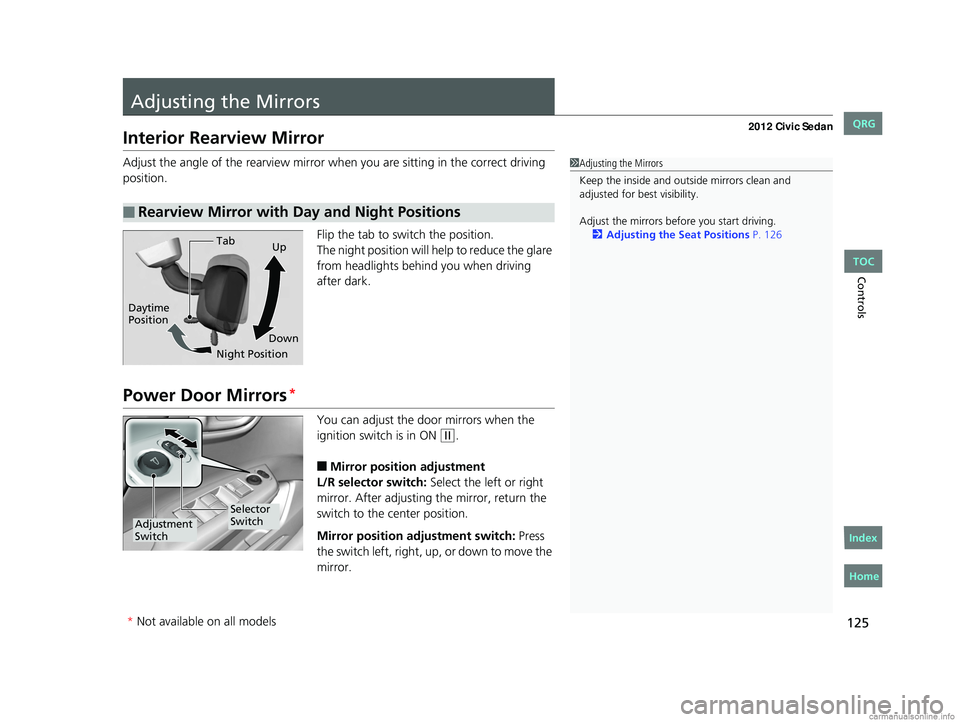
Adjust the angle of the rearview mirror when you are sitting in the correct driving
position.
Flip the tab to switch the position.
The night position will help to reduce the glare
from headlights behind you when driving
after dark.
Power Door Mirrors*
You can adjust the door mirrors when the
ignition switch is in ON
(w.
■Mirror position adjustment
L/R selector switch: Select the left or right
mirror. After adjusting the mirror, return the
switch to the center position.
Mirror positi on adjustment switch: Press
the switch left, right, up, or down to move the
mirror.
■Rearview Mirror with Day and Night Positions
1 Adjusting the Mirrors
Keep the inside and out side mirrors clean and
adjusted for best visibility.
Adjust the mirrors before you start driving. 2 Adjusting the Seat Positions P. 126
Tab
Daytime
Position
Night PositionUp
Down
Selector
Switch
Adjustment
Switch
* Not available on all models
CIVIC 4D-31TR3600.book 125 ページ 2011年2月14日 月曜日 午後2時51分
TOC
Home
QRG
Index
Page 135 of 345
134
Controls
Interior Lights/Interior Convenience Items
Interior Lights
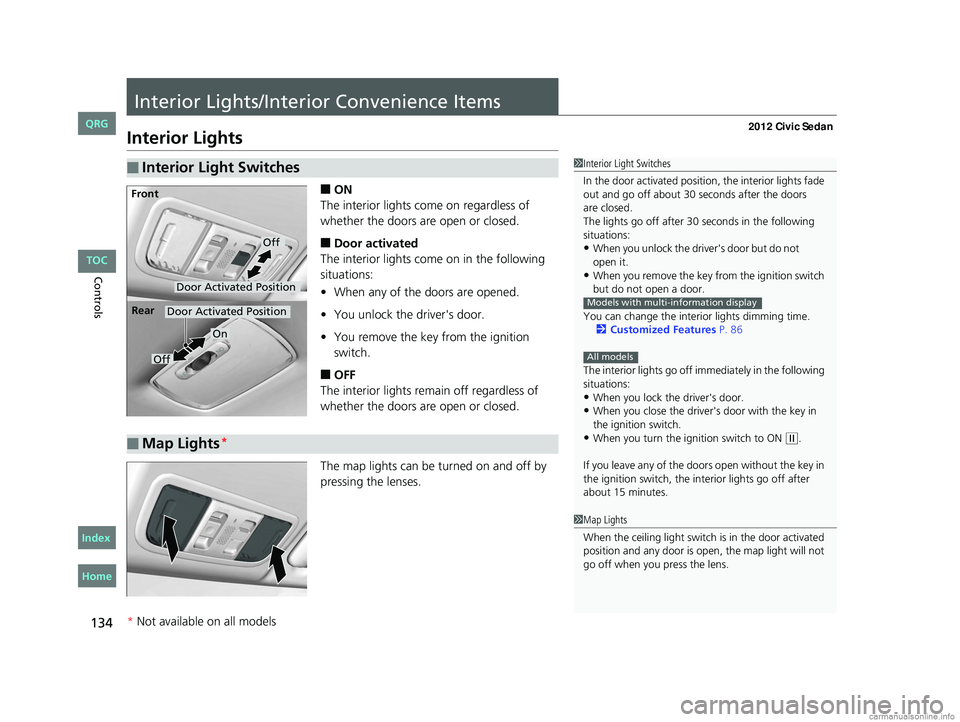
■ON
The interior lights come on regardless of
whether the doors are open or closed.
■Door activated
The interior lights come on in the following
situations:
• When any of the doors are opened.
• You unlock the driver's door.
• You remove the key from the ignition
switch.
■OFF
The interior lights remain off regardless of
whether the doors are open or closed.
The map lights can be turned on and off by
pressing the lenses.
■Interior Light Switches1 Interior Light Switches
In the door activated position, the interior lights fade
out and go off about 30 seconds after the doors
The lights go off after 30 seconds in the following
situations:
•When you unlock the driver's door but do not
•When you remove the key from the ignition switch
but do not open a door.
You can change the interior lights dimming time. 2 Customized Features P. 86
The interior lights go off i mmediately in the following
situations:
•When you lock the driver's door.•When you close the driver's door with the key in
the ignition switch.
•When you turn the ignition switch to ON ( w.
If you leave any of the doors open without the key in
the ignition switch, the interior lights go off after
about 15 minutes.
Models with multi-information display
All models
Door Activated Position
Off
Front
Door Activated Position
On
Off
Rear
■Map Lights*
1
Map Lights
When the ceiling light switch is in the door activated
position and any door is open, the map light will not
go off when you press the lens.
* Not available on all models
CIVIC 4D-31TR3600.book 134 ページ 2011年2月14日 月曜日 午後2時51分
TOC
Home
QRG
Index
open i t.
are closed.
Page 140 of 345
139
uuInterior Lights/Interior Convenience Items uInterior Convenience Items
Controls
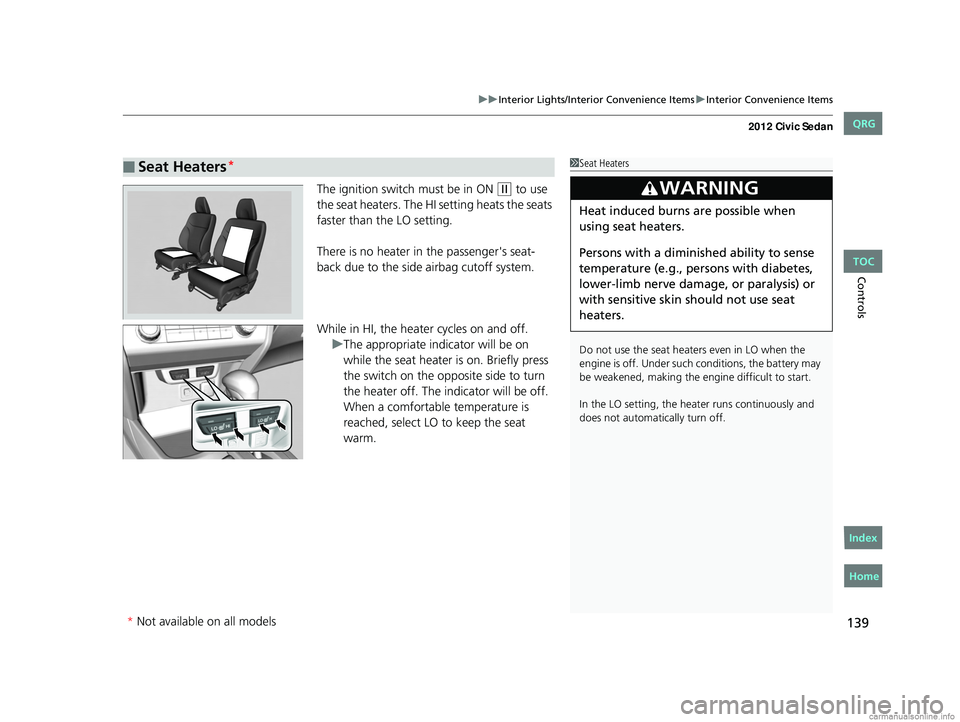
The ignition switch must be in ON (w to use
the seat heaters. The HI setting heats the seats
faster than the LO setting.
There is no heater in the passenger's seat-
back due to the side airbag cutoff system.
While in HI, the heater cycles on and off. uThe appropriate indicator will be on
while the seat heater is on. Briefly press
the switch on the opposite side to turn
the heater off. The indicator will be off.
When a comfortable temperature is
reached, select LO to keep the seat
warm.
■Seat Heaters*1Seat Heaters
Do not use the seat heaters even in LO when the
engine is off. Under such conditions, the battery may
be weakened, making the engine difficult to start.
In the LO setting, the heater runs continuously and
does not automatically turn off.
3WARNING
Heat induced burns are possible when
using seat heaters.
Persons with a diminished ability to sense
temperature (e.g., persons with diabetes,
lower-limb nerve damage, or paralysis) or
with sensitive skin should not use seat
heaters.
* Not available on all models
CIVIC 4D-31TR3600.book 139 ページ 2011年2月14日 月曜日 午後2時51分
TOC
Home
QRG
Index
Page 147 of 345
146
uuAudio System*uAudio System Theft Protection*
Features
Audio System Theft Protection*
The audio system is disabled when it is di sconnected from the power source, such as
when the battery is disconnected or goes dead.
■Reactivating th e audio system
1. Turn the ignition switch to ON
(w, and turn on the audio system.
u If you turn the ignition switch to ACCESSORY
(q, you will be requested to
enter the audio security code. See step 3.
2. Press and hold the power button ag ain for more than two seconds.
u The audio system is reactivated when the system’s control unit recognizes that
the system is in your vehicle.
If the control unit fails to recogniz e, “ENTER CODE” appears on the multi-
information display.
3. Enter the audio security code using the pr eset buttons. If you enter an incorrect
digit, continue to the last digit, then try again. If you do not enter code correctly
after 10 tries, leave the system for one ho ur before trying again, or visit a dealer
to have the system reset.
1 Audio System Theft Protection
Find the audio system's se curity code and serial
number label in your owner’s manual kit.
We recommend that you write down the serial
number in this owner’s manual.
Do not store the label in your vehicle. If you lose the
label, you must first retrie ve the serial number, and
then obtain the code.
You can find out about your serial number and
security code from a dealer.
You can register the securi ty code at Owner Link
(owners.honda.com. ), and find information on how
to retrieve the serial num ber and obtain the code at
radio-navicode.honda.com .
U.S. models
* Not available on all models
CIVIC 4D-31TR3600.book 146 ページ 2011年2月14日 月曜日 午後2時51分
TOC
Home
QRG
Index
Page 148 of 345
147
Features
Audio System Basic Operation*
To use the audio system function, the ignition swit ch must be in ACCESSORY (q or
ON
(w.
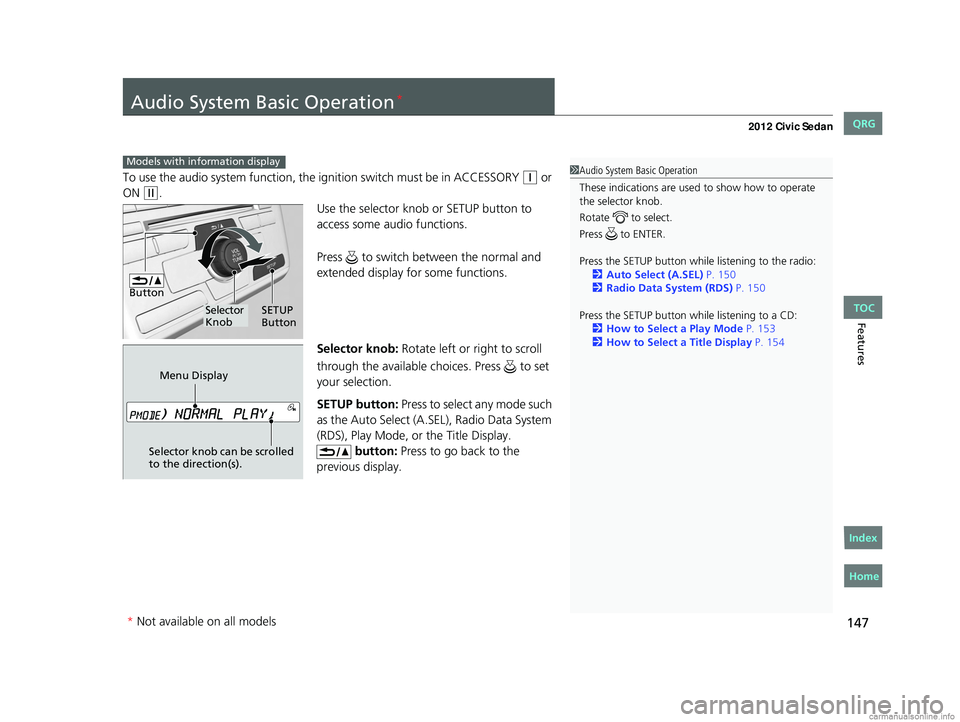
Use the selector knob or SETUP button to
access some audio functions.
Press to switch between the normal and
extended display fo r some functions.
Selector knob: Rotate left or right to scroll
through the available choices. Press to set
your selection.
SETUP button: Press to select any mode such
as the Auto Select (A.SEL), Radio Data System
(RDS), Play Mode, or the Title Display. button: Press to go back to the
previous display.
Models with info rmation display1Audio System Basic Operation
These indications are used to show how to operate
the selector knob.
Rotate to select.
Press to ENTER.
Press the SETUP button whil e listening to the radio:
2 Auto Select (A.SEL) P. 150
2 Radio Data System (RDS) P. 150
Press the SETUP button while listening to a CD: 2 How to Select a Play Mode P. 153
2 How to Select a Title Display P. 154
Button
Selector
Knob SETUP
Button
Menu Display
Selector knob can be scrolled
to the direction(s).
* Not available on all models
CIVIC 4D-31TR3600.book 147 ページ 2011年2月14日 月曜日 午後2時51分
TOC
Home
QRG
Index
Page 156 of 345
155
Features
Audio System Basic Operation*
To use the audio system function, the ignition swit ch must be in ACCESSORY (q or
ON
(w.
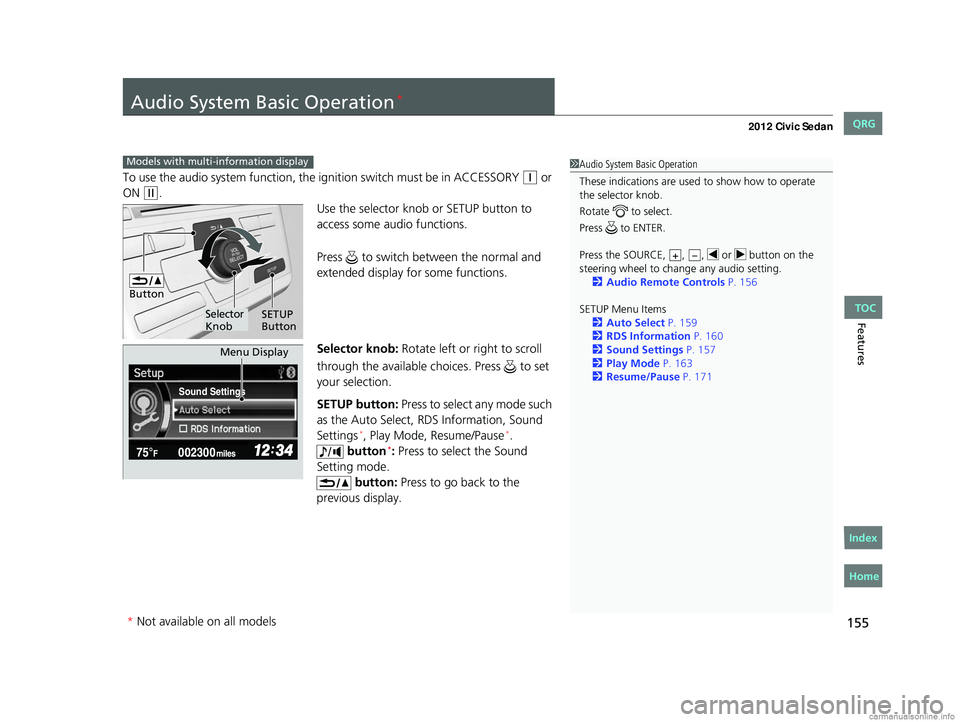
Use the selector knob or SETUP button to
access some audio functions.
Press to switch between the normal and
extended display fo r some functions.
Selector knob: Rotate left or right to scroll
through the available choices. Press to set
your selection.
SETUP button: Press to select any mode such
as the Auto Select, RDS Information, Sound
Settings
*, Play Mode, Resume/Pause*.
button*: Press to select the Sound
Setting mode. button: Press to go back to the
previous display.
Models with multi- information display1Audio System Basic Operation
These indications are used to show how to operate
the selector knob.
Rotate to select.
Press to ENTER.
Press the SOURCE, , , or button on the
steering wheel to cha nge any audio setting.
2 Audio Remote Controls P. 156
SETUP Menu Items 2 Auto Select P. 159
2 RDS Information P. 160
2 Sound Settings P. 157
2 Play Mode P. 163
2 Resume/Pause P. 171
+–
Button
Selector
Knob SETUP
Button
Sound Settings
Menu Display
* Not available on all models
CIVIC 4D-31TR3600.book 155 ページ 2011年2月14日 月曜日 午後2時51分
TOC
Home
QRG
Index
Page 180 of 345
179
uuBluetooth® HandsFreeLink®*uHFL Menus
Continued
Features
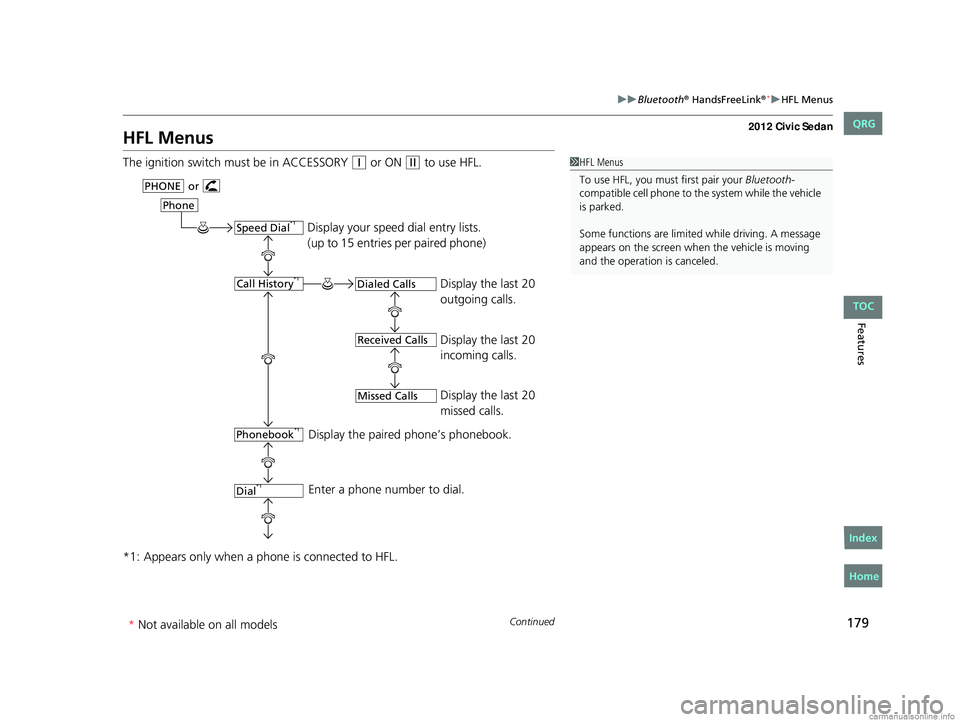
HFL Menus
The ignition switch mu st be in ACCESSORY (q or ON (w to use HFL.
*1: Appears only when a phone is connected to HFL.1 HFL Menus
To use HFL, you must first pair your Bluetooth-
compatible cell phone to th e system while the vehicle
is parked.
Some functions are limited while driving. A message
appears on the screen when the vehicle is moving
and the operation is canceled.
Display your speed dial entry lists.
(up to 15 entries per paired phone)
Display the last 20
outgoing calls.
Display the last 20
incoming calls.
Display the last 20
missed calls.
Display the paired phone’s phonebook.
Enter a phone number to dial.
orPHONE
Phone
Speed Dial*1
Call History*1
Phonebook*1
Dial*1
Dialed Calls
Received Calls
Missed Calls
CIVIC 4D-31TR3600.book 179 ページ 2011年2月14日 月曜日 午後2時51分
* Not available on all models
TOC
Home
QRG
Index
Page 213 of 345
uuWhen Driving uStarting the Engine
212
Driving
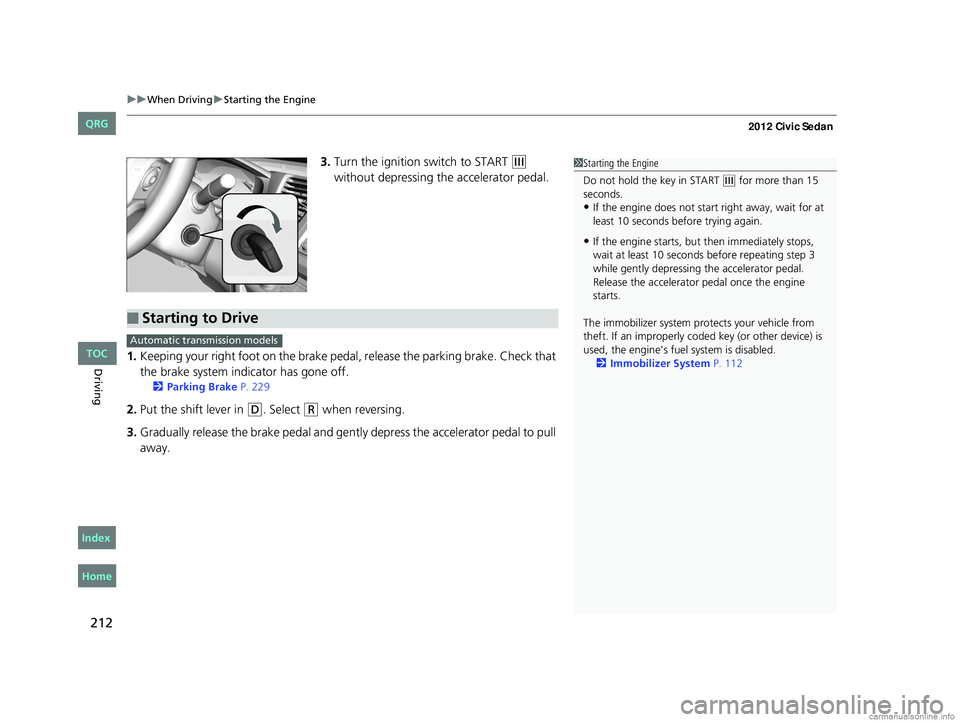
3. Turn the ignition switch to START (e
without depressing the accelerator pedal.
1. Keeping your right foot on the brake peda l, release the parking brake. Check that
the brake system indicator has gone off.
2 Parking Brake P. 229
2.Put the shift lever in (D. Select (R when reversing.
3. Gradually release the brake pedal and gently depress the accelerator pedal to pull
away.
1Starting the Engine
Do not hold the key in START
(e for more than 15
seconds.
•If the engine does not start right away, wait for at
least 10 seconds before trying again.
•If the engine starts, but then immediately stops,
wait at least 10 seconds before repeating step 3
while gently depressing the accelerator pedal.
Release the accelerator pedal once the engine
starts.
The immobilizer system pr otects your vehicle from
theft. If an improperly code d key (or other device) is
used, the engine's fuel system is disabled.
2 Immobilizer System P. 112
■Starting to Drive
Automatic transmission models
CIVIC 4D-31TR3600.book 212 ページ 2011年2月14日 月曜日 午後2時51分
TOC
Home
QRG
Index
Page 214 of 345
213
uuWhen Driving uPrecautions While Driving
Driving
Precautions While Driving
Avoid driving in deep water and on flooded roads. This can damage the engine or
cause electrical component failure.
If there is a strong impact with something under the vehicle, stop in a safe location.
Check the underside of the vehicle for damage or any fluid leaks.
■In Rain
■Other Precautions
1Precautions While Driving
NOTICE
Do not operate the shift lever while pressing the
accelerator pedal. You could damage the
transmission.
If the ignition switch is turned to ACCESSORY
( q or
LOCK ( 0 while driving, the e ngine will shut down
and all steering and brake pow er assist functions will
stop, making it difficult to control the vehicle.
Do not put the shift lever in
( N, as you will lose
engine braking (and acceleration) pe rformance.
During the first 600 miles (1,000 km) of operation,
avoid sudden acceleration or full throttle operation so
as to not damage the engine or powertrain.
Avoid hard braking for the first 200 miles (300 km).
You should also follow this when the brake pads are
replaced.
NOTICE
The following can dama ge the under spoiler:
•Parking the vehicle by a parking block
•Parallel parking along the road shoulder
•Driving towards the bottom of a hill
•Driving up or down to a different surface level
(such as a road shoulder)
•Driving on a rutted or bumpy road
•Driving on a road with potholes.
2.4 ℓ engine models
CIVIC 4D-31TR3600.book 213 ページ 2011年2月14日 月曜日 午後2時51分
TOC
Home
QRG
Index