ECO mode HONDA CIVIC SEDAN 2012 (in English) Manual Online
[x] Cancel search | Manufacturer: HONDA, Model Year: 2012, Model line: CIVIC SEDAN, Model: HONDA CIVIC SEDAN 2012Pages: 345, PDF Size: 53.95 MB
Page 308 of 345
307Continued
Handling the Unexpected
Jump Starting
Turn off the power to electric devices, such as audio and lights. Turn off the engine,
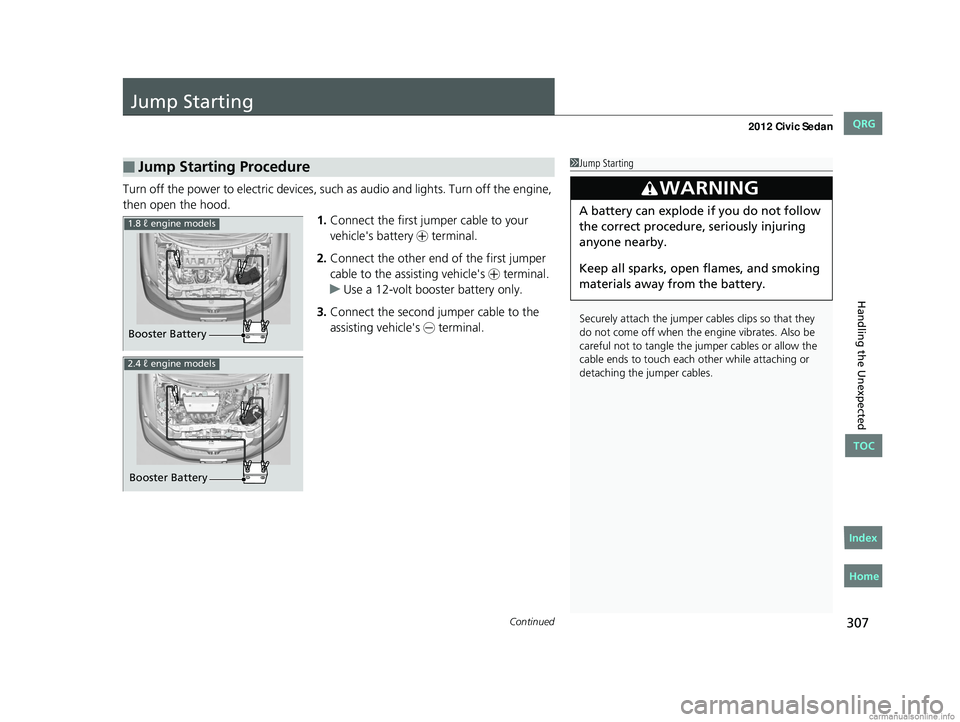
then open the hood. 1.Connect the first jumper cable to your
vehicle's battery + terminal.
2. Connect the other end of the first jumper
cable to the assisting vehicle's + terminal.
u Use a 12-volt booster battery only.
3. Connect the second jumper cable to the
assisting vehicle's - terminal.
■Jump Starting Procedure1Jump Starting
Securely attach the jumper cables clips so that they
do not come off when the e ngine vibrates. Also be
careful not to tangle the ju mper cables or allow the
cable ends to touch each other while attaching or
detaching the jumper cables.
3WARNING
A battery can explode if you do not follow
the correct procedure, seriously injuring
anyone nearby.
Keep all sparks, open flames, and smoking
materials away from the battery.
Booster Battery
1.8 ℓ engine models
2.4 ℓ engine models
Booster Battery
CIVIC 4D-31TR3600.book 307 ページ 2011年2月14日 月曜日 午後2時51分
TOC
Home
QRG
Index
Page 309 of 345
uuJump Starting u
308
Handling the Unexpected
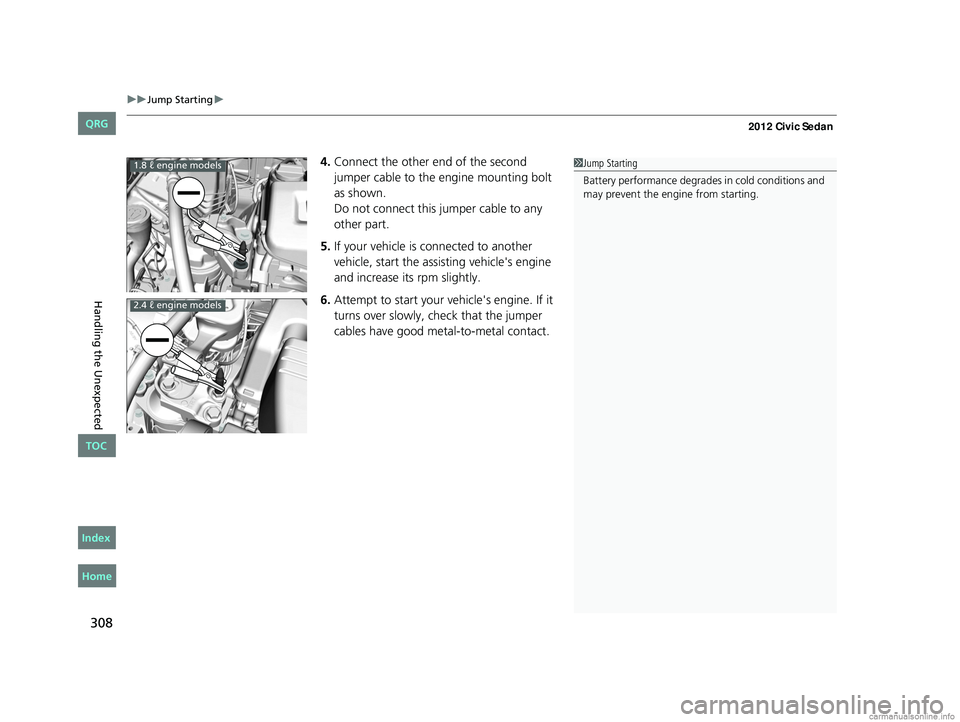
4.Connect the other end of the second
jumper cable to the engine mounting bolt
as shown.
Do not connect this jumper cable to any
other part.
5. If your vehicle is connected to another
vehicle, start the assisting vehicle's engine
and increase its rpm slightly.
6. Attempt to start your vehicle's engine. If it
turns over slowly, check that the jumper
cables have good metal-to-metal contact.1Jump Starting
Battery performance degrades in cold conditions and
may prevent the engi ne from starting.1.8 ℓ engine models
2.4 ℓ engine models
CIVIC 4D-31TR3600.book 308 ページ 2011年2月14日 月曜日 午後2時51分
TOC
Home
QRG
Index
Page 314 of 345
313
Handling the Unexpected
Indicator, Coming On/Blinking
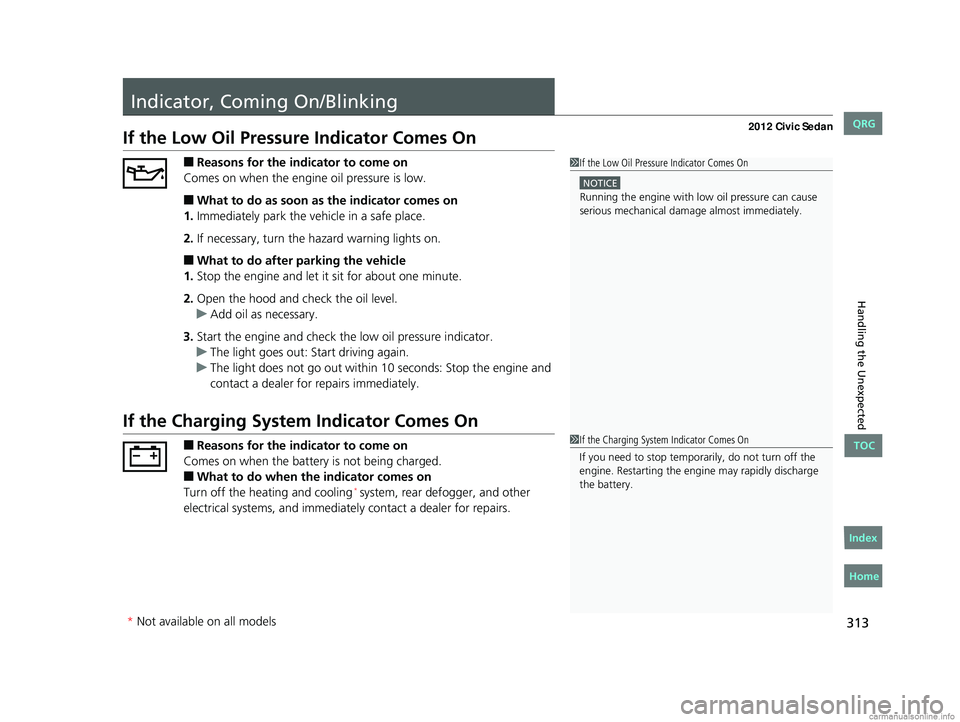
If the Low Oil Pressure Indicator Comes On
■Reasons for the indicator to come on
Comes on when the engine oil pressure is low.
■What to do as soon as the indicator comes on
1. Immediately park the vehicle in a safe place.
2. If necessary, turn the hazard warning lights on.
■What to do after parking the vehicle
1. Stop the engine and let it sit for about one minute.
2. Open the hood and check the oil level.
u Add oil as necessary.
3. Start the engine and check th e low oil pressure indicator.
u The light goes out: Start driving again.
u The light does not go out within 10 seconds: Stop the engine and
contact a dealer for repairs immediately.
If the Charging System Indicator Comes On
■Reasons for the indicator to come on
Comes on when the battery is not being charged.
■What to do when th e indicator comes on
Turn off the heating and cooling* system, rear defogger, and other
electrical systems, and immediatel y contact a dealer for repairs.
1If the Low Oil Pressure Indicator Comes On
NOTICE
Running the engine with low oil pressure can cause
serious mechanical damage almost immediately.
1If the Charging System Indicator Comes On
If you need to stop temporarily, do not turn off the
engine. Restarting the engi ne may rapidly discharge
the battery.
* Not available on all models
CIVIC 4D-31TR3600.book 313 ページ 2011年2月14日 月曜日 午後2時51分
TOC
Home
QRG
Index
Page 316 of 345
315
uuIndicator, Coming On/Blinking uIf the Brake System Indicator Comes On
Handling the Unexpected
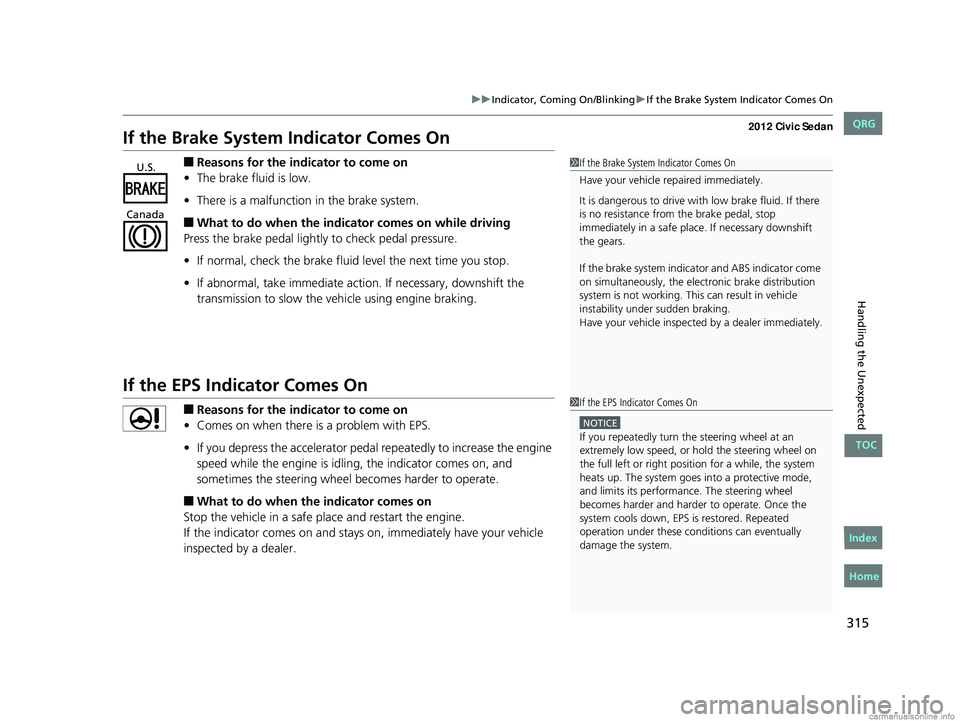
If the Brake System Indicator Comes On
■Reasons for the indicator to come on
• The brake fluid is low.
• There is a malfunction in the brake system.
■What to do when the indicator comes on while driving
Press the brake pedal lightly to check pedal pressure.
• If normal, check the brake fluid level the next time you stop.
• If abnormal, take immediate acti on. If necessary, downshift the
transmission to slow the vehicle using engine braking.
If the EPS Indicator Comes On
■Reasons for the indicator to come on
• Comes on when there is a problem with EPS.
• If you depress the accelerator pedal repeatedly to increase the engine
speed while the engine is idling, the indicator comes on, and
sometimes the steering wheel becomes harder to operate.
■What to do when th e indicator comes on
Stop the vehicle in a safe place and restart the engine.
If the indicator comes on and stays on, immediately have your vehicle
inspected by a dealer.
1 If the Brake System Indicator Comes On
Have your vehicle re paired immediately.
It is dangerous to drive with low brake fluid. If there
is no resistance from the brake pedal, stop
immediately in a safe plac e. If necessary downshift
the gears.
If the brake system indica tor and ABS indicator come
on simultaneously, the elec tronic brake distribution
system is not working. Th is can result in vehicle
instability under sudden braking.
Have your vehicle inspecte d by a dealer immediately.U.S.
Canada
1 If the EPS Indicator Comes On
NOTICE
If you repeatedly turn the steering wheel at an
extremely low speed, or hold the steering wheel on
the full left or right position for a while, the system
heats up. The system goes into a protective mode,
and limits its performa nce. The steering wheel
becomes harder and harder to operate. Once the
system cools down, EPS is restored. Repeated
operation under these condi tions can eventually
damage the system.
CIVIC 4D-31TR3600.book 315 ページ 2011年2月14日 月曜日 午後2時51分
TOC
Home
QRG
Index
Page 326 of 345
325
uuSpecifications u
Continued
Information
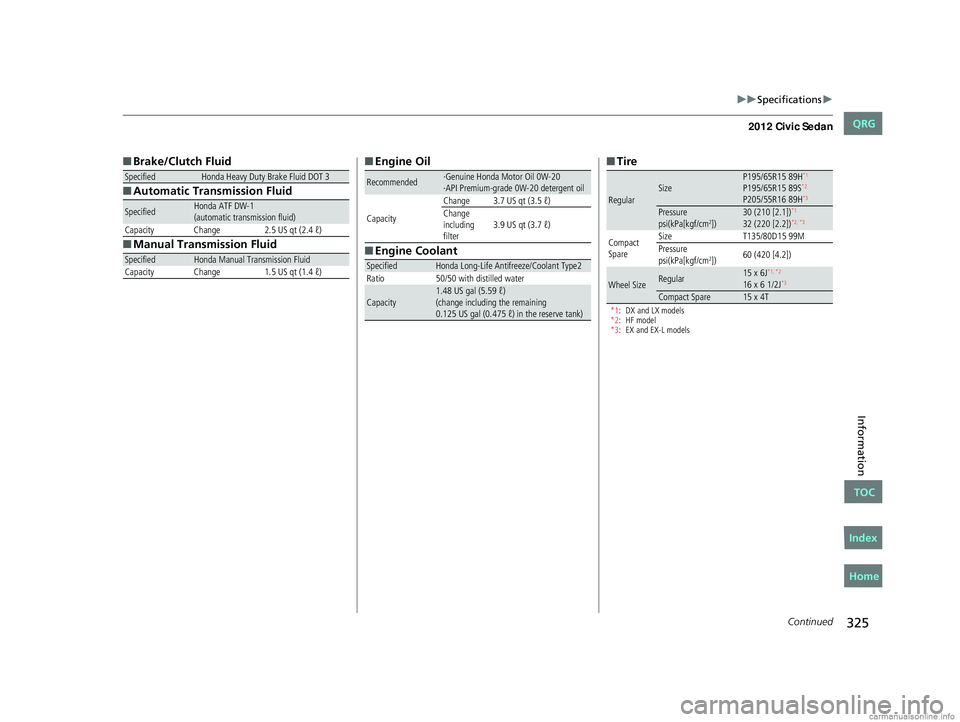
■Brake/Clutch Fluid
■ Automatic Transmission Fluid
■ Manual Transmission Fluid
SpecifiedHonda Heavy Duty Brake Fluid DOT 3
SpecifiedHonda ATF DW-1
(automatic transmission fluid)
Capacity Change 2.5 US qt (2.4 ℓ)
SpecifiedHonda Manual Transmission Fluid
Capacity Change 1.5 US qt (1.4 ℓ)
■ Engine Oil
■ Engine Coolant
Recommended·Genuine Honda Motor Oil 0W-20
·API Premium-grade 0W-20 detergent oil
Capacity Change 3.7 US qt (3.5 ℓ)
Change
including
filter
3.9 US qt (3.7 ℓ)
SpecifiedHonda Long-Life Antifreeze/Coolant Type2
Ratio 50/50 with distilled water
Capacity1.48 US gal (5.59 ℓ)
(change including the remaining
0.125 US gal (0.475 ℓ) in the reserve tank)
■Tire
*1: DX and LX models
*2: HF model
*3: EX and EX-L models
RegularSizeP195/65R15 89H*1
P195/65R15 89S*2
P205/55R16 89H*3
Pressure
psi(kPa[kgf/cm2])30 (210 [2.1])*1
32 (220 [2.2])*2, *3
Compact
Spare Size
T135/80D15 99M
Pressure
psi(kPa[kgf/cm
2]) 60 (420 [4.2])
Wheel SizeRegular15 x 6J*1, *2
16 x 6 1/2J*3
Compact Spare15 x 4T
CIVIC 4D-31TR3600.book 325 ページ 2011年2月14日 月曜日 午後2時51分
TOC
Home
QRG
Index
Page 328 of 345
327
uuSpecifications u
Information
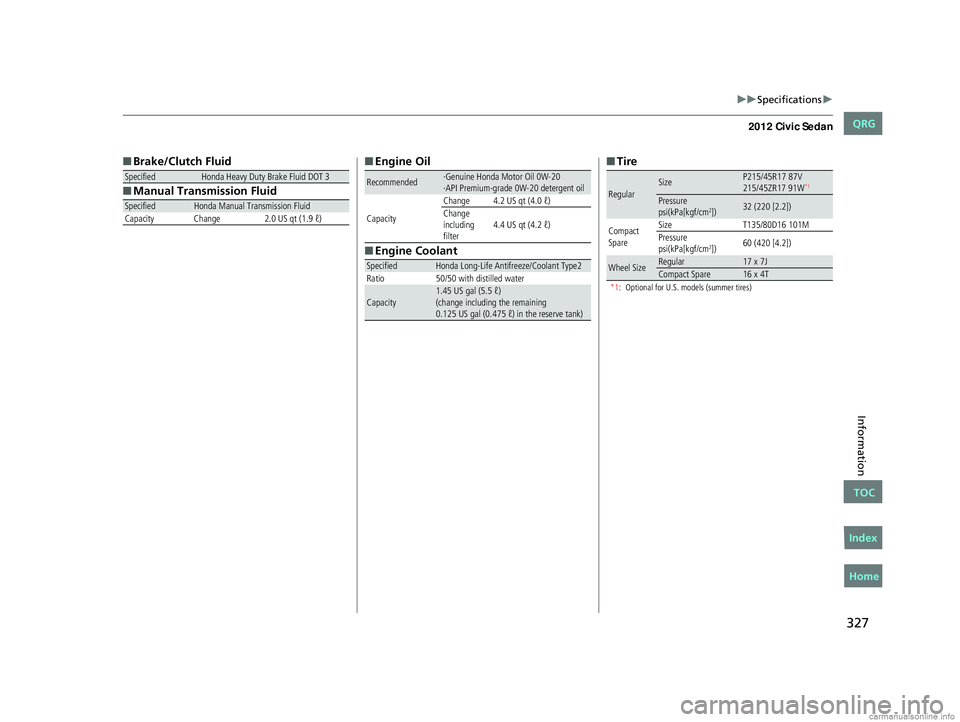
■Brake/Clutch Fluid
■ Manual Transmission Fluid
SpecifiedHonda Heavy Duty Brake Fluid DOT 3
SpecifiedHonda Manual Transmission Fluid
Capacity Change 2.0 US qt (1.9 ℓ)
■ Engine Oil
■ Engine Coolant
Recommended·Genuine Honda Motor Oil 0W-20
·API Premium-grade 0W-20 detergent oil
Capacity Change 4.2 US qt (4.0 ℓ)
Change
including
filter
4.4 US qt (4.2 ℓ)
SpecifiedHonda Long-Life Antifreeze/Coolant Type2
Ratio 50/50 with distilled water
Capacity1.45 US gal (5.5 ℓ)
(change including the remaining
0.125 US gal (0.475 ℓ) in the reserve tank)
■Tire
*1: Optional for U.S. models (summer tires)
RegularSizeP215/45R17 87V
215/45ZR17 91W*1
Pressure
psi(kPa[kgf/cm2])32 (220 [2.2])
Compact
Spare Size
T135/80D16 101M
Pressure
psi(kPa[kgf/cm
2]) 60 (420 [4.2])
Wheel SizeRegular17 x 7JCompact Spare16 x 4T
CIVIC 4D-31TR3600.book 327 ページ 2011年2月14日 月曜日 午後2時51分
TOC
Home
QRG
Index
Page 341 of 345
340
INDEX
HFL Status Display.................................... 178
Making a Call .......................................... 195
Options During a Call .............................. 200
Phone Setup ............................................ 183
Receiving a Call ....................................... 199
Speed Dial ............................................... 192
To Clear the System ................................. 190
To Create a Security PIN........................... 188
Hazard Warning Button ............................... 2
Head Restraints ......................................... 129
Headlights ................................................. 118
Aiming .................................................... 268
Automatic Operation ............................... 119
Dimming ......................................... 118, 120
Operating ................................................ 118
Heaters (Seat) ............................................ 139
Heating and Cooling System .................... 140
Cooling ................................................... 142
Defrosting the Windshield and Windows ............................................... 142
Dust and Pollen Filter ............................... 291
Heating ................................................... 141
HFL (HandsFreeLink
®) ............................... 177
High-Beam Indicator .................................. 73
I
Identification Numbers ............................ 328
Engine and Transmission.......................... 328
Vehicle Identification ............................... 328
Ignition Switch .......................................... 117 Illumination Control
................................. 122
Knob ....................................................... 122
Immobilizer System .................................. 112
Indicator.................................................... 74
Indicators .................................................... 66
ABS (Anti-lock Brake System)..................... 69
Charging System ............................... 67, 313
CRUISE CONTROL ............................. 75, 221
CRUISE MAIN .................................... 75, 220
Daytime Running Lights............................. 71
Door Open .......................................... 27, 70
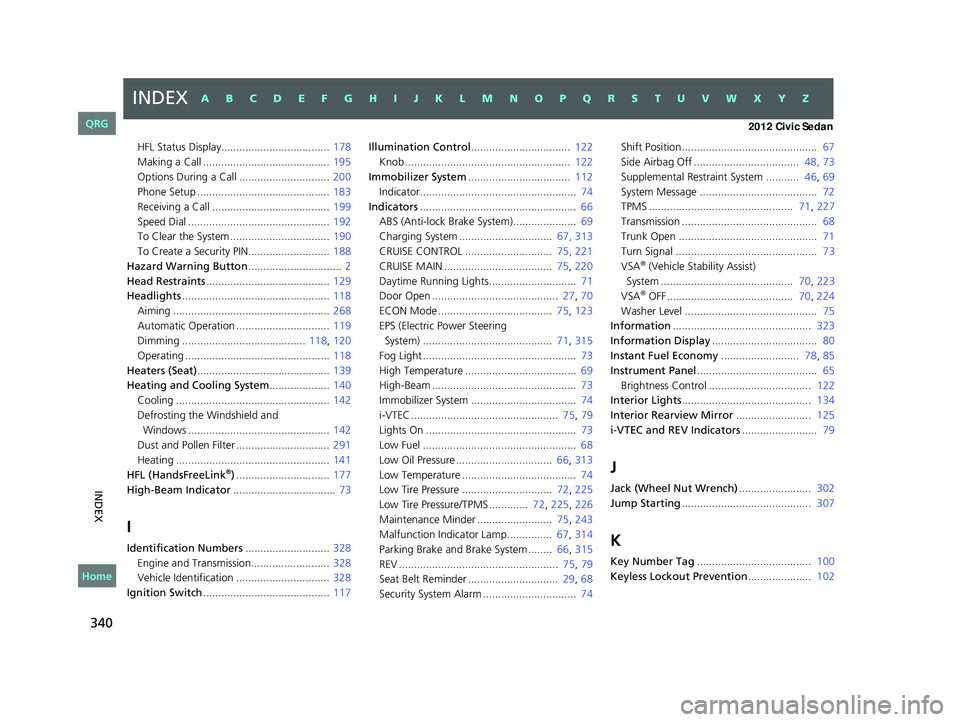
ECON Mode ...................................... 75, 123
EPS (Electric Power Steering System) ........................................... 71, 315
Fog Light ................................................... 73
High Temperature ..................................... 69
High-Beam ................................................ 73
Immobilizer System ................................... 74
i-VTEC ................................................. 75, 79
Lights On .................................................. 73
Low Fuel ................................................... 68
Low Oil Pressure ................................ 66, 313
Low Temperature ...................................... 74
Low Tire Pressure .............................. 72, 225
Low Tire Pressure/TPMS ............. 72 , 225, 226
Maintenance Minder ......................... 75, 243
Malfunction Indicator Lamp............... 67, 314
Parking Brake and Brake System ........ 66, 315
REV ..................................................... 75, 79
Seat Belt Reminder .............................. 29, 68
Security System Alarm ............................... 74 Shift Position............................................. 67
Side Airbag Off ................................... 48, 73
Supplemental Restraint System ........... 46
, 69
System Message ....................................... 72
TPMS ................................................ 71, 227
Transmission ............................................. 68
Trunk Open .............................................. 71
Turn Signal ............................................... 73
VSA
® (Vehicle Stability Assist)
System ............................................ 70, 223
VSA
® OFF .......................................... 70, 224
Washer Level ............................................ 75
Information .............................................. 323
Information Display ................................... 80
Instant Fuel Economy .......................... 78, 85
Instrument Panel ........................................ 65
Brightness Control .................................. 122
Interior Lights ........................................... 134
Interior Rearview Mirror ......................... 125
i-VTEC and REV Indicators ......................... 79
J
Jack (Wheel Nut Wrench)........................ 302
Jump Starting ........................................... 307
K
Key Number Tag ...................................... 100
Keyless Lockout Prevention ..................... 102
CIVIC 4D-31TR3600.book 340 ページ 2011年2月14日 月曜日 午後2時51分
INDEXA B C D E F G H I J K L M N O P Q R S T U V W X Y Z
Home
QRG