fuel HONDA CIVIC SEDAN 2014 (in English) User Guide
[x] Cancel search | Manufacturer: HONDA, Model Year: 2014, Model line: CIVIC SEDAN, Model: HONDA CIVIC SEDAN 2014Pages: 469, PDF Size: 21.06 MB
Page 86 of 469
85
uuGauges and Displays uInformation Display*
Instrument Panel
Shows the estimated average fuel economy of each trip meter in mpg or l/100 km.
The display is updated at set intervals. Wh en a trip meter is reset, the average fuel
economy is also reset.
Shows the remaining oil life and Maintenance Minder
TM.
2 Maintenance MinderTM P. 353
Shows the estimated distance you can travel on the remaining fuel. This distance is
estimated from the fuel economy of your previous trips.
Appears when the fuel fill cap is loose or is not installed.
2Check/Tighten Fuel Cap Message P. 436
■Average Fuel Economy
■Engine Oil Life
■Range
■Check Fuel Cap
14 CIVIC 4D_SI-31TR36210.book 85 ページ 2014年1月30日 木曜日 午後12時18分
Page 87 of 469
86
uuGauges and Displays uintelligent Multi-Information Display (i-MID)*
Instrument Panel
intelligent Multi-Information Display (i-MID)*
The i-MID shows the odometer, trip meter, out side temperature indicator, and other
gauges.
It also displays important messages such as warnings and other helpful information.
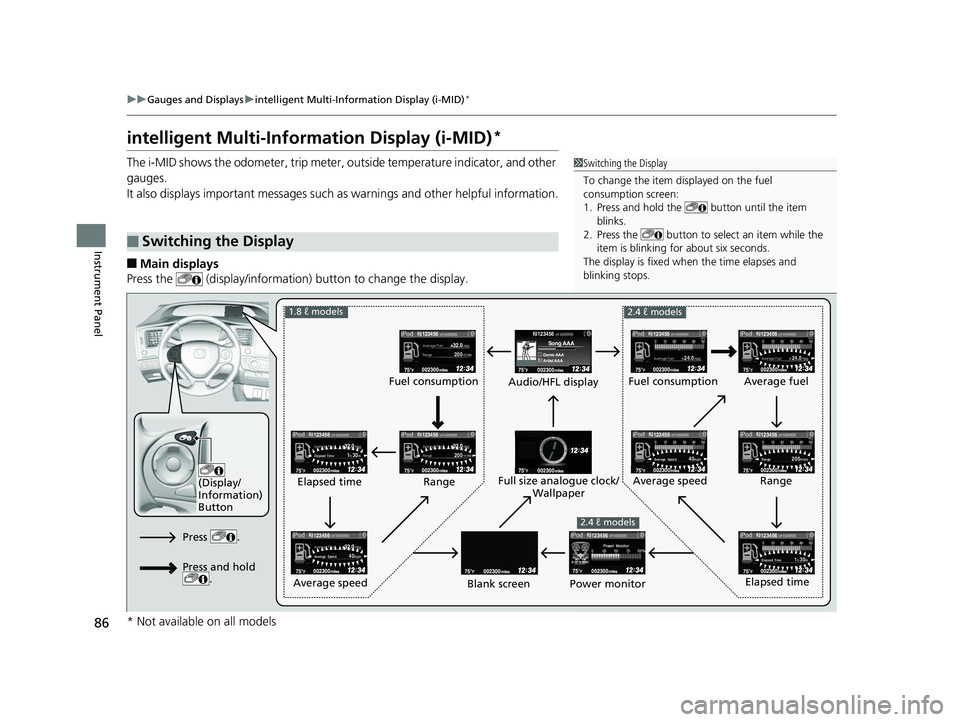
■Main displays
Press the (display/information ) button to change the display.
■Switching the Display
1Switching the Display
To change the item displayed on the fuel
consumption screen:
1. Press and hold the button until the item
blinks.
2. Press the button to select an item while the
item is blinking for about six seconds.
The display is fixed when the time elapses and
blinking stops.
123456
Genre AAASong AAA
Artist AAA200
2001h 30mElapsed Time
1h 30mElapsed Time
24.024.0
40mphAverage Speed
40mphAverage Speed200milesRange
123456
123456
123456123456
123456
123456123456
123456123456
123456
(Display/
Information)
Button
Audio/HFL display Fuel consumption
Blank screen Full size analogue clock/
Wallpaper
2.4 ℓ models
Power monitor
1.8 ℓ models
2.4 ℓ models
Fuel consumption
Range
Elapsed time
Average speed Elapsed time
Average speed
Average fuel
Range
Press .
Press and hold .
* Not available on all models
14 CIVIC 4D_SI-31TR36210.book 86 ページ 2014年1月30日 木曜日 午後12時18分
Page 89 of 469
uuGauges and Displays uintelligent Multi-Information Display (i-MID)*
88
Instrument Panel
Shows the estimated average fuel economy of each trip meter in mpg or l/100 km.
The display is updated at set intervals. When a trip meter is reset, the average fuel
economy is also reset.
Shows the estimated distance you can travel on the remaining fuel. This distance is
estimated from the fuel economy of your previous trips.
Shows the time elapsed since Trip A or Trip B was reset.
Shows the average speed in mph or km/h since Trip A or Trip B was reset.
Shows the remaining oil life and Maintenance Minder
TM.
2 Maintenance MinderTM P. 353
■Average Fuel Economy
■Range
■Elapsed Time
■Average Speed
■Engine Oil Life
1Average Fuel Economy
You can change when to reset the average fuel
economy.
2 Customized Features P. 90
You can choose an item to be displayed in the fuel
consumption screen. Averag e fuel economy, range,
elapsed time, or average speed can be selected.
2 Customized Features P. 90
2 Switching the Display P. 86
2.4 ℓ engine models
1Range
You can choose an item to be displayed in the fuel
consumption screen. Range, elapsed time, or average
speed can be selected. 2 Customized Features P. 90
2 Switching the Display P. 86
1.8 ℓ engine models
14 CIVIC 4D_SI-31TR36210.book 88 ページ 2014年1月30日 木曜日 午後12時18分
Page 90 of 469
Continued89
uuGauges and Displays uintelligent Multi-Inform ation Display (i-MID)*
Instrument Panel
Shows the outside temperature in Fahr enheit (U.S.) or Celsius (Canada).
■Adjusting the outside temperature display
Adjust the temperature reading up to ±5°F or ±3°C if the temperature reading
seems incorrect.
Use the i-MID’s customized featur es to correct the temperature.
2Customized Features P. 90
Shows the instant fuel economy as a bar graph in mpg or l/100 km.
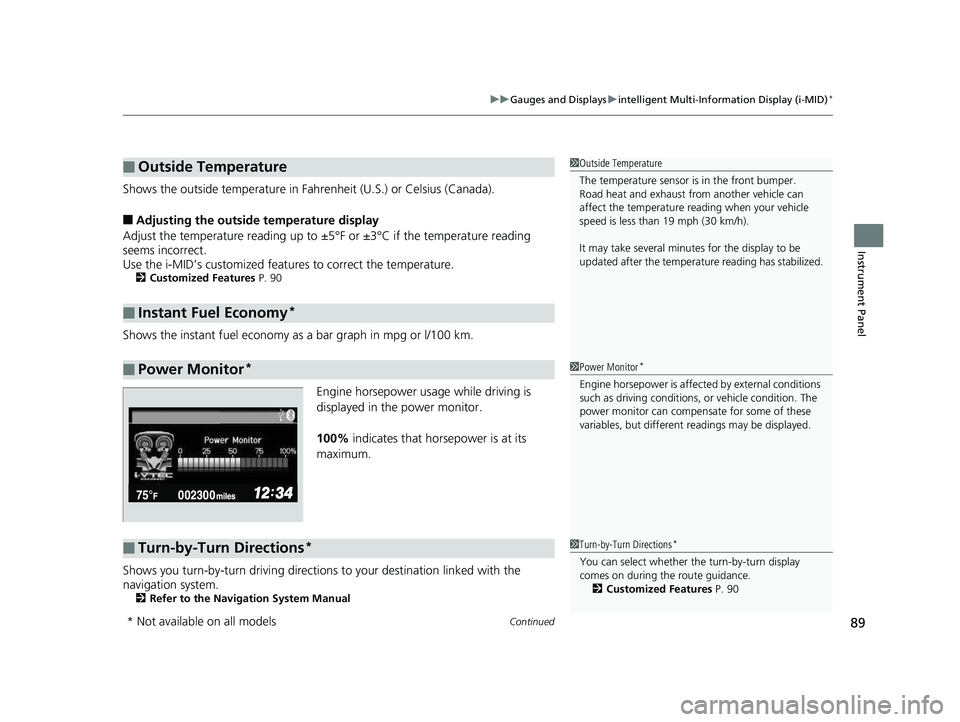
Engine horsepower usage while driving is
displayed in the power monitor.
100% indicates that horsepower is at its
maximum.
Shows you turn-by-turn driv ing directions to your destination linked with the
navigation system.
2 Refer to the Navigation System Manual
■Outside Temperature
■Instant Fuel Economy*
■Power Monitor*
1Outside Temperature
The temperature sensor is in the front bumper.
Road heat and exhaust from another vehicle can
affect the temperature reading when your vehicle
speed is less than 19 mph (30 km/h).
It may take several minutes for the display to be
updated after the temperature reading has stabilized.
1Power Monitor*
Engine horsepower is affected by external conditions
such as driving conditions, or vehicle condition. The
power monitor can compensate for some of these
variables, but different re adings may be displayed.
■Turn-by-Turn Directions*1Turn-by-Turn Directions*
You can select whether th e turn-by-turn display
comes on during the route guidance. 2 Customized Features P. 90
* Not available on all models
14 CIVIC 4D_SI-31TR36210.book 89 ページ 2014年1月30日 木曜日 午後12時18分
Page 93 of 469
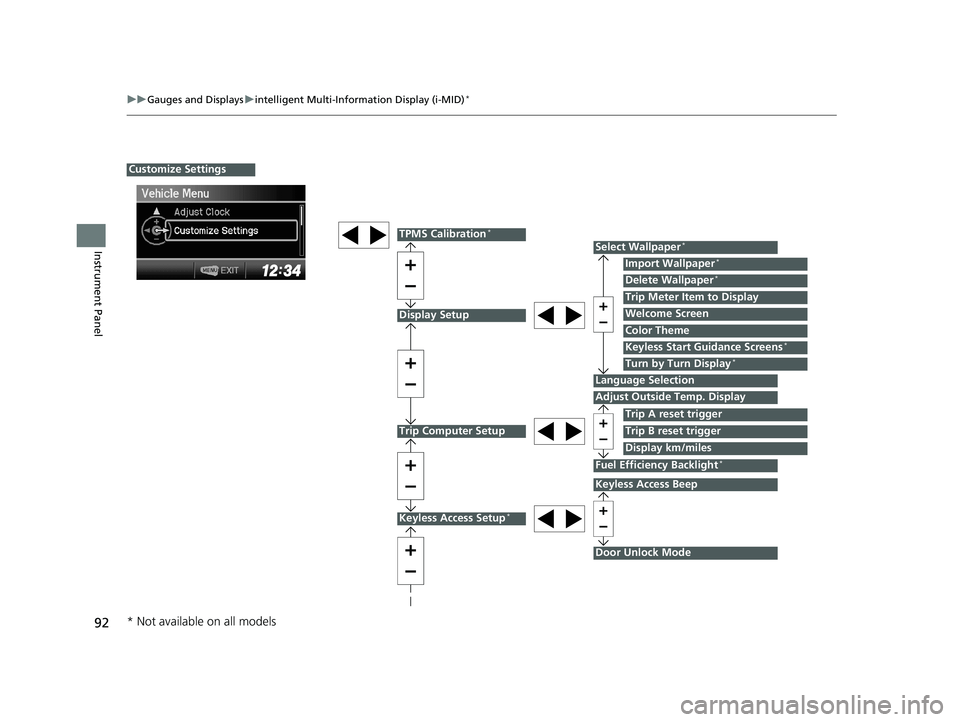
92
uuGauges and Displays uintelligent Multi-Information Display (i-MID)*
Instrument Panel
Display Setup
Trip Computer Setup
Select Wallpaper*
Import Wallpaper*
Delete Wallpaper*
Language Selection
Adjust Outside Temp. Display
Trip A reset trigger
Display km/miles
Trip Meter Item to Display
Welcome Screen
Color Theme
Fuel Efficiency Backlight*
Customize Settings
Turn by Turn Display*
Trip B reset trigger
TPMS Calibration*
Keyless Start Guidance Screens*
Keyless Access Setup*
Door Unlock Mode
Keyless Access Beep
* Not available on all models
14 CIVIC 4D_SI-31TR36210.book 92 ページ 2014年1月30日 木曜日 午後12時18分
Page 96 of 469
95
uuGauges and Displays uintelligent Multi-Inform ation Display (i-MID)*
Continued
Instrument Panel
*1: Models with the smart entry system have an ENGINE START/STOP button instead of an ignition switch.
*2: Default Setting
*3: Default Setting for 1.8 ℓ engine models
*4: Default Setting for 2.4 ℓ engine models
*5: Refer to the Navigation System Manual for complete details.
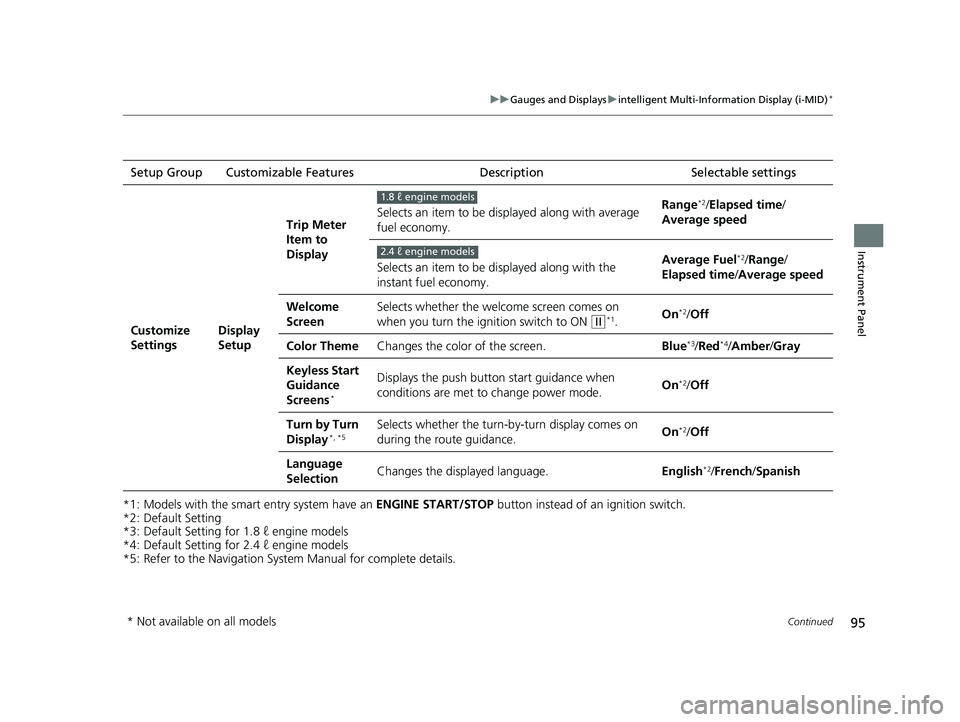
Setup Group Customizable Features
Description Selectable settings
Customize
SettingsDisplay
SetupTrip Meter
Item to
Display
Selects an item to be di
splayed along with average
fuel economy. Range
*2/
Elapsed time /
Average speed
Selects an item to be displayed along with the
instant fuel economy. Average Fuel
*2/
Range /
Elapsed time /Average speed
Welcome
Screen Selects whether the welcome screen comes on
when you turn the igni
tion switch to ON
(w*1.On*2/
Off
Color Theme Changes the color of the screen. Blue
*3/Red*4/Amber /Gray
Keyless Start
Guidance
Screens
*
Displays the push button start guidance when
conditions are met to change power mode. On*2/
Off
Turn by Turn
Display
*, *5Selects whether the turn-b y-turn display comes on
during the route guidance. On*2/
Off
Language
Selection Changes the displayed language.
English
*2/French /Spanish
1.8 ℓ engine models
2.4 ℓ engine models
* Not available on all models
14 CIVIC 4D_SI-31TR36210.book 95 ページ 2014年1月30日 木曜日 午後12時18分
Page 97 of 469
96
uuGauges and Displays uintelligent Multi-Information Display (i-MID)*
Instrument Panel
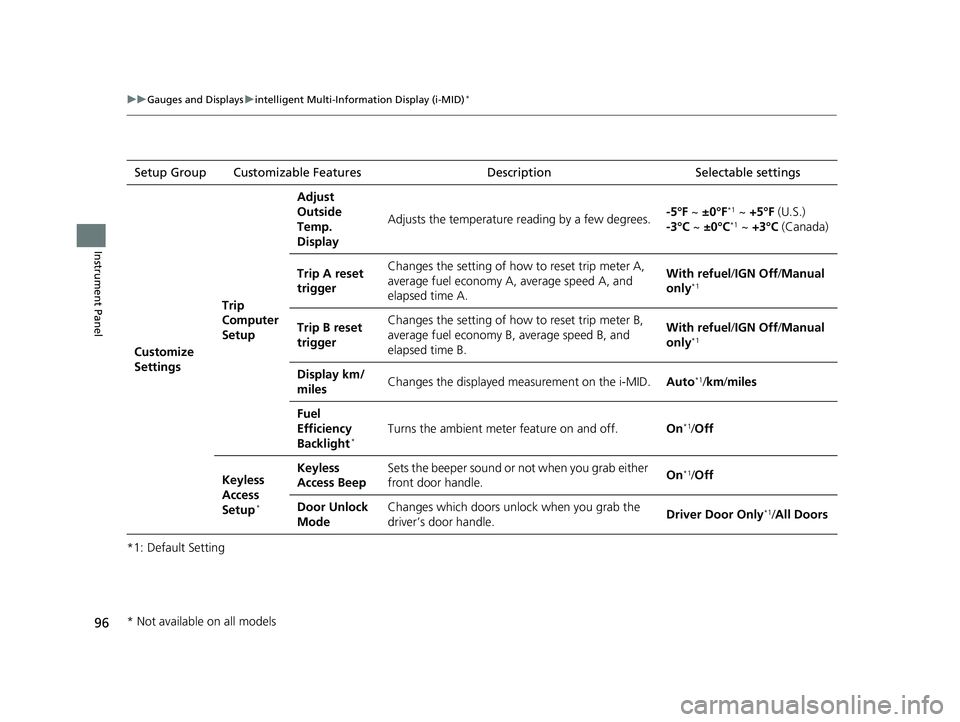
*1: Default SettingSetup Group Customizable Features
Description Selectable settings
Customize
Settings Trip
Computer
SetupAdjust
Outside
Temp.
Display
Adjusts the temperature reading by a few degrees.
-5°F ~
±0°F
*1 ~ +5°F (U.S.)
-3°C ~ ±0°C*1 ~ +3°C (Canada)
Trip A reset
trigger Changes the setting of how to reset trip meter A,
average fuel economy A,
average speed A, and
elapsed time A. With refuel/
IGN Off/Manual
only
*1
Trip B reset
trigger Changes the setting of how to reset trip meter B,
average fuel economy B,
average speed B, and
elapsed time B. With refuel/
IGN Off/Manual
only*1
Display km/
miles Changes the displayed measurement on the i-MID.
Auto*1/km/ miles
Fuel
Efficiency
Backlight
*Turns the ambient meter feature on and off. On*1/Off
Keyless
Access
Setup
*
Keyless
Access Beep Sets the beeper sound or
not when you grab either
front door handle. On*1/
Off
Door Unlock
Mode Changes which doors unlock when you grab the
driver’s door handle.
Driver Door Only
*1/
All Doors
* Not available on all models
14 CIVIC 4D_SI-31TR36210.book 96 ページ 2014年1月30日 木曜日 午後12時18分
Page 304 of 469
303
Driving
This chapter discusses driving, refueling, and information on items such as accessories.
Before Driving
Driving Preparation .......................... 304
Maximum Load Limit........................ 307
Towing a Trailer
Towing Preparation .......................... 309
Driving Safely with a Trailer .............. 311
Towing Your Vehicle ........................ 312
When Driving
Starting the Engine .................. 313, 315
Precautions While Driving................. 318
Automatic Transmission (CVT) .......... 319
Shifting .................................... 320, 322
ECON Button
*................................. 325 Cruise Control
*............................... 326
Vehicle Stability Assist (VSA®), aka Electronic
Stability Control (ESC), System ............... 329
LaneWatchTM*..................................... 331
Tire Pressure Monitoring System (TPMS) ... 333
Tire Pressure Monitoring System (TPMS) -
Required Federal Explanation............. 335
Braking Brake System ................................... 337
Anti-lock Brake System (ABS) ........... 339
Brake Assist System.......................... 340 Parking Your Vehicle
When Stopped ................................ 341
Rearview Camera
*............................ 342
Refueling Fuel Information .............................. 343
How to Refuel ................................. 344
Fuel Economy Improving Fuel Economy .................. 346
Accessories and Modifications Accessories ...................................... 347
Modifications................................... 347
* Not available on all models
14 CIVIC 4D_SI-31TR36210.book 303 ページ 2014年1月30日 木曜日 午後12時18分
Page 315 of 469
uuWhen Driving uStarting the Engine
314
Driving
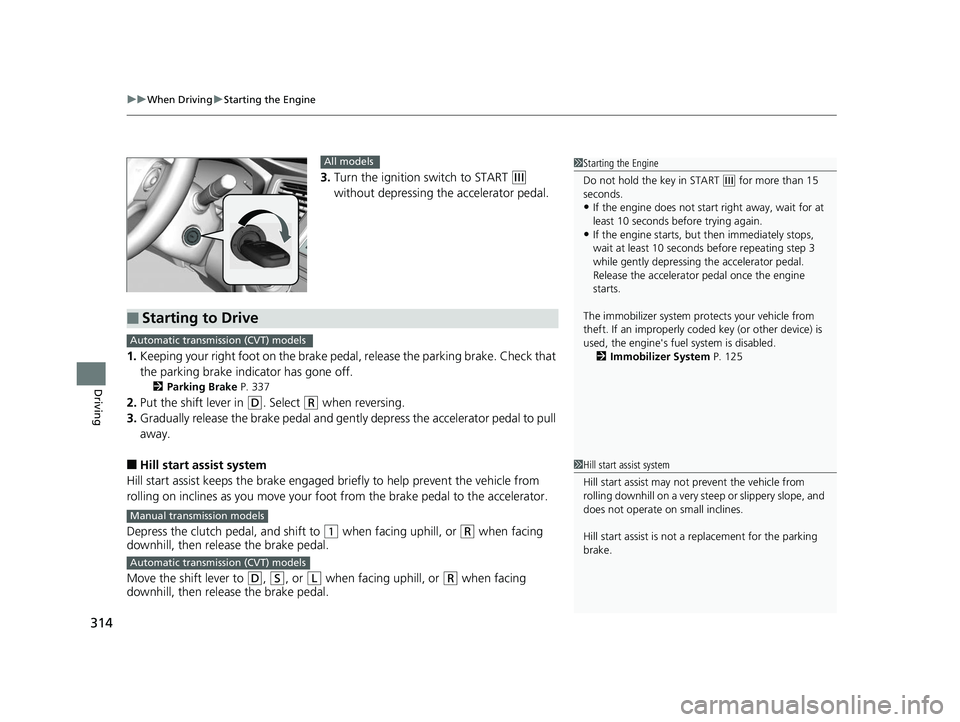
3. Turn the ignition switch to START (e
without depressing the accelerator pedal.
1. Keeping your right foot on the brake peda l, release the parking brake. Check that
the parking brake indicator has gone off.
2 Parking Brake P. 337
2.Put the shift lever in (D. Select (R when reversing.
3. Gradually release the brake pedal and gently depress the accelerator pedal to pull
away.
■Hill start assist system
Hill start assist keeps the brake engaged br iefly to help prevent the vehicle from
rolling on inclines as you move your fo ot from the brake pedal to the accelerator.
Depress the clutch pedal, and shift to
(1 when facing uphill, or (R when facing
downhill, then release the brake pedal.
Move the shift lever to
(D, (S, or (L when facing uphill, or (R when facing
downhill, then release the brake pedal.
1 Starting the Engine
Do not hold the key in START
(e for more than 15
seconds.
•If the engine does not start right away, wait for at
least 10 seconds before trying again.
•If the engine starts, but then immediately stops,
wait at least 10 seconds before repeating step 3
while gently depressing the accelerator pedal.
Release the accelerator pedal once the engine
starts.
The immobilizer system pr otects your vehicle from
theft. If an improperly code d key (or other device) is
used, the engine's fuel system is disabled.
2 Immobilizer System P. 125
All models
■Starting to Drive
Automatic transmission (CVT) models
Manual transmission models
Automatic transmission (CVT) models
1Hill start assist system
Hill start assist may not prevent the vehicle from
rolling downhill on a very st eep or slippery slope, and
does not operate on small inclines.
Hill start assist is not a replacement for the parking
brake.
14 CIVIC 4D_SI-31TR36210.book 314 ページ 2014年1月30日 木曜日 午後12時18分
Page 316 of 469
315
uuWhen Driving uStarting the Engine
Continued
Driving
Starting the Engine
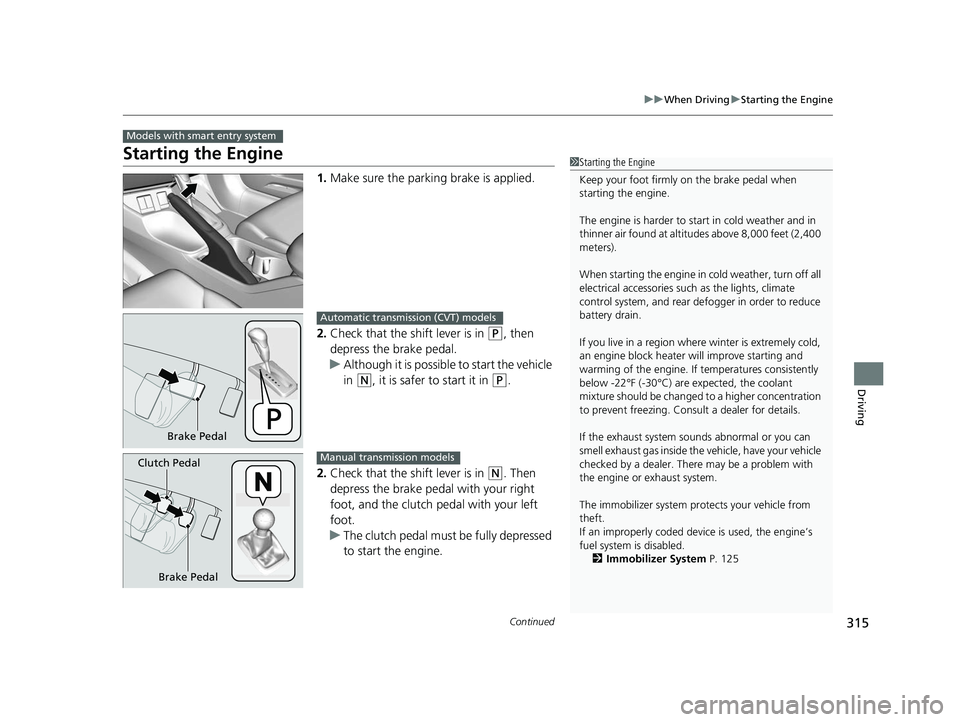
1. Make sure the parkin g brake is applied.
2. Check that the shift lever is in
(P, then
depress the brake pedal.
u Although it is possible to start the vehicle
in
(N, it is safer to start it in (P.
2. Check that the shift lever is in
(N. Then
depress the brake pedal with your right
foot, and the clutch pedal with your left
foot.
u The clutch pedal must be fully depressed
to start the engine.
Models with smart entry system
1Starting the Engine
Keep your foot firmly on the brake pedal when
starting the engine.
The engine is harder to st art in cold weather and in
thinner air found at altitudes above 8,000 feet (2,400
meters).
When starting the engine in cold weather, turn off all
electrical accessories such as the lights, climate
control system, and rear de fogger in order to reduce
battery drain.
If you live in a region where winter is extremely cold,
an engine block heater will improve starting and
warming of the engine. If temperatures consistently
below -22°F (-30°C) are expected, the coolant
mixture should be changed to a higher concentration
to prevent freezing. Cons ult a dealer for details.
If the exhaust system sounds abnormal or you can
smell exhaust gas inside the vehicle, have your vehicle
checked by a dealer. There may be a problem with
the engine or exhaust system.
The immobilizer system pr otects your vehicle from
theft.
If an improperly c oded device is used, the engine’s
fuel system is disabled. 2 Immobilizer System P. 125
Brake Pedal
Automatic transmission (CVT) models
Brake Pedal
Clutch Pedal
Manual transmission models
14 CIVIC 4D_SI-31TR36210.book 315 ページ 2014年1月30日 木曜日 午後12時18分