AUX HONDA CIVIC SEDAN 2014 Owner's Manual (in English)
[x] Cancel search | Manufacturer: HONDA, Model Year: 2014, Model line: CIVIC SEDAN, Model: HONDA CIVIC SEDAN 2014Pages: 469, PDF Size: 21.06 MB
Page 5 of 469
Visual Index
4
Quick Reference Guide
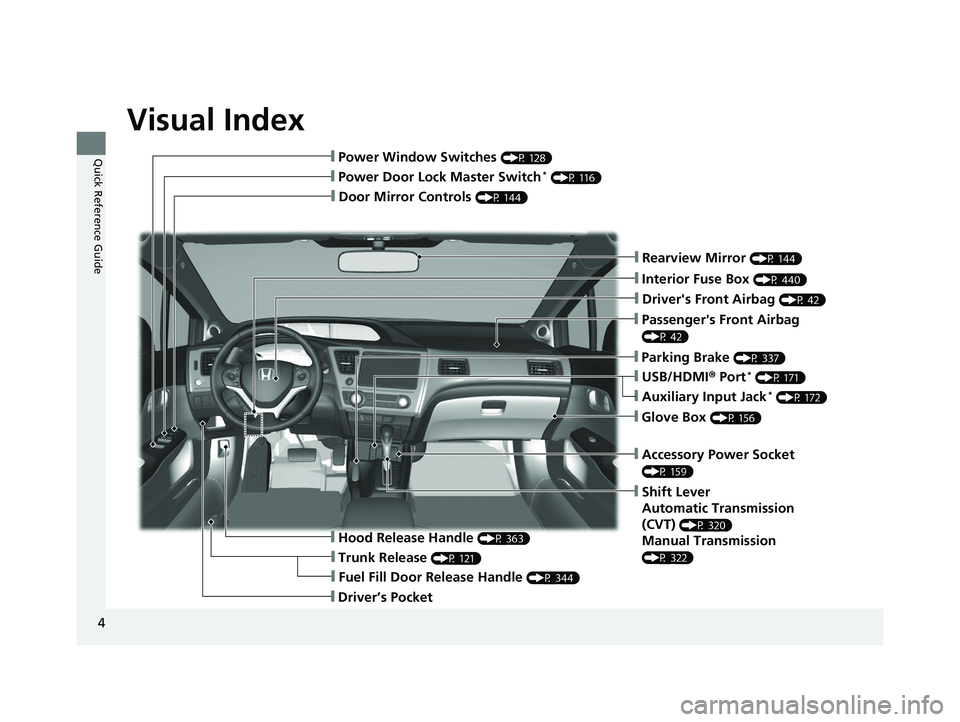
❙Door Mirror Controls (P 144)
❙Passenger's Front Airbag
(P 42)
❙Parking Brake (P 337)
❙Glove Box (P 156)
❙Rearview Mirror (P 144)
❙Accessory Power Socket
(P 159)
❙Shift Lever
Automatic Transmission
(CVT)
(P 320)
Manual Transmission
(P 322)
❙Hood Release Handle (P 363)
❙Fuel Fill Door Release Handle (P 344)
❙Driver’s Pocket
❙Trunk Release (P 121)
❙Power Door Lock Master Switch* (P 116)
❙Power Window Switches (P 128)
❙USB/HDMI® Port* (P 171)
❙Interior Fuse Box (P 440)
❙Driver's Front Airbag (P 42)
❙Auxiliary Input Jack* (P 172)
14 CIVIC 4D_SI-31TR36210.book 4 ページ 2014年1月30日 木曜日 午後12時18分
Page 15 of 469
14
Quick Reference Guide
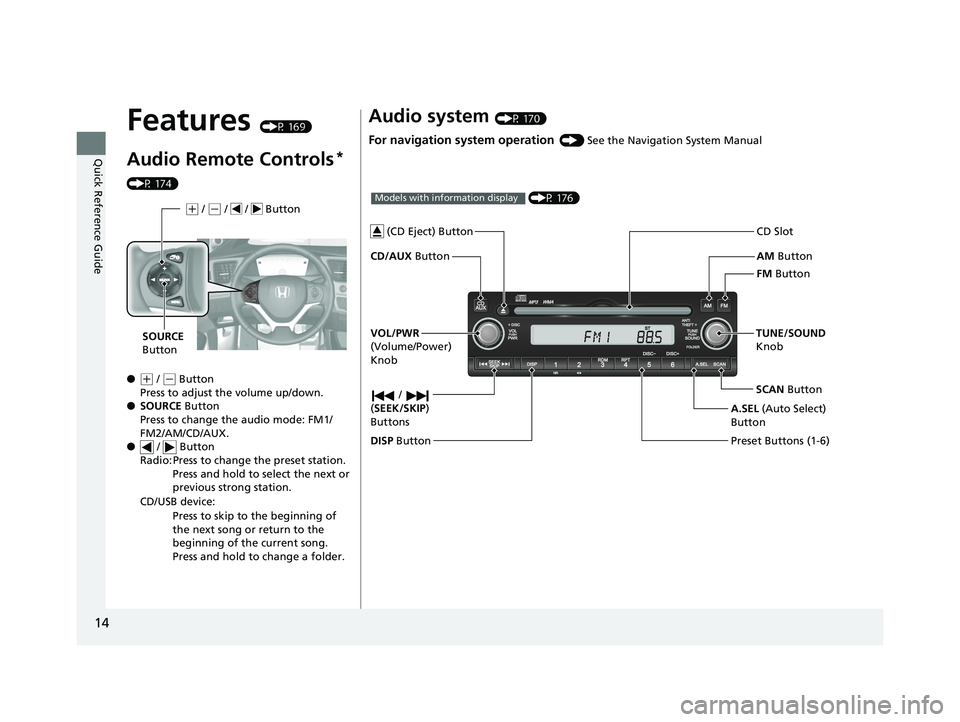
Features (P 169)
Audio Remote Controls*
(P 174)
●
(+ / ( - Button
Press to adjust the volume up/down.
● SOURCE Button
Press to change the audio mode: FM1/
FM2/AM/CD/AUX.
● / Button
Radio: Press to change the preset station. Press and hold to select the next or
previous strong station.
CD/USB device: Press to skip to the beginning of
the next song or return to the
beginning of the current song.
Press and hold to change a folder.
(+ / (- / / Button
SOURCE
Button
Audio system (P 170)
For navigation system operation () See the Navigation System Manual
AM Button
FM Button
CD/AUX
Button CD Slot
SCAN Button
Preset Buttons (1-6) TUNE/SOUND
Knob
/
( SEEK/SKIP )
Buttons
(P 176)Models with information display
A.SEL (Auto Select)
Button
VOL/PWR
(Volume/Power)
Knob
DISP Button
(CD Eject) Button
14 CIVIC 4D_SI-31TR36210.book 14 ページ 2014年1月30日 木曜日 午後12時18分
Page 16 of 469
15
Quick Reference Guide
002300
75°F miles
(P 179)Models with one display
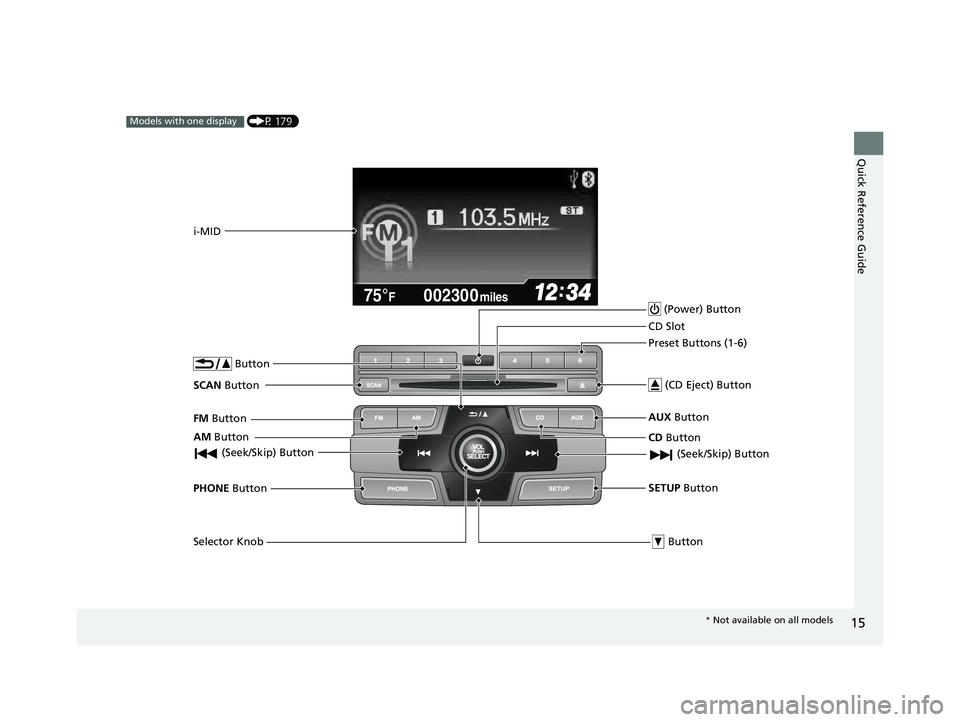
AM Button
FM
Button
SCAN Button
(Seek/Skip) Button
Selector Knob Button
PHONE
Button
i-MID
(Power) Button
CD Button
AUX
Button
CD Slot
(CD Eject) Button
Preset Buttons (1-6)
Button
SETUP Button (Seek/Skip) Button
*
Not available on all models
14 CIVIC 4D_SI-31TR36210.book 15 ページ 2014年1月30日 木曜日 午後12時18分
Page 170 of 469
169
Features
This chapter describes how to operate technology features.
Audio SystemAbout Your Audio System ................ 170
USB/HDMI ® Port
*............................. 171
USB Adapter Cable*........................ 172
Auxiliary Input Jack*........................ 172
Audio System Theft Protection*....... 173
Audio Remote Controls*.................. 174
Audio System Basic Operation ...... 176
Adjusting the Sound ........................ 176
Playing AM/FM Radio ....................... 177
Playing a CD .................................... 178Models with information display
Audio System Basic Operation ...... 179
Adjusting the Sound ........................ 180
Playing AM/FM Radio ....................... 181
Playing a CD .................................... 184
Playing an iPod ................................ 187
Playing Internet Radio ...................... 190
Playing a USB Flash Drive ................. 192
Playing Bluetooth ® Audio................. 195
Audio System Basic Operation ........ 197
Audio/Information Screen ................ 198
Adjusting the Sound ........................ 202
Display Setup ................................... 203Models with one display
Models with display audio system
Playing AM/FM Radio....................... 204
Playing a CD .................................... 207
Playing an iPod ................................ 210
Playing Internet Radio ...................... 213
Playing a USB Flash Drive ................. 215
Playing Bluetooth ® Audio ................ 218
Playing a Video Using the HDMI ®..... 220
Smartphone Apps ............................ 222
Siri Eyes Free .................................... 223
Audio Error Messages ...................... 224
General Information on the Audio System ............................................. 230
Customized Features
*...................... 233
Bluetooth® HandsFreeLink®*... 246, 277
* Not available on all models
14 CIVIC 4D_SI-31TR36210.book 169 ページ 2014年1月30日 木曜日 午後12時18分
Page 173 of 469
172
uuAudio System uUSB Adapter Cable*
Features
USB Adapter Cable*
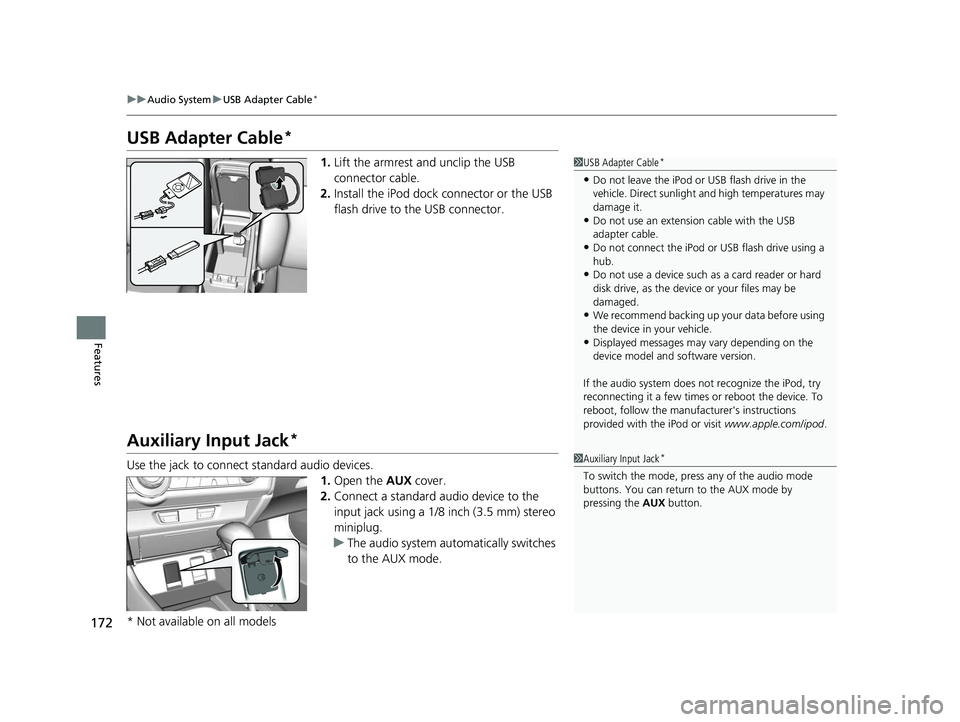
1. Lift the armrest and unclip the USB
connector cable.
2. Install the iPod dock connector or the USB
flash drive to the USB connector.
Auxiliary Input Jack*
Use the jack to connect standard audio devices.
1.Open the AUX cover.
2. Connect a standard audio device to the
input jack using a 1/8 inch (3.5 mm) stereo
miniplug.
u The audio system automatically switches
to the AUX mode.
1USB Adapter Cable*
•Do not leave the iPod or USB flash drive in the
vehicle. Direct sunlight and high temperatures may
damage it.
•Do not use an extension cable with the USB
adapter cable.
•Do not connect the iPod or USB flash drive using a
hub.
•Do not use a device such as a card reader or hard
disk drive, as the device or your files may be
damaged.
•We recommend backing up yo ur data before using
the device in your vehicle.
•Displayed messages may vary depending on the
device model and software version.
If the audio system does not recognize the iPod, try
reconnecting it a few times or reboot the device. To
reboot, follow the manufac turer's instructions
provided with the iPod or visit www.apple.com/ipod.
1Auxiliary Input Jack*
To switch the mode, pres s any of the audio mode
buttons. You can return to the AUX mode by
pressing the AUX button.
* Not available on all models
14 CIVIC 4D_SI-31TR36210.book 172 ページ 2014年1月30日 木曜日 午後12時18分
Page 175 of 469
174
uuAudio System uAudio Remote Controls*
Features
Audio Remote Controls*
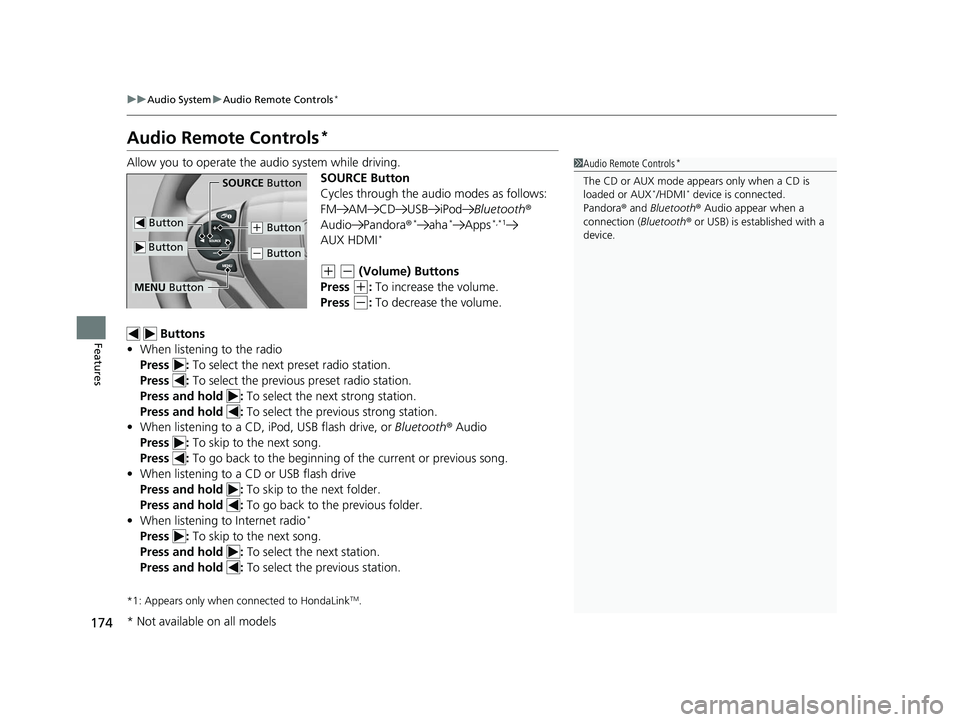
Allow you to operate the audio system while driving.
SOURCE Button
Cycles through the audio modes as follows:
FM AM CD USB iPodBluetooth®
Audio Pandora ®
*aha*Apps*,*1
AUX HDMI*
(+ (- (Volume) Buttons
Press
(+: To increase the volume.
Press
(-: To decrease the volume.
Buttons
• When listening to the radio
Press : To select the next preset radio station.
Press : To select the previous preset radio station.
Press and hold : To select the next strong station.
Press and hold : To select the previous strong station.
• When listening to a CD, iPod, USB flash drive, or Bluetooth® Audio
Press : To skip to the next song.
Press : To go back to the beginning of the current or previous song.
• When listening to a CD or USB flash drive
Press and hold : To skip to the next folder.
Press and hold : To go back to the previous folder.
• When listening to Internet radio
*
Press : To skip to the next song.
Press and hold : To select the next station.
Press and hold : To select the previous station.
*1: Appears only when connected to HondaLinkTM.
1Audio Remote Controls*
The CD or AUX mode appears only when a CD is
loaded or AUX*/HDMI* device is connected.
Pandora ® and Bluetooth ® Audio appear when a
connection (Bluetooth ® or USB) is established with a
device.
Button
SOURCE Button
Button
(+ Button
(- Button
MENU Button
* Not available on all models
14 CIVIC 4D_SI-31TR36210.book 174 ページ 2014年1月30日 木曜日 午後12時18分
Page 179 of 469
178
uuAudio System Basic Operation uPlaying a CD
Features
Playing a CD
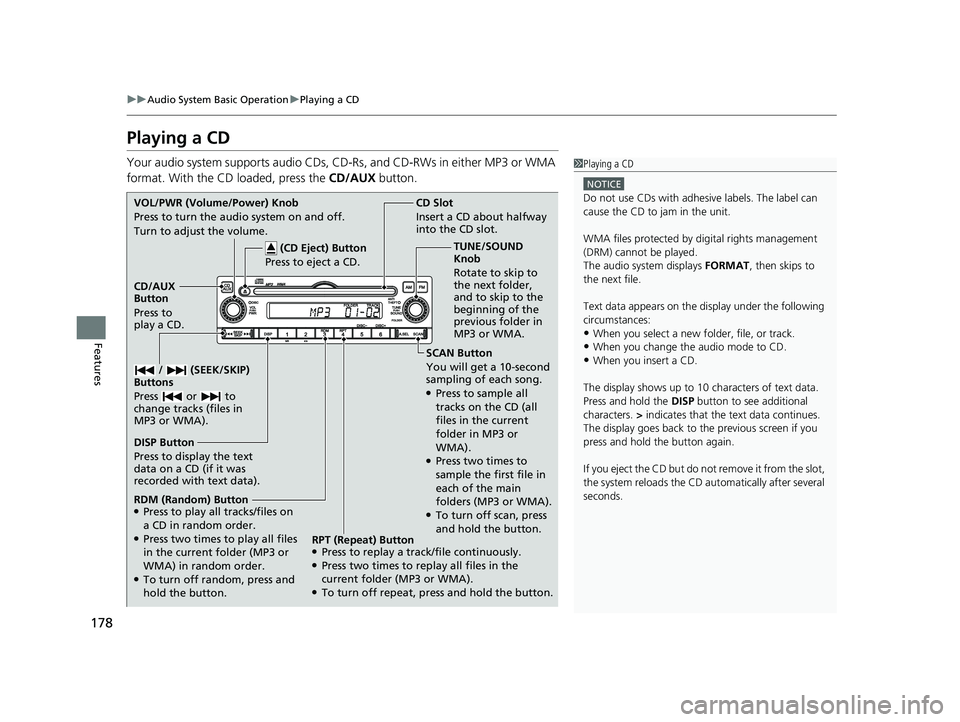
Your audio system supports audio CDs, CD-Rs, and CD-RWs in either MP3 or WMA
format. With the CD loaded, press the CD/AUX button.1Playing a CD
NOTICE
Do not use CDs with adhesive labels. The label can
cause the CD to jam in the unit.
WMA files protected by di gital rights management
(DRM) cannot be played.
The audio system displays FORMAT, then skips to
the next file.
Text data appears on the di splay under the following
circumstances:
•When you select a new folder, file, or track.
•When you change the audio mode to CD.•When you insert a CD.
The display shows up to 10 ch aracters of text data.
Press and hold the DISP button to see additional
characters. > indicates that the te xt data continues.
The display goes back to the previous screen if you
press and hold the button again.
If you eject the CD but do not remove it from the slot,
the system reloads the CD automatically after several
seconds.SCAN Button
You will get a 10-second
sampling of each song.
●Press to sample all
tracks on the CD (all
files in the current
folder in MP3 or
WMA).
●Press two times to
sample the first file in
each of the main
folders (MP3 or WMA).
●To turn off scan, press
and hold the button.
CD Slot
Insert a CD about halfway
into the CD slot.
DISP Button
Press to display the text
data on a CD (if it was
recorded with text data). CD/AUX
Button
Press to
play a CD. (CD Eject) Button
Press to eject a CD.
VOL/PWR (Volume/Power) Knob
Press to turn the audio system on and off.
Turn to adjust the volume.
/ (SEEK/SKIP)
Buttons
Press or to
change tracks (files in
MP3 or WMA).
RDM (Random) Button●Press to play all tracks/files on
a CD in random order.
●Press two times to play all files
in the current folder (MP3 or
WMA) in random order.
●To turn off random, press and
hold the button. TUNE/SOUND
Knob
Rotate to skip to
the next folder,
and to skip to the
beginning of the
previous folder in
MP3 or WMA.
RPT (Repeat) Button
●Press to replay a track/file continuously.●Press two times to replay all files in the
current folder (MP3 or WMA).
●To turn off repeat, press and hold the button.
14 CIVIC 4D_SI-31TR36210.book 178 ページ 2014年1月30日 木曜日 午後12時18分
Page 188 of 469
187
uuAudio System Basic Operation uPlaying an iPod
Continued
Features
Playing an iPod
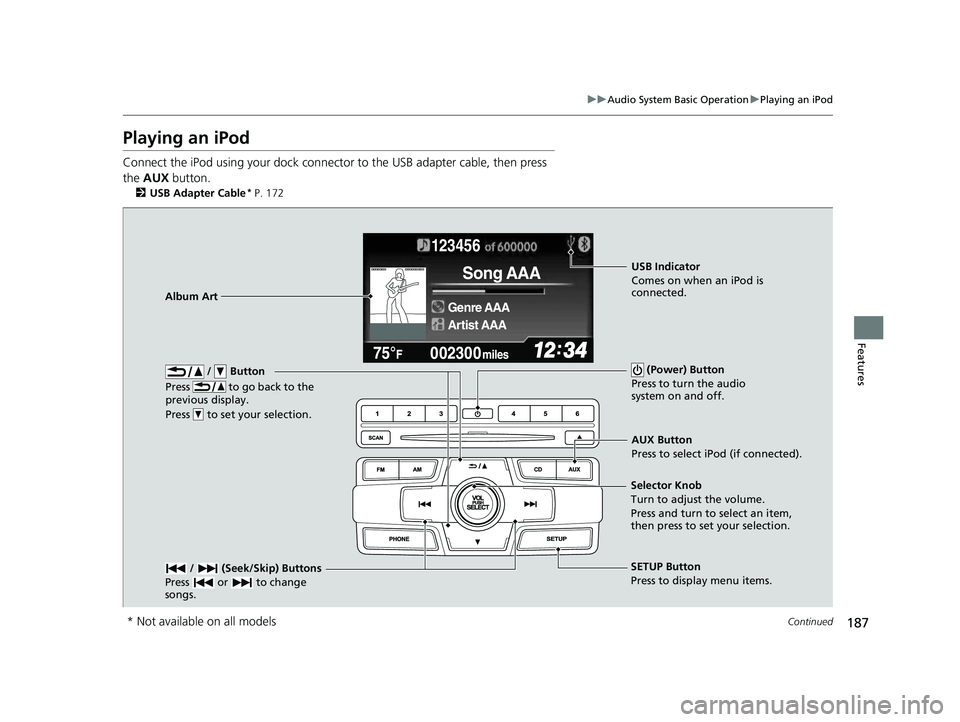
Connect the iPod using your dock connector to the USB adapter cable, then press
the AUX button.
2USB Adapter Cable* P. 172
123456
Genre AAA
Song AAA
Artist AAA
/ Button
Press to go back to the
previous display.
Press to set your selection. (Power) Button
Press to turn the audio
system on and off.
/ (Seek/Skip) Buttons
Press or to change
songs.SETUP Button
Press to display menu items.
Selector Knob
Turn to adjust the volume.
Press and turn to select an item,
then press to set your selection.
AUX Button
Press to select iPod (if connected).
Album Art
USB Indicator
Comes on when an iPod is
connected.
* Not available on all models
14 CIVIC 4D_SI-31TR36210.book 187 ページ 2014年1月30日 木曜日 午後12時18分
Page 191 of 469
190
uuAudio System Basic Operation uPlaying Internet Radio
Features
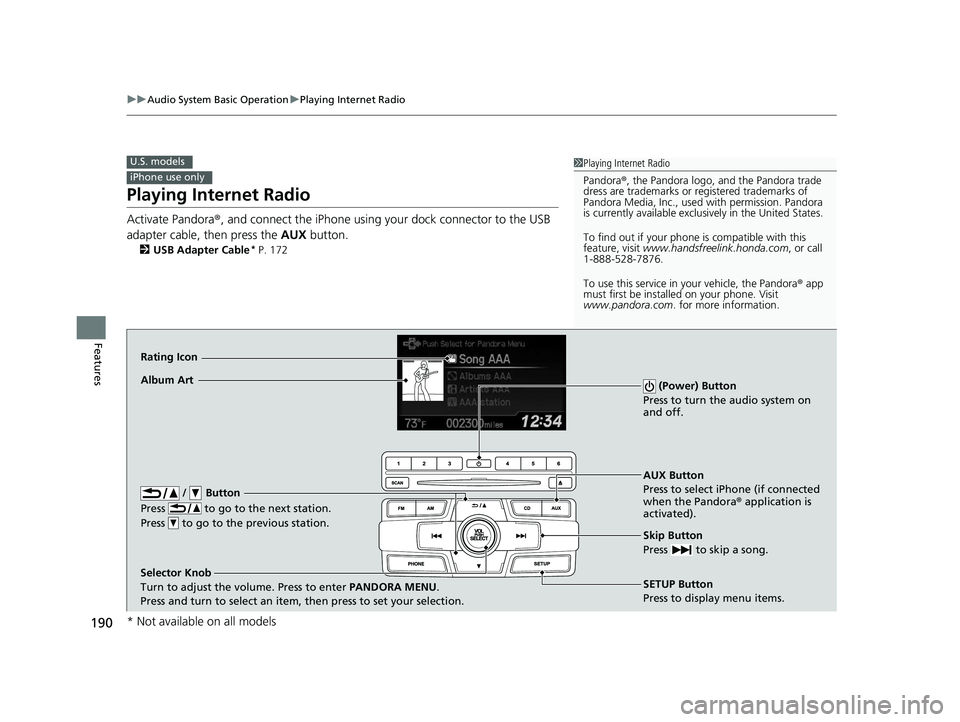
Playing Internet Radio
Activate Pandora ®, and connect the iPhone using your dock connector to the USB
adapter cable, then press the AUX button.
2USB Adapter Cable* P. 172
U.S. models
iPhone use only
1Playing Internet Radio
Pandora ®, the Pandora logo, and the Pandora trade
dress are trademarks or registered trademarks of
Pandora Media, Inc., used with permission. Pandora
is currently available exclusively in the United States.
To find out if your phone is compatible with this
feature, visit www.handsfreelink.honda.com , or call
1-888-528-7876.
To use this service in your vehicle, the Pandora ® app
must first be installed on your phone. Visit
www.pandora.com . for more information.
AUX Button
Press to select iPhone (if connected
when the Pandora ® application is
activated).
Skip Button
Press to skip a song.
SETUP Button
Press to display menu items.
Selector Knob
Turn to adjust the volume. Press to enter
PANDORA MENU.
Press and turn to select an item, then press to set your selection.
Album Art
Rating Icon
/ Button
Press to go to the next station.
Press to go to the previous station.
(Power) Button
Press to turn the audio system on
and off.
* Not available on all models
14 CIVIC 4D_SI-31TR36210.book 190 ページ 2014年1月30日 木曜日 午後12時18分
Page 193 of 469
192
uuAudio System Basic Operation uPlaying a USB Flash Drive
Features
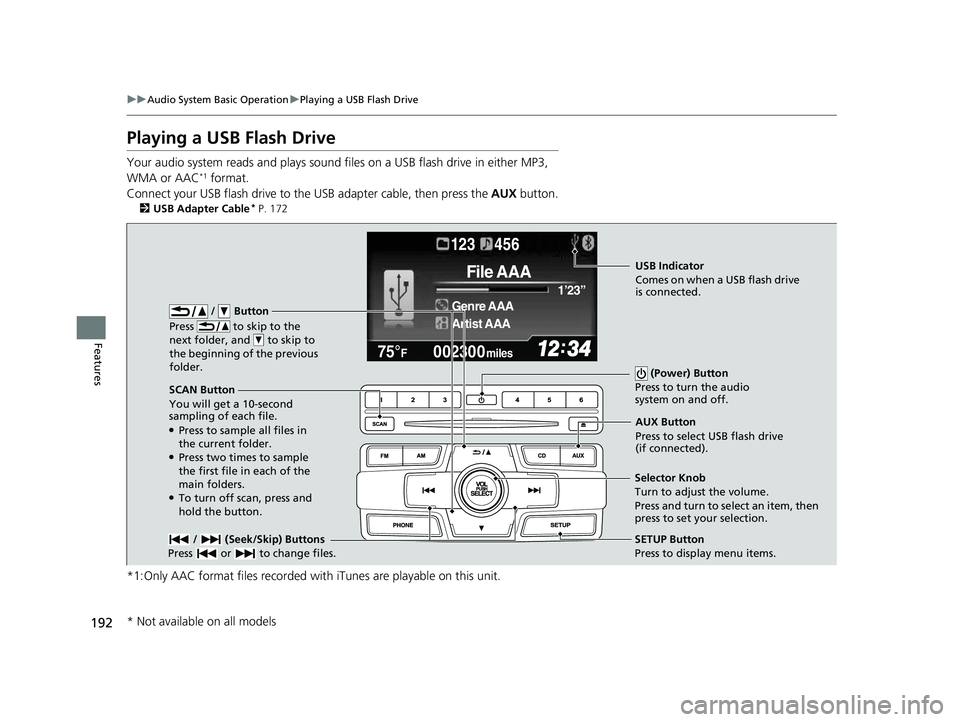
Playing a USB Flash Drive
Your audio system reads and plays sound files on a USB flash drive in either MP3,
WMA or AAC*1 format.
Connect your USB flash drive to the USB adapter cable, then press the AUX button.
2USB Adapter Cable* P. 172
*1:Only AAC format files recorded with iTunes are playable on this unit.
002300
75°F miles
Genre AAA 1’23’’
File AAA
Artist AAA
123 456
/ Button
Press to skip to the
next folder, and to skip to
the beginning of the previous
folder.
SCAN Button
You will get a 10-second
sampling of each file.
●Press to sample all files in
the current folder.
●Press two times to sample
the first file in each of the
main folders.
●To turn off scan, press and
hold the button. (Power) Button
Press to turn the audio
system on and off.
/ (Seek/Skip) Buttons
Press or to change files.SETUP Button
Press to display menu items.
Selector Knob
Turn to adjust the volume.
Press and turn to select an item, then
press to set your selection. AUX Button
Press to select USB flash drive
(if connected).
USB Indicator
Comes on when a USB flash drive
is connected.
* Not available on all models
14 CIVIC 4D_SI-31TR36210.book 192 ページ 2014年1月30日 木曜日 午後12時18分