USB HONDA CIVIC SEDAN 2016 Owner's Manual (in English)
[x] Cancel search | Manufacturer: HONDA, Model Year: 2016, Model line: CIVIC SEDAN, Model: HONDA CIVIC SEDAN 2016Pages: 595, PDF Size: 33.34 MB
Page 8 of 595
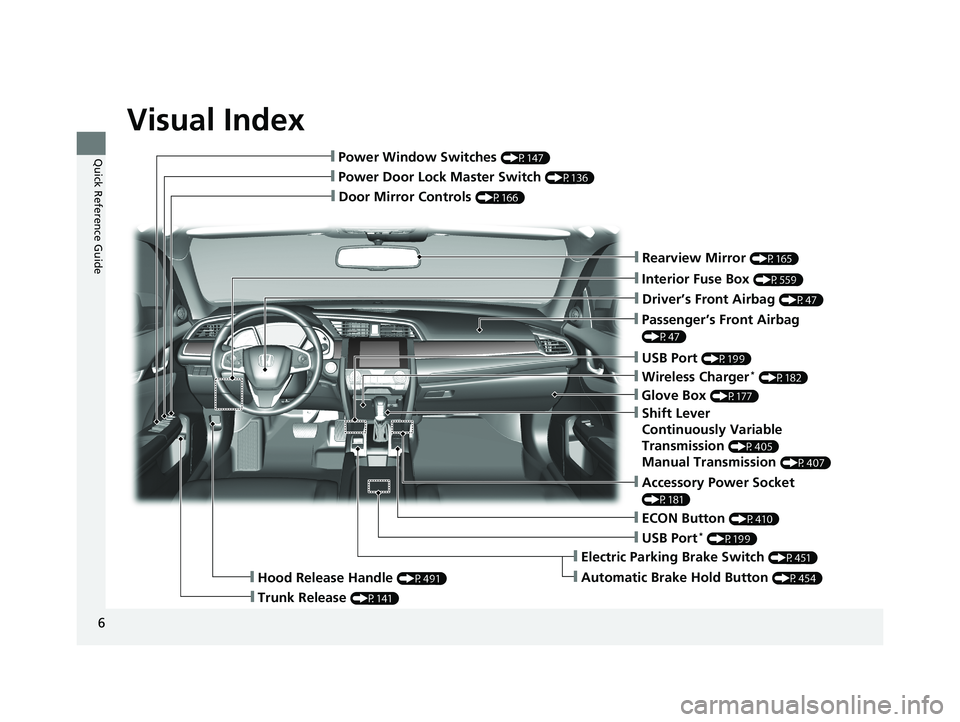
Visual Index
6
Quick Reference Guide
❙Door Mirror Controls (P166)
❙Passenger’s Front Airbag
(P47)
❙Glove Box (P177)
❙Rearview Mirror (P165)
❙Accessory Power Socket
(P181)
❙Hood Release Handle (P491)
❙Trunk Release (P141)
❙Power Door Lock Master Switch (P136)
❙Power Window Switches (P147)
❙Interior Fuse Box (P559)
❙Driver’s Front Airbag (P47)
❙USB Port (P199)
❙Shift Lever
Continuously Variable
Transmission
(P405)
Manual Transmission (P407)
❙ECON Button (P410)
❙Electric Parking Brake Switch (P451)
❙Automatic Brake Hold Button (P454)
❙USB Port* (P199)
❙Wireless Charger* (P182)
16 CIVIC 4D-31TBA6011.book 6 ページ 2018年10月26日 金曜日 午前11時51分
Page 22 of 595
20
Quick Reference Guide
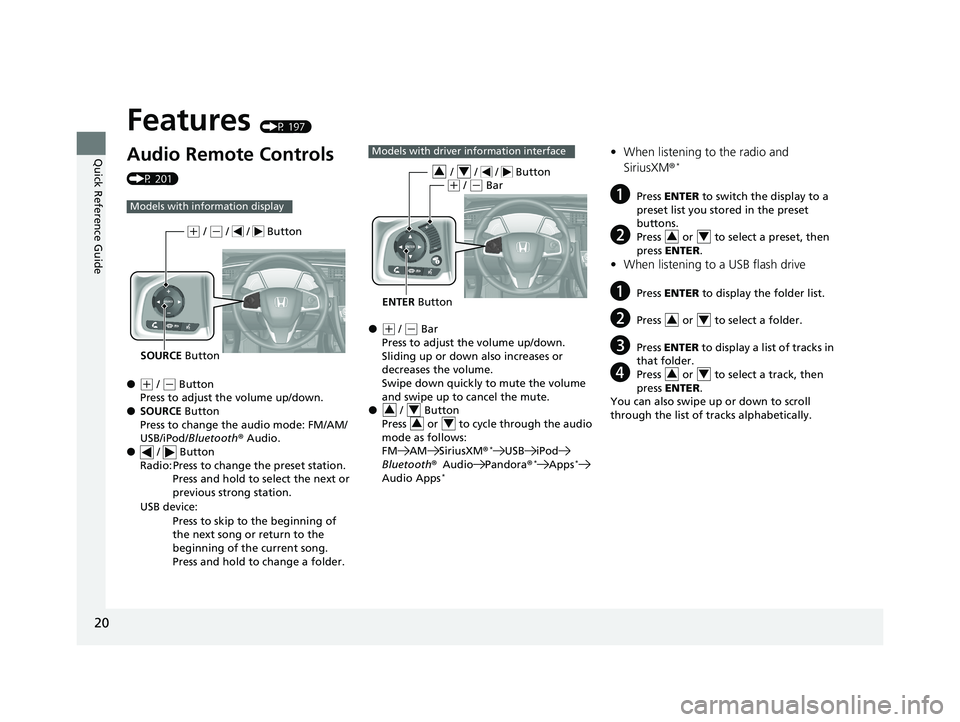
Features (P 197)
Audio Remote Controls
(P 201)
●
(+ / ( - Button
Press to adjust the volume up/down.
● SOURCE Button
Press to change the audio mode: FM/AM/
USB/iPod/ Bluetooth ®Audio.
● / Button
Radio: Press to change the preset station.
Press and hold to select the next or
previous strong station.
USB device: Press to skip to the beginning of
the next song or return to the
beginning of the current song.
Press and hold to change a folder.
Models with info rmation display
SOURCE Button
(+ / (- / / Button
●(+ / (- Bar
Press to adjust the volume up/down.
Sliding up or down also increases or
decreases the volume.
Swipe down quickly to mute the volume
and swipe up to cancel the mute.
● / Button
Press or to cycle through the audio
mode as follows:
FM AM SiriusXM ®
*USB iPod
Bluetooth ®Audio Pandora ®*Apps*
Audio Apps*
Models with driver information interface
ENTER Button
/ / / Button34(+ / (- Bar
34
34
• When listening to the radio and
SiriusXM ®*
aPress ENTER to switch the display to a
preset list you stored in the preset
buttons.
bPress or to select a preset, then
press ENTER .
•When listening to a USB flash drive
aPress ENTER to display the folder list.
bPress or to select a folder.
cPress ENTER to display a list of tracks in
that folder.
dPress or to select a track, then
press ENTER .
You can also swipe up or down to scroll
through the list of tra cks alphabetically.
34
34
34
16 CIVIC 4D-31TBA6011.book 20 ページ 2018年10月26日 金曜日 午前11時51分
Page 23 of 595
21
Quick Reference Guide
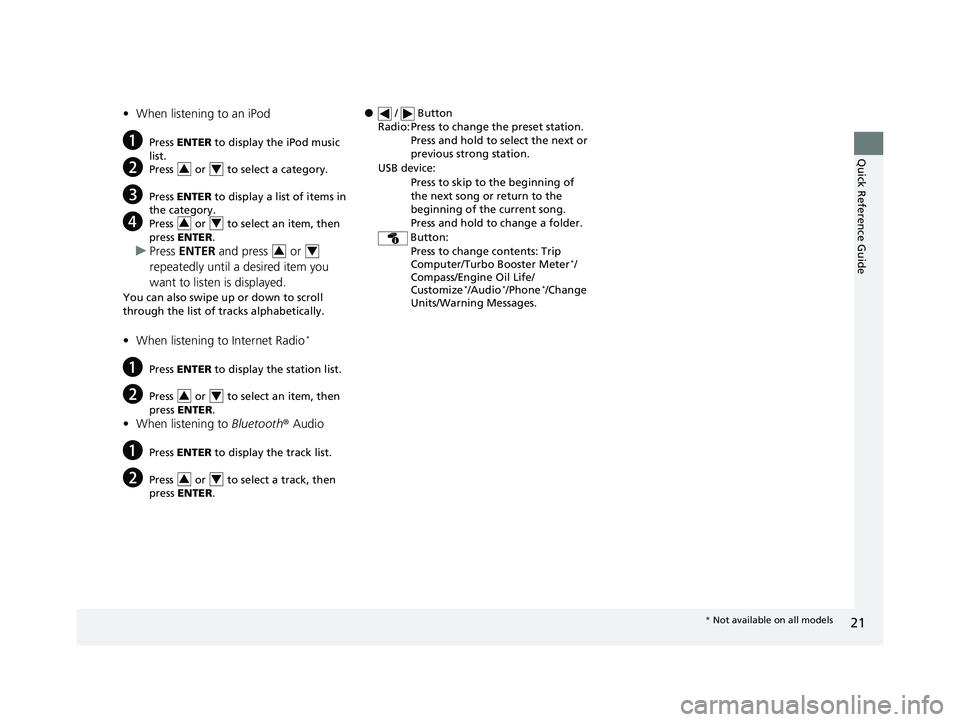
•When listening to an iPod
aPress ENTER to display the iPod music
list.
bPress or to select a category.
cPress ENTER to display a list of items in
the category.
dPress or to select an item, then
press ENTER .
uPress ENTER and press or
repeatedly until a desired item you
want to listen is displayed.
You can also swipe up or down to scroll
through the list of tracks alphabetically.
• When listening to Internet Radio*
aPress ENTER to display the station list.
bPress or to select an item, then
press ENTER .
•When listening to Bluetooth ®Audio
aPress ENTER to display the track list.
bPress or to select a track, then
press ENTER .
34
34
34
34
34
● / Button
Radio: Press to change the preset station. Press and hold to select the next or
previous strong station.
USB device: Press to skip to the beginning of
the next song or return to the
beginning of the current song.
Press and hold to change a folder.
Button: Press to change contents: Trip
Computer/Turbo Booster Meter
*/
Compass/Engine Oil Life/
Customize
*/Audio*/Phone*/Change
Units/Warning Messages.
* Not available on all models
16 CIVIC 4D-31TBA6011.book 21 ページ 2018年10月26日 金曜日 午前11時51分
Page 199 of 595
197
Features
This chapter describes how to operate technology features.
Audio SystemAbout Your Audio System ................ 198
USB Port(s) ....................................... 199
Audio System Theft Protection ......... 200
Audio Remote Controls .................... 201
Audio System Basic Operation ........ 205
Audio/Information Screen ................ 206
Adjusting the Sound ........................ 210
Display Setup ................................... 211
Playing the AM/FM Radio ................. 212
Playing an iPod ................................ 214
Playing a USB Flash Drive ................. 217
Models with color audio system
Playing Bluetooth ® Audio................. 220
Audio System Basic Operation ........ 223
Audio/Information Screen ................ 224
Adjusting the Sound ........................ 245
Display Setup ................................... 246
Voice Control Operation .................. 248
Playing AM/FM Radio ....................... 252
Playing SiriusXM ® Radio
*................. 256
Playing an iPod ................................ 263
Song By Voice
TM (SBV) ...................... 266
Playing Pandora ®*............................ 270
Playing AhaTM................................... 272
Models with Display AudioPlaying a USB Flash Drive ................. 273
Playing Bluetooth ® Audio ................ 276
HondaLink ®..................................... 278
Wi-Fi Connection ............................. 283
Siri Eyes Free .................................... 285
Apple CarPlay .................................. 286
Android Auto .................................. 289
Audio Error Messages ...................... 293
General Information on the Audio System ............................................. 296
Customized Features ........................ 302
Bluetooth® HandsFreeLink®
*... 333, 356
* Not available on all models
16 CIVIC 4D-31TBA6011.book 197 ページ 2018年10月26日 金曜日 午前11時51分
Page 200 of 595
198
Features
Audio System
About Your Audio System
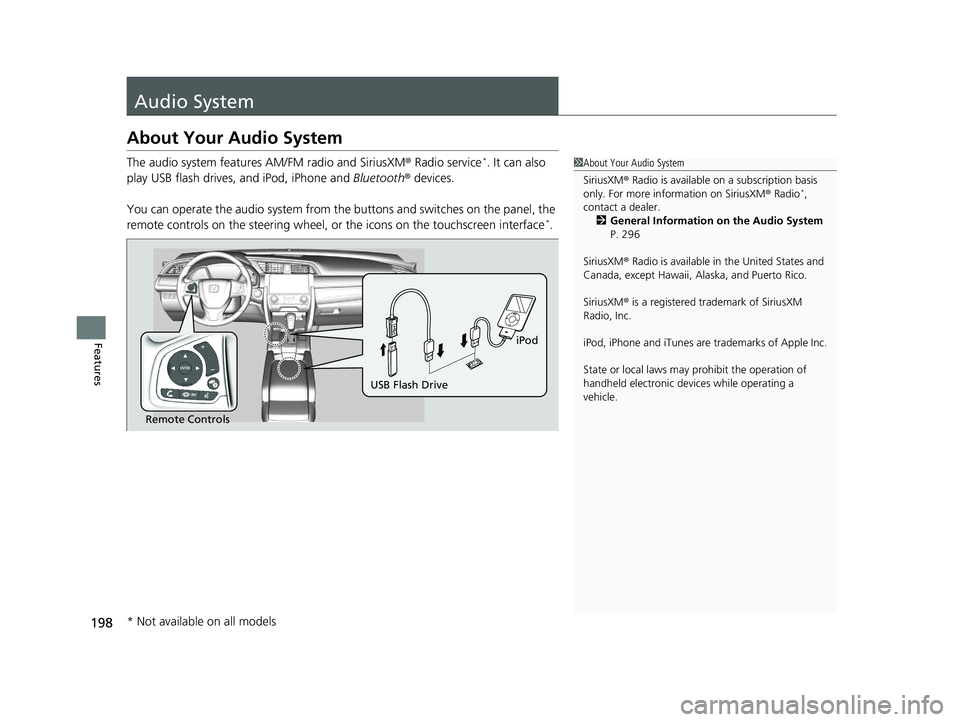
The audio system features AM/FM radio and SiriusXM® Radio service*. It can also
play USB flash drives, and iPod, iPhone and Bluetooth® devices.
You can operate the audio system from the buttons and switches on the panel, the
remote controls on the steering wheel, or the icons on the touchscreen interface
*.
1 About Your Audio System
SiriusXM ® Radio is available on a subscription basis
only. For more information on SiriusXM ® Radio
*,
contact a dealer.
2 General Information on the Audio System
P. 296
SiriusXM ® Radio is available in the United States and
Canada, except Ha waii, Alaska, and Puerto Rico.
SiriusXM ® is a registered trademark of SiriusXM
Radio, Inc.
iPod, iPhone and iTunes are trademarks of Apple Inc.
State or local laws may pr ohibit the operation of
handheld electronic devi ces while operating a
vehicle.
Remote Controls iPod
USB Flash Drive
* Not available on all models
16 CIVIC 4D-31TBA6011.book 198 ページ 2018年10月26日 金曜日 午前11時51分
Page 201 of 595
199
uuAudio System uUSB Port(s)
Features
USB Port(s)
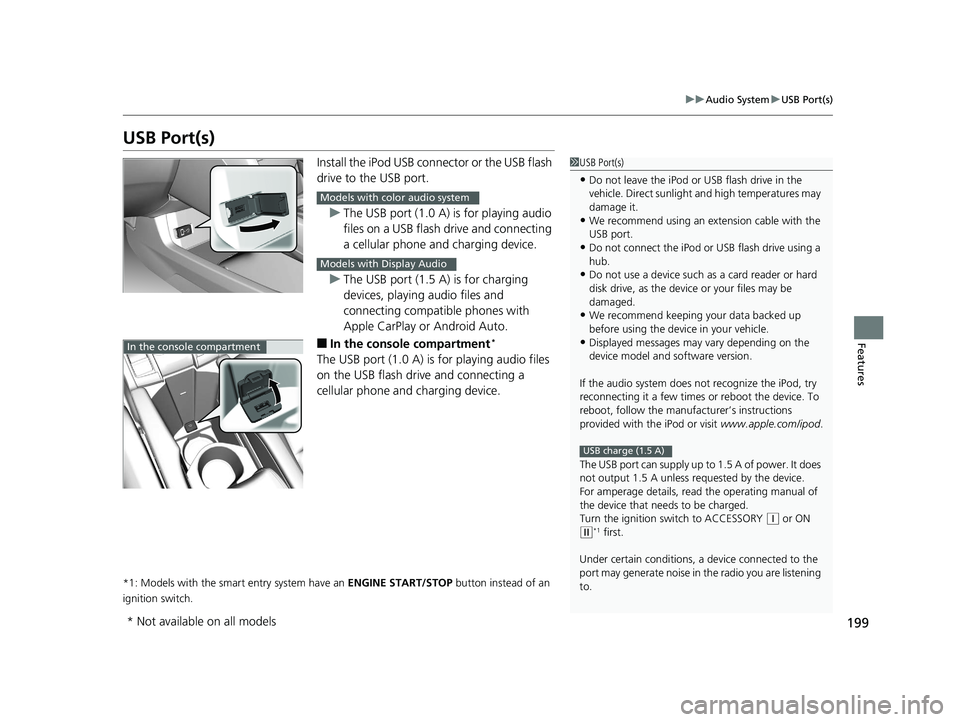
Install the iPod USB connector or the USB flash
drive to the USB port.
u The USB port (1.0 A) is for playing audio
files on a USB flash drive and connecting
a cellular phone and charging device.
u The USB port (1.5 A) is for charging
devices, playing audio files and
connecting compatib le phones with
Apple CarPlay or Android Auto.
■In the consol e compartment*
The USB port (1.0 A) is for playing audio files
on the USB flash drive and connecting a
cellular phone and charging device.
*1: Models with the smart entry system have an ENGINE START/STOP button instead of an
ignition switch.
1 USB Port(s)
•Do not leave the iPod or USB flash drive in the
vehicle. Direct sunlight and high temperatures may
damage it.
•We recommend using an ex tension cable with the
USB port.
•Do not connect the iPod or USB flash drive using a
hub.
•Do not use a device such as a card reader or hard
disk drive, as the device or your files may be
damaged.
•We recommend k eeping your data backed up
before using the device in your vehicle.
•Displayed messages may vary depending on the
device model and software version.
If the audio system does not recognize the iPod, try
reconnecting it a few times or reboot the device. To
reboot, follow the manufac turer’s instructions
provided with the iPod or visit www.apple.com/ipod.
The USB port can supply up to 1.5 A of power. It does
not output 1.5 A unless re quested by the device.
For amperage details, read the operating manual of
the device that ne eds to be charged.
Turn the ignition switch to ACCESSORY
( q or ON
(w*1 first.
Under certain condi tions, a device connected to the
port may generate noi se in the radio you are listening
to.
USB charge (1.5 A)
Models with color audio system
Models with Display Audio
In the console compartment
* Not available on all models
16 CIVIC 4D-31TBA6011.book 199 ページ 2018年10月26日 金曜日 午前11時51分
Page 203 of 595
201
uuAudio System uAudio Remote Controls
Continued
Features
Audio Remote Controls
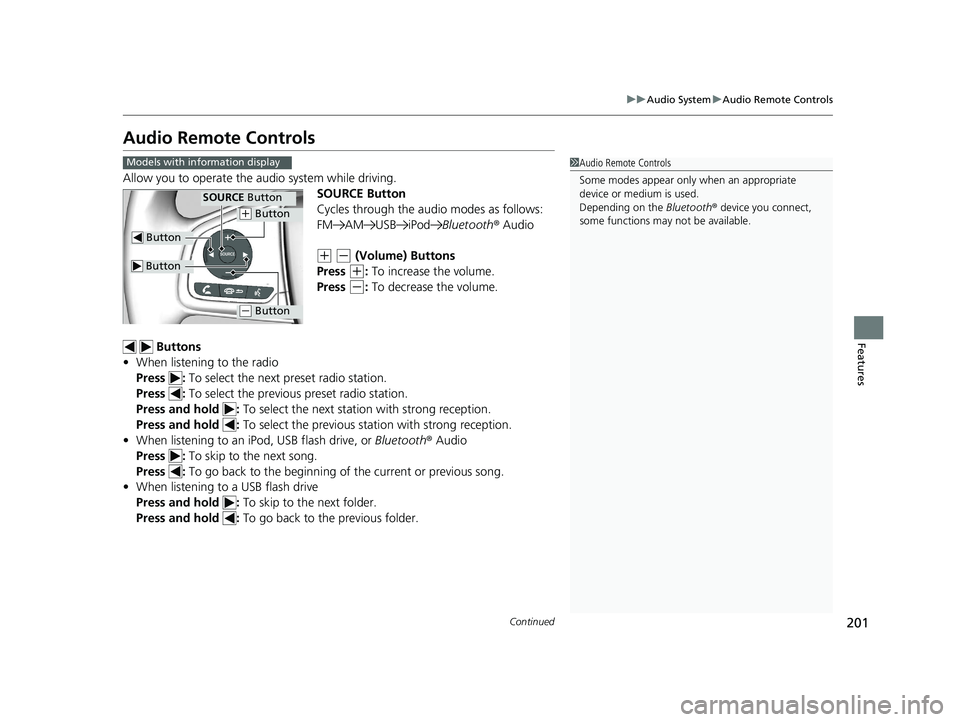
Allow you to operate the au dio system while driving.
SOURCE Button
Cycles through the audio modes as follows:
FM AM USB iPod Bluetooth® Audio
(+ (- (Volume) Buttons
Press
(+: To increase the volume.
Press
(-: To decrease the volume.
Buttons
• When listening to the radio
Press : To select the next preset radio station.
Press : To select the previous preset radio station.
Press and hold : To select the next station with strong reception.
Press and hold : To select the previous station with strong reception.
• When listening to an iPod, USB flash drive, or Bluetooth® Audio
Press : To skip to the next song.
Press : To go back to the beginning of the current or previous song.
• When listening to a USB flash drive
Press and hold : To skip to the next folder.
Press and hold : To go back to the previous folder.
1Audio Remote Controls
Some modes appear only when an appropriate
device or medium is used.
Depending on the Bluetooth® device you connect,
some functions may not be available.Models with information display
Button
SOURCE Button
Button
(+ Button
(- Button
16 CIVIC 4D-31TBA6011.book 201 ページ 2018年10月26日 金曜日 午前11時51分
Page 204 of 595
uuAudio System uAudio Remote Controls
202
Features
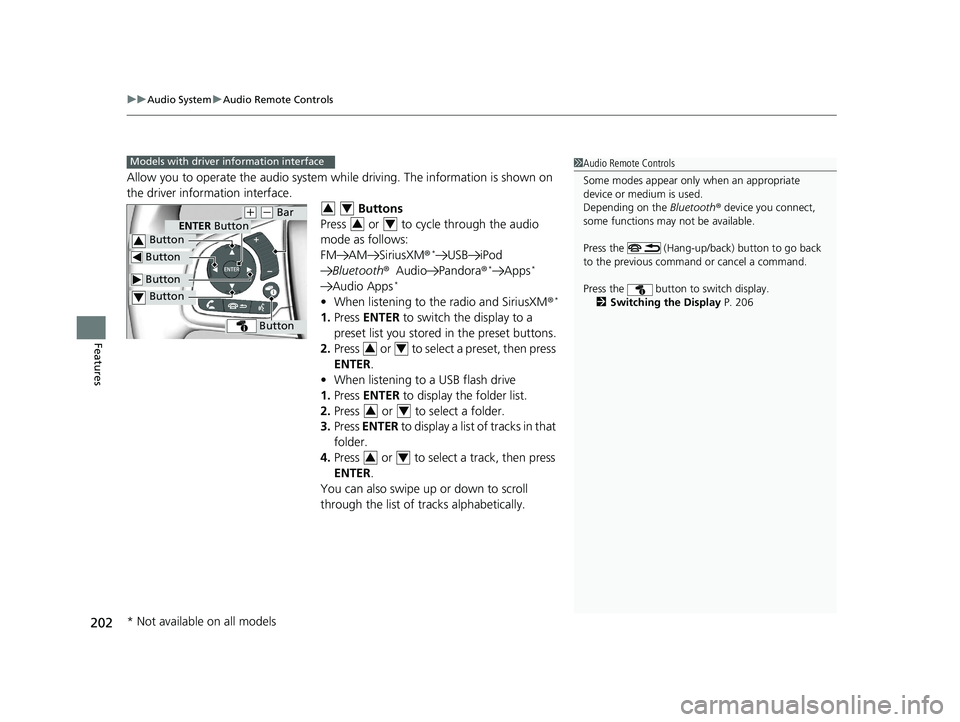
Allow you to operate the audio system wh ile driving. The information is shown on
the driver information interface.
Buttons
Press or to cycle through the audio
mode as follows:
FM AM SiriusXM®
*USB iPod
Bluetooth ®Audio Pandora ®*Apps*
Audio Apps*
•When listening to the radio and SiriusXM ®*
1.Press ENTER to switch the display to a
preset list you stored in the preset buttons.
2. Press or to select a preset, then press
ENTER .
• When listening to a USB flash drive
1. Press ENTER to display the folder list.
2. Press or to select a folder.
3. Press ENTER to display a list of tracks in that
folder.
4. Press or to select a track, then press
ENTER .
You can also swipe up or down to scroll
through the list of tracks alphabetically.
1 Audio Remote Controls
Some modes appear only when an appropriate
device or medium is used.
Depending on the Bluetooth® device you connect,
some functions may not be available.
Press the (Hang-up/back) button to go back
to the previous command or cancel a command.
Press the button to switch display. 2 Switching the Display P. 206Models with driver information interface
Button
ENTER Button
Button
(+ (- Bar
Button
Button3
Button4
34
34
34
34
34
* Not available on all models
16 CIVIC 4D-31TBA6011.book 202 ページ 2018年10月26日 金曜日 午前11時51分
Page 206 of 595
204
uuAudio System uAudio Remote Controls
Features
(+ (- (Volume) Bar
Press
(+: To increase the volume.
Press
(-: To decrease the volume.
Slide your finger up or down to incr ease or decrease the volume, respectively.
Swipe down quickly to mute the volu me and swipe up to cancel the mute.
Buttons
• When listening to the radio
Press : To select the next preset radio station.
Press : To select the previous preset radio station.
Press and hold : To select the next strong station.
Press and hold : To select the previous strong station.
• When listening to an iPod, USB flash drive, or Bluetooth ® Audio
Press : To skip to the next song.
Press : To go back to the beginning of the current or previous song.
• When listening to a USB flash drive
Press and hold : To skip to the next folder.
Press and hold : To go back to the previous folder.
• When listening to Internet radio
*
Press : To skip to the next song.
Press and hold : To select the next station.
Press and hold : To select the previous station.
Models with Display Audio
* Not available on all models
16 CIVIC 4D-31TBA6011.book 204 ページ 2018年10月26日 金曜日 午前11時51分
Page 210 of 595
uuAudio System Basic Operation uAudio/Information Screen
208
Features
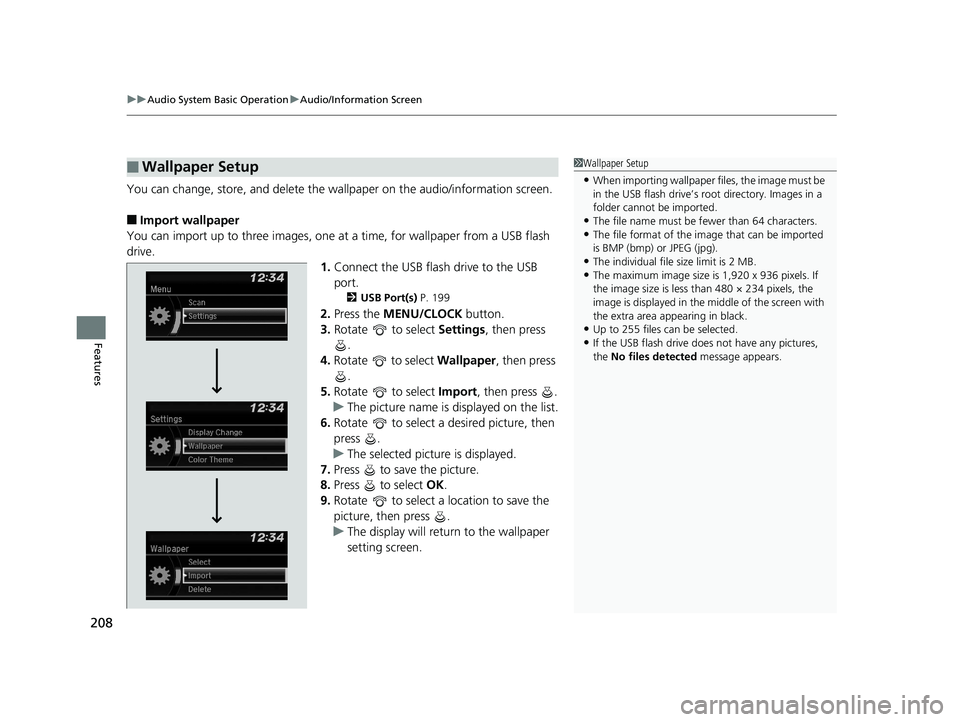
You can change, store, and delete the wallpaper on the audio/information screen.
■Import wallpaper
You can import up to three images, one at a time, for wallpaper from a USB flash
drive.
1.Connect the USB flash drive to the USB
port.
2 USB Port(s) P. 199
2.Press the MENU/CLOCK button.
3. Rotate to select Settings, then press
.
4. Rotate to select Wallpaper , then press
.
5. Rotate to select Import, then press .
u The picture name is displayed on the list.
6. Rotate to select a desired picture, then
press .
u The selected picture is displayed.
7. Press to save the picture.
8. Press to select OK.
9. Rotate to select a location to save the
picture, then press .
u The display will return to the wallpaper
setting screen.
■Wallpaper Setup1Wallpaper Setup
•When importing wallpaper files, the image must be
in the USB flash drive’s root directory. Images in a
folder cannot be imported.
•The file name must be fewer than 64 characters.•The file format of the im age that can be imported
is BMP (bmp) or JPEG (jpg).
•The individual file size limit is 2 MB.•The maximum image size is 1,920 x 936 pixels. If
the image size is less than 480 × 234 pixels, the
image is displayed in the middle of the screen with
the extra area appearing in black.
•Up to 255 files can be selected.
•If the USB flash drive doe s not have any pictures,
the No files detected message appears.
16 CIVIC 4D-31TBA6011.book 208 ページ 2018年10月26日 金曜日 午前11時51分