TPMS HONDA CIVIC SEDAN 2017 (in English) User Guide
[x] Cancel search | Manufacturer: HONDA, Model Year: 2017, Model line: CIVIC SEDAN, Model: HONDA CIVIC SEDAN 2017Pages: 643, PDF Size: 36.61 MB
Page 419 of 643
417
Driving
This chapter discusses driving, refueling, and information on items such as accessories.
Before Driving
Driving Preparation .......................... 418
Maximum Load Limit........................ 421
Towing a Trailer ................................ 423
When Driving Starting the Engine .................. 424, 427
Precautions While Driving................. 432
Continuously Variable Transmission*... 433
Shifting .................................... 434, 436
SPORT Mode*.................................. 439
ECON Button*................................. 440
Cruise Control*................................ 441
Front Sensor Camera*...................... 444 Adaptive Cruise Control (ACC) with Low
Speed Follow (LSF)
*....................... 446Road Departure Mitigation (RDM) System*...... 460Lane Keeping Assist System (LKAS)*.... 464
Vehicle Stabilit y Assist (VSA®), aka Electronic
Stability Control (ESC), System........... 471
LaneWatchTM*.................................. 475Tire Pressure Monitoring System (TPMS) ...... 477Tire Pressure Monitoring System (TPMS) -
Required Federal Explanation ......... 480
Braking Brake System ................................... 482
Anti-lock Brake System (ABS) ........... 488 Brake Assist System ......................... 489
Collision Mitigation Braking System
TM
(CMBSTM)*..................................... 490
Parking Your Vehicle When Stopped ................................ 498
Multi-View Rear Camera .................. 499
Refueling Fuel Information .............................. 501
How to Refuel ................................. 502
Fuel Economy and CO
2 Emissions
Improving Fuel Economy and Reducing
CO
2 Emissions ................................ 504
Turbo Engine Vehicle*
Handling Precautions ....................... 505
* Not available on all models
17 CIVIC 4D HCM (KA KC KL)-31TBA6111.book 417 ページ 2018年10月25日 木曜日 午前11時56分
Page 473 of 643
471
uuWhen Driving uVehicle Stability Assist (VSA ®), aka Electronic Stability Control (ESC), System
Continued
Driving
Vehicle Stability Assist (VSA ®), aka Electronic
Stability Control (ESC), System
VSA ® helps to stabilize the vehicle during corn ering if the vehicle turns more or less
than what was intended. It also assists in maintaining traction on slippery surfaces.
It does so by regulating engine ou tput and selectively applying the brakes.
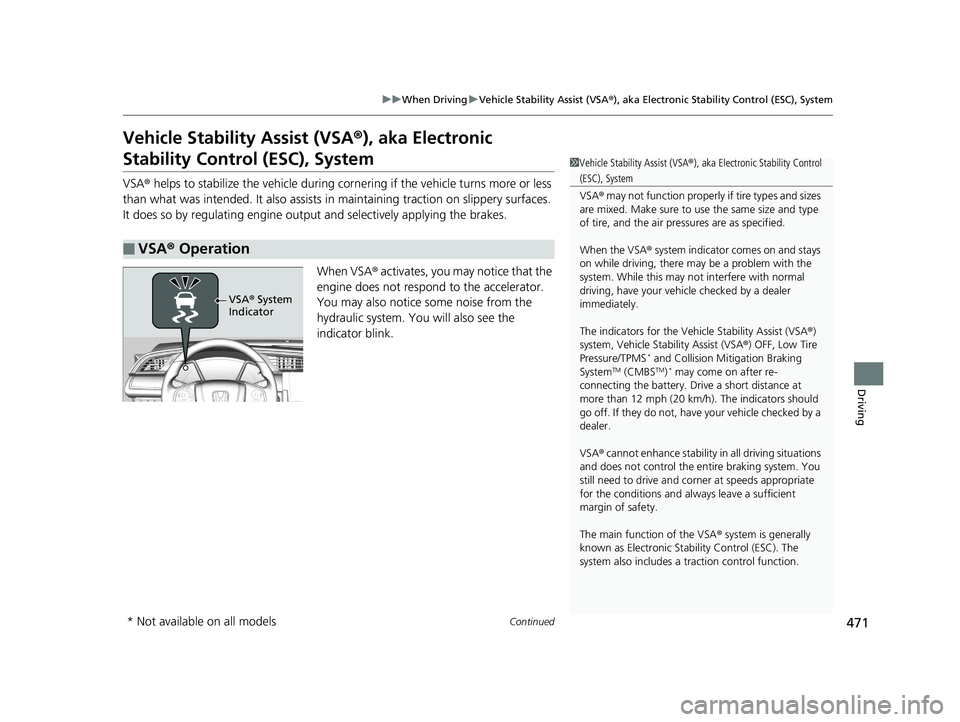
When VSA ® activates, you may notice that the
engine does not respond to the accelerator.
You may also notice some noise from the
hydraulic system. You will also see the
indicator blink.
■VSA ® Operation
1 Vehicle Stability Assist (VSA ®), aka Electronic Stability Control
(ESC), System
VSA ® may not function properly if tire types and sizes
are mixed. Make sure to use the same size and type
of tire, and the air pressures are as specified.
When the VSA ® system indicator comes on and stays
on while driving, there ma y be a problem with the
system. While this may not interfere with normal
driving, have your vehi cle checked by a dealer
immediately.
The indicators for the Vehicle Stability Assist (VSA ®)
system, Vehicle Stability Assist (VSA ®) OFF, Low Tire
Pressure/TPMS
* and Collision Mi tigation Braking
SystemTM (CMBSTM)* may come on after re-
connecting the battery. Drive a short distance at
more than 12 mph (20 km/h ). The indicators should
go off. If they do not, have your vehicle checked by a
dealer.
VSA ® cannot enhance stability in all driving situations
and does not control the entire braking system. You
still need to drive and corner at speeds appropriate
for the conditions and always leave a sufficient
margin of safety.
The main function of the VSA ® system is generally
known as Electronic Stability Control (ESC). The
system also includes a traction control function.
VSA® System
Indicator
* Not available on all models
17 CIVIC 4D HCM (KA KC KL)-31TBA6111.book 471 ページ 2018年10月25日 木曜日 午前11時56分
Page 479 of 643
477
uuWhen Driving uTire Pressure Monitoring System (TPMS)
Continued
Driving
Tire Pressure Monitoring System (TPMS)
Instead of directly measuring the pressure in each tire, the TPMS on this vehicle
monitors and compares the rolling radius and rotational characteristics of each
wheel and tire while you are driving to determine if one or more tires are
significantly under-inflated. This will caus e the low tire pressure/TPMS indicator to
come on and a message to appear on the driver information interface
*.
You must start TPMS calibration every time you:
• Adjust the pressure in one or more tires.
• Rotate the tires.
• Replace one or more tires.
Before calibrating the TPMS:
• Set the cold tire pressure in all four tires.
2 Checking Tires P. 548
Make sure:
•The vehicle is at a complete stop.
• The shift lever is in
(N.
• The shift lever is in
(P.
• The ignition switch is in ON
(w*1.
*1: Models with the smart entry system have an ENGINE START/STOP button instead of an
ignition switch.
■TPMS Calibration
U.S. models
1 Tire Pressure Monitoring System (TPMS)
The system does not monitor the tires when driving
at low speed.
Conditions such as low ambient temperature and
altitude change directly a ffect tire pressure and can
trigger the low tire pressure/TPMS indicator to come on.
Tire pressure checked and inflated in:
•Warm weather can beco me under-inflated in
colder weather.
•Cold weather can become over-inflated in warmer
weather.
The low tire pressure indica tor will not come on as a
result of over inflation.
The TPMS may not function pr operly if tire type and
size are mixed. Make sure to use the same size and
type of tire. 2 Checking and Maintaining Tires P. 548
The low tire pressure/TPMS indicator may come on
with a delay or may not come on at all when:
•You rapidly accelerate, decelerate, or turn the
steering wheel.
•You drive on snowy or slippery roads.•Snow chains are used.
The low tire pressure/TPMS indicator may come on
under the following conditions:
•A compact spare tire* is used.•There is a heavier and une ven load on the tires,
such as when towing a trailer, than the condition at
calibration.
•Snow chains are used.
Manual transmission models
Continuously variable transmission models
All models
* Not available on all models
17 CIVIC 4D HCM (KA KC KL)-31TBA6111.book 477 ページ 2018年10月25日 木曜日 午前11時56分
Page 480 of 643
uuWhen Driving uTire Pressure Monitoring System (TPMS)
478
Driving
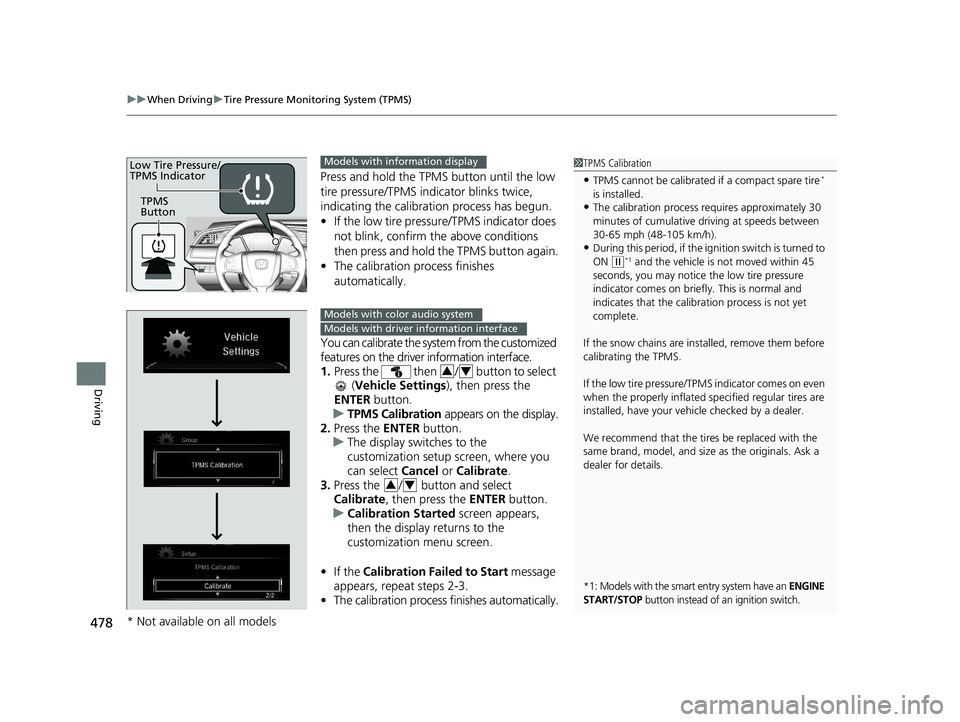
Press and hold the TPMS button until the low
tire pressure/TPMS indi cator blinks twice,
indicating the calibration process has begun.
• If the low tire pressure/TPMS indicator does
not blink, confirm the above conditions
then press and hold the TPMS button again.
• The calibration pr ocess finishes
automatically.
You can calibrate the system from the customized
features on the driver information interface.
1. Press the then / button to select
(Vehicle Settings ), then press the
ENTER button.
u TPMS Calibration appears on the display.
2. Press the ENTER button.
u The display switches to the
customization setup screen, where you
can select Cancel or Calibrate .
3. Press the / button and select
Calibrate , then press the ENTER button.
u Calibration Started screen appears,
then the display returns to the
customization menu screen.
• If the Calibration Failed to Start message
appears, repeat steps 2-3.
• The calibration process finishes automatically.
1TPMS Calibration
•TPMS cannot be calibrated if a compact spare tire*
is installed.
•The calibration process requires approximately 30
minutes of cumulative dr iving at speeds between
30-65 mph (48-105 km/h).
•During this period, if the igni tion switch is turned to
ON
( w*1 and the vehicle is not moved within 45
seconds, you may notice th e low tire pressure
indicator comes on briefl y. This is normal and
indicates that the calibr ation process is not yet
complete.
If the snow chains are installed, remove them before
calibrating the TPMS.
If the low tire pressure/TPMS indicator comes on even
when the properly inflated specified regular tires are
installed, have your vehi cle checked by a dealer.
We recommend that the tires be replaced with the
same brand, model, and size as the originals. Ask a
dealer for details.
*1: Models with the smart entry system have an ENGINE
START/STOP button instead of an ignition switch.
TPMS
Button
Low Tire Pressure/
TPMS IndicatorModels with info rmation display
Models with color audio system
Models with driver information interface
34
34
* Not available on all models
17 CIVIC 4D HCM (KA KC KL)-31TBA6111.book 478 ページ 2018年10月25日 木曜日 午前11時56分
Page 481 of 643
479
uuWhen Driving uTire Pressure Monitoring System (TPMS)
Driving
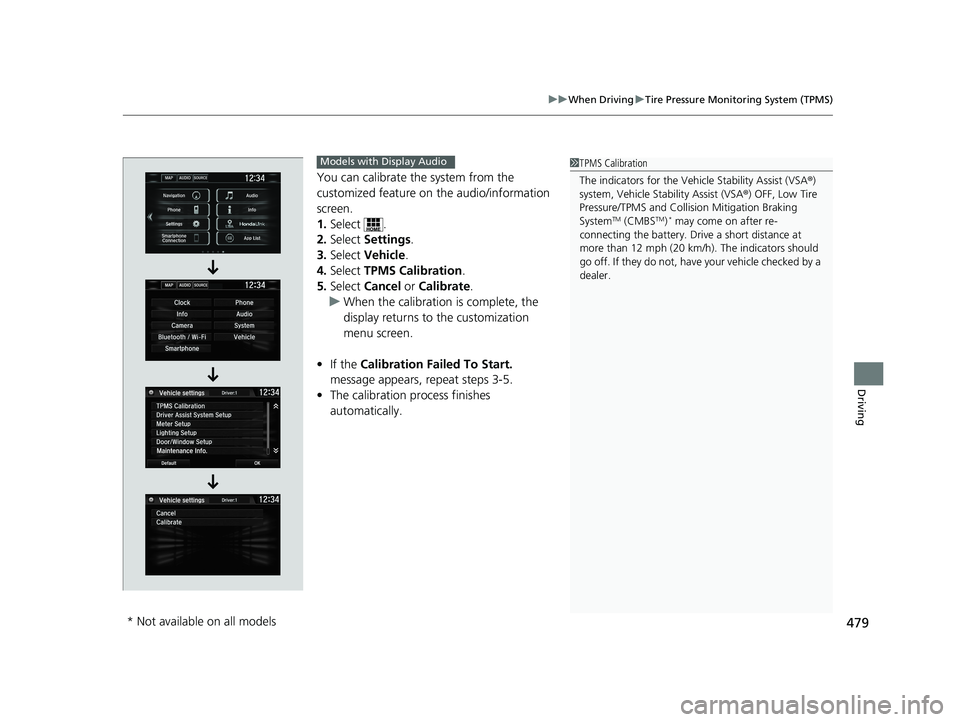
You can calibrate the system from the
customized feature on the audio/information
screen.
1. Select .
2. Select Settings .
3. Select Vehicle .
4. Select TPMS Calibration .
5. Select Cancel or Calibrate .
u When the calibration is complete, the
display returns to the customization
menu screen.
• If the Calibration Failed To Start.
message appears, repeat steps 3-5.
• The calibration process finishes
automatically.
1TPMS Calibration
The indicators for the Vehicle Stability Assist (VSA ®)
system, Vehicle Stability Assist (VSA ®) OFF, Low Tire
Pressure/TPMS and Collision Mitigation Braking
System
TM (CMBSTM)* may come on after re-
connecting the battery. Drive a short distance at
more than 12 mph (20 km/h ). The indicators should
go off. If they do not, have your vehicle checked by a
dealer.
Models with Display Audio
* Not available on all models
17 CIVIC 4D HCM (KA KC KL)-31TBA6111.book 479 ページ 2018年10月25日 木曜日 午前11時56分
Page 482 of 643
480
uuWhen Driving uTire Pressure Monitoring System (TPMS) - Required Federal Explanation
Driving
Tire Pressure Monitoring System (TPMS) - Required
Federal Explanation
Each tire, including the spare (i f provided), should be checked
monthly when cold and inflated to the inflation pressure
recommended by the vehicle manufacturer on the vehicle placard
or tire inflation pressure label.
(If your vehicle has tires of a different size than the size indicated
on the vehicle placard or tire infl ation pressure label, you should
determine the proper tire inflat ion pressure for those tires.)
As an added safety feature, your vehicle has been equipped with
a tire pressure monitoring system (TPMS) that illuminates a low
tire pressure telltale
when one or more of your tire s is significantly under-inflated.
Accordingly, when the low tire pr essure telltale illuminates, you
should stop and check your tires as soon as possible, and inflate
them to the proper pressure.
Driving on a significantly under-in flated tire causes the tire to
overheat and can lead to tire failure. Under-inflat ion also reduces
fuel efficiency and tire tread li fe, and may affect the vehicle's
handling and stopping ability.
U.S. models
17 CIVIC 4D HCM (KA KC KL)-31TBA6111.book 480 ページ 2018年10月25日 木曜日 午前11時56分
Page 483 of 643
481
uuWhen Driving uTire Pressure Monitoring System (TPMS) - Required Federal Explanation
Driving
Please note that the TPMS is not a substitute for proper tire
maintenance, and it is the driver 's responsibility to maintain
correct tire pressure, even if un der-inflation has not reached the
level to trigger illumination of th e TPMS low tire pressure telltale.
Your vehicle has also been equi pped with a TPMS malfunction
indicator to indicate when the system is not operating properly.
The TPMS malfunction indicator is combined with the low tire
pressure telltale. When the syst em detects a malfunction, the
telltale will flash fo r approximately one minute and then remain
continuously illumina ted. This sequence will continue upon
subsequent vehicle start-ups as long as the malfunction exists.
When the malfunction indicator is illuminated, the system may
not be able to detect or signal low tire pressure as intended.
TPMS malfunctions may occur for a variety of reasons, including
the installation of replacement or alternate tires or wheels on the
vehicle that prevent the TPMS from functioning properly.
Always check the TPMS malfunction telltale after replacing one or
more tires or wheels on your vehicle to ensure that the
replacement or alternate tires and wheels allow the TPMS to
continue to function properly.
17 CIVIC 4D HCM (KA KC KL)-31TBA6111.book 481 ページ 2018年10月25日 木曜日 午前11時56分
Page 495 of 643
Continued493
uuBraking uCollision Mitigation Braking SystemTM (CMBSTM)*
Driving
Press and hold the butt on until the beeper
sounds to switch the system on or off.
When the CMBS
TM is off:
• The CMBSTM indicator in the instrument
panel comes on.
• A message on the driver information
interface reminds you th at the system is off.
The CMBS
TM is in the previously selected ON or
OFF setting each time you start the engine.
■CMBSTM On and Off1 Collision Mitigation Braking SystemTM (CMBSTM)*
The CMBSTM may automatically shut off, and the
CMBSTM indicator will come and stay on under certain
conditions:
2 CMBS
TM Conditions and Limitations P. 494
The indicators for the Vehicle Stability Assist (VSA ®)
system, Vehicle Stability Assist (VSA ®) OFF, Low Tire
Pressure/TPMS
* and Collision Mi tigation Braking
SystemTM (CMBSTM) may come on after re-connecting
the battery. Drive a short distance at more than 12
mph (20 km/h). The indicators should go off. If they
do not, have your vehicl e checked by a dealer.
* Not available on all models
17 CIVIC 4D HCM (KA KC KL)-31TBA6111.book 493 ページ 2018年10月25日 木曜日 午前11時56分
Page 550 of 643
548
Maintenance
Checking and Maintaining Tires
Checking Tires
To safely operate your vehicle, your tires must be of the proper type and size, in
good condition with adequate tread, and properly inflated.
■Inflation guidelines
Properly inflated tires provide the best combination of handling, tread life, and
comfort. Refer to the driver’s doorjamb labe l or specification’s page for the specified
pressure.
Underinflated tires wear unevenly, adversely affect handling and fuel economy, and
are more likely to fail from overheating.
Overinflated tires make your vehicle ride harshly, are more prone to road hazards,
and wear unevenly.
Every day before you drive, look at each of the tires. If one looks lower than the
others, check the pressure with a tire gauge.
At least once a month or before long trips, use a gauge to measure the pressure in
all tires, including the spare
*. Even tires in good condition can lose 1-2 psi (10-20
kPa, 0.1-0.2 kgf/cm2) per month.
■Inspection guidelines
Every time you check inflation, also exam ine the tires and valve stems. Look for:
• Bumps or bulges on the side or in the tread. Replace the tire if you find any cuts,
splits, or cracks in the si de of the tire. Replace it if you see fabric or cord.
• Remove any foreign objects and inspect for air leaks.
• Uneven tread wear. Have a deal er check the wheel alignment.
• Excessive tread wear.
2 Wear Indicators P. 553
•Cracks or other damage around valve stem.
1Checking Tires
Measure the air pressure when tires are cold. This
means the vehicle has been parked for at least three
hours, or driven less than 1 mile (1.6 km). If
necessary, add or releas e air until the specified
pressure is reached.
If checked when hot, tire pressure can be as much as
4–6 psi (30–40 kPa, 0.3–0.4 kgf/cm
2) higher than if
checked when cold.
Whenever tire pressure is adjusted, you must
calibrate the TPMS. 2 TPMS Calibration P. 477
Have a dealer check the tires if you feel a consistent
vibration while driving. Ne w tires and any that have
been removed and reinst alled should be properly
balanced.
Check the spare tire pressu re once a month or before
long trips.
3WARNING
Using tires that are excessively worn or
improperly inflated can cause a crash in
which you can be seriously hurt or killed.
Follow all instruction s in this owner’s
manual regarding ti re inflation and
maintenance.
U.S. models
Models with a spare tire
* Not available on all models
17 CIVIC 4D HCM (KA KC KL)-31TBA6111.book 548 ページ 2018年10月25日 木曜日 午前11時56分
Page 557 of 643
555
uuChecking and Maintaining Tires uTire Rotation
Maintenance
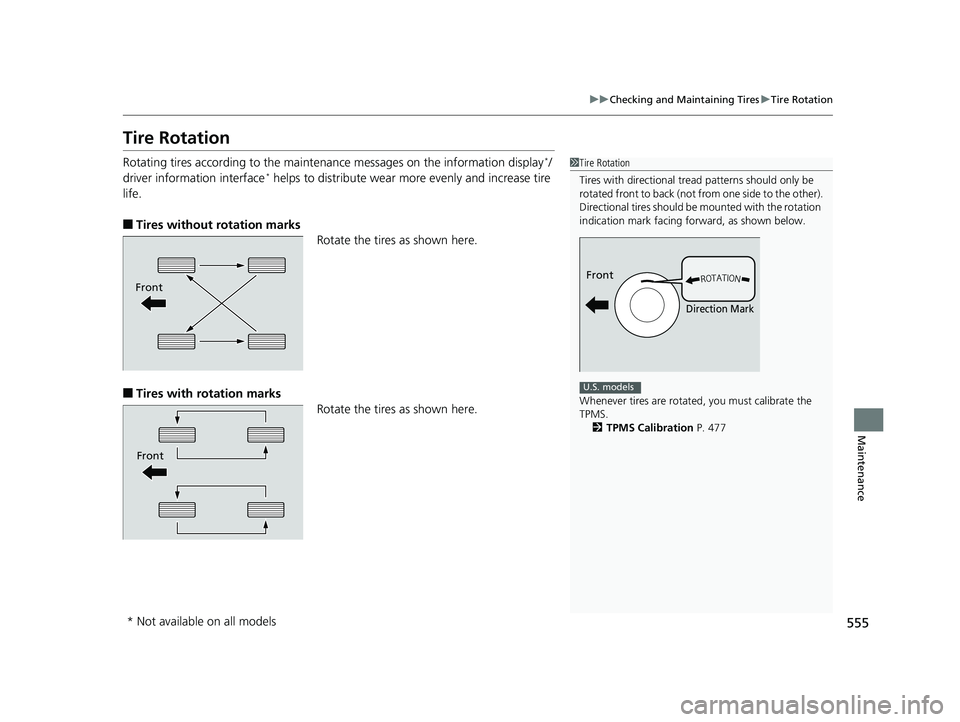
Tire Rotation
Rotating tires according to the maintena nce messages on the information display*/
driver information interface* helps to distribute wear mo re evenly and increase tire
life.
■Tires without rotation marks Rotate the tires as shown here.
■Tires with rotation marks
Rotate the tires as shown here.
1Tire Rotation
Tires with directional trea d patterns should only be
rotated front to back (not fr om one side to the other).
Directional tires should be mounted with the rotation
indication mark facing forward, as shown below.
Whenever tires are rotated, you must calibrate the
TPMS. 2 TPMS Calibration P. 477
Front
Direction Mark
U.S. models
Front
Front
* Not available on all models
17 CIVIC 4D HCM (KA KC KL)-31TBA6111.book 555 ページ 2018年10月25日 木曜日 午前11時56分