change time HONDA CIVIC SEDAN 2018 (in English) Workshop Manual
[x] Cancel search | Manufacturer: HONDA, Model Year: 2018, Model line: CIVIC SEDAN, Model: HONDA CIVIC SEDAN 2018Pages: 643, PDF Size: 38.26 MB
Page 443 of 643
441
uuWhen Driving uSPORT Mode*
Driving
SPORT Mode*
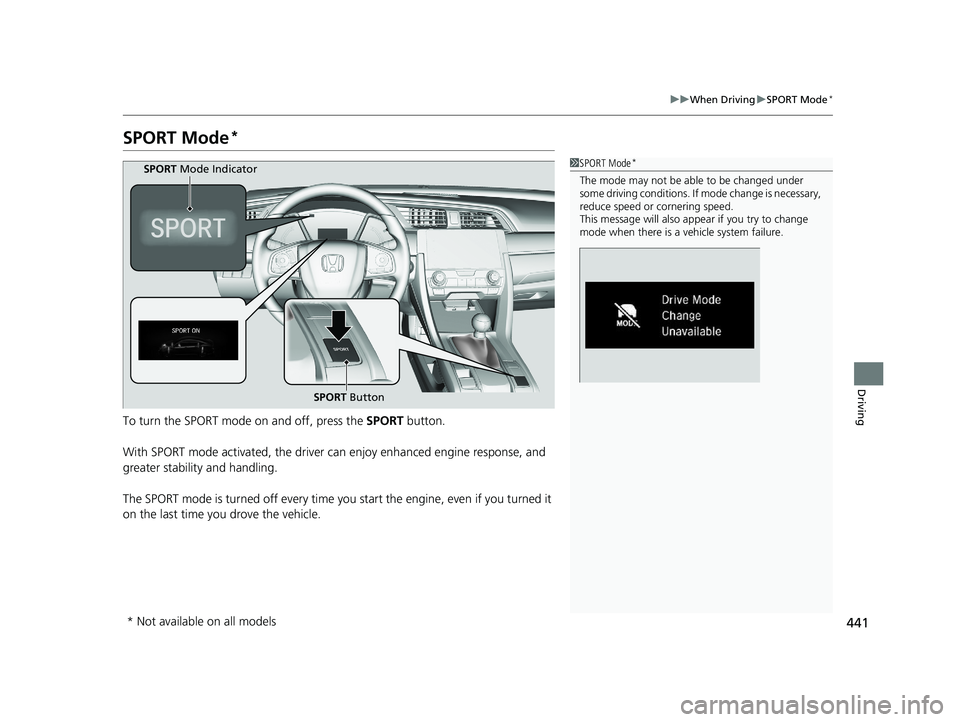
To turn the SPORT mode on and off, press the SPORT button.
With SPORT mode activated, the driver can enjoy enhanced engine response, and
greater stability and handling.
The SPORT mode is turned off every time yo u start the engine, even if you turned it
on the last time you drove the vehicle.
1 SPORT Mode*
The mode may not be able to be changed under
some driving conditions. If mode change is necessary,
reduce speed or cornering speed.
This message will also appear if you try to change
mode when there is a vehicle system failure.
SPORT Button
SPORT
Mode Indicator
* Not available on all models
18 CIVIC 4D HCM (KA KC KL)-31TBA6201.book 441 ページ 2018年10月30日 火曜日 午前7時28分
Page 445 of 643
443
uuWhen Driving uCruise Control*
Continued
Driving
Cruise Control*
Maintains a constant vehicle speed without having to keep your foot on the
accelerator. Use cruise control on freeways or open road s where you can travel at a
constant speed with little ac celeration or deceleration.
*1 : Models with information display
*2 : Models with driver information interface
1Cruise Control*
It may not be possible to maintain a constant speed
when driving uphill or downhill.
When not using cruise control:
Turn off cruise control by pressing the CRUISE
button.
While in ECON mode, it may take relatively more time
to accelerate to maintain the set speed.
When the engine speed slows down, try to
downshift.
You can maintain the set sp eed if you change gear
within five seconds.
3WARNING
Improper use of the cruise control can lead
to a crash.
Use the cruise control only when traveling
on open highways in good weather.
Models with ECON system
Manual transmission models
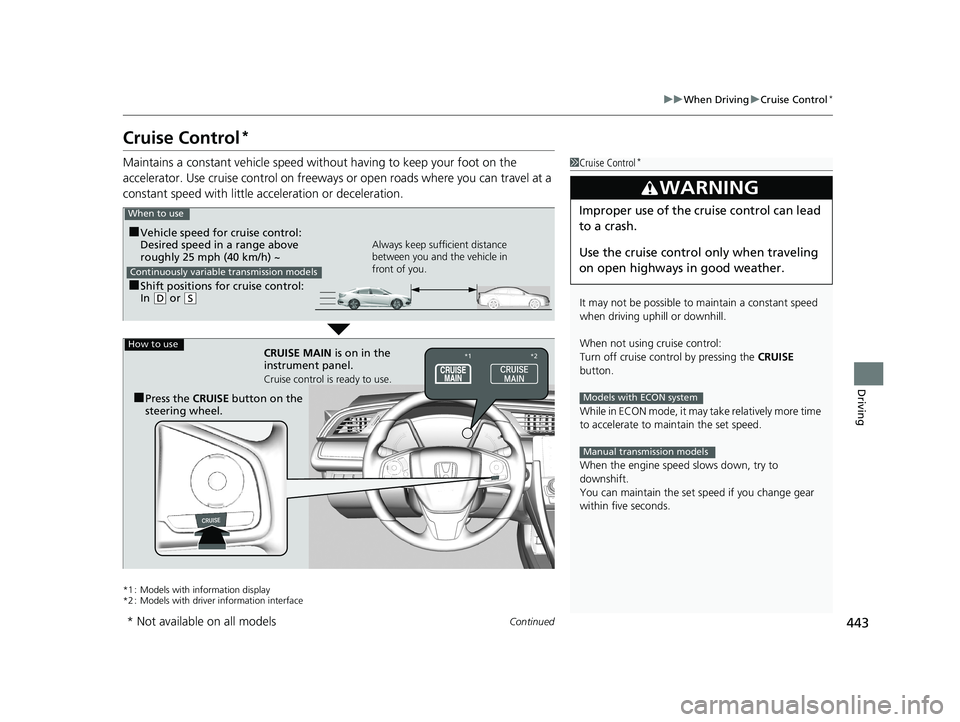
■Shift positions for cruise control:
In ( D or (S Always keep sufficient distance
between you and the vehicle in
front of you.
Continuously variable transmission models
■Vehicle speed for cruise control:
Desired speed in a range above
roughly 25 mph (40 km/h) ~
When to use
CRUISE MAIN
is on in the
instrument panel.
Cruise control is ready to use.
■Press the CRUISE button on the
steering wheel.
How to use*1 *2
* Not available on all models
18 CIVIC 4D HCM (KA KC KL)-31TBA6201.book 443 ページ 2018年10月30日 火曜日 午前7時28分
Page 458 of 643
456
uuWhen Driving uAdaptive Cruise Control (ACC) with Low Speed Follow (LSF)*
Driving
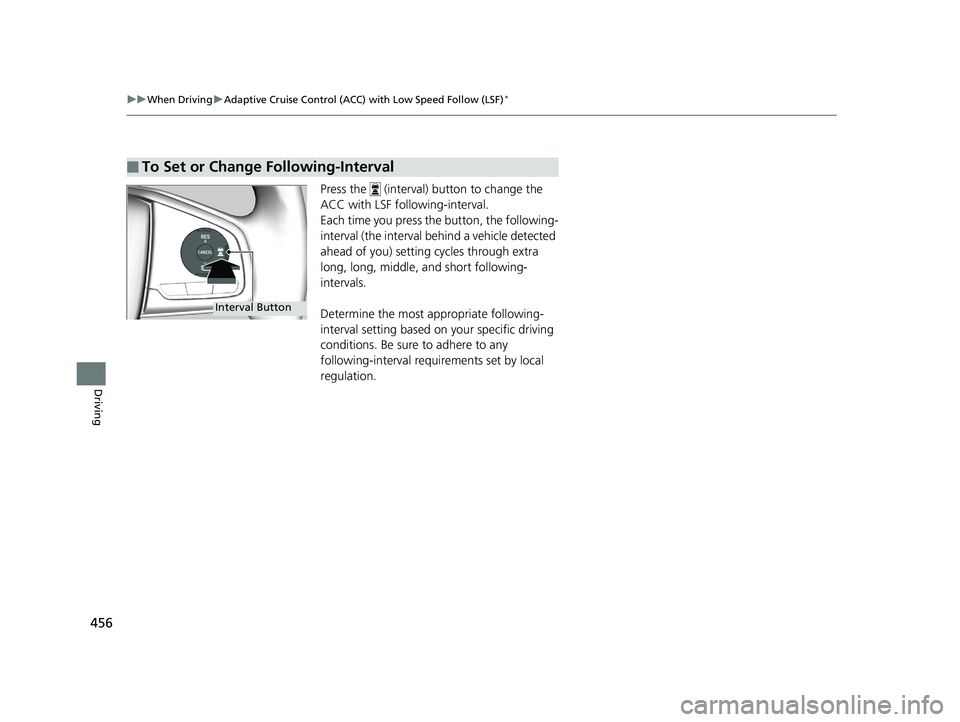
Press the (interval) button to change the
ACC with LSF following-interval.
Each time you press the button, the following-
interval (the interval behind a vehicle detected
ahead of you) setting cycles through extra
long, long, middle, and short following-
intervals.
Determine the most appropriate following-
interval setting based on your specific driving
conditions. Be sure to adhere to any
following-interval requ irements set by local
regulation.
■To Set or Change Following-Interval
Interval Button
18 CIVIC 4D HCM (KA KC KL)-31TBA6201.book 456 ページ 2018年10月30日 火曜日 午前7時28分
Page 471 of 643
Continued469
uuWhen Driving uLane Keeping Assist System (LKAS)*
Driving
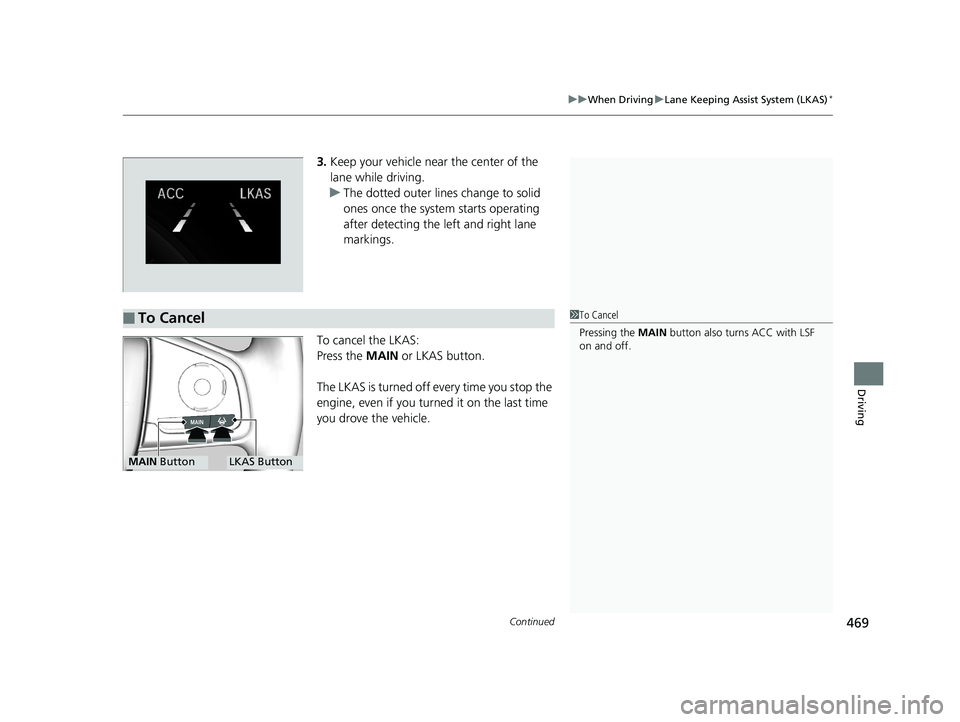
3. Keep your vehicle near the center of the
lane while driving.
u The dotted outer lines change to solid
ones once the system starts operating
after detecting the left and right lane
markings.
To cancel the LKAS:
Press the MAIN or LKAS button.
The LKAS is turned off every time you stop the
engine, even if you turned it on the last time
you drove the vehicle.
■To Cancel1 To Cancel
Pressing the MAIN button also turns ACC with LSF
on and off.
MAIN ButtonLKAS Button
18 CIVIC 4D HCM (KA KC KL)-31TBA6201.book 469 ページ 2018年10月30日 火曜日 午前7時28分
Page 480 of 643
uuWhen Driving uLaneWatchTM*
478
Driving
■Customizing the LaneWatch settings
You can customize the following items using the audio/information screen.
• Show with Turn Signal : Selects whether LaneWatch monitor comes on when
you operate the turn signal light lever.
• Display Time after Turn Signal Off : Changes the length of time the LaneWatch
display stays on after you pull the turn signal lever back.
• Reference Line : Selects whether the reference lines appear on the LaneWatch
monitor.
• Display : Allows for display adjustments of items, such as brightness, contrast and
black level. This se tting is part of the System setup group.
2Customized Features P. 328
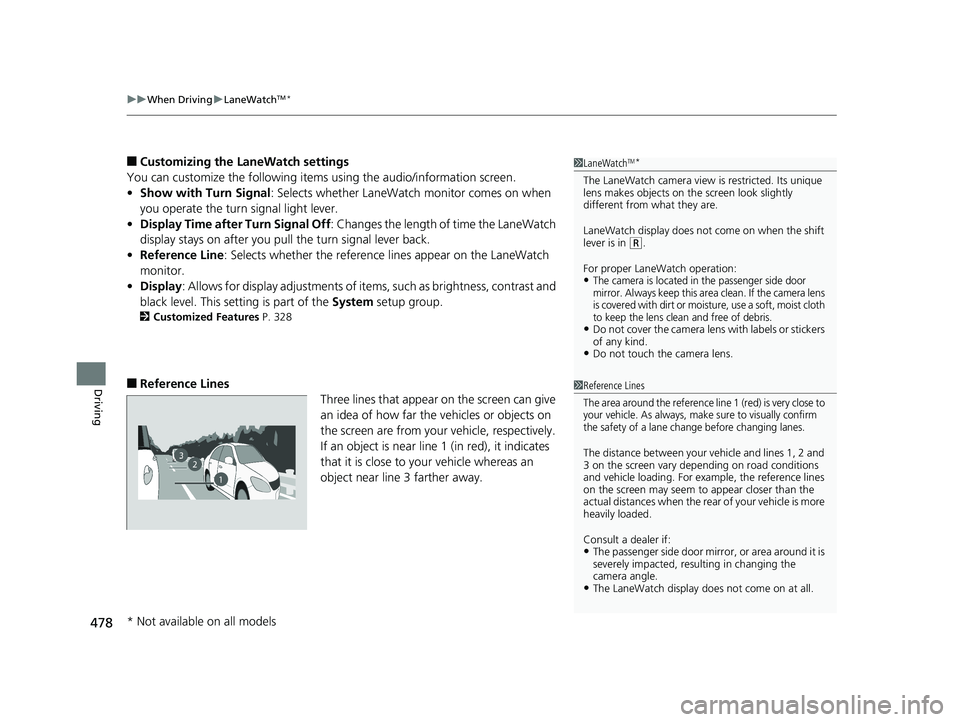
■Reference Lines
Three lines that appear on the screen can give
an idea of how far the vehicles or objects on
the screen are from your vehicle, respectively.
If an object is near line 1 (in red), it indicates
that it is close to your vehicle whereas an
object near line 3 farther away.
1 LaneWatchTM*
The LaneWatch camera view is restricted. Its unique
lens makes objects on the screen look slightly
different from what they are.
LaneWatch display does not come on when the shift
lever is in
( R.
For proper LaneWatch operation:
•The camera is located in the passenger side door
mirror. Always keep this area clean. If the camera lens
is covered with dirt or moisture, use a soft, moist cloth
to keep the lens clean and free of debris.
•D o n o t c o v er t h e c am e ra le n s wi th l ab el s o r s ti c ke rs
of any kind.
•Do not touch the camera lens.
1 Reference Lines
The area around the reference line 1 (red) is very close to
your vehicle. As always, make sure to visually confirm
the safety of a lane change before changing lanes.
The distance betwee n your vehicle and lines 1, 2 and
3 on the screen vary depending on road conditions
and vehicle loading. For ex ample, the reference lines
on the screen may seem to appear closer than the
actual distances when the rear of your vehicle is more
heavily loaded.
Consult a dealer if:
•The passenger side door mirr or, or area around it is
severely impacted, resulting in changing the
camera angle.
•The LaneWatch display doe s not come on at all.
23
1
* Not available on all models
18 CIVIC 4D HCM (KA KC KL)-31TBA6201.book 478 ページ 2018年10月30日 火曜日 午前7時28分
Page 481 of 643
479
uuWhen Driving uTire Pressure Monitoring System (TPMS)
Continued
Driving
Tire Pressure Monitoring System (TPMS)
Instead of directly measuring the pressure in each tire, the TPMS on this vehicle
monitors and compares the rolling radius and rotational characteristics of each
wheel and tire while you are driving to determine if one or more tires are
significantly under-inflated. This will caus e the low tire pressure/TPMS indicator to
come on and a message to appear on the driver information interface
*.
You must start TPMS calibration every time you:
• Adjust the pressure in one or more tires.
• Rotate the tires.
• Replace one or more tires.
Before calibrating the TPMS:
• Set the cold tire pressure in all four tires.
2 Checking Tires P. 550
Make sure:
•The vehicle is at a complete stop.
• The shift lever is in
(N.
• The shift lever is in
(P.
• The ignition switch is in ON
(w*1.
*1: Models with the smart entry system have an ENGINE START/STOP button instead of an
ignition switch.
■TPMS Calibration
U.S. models
1 Tire Pressure Monitoring System (TPMS)
The system does not monitor the tires when driving
at low speed.
Conditions such as low ambient temperature and
altitude change directly a ffect tire pressure and can
trigger the low tire pressure/TPMS indicator to come on.
Tire pressure checked and inflated in:
•Warm weather can beco me under-inflated in
colder weather.
•Cold weather can become over-inflated in warmer
weather.
The low tire pressure indica tor will not come on as a
result of over inflation.
The TPMS may not function pr operly if tire type and
size are mixed. Make sure to use the same size and
type of tire. 2 Checking and Maintaining Tires P. 550
The low tire pressure/TPMS indicator may come on
with a delay or may not come on at all when:
•You rapidly accelerate, decelerate, or turn the
steering wheel.
•You drive on snowy or slippery roads.•Snow chains are used.
The low tire pressure/TPMS indicator may come on
under the following conditions:
•A compact spare tire* is used.•There is a heavier and une ven load on the tires,
such as when towing a trailer, than the condition at
calibration.
•Snow chains are used.
Manual transmission models
Continuously variable transmission models
All models
* Not available on all models
18 CIVIC 4D HCM (KA KC KL)-31TBA6201.book 479 ページ 2018年10月30日 火曜日 午前7時28分
Page 504 of 643
uuMulti-View Rear Camera uAbout Your Multi-View Rear Camera
502
Driving
You can view three different camera angles on the rearview display.
Press the LIST/SELECT (selector) knob to switch the angle.
Touch the appropriate icon to switch the angle. : Wide view
: Normal view
: Top down view
• If the last used viewing mode was Wide or Normal, the same mode is selected the
next time you put the transmission into
(R.
• If Top down view was last used before you turned off the engine, Wide View
mode is selected next time you turn the ignition switch to ON
(w*1 and put the
transmission into
(R.
• If Top down view was last used more than 10 seconds after you put the
transmission from
(R, Wide View mode is selected the next time you put the
transmission into
(R.
*1: Models with the smart entry system have an ENGINE START/STOP button instead of an
ignition switch.
1 About Your Multi-View Rear Camera
You can change the Camera Guideline settings.
2 Customized Features P. 328
Camera Guideline
On: Guidelines appear when you put the
transmission into
( R.
Off: Guidelines do not appear.
Models with color audio systemModels with color audio system
Models with Display Audio
All models
18 CIVIC 4D HCM (KA KC KL)-31TBA6201.book 502 ページ 2018年10月30日 火曜日 午前7時28分
Page 515 of 643
513Continued
Maintenance
Maintenance MinderTM
If the engine oil life is less than 15%, you will see the Maintenance Minder messages
appear on the information display* or the driver information interface* every time
you turn the ignition switch to ON
( w*1. The messages notify you when to change
the engine oil, or when to bring your ve hicle to a dealer for indicated maintenance
services.
To Use Maintenance MinderTM
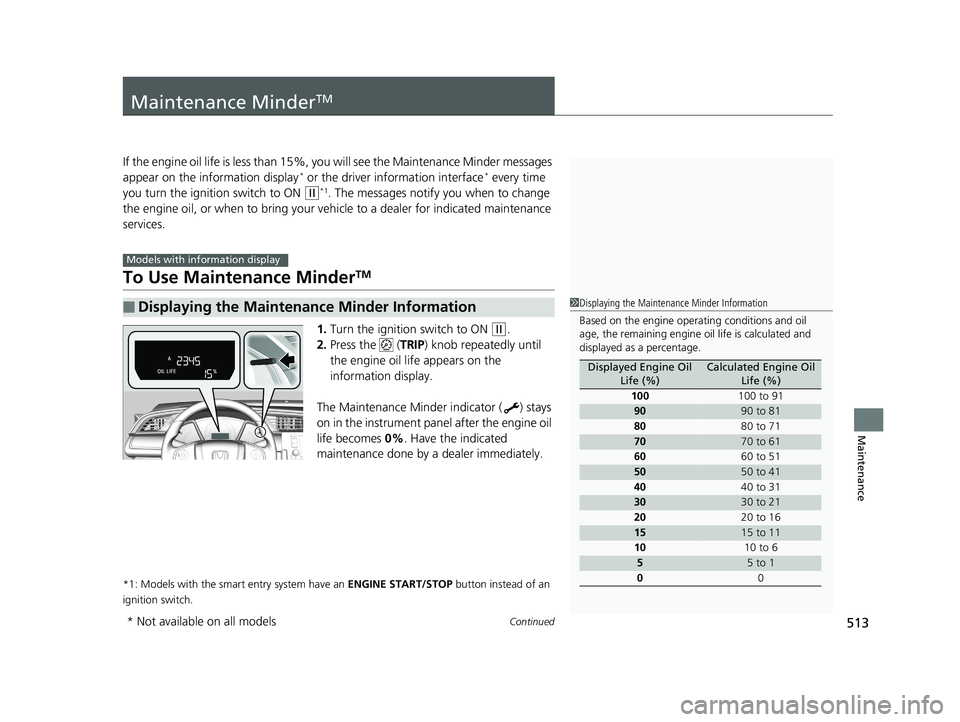
1. Turn the ignition switch to ON (w.
2. Press the ( TRIP) knob repeatedly until
the engine oil life appears on the
information display.
The Maintenance Minder indicator ( ) stays
on in the instrument panel after the engine oil
life becomes 0% . Have the indicated
maintenance done by a dealer immediately.
*1: Models with the smart entry system have an ENGINE START/STOP button instead of an
ignition switch.
■Displaying the Maintenance Minder Information
Models with info rmation display
1Displaying the Maintena nce Minder Information
Based on the engine opera ting conditions and oil
age, the remaining engine oi l life is calculated and
displayed as a percentage.
Displayed Engine Oil
Life (%)Calculated Engine Oil Life (%)
100 100 to 91
9090 to 81
80 80 to 71
7070 to 61
60 60 to 51
5050 to 41
40 40 to 31
3030 to 21
20 20 to 16
1515 to 11
10 10 to 6
55 to 1
0 0
* Not available on all models
18 CIVIC 4D HCM (KA KC KL)-31TBA6201.book 513 ページ 2018年10月30日 火曜日 午前7時28分
Page 598 of 643
596
uuEngine Does Not StartuEmergency Engine Stop
Handling the Unexpected
Emergency Engine Stop
The ENGINE START/STOP button may be used to st op the engine due to an
emergency situation even while driving. If you must stop the engine, do either of the
following operations:
• Press and hold the ENGINE START/STOP button for about two seconds.
• Firmly press the ENGINE START/STOP button three times.
The steering wheel will not lock. However, because turning off the engine disables
the power assist the engine provides to the steering and braking systems, it will
require significantly more physical effort an d time to steer and slow the vehicle. Use
both feet on the brake pedal to slow down the vehicle and stop immediately in a
safe place. With manual transmission models you can also downshift the
transmission to utilize engine braking.
The power mode is in ACCESSORY when the engine is stopped.
To change the mode to VEHICLE OFF, move the shift lever to
(P after the vehicle
comes to a complete stop.
Then press the ENGINE START/STOP button twice without depressing the brake
pedal.
The power mode changes to VEHICLE OFF.
Models with smart entry system
1 Emergency Engine Stop
Do not press the button while driving unless it is
absolutely necessary for the engine to be turned off.
Continuously variable transmission models
Canadian continuously variable transmission models
Manual transmission models
18 CIVIC 4D HCM (KA KC KL)-31TBA6201.book 596 ページ 2018年10月30日 火曜日 午前7時28分