ECU HONDA CLARITY ELECTRIC 2018 (in English) Owner's Guide
[x] Cancel search | Manufacturer: HONDA, Model Year: 2018, Model line: CLARITY ELECTRIC, Model: HONDA CLARITY ELECTRIC 2018Pages: 559, PDF Size: 27.8 MB
Page 135 of 559
133
uuLocking and Unlocking the Doors uLocking/Unlocking the Doors from the Outside
Continued
Controls
Locking/Unlocking the Doors from the Outside
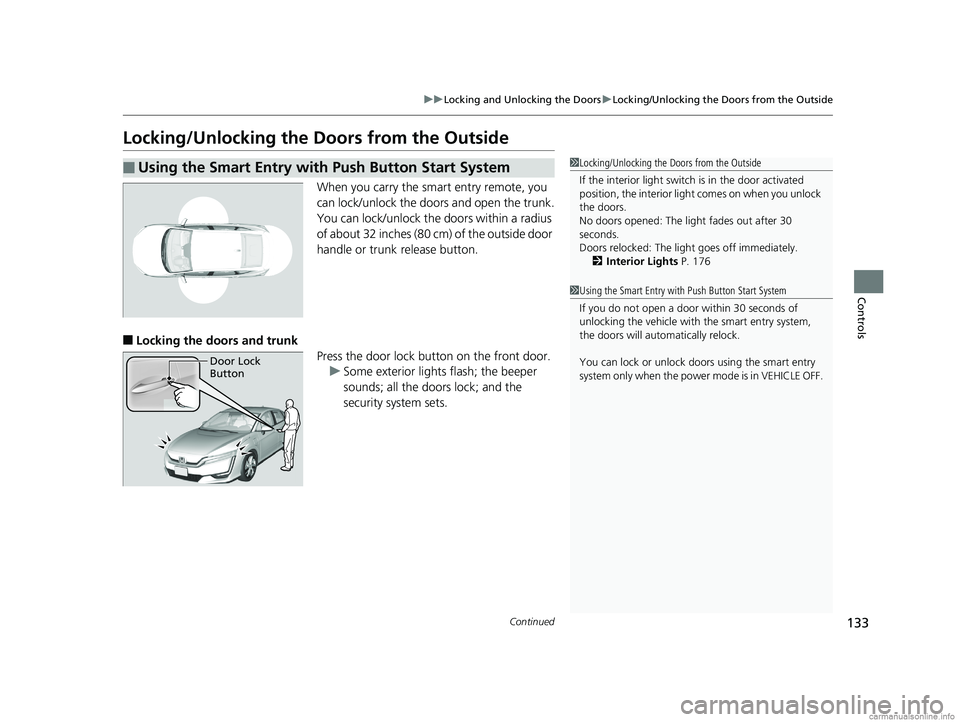
When you carry the sm art entry remote, you
can lock/unlock the doors and open the trunk.
You can lock/unlock the doors within a radius
of about 32 inches (80 cm) of the outside door
handle or trunk release button.
■Locking the doors and trunk Press the door lock button on the front door.u Some exterior lights flash; the beeper
sounds; all the doors lock; and the
security system sets.
■Using the Smart Entry with Push Button Start System1Locking/Unlocking the Doors from the Outside
If the interior light switch is in the door activated
position, the interior light comes on when you unlock
the doors.
No doors opened: The li ght fades out after 30
seconds.
Doors relocked: The light goes off immediately.
2 Interior Lights P. 176
1Using the Smart Entry with Push Button Start System
If you do not open a door within 30 seconds of
unlocking the vehicle with the smart entry system,
the doors will automatically relock.
You can lock or unlock doors using the smart entry
system only when the power mode is in VEHICLE OFF.
Door Lock
Button
18 CLARITY ELECTRIC CSS-31TRV6100.book 133 ページ 2018年2月5日 月曜日 午後12時0分
Page 139 of 559
Continued137
uuLocking and Unlocking the Doors uLocking/Unlocking the Doors from the Outside
Controls
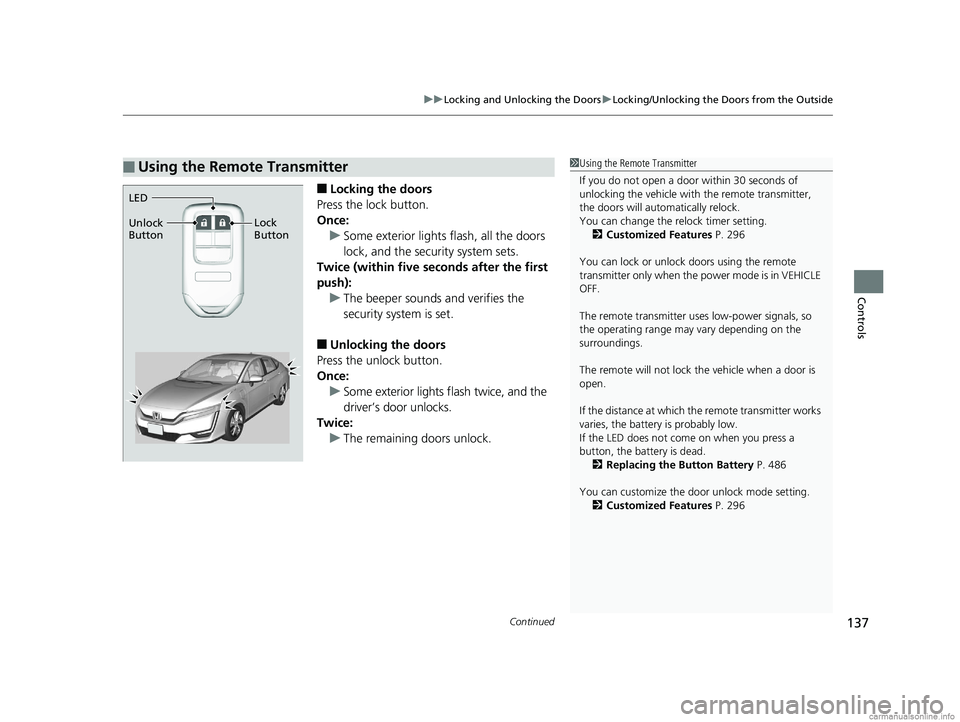
■Locking the doors
Press the lock button.
Once: u Some exterior lights flash, all the doors
lock, and the security system sets.
Twice (within five se conds after the first
push): u The beeper sounds and verifies the
security system is set.
■Unlocking the doors
Press the unlock button.
Once: u Some exterior lights flash twice, and the
driver’s door unlocks.
Twice: u The remaining doors unlock.
■Using the Remote Transmitter1Using the Remote Transmitter
If you do not open a door within 30 seconds of
unlocking the vehicle with the remote transmitter,
the doors will automatically relock.
You can change the relock timer setting. 2 Customized Features P. 296
You can lock or unlock doors using the remote
transmitter only when the power mode is in VEHICLE
OFF.
The remote transmitter us es low-power signals, so
the operating range may vary depending on the
surroundings.
The remote will not lock th e vehicle when a door is
open.
If the distance at which the remote transmitter works
varies, the batter y is probably low.
If the LED does not come on when you press a
button, the battery is dead. 2 Replacing the Button Battery P. 486
You can customize the door unlock mode setting. 2 Customized Features P. 296
LED
Unlock
Button Lock
Button
18 CLARITY ELECTRIC CSS-31TRV6100.book 137 ページ 2018年2月5日 月曜日 午後12時0分
Page 149 of 559
147Continued
Controls
Security System
Immobilizer System
The immobilizer system prevents a key that has not been pre-registered from
starting the power system. Each key cont ains electronic transmitters that use
electronic signals to verify the key.
Pay attention to the follo wing when pressing the POWER button:
• Do not allow objects that emit strong radio waves near the POWER button.
• Make sure the key is not covered by or touching a metal object.
• Do not bring a key from another vehicle’s immobilizer system near the POWER
button.
• Do not put the key near magnetic items. Electronic devices, such as televisions
and audio systems emit strong magnetic fields. Note that even a key chain can
become magnetic.
Security System Alarm
The security system alarm activates when the trunk, hood or doors are forcibly
opened. The alarm does not activate if the trunk or doors are opened with the key,
remote transmitter or smart entry system.
However, the alarm activates if a door is opened with the key and then the hood is
opened before the power mode is set to ON.
■When the security system alarm activates
The horn sounds intermittently and some exterior lights flash.
■To deactivate the security system alarm
Unlock the vehicle using the key, remote transmitter or smart entry system. The
system, along with the horn and flashing lights, is deactivated.
1 Immobilizer System
NOTICE
Leaving the key in the vehicl e can result in theft or
accidental movement of the vehicle.
Always take the key with you whenever you leave the
vehicle unattended.
Do not alter the system or add other devices to it.
Doing so may damage the system and make your
vehicle inoperable.
1 Security System Alarm
Do not alter the system or add other devices to it.
Doing so may damage the system and make your
vehicle inoperable.
The security alarm continues for a maximum of two
minutes until the security system alarm deactivates.
18 CLARITY ELECTRIC CSS-31TRV6100.book 147 ページ 2018年2月5日 月曜日 午後12時0分
Page 150 of 559
uuSecurity System uSecurity System Alarm
148
Controls
■Setting the security system alarm
The security system alarm automatically sets when the following conditions have
been met:
• The power mode is set to VEHICLE OFF (LOCK).
• The hood is closed.
• All doors and the trunk are locked from outside with the key, remote transmitter
or smart entry system.
■When the security system alarm sets
The security system alarm indicator in the instrument panel blinks. When the
blinking interval changes after about 15 seconds, the security system alarm is set.
■To cancel the security system alarm
The security system alarm is canceled when the vehicle is unlocked using the remote
transmitter, smart entry system, or the power mode is set to ON. The security system
alarm indicator goes off at the same time.
1 Security System Alarm
Do not set the security system alarm when someone
is in the vehicle or a window is open. The system can
accidentally activate when:
•Unlocking the door with the lock tab.•Opening the trunk with the trunk opener or the
emergency trunk opener.
•Opening the hood with the hood release.
If the 12-volt battery goes dead after you have set the
security system alarm, the security alarm may go off
once the 12-volt battery is recharged or replaced.
If this occurs, deactivate the security system alarm by
unlocking a door using the key, remote transmitter or
smart entry system.
18 CLARITY ELECTRIC CSS-31TRV6100.book 148 ページ 2018年2月5日 月曜日 午後12時0分
Page 151 of 559
149
uuSecurity System uSecurity System Alarm
Controls
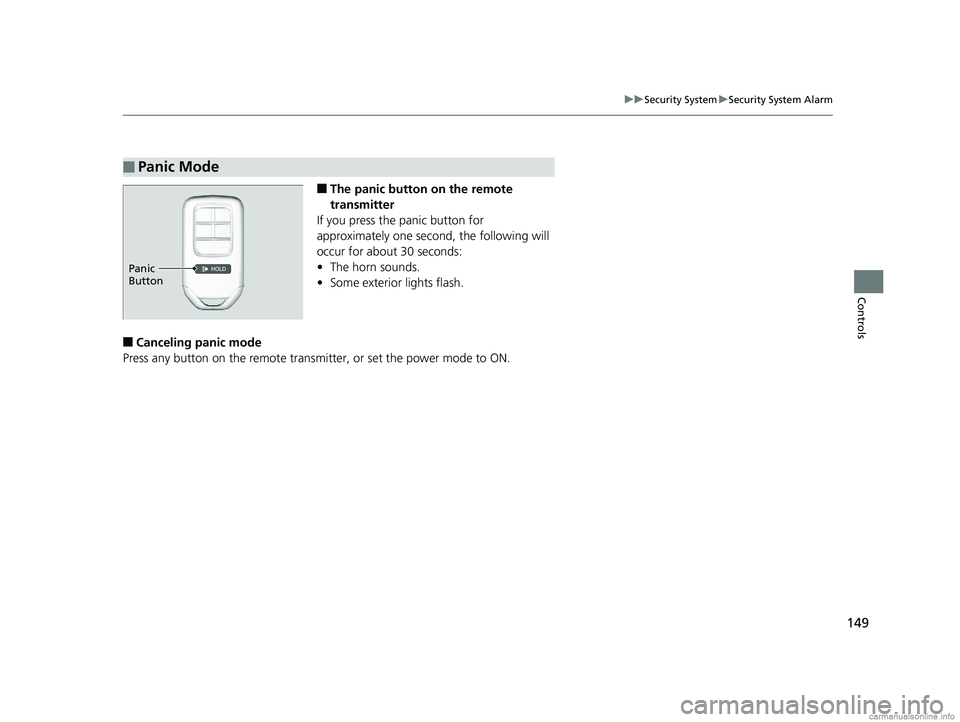
■The panic button on the remote
transmitter
If you press the panic button for
approximately one second, the following will
occur for about 30 seconds:
• The horn sounds.
• Some exterior lights flash.
■Canceling panic mode
Press any button on the remote transmi tter, or set the power mode to ON.
■Panic Mode
Panic
Button
18 CLARITY ELECTRIC CSS-31TRV6100.book 149 ページ 2018年2月5日 月曜日 午後12時0分
Page 168 of 559
166
uuOperating the Switches Around the Steering Wheel uAdjusting the Steering Wheel
Controls
Adjusting the Steering Wheel
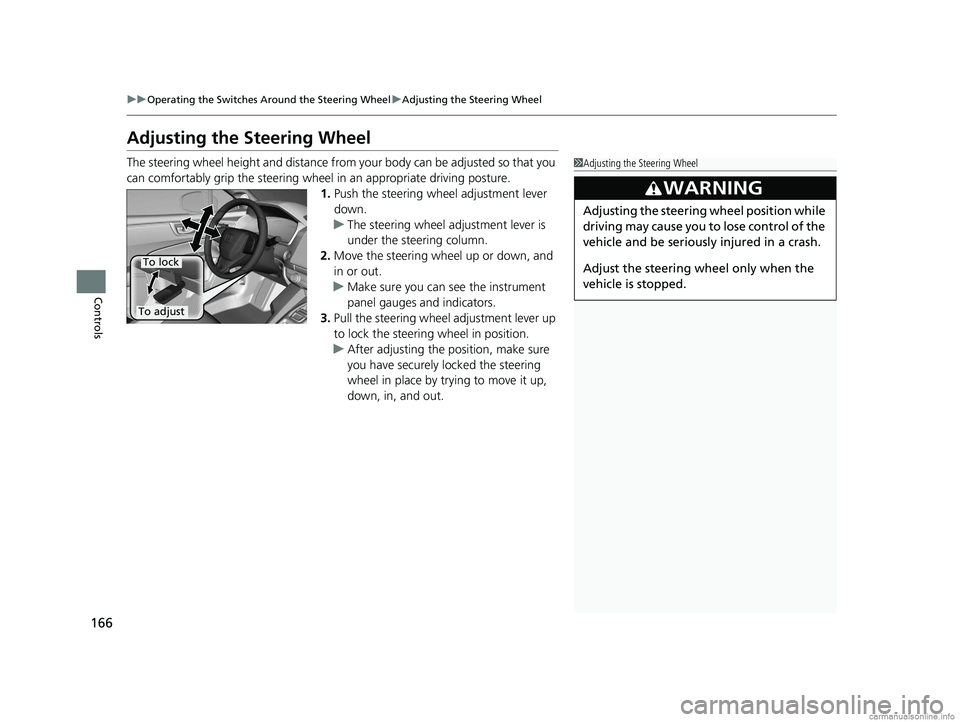
The steering wheel height and distance from your body can be adjusted so that you
can comfortably grip the steering wheel in an appropriate driving posture.
1.Push the steering wheel adjustment lever
down.
u The steering wheel adjustment lever is
under the steering column.
2. Move the steering wheel up or down, and
in or out.
u Make sure you can see the instrument
panel gauges and indicators.
3. Pull the steering wheel adjustment lever up
to lock the steerin g wheel in position.
u After adjusting the position, make sure
you have securely locked the steering
wheel in place by trying to move it up,
down, in, and out.1Adjusting the Steering Wheel
3WARNING
Adjusting the steering wheel position while
driving may cause you to lose control of the
vehicle and be seriously injured in a crash.
Adjust the steering wheel only when the
vehicle is stopped.
To adjust
To lock
18 CLARITY ELECTRIC CSS-31TRV6100.book 166 ページ 2018年2月5日 月曜日 午後12時0分
Page 176 of 559
174
uuAdjusting the Seats uRear Seats
Controls
Rear Seats
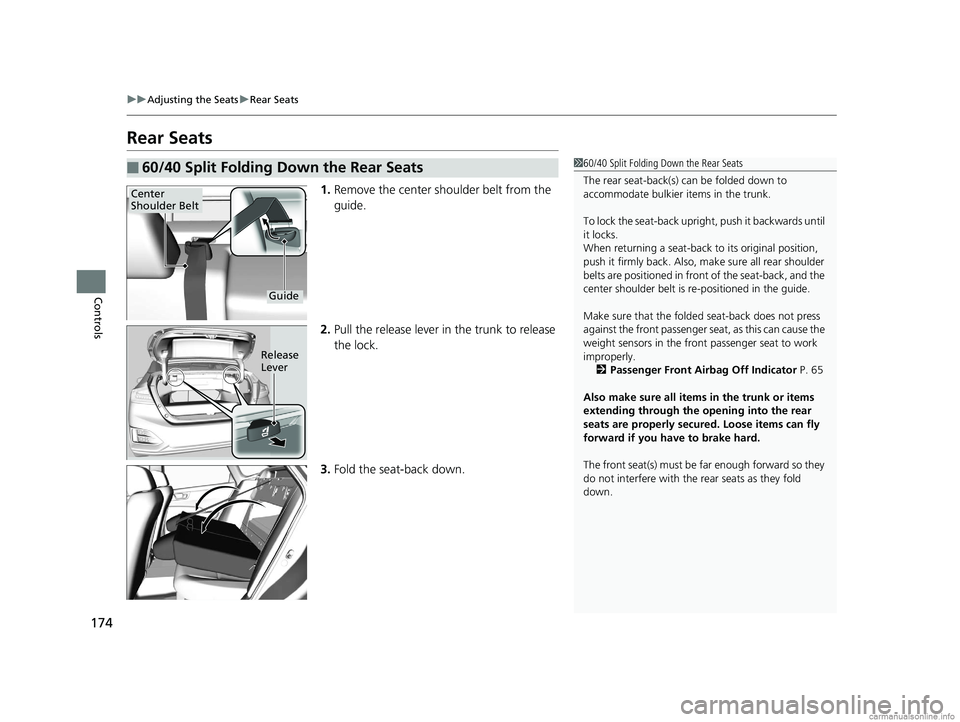
1. Remove the center shoulder belt from the
guide.
2. Pull the release lever in the trunk to release
the lock.
3. Fold the seat-back down.
■60/40 Split Folding Down the Rear Seats160/40 Split Folding Down the Rear Seats
The rear seat-back(s) can be folded down to
accommodate bulkier items in the trunk.
To lock the seat-back upri ght, push it backwards until
it locks.
When returning a seat-back to its original position,
push it firmly back. Also, m ake sure all rear shoulder
belts are positioned in front of the seat-back, and the
center shoulder belt is re -positioned in the guide.
Make sure that the folded seat-back does not press
against the front passenger se at, as this can cause the
weight sensors in the front passenger seat to work
improperly.
2 Passenger Front Airbag Off Indicator P. 65
Also make sure all items in the trunk or items
extending through the opening into the rear
seats are properly secured. Loose items can fly
forward if you have to brake hard.
The front seat(s) must be far enough forward so they
do not interfere with the rear seats as they fold
down.
Center
Shoulder Belt
Guide
Release
Lever
18 CLARITY ELECTRIC CSS-31TRV6100.book 174 ページ 2018年2月5日 月曜日 午後12時0分
Page 282 of 559
280
uuGeneral Information on the Audio System uCompatible iPod, iPhone, and USB Flash Drives
Features
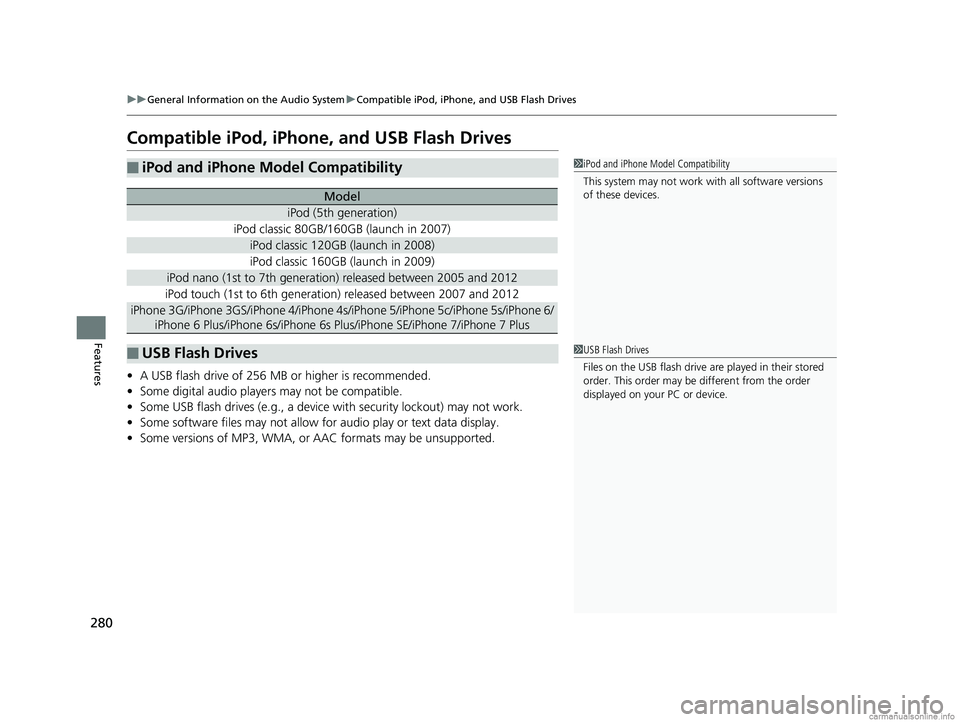
Compatible iPod, iPhone, and USB Flash Drives
• A USB flash drive of 256 MB or higher is recommended.
• Some digital audio players may not be compatible.
• Some USB flash drives (e.g., a device with security lockout) may not work.
• Some software files may not allow for audio play or text data display.
• Some versions of MP3, WMA, or AAC formats may be unsupported.
■iPod and iPhone Model Compatibility
Model
iPod (5th generation)
iPod classic 80GB/160GB (launch in 2007)
iPod classic 120GB (launch in 2008)
iPod classic 160GB (launch in 2009)
iPod nano (1st to 7th generation) released between 2005 and 2012
iPod touch (1st to 6th generation) released between 2007 and 2012
iPhone 3G/iPhone 3GS/iPhone 4/iPhone 4s/i Phone 5/iPhone 5c/iPhone 5s/iPhone 6/
iPhone 6 Plus/iPhone 6s/iPhone 6s Plus/iPhone SE/iPhone 7/iPhone 7 Plus
■USB Flash Drives
1 iPod and iPhone Model Compatibility
This system may not work with all software versions
of these devices.
1USB Flash Drives
Files on the USB flash drive are played in their stored
order. This order may be different from the order
displayed on your PC or device.
18 CLARITY ELECTRIC CSS-31TRV6100.book 280 ページ 2018年2月5日 月曜日 午後12時0分
Page 283 of 559
281
uuGeneral Information on the Audio System uHonda App License Agreement
Continued
Features
Honda App License Agreement
PLEASE CAREFULLY READ THIS END USER LICENSE AGREEMENT (THI S “AGREEMENT”) WHICH GOVERNS YOUR USE OF THE SOFTWARE
INSTALLED ON YOUR HONDA OR ACURA VEHICLE (YOUR “VEHICLE”) AS WELL AS THE APPLICATIONS, SERVICES, FUNCTIONS, AND
CONTENT PROVIDED THROUGH THE SOFTWARE (COLLECTIVELY, THE “SERVICES”). YOUR USE OF THE SOFTWARE OR SERVICES WILL
SERVE AS YOUR CONSENT TO THE TERMS OF THIS AGREEMENT. THE SOFTWARE IS OWNED (OR LICENSED), PROVIDED, AND/OR
OPERATED BY AMERICAN HONDA MOTOR CO . INC., (“HONDA,” “US,” “WE,” OR “OUR”), WITH ITS BUSINESS ADDRESS AT 1919
TORRANCE BLVD., TORRANCE, CA 90501. REFERENCE TO “HONDA” IN THIS AGREEMENT INCLUDES HONDA’S PARENT COMPANY AND
ITS AFFILIATES AND DESIGNATED AGENTS. THE SERVICES ARE OWNED (OR LICENSED), PR OVIDED, AND/OR OPERATED BY HONDA OR A
THIRD-PARTY SERVICE PROVIDER (A “PROVI DER”). REFERENCE TO A “PROVIDER” IN THIS AGREEMENT INCLUDES SUCH PROVIDER’S
PARENT COMPANY, AFFILIATES, AND DESIGNATED AGENTS.
A. Description of the Software. The SOFTWARE includes the software, firmware and the like, installed and executing on your VEHICLE
during manufacture, and thereafter updated from time to time by HONDA, you or an authorized HONDA dealer (a “DEALER”). The
SOFTWARE allows you to access and use a variety of SERVICES, including but not limited to: (a) HONDA applications, services, an d content
provided through the SOFTWARE (together, “H ONDA SERVICES”); and (b) PROVIDER applicatio ns, services, and content provided through
the SOFTWARE (together, “PROVIDER SERVICES” ), each of which may provide access to various information, media, content, and services.
B. SOFTWARE Licensing and Intellectual Property.
1. SOFTWARE. This AGREEMENT grants you a non-exclus ive, limited, and revocable license to use the SOFTWARE and SERVICES solely (a)
as installed on your VEHICLE by HONDA, (b) as updated on your Vehicle by HONDA, you (but only as and when directed by HONDA), or a
DEALER and (c) as permitted under the terms of this AGREEMENT.
2. HONDA Services. The SOFTWARE may provide you with access to various HONDA SERVICES. Inst allation, activation, or use of HONDA
SERVICES may require your consent to addi tional terms, conditions, and privacy policies applicable to those HONDA SERVICES (the
“HONDA TERMS”). You acknowledge and agree that any collection, use, sharing of data generated by yo ur VEHICLE or your use of your
VEHICLE, and your use of the HONDA SERVIC ES shall be subject to this AGREEMENT and any additional HONDA TERMS that may be
specifically applicable to such HONDA SERVICES or data generation. The HONDA SERVI CES may collect, use, and share such data while
you are using the SOFTWARE.
■END USER LICENSE AGREEMENT
18 CLARITY ELECTRIC CSS-31TRV6100.book 281 ページ 2018年2月5日 月曜日 午後12時0分
Page 286 of 559
284
uuGeneral Information on the Audio System uHonda App License Agreement
Features
7. Export Restrictions: You acknowledge that the SOFTWARE and SERVICES are subject to U.S., European Union, and other export
jurisdictions. You agree to comply with all applicable international and nati onal laws that apply to the SOFTWARE and SERVICES, including
the U.S. Export Administration Regulations, as well as end-user, en d-use, and destination restrictions issued by the U.S. and other
governments.
C. SOFTWARE Operation
1. HONDA reserves the right to suspend or te rminate your access to and use of the SOFTWARE or SERVICES if you are found to be in
violation of this AGREEMENT or as reasonably deemed necessary by HONDA.
2. Eligibility/Registration/Activation.
The SOFTWARE is intended for and available to indivi duals who (a) are of legal age of majority in their
jurisdiction of residence (and at least 18 years of age), or are younger than 18 years of age and possess a valid driver’s lice nse issued by
their jurisdiction of residence, and (b) own or have permissive access to a compatible VEHICLE. We do not knowingly collect any
information, including personal information, from children under 13. If we learn or are notified that we have collected personal
information of a child under 13, we will imme diately take steps to delete such information.
3. Use of PROVIDER SERVICES through the SOFTWARE.
Certain PROVIDER SERVICES made availa ble through the SOFTWARE may require
that you register or otherwise have an account with the PROVIDER and agree to PROVIDER TERMS. Any use of any of such PROVIDER
SERVICES within the SOFTWARE is subject to this AGREEMENT and the applicable PROVIDER TERMS . HONDA does not exercise control
over such PROVIDER SERVICES and is not resp onsible or liable for the availability, security, or content of such PROVIDER SERVIC ES, and the
inclusion of any PROV IDER SERVICES does not imply a referral from, the approv al of, or the endorsement by HONDA of such PROVIDE R
SERVICES. HONDA is not responsible or liable, directly or indirect ly, for any damage relating to or resulting from your use of the PROVIDER
SERVICES.
4. Links to Third Party Sites:
The SOFTWARE may provide you with the ability to access third-party sites and content through the use of the
SOFTWARE or SERVICES. The third-party sites and content are not under the control of HONDA. HO NDA is not responsible or liable,
directly or indirectly, fo r such third-party websites and th eir content or for any damage rela ting to or resulting from your access or use of
such websites and content.
18 CLARITY ELECTRIC CSS-31TRV6100.book 284 ページ 2018年2月5日 月曜日 午後12時0分