steering HONDA CLARITY ELECTRIC 2018 (in English) Owner's Guide
[x] Cancel search | Manufacturer: HONDA, Model Year: 2018, Model line: CLARITY ELECTRIC, Model: HONDA CLARITY ELECTRIC 2018Pages: 559, PDF Size: 27.8 MB
Page 171 of 559
169Continued
Controls
Adjusting the Seats
Front Seats
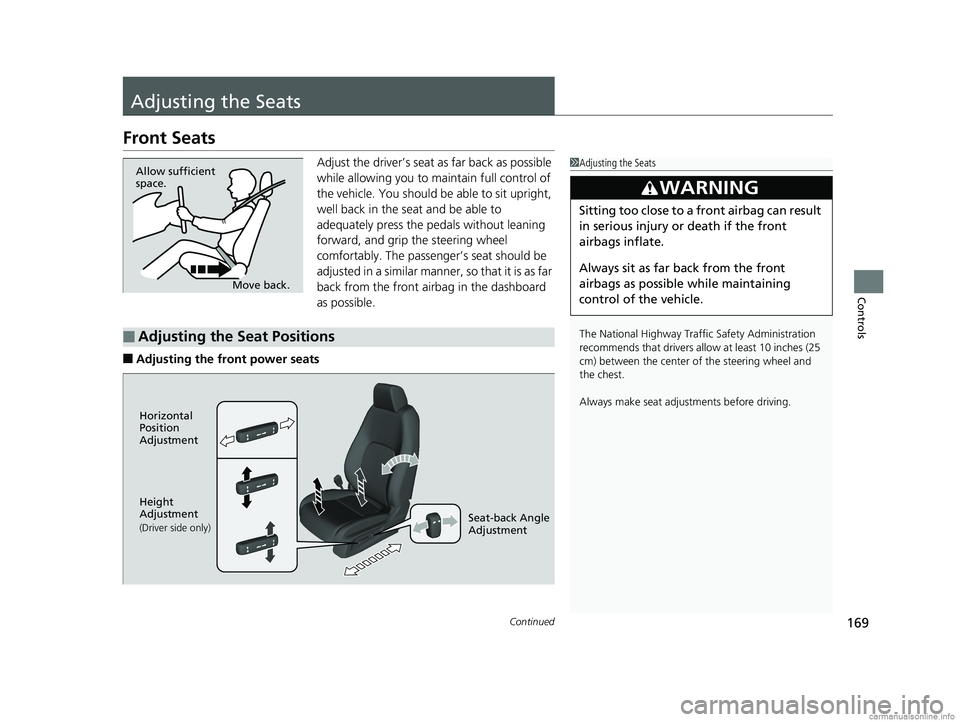
Adjust the driver’s seat as far back as possible
while allowing you to ma intain full control of
the vehicle. You should be able to sit upright,
well back in the seat and be able to
adequately press the pedals without leaning
forward, and grip the steering wheel
comfortably. The passenger’s seat should be
adjusted in a similar manner, so that it is as far
back from the front airbag in the dashboard
as possible.
■Adjusting the fro nt power seats
1Adjusting the Seats
The National Highway Traffic Safety Administration
recommends that drivers allow at least 10 inches (25
cm) between the center of the steering wheel and
the chest.
Always make seat adjustments before driving.
3WARNING
Sitting too close to a front airbag can result
in serious injury or death if the front
airbags inflate.
Always sit as far back from the front
airbags as possible while maintaining
control of the vehicle.
Move back.
Allow sufficient
space.
■Adjusting the Seat Positions
Horizontal
Position
Adjustment
Height
Adjustment
(Driver side only)Seat-back Angle
Adjustment
18 CLARITY ELECTRIC CSS-31TRV6100.book 169 ページ 2018年2月5日 月曜日 午後12時0分
Page 172 of 559
uuAdjusting the Seats uFront Seats
170
Controls
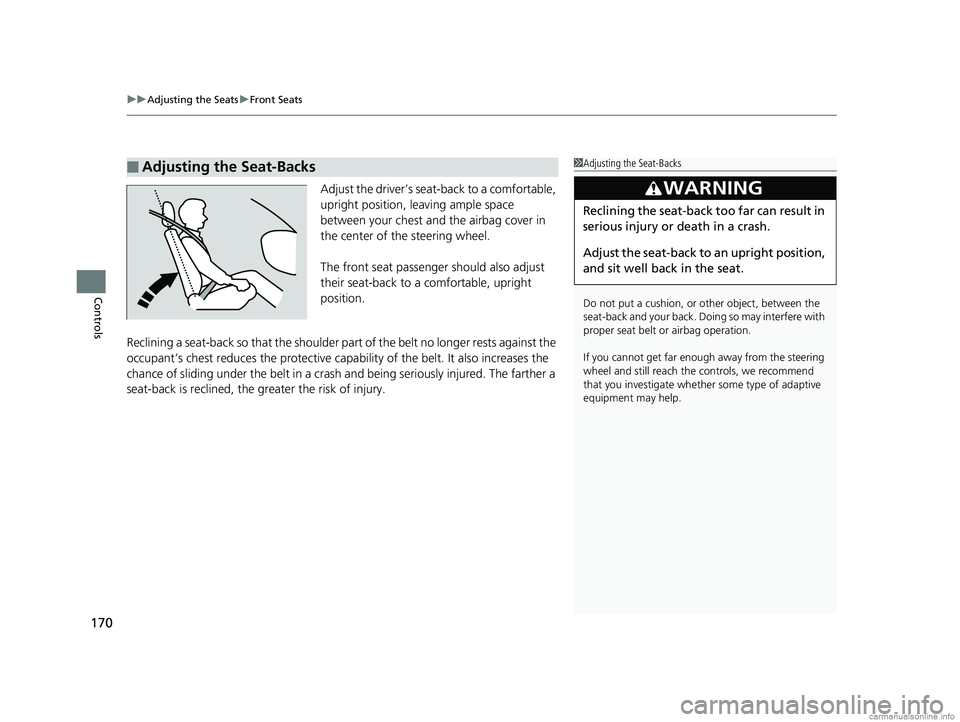
Adjust the driver’s sea t-back to a comfortable,
upright position, leaving ample space
between your chest and the airbag cover in
the center of the steering wheel.
The front seat passenger should also adjust
their seat-back to a comfortable, upright
position.
Reclining a seat-back so that the shoulder pa rt of the belt no longer rests against the
occupant’s chest reduces the protective capa bility of the belt. It also increases the
chance of sliding under the belt in a crash and being seriously injured. The farther a
seat-back is reclined, the gr eater the risk of injury.
■Adjusting the Seat-Backs1Adjusting the Seat-Backs
Do not put a cushion, or other object, between the
seat-back and your back. Do ing so may interfere with
proper seat belt or airbag operation.
If you cannot get far e nough away from the steering
wheel and still reach th e controls, we recommend
that you investigate whether some type of adaptive
equipment may help.
3WARNING
Reclining the seat-back too far can result in
serious injury or death in a crash.
Adjust the seat-back to an upright position,
and sit well back in the seat.
18 CLARITY ELECTRIC CSS-31TRV6100.book 170 ページ 2018年2月5日 月曜日 午後12時0分
Page 198 of 559
196
Features
Audio System
About Your Audio System
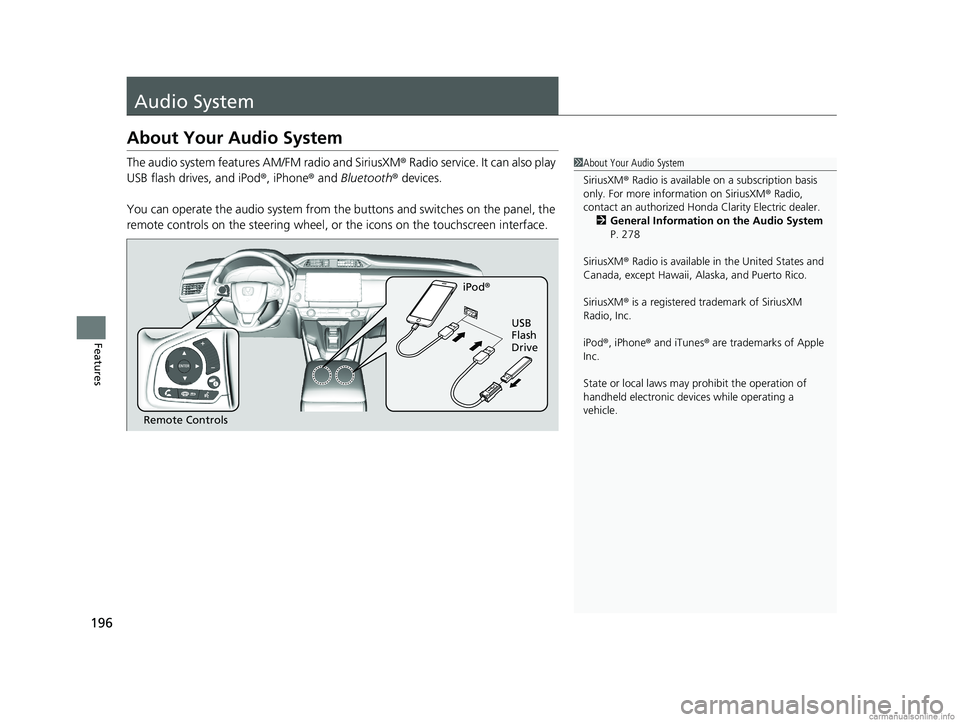
The audio system features AM/FM radio and SiriusXM® Radio service. It can also play
USB flash drives, and iPod ®, iPhone® and Bluetooth® devices.
You can operate the audio system from the buttons and switches on the panel, the
remote controls on the steering wheel, or the icons on the touchscreen interface.1 About Your Audio System
SiriusXM ® Radio is available on a subscription basis
only. For more information on SiriusXM ® Radio,
contact an authorized Honda Clarity Electric dealer.
2 General Information on the Audio System
P. 278
SiriusXM ® Radio is available in the United States and
Canada, except Ha waii, Alaska, and Puerto Rico.
SiriusXM ® is a registered trademark of SiriusXM
Radio, Inc.
iPod ®, iPhone ® and iTunes ® are trademarks of Apple
Inc.
State or local laws may pr ohibit the operation of
handheld electronic devices while operating a
vehicle.
Remote Controls iPod
®
USB
Flash
Drive
18 CLARITY ELECTRIC CSS-31TRV6100.book 196 ページ 2018年2月5日 月曜日 午後12時0分
Page 231 of 559
229
uuAudio System Basic Operation uVoice Control Operation
Continued
Features
Voice Control Operation
Your vehicle has a voice control syst em that allows hands-free operation.
The voice control system uses the ( Talk) and (hang-up/back) buttons on
the steering wheel and a microphone near the map lights in the ceiling.
To achieve optimum voice recognition when using the voice control system:
• Make sure the correct screen is displa yed for the voice command that you are
using.
The system recognizes only certain commands.
Available voic e command P. 230
• Close the windows.
• Adjust the dashboard and side vents so air does not blow onto the microphone in
the ceiling.
• Speak clearly in a natural speaking vo ice without pausing between words.
• Reduce any background noise if possible. The system may misinterpret your
command if more than one person is speaking at the same time.
■Voice Recognition
1Voice Control Operation
When you press the button, a helpful prompt asks
what you would like to do. Press and release the
button again to bypass this prompt and give a
command.
1 Voice Recognition
The voice control system can only be used from the
driver’s seat because the microphone unit removes
noises from the front passenger’s side.
18 CLARITY ELECTRIC CSS-31TRV6100.book 229 ページ 2018年2月5日 月曜日 午後12時0分
Page 236 of 559
uuAudio System Basic Operation uPlaying AM/FM Radio
234
Features
To store a station:
1. Tune to the selected station.
2. Select and hold the preset number fo r the station you want to store.
You can also store a preset station by the following procedure.
1. Tune to the selected station.
2. Select the open/close ic on to display a list.
3. Select the Preset tab.
4. Select and hold the preset number fo r the station you want to store.
Lists the strongest stations on the selected band.
1. Select the open/close ic on to display a list.
2. Select the Station List tab.
3. Select the station.
■Manual update
Updates your available station list at any time.
1. Select the open/close ic on to display a list.
2. Select the Station List tab.
3. Select Refresh .
■Preset Memory
■Station List
1Playing AM/FM Radio
The ST indicator appears on the display indicating
stereo FM broadcasts.
Stereo reproduction in AM is not available.
Switching the Audio Mode
Press the or button on the steering wheel or
select SOURCE on the screen.
2 Audio Remote Controls P. 199
You can store 6 AM stations and 12 FM stations into
preset memory.
HD Radio Technology manufactured under license
from iBiquity Digi tal Corporation. U.S. and Foreign
Patents. HD Radio
TM and the HD, HD Radio, and
“Arc” logos are proprietary trademarks of iBiquity
Digital Corp.
34
18 CLARITY ELECTRIC CSS-31TRV6100.book 234 ページ 2018年2月5日 月曜日 午後12時0分
Page 240 of 559
uuAudio System Basic Operation uPlaying SiriusXM ® Radio
238
Features
1. Select .
2. Select Tune Mode .
3. Select Channel Mode or Category Mode .
■To Change the Tune Mode1Playing SiriusXM ® Radio
In the channel mode, all available channels are
selectable. In the categor y mode, you can select a
channel within a ca tegory (Jazz, Rock, Classical, etc.).
There may be instances when SiriusXM ® Radio does
not broadcast all the data fi elds (artist name, title).
This does not indicate a problem with your audio
system.
SiriusXM ® Radio stations load in ascending order,
which can take about a minute. Once they have
loaded you will be able to scroll up or down to make
your selections.
Switching the Audio Mode
Press the or button on the steering wheel or
select SOURCE on the screen.
2 Audio Remote Controls P. 199
Tune Start:
When you change to a preset channel, a song being
played on that channel restarts from the beginning
with this function. This can be turned on or off from
the Audio settings screen.
2 Customized Features P. 296
34
18 CLARITY ELECTRIC CSS-31TRV6100.book 238 ページ 2018年2月5日 月曜日 午後12時0分
Page 251 of 559
Continued249
uuAudio System Basic Operation uSong By VoiceTM (SBV)
Features
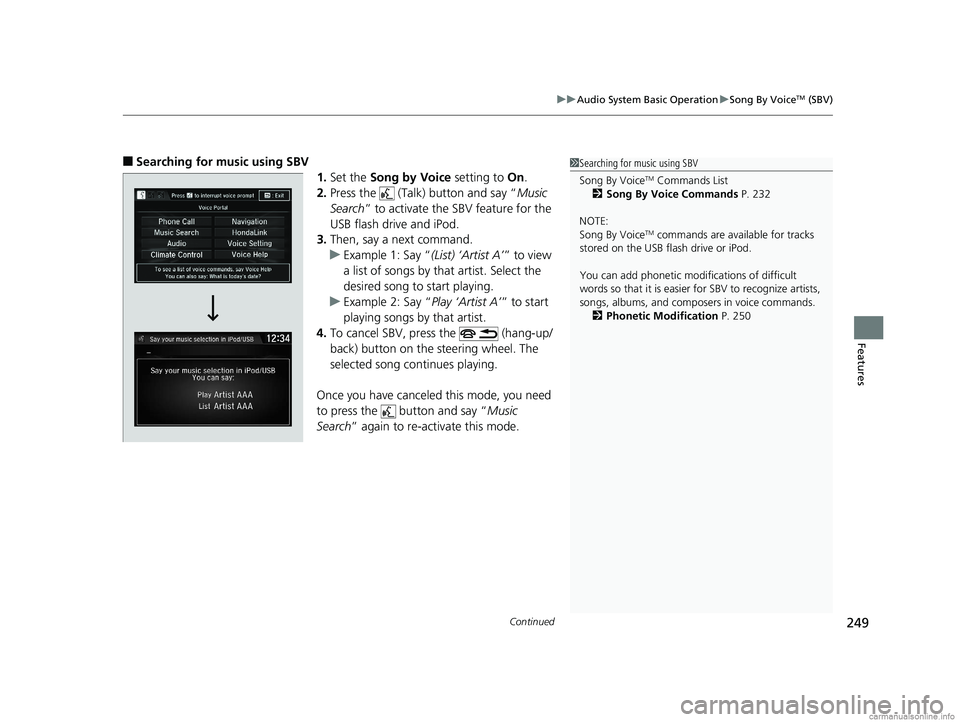
■Searching for music using SBV
1.Set the Song by Voice setting to On.
2. Press the (Talk) button and say “ Music
Search ” to activate the SBV feature for the
USB flash drive and iPod.
3. Then, say a next command.
u Example 1: Say “ (List) ‘Artist A’” to view
a list of songs by th at artist. Select the
desired song to start playing.
u Example 2: Say “ Play ‘Artist A’” to start
playing songs by that artist.
4. To cancel SBV, press the (hang-up/
back) button on the steering wheel. The
selected song continues playing.
Once you have canceled this mode, you need
to press the button and say “ Music
Search ” again to re-activate this mode.1Searching for music using SBV
Song By Voice
TM Commands List
2 Song By Voice Commands P. 232
NOTE:
Song By Voice
TM commands are available for tracks
stored on the USB flash drive or iPod.
You can add phonetic modi fications of difficult
words so that it is easier for SBV to recognize artists,
songs, albums, and composers in voice commands. 2 Phonetic Modification P. 250
18 CLARITY ELECTRIC CSS-31TRV6100.book 249 ページ 2018年2月5日 月曜日 午後12時0分
Page 268 of 559
266
uuAudio System Basic Operation uSiri Eyes Free
Features
Siri Eyes Free
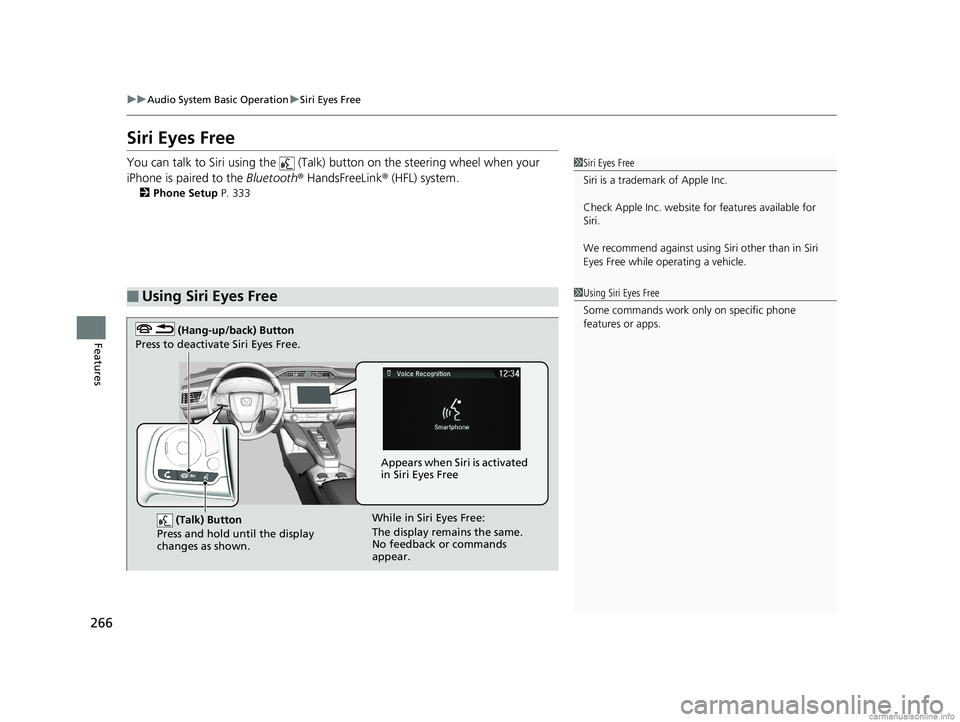
You can talk to Siri using the (Talk) button on the steering wheel when your
iPhone is paired to the Bluetooth® HandsFreeLink ® (HFL) system.
2Phone Setup P. 333
■Using Siri Eyes Free
1Siri Eyes Free
Siri is a trademark of Apple Inc.
Check Apple Inc. website for features available for
Siri.
We recommend against using Si ri other than in Siri
Eyes Free while operating a vehicle.
1 Using Siri Eyes Free
Some commands work only on specific phone
features or apps.
(Talk) Button
Press and hold until the display
changes as shown.
(Hang-up/back) Button
Press to deactivate Siri Eyes Free.
While in Siri Eyes Free:
The display remains the same.
No feedback or commands
appear. Appears when Siri is activated
in Siri Eyes Free
18 CLARITY ELECTRIC CSS-31TRV6100.book 266 ページ 2018年2月5日 月曜日 午後12時0分
Page 280 of 559
278
Features
General Information on the Audio System
SiriusXM® Radio Service
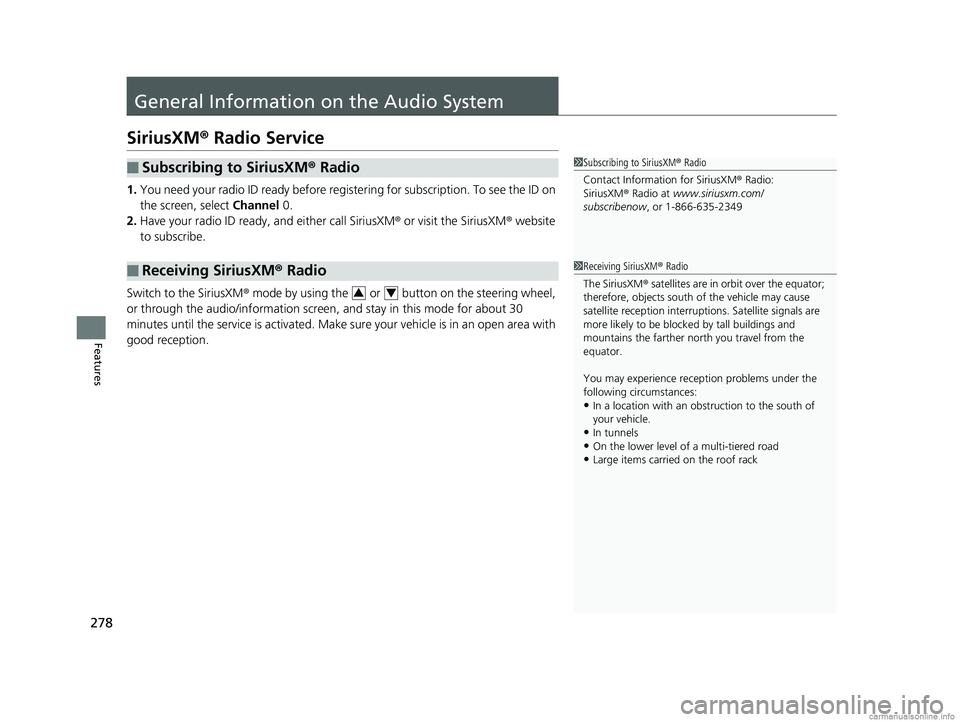
1. You need your radio ID ready before regist ering for subscription. To see the ID on
the screen, select Channel 0.
2. Have your radio ID ready, and either call SiriusXM ® or visit the SiriusXM ® website
to subscribe.
Switch to the SiriusXM ® mode by using the or button on the steering wheel,
or through the audio/information screen, and stay in this mode for about 30
minutes until the service is activated. Make sure your vehicle is in an open area with
good reception.
■Subscribing to SiriusXM ® Radio
■Receiving SiriusXM® Radio
1Subscribing to SiriusXM ® Radio
Contact Information for SiriusXM ® Radio:
SiriusXM ® Radio at www.siriusxm.com/
subscribenow , or 1-866-635-2349
1Receiving SiriusXM ® Radio
The SiriusXM ® satellites are in orbit over the equator;
therefore, objects south of the vehicle may cause
satellite reception interruptions. Sa tellite signals are
more likely to be blocked by tall buildings and
mountains the farther north you travel from the
equator.
You may experience rece ption problems under the
following circumstances:
•In a location with an obstruction to the south of
your vehicle.
•In tunnels
•On the lower level of a multi-tiered road•Large items carried on the roof rack
34
18 CLARITY ELECTRIC CSS-31TRV6100.book 278 ページ 2018年2月5日 月曜日 午後12時0分
Page 309 of 559
307
uuCustomized Features u
Continued
Features
*1:Default SettingSetup
Group Customizable Features Descri
ption Selectable Settings
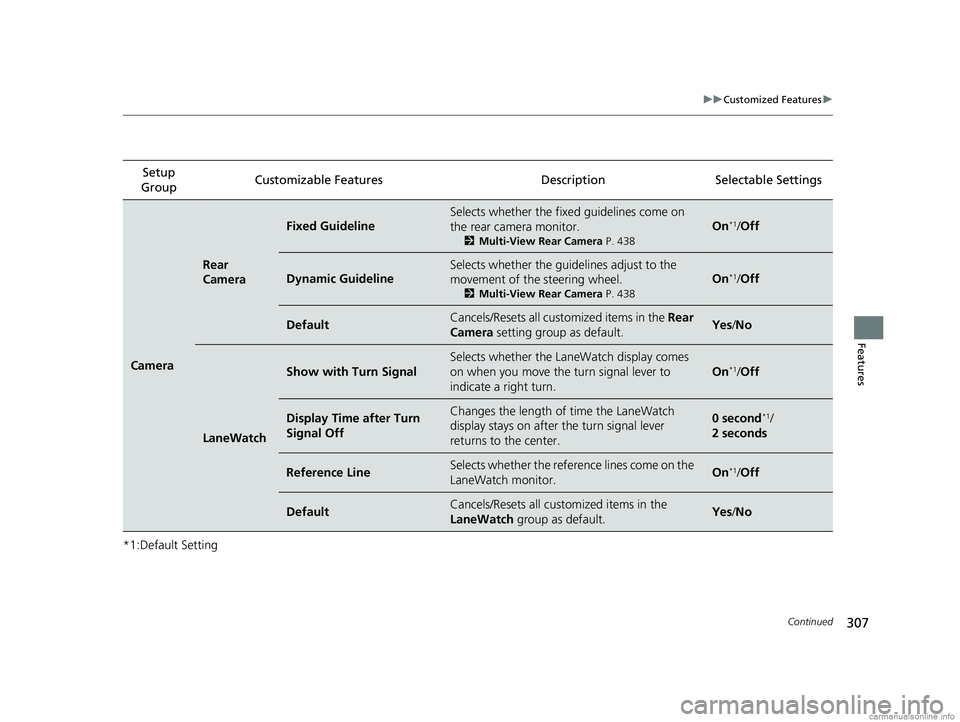
Camera
Rear
Camera
Fixed Guideline
Selects whether the fixed guidelines come on
the rear camera monitor.
2 Multi-View Rear Camera P. 438
On*1/Off
Dynamic Guideline
Selects whether the guid elines adjust to the
movement of the steering wheel.
2 Multi-View Rear Camera P. 438
On*1/Off
DefaultCancels/Resets all cust omized items in the Rear
Camera setting group as default.Yes/No
LaneWatch
Show with Turn Signal
Selects whether the LaneWatch display comes
on when you move the turn signal lever to
indicate a right turn.
On*1/ Off
Display Time after Turn
Signal OffChanges the length of time the LaneWatch
display stays on after the turn signal lever
returns to the center.0 second*1/
2 seconds
Reference LineSelects whether the refere nce lines come on the
LaneWatch monitor.On*1/ Off
DefaultCancels/Resets all cust omized items in the
LaneWatch group as default.Yes/No
18 CLARITY ELECTRIC CSS-31TRV6100.book 307 ページ 2018年2月5日 月曜日 午後12時0分