steering HONDA CLARITY ELECTRIC 2018 (in English) Repair Manual
[x] Cancel search | Manufacturer: HONDA, Model Year: 2018, Model line: CLARITY ELECTRIC, Model: HONDA CLARITY ELECTRIC 2018Pages: 559, PDF Size: 27.8 MB
Page 432 of 559
430
uuBraking uCollision Mitigation Braking SystemTM (CMBSTM)
Driving
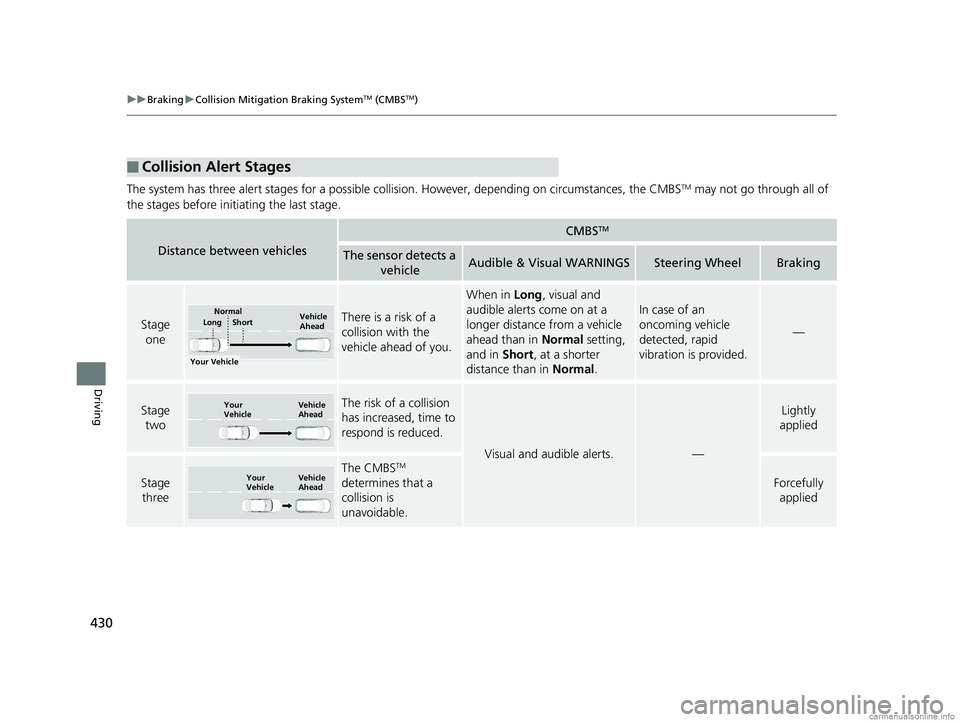
The system has three alert stages for a possible collis ion. However, depending on circumstances, the CMBSTM may not go through all of
the stages before initiating the last stage.
■Collision Alert Stages
Distance between vehicles
CMBSTM
The sensor detects a vehicleAudible & Visual WARNINGSSteering WheelBraking
Stage oneThere is a risk of a
collision with the
vehicle ahead of you.
When in Long, visual and
audible alerts come on at a
longer distance from a vehicle
ahead than in Normal setting,
and in Short, at a shorter
distance than in Normal.
In case of an
oncoming vehicle
detected, rapid
vibration is provided.
—
Stage
twoThe risk of a collision
has increased, time to
respond is reduced.
Visual and audible alerts.—
Lightly
applied
Stage three
The CMBSTM
determines that a
collision is
unavoidable.
Forcefully applied
Your Vehicle Vehicle
Ahead
Short
LongNormal
Your
Vehicle Vehicle
Ahead
Your
VehicleVehicle
Ahead
18 CLARITY ELECTRIC CSS-31TRV6100.book 430 ページ 2018年2月5日 月曜日 午後12時0分
Page 440 of 559
438
Driving
Multi-View Rear Camera
About Your Multi-View Rear Camera
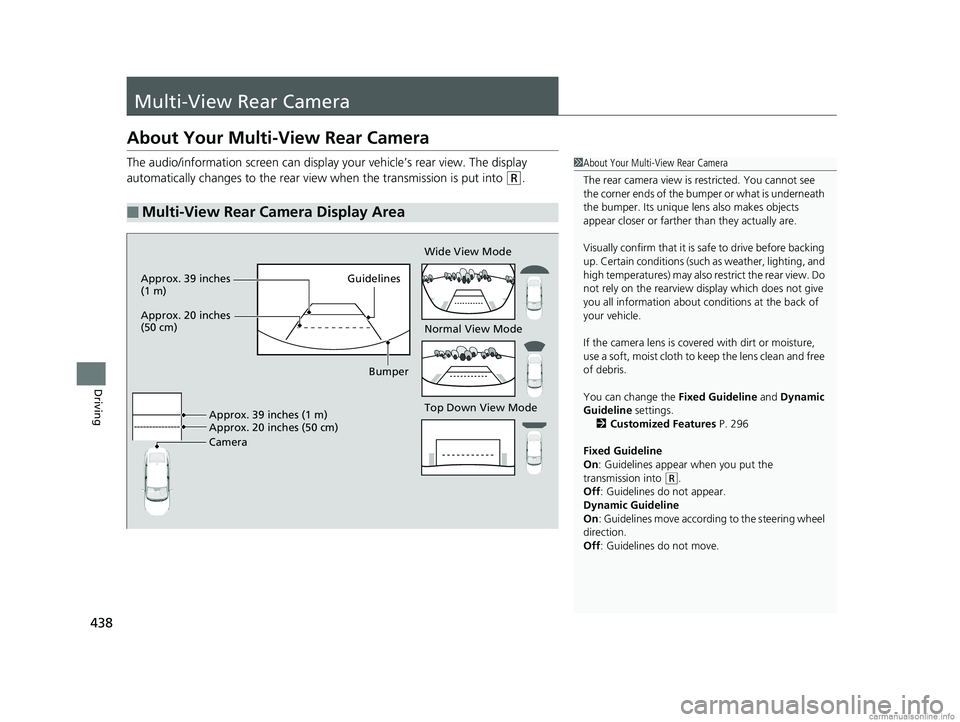
The audio/information screen can display your vehicle’s rear view. The display
automatically changes to the rear view when the transmission is put into
(R.
■Multi-View Rear Camera Display Area
1About Your Multi-View Rear Camera
The rear camera view is restricted. You cannot see
the corner ends of the bum per or what is underneath
the bumper. Its unique le ns also makes objects
appear closer or farther than they actually are.
Visually confirm that it is safe to drive before backing
up. Certain conditions (such as weather, lighting, and
high temperatures) may also restrict the rear view. Do
not rely on the rearview display which does not give
you all information about conditions at the back of
your vehicle.
If the camera lens is cove red with dirt or moisture,
use a soft, moist cloth to keep the lens clean and free
of debris.
You can change the Fixed Guideline and Dynamic
Guideline settings.
2 Customized Features P. 296
Fixed Guideline
On : Guidelines appear when you put the
transmission into
( R.
Off : Guidelines do not appear.
Dynamic Guideline
On : Guidelines move according to the steering wheel
direction.
Off : Guidelines do not move.
Top Down View Mode Normal View Mode Wide View Mode
Guidelines
Bumper
Camera Approx. 39 inches (1 m)
Approx. 20 inches (50 cm)
Approx. 39 inches
(1 m)
Approx. 20 inches
(50 cm)
18 CLARITY ELECTRIC CSS-31TRV6100.book 438 ページ 2018年2月5日 月曜日 午後12時0分
Page 465 of 559
463
uuMaintenance MinderTMuTo Use Maintenance MinderTM
Continued
Maintenance
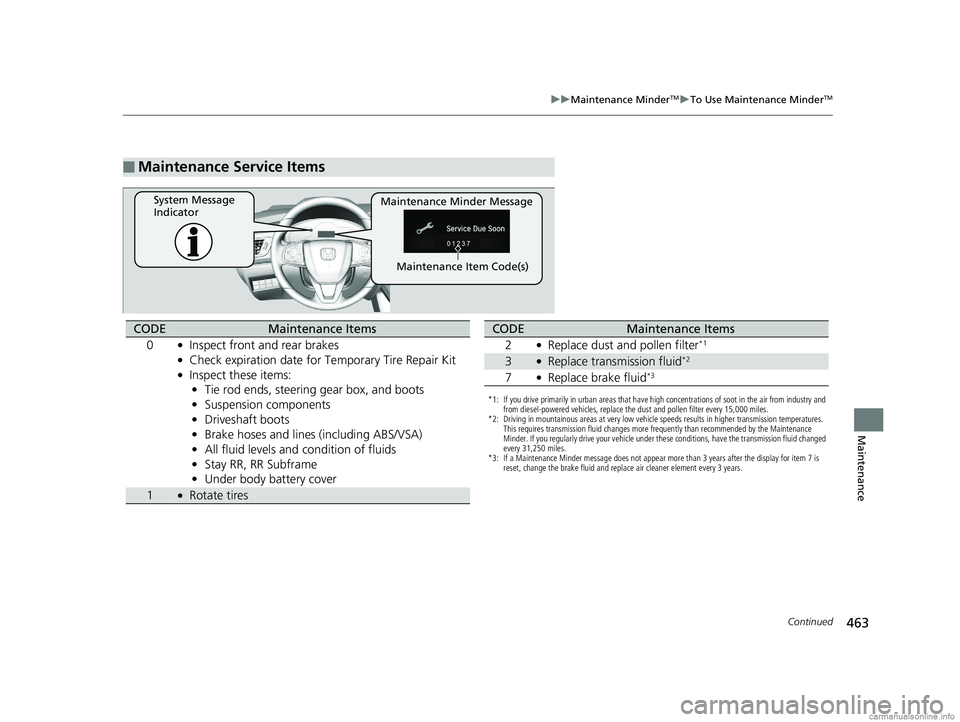
■Maintenance Service Items
Maintenance Minder Message
System Message
Indicator
Maintenance Item Code(s)
CODEMaintenance Items
0
●Inspect front and rear brakes●Check expiration date for Temporary Tire Repair Kit●Inspect these items: • Tie rod ends, steering gear box, and boots
• Suspension components
• Driveshaft boots
• Brake hoses and lines (including ABS/VSA)
• All fluid levels and condition of fluids
• Stay RR, RR Subframe
• Under body battery cover
1●Rotate tires
*1: If you drive primarily in urban areas that have high concentrations of soot in the air from industry and
from diesel-powered vehicles, replace the dust and pollen filter every 15,000 miles.
*2: Driving in mountainous areas at very low vehicle speeds results in higher transmission temperatures. This requires transmission fluid changes more frequently than recommended by the Maintenance
Minder. If you regularly drive your vehicle under these conditions, have the transmission fluid changed
every 31,250 miles.
*3: If a Maintenance Minder message does not appear more than 3 years after the display for item 7 is reset, change the brake fluid and replace air cleaner element every 3 years.
CODEMaintenance Items
2
●Replace dust and pollen filter*1
3●Replace transmission fluid*2
7●Replace brake fluid*3
18 CLARITY ELECTRIC CSS-31TRV6100.book 463 ページ 2018年2月5日 月曜日 午後12時0分
Page 485 of 559
483
uuChecking and Maintaining Tires uWinter Tires
Maintenance
Winter Tires
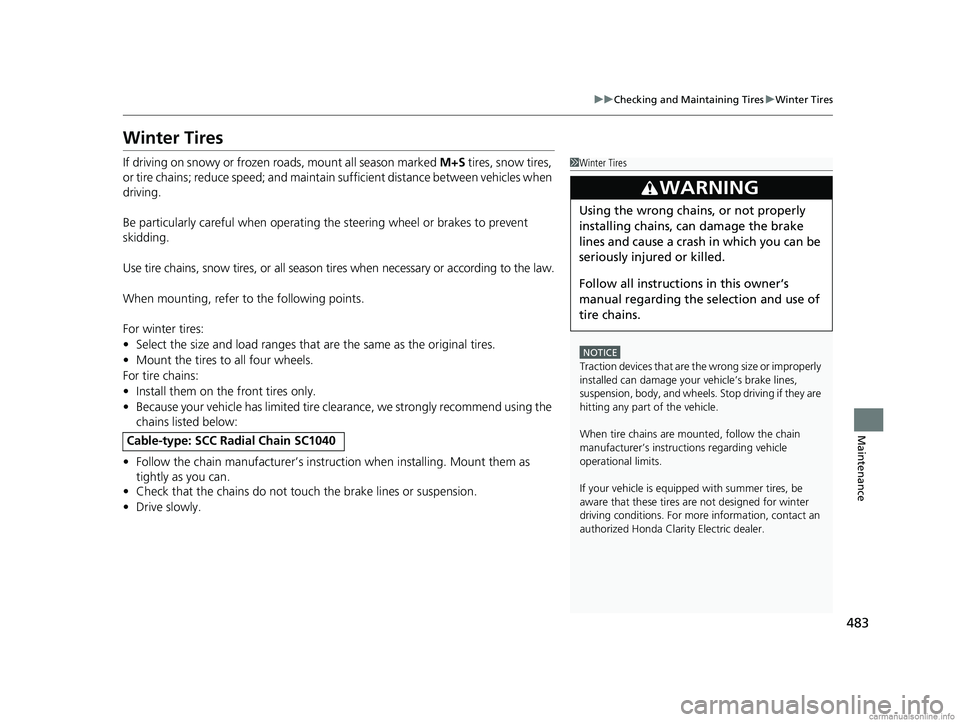
If driving on snowy or frozen roads, mount all season marked M+S tires, snow tires,
or tire chains; reduce speed; and maintain sufficient distance between vehicles when
driving.
Be particularly careful wh en operating the steering wheel or brakes to prevent
skidding.
Use tire chains, snow tires, or all season tires when necessary or according to the law.
When mounting, refer to the following points.
For winter tires:
• Select the size and load ranges that are the same as the original tires.
• Mount the tires to all four wheels.
For tire chains:
• Install them on the front tires only.
• Because your vehicle has limited tire clea rance, we strongly recommend using the
chains listed below:
• Follow the chain manufactur er’s instruction when installing. Mount them as
tightly as you can.
• Check that the chains do not touc h the brake lines or suspension.
• Drive slowly.
Cable-type: SCC Radial Chain SC1040
1Winter Tires
NOTICE
Traction devices that are th e wrong size or improperly
installed can damage your vehicle’s brake lines,
suspension, body, and wheels. Stop driving if they are
hitting any part of the vehicle.
When tire chains are mounted, follow the chain
manufacturer’s instructi ons regarding vehicle
operational limits.
If your vehicle is equipp ed with summer tires, be
aware that these tires are not designed for winter
driving conditions. For more information, contact an
authorized Honda Clarity Electric dealer.
3WARNING
Using the wrong chains, or not properly
installing chains, can damage the brake
lines and cause a crash in which you can be
seriously injured or killed.
Follow all instruction s in this owner’s
manual regarding the selection and use of
tire chains.
18 CLARITY ELECTRIC CSS-31TRV6100.book 483 ページ 2018年2月5日 月曜日 午後12時0分
Page 499 of 559
497
Handling the Unexpected
This chapter explains how to handle unexpected troubles.
If a Tire Goes FlatTemporarily Repairi ng a Flat Tire....... 498
Handling of the Jack ......................... 510
Power System Won’t Start Checking the Procedure ................... 511
If the Smart Entry Remote Battery is Weak .......................................... 512
Emergency Power System Off........... 513
Jump Starting .................................... 514
Overheating How to Handle Overheating ............. 517 Indicator, Coming On/Blinking
If the 12-Volt Battery Charging System Indicator Comes On ....................... 518
If the Brake System Indicator (Red) Comes On or Blinks ....................................... 519
If the Electric Power Steering (EPS) System
Indicator Comes On ........................... 520If the Brake System Indicator (Red) Comes On or Blinks at the Same Time
When the Brake System Indicator
(Amber) Comes On ...................... 521
If the Low Tire Pressure/TPMS Indicator
Comes On or Blinks........................ 522 If the Transmission System Indicator Blinks
along with the Warning Message .... 523
Fuses
Fuse Locations ................................. 524
Inspecting and Changing Fuses ........ 530
Emergency Towing ........................... 531
When You Cannot Open the Charge
Lid ................................................. 532
When You Cannot Disengage the Charging
Connector.................................................533When You Cannot Open the Trunk .. 534
18 CLARITY ELECTRIC CSS-31TRV6100.book 497 ページ 2018年2月5日 月曜日 午後12時0分
Page 500 of 559
498
Handling the Unexpected
If a Tire Goes Flat
Temporarily Repairing a Flat Tire
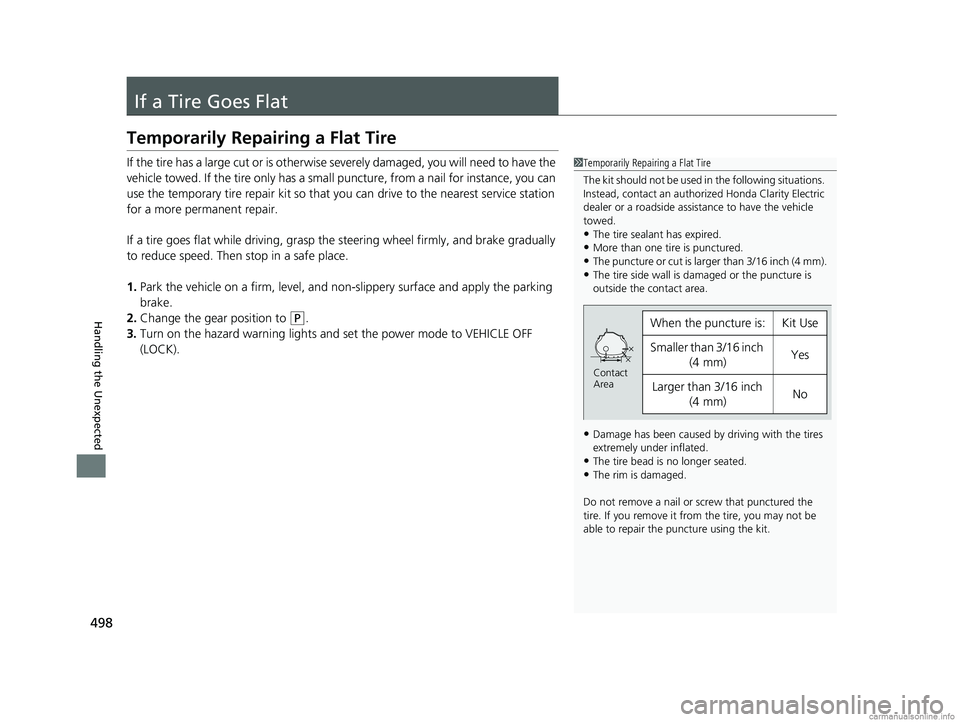
If the tire has a large cut or is otherwise severely damaged, you will need to have the
vehicle towed. If the tire only has a smal l puncture, from a nail for instance, you can
use the temporary tire repair kit so that you can drive to the nearest service station
for a more permanent repair.
If a tire goes flat while driving, grasp the steering wheel firmly, and brake gradually
to reduce speed. Then stop in a safe place.
1. Park the vehicle on a firm, level, and non-slippery surface and apply the parking
brake.
2. Change the gear position to
(P.
3. Turn on the hazard warning lights an d set the power mode to VEHICLE OFF
(LOCK).
1 Temporarily Repairing a Flat Tire
The kit should not be used in the following situations.
Instead, contact an authorized Honda Clarity Electric
dealer or a roadside assistance to have the vehicle
towed.
•The tire sealant has expired.•More than one tire is punctured.
•The puncture or cut is larger than 3/16 inch (4 mm).
•The tire side wall is da maged or the puncture is
outside the contact area.
•Damage has been caused by driving with the tires
extremely under inflated.
•The tire bead is no longer seated.•The rim is damaged.
Do not remove a nail or screw that punctured the
tire. If you remove it from the tire, you may not be
able to repair the puncture using the kit.
When the puncture is:Kit Use
Smaller than 3/16 inch (4 mm)Yes
Larger than 3/16 inch
(4 mm)No
Contact
Area
18 CLARITY ELECTRIC CSS-31TRV6100.book 498 ページ 2018年2月5日 月曜日 午後12時0分
Page 515 of 559
513
uuPower System Won’t StartuEmergency Power System Off
Handling the Unexpected
Emergency Power System Off
The POWER button may be used to turn the power system off due to an emergency
situation even while driving. If you must tu rn the power system off, do either of the
following operations:
• Press and hold the POWER button for about two seconds.
• Firmly press the POWER button three times.
The steering wheel will not lock. However, because turning off the power system
disables the power assist the power syst em provides to the steering and braking
systems, it will require significantly more physical effort and time to steer and slow
the vehicle. Use both feet on the brake pe dal to slow down the vehicle and stop
immediately in a safe place.
The gear position auto matically changes to
(P after the vehicle comes to a complete
stop. Then, the power mode changes to VEHICLE OFF.
1 Emergency Power System Off
Do not press the button while driving unless it is
absolutely necessary for the power system to be
turned off.
18 CLARITY ELECTRIC CSS-31TRV6100.book 513 ページ 2018年2月5日 月曜日 午後12時0分
Page 522 of 559
520
uuIndicator, Coming On/Blinking uIf the Electric Power Steering (EPS) System Indicator Comes On
Handling the Unexpected
If the Electric Power Steeri ng (EPS) System Indicator
Comes On
■Reasons for the indicator to come on
• Comes on when there is a problem with the EPS system.
• If you depress the accelerator pedal repeatedly to increase the motor
speed while the motor is idling, the indicator comes on, and
sometimes the steering wheel becomes harder to operate.
• Comes on when the EPS st eering angle center point memory is lost.
This could be due to a number of problems including: battery
disconnection, main fuse blow, low battery causing the reset of the
EPS system, wire damage to EPS harness. Vehicle Stability Assist®
(VSA ®), VSA ® OFF, Collision Mitigation Braking System
TM (CMBSTM),
and low tire pressure/TPMS indicato rs come on along with a message
in the driver information interface.
■What to do when the indicator comes on
• Stop the vehicle in a safe place, tu rn off the power system, and turn
on the power system again.
If the indicator re-appears and stays on, immediately have your vehicle
inspected by an authorized Ho nda Clarity Electric dealer.
• If VSA ® indicator, VSA ® OFF indicator, CMBS
TM indicator, and low tire
pressure/TPMS indicator come on alo ng with a message in the driver
information interface, you need to calibrate the VSA and EPS systems.
Drive a short distance at more than 12 mph (20 km/h) to calibrate the
VSA and EPS systems.
If the indicators come on and stay on, park your vehicle in a safe
place, turn off and turn on the pow er system, then repeat the above
operation.
If the indicators still come on and stay on, immediately have your
vehicle inspected by an authorized Honda Clarity Electric dealer.
18 CLARITY ELECTRIC CSS-31TRV6100.book 520 ページ 2018年2月5日 月曜日 午後12時0分
Page 548 of 559
Index
546
Index
Index
Numbers
120V AC (AC Level 1)................................ 442
12-Volt Battery Charging System Indicator .................................................... 86
240V AC (AC Level 2) ................................ 444
A
ABS (Anti-lock Brake System) ................... 426
Accessories and Modifications ................. 494
Accessory Power Sockets .......................... 182
Acoustic Vehicle Alerting System ............ 382
Adaptive Cruise Control (ACC) with
Low Speed Follow (LSF) .................... 97, 389
Additives Washer .................................................... 469
Adjusting Armrest ................................................... 175
Front Seats .............................................. 169
Head Restraints........................................ 171
Mirrors .................................................... 167
Steering Wheel ........................................ 166
Temperature ............................................ 122
Agile Handling Assist ................................ 413
Air Conditioning System (Climate Control System) .................................................... 186
Changing the Mode ................................ 188
Defrosting the Windshield and Windows ............................................... 190
Dust and Pollen Filter ............................... 487
Sensors .................................................... 194 Synchronization Mode............................. 191
Using Automatic Climate Control ............ 186
Air Pressure ....................................... 476, 537
Airbags ........................................................ 52
Advanced Airbags ..................................... 58
Airbag Care............................................... 66
Driver’s Knee Airbag.................................. 59
Event Data Recorder .................................... 0
Front Airbags (SRS) .................................... 55
Indicator.............................................. 64, 90
Passenger Front Airbag Off Indicator ......... 65
Sensors ..................................................... 52
Side Airbags .............................................. 61
Side Curtain Airbags.................................. 63
AM/FM Radio ............................................ 233
Android Auto ........................................... 270
Anti-lock Brake System (ABS) .................. 426
Indicator.................................................... 89
Apple CarPlay ........................................... 267
Armrest ..................................................... 175
Audio Remote Controls ........................... 199
Audio System .................................... 196, 202
Adjusting the Sound................................ 226
Audio/Information Screen........................ 203
Changing the Home Screen Icon Layout .. 209
Changing the Screen Interface ................ 223
Closing Apps ........................................... 225
Customizing the Meter............................ 209
Display Setup .......................................... 227
Error Messages ........................................ 274
General Information ................................ 278 Home Screen .......................................... 215
Limitations for Manual Operation ............ 228
Menu Customize .................................... 224
MP3/WMA/AAC ..................................... 254
Reactivating ............................................ 198
Recommended Devices ........................... 280
Remote Controls ..................................... 199
Security Code ......................................... 198
Selecting an Audio Source ...................... 228
Status Area ............................................. 222
Theft Protection ...................................... 198
USB Flash Drives...................................... 280
USB Port ................................................. 197
Wallpaper Setup ..................................... 213
Audio/Information Screen ....................... 203
Authorized Manuals ................................ 543
Auto Door Locking/Unlocking ................ 143
Automatic Brake Hold ............................. 424
Indicator ........................................... 83, 424
Automatic Brake Hold System Indicator ........................................... 83, 424
Automatic Lighting .................................. 157
Average Energy Consumption ........ 122, 125
Average Speed ......................................... 123
B
Battery
12-Volt ................................................... 484
12-Volt Battery Charging System
Indicator ......................................... 86, 518
18 CLARITY ELECTRIC CSS-31TRV6100.book 546 ページ 2018年2月5日 月曜日 午後12時0分
Page 550 of 559
548
Index
Coolant...................................................... 467
Overheating............................................. 517
Creeping (Transmission) ........................... 370
Cup Holders ............................................... 180
Customer Service Information ................. 544
Customized Features ........................ 128, 296
D
Daytime Running Lights ........................... 159
Dead Battery (12-Volt) ............................. 514
Deceleration Paddle Selector ................... 379
Defrosting the Windshield and
Windows .................................................. 190
Devices that Emit Radio Waves ................ 539
Dimming
Headlights ............................................... 156
Rearview Mirror ....................................... 167
Directional Signals (Turn Signal) .............. 155
Display Button .......................................... 203
Door Mirrors ............................................. 168
Doors ......................................................... 131
Auto Door Locking .................................. 143
Auto Door Unlocking ............................... 143
Door Open Message .................................. 43
Keys ........................................................ 131
Locking/Unlocking the Doors from the
Inside ............................................... 25, 140
Locking/Unlocking the Doors from the Outside .................................................. 133
Lockout Prevention System ...................... 139 DOT Tire Quality Grading
........................ 478
Driver Information Interface ................... 120
Driver’s Knee Airbag .................................. 59
Driving ...................................................... 359
Braking ................................................... 420
Shifting Gear ........................................... 371
Transmission ........................................... 370
Turning on the Power.............................. 366
Driving Position Memory System ............ 164
Dust and Pollen Filter ............................... 487
E
Eco Assist® System ...................................... 20
Eco Drive Display/Drive Cycle Score/ Lifetime Points ........................................ 126
ECON Mode .............................................. 377
Elapsed Time ............................................. 123
Electric Power Steering (EPS) System Indicator............................................ 90, 520
Electric Vehicle Precautions ....................... 15
Electricity Consumption and Driving Range ........................................................ 19
Electricity Consumption Indicator
(ENERGY USAGE) .................................... 119
Electronic Stability Control (ESC) ............. 411
Emergency ................................................ 531
Energy Instant Energy Economy .......................... 123
Range ..................................................... 116
Energy Economy ....................................... 456 EPS (Electric Power Steering) System
........ 90
Expanded View Driver’s Mirror ............... 168
Exterior Care (Cleaning) .......................... 490
Exterior Mirrors ........................................ 168
F
Features.................................................... 195
Filters Dust and Pollen....................................... 487
Flat Tire ..................................................... 498
Floor Mats ................................................ 489
Fluids
Brake ...................................................... 468
Coolant .................................................. 467
Transmission ........................................... 468
Windshield Washer ................................. 469
FM/AM Radio ........................................... 233
Foot Brake ................................................ 423
Front Airbags (SRS) .................................... 55
Front Seat Heaters ................................... 184
Front Seats ................................................ 169
Adjusting ................................................ 169
Front Sensor Camera ............................... 383
Fuses ......................................................... 524
Inspecting and Changing ........................ 530
Locations ........................................ 524, 526
G
Gauges ...................................................... 116
18 CLARITY ELECTRIC CSS-31TRV6100.book 548 ページ 2018年2月5日 月曜日 午後12時0分