wiper blades HONDA CLARITY ELECTRIC 2018 Owner's Manual (in English)
[x] Cancel search | Manufacturer: HONDA, Model Year: 2018, Model line: CLARITY ELECTRIC, Model: HONDA CLARITY ELECTRIC 2018Pages: 559, PDF Size: 27.8 MB
Page 6 of 559
Contents
This owner’s manual should be considered a permanent part of the
vehicle and should remain with the vehicle when it is sold.
This owner’s manual covers all models of your vehicle. You may find
descriptions of equipment and features that are not on your
particular model.
Images throughout this owner’s manual (including the front cover)
represent features and equipment that are available on some, but
not all, models. Your particular mo del may not have some of these
features.
The information and specifications in cluded in this publication were
in effect at the time of approval for printing. Honda Motor Co., Ltd.
reserves the right, however, to discontinue or change specifications
or design at any time without notice and without incurring any
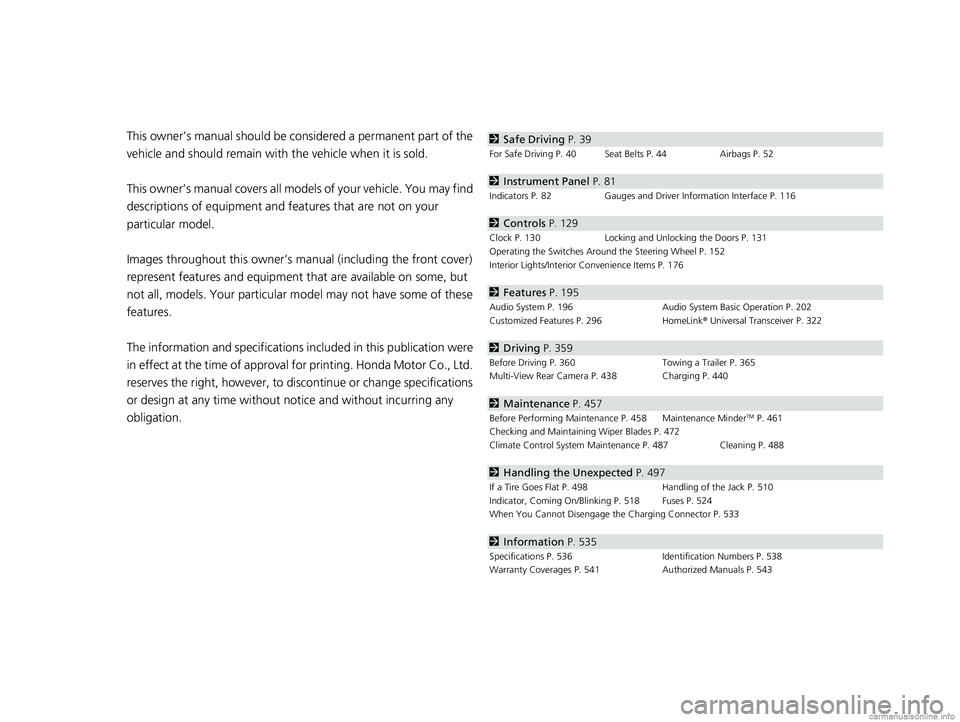
obligation.2 Safe Driving P. 39
For Safe Driving P. 40 Seat Belts P. 44 Airbags P. 52
2Instrument Panel P. 81
Indicators P. 82 Gauges and Driver Information Interface P. 116
2Controls P. 129
Clock P. 130 Locking and Unlocking the Doors P. 131
Operating the Switches Around the Steering Wheel P. 152
Interior Lights/Interior Convenience Items P. 176
2 Features P. 195
Audio System P. 196 Audio System Basic Operation P. 202
Customized Features P. 296 HomeLink® Universal Transceiver P. 322
2 Driving P. 359
Before Driving P. 360 Towing a Trailer P. 365
Multi-View Rear Camera P. 438 Charging P. 440
2 Maintenance P. 457
Before Performing Maintenance P. 458 Maintenance MinderTM P. 461
Checking and Maintaining Wiper Blades P. 472
Climate Control System Main tenance P. 487 Cleaning P. 488
2Handling the Unexpected P. 497
If a Tire Goes Flat P. 498 Handling of the Jack P. 510
Indicator, Coming On/Blinking P. 518 Fuses P. 524
When You Cannot Disengage the Charging Connector P. 533
2Information P. 535
Specifications P. 536 Identification Numbers P. 538
Warranty Coverages P. 541 Authorized Manuals P. 543
18 CLARITY ELECTRIC CSS-31TRV6100.book 4 ページ 2018年2月5日 月曜日 午後12時0分
Page 36 of 559
34
Quick Reference Guide
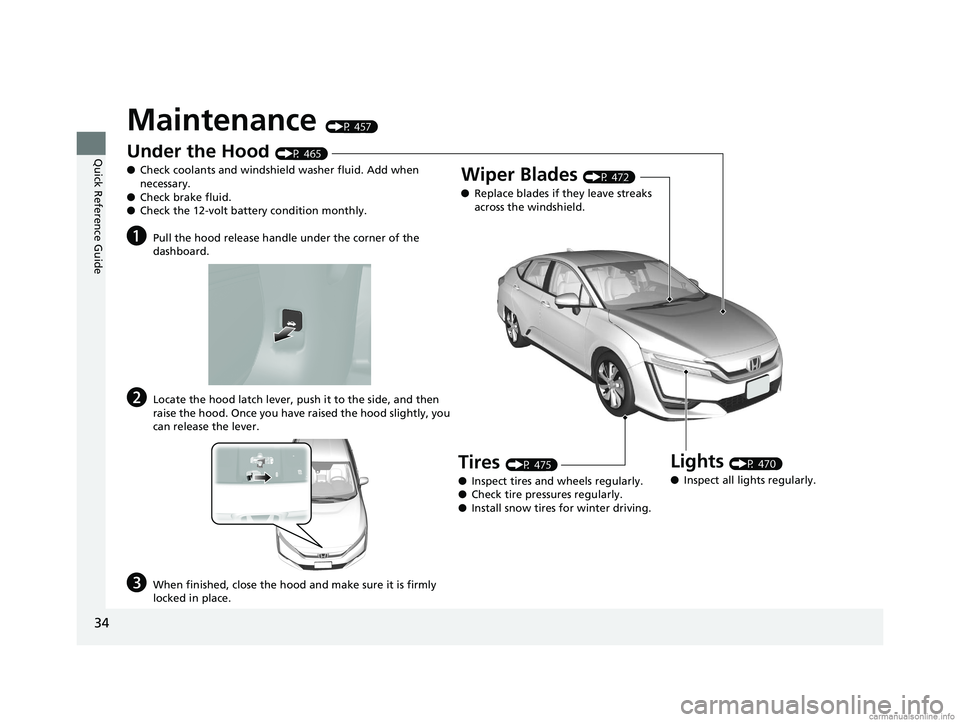
Maintenance (P 457)
Under the Hood (P 465)
● Check coolants and windshield washer fluid. Add when
necessary.
● Check brake fluid.
● Check the 12-volt battery condition monthly.
aPull the hood release handle under the corner of the
dashboard.
bLocate the hood latch lever, push it to the side, and then
raise the hood. Once you have raised the hood slightly, you
can release the lever.
cWhen finished, close the hood and make sure it is firmly
locked in place.
Lights (P 470)
● Inspect all lights regularly.
Wiper Blades (P 472)
● Replace blades if they leave streaks
across the windshield.
Tires (P 475)
● Inspect tires and wheels regularly.
● Check tire pressures regularly.
● Install snow tires for winter driving.
18 CLARITY ELECTRIC CSS-31TRV6100.book 34 ページ 2018年2月5日 月曜日 午後12時0分
Page 162 of 559
160
uuOperating the Switches Around the Steering Wheel uWipers and Washers
Controls
Wipers and Washers
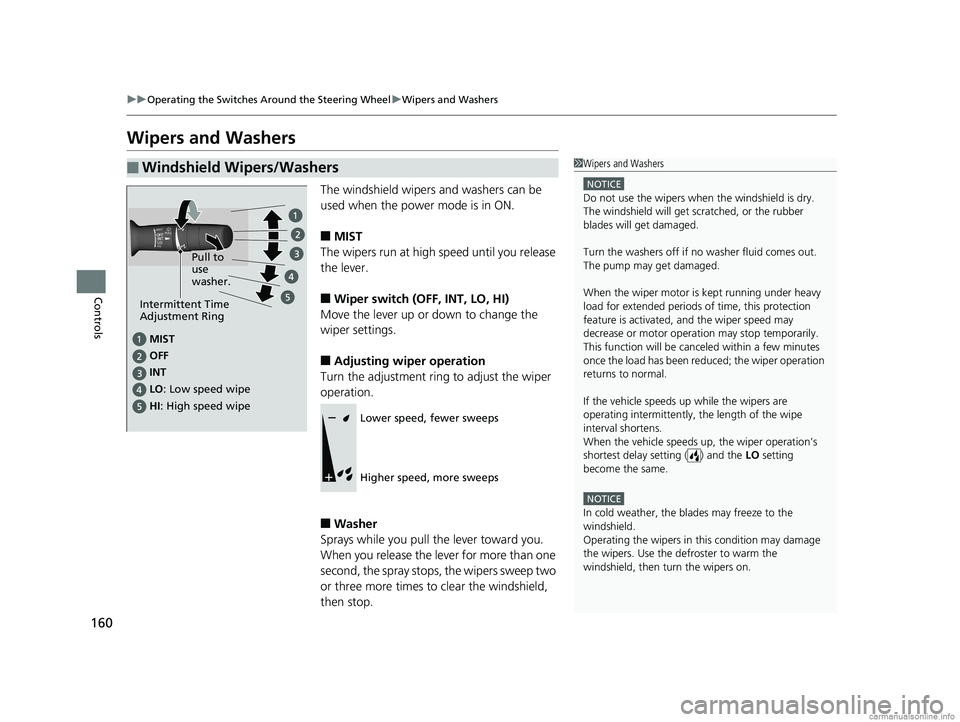
The windshield wipers and washers can be
used when the power mode is in ON.
■MIST
The wipers run at high speed until you release
the lever.
■Wiper switch (OFF, INT, LO, HI)
Move the lever up or down to change the
wiper settings.
■Adjusting wiper operation
Turn the adjustment ring to adjust the wiper
operation.
■Washer
Sprays while you pull the lever toward you.
When you release the lever for more than one
second, the spray stops, the wipers sweep two
or three more times to clear the windshield,
then stop.
■Windshield Wipers/Washers1 Wipers and Washers
NOTICE
Do not use the wipers when the windshield is dry.
The windshield will get sc ratched, or the rubber
blades will get damaged.
Turn the washers off if no washer fluid comes out.
The pump may get damaged.
When the wiper motor is kept running under heavy
load for extended periods of time, this protection
feature is activated, and the wiper speed may
decrease or motor operat ion may stop temporarily.
This function will be canceled within a few minutes
once the load has been reduced; the wiper operation
returns to normal.
If the vehicle speeds up while the wipers are
operating intermittently, the length of the wipe
interval shortens.
When the vehicle speeds up, the wiper operation’s
shortest delay setting ( ) and the LO setting
become the same.
NOTICE
In cold weather, the blades may freeze to the
windshield.
Operating the wipers in th is condition may damage
the wipers. Use the defroster to warm the
windshield, then turn the wipers on.
MIST
OFF
LO: Low speed wipe
HI : High speed wipe Pull to
use
washer.
INT
Intermittent Time
Adjustment Ring
Lower speed, fewer sweeps
Higher speed, more sweeps
18 CLARITY ELECTRIC CSS-31TRV6100.book 160 ページ 2018年2月5日 月曜日 午後12時0分
Page 459 of 559
457
Maintenance
This chapter discusses basic maintenance.
Before Performing MaintenanceInspection and Maintenance ............ 458
Safety When Performing Maintenance...459
Parts and Fluids Used in Maintenance Service ........................................... 460
Maintenance Minder
TM..................... 461
Maintenance Under the Hood Maintenance Items Under the Hood .. 465
Opening the Hood ........................... 466
Cooling System ................................ 467
Transmission Fluid ............................ 468
Brake Fluid ....................................... 468 Refilling Window Wa
sher Fluid......... 469
Replacing Light Bulbs ....................... 470
Checking and Maintaining Wiper
Blades .......................................... 472
Checking and Maintaining Tires
Checking Tires ................................. 475
Tire and Loading Information Label .. 476
Tire Labeling .................................... 476
DOT Tire Quality Grading (U.S. Vehicles).. 478
Wear Indicators................................ 480
Tire Service Life ................................ 480
Tire and Wheel Replacement............ 481 Tire Rotation .................................... 482
Winter Tires ..................................... 483
12-Volt Battery ................................. 484
Remote Transmitter Care Replacing the Button Battery ........... 486
Climate Control System Maintenance.. 487
CleaningInterior Care .................................... 488
Exterior Care.................................... 490
Accessories and Modifications ........ 494
18 CLARITY ELECTRIC CSS-31TRV6100.book 457 ページ 2018年2月5日 月曜日 午後12時0分
Page 460 of 559
458
Maintenance
Before Performing Maintenance
Inspection and Maintenance
For your safety, perform all listed inspections and maintenance to keep your vehicle
in good condition. If you become aware of any abnormality (noise, smell, insufficient
brake fluid, fluid residue on th e ground, etc.), have your vehicle inspected by an
authorized Honda Clarity Electric dealer. (Note, however, that service at an
authorized Honda Clarity Elec tric dealer is not mandatory to keep your warranties in
effect.)
■Daily inspections
Perform inspections before long distance tri ps, when washing the vehicle, or when
charging.
■Periodic inspections
• Check the brake fluid level monthly.
2 Brake Fluid P. 468
•Check the tire pressure monthly. Examin e the tread for wear and foreign objects.
2Checking and Maintaining Tires P. 475
•Check the operation of the exterior lights monthly.
2 Replacing Light Bulbs P. 470
•Check the condition of the wiper bl ades at least every six months.
2Checking and Maintaining Wiper Blades P. 472
■Types of Inspection and Maintenance
1Inspection and Maintenance
At this time, maintenance involving the high-voltage
system should only be perf ormed at an authorized
Honda Clarity Electric dealer.
All maintenance services should be performed in
accordance with the intervals indicated by the driver
information interface. 2 Maintenance Service Items P. 463
If you want to perform basic maintenance yourself,
make sure that you have th e necessary tools and skills
first.
After performing ma intenance, update the records in
the separate maintenance booklet.
18 CLARITY ELECTRIC CSS-31TRV6100.book 458 ページ 2018年2月5日 月曜日 午後12時0分
Page 474 of 559
472
Maintenance
Checking and Maintaining Wiper Blades
Checking Wiper Blades
If the wiper blade rubber has deteriorated, it will leave streaks and the hard surfaces
of the blade may scratch the window glass.
Changing the Wiper Blade Rubber
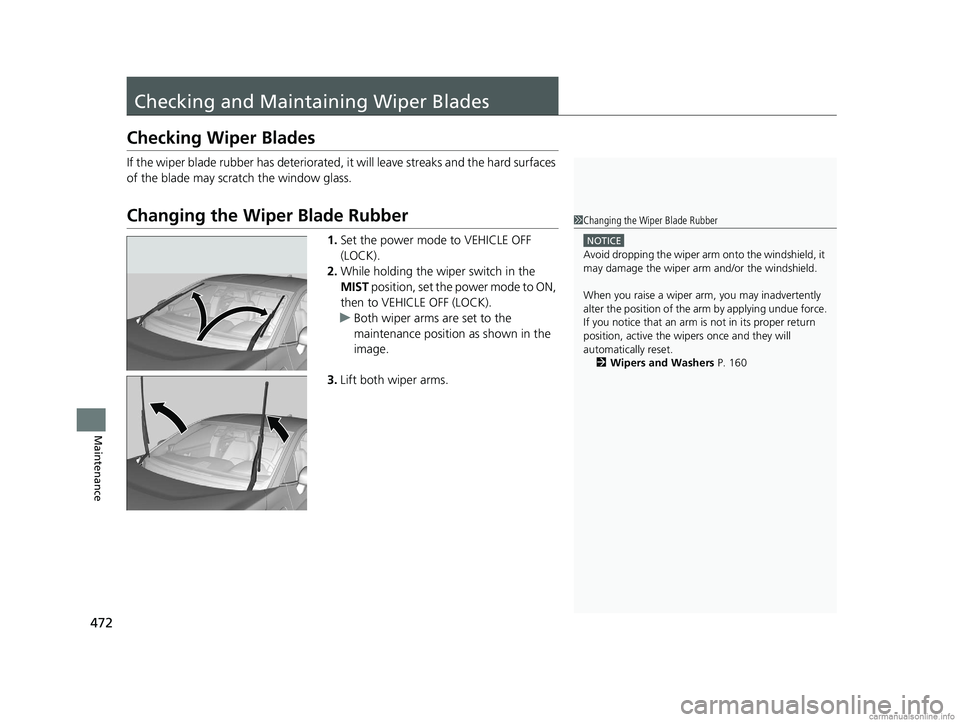
1. Set the power mode to VEHICLE OFF
(LOCK).
2. While holding the wiper switch in the
MIST position, set the power mode to ON,
then to VEHICLE OFF (LOCK).
u Both wiper arms are set to the
maintenance position as shown in the
image.
3. Lift both wiper arms.
1Changing the Wiper Blade Rubber
NOTICE
Avoid dropping the wiper arm onto the windshield, it
may damage the wiper arm and/or the windshield.
When you raise a wiper arm, you may inadvertently
alter the position of the arm by applying undue force.
If you notice that an arm is not in its proper return
position, active the wipers once and they will
automatically reset. 2 Wipers and Washers P. 160
18 CLARITY ELECTRIC CSS-31TRV6100.book 472 ページ 2018年2月5日 月曜日 午後12時0分
Page 475 of 559
473
uuChecking and Maintaining Wiper Blades uChanging the Wiper Blade Rubber
Continued
Maintenance
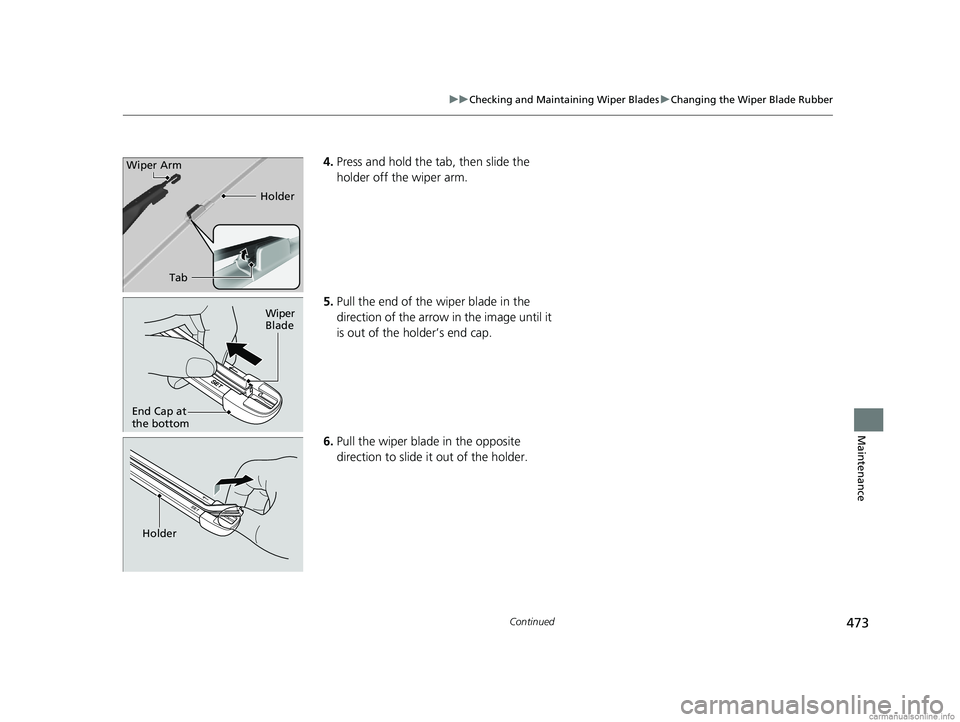
4. Press and hold the ta b, then slide the
holder off the wiper arm.
5. Pull the end of the wiper blade in the
direction of the arrow in the image until it
is out of the holder’s end cap.
6. Pull the wiper blade in the opposite
direction to slide it out of the holder.
Tab Holder
Wiper Arm
Wiper
Blade
End Cap at
the bottom
Holder
18 CLARITY ELECTRIC CSS-31TRV6100.book 473 ページ 2018年2月5日 月曜日 午後12時0分
Page 476 of 559
474
uuChecking and Maintaining Wiper Blades uChanging the Wiper Blade Rubber
Maintenance
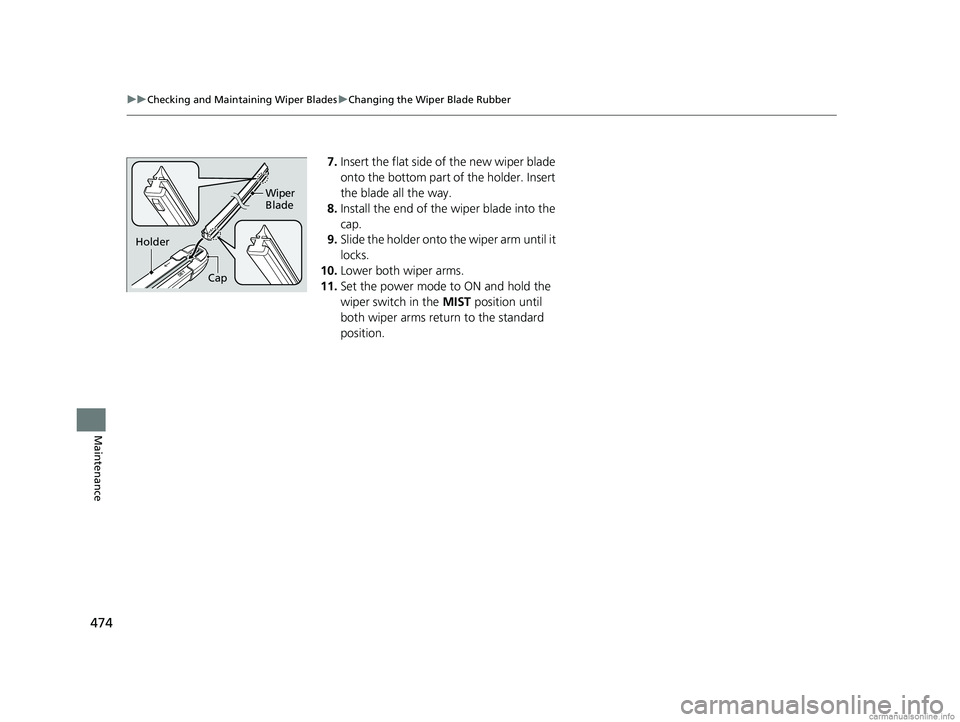
7. Insert the flat side of the new wiper blade
onto the bottom part of the holder. Insert
the blade all the way.
8. Install the end of the wiper blade into the
cap.
9. Slide the holder onto the wiper arm until it
locks.
10. Lower both wiper arms.
11. Set the power mode to ON and hold the
wiper switch in the MIST position until
both wiper arms return to the standard
position.
Cap Wiper
Blade
Holder
18 CLARITY ELECTRIC CSS-31TRV6100.book 474 ページ 2018年2月5日 月曜日 午後12時0分
Page 555 of 559
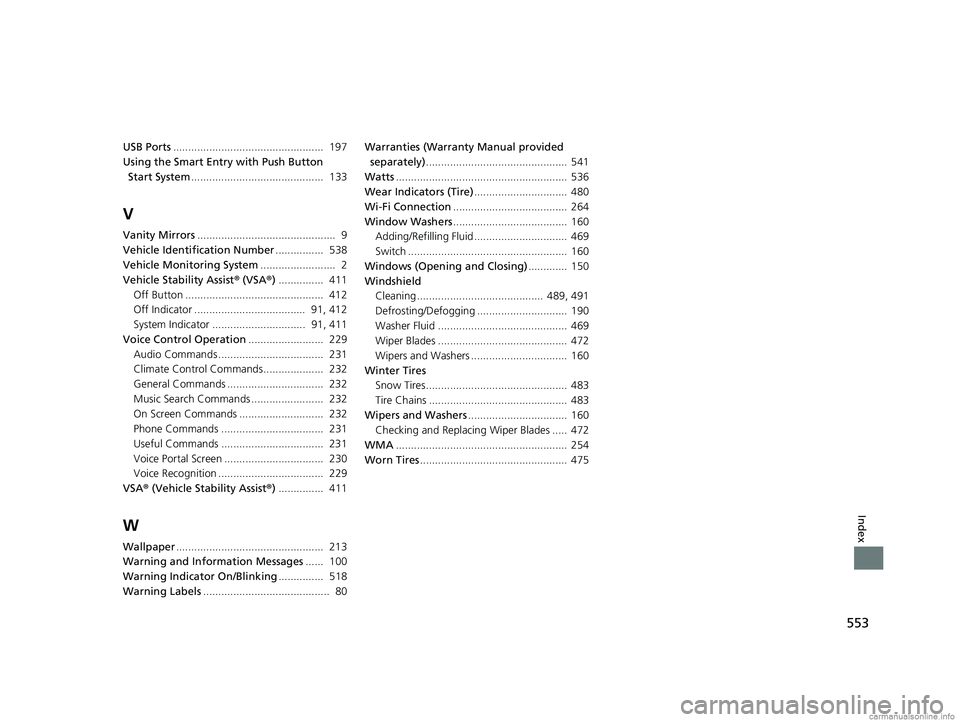
553
Index
USB Ports.................................................. 197
Using the Smart Entr y with Push Button
Start System ............................................ 133
V
Vanity Mirrors .............................................. 9
Vehicle Identification Number ................ 538
Vehicle Monitoring System ......................... 2
Vehicle Stability Assist ® (VSA ®) ............... 411
Off Button .............................................. 412
Off Indicator ..................................... 91, 412
System Indicator ............................... 91, 411
Voice Control Operation ......................... 229
Audio Commands ................................... 231
Climate Control Commands.................... 232
General Commands ................................ 232
Music Search Commands ........................ 232
On Screen Commands ............................ 232
Phone Commands .................................. 231
Useful Commands .................................. 231
Voice Portal Screen ................................. 230
Voice Recognition ................................... 229
VSA ® (Vehicle Stability Assist ®) ............... 411
W
Wallpaper ................................................. 213
Warning and Info rmation Messages ...... 100
Warning Indicator On/Blinking ............... 518
Warning Labels .......................................... 80 Warranties (Warranty Manual provided
separately) ............................................... 541
Watts ......................................................... 536
Wear Indicators (Tire) ............................... 480
Wi-Fi Connection ...................................... 264
Window Washers ...................................... 160
Adding/Refilling Fluid ............................... 469
Switch ..................................................... 160
Windows (Opening and Closing) ............. 150
Windshield Cleaning .......................................... 489, 491
Defrosting/Defogging .............................. 190
Washer Fluid ........................................... 469
Wiper Blades ........................................... 472
Wipers and Washers ................................ 160
Winter Tires Snow Tires ............................................... 483
Tire Chains .............................................. 483
Wipers and Washers ................................. 160
Checking and Replacing Wiper Blades ..... 472
WMA ......................................................... 254
Worn Tires ................................................. 475
18 CLARITY ELECTRIC CSS-31TRV6100.book 553 ページ 2018年2月5日 月曜日 午後12時0分