climate control HONDA CLARITY FUEL CELL 2017 Owner's Manual (in English)
[x] Cancel search | Manufacturer: HONDA, Model Year: 2017, Model line: CLARITY FUEL CELL, Model: HONDA CLARITY FUEL CELL 2017Pages: 527, PDF Size: 17.62 MB
Page 4 of 527
Contents
This owner’s manual should be considered a permanent part of the
vehicle and should remain with the vehicle when it is sold.
This owner’s manual covers all models of your vehicle. You may find
descriptions of equipment and features that are not on your
particular model.
Images throughout this owner’s manu al (including the front cover)
represent features and equipment that are available on some, but
not all, models. Your particular mo del may not have some of these
features.
The information and specifications in cluded in this publication were
in effect at the time of approval for printing. Honda Motor Co., Ltd.
reserves the right, however, to discontinue or change specifications
or design at any time without notice and without incurring any
obligation.2 Safe Driving P. 41
For Safe Driving P. 42 Seat Belts P. 46 Airbags P. 53
2Instrument Panel P. 83
Indicators P. 84 Gauges and Displays P. 114
2Controls P. 129
Clock P. 130 Locking and Unlocking the Doors P. 131
Operating the Switches Ar ound the Steering Wheel P. 151
Interior Lights/Interior Convenience Items P. 175
2 Features P. 193
Audio System P. 194 Audio System Basic Operation P. 200
Customized Features P. 284 HomeLink® Universal Transceiver P. 309
2 Driving P. 345
Before Driving P. 346 Towing a Trailer P. 351
Multi-View Rear Camera P. 420 Refueling P. 422
2 Maintenance P. 427
Before Performing Maintenance P. 428 Maintenance MinderTM P. 431
Checking and Maintaining Wiper Blades P. 443
Climate Control System Main tenance P. 457 Cleaning P. 458
2Handling the Unexpected P. 465
If a Tire Goes Flat P. 466 Handling of the Jack P. 478
If Hydrogen Gas is Leaking P. 487 Indicator, Coming On/Blinking P. 489
When You Cannot Unlock the Hydrogen Fuel Lid P. 503
2 Information P. 505
Specifications P. 506 Identification Numbers P. 508
Warranty Coverages P. 511 Authorized Manuals P. 513
17 CLARITY FCV PPO-31TRT6000.book 2 ページ 2016年10月27日 木曜日 午後3時11分
Page 5 of 527
Contents
Child Safety P. 68Safety Labels P. 81
Opening and Closing the Trunk P. 143 Security System P. 146 Opening and Closing the Windows P. 149
Adjusting the Mirrors P. 167 Adjusting the Seats P. 169
Climate Control System P. 185
Audio Error Messages P. 273 General Information on the Audio System P. 277
Bluetooth® HandsFreeLink ® P. 312
When Driving P. 352 Braking P. 404Parking Your Vehicle P. 419
Fuel Economy P. 425
Maintenance Under the Hood P. 435 Replacing Light Bulbs P. 441
Checking and Maintaining Tires P. 446 12-Volt Battery P. 455 Remote Transmitter Care P. 456
Accessories and Modifications P. 463
Power System Won’t Start P. 479 Jump Starting P. 482 Overheating P. 485
Fuses P. 494 Emergency Towing P. 502
When You Cannot Open the Trunk P. 504
Devices that Emit Radio Waves P. 509 Reporting Safety Defects P. 510
Customer Service Information P. 514
Quick Reference GuideP. 4
Safe DrivingP. 41
Instrument PanelP. 83
ControlsP. 129
FeaturesP. 193
DrivingP. 345
MaintenanceP. 427
Handling the UnexpectedP. 465
InformationP. 505
IndexP. 516
17 CLARITY FCV PPO-31TRT6000.book 3 ページ 2016年10月27日 木曜日 午後3時11分
Page 6 of 527
4
Quick Reference Guide
Quick Reference Guide
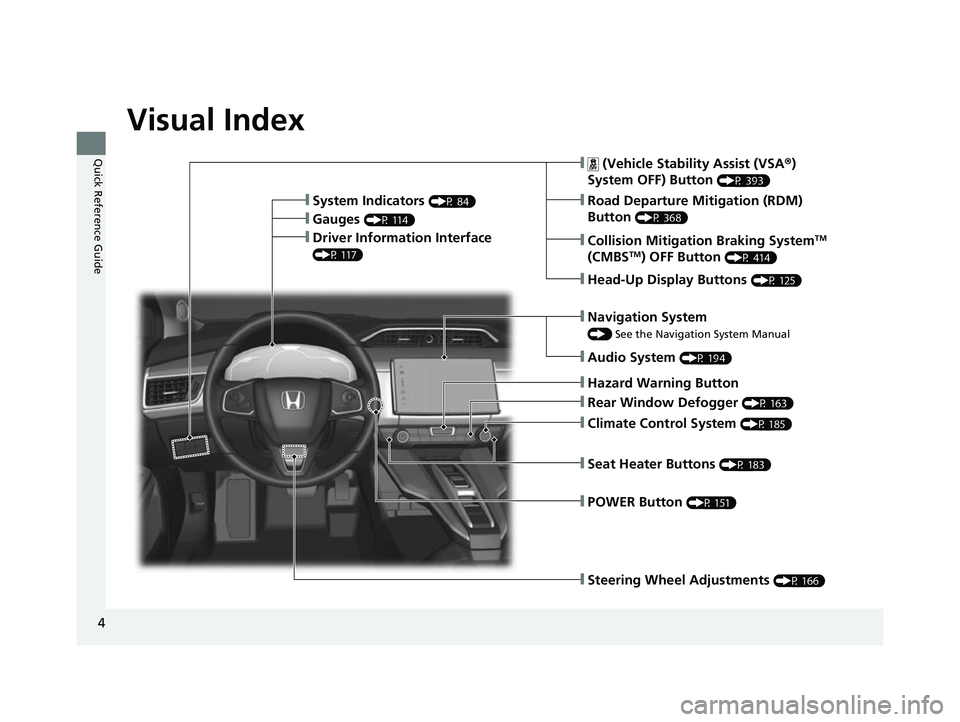
Visual Index
❙Steering Wheel Adjustments (P 166)
❙ (Vehicle Stability Assist (VSA®)
System OFF) Button
(P 393)
❙Road Departure Mitigation (RDM)
Button
(P 368)
❙System Indicators (P 84)
❙Gauges (P 114)
❙Collision Mitigation Braking SystemTM
(CMBSTM) OFF Button (P 414)
❙Head-Up Display Buttons (P 125)
❙Driver Information Interface
(P 117)
❙Navigation System
() See the Navigation System Manual
❙Audio System (P 194)
❙Hazard Warning Button
❙Climate Control System (P 185)
❙Rear Window Defogger (P 163)
❙POWER Button (P 151)
❙Seat Heater Buttons (P 183)
17 CLARITY FCV PPO-31TRT6000.book 4 ページ 2016年10月27日 木曜日 午後3時11分
Page 13 of 527
11
Quick Reference Guide
Sounds Unique to the Fuel Cell Vehicle
When you first start driving this vehicle, you likely will hear some unfamiliar sounds, particularly when you first turn on the power system,
while driving, and just after parking. Some of these sounds are unique to this vehicle’s powertrain, fuel, and climate control systems; others
are similar to sounds generated by conventional automobiles that typically are masked by louder noises absent from a vehicle of this design.
These sounds are not a cause for concern, and you will soon recognize them as normal and thus be able to detect any new or unus ual noise
should one develop.
Certain sounds associated with your vehicle may be caused by:
● Pressurized intake air being released through the rear of the vehicle.
u This can happen if the accelerator is released suddenly when the vehicle is under a heavy load, such as when climbing a hill.
● The power system warming up.
u This sound is particularly loud when temperat ures are extremely low (below –4°F [–20°C]).
● Hydrogen gas flowing through the fuel line during refueling.
17 CLARITY FCV PPO-31TRT6000.book 11 ページ 2016年10月27日 木曜日 午後3時 11分
Page 30 of 527
28
Quick Reference Guide
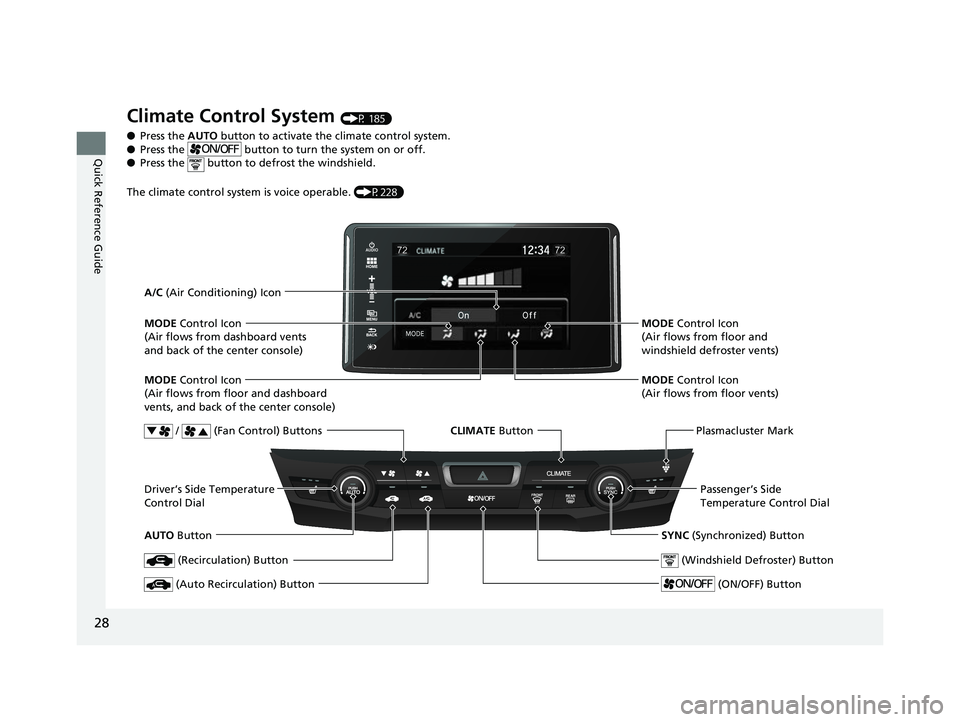
Climate Control System (P 185)
● Press the AUTO button to activate the climate control system.
● Press the button to turn the system on or off.
● Press the button to defrost the windshield.
The climate control system is voice operable. (P228)
AUTO Button
/ (Fan Control) Buttons
MODE
Control Icon
(Air flows from floor and dashboard
vents, and back of the center console) A/C (Air Conditioning) Icon
Plasmacluster Mark
MODE Control Icon
(Air flows from floor and
windshield defroster vents)
MODE Control Icon
(Air flows from floor vents)
Passenger’s Side
Temperature Control Dial
SYNC (Synchronized) Button
(Windshield Defroster) Button
(ON/OFF) Button
(Recirculation) Button
(Auto Recirculation) Button
MODE Control Icon
(Air flows from dashboard vents
and back of the center console)
Driver’s Side Temperature
Control Dial CLIMATE
Button
17 CLARITY FCV PPO-31TRT6000.book 28 ページ 2016年10月27日 木曜日 午後3時 11分
Page 90 of 527
88
uuIndicators u
Instrument Panel
IndicatorNameOn/BlinkingExplanationMessage
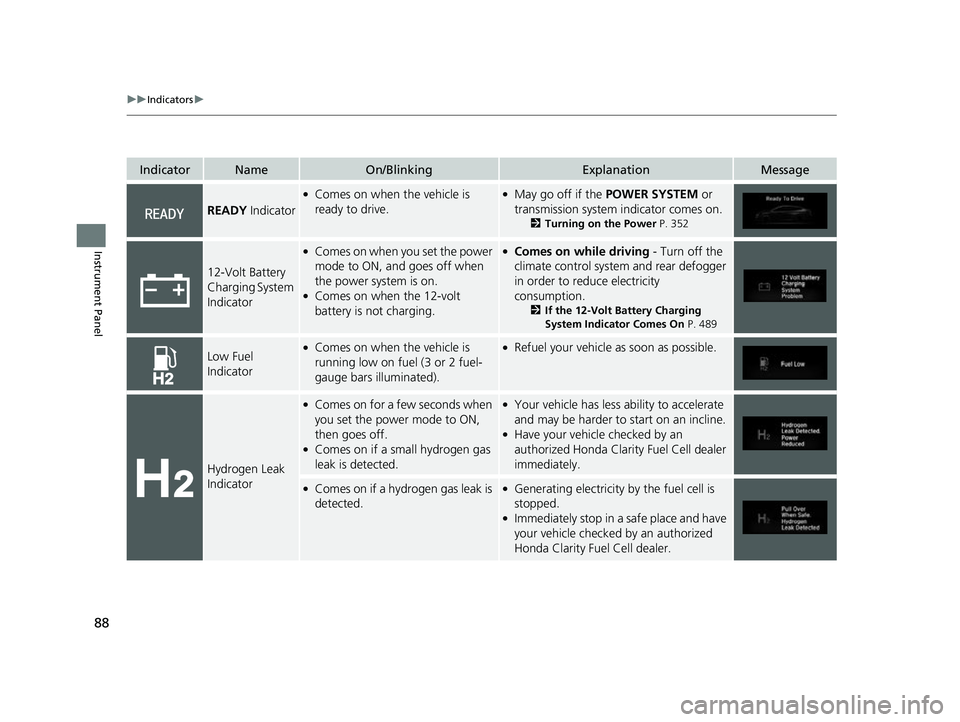
READY Indicator
●Comes on when the vehicle is
ready to drive.●May go off if the POWER SYSTEM or
transmission system indicator comes on.
2 Turning on the Power P. 352
12-Volt Battery
Charging System
Indicator
●Comes on when you set the power
mode to ON, and goes off when
the power system is on.
●Comes on when the 12-volt
battery is not charging.
●Comes on while driving - Turn off the
climate control system and rear defogger
in order to reduce electricity
consumption.
2 If the 12-Volt Battery Charging
System Indicator Comes On P. 489
Low Fuel
Indicator●Comes on when the vehicle is
running low on fuel (3 or 2 fuel-
gauge bars illuminated).●Refuel your vehicle as soon as possible.
Hydrogen Leak
Indicator
●Comes on for a few seconds when
you set the power mode to ON,
then goes off.
●Comes on if a small hydrogen gas
leak is detected.
●Your vehicle has less ability to accelerate
and may be harder to start on an incline.
●Have your vehicle checked by an
authorized Honda Clarity Fuel Cell dealer
immediately.
●Comes on if a hydrogen gas leak is
detected.●Generating electricity by the fuel cell is
stopped.
●Immediately stop in a safe place and have
your vehicle checked by an authorized
Honda Clarity Fuel Cell dealer.
17 CLARITY FCV PPO-31TRT6000.book 88 ページ 2016年10月27日 木曜日 午後3時 11分
Page 98 of 527
96
uuIndicators u
Instrument Panel
IndicatorNameOn/BlinkingExplanationMessage
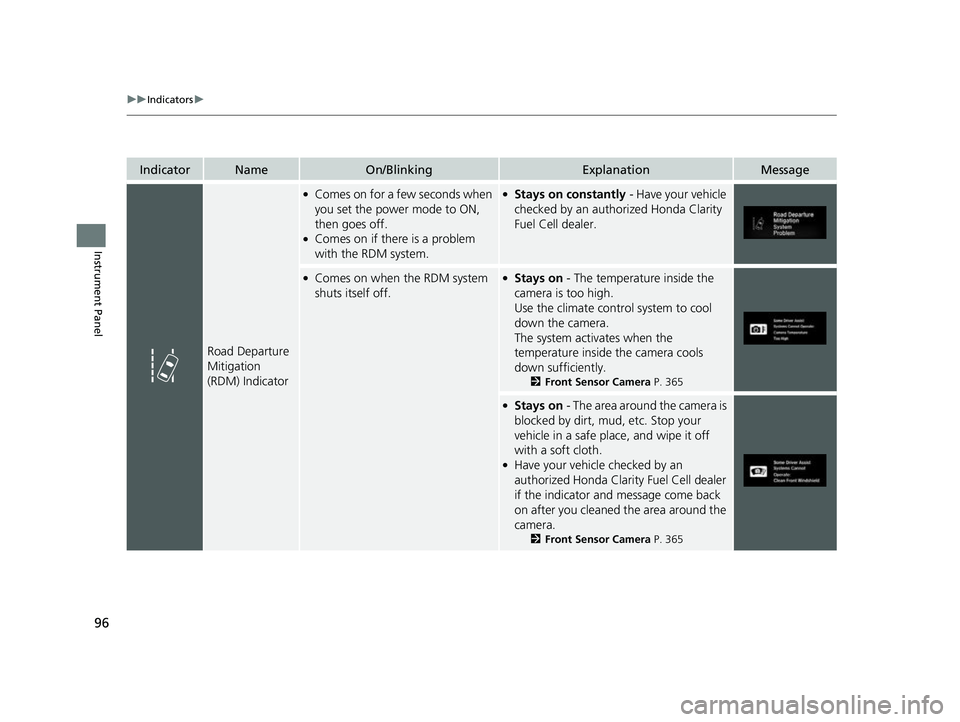
Road Departure
Mitigation
(RDM) Indicator
●Comes on for a few seconds when
you set the power mode to ON,
then goes off.
●Comes on if there is a problem
with the RDM system.
●Stays on constantly - Have your vehicle
checked by an authorized Honda Clarity
Fuel Cell dealer.
●Comes on when the RDM system
shuts itself off.●Stays on - The temperature inside the
camera is too high.
Use the climate control system to cool
down the camera.
The system activates when the
temperature inside the camera cools
down sufficiently.
2 Front Sensor Camera P. 365
●Stays on - The area around the camera is
blocked by dirt, mud, etc. Stop your
vehicle in a safe plac e, and wipe it off
with a soft cloth.
●Have your vehicle checked by an
authorized Honda Clarity Fuel Cell dealer
if the indicator and message come back
on after you cleaned the area around the
camera.
2 Front Sensor Camera P. 365
17 CLARITY FCV PPO-31TRT6000.book 96 ページ 2016年10月27日 木曜日 午後3時 11分
Page 101 of 527
99
uuIndicators u
Instrument Panel
IndicatorNameOn/BlinkingExplanationMessage
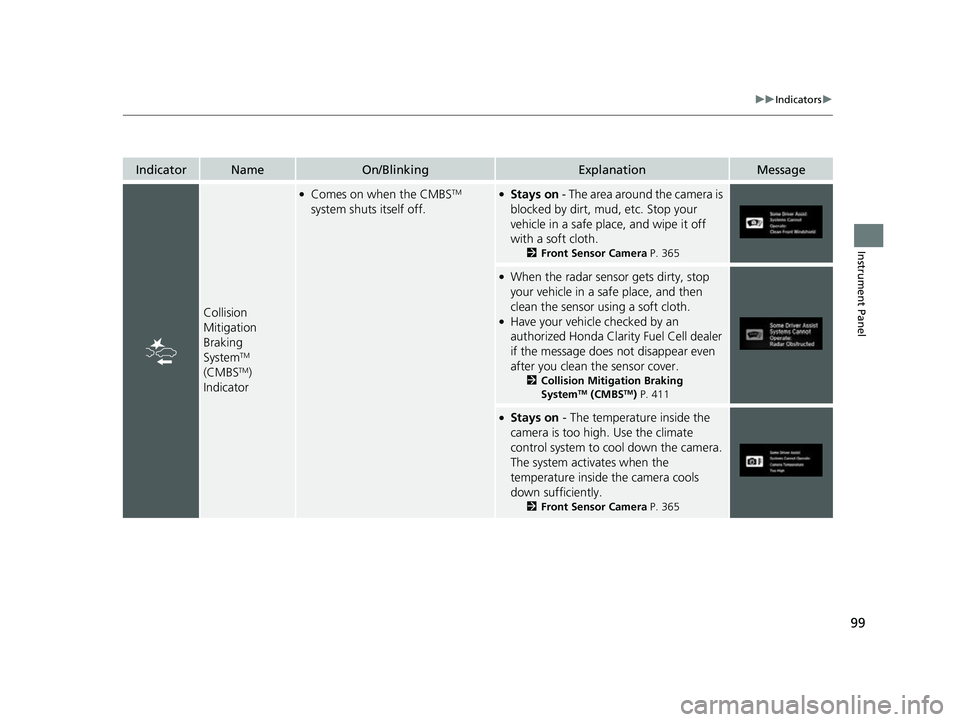
Collision
Mitigation
Braking
System
TM
(CMBSTM)
Indicator
●Comes on when the CMBSTM
system shuts itself off.●Stays on - The area around the camera is
blocked by dirt, mud, etc. Stop your
vehicle in a safe place, and wipe it off
with a soft cloth.
2 Front Sensor Camera P. 365
●When the radar sensor gets dirty, stop
your vehicle in a safe place, and then
clean the sensor using a soft cloth.
●Have your vehicle checked by an
authorized Honda Clarity Fuel Cell dealer
if the message does not disappear even
after you clean the sensor cover.
2Collision Mitigation Braking
SystemTM (CMBSTM) P. 411
●Stays on - The temperature inside the
camera is too high. Use the climate
control system to cool down the camera.
The system activates when the
temperature inside the camera cools
down sufficiently.
2 Front Sensor Camera P. 365
17 CLARITY FCV PPO-31TRT6000.book 99 ページ 2016年10月27日 木曜日 午後3時 11分
Page 102 of 527
100
uuIndicators uDriver Information Interface Wa rning and Information Messages
Instrument Panel
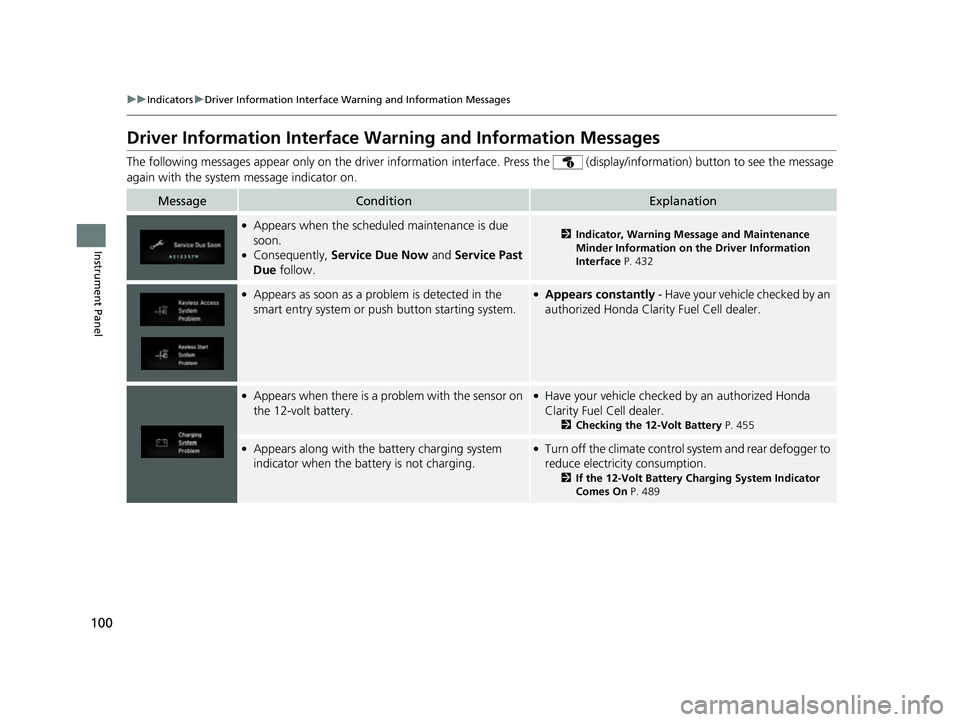
Driver Information Interface Warning and Information Messages
The following messages appear only on the driver information interface. Press th e (display/information) button to see the mess age
again with the system message indicator on.
MessageConditionExplanation
●Appears when the schedu led maintenance is due
soon.
●Consequently, Service Due Now and Service Past
Due follow.
2Indicator, Warning Message and Maintenance
Minder Information on the Driver Information
Interface P. 432
●Appears as soon as a problem is detected in the
smart entry system or push button starting system.●Appears constantly - Have your vehicle checked by an
authorized Honda Clarity Fuel Cell dealer.
●Appears when there is a problem with the sensor on
the 12-volt battery.●Have your vehicle checked by an authorized Honda
Clarity Fuel Cell dealer.
2 Checking the 12-Volt Battery P. 455
●Appears along with the battery charging system
indicator when the battery is not charging.●Turn off the climate control system and rear defogger to
reduce electricity consumption.
2If the 12-Volt Battery Charging System Indicator
Comes On P. 489
17 CLARITY FCV PPO-31TRT6000.book 100 ページ 2016年10月27日 木曜日 午後3 時11分
Page 106 of 527
104
uuIndicators uDriver Information Interface Wa rning and Information Messages
Instrument Panel
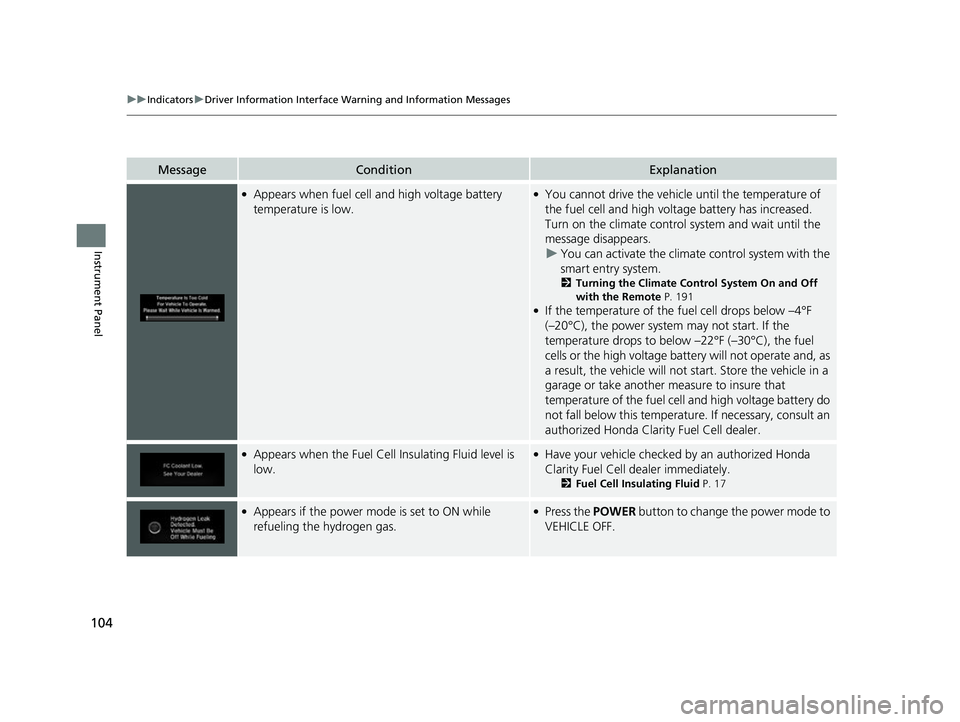
MessageConditionExplanation
●Appears when fuel cell and high voltage battery
temperature is low.●You cannot drive the vehicle until the temperature of
the fuel cell and high voltage battery has increased.
Turn on the climate control system and wait until the
message disappears. u You can activate the climat e control system with the
smart entry system.
2 Turning the Climate Control System On and Off
with the Remote P. 191
●If the temperature of the fuel cell drops below –4°F
(–20°C), the power system may not start. If the
temperature drops to below –22°F (–30°C), the fuel
cells or the high voltage batte ry will not operate and, as
a result, the vehicle will not start. Store the vehicle in a
garage or take another measure to insure that
temperature of the fuel cell and high voltage battery do
not fall below this temperatur e. If necessary, consult an
authorized Honda Clarity Fuel Cell dealer.
●Appears when the Fuel Cell Insulating Fluid level is
low.●Have your vehicle checked by an authorized Honda
Clarity Fuel Cell dealer immediately.
2 Fuel Cell Insulating Fluid P. 17
●Appears if the power mode is set to ON while
refueling the hydrogen gas.●Press the POWER button to change the power mode to
VEHICLE OFF.
17 CLARITY FCV PPO-31TRT6000.book 104 ページ 2016年10月27日 木曜日 午後3 時11分