rear view mirror HONDA CLARITY FUEL CELL 2017 Owner's Manual (in English)
[x] Cancel search | Manufacturer: HONDA, Model Year: 2017, Model line: CLARITY FUEL CELL, Model: HONDA CLARITY FUEL CELL 2017Pages: 527, PDF Size: 17.62 MB
Page 8 of 527
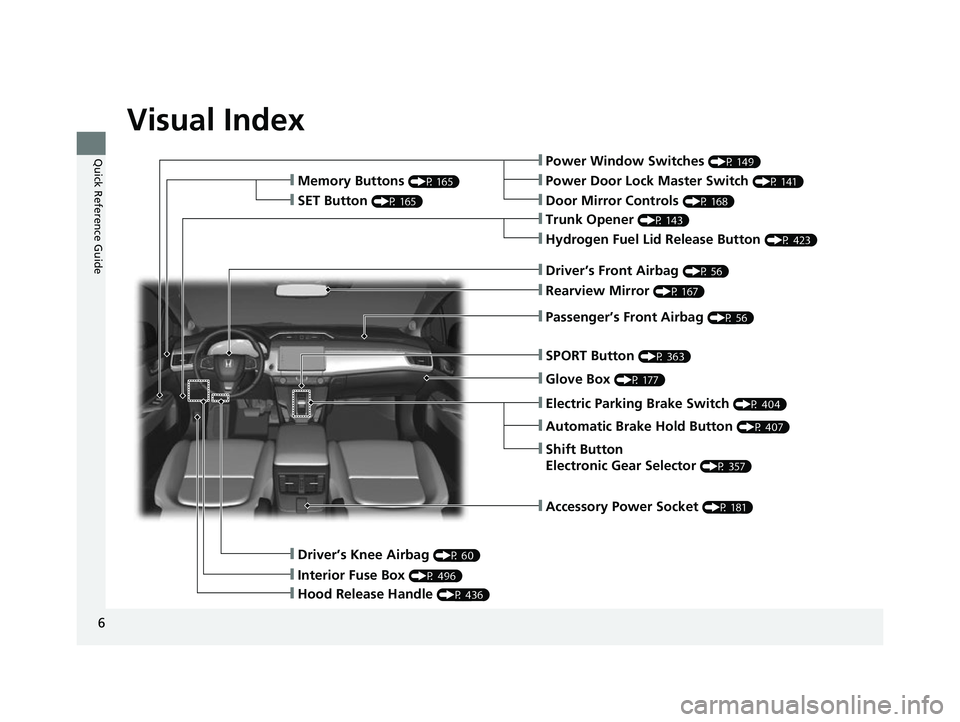
Visual Index
6
Quick Reference Guide❙Power Window Switches (P 149)
❙Trunk Opener (P 143)
❙Driver’s Knee Airbag (P 60)
❙Door Mirror Controls (P 168)
❙Power Door Lock Master Switch (P 141)
❙Hydrogen Fuel Lid Release Button (P 423)
❙Memory Buttons (P 165)
❙SET Button (P 165)
❙Interior Fuse Box (P 496)
❙Automatic Brake Hold Button (P 407)
❙Driver’s Front Airbag (P 56)
❙Passenger’s Front Airbag (P 56)
❙Rearview Mirror (P 167)
❙SPORT Button (P 363)
❙Glove Box (P 177)
❙Electric Parking Brake Switch (P 404)
❙Shift Button
Electronic Gear Selector
(P 357)
❙Accessory Power Socket (P 181)
❙Hood Release Handle (P 436)
17 CLARITY FCV PPO-31TRT6000.book 6 ページ 2016年10月27日 木曜日 午後3時11分
Page 10 of 527
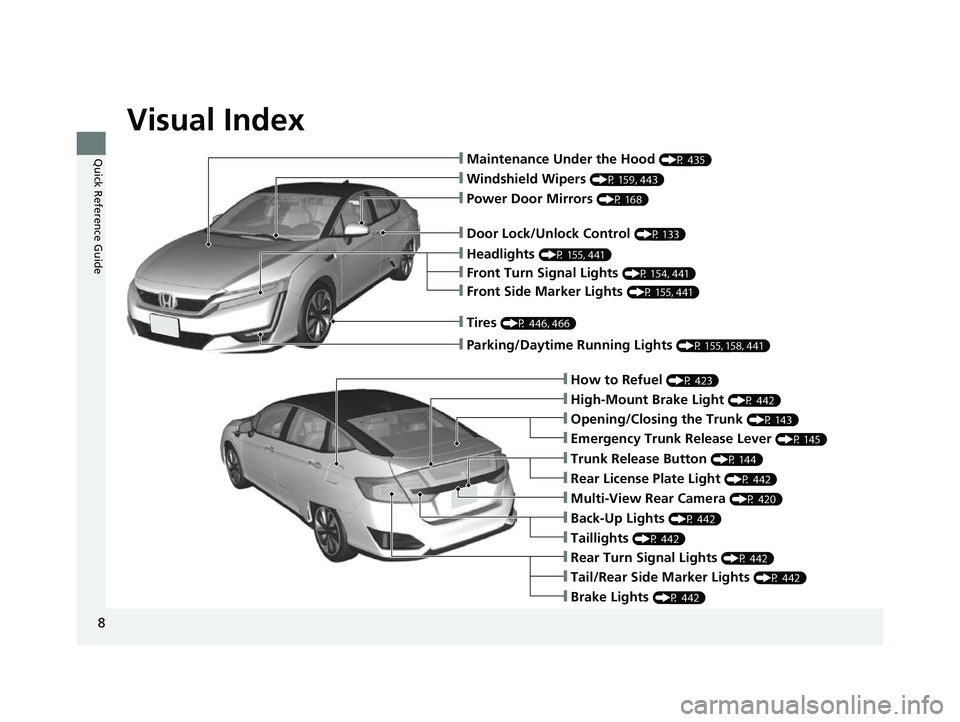
Visual Index
8
Quick Reference Guide❙Maintenance Under the Hood (P 435)
❙Windshield Wipers (P 159, 443)
❙Tires (P 446, 466)
❙Door Lock/Unlock Control (P 133)
❙Power Door Mirrors (P 168)
❙Headlights (P 155, 441)
❙Front Side Marker Lights (P 155, 441)
❙Front Turn Signal Lights (P 154, 441)
❙How to Refuel (P 423)
❙High-Mount Brake Light (P 442)
❙Emergency Trunk Release Lever (P 145)
❙Opening/Closing the Trunk (P 143)
❙Tail/Rear Side Marker Lights (P 442)
❙Brake Lights (P 442)
❙Rear Turn Signal Lights (P 442)
❙Back-Up Lights (P 442)
❙Taillights (P 442)
❙Trunk Release Button (P 144)
❙Rear License Plate Light (P 442)
❙Multi-View Rear Camera (P 420)
❙Parking/Daytime Running Lights (P 155, 158, 441)
17 CLARITY FCV PPO-31TRT6000.book 8 ページ 2016年10月27日 木曜日 午後3時11分
Page 36 of 527
34
Quick Reference Guide
Honda SensingTM
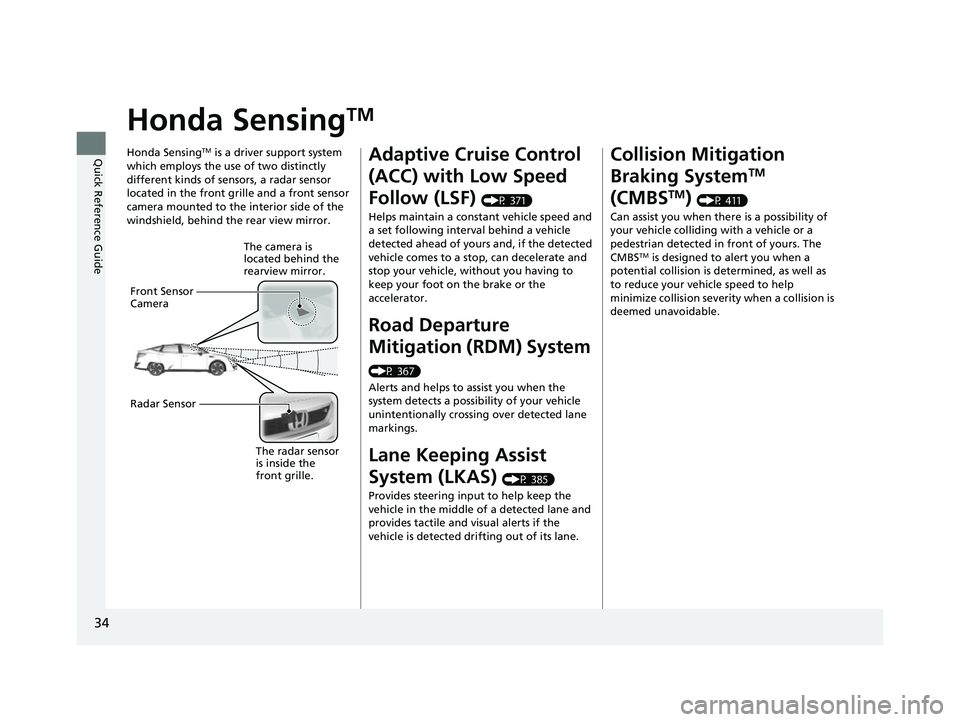
Honda SensingTM is a driver support system
which employs the use of two distinctly
different kinds of sensors, a radar sensor
located in the front grille and a front sensor
camera mounted to the interior side of the
windshield, behind the rear view mirror.
The camera is
located behind the
rearview mirror.
Front Sensor
Camera
Radar Sensor
The radar sensor
is inside the
front grille.
Adaptive Cruise Control
(ACC) with Low Speed
Follow (LSF)
(P 371)
Helps maintain a constant vehicle speed and
a set following interval behind a vehicle
detected ahead of yours and, if the detected
vehicle comes to a stop, can decelerate and
stop your vehicle, wi thout you having to
keep your foot on the brake or the
accelerator.
Road Departure
Mitigation (RDM) System
(P 367)
Alerts and helps to assist you when the
system detects a possibility of your vehicle
unintentionally crossing over detected lane
markings.
Lane Keeping Assist
System (LKAS)
(P 385)
Provides steering input to help keep the
vehicle in the middle of a detected lane and
provides tactile and visual alerts if the
vehicle is detected drifting out of its lane.
Collision Mitigation
Braking System
TM
(CMBS
TM) (P 411)
Can assist you when there is a possibility of
your vehicle colliding with a vehicle or a
pedestrian detected in front of yours. The
CMBS
TM is designed to alert you when a
potential collision is determined, as well as
to reduce your vehicle speed to help
minimize collision severity when a collision is
deemed unavoidable.
17 CLARITY FCV PPO-31TRT6000.book 34 ページ 2016年10月27日 木曜日 午後3時 11分
Page 131 of 527
129
Controls
This chapter explains how to operate the various controls necessary for driving.
Clock.................................................. 130
Locking and Unlocking the Doors Key Types and Functions .................. 131
Low Smart Entry Remote Signal Strength .. 132Locking/Unlocking the Doors from the Outside .......................................... 133
Locking/Unlocking the Doors from the Inside ............................................. 139
Childproof Door Locks ..................... 141
Auto Door Locking/Unlocking .......... 142
Opening and Closing the Trunk ....... 143
Security System ................................ 146
Immobilizer System .......................... 146 Security System Alarm...................... 146
Opening and Closing the Windows ... 149
Operating the Switches Around the
Steering Wheel POWER Button................................. 151
Turn Signals ..................................... 154
Light Switches.................................. 155
Daytime Running Lights ................... 158
Wipers and Washers ........................ 159
Brightness Control ........................... 161
Rear Defogger Button ...................... 163
Driving Position Memory System ...... 164
Adjusting the Steering Wheel........... 166 Adjusting the Mirrors
....................... 167
Interior Rearview Mirror ................... 167
Power Door Mirrors ......................... 168
Adjusting the Seats .......................... 169
Front Seats ...................................... 169
Interior Lights/Interior Convenience
Items ................................................ 175
Interior Lights .................................. 175
Interior Convenience Items .............. 177
Climate Control System ................... 185
Using Automatic Climate Control .... 185
Automatic Climate Control Sensors ... 192
17 CLARITY FCV PPO-31TRT6000.book 129 ページ 2016年10月27日 木曜日 午後3 時11分
Page 169 of 527
167
Controls
Adjusting the Mirrors
Interior Rearview Mirror
Adjust the angle of the rearview mirror when you are sitting in the correct driving
position.
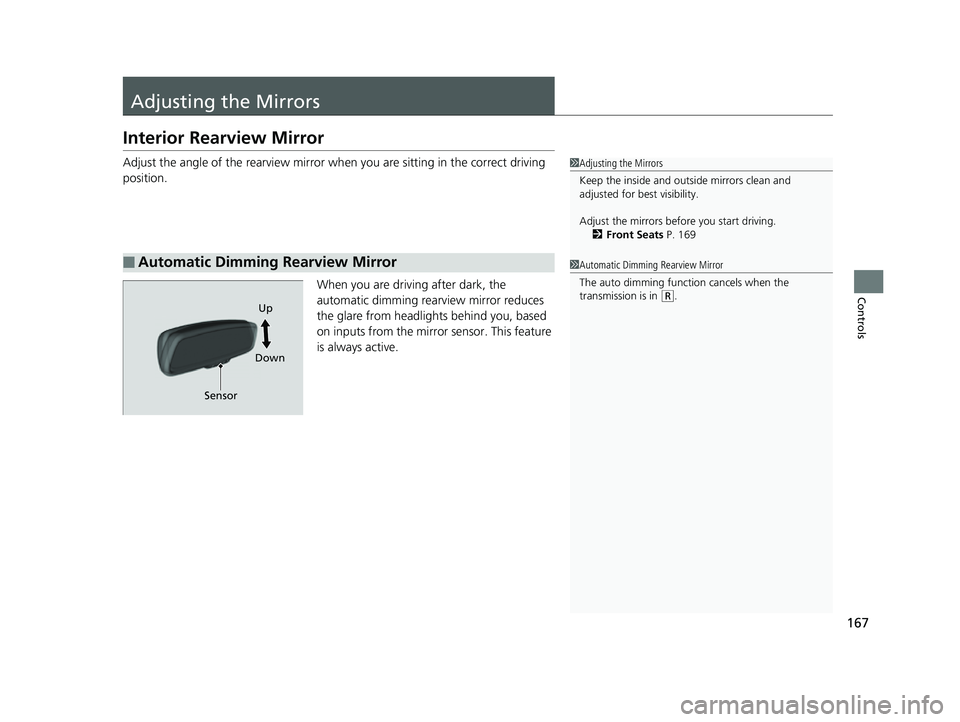
When you are driving after dark, the
automatic dimming rearview mirror reduces
the glare from headlights behind you, based
on inputs from the mirror sensor. This feature
is always active.
■Automatic Dimming Rearview Mirror
1 Adjusting the Mirrors
Keep the inside and out side mirrors clean and
adjusted for best visibility.
Adjust the mirrors befo re you start driving.
2 Front Seats P. 169
1Automatic Dimming Rearview Mirror
The auto dimming function cancels when the
transmission is in
(R.
Sensor Up
Down
17 CLARITY FCV PPO-31TRT6000.book 167 ページ 2016年10月27日 木曜日 午後3 時11分
Page 367 of 527
365
uuWhen Driving uFront Sensor Camera
Continued
Driving
Front Sensor Camera
The camera, used in systems such as LKAS, RDM, ACC with LSF, and CMBSTM, is
designed to detect an object that tri ggers any of the systems to operate its
functions.
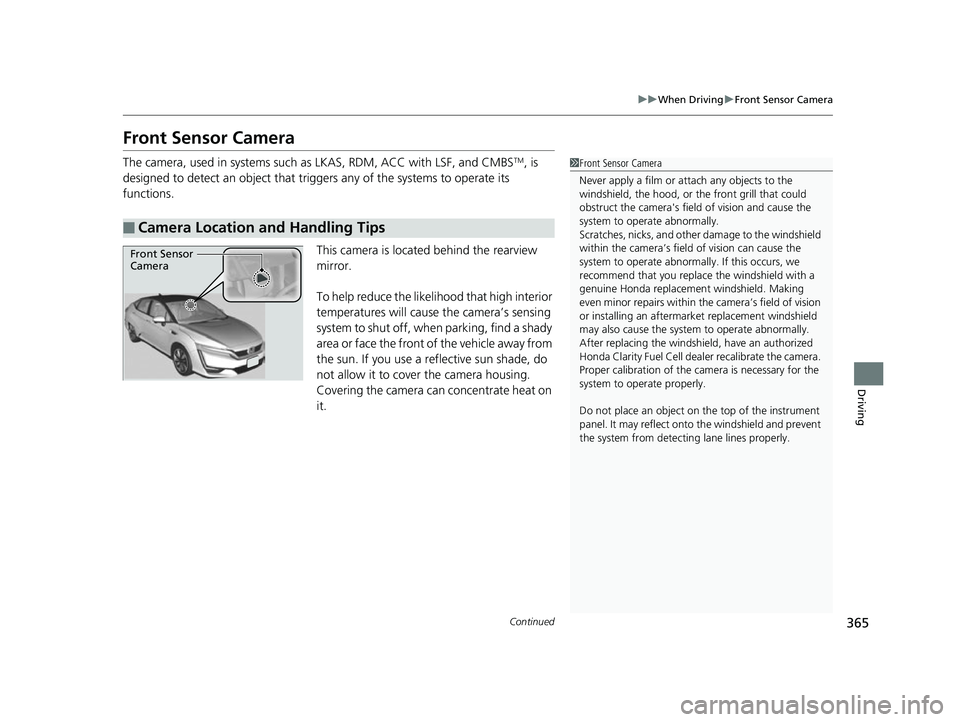
This camera is located behind the rearview
mirror.
To help reduce the likelihood that high interior
temperatures will cause the camera’s sensing
s y s t e m t o s h u t o f f , w h e n p a r k i n g , f i n d a s h a d y
area or face the front of the vehicle away from
the sun. If you use a reflective sun shade, do
not allow it to cover the camera housing.
Covering the camera can concentrate heat on
it.
■Camera Location and Handling Tips
1Front Sensor Camera
Never apply a film or attach any objects to the
windshield, the hood, or the front grill that could
obstruct the camera's fiel d of vision and cause the
system to operate abnormally.
Scratches, nicks, and othe r damage to the windshield
within the camera’s fiel d of vision can cause the
system to operate abnormall y. If this occurs, we
recommend that you replac e the windshield with a
genuine Honda replacem ent windshield. Making
even minor repairs within th e camera’s field of vision
or installing an aftermarket replacement windshield
may also cause the system to operate abnormally.
After replacing th e windshield, have an authorized
Honda Clarity Fuel Cell deal er recalibrate the camera.
Proper calibrat ion of the camera is necessary for the
system to ope rate properly.
Do not place an object on the top of the instrument
panel. It may reflect onto the windshield and prevent
the system from detecting lane lines properly.
Front Sensor
Camera
17 CLARITY FCV PPO-31TRT6000.book 365 ページ 2016年10月27日 木曜日 午後3 時11分
Page 369 of 527
367
uuWhen Driving uRoad Departure Mitigation (RDM) System
Continued
Driving
Road Departure Mitigation (RDM) System
Alerts and helps to assist you when the system determines a possibility of your
vehicle unintentionally crossing over detected lane markings.
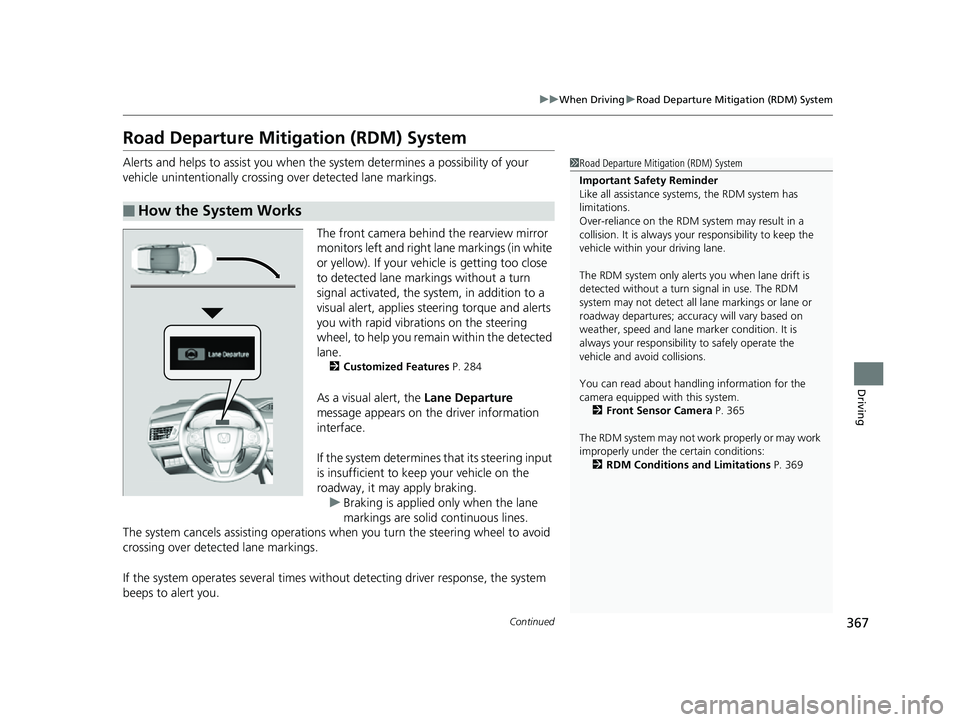
The front camera behind the rearview mirror
monitors left and right lane markings (in white
or yellow). If your vehicle is getting too close
to detected lane markings without a turn
signal activated, the system, in addition to a
visual alert, applies st eering torque and alerts
you with rapid vibrations on the steering
wheel, to help you remain within the detected
lane.
2 Customized Features P. 284
As a visual alert, the Lane Departure
message appears on the driver information
interface.
If the system determines that its steering input
is insufficient to keep your vehicle on the
roadway, it may apply braking.
u Braking is applied only when the lane
markings are solid continuous lines.
The system cancels assisting operations wh en you turn the steering wheel to avoid
crossing over detected lane markings.
If the system operates several times with out detecting driver response, the system
beeps to alert you.
■How the System Works
1 Road Departure Mitigation (RDM) System
Important Safety Reminder
Like all assistance systems, the RDM system has
limitations.
Over-reliance on the RDM system may result in a
collision. It is always your responsibility to keep the
vehicle within your driving lane.
The RDM system only alerts you when lane drift is
detected without a turn signal in use. The RDM
system may not detect all la ne markings or lane or
roadway departures; accu racy will vary based on
weather, speed and lane marker condition. It is
always your responsibilit y to safely operate the
vehicle and avoid collisions.
You can read about handling information for the
camera equipped with this system.
2 Front Sensor Camera P. 365
The RDM system may not wo rk properly or may work
improperly under the certain conditions: 2 RDM Conditions and Limitations P. 369
17 CLARITY FCV PPO-31TRT6000.book 367 ページ 2016年10月27日 木曜日 午後3 時11分
Page 373 of 527
371
uuWhen Driving uAdaptive Cruise Control (ACC) with Low Speed Follow (LSF)
Continued
Driving
Adaptive Cruise Control (ACC) with Low Speed
Follow (LSF)
Helps maintain a constant vehicle speed an d a set following-interval behind a vehicle
detected ahead of yours and, if the detect ed vehicle slows to a stop, decelerates and
stops your vehicle, without you having to keep your foot on the brake or the
accelerator.
When ACC with LSF slows your vehicle by applying the brakes, your vehicle's brake
lights will illuminate.
1 Adaptive Cruise Control (ACC) with Low Speed Follow (LSF)
Important Reminder
As with any system, there are limits to ACC with LSF.
Use the brake pedal whenever necessary, and always
keep a safe interval between your vehicle and other
vehicles.
3WARNING
Improper use of ACC wi th LSF can lead to a
crash.
Use ACC with LSF only when driving on
expressways or freeways and in good
weather conditions.
3WARNING
ACC with LSF has limited braking capability
and may not stop your vehicle in time to
avoid a collision with a vehicle that quickly
stops in front of you.
Always be prepared to apply the brake
pedal if the conditions require.
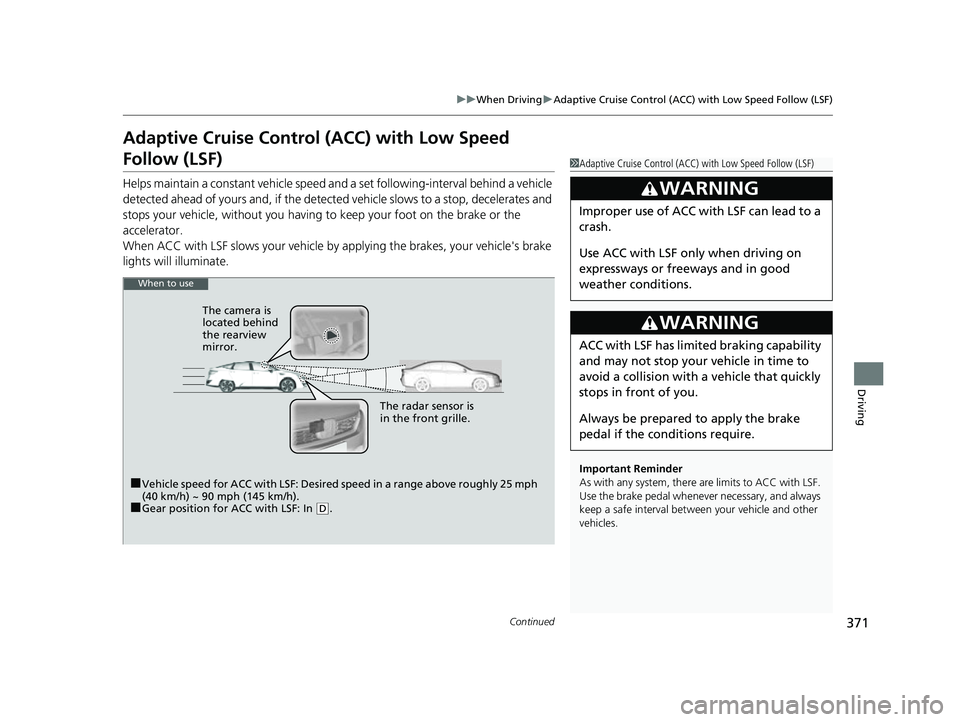
When to use
■Vehicle speed for ACC with LSF: Desired speed in a range above roughly 25 mph
(40 km/h) ~ 90 mph (145 km/h).
■Gear position for ACC with LSF: In ( D. The radar sensor is
in the front grille.
The camera is
located behind
the rearview
mirror.
17 CLARITY FCV PPO-31TRT6000.book 371 ページ 2016年10月27日 木曜日 午後3
時11分
Page 384 of 527
uuWhen Driving uAdaptive Cruise Control (ACC) with Low Speed Follow (LSF)
382
Driving
■Automatic cancellation
The beeper sounds and a message appears on the driver information interface and
the head-up display when ACC with LSF is automatically canceled. Any of these
conditions may cause the ACC with LSF to automatically cancel:
• Bad weather (rain, fog, snow, etc.)
• When the radar sensor in the front grille gets dirty.
• An abnormal tire condition is detected, or the tires are skidding.
• Driving on a mountainous road, or driving off road for extended periods.
• Abrupt steering wheel movement.
• When the ABS, VSA ® or CMBS
TM is activated.
• When the ABS or VSA ® system indicator comes on.
• When the vehicle is stopped on a very steep slope.
• When you manually apply the parking brake.
• When the detected vehicle within the ACC with LSF range is too close to your
vehicle.
• The camera behind the rearview mirror, or the area around the camera, including
the windshield, gets dirty.
The ACC with LSF automatic cancellation can be also triggered by the following
causes. In these cases, the parking brake will be automatically applied.
• The driver’s seat belt is unfastened when the vehicl e is stationary.
• The vehicle stops for mo re than 10 minutes.
• The power system is turned off.
1Automatic cancellation
Even though ACC with LSF has been automatically
canceled, you can still resu me the prior set speed.
Wait until the condition that caused ACC with LSF to
cancel improves, then press the RES/+ button.
17 CLARITY FCV PPO-31TRT6000.book 382 ページ 2016年10月27日 木曜日 午後3 時11分
Page 392 of 527
390
uuWhen Driving uLane Keeping Assist System (LKAS)
Driving
■The LKAS may automatically be canceled when:
• The camera temperature gets extremely high or low.
• The camera behind the rearview mirror, or the area around the camera, including
the windshield, gets dirty.
• When driving through a sharp curve.
• When driving at a speed in excess of approximately 90 mph (145 km/h).
• When the ABS or VSA ® systems engage.
A beeper will sound if the LKAS is automatically canceled.
The system may not detect lane markings and therefore may not keep the vehicle in
the middle of a lane under certain conditions, including the following:
■Environmental conditions
• Driving in bad weather (rain, fog, snow, etc.).
• Sudden changes between light and dark, such as an entrance or exit of a tunnel.
• There is little contrast between la ne lines and the roadway surface.
• Driving into low sunlight (e.g., at dawn or dusk).
• Strong light is reflected onto the roadway.
• Driving in the shadows of trees, buildings, etc.
• Shadows of adjacent objects are parallel to lane markings.
• Roadway objects or structures are misinterpreted as lane markers.
• Reflections on the interi or of the windshield.
■LKAS Conditions and Limitations
17 CLARITY FCV PPO-31TRT6000.book 390 ページ 2016年10月27日 木曜日 午後3 時11分