key HONDA CLARITY PLUG-IN 2018 (in English) User Guide
[x] Cancel search | Manufacturer: HONDA, Model Year: 2018, Model line: CLARITY PLUG-IN, Model: HONDA CLARITY PLUG-IN 2018Pages: 591, PDF Size: 29.97 MB
Page 159 of 591
157
uuOpening and Closing the Windows uOpening/Closing the Power Windows
Controls
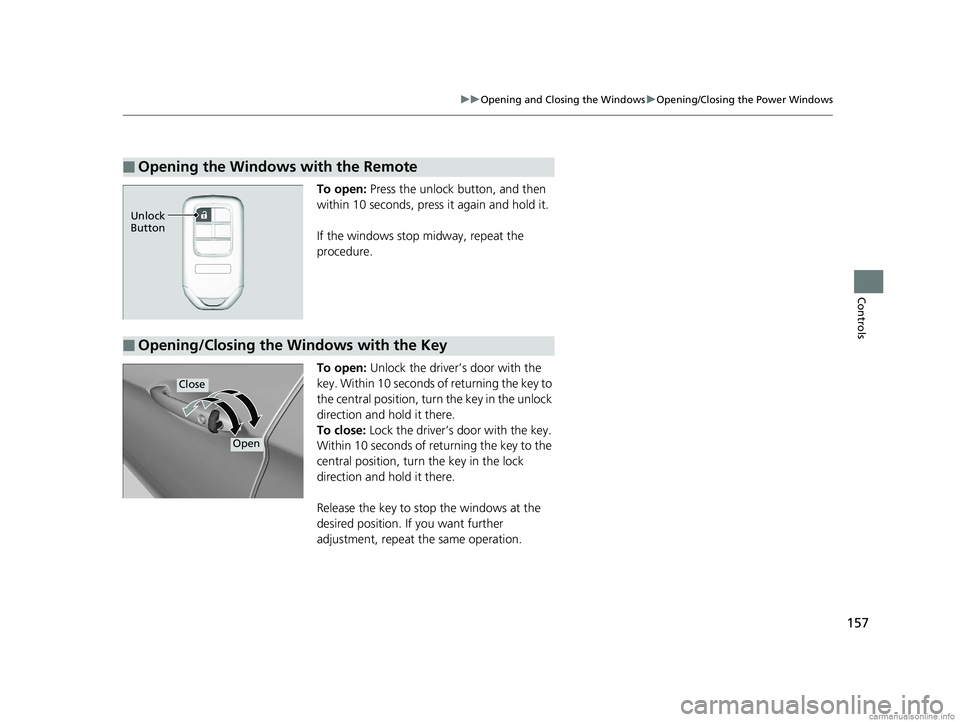
To open: Press the unlock button, and then
within 10 seconds, press it again and hold it.
If the windows stop midway, repeat the
procedure.
To open: Unlock the driver’s door with the
key. Within 10 seconds of returning the key to
the central position, turn the key in the unlock
direction and hold it there.
To close: Lock the driver’s door with the key.
Within 10 seconds of re turning the key to the
central position, turn the key in the lock
direction and hold it there.
Release the key to stop the windows at the
desired position. If you want further
adjustment, repeat the same operation.
■Opening the Windows with the Remote
Unlock
Button
■Opening/Closing the Windows with the Key
Close
Open
18 CLARITY PHEV CSS-31TRW6000.book 157 ページ 2017年12月25日 月曜日 午後2時22分
Page 283 of 591
Continued281
uuAudio System Basic Operation uAndroid Auto
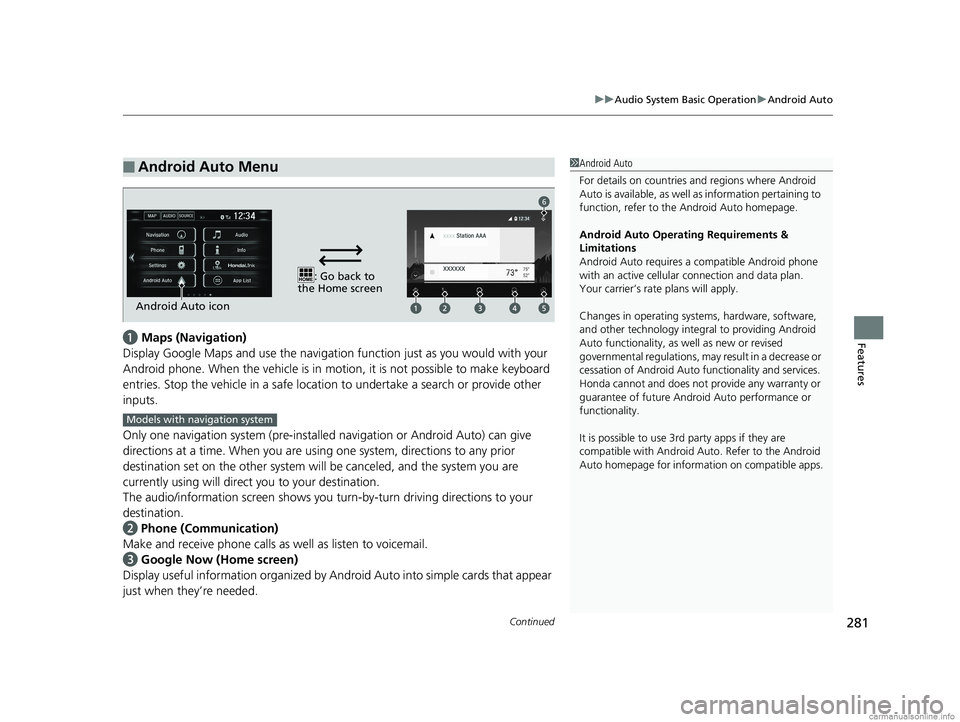
Featuresa Maps (Navigation)
Display Google Maps and use the navigation function just as you would with your
Android phone. When the vehicle is in motion, it is not possible to make keyboard
entries. Stop the vehicle in a safe locati on to undertake a search or provide other
inputs.
Only one navigation system (pre-installed navigation or Android Auto) can give
directions at a time. When you are using one system, directions to any prior
destination set on the other system will be canceled, and the system you are
currently using will direct you to your destination.
The audio/information screen shows you turn-by-turn dr iving directions to your
destination.
b Phone (Communication)
Make and receive phone calls as well as listen to voicemail.
c Google Now (Home screen)
Display useful information organized by Android Auto into simple cards that appear
just when they’re needed.
■Android Auto Menu1 Android Auto
For details on c ountries and regions where Android
Auto is available, as well as information pertaining to
function, refer to the Android Auto homepage.
Android Auto Operating Requirements &
Limitations
Android Auto requires a compatible Android phone
with an active cellular connection and data plan.
Your carrier’s rate plans will apply.
Changes in operating systems, hardware, software,
and other technology integral to providing Android
Auto functionality, as well as new or revised
governmental regulations, may result in a decrease or
cessation of Android Auto functionality and services.
Honda cannot and does not pr ovide any warranty or
guarantee of future Android Auto performance or
functionality.
It is possible to use 3r d party apps if they are
compatible with Android Auto. Refer to the Android
Auto homepage for informat ion on compatible apps.
: Go back to
the Home screen
Android Auto icon
6
Models with navigation system
18 CLARITY PHEV CSS-31TRW6000.book 281 ページ 2017年12月25日 月曜日 午後2時22分
Page 315 of 591
313
uuCustomized Features u
Continued
Features
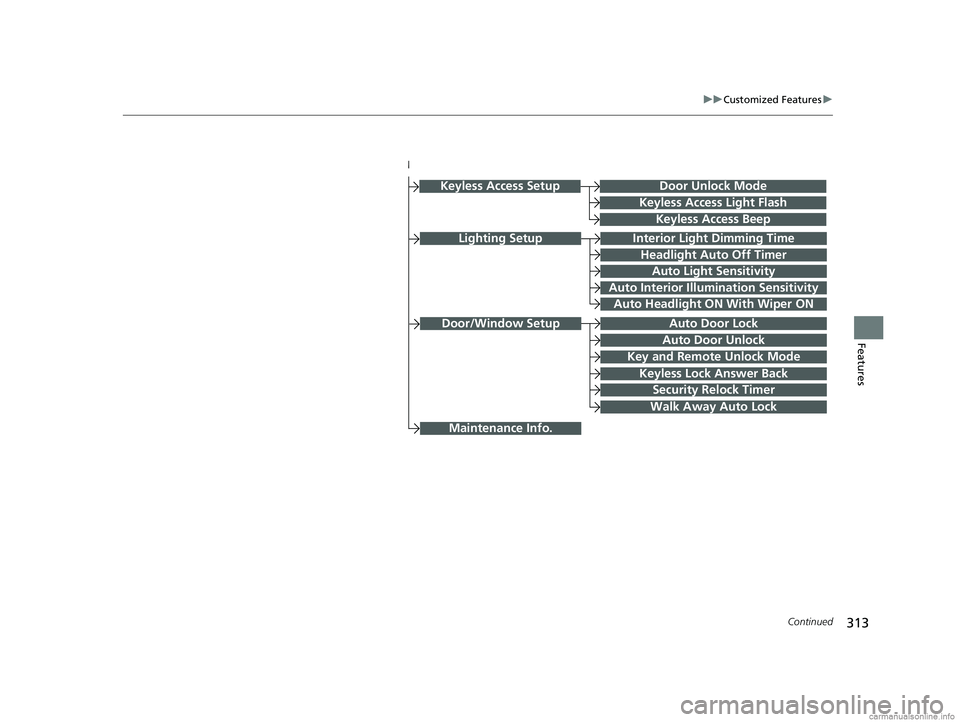
Lighting SetupInterior Light Dimming Time
Headlight Auto Off Timer
Auto Light Sensitivity
Auto Interior Illumination Sensitivity
Auto Door Lock
Key and Remote Unlock Mode
Door/Window Setup
Maintenance Info.
Auto Headlight ON With Wiper ON
Keyless Lock Answer Back
Security Relock Timer
Walk Away Auto Lock
Keyless Access Setup
Keyless Access Light Flash
Keyless Access Beep
Door Unlock Mode
Auto Door Unlock
18 CLARITY PHEV CSS-31TRW6000.book 313 ページ 2017年12月25日 月曜日 午後2時22分
Page 330 of 591
328
uuCustomized Features u
Features
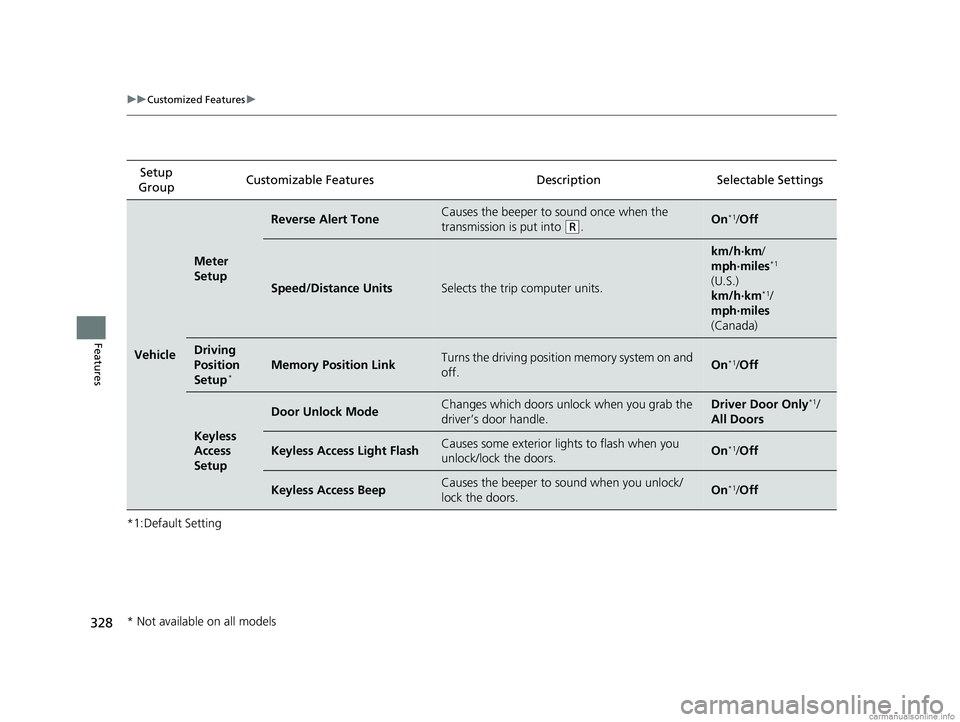
*1:Default SettingSetup
Group Customizable Features Desc
ription Selectable Settings
Vehicle
Meter
Setup
Reverse Alert ToneCauses the beeper to sound once when the
transmission is put into
(R.On*1/ Off
Speed/Distance UnitsSelects the trip computer units.
km/h∙km /
mph∙miles*1
(U.S.)
km/h∙km
*1/
mph∙miles
(Canada)
Driving
Position
Setup
*Memory Position LinkTurns the driving position memory system on and
off.On*1/ Off
Keyless
Access
Setup
Door Unlock ModeChanges which doors unlock when you grab the
driver’s door handle.Driver Door Only*1/
All Doors
Keyless Access Light FlashCauses some exterior lights to flash when you
unlock/lock the doors.On*1/ Off
Keyless Access BeepCauses the beeper to sound when you unlock/
lock the doors.On*1/Off
* Not available on all models
18 CLARITY PHEV CSS-31TRW6000.book 328 ページ 2017年12月25日 月曜日 午後2時22分
Page 332 of 591
330
uuCustomized Features u
Features
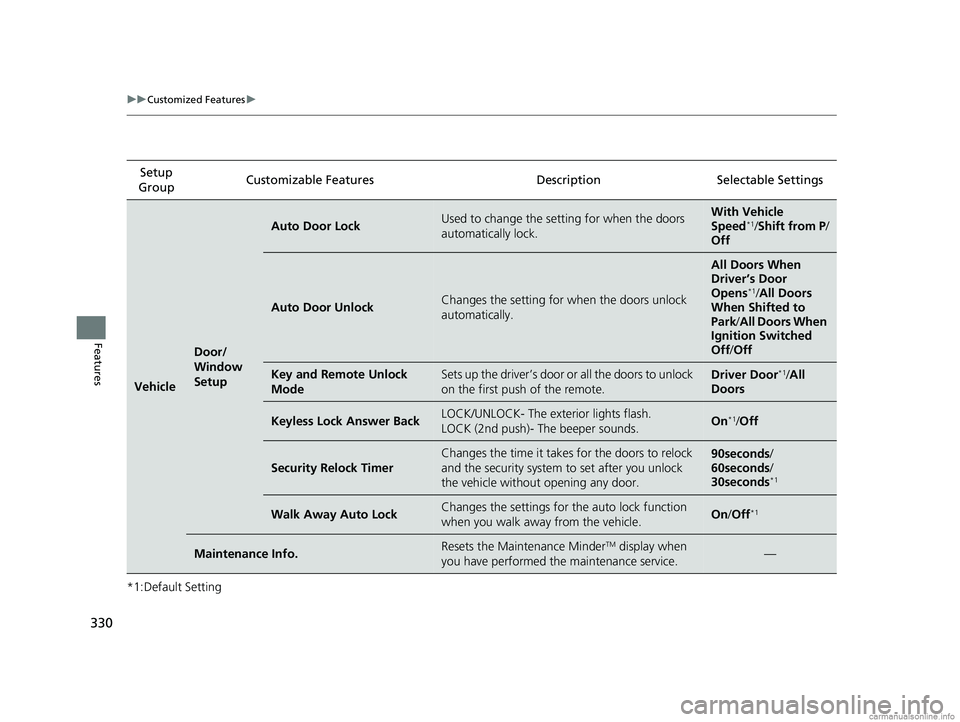
*1:Default SettingSetup
Group Customizable Features Desc
ription Selectable Settings
Vehicle
Door/
Window
Setup
Auto Door LockUsed to change the setting for when the doors
automatically lock.With Vehicle
Speed*1/ Shift from P /
Off
Auto Door UnlockChanges the setting for when the doors unlock
automatically.
All Doors When
Driver’s Door
Opens
*1/ All Doors
When Shifted to
Park/ All Doors When
Ignition Switched
Off /Off
Key and Remote Unlock
ModeSets up the driver’s door or all the doors to unlock
on the first push of the remote.Driver Door*1/All
Doors
Keyless Lock Answer BackLOCK/UNLOCK- The exterior lights flash.
LOCK (2nd push)- The beeper sounds.On*1/ Off
Security Relock Timer
Changes the time it takes for the doors to relock
and the security system to set after you unlock
the vehicle without opening any door.90seconds /
60seconds /
30seconds
*1
Walk Away Auto LockChanges the settings for the auto lock function
when you walk away from the vehicle.On /Off*1
Maintenance Info.Resets the Maintenance MinderTM display when
you have performed the maintenance service.—
18 CLARITY PHEV CSS-31TRW6000.book 330 ページ 2017年12月25日 月曜日 午後2時22分
Page 359 of 591
Continued357
uuBluetooth ® HandsFreeLink ®u HFL Menus
Features
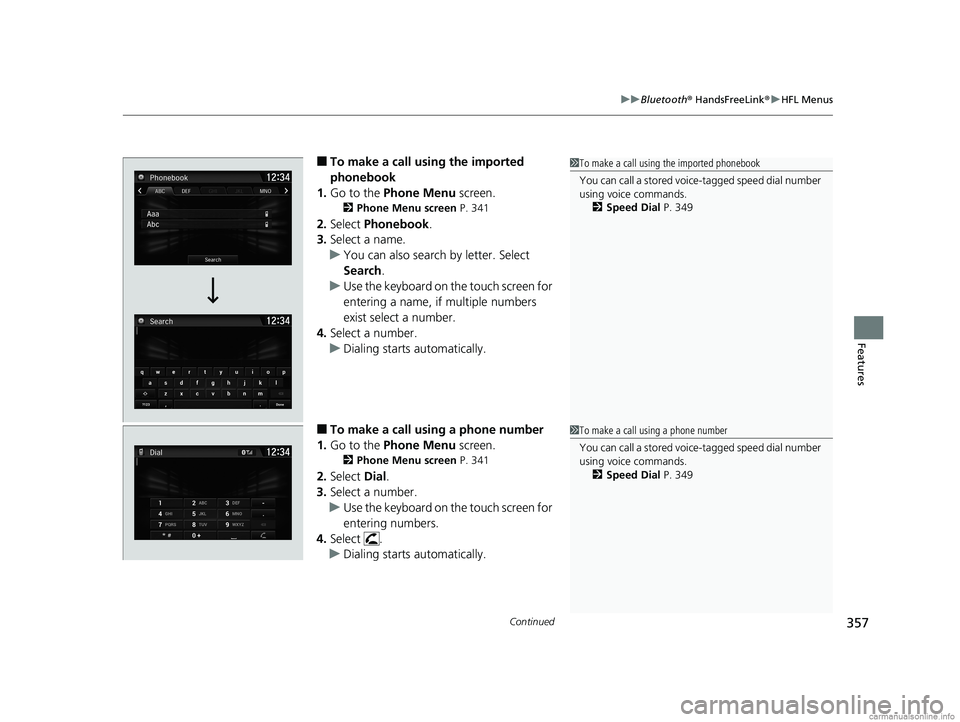
■To make a call us ing the imported
phonebook
1. Go to the Phone Menu screen.
2Phone Menu screen P. 341
2.Select Phonebook .
3. Select a name.
u You can also search by letter. Select
Search .
u Use the keyboard on the touch screen for
entering a name, if multiple numbers
exist select a number.
4. Select a number.
u Dialing starts automatically.
■To make a call using a phone number
1. Go to the Phone Menu screen.
2Phone Menu screen P. 341
2.Select Dial.
3. Select a number.
u Use the keyboard on the touch screen for
entering numbers.
4. Select .
u Dialing starts automatically.
1To make a call using the imported phonebook
You can call a stored voic e-tagged speed dial number
using voice commands.
2 Speed Dial P. 349
1To make a call using a phone number
You can call a stored voic e-tagged speed dial number
using voice commands.
2 Speed Dial P. 349
18 CLARITY PHEV CSS-31TRW6000.book 357 ページ 2017年12月25日 月曜日 午後2時22分
Page 372 of 591
370
Driving
Before Driving
Driving Preparation
Check the following items before you start driving.
• Make sure there are no obstructions on the windows, door mirrors, exterior
lights, or other parts of the vehicle.
u Remove any frost, snow, or ice.
u Remove any snow on the roof, as this can slip down and obstruct your field of
vision while driving. If frozen solid , remove ice once it has softened.
u When removing ice from around the wheels, be sure not to damage the wheel
or wheel components.
• Make sure the hood is securely closed.
u If the hood opens while driving, your front view will be blocked.
• Make sure the tires are in good condition.
u Check air pressures, and check for damage and excessive wear.
2Checking and Maintaining Tires P. 499
•Make sure there are no people or ob jects behind or around the vehicle.
u There are blind spots from the inside.
• Disconnect the charging cable.
■Exterior Checks1Exterior Checks
NOTICE
When doors are frozen s hut, use warm water around
the door edges to melt any ice. Do not try to force
them open, as this can damage the rubber trim
around the doors. When done, wipe dry to avoid
further freezing.
Do not pour warm water into the key cylinder.
You will be unable to insert the key if the water
freezes in the hole.
Heat from the engine and exhaust can ignite
flammable material s left under the hood, causing a
fire. If you’ve parked y our vehicle for an extended
period, inspect and remove any debris that may have
collected, such as dried grass and leaves that have
fallen or have been carried in for use as a nest by a
small animal. Also check under the hood for leftover
flammable materials after you or someone else has
performed maintenance on your vehicle.
18 CLARITY PHEV CSS-31TRW6000.book 370 ページ 2017年12月25日 月曜日 午後2時22分
Page 512 of 591
510
Maintenance
Remote Transmitter Care
Replacing the Button Battery
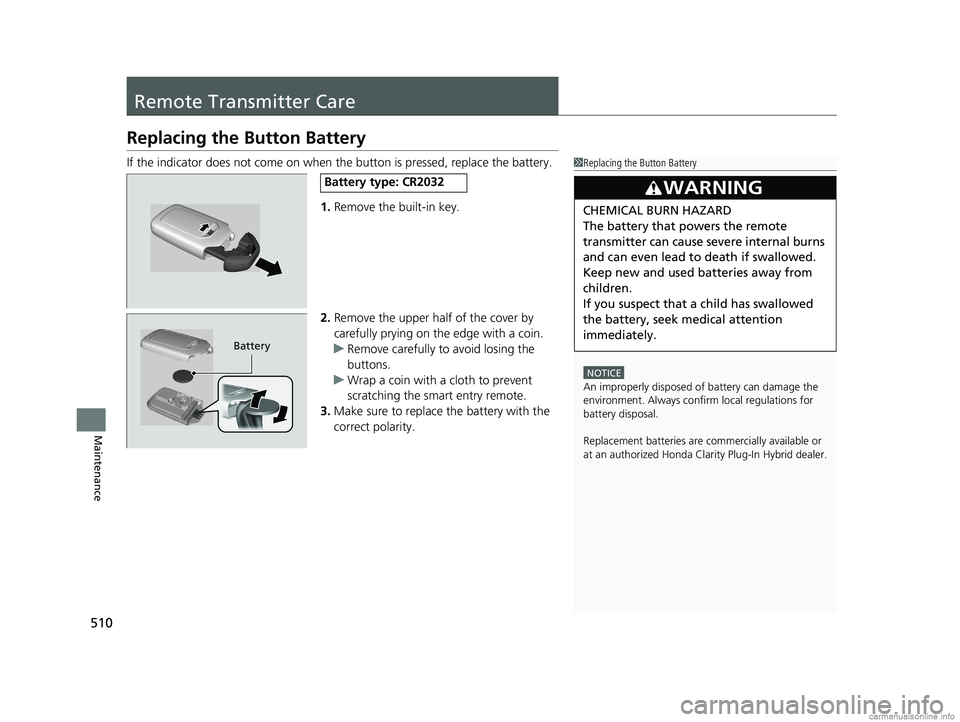
If the indicator does not come on when the button is pressed, replace the battery.
1.Remove the built-in key.
2. Remove the upper half of the cover by
carefully prying on the edge with a coin.
u Remove carefully to avoid losing the
buttons.
u Wrap a coin with a cloth to prevent
scratching the smart entry remote.
3. Make sure to replace the battery with the
correct polarity.1 Replacing the Button Battery
NOTICE
An improperly disposed of battery can damage the
environment. Always conf irm local regulations for
battery disposal.
Replacement batteries are commercially available or
at an authorized Honda Clar ity Plug-In Hybrid dealer.
3WARNING
CHEMICAL BURN HAZARD
The battery that powers the remote
transmitter can cause severe internal burns
and can even lead to death if swallowed.
Keep new and used batteries away from
children.
If you suspect that a child has swallowed
the battery, seek medical attention
immediately.
Battery type: CR2032
Battery
18 CLARITY PHEV CSS-31TRW6000.book 510 ページ 2017年12月25日 月曜日 午後2時22分
Page 566 of 591
564
Handling the Unexpected
When You Cannot Open the Trunk
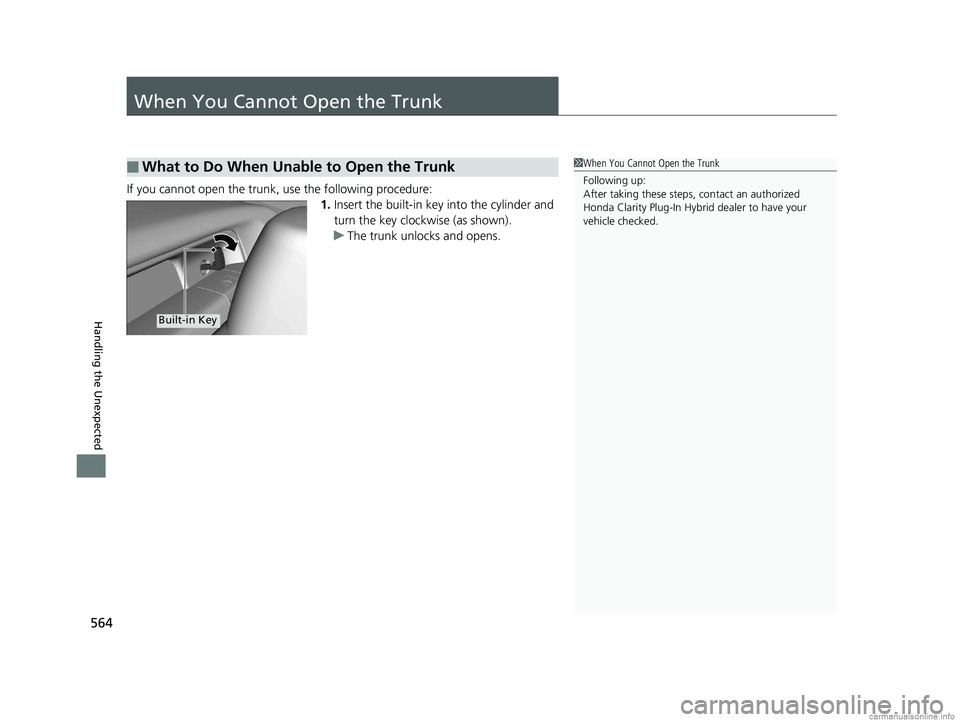
If you cannot open the trunk, use the following procedure:1.Insert the built-in key into the cylinder and
turn the key clockwise (as shown).
u The trunk unlocks and opens.
■What to Do When Unable to Open the Trunk1When You Cannot Open the Trunk
Following up:
After taking these steps, contact an authorized
Honda Clarity Plug-In Hybrid dealer to have your
vehicle checked.
Built-in Key
18 CLARITY PHEV CSS-31TRW6000.book 564 ページ 2017年12月25日 月曜日 午後2時22分
Page 583 of 591
581
Index
Control Box.............................................. 461
Controls .................................................... 135
Coolant (Engine) ...................................... 488
Adding to the Radiator ........................... 489
Adding to the Reserve Tank .................... 488
Overheating ............................................ 542
Creeping (Transmission) .......................... 381
Cup Holders .............................................. 187
Customer Service Information ................ 577
Customized Features ....................... 133, 306
D
Daytime Running Lights .......................... 165
Dead Battery (12-Volt) ............................. 539
Deceleration Paddle Selector .................. 390
Deceleration Paddl e Selector Indicator....... 91
Defrosting the Windshield and
Windows ................................................. 197
Devices that Emit Radio Waves ............... 569
Dimming
Headlights .............................................. 162
Rearview Mirror ...................................... 173
Dipstick (Engine Oil) ................................ 483
Directional Signals (Turn Signal) ............. 161
Display Button .......................................... 211
Door Mirrors ............................................. 174
Doors ........................................................ 137
Auto Door Locking.................................. 149
Auto Door Unlocking .............................. 149
Door Open Message ................................. 46 Keys ........................................................ 137
Locking/Unlocking the Doors from the
Inside............................................... 25, 146
Locking/Unlocking the Doors from the Outside.................................................. 139
Lockout Prevention System ...................... 145
DOT Tire Quality Grading ........................ 502
Drive Cycle Score/Lifetime Points ............ 131
Driver Information Interface ................... 124
Driver’s Knee Airbag .................................. 61
Driving ....................................................... 369
Braking .................................................... 431
Shifting Gear ........................................... 382
Transmission ............................................ 381
Turning on the Power .............................. 376
Driving Position Memory System ............. 170
Dust and Pollen Filter ............................... 512
E
Eco Assist® System ...................................... 20
Eco Drive Display ...................................... 130
ECON Mode .............................................. 388
Elapsed Time ............................................. 127
Electric Power Steering (EPS) System Indicator .................................................... 94
Electronic Stability Control (ESC) ............. 422
Emergency ................................................ 561
Emissions Testing (Readiness Codes) ....... 572
Energy Flow Screen .................................. 215 Engine
Coolant ................................................... 488
Oil ........................................................... 482
Engine Coolant ......................................... 488
Adding to the Radiator ............................ 489
Adding to the Reserve Tank..................... 488
Overheating ............................................ 542
Engine Oil ................................................. 482
Adding .................................................... 484
Checking................................................. 483
Recommended Engine Oil ....................... 482
EPS (Electric Power Steering) System ........ 94
EV Indicator ................................................ 89
Exhaust Gas Hazard (Carbon Monoxide) .. 82
Expanded View Driver’s Mirror ............... 174
Exterior Care (Cleaning) ........................... 515
Exterior Mirrors ........................................ 174
F
Features.................................................... 203
Filters Dust and Pollen ....................................... 512
Oil ........................................................... 485
Flat Tire ..................................................... 522
Floor Mats ................................................. 514
Fluids
Brake ...................................................... 492
Engine Coolant ....................................... 488
Transmission ........................................... 492
Windshield Washer ................................. 493
18 CLARITY PHEV CSS-31TRW6000.book 581 ページ 2017年12月25日 月曜日 午後2時22分