stop start HONDA CLARITY PLUG-IN 2018 (in English) User Guide
[x] Cancel search | Manufacturer: HONDA, Model Year: 2018, Model line: CLARITY PLUG-IN, Model: HONDA CLARITY PLUG-IN 2018Pages: 591, PDF Size: 29.97 MB
Page 427 of 591
425
uuWhen Driving uTire Pressure Monitoring System (TPMS)
Continued
Driving
Tire Pressure Monitoring System (TPMS)
Instead of directly measuring the pressure in each tire, the TPMS on this vehicle
monitors and compares the rolling radius and rotational characteristics of each
wheel and tire while you are driving to determine if one or more tires are
significantly under-inflated. This will caus e the low tire pressure/TPMS indicator to
come on and a message to appear on the driver information interface.
You must start TPMS calibration every time you:
• Adjust the pressure in one or more tires.
• Rotate the tires.
• Replace one or more tires.
Before calibrating the TPMS:
• Set the cold tire pressure in all four tires.
2 Checking Tires P. 499
Make sure:
•The vehicle is at a complete stop.
• The gear position is in
(P.
• The power mode is in ON.
■TPMS Calibration
1Tire Pressure Monitoring System (TPMS)
The system does not monitor the tires when driving
at low speed.
Conditions such as low ambient temperature and
altitude change directly a ffect tire pressure and can
trigger the low tire pressure/TPMS indicator to come on.
Tire pressure checked and inflated in:
•Warm weather can beco me under-inflated in
colder weather.
•Cold weather can become over-inflated in warmer
weather.
The low tire pressure/TPMS indicator will not come
on as a result of over inflation.
The TPMS may not function pr operly if tire type and
size are mixed. Make sure to use the same size and
type of tire. 2 Checking and Maintaining Tires P. 499
The low tire pressure/TPMS indicator may come on
with a delay or may not come on at all when:
•You rapidly accelerate, decelerate, or turn the
steering wheel.
•You drive on snowy or slippery roads.•Snow chains are used.
The low tire pressure/TPMS indicator may come on
under the following conditions:
•There is a heavier and une ven load on the tires,
such as when towing a trailer, than the condition at
calibration.
•Snow chains are used.
18 CLARITY PHEV CSS-31TRW6000.book 425 ページ 2017年12月25日 月曜日 午後2時22分
Page 433 of 591
431Continued
Driving
Braking
Brake System
Use the parking brake to keep the vehicle stationary when parked. When the
parking brake is applied, you can manu ally or automatically release it.
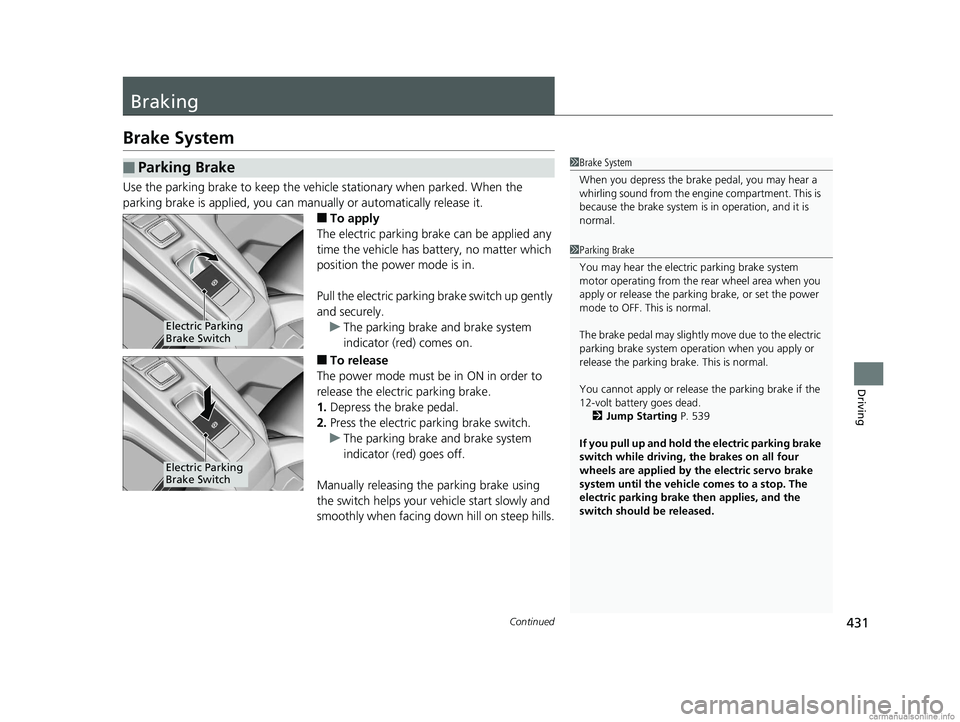
■To apply
The electric parking brake can be applied any
time the vehicle has battery, no matter which
position the power mode is in.
Pull the electric parking brake switch up gently
and securely. u The parking brake and brake system
indicator (red) comes on.
■To release
The power mode must be in ON in order to
release the electric parking brake.
1. Depress the brake pedal.
2. Press the electric parking brake switch.
u The parking brake and brake system
indicator (red) goes off.
Manually releasing the parking brake using
the switch helps your vehicle start slowly and
smoothly when facing down hill on steep hills.
■Parking Brake1 Brake System
When you depress the brak e pedal, you may hear a
whirling sound from the engine compartment. This is
because the brake system is in operation, and it is
normal.
1 Parking Brake
You may hear the electric parking brake system
motor operating from the re ar wheel area when you
apply or release the parki ng brake, or set the power
mode to OFF. This is normal.
The brake pedal may slightly move due to the electric
parking brake system opera tion when you apply or
release the parking br ake. This is normal.
You cannot apply or release the parking brake if the
12-volt battery goes dead. 2 Jump Starting P. 539
If you pull up and hold the electric parking brake
switch while driving, the brakes on all four
wheels are applied by the electric servo brake
system until the vehicle comes to a stop. The
electric parking brake then applies, and the
switch should be released.
Electric Parking
Brake Switch
Electric Parking
Brake Switch
18 CLARITY PHEV CSS-31TRW6000.book 431 ページ 2017年12月25日 月曜日 午後2時22分
Page 434 of 591
uuBraking uBrake System
432
Driving
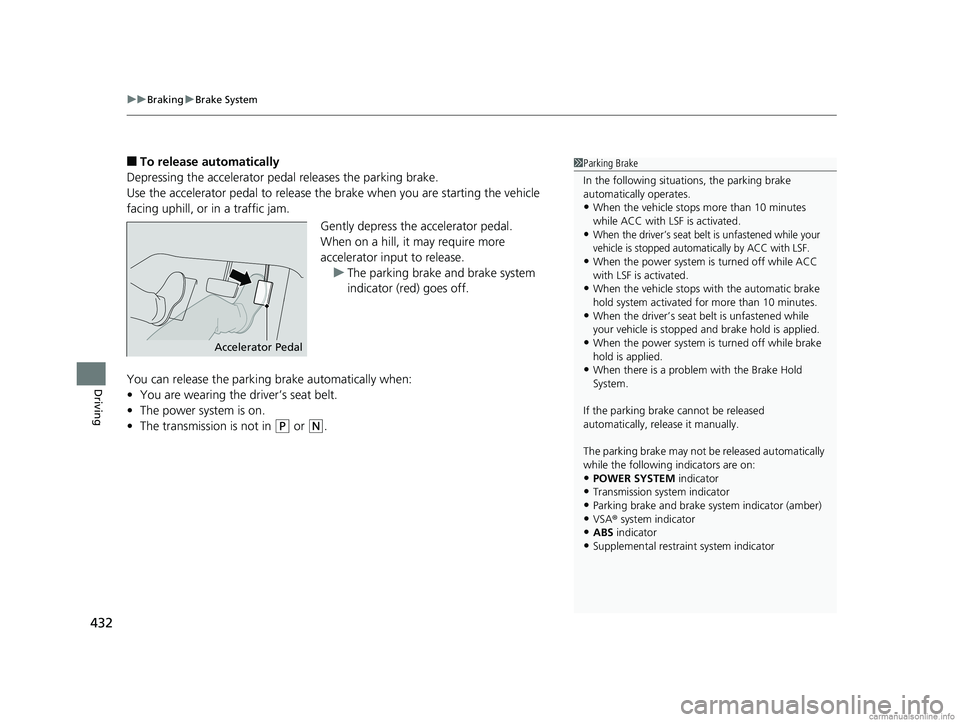
■To release automatically
Depressing the accelerator pedal releases the parking brake.
Use the accelerator pedal to release th e brake when you are starting the vehicle
facing uphill, or in a traffic jam.
Gently depress the accelerator pedal.
When on a hill, it may require more
accelerator input to release.u The parking brake and brake system
indicator (red) goes off.
You can release the parki ng brake automatically when:
• You are wearing the driver’s seat belt.
• The power system is on.
• The transmission is not in
(P or (N.
1Parking Brake
In the following situations, the parking brake
automatically operates.
•When the vehicle stops more than 10 minutes
while ACC with LSF is activated.
•When the driver’s seat belt is unfastened while your
vehicle is stopped automatically by ACC with LSF.
•When the power system is turned off while ACC
with LSF is activated.
•When the vehicle stops with the automatic brake
hold system activated for more than 10 minutes.
•When the driver’s seat belt is unfastened while
your vehicle is stopped and brake hold is applied.
•When the power system is turned off while brake
hold is applied.
•When there is a problem with the Brake Hold
System.
If the parking brake cannot be released
automatically, release it manually.
The parking brake may not be released automatically
while the following indicators are on:
•POWER SYSTEM indicator•Transmission system indicator
•Parking brake and brake sy stem indicator (amber)
•VSA® system indicator•ABS indicator
•Supplemental restraint system indicator
Accelerator Pedal
18 CLARITY PHEV CSS-31TRW6000.book 432 ページ 2017年12月25日 月曜日 午後2時22分
Page 437 of 591
Continued435
uuBraking uBrake System
Driving
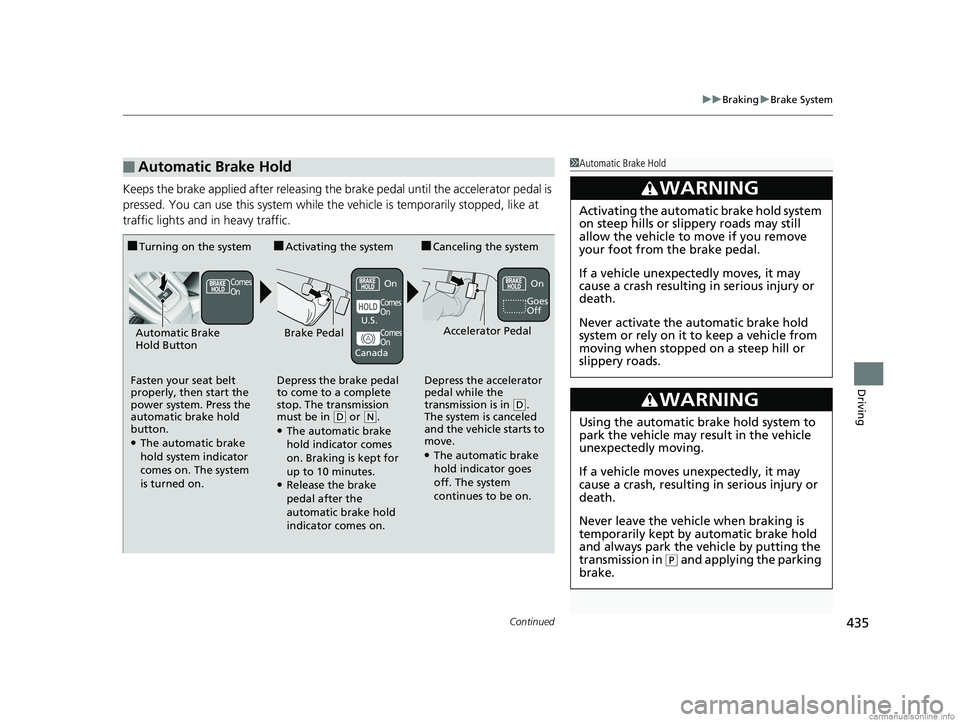
Keeps the brake applied after releasing the brake pedal until the accelerator pedal is
pressed. You can use this system while th e vehicle is temporarily stopped, like at
traffic lights and in heavy traffic.
■Automatic Brake Hold1 Automatic Brake Hold
3WARNING
Activating the automatic brake hold system
on steep hills or slippery roads may still
allow the vehicle to move if you remove
your foot from the brake pedal.
If a vehicle unexpectedly moves, it may
cause a crash resulting in serious injury or
death.
Never activate the automatic brake hold
system or rely on it to keep a vehicle from
moving when stopped on a steep hill or
slippery roads.
3WARNING
Using the automatic brake hold system to
park the vehicle may result in the vehicle
unexpectedly moving.
If a vehicle moves unexpectedly, it may
cause a crash, resulting in serious injury or
death.
Never leave the vehicle when braking is
temporarily kept by automatic brake hold
and always park the vehicle by putting the
transmission in
( P and applying the parking
brake.
■Turning on the system
Fasten your seat belt
properly, then start the
power system. Press the
automatic brake hold
button.
●The automatic brake
hold system indicator
comes on. The system
is turned on.
■Activating the system
Depress the brake pedal
to come to a complete
stop. The transmission
must be in
( D or (N.●The automatic brake
hold indicator comes
on. Braking is kept for
up to 10 minutes.
●Release the brake
pedal after the
automatic brake hold
indicator comes on.
■Canceling the system
Depress the accelerator
pedal while the
transmission is in
( D.
The system is canceled
and the vehicle starts to
move.
●The automatic brake
hold indicator goes
off. The system
continues to be on.
Accelerator PedalBrake PedalAutomatic Brake
Hold Button
Goes
Off
Comes
OnOn On
Comes
On
Comes
On
U.S.
Canada
18 CLARITY PHEV CSS-31TRW6000.book 435 ページ 2017年12月25日 月曜日 午後2時22分
Page 441 of 591
439
uuBraking uCollision Mitigation Braking SystemTM (CMBSTM)
Continued
Driving
Collision Mitigation Braking SystemTM (CMBSTM)
Can assist you when there is a possibility of your vehicle colliding with a vehicle or a
pedestrian detected in front of yours. The CMBSTM is designed to alert you when a
potential collision is determined, as well as to reduce your vehicle speed to help
minimize collision severity when a collision is deemed unavoidable.
■How the system works
1 Collision Mitigation Braking SystemTM (CMBSTM)
Important Safety Reminder
The CMBS
TM is designed to reduce the severity of an
unavoidable collision. It do es not prevent a collision
nor stop the vehicle automati cally. It is still your
responsibility to operate the brake pedal and steering
wheel appropriately acco rding to the driving
conditions.
The CMBS
TM may not activate or may not detect a
vehicle in front of y our vehicle under certain
conditions: 2 CMBS
TM Conditions and Limitations P. 443
You can read about handling information for the
camera equipped with this system. 2 Front Sensor Camera P. 394
Be careful not to severely impact the radar sensor
cover.
1 How the system works
Rapid vibrations on the steering wheel alert you
when the your vehicle speed is between 19 and 62
mph (30 and 100 km/h) with an oncoming vehicle
detected in front of you.
When the CMBS
TM activates, it may automatically
apply the brake. It will be canceled when your vehicle
stops or a potential coll ision is not determined.
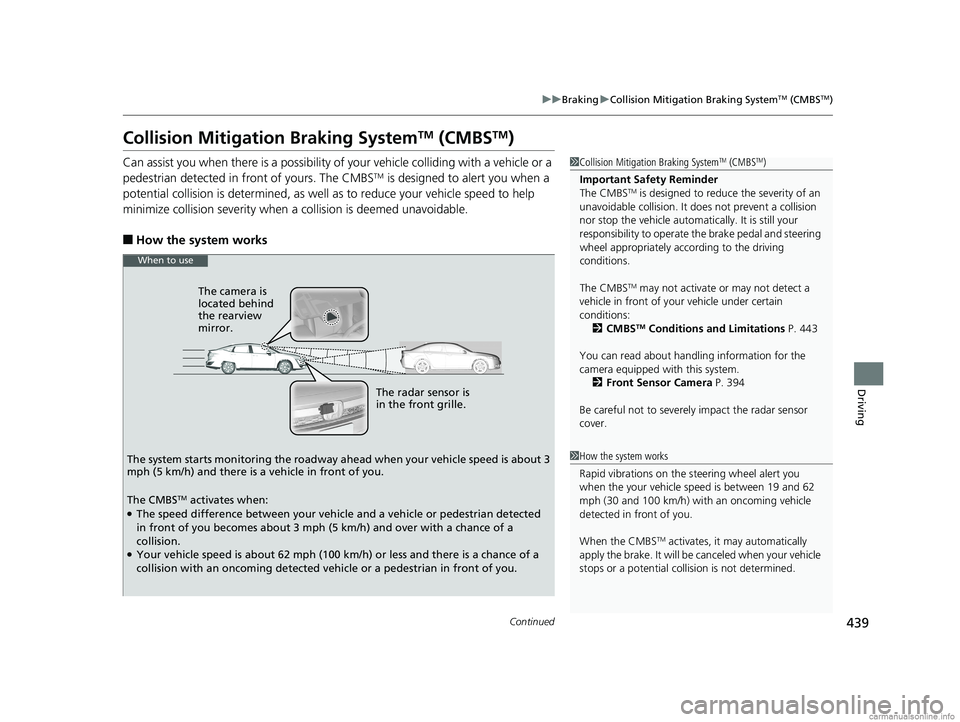
The radar sensor is
in the front grille.
The camera is
located behind
the rearview
mirror.
The system starts monitoring the roadway ah ead when your vehicle speed is about 3
mph (5 km/h) and there is a vehicle in front of you.
When to use
The CMBSTM activates when:●The speed difference between your vehicle and a vehicle or pedestrian detected
in front of you becomes about 3 mph (5 km/h) and over with a chance of a
collision.
●Your vehicle speed is about 62 mph (100 km/h) or less and there is a chance of a
collision with an oncoming detected vehicle or a pedestrian in front of you.
18 CLARITY PHEV CSS-31TRW6000.book 439 ページ 2017年12月25日 月曜日 午後2時22分
Page 454 of 591
452
uuRefueling uHow to Refuel
Driving
How to Refuel
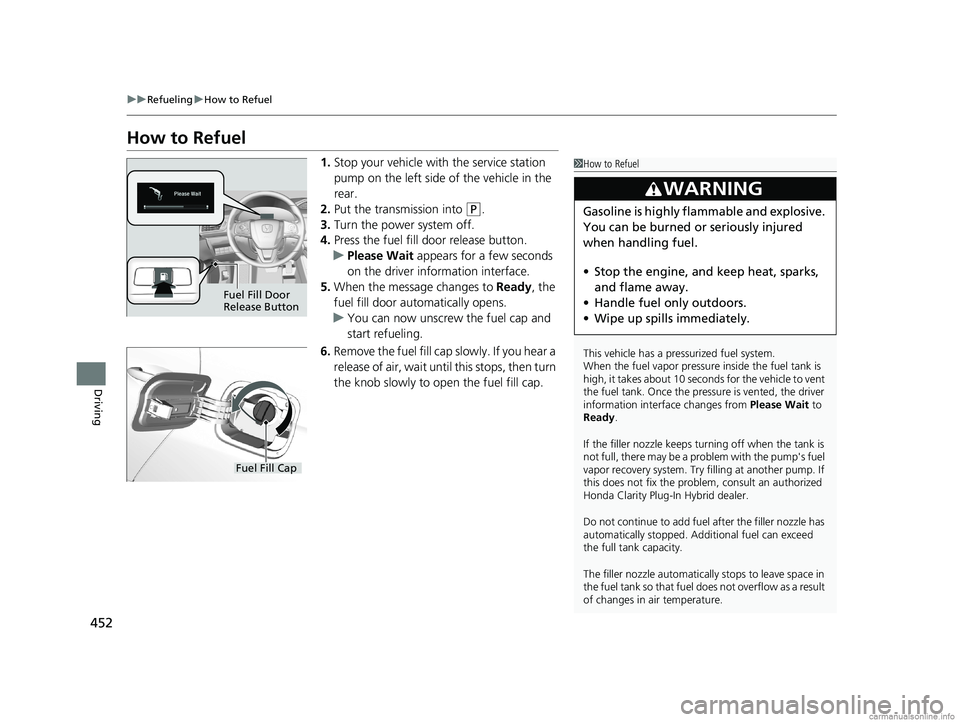
1. Stop your vehicle with the service station
pump on the left side of the vehicle in the
rear.
2. Put the transmission into
(P.
3. Turn the power system off.
4. Press the fuel fill door release button.
u Please Wait appears for a few seconds
on the driver information interface.
5. When the message changes to Ready, the
fuel fill door automatically opens.
u You can now unscrew the fuel cap and
start refueling.
6. Remove the fuel fill cap slowly. If you hear a
release of air, wait unt il this stops, then turn
the knob slowly to open the fuel fill cap.
1 How to Refuel
This vehicle has a pressurized fuel system.
When the fuel vapor pressure inside the fuel tank is
high, it takes about 10 seconds for the vehicle to vent
the fuel tank. Once the pressure is vented, the driver
information interface changes from Please Wait to
Ready.
If the filler nozzle keeps tu rning off when the tank is
not full, there may be a problem with the pump's fuel
vapor recovery system. Try fi lling at another pump. If
this does not fix the problem, consult an authorized
Honda Clarity Plug-In Hybrid dealer.
Do not continue to add fuel after the filler nozzle has
automatically stopped. Addi tional fuel can exceed
the full tank capacity.
The filler nozzle automatically stops to leave space in
the fuel tank so that fuel does not overflow as a result
of changes in air temperature.
3WARNING
Gasoline is highly flammable and explosive.
You can be burned or seriously injured
when handling fuel.
• Stop the engine, and keep heat, sparks,
and flame away.
• Handle fuel only outdoors.
• Wipe up spills immediately.
Fuel Fill Door
Release Button
Fuel Fill Cap
18 CLARITY PHEV CSS-31TRW6000.book 452 ページ 2017年12月25日 月曜日 午後2時22分
Page 459 of 591
Continued457
uuCharging uCharge the High Voltage battery using a Level 1 or 2 charger
Driving
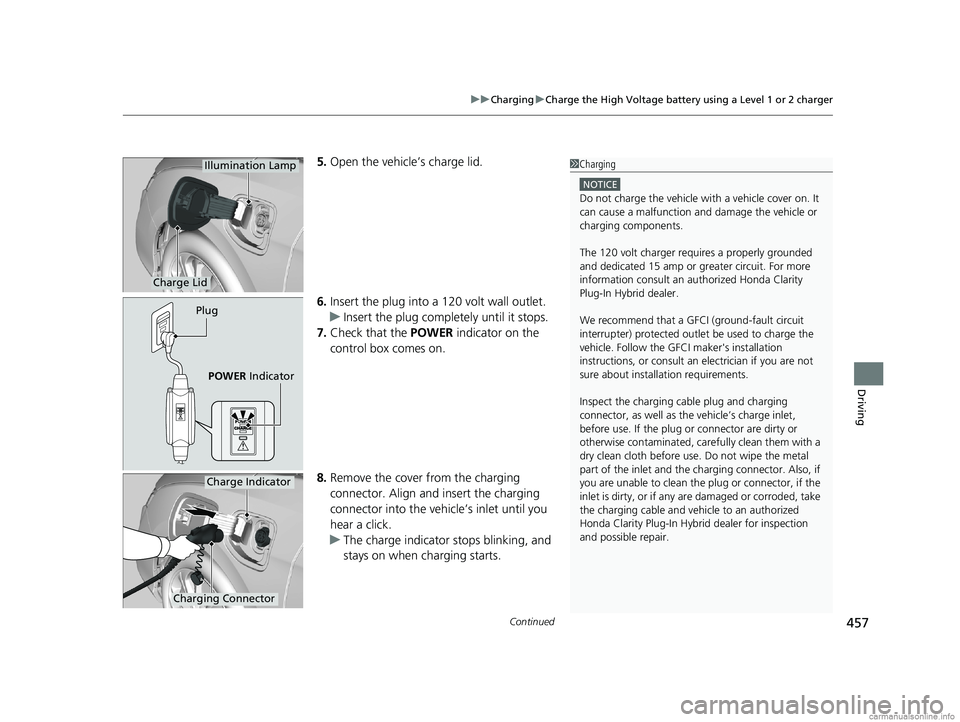
5. Open the vehicle’s charge lid.
6. Insert the plug into a 120 volt wall outlet.
u Insert the plug complete ly until it stops.
7. Check that the POWER indicator on the
control box comes on.
8. Remove the cover from the charging
connector. Align and insert the charging
connector into the vehicle’s inlet until you
hear a click.
u The charge indicator stops blinking, and
stays on when charging starts.
Charge Lid
Illumination Lamp
Plug
POWER Indicator
1Charging
NOTICE
Do not charge the vehicle wi th a vehicle cover on. It
can cause a malfunction and damage the vehicle or
charging components.
The 120 volt charger requires a properly grounded
and dedicated 15 amp or gr eater circuit. For more
information consult an au thorized Honda Clarity
Plug-In Hybrid dealer.
We recommend that a GFCI (ground-fault circuit
interrupter) protected outlet be used to charge the
vehicle. Follow the GF CI maker's installation
instructions, or consult an electrician if you are not
sure about installation requirements.
Inspect the charging cable plug and charging
connector, as well as the vehicle’s charge inlet,
before use. If the plug or connector are dirty or
otherwise contaminated, care fully clean them with a
dry clean cloth before use. Do not wipe the metal
part of the inlet and the ch arging connector. Also, if
you are unable to clean the plug or connector, if the
inlet is dirty, or if any ar e damaged or corroded, take
the charging cable and vehi cle to an authorized
Honda Clarity Plug-In Hybrid dealer for inspection
and possible repair.
Charging Connector
Charge Indicator
18 CLARITY PHEV CSS-31TRW6000.book 457 ページ 2017年12月25日 月曜日 午後2時22分
Page 461 of 591
Continued459
uuCharging uCharge the High Voltage battery using a Level 1 or 2 charger
Driving
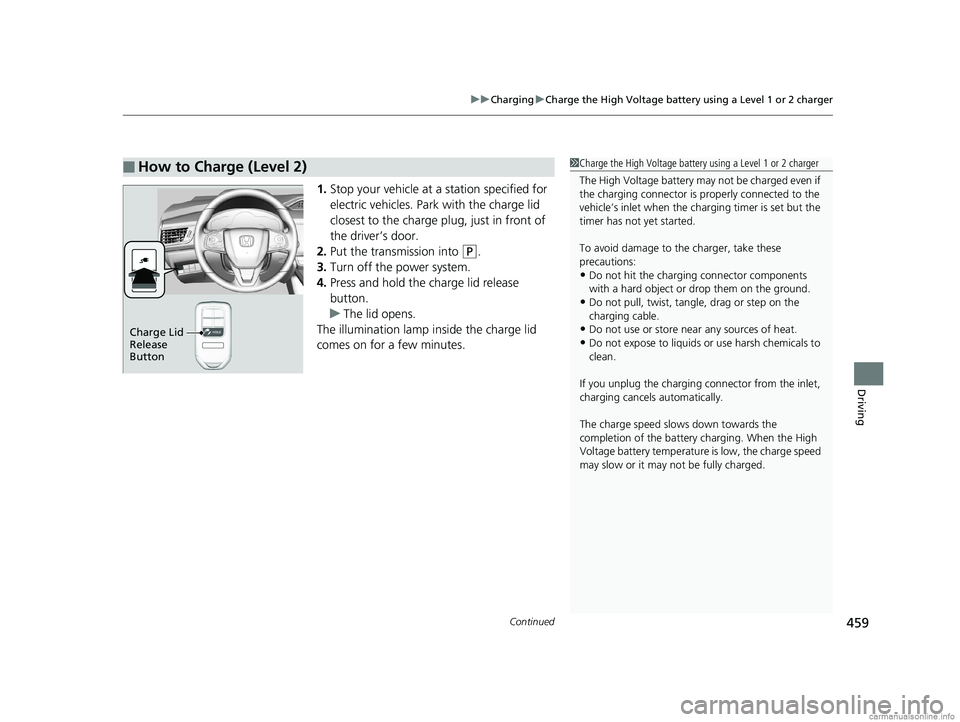
1. Stop your vehicle at a station specified for
electric vehicles. Park with the charge lid
closest to the charge plug, just in front of
the driver’s door.
2. Put the transmission into
(P.
3. Turn off the power system.
4. Press and hold the charge lid release
button.
u The lid opens.
The illumination lamp inside the charge lid
comes on for a few minutes.
■How to Charge (Level 2)1 Charge the High Voltage battery using a Level 1 or 2 charger
The High Voltage battery may not be charged even if
the charging connector is properly connected to the
vehicle’s inlet when the charging timer is set but the
timer has not yet started.
To avoid damage to th e charger, take these
precautions:
•Do not hit the charging connector components
with a hard object or drop them on the ground.
•Do not pull, twist, tangle, drag or step on the
charging cable.
•Do not use or store near any sources of heat.
•Do not expose to liquids or use harsh chemicals to
clean.
If you unplug the charging connector from the inlet,
charging cancels automatically.
The charge speed slows down towards the
completion of the battery charging. When the High
Voltage battery temperature is low, the charge speed
may slow or it may not be fully charged.Charge Lid
Release
Button
18 CLARITY PHEV CSS-31TRW6000.book 459 ページ 2017年12月25日 月曜日 午後2時22分
Page 489 of 591
487
uuMaintenance Under the Hood uChanging the Engine Oil and Oil Filter
Maintenance
10. Reinstall the engine oil fill cap securely and
start the engine.
11. Run the engine for a few minutes, and
then check that there is no leak from the
drain bolt or oil filter.
12. Stop the engine, wait for three minutes,
and then check the oil level on the
dipstick.
u If necessary, add more engine oil.1Changing the Engine Oil and Oil Filter
Reinstall the engine oil fill cap. Start the engine. The
low oil pressure indicator should go off within five
seconds. If it does not, turn off the engine, and check
your work.
18 CLARITY PHEV CSS-31TRW6000.book 487 ページ 2017年12月25日 月曜日 午後2時22分
Page 540 of 591
538
uuPower System Won’t StartuEmergency Power System Off
Handling the Unexpected
Emergency Power System Off
The POWER button may be used to turn the pow er system off due to an emergency
situation even while driving. If you must turn the power system off, do either of the
following operations:
• Press and hold the POWER button for about two seconds.
• Firmly press the POWER button three times.
The steering wheel will not lock. However, because turning off the power system
disables the power assist the power syst em provides to the steering and braking
systems, it will require significantly more physical effort and time to steer and slow
the vehicle. Use both feet on the brake pe dal to slow down the vehicle and stop
immediately in a safe place.
The gear position auto matically changes to
(P after the vehicle comes to a complete
stop. Then, the power mode changes to VEHICLE OFF.
1Emergency Power System Off
Do not press the button while driving unless it is
absolutely necessary for the power system to be
turned off.
18 CLARITY PHEV CSS-31TRW6000.book 538 ページ 2017年12月25日 月曜日 午後2時22分