power steering HONDA CLARITY PLUG-IN 2018 (in English) Owner's Guide
[x] Cancel search | Manufacturer: HONDA, Model Year: 2018, Model line: CLARITY PLUG-IN, Model: HONDA CLARITY PLUG-IN 2018Pages: 591, PDF Size: 29.97 MB
Page 382 of 591
380
uuWhen Driving uPrecautions While Driving
Driving
Precautions While Driving
Avoid driving in deep water and on flooded roads. This can damage the power
system or driveline, or cause electrical component failure.
■In Rain1Precautions While Driving
NOTICE
Do not select a shift button while pressing the
accelerator pedal. You could damage the
transmission.
NOTICE
The following can damage the rear frames and rear
suspensions. Be careful when driving.
•Backing up the vehicle into a space with a parking
block or road shoulder
•Driving up or down to a different surface level
(such as a road shoulder)
•Driving on a road with potholes
NOTICE
If you repeatedly turn the steering wheel at an
extremely low speed, or hold the steering wheel in
the full left or right position for a while, the electric
power steering (EPS) system heats up. The system
goes into a protective mode, and limits its
performance. The steering wheel becomes harder
and harder to operate. Once the system cools down,
the EPS system is restored.
Repeated operation under these conditions can
eventually damage the system.
If the power mode is set to ACCESSORY while
driving, the power system will shut down and all
steering and brake power a ssist functions will stop,
making it difficult to control the vehicle.
18 CLARITY PHEV CSS-31TRW6000.book 380 ページ 2017年12月25日 月曜日 午後2時22分
Page 405 of 591
403
uuWhen Driving uAdaptive Cruise Control (ACC) with Low Speed Follow (LSF)
Continued
Driving
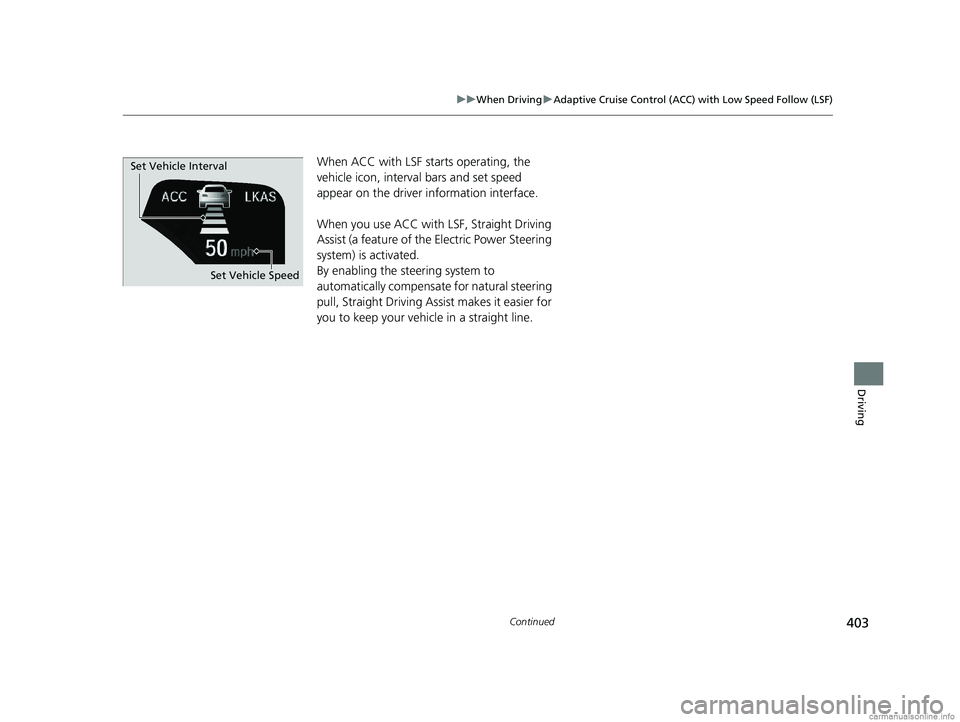
When ACC with LSF starts operating, the
vehicle icon, interval bars and set speed
appear on the driver information interface.
When you use ACC with LSF, Straight Driving
Assist (a feature of the Electric Power Steering
system) is activated.
By enabling the steering system to
automatically compensate for natural steering
pull, Straight Driving Assist makes it easier for
you to keep your vehicle in a straight line.
Set Vehicle Speed
Set Vehicle Interval
18 CLARITY PHEV CSS-31TRW6000.book 403 ページ 2017年12月25日 月曜日 午後2時22分
Page 414 of 591
uuWhen Driving uAdaptive Cruise Control (ACC) with Low Speed Follow (LSF)
412
Driving
■Automatic cancellation
The beeper sounds and a message appears on the driver information interface when
ACC with LSF is automatically canceled. An y of these conditions may cause the ACC
with LSF to automatically cancel:
• Bad weather (rain, fog, snow, etc.)
• When the radar sensor in the front grille gets dirty.
• An abnormal tire condition is detected, or the tires are skidding.
• Driving on a mountainous road, or driving off road for extended periods.
• Abrupt steering wheel movement.
• When the ABS, VSA ® or CMBS
TM is activated.
• When the ABS or VSA ® system indicator comes on.
• When the vehicle is stopped on a very steep slope.
• When you manually apply the parking brake.
• When the detected vehicle within the ACC with LSF range is too close to your
vehicle.
• The camera behind the rearview mirror, or the area around the camera, including
the windshield, gets dirty.
The ACC with LSF automatic cancellation can be also triggered by the following
causes. In these cases, the parking brake will be automatically applied.
• The driver’s seat belt is unfasten ed when the vehicle is stationary.
• The vehicle stops for mo re than 10 minutes.
• The power system is turned off.
In the following cases, a buzzer sounds, ACC with LSF is deactivated, and the
message Cruise Cancelled: Slope Too Steep. Watch Downhill Speed appears in
the driver information interface.
• While descending a long slope and the vehi cle has repeatedly applied the brakes
to maintain the set speed.
1 Automatic cancellation
Even though ACC with LSF has been automatically
canceled, you can still resu me the prior set speed.
Wait until the condition that caused ACC with LSF to
cancel improves, then press the RES/+ button.
18 CLARITY PHEV CSS-31TRW6000.book 412 ページ 2017年12月25日 月曜日 午後2時22分
Page 418 of 591
uuWhen Driving uLane Keeping Assist System (LKAS)
416
Driving
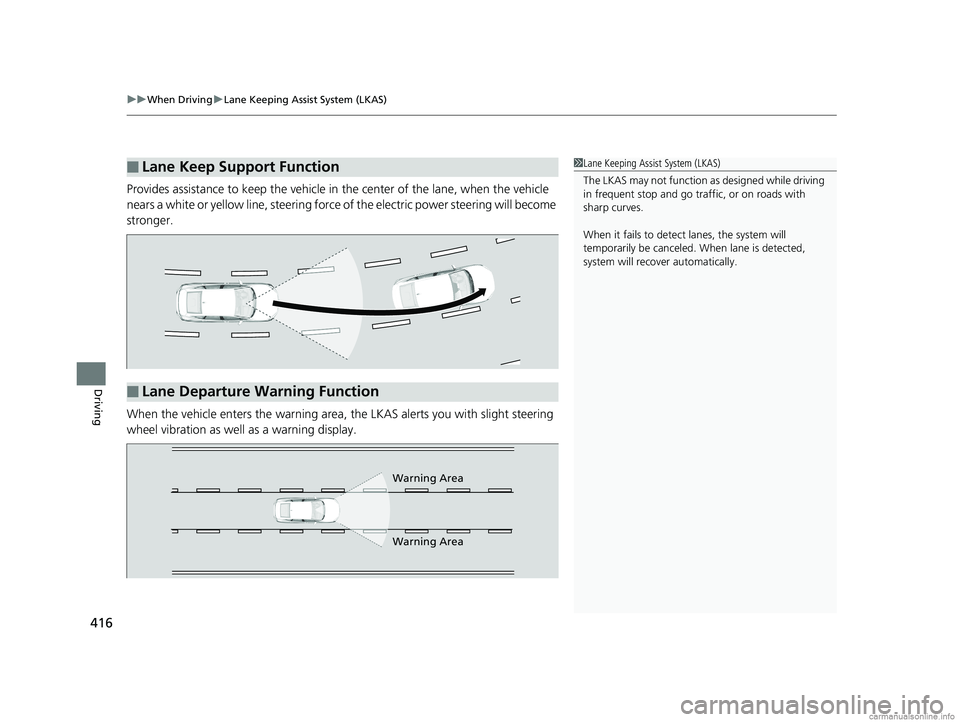
Provides assistance to keep the vehicle in the center of the lane, when the vehicle
nears a white or yellow line, steering force of the electric power steering will become
stronger.
When the vehicle enters the warning area, the LKAS alerts you with slight steering
wheel vibration as well as a warning display.
■Lane Keep Support Function1 Lane Keeping Assist System (LKAS)
The LKAS may not function as designed while driving
in frequent stop and go traf fic, or on roads with
sharp curves.
When it fails to detect lanes, the system will
temporarily be canceled. When lane is detected,
system will recover automatically.
■Lane Departure Warning Function
Warning Area
Warning Area
18 CLARITY PHEV CSS-31TRW6000.book 416 ページ 2017年12月25日 月曜日 午後2時22分
Page 427 of 591
425
uuWhen Driving uTire Pressure Monitoring System (TPMS)
Continued
Driving
Tire Pressure Monitoring System (TPMS)
Instead of directly measuring the pressure in each tire, the TPMS on this vehicle
monitors and compares the rolling radius and rotational characteristics of each
wheel and tire while you are driving to determine if one or more tires are
significantly under-inflated. This will caus e the low tire pressure/TPMS indicator to
come on and a message to appear on the driver information interface.
You must start TPMS calibration every time you:
• Adjust the pressure in one or more tires.
• Rotate the tires.
• Replace one or more tires.
Before calibrating the TPMS:
• Set the cold tire pressure in all four tires.
2 Checking Tires P. 499
Make sure:
•The vehicle is at a complete stop.
• The gear position is in
(P.
• The power mode is in ON.
■TPMS Calibration
1Tire Pressure Monitoring System (TPMS)
The system does not monitor the tires when driving
at low speed.
Conditions such as low ambient temperature and
altitude change directly a ffect tire pressure and can
trigger the low tire pressure/TPMS indicator to come on.
Tire pressure checked and inflated in:
•Warm weather can beco me under-inflated in
colder weather.
•Cold weather can become over-inflated in warmer
weather.
The low tire pressure/TPMS indicator will not come
on as a result of over inflation.
The TPMS may not function pr operly if tire type and
size are mixed. Make sure to use the same size and
type of tire. 2 Checking and Maintaining Tires P. 499
The low tire pressure/TPMS indicator may come on
with a delay or may not come on at all when:
•You rapidly accelerate, decelerate, or turn the
steering wheel.
•You drive on snowy or slippery roads.•Snow chains are used.
The low tire pressure/TPMS indicator may come on
under the following conditions:
•There is a heavier and une ven load on the tires,
such as when towing a trailer, than the condition at
calibration.
•Snow chains are used.
18 CLARITY PHEV CSS-31TRW6000.book 425 ページ 2017年12月25日 月曜日 午後2時22分
Page 439 of 591
437
uuBraking uAnti-lock Brake System (ABS)
Driving
Anti-lock Brake System (ABS)
Helps prevent the wheels from locking up, and helps you retain steering control by
pumping the brakes rapidly, much faster than you.
The electronic brake distribu tion (EBD) system, which is part of the ABS, also
balances the front-to-rear braking distribution according to vehicle loading.
You should never pump the brake pedal. Let the ABS work for you by always
keeping firm, steady pressure on the brake pe dal. This is sometimes referred to as
“stomp and steer.”
■ABS operation
You may hear an operating noise when the ABS is working. Keep holding the pedal
firmly down. On dry pavement, you will ne ed to press on the brake pedal very hard
before the ABS activates. Ho wever, you may feel the ABS activate immediately if you
are trying to stop on snow or ice.
ABS may activate when you depres s the brake pedal when driving on:
• Wet or snow covered roads.
• Roads paved with stone.
• Roads with uneven surf aces, such as potholes, cracks, manholes, etc.
When the vehicle speed goes under 6 mph (10 km/h), the ABS stops.
■ABS1Anti-lock Brake System (ABS)
NOTICE
The ABS may not function correc tly if you use a tire of
the wrong size or type.
If the ABS indicator comes on while driving, there
may be a problem with the system.
While normal braking will not be affected, there is a
possibility that the ABS will not operating. Have your
vehicle checked by an aut horized Honda Clarity Plug-
In Hybrid dealer immediately.
The ABS is not designed for the purpose of reducing
the time or distance it takes for a vehicle to stop: It is
designed to limit brake lo ckup which can lead to
skidding and loss of steering control.
In the following cases, yo ur vehicle may need more
distance to stop than a vehicle without the ABS:
•You are driving on rough or uneven road surfaces,
such as gravel or snow.
•The tires are equipped with snow chains.
The following may be observed with the ABS system:
•Motor sounds coming from the engine
compartment when the brakes are applied, or
when system checks are being performed after the
power system has been turned on and while
vehicle is accelerates.
•Brake pedal and/or the ve hicle body vibration when
ABS activates.
These vibrations and sounds are normal to ABS
systems and are no cause for concern.
18 CLARITY PHEV CSS-31TRW6000.book 437 ページ 2017年12月25日 月曜日 午後2時22分
Page 442 of 591
uuBraking uCollision Mitigation Braking SystemTM (CMBSTM)
440
Driving
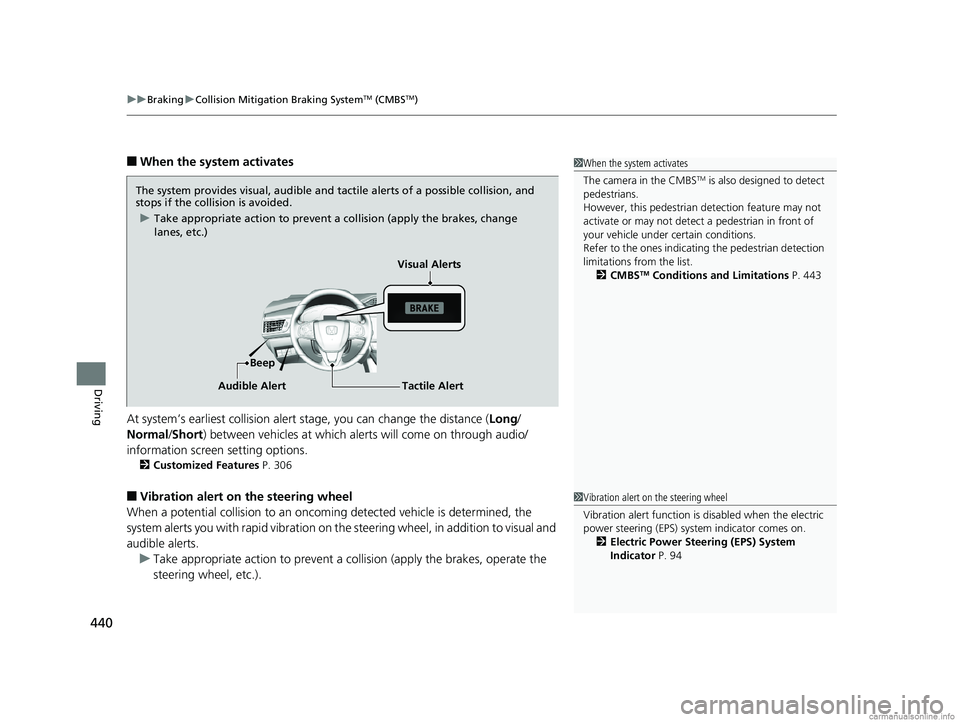
■When the system activates
At system’s earliest collision alert stage, you can change the distance ( Long/
Normal /Short) between vehicles at which alerts will come on through audio/
information screen setting options.
2 Customized Features P. 306
■Vibration alert on the steering wheel
When a potential collision to an oncoming detected vehicle is determined, the
system alerts you with rapid vibration on the steering wheel, in addition to visual and
audible alerts.
u Take appropriate action to prevent a co llision (apply the brakes, operate the
steering wheel, etc.).
1 When the system activates
The camera in the CMBS
TM is also designed to detect
pedestrians.
However, this pedestrian detection feature may not
activate or may not detect a pedestrian in front of
your vehicle under certain conditions.
Refer to the ones indicating the pedestrian detection
limitations from the list. 2 CMBS
TM Conditions and Limitations P. 443
The system provides visual, audible and tactile alerts of a possible collision, and
stops if the collision is avoided.
u Take appropriate action to prevent a collision (apply the brakes, change
lanes, etc.)
Beep Visual Alerts
Audible Alert
Tactile Alert
1 Vibration alert on the steering wheel
Vibration alert function is disabled when the electric
power steering (EPS) system indicator comes on. 2 Electric Power Steering (EPS) System
Indicator P. 94
18 CLARITY PHEV CSS-31TRW6000.book 440 ページ 2017年12月25日 月曜日 午後2時22分
Page 479 of 591
477
uuMaintenance MinderTMuTo Use Maintenance MinderTM
Continued
Maintenance
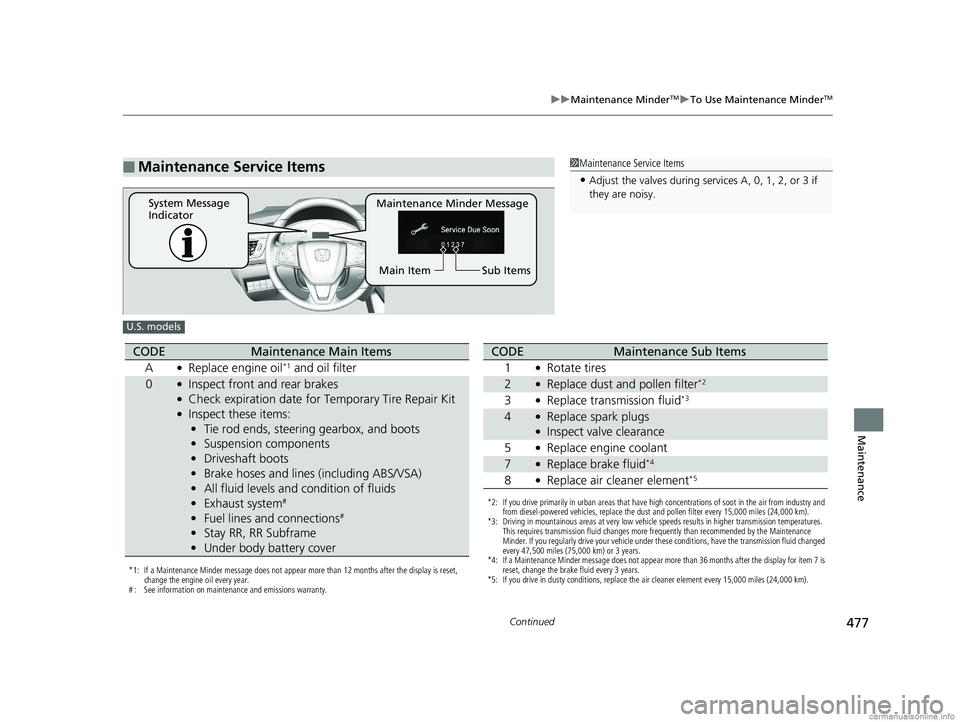
■Maintenance Service Items1Maintenance Service Items
•Adjust the valves during services A, 0, 1, 2, or 3 if
they are noisy.
Maintenance Minder Message
System Message
Indicator
Sub Items
Main Item
U.S. models
*1: If a Maintenance Minder message does not appear more than 12 months after the display is reset,
change the engine oil every year.
# : See information on maintenance and emissions warranty.
CODEMaintenance Main Items
A
●Replace engine oil*1 and oil filter
0●Inspect front and rear brakes●Check expiration date for Temporary Tire Repair Kit●Inspect these items: • Tie rod ends, steering gearbox, and boots
• Suspension components
• Driveshaft boots
• Brake hoses and lines (including ABS/VSA)
• All fluid levels and condition of fluids
• Exhaust system
#
•Fuel lines and connections#
•Stay RR, RR Subframe
• Under body battery cover
*2: If you drive primarily in urban areas that have high concentrations of soot in the air from industry and
from diesel-powered vehicles, replace the dust and pollen filter every 15,000 miles (24,000 km).
*3: Driving in mountainous areas at very low vehicle speeds results in higher transmission temperatures.
This requires transmission fluid changes more frequently than recommended by the Maintenance
Minder. If you regularly drive your vehicle under these conditions, have the transmission fluid changed
every 47,500 miles (75,000 km) or 3 years.
*4: If a Maintenance Minder message does not appear more than 36 months after the display for item 7 is reset, change the brake fluid every 3 years.
*5: If you drive in dusty conditions, replace the air cleaner element every 15,000 miles (24,000 km).
CODEMaintenance Sub Items
1
●Rotate tires
2●Replace dust and pollen filter*2
3●Replace transmission fluid*3
4●Replace spark plugs●Inspect valve clearance
5
●Replace engine coolant
7●Replace brake fluid*4
8●Replace air cleaner element*5
18 CLARITY PHEV CSS-31TRW6000.book 477 ページ 2017年12月25日 月曜日 午後2時22分
Page 480 of 591
478
uuMaintenance MinderTMuTo Use Maintenance MinderTM
Maintenance
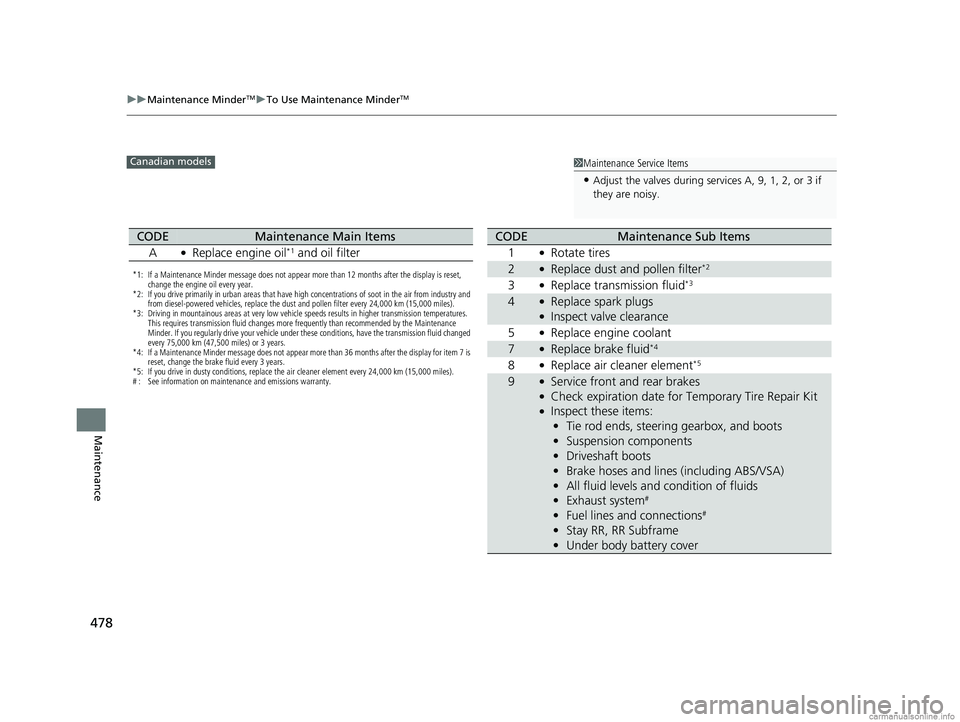
1Maintenance Service Items
•Adjust the valves during services A, 9, 1, 2, or 3 if
they are noisy.
Canadian models
*1: If a Maintenance Minder message does not appear more than 12 months after the display is reset,
change the engine oil every year.
*2: If you drive primarily in urban areas that have high concentrations of soot in the air from industry and from diesel-powered vehicles, replace the dust and pollen filter every 24,000 km (15,000 miles).
*3: Driving in mountainous areas at very low vehicle speeds results in higher transmission temperatures.
This requires transmission fluid changes more frequently than recommended by the Maintenance
Minder. If you regularly drive your vehicle under these conditions, have the transmission fluid changed
every 75,000 km (47,500 miles) or 3 years.
*4: If a Maintenance Minder message does not appear more than 36 months after the display for item 7 is reset, change the brake fluid every 3 years.
*5: If you drive in dusty conditions, replace the air cleaner element every 24,000 km (15,000 miles).
# : See information on maintenance and emissions warranty.
CODEMaintenance Main Items
A
●Replace engine oil*1 and oil filter
CODEMaintenance Sub Items
1
●Rotate tires
2●Replace dust and pollen filter*2
3●Replace transmission fluid*3
4●Replace spark plugs●Inspect valve clearance
5
●Replace engine coolant
7●Replace brake fluid*4
8●Replace air cleaner element*5
9●Service front and rear brakes●Check expiration date for Temporary Tire Repair Kit●Inspect these items: • Tie rod ends, steering gearbox, and boots
• Suspension components
• Driveshaft boots
• Brake hoses and lines (including ABS/VSA)
• All fluid levels and condition of fluids
• Exhaust system
#
•Fuel lines and connections#
•Stay RR, RR Subframe
• Under body battery cover
18 CLARITY PHEV CSS-31TRW6000.book 478 ページ 2017年12月25日 月曜日 午後2時22分
Page 523 of 591
521
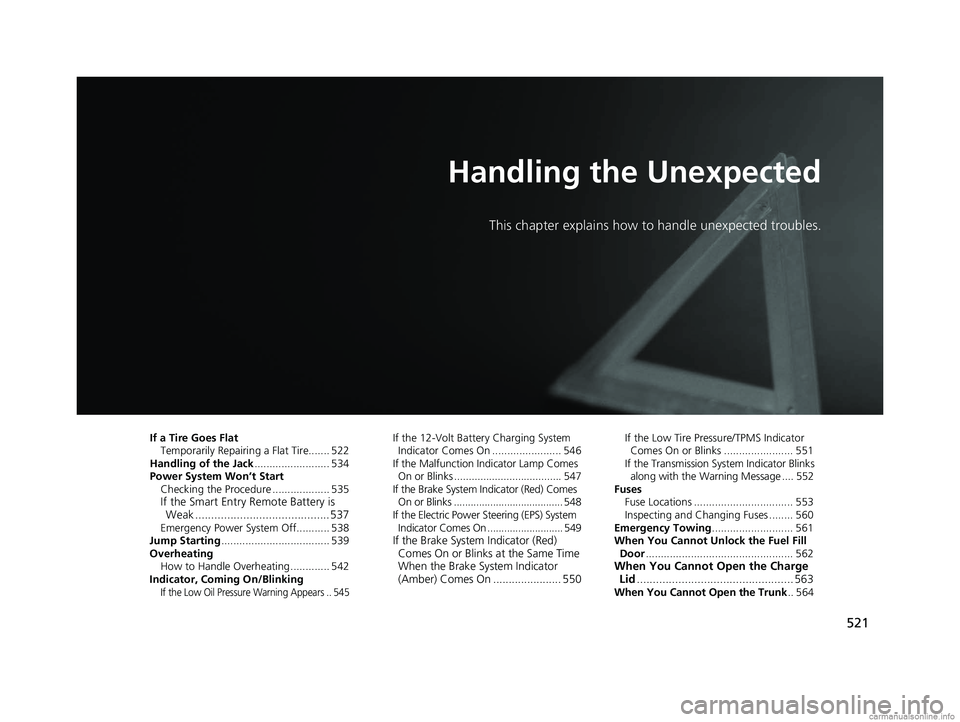
Handling the Unexpected
This chapter explains how to handle unexpected troubles.
If a Tire Goes FlatTemporarily Repairi ng a Flat Tire....... 522
Handling of the Jack ......................... 534
Power System Won’t Start Checking the Procedure ................... 535
If the Smart Entry Remote Battery is Weak .......................................... 537
Emergency Power System Off........... 538
Jump Starting .................................... 539
Overheating How to Handle Overheating ............. 542
Indicator, Coming On/Blinking
If the Low Oil Pressure Warning Appears .. 545
If the 12-Volt Battery Charging System Indicator Comes On ....................... 546
If the Malfunction Indicator Lamp Comes
On or Blinks ..................................... 547
If the Brake System Indicator (Red) Comes On or Blinks ....................................... 548
If the Electric Power Steering (EPS) System Indicator Comes On ........................... 549
If the Brake System Indicator (Red) Comes On or Blinks at the Same Time
When the Brake System Indicator
(Amber) Comes On ...................... 550
If the Low Tire Pressure/TPMS Indicator
Comes On or Blinks ....................... 551
If the Transmission System Indicator Blinks
along with the Warning Message .... 552
Fuses Fuse Locations ................................. 553
Inspecting and Changing Fuses ........ 560
Emergency Towing ........................... 561
When You Cannot Unlock the Fuel Fill
Door ................................................. 562
When You Cannot Open the Charge
Lid ................................................. 563
When You Cannot Open the Trunk .. 564
18 CLARITY PHEV CSS-31TRW6000.book 521 ページ 2017年12月25日 月曜日 午後2時22分