camera HONDA CLARITY PLUG-IN 2018 Owner's Manual (in English)
[x] Cancel search | Manufacturer: HONDA, Model Year: 2018, Model line: CLARITY PLUG-IN, Model: HONDA CLARITY PLUG-IN 2018Pages: 591, PDF Size: 29.97 MB
Page 6 of 591
Contents
This owner’s manual should be considered a permanent part of the
vehicle and should remain with the vehicle when it is sold.
This owner’s manual covers all models of your vehicle. You may find
descriptions of equipment and features that are not on your
particular model.
Images throughout this owner’s manual (including the front cover)
represent features and equipment that are available on some, but
not all, models. Your particular mo del may not have some of these
features.
This owner’s manual is for vehicles sold in the United States and
Canada.
The information and specifications in cluded in this publication were
in effect at the time of approval for printing. Honda Motor Co., Ltd.
reserves the right, however, to discontinue or change specifications
or design at any time without notice and without incurring any
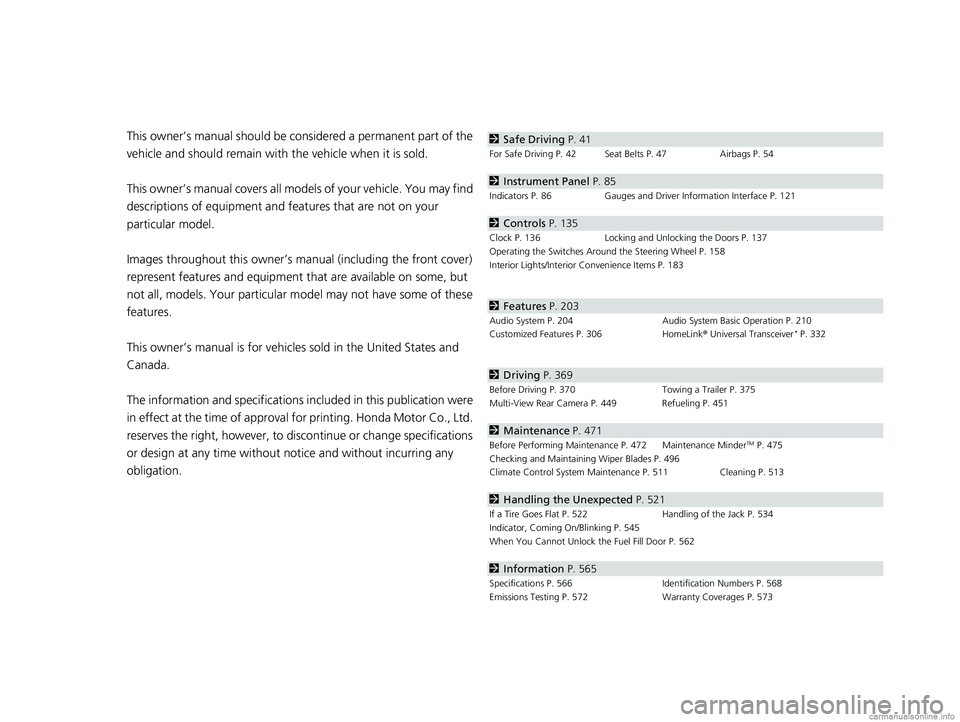
obligation.2 Safe Driving P. 41
For Safe Driving P. 42 Seat Belts P. 47 Airbags P. 54
2Instrument Panel P. 85
Indicators P. 86 Gauges and Driver Information Interface P. 121
2Controls P. 135
Clock P. 136 Locking and Unlocking the Doors P. 137
Operating the Switches Around the Steering Wheel P. 158
Interior Lights/Interior Convenience Items P. 183
2 Features P. 203
Audio System P. 204 Audio System Basic Operation P. 210
Customized Features P. 306 HomeLink® Universal Transceiver* P. 332
2 Driving P. 369
Before Driving P. 370 Towing a Trailer P. 375
Multi-View Rear Camera P. 449 Refueling P. 451
2 Maintenance P. 471
Before Performing Maintenance P. 472 Maintenance MinderTM P. 475
Checking and Maintaining Wiper Blades P. 496
Climate Control System Main tenance P. 511 Cleaning P. 513
2Handling the Unexpected P. 521
If a Tire Goes Flat P. 522 Handling of the Jack P. 534
Indicator, Coming On/Blinking P. 545
When You Cannot Unlock the Fuel Fill Door P. 562
2 Information P. 565
Specifications P. 566 Identification Numbers P. 568
Emissions Testing P. 572 Warranty Coverages P. 573
18 CLARITY PHEV CSS-31TRW6000.book 6 ページ 2017年12月25日 月曜日 午後2時22分
Page 12 of 591
Visual Index
10
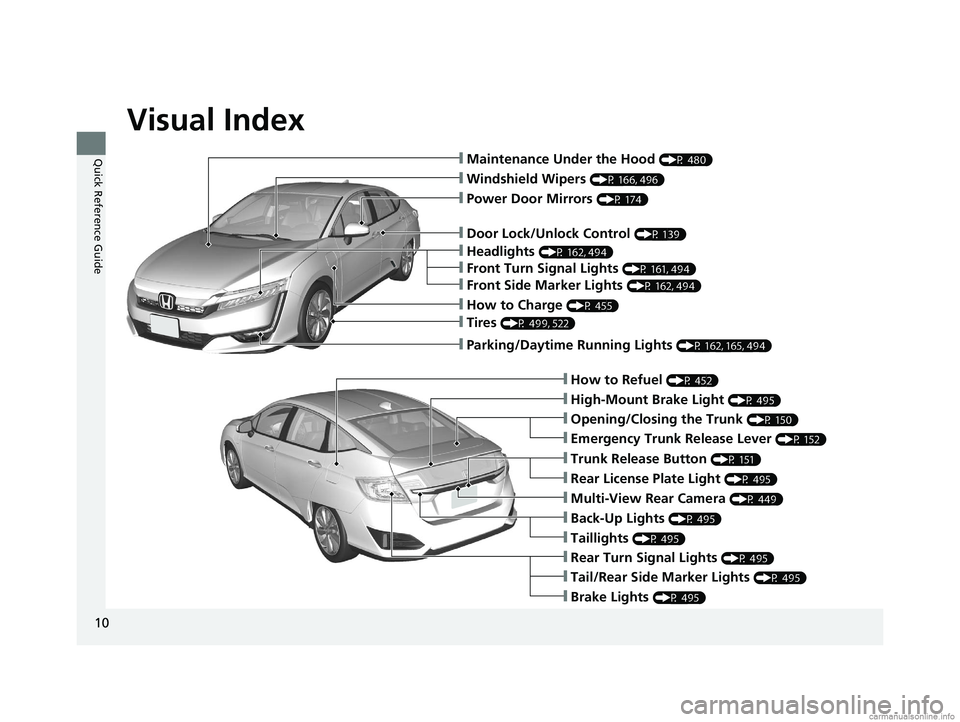
Quick Reference Guide❙Maintenance Under the Hood (P 480)
❙Windshield Wipers (P 166, 496)
❙Tires (P 499, 522)
❙Door Lock/Unlock Control (P 139)
❙Power Door Mirrors (P 174)
❙Headlights (P 162, 494)
❙Front Turn Signal Lights (P 161, 494)
❙How to Refuel (P 452)
❙High-Mount Brake Light (P 495)
❙Emergency Trunk Release Lever (P 152)
❙Opening/Closing the Trunk (P 150)
❙Tail/Rear Side Marker Lights (P 495)
❙Brake Lights (P 495)
❙Rear Turn Signal Lights (P 495)
❙Back-Up Lights (P 495)
❙Taillights (P 495)
❙Trunk Release Button (P 151)
❙Rear License Plate Light (P 495)
❙Multi-View Rear Camera (P 449)
❙Parking/Daytime Running Lights (P 162, 165, 494)
❙Front Side Marker Lights (P 162, 494)
❙How to Charge (P 455)
18 CLARITY PHEV CSS-31TRW6000.book 10 ページ 2017年12月25日 月曜日 午後2時22分
Page 36 of 591
34
Quick Reference Guide
Honda SensingTM
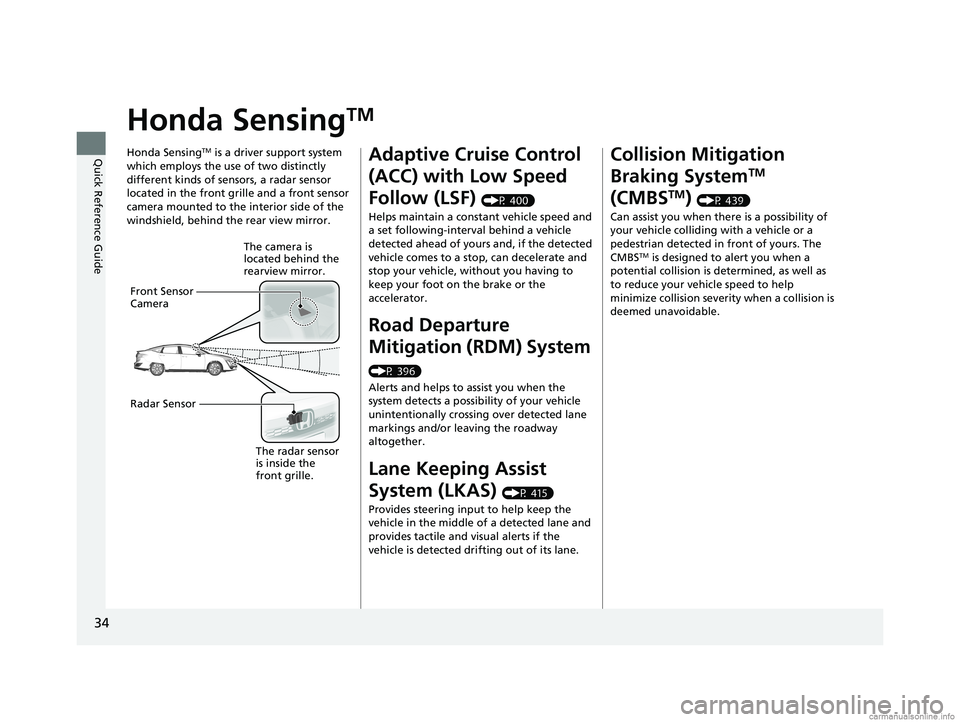
Honda SensingTM is a driver support system
which employs the use of two distinctly
different kinds of sensors, a radar sensor
located in the front grille and a front sensor
camera mounted to the interior side of the
windshield, behind the rear view mirror.
The camera is
located behind the
rearview mirror.
Front Sensor
Camera
Radar Sensor
The radar sensor
is inside the
front grille.
Adaptive Cruise Control
(ACC) with Low Speed
Follow (LSF)
(P 400)
Helps maintain a constant vehicle speed and
a set following-interval behind a vehicle
detected ahead of yours and, if the detected
vehicle comes to a stop, can decelerate and
stop your vehicle, wi thout you having to
keep your foot on the brake or the
accelerator.
Road Departure
Mitigation (RDM) System
(P 396)
Alerts and helps to assist you when the
system detects a possibility of your vehicle
unintentionally crossing over detected lane
markings and/or leaving the roadway
altogether.
Lane Keeping Assist
System (LKAS)
(P 415)
Provides steering input to help keep the
vehicle in the middle of a detected lane and
provides tactile and visual alerts if the
vehicle is detected drifting out of its lane.
Collision Mitigation
Braking System
TM
(CMBS
TM) (P 439)
Can assist you when there is a possibility of
your vehicle colliding with a vehicle or a
pedestrian detected in front of yours. The
CMBS
TM is designed to alert you when a
potential collision is determined, as well as
to reduce your vehicle speed to help
minimize collision severity when a collision is
deemed unavoidable.
18 CLARITY PHEV CSS-31TRW6000.book 34 ページ 2017年12月25日 月曜日 午後2時22分
Page 101 of 591
99
uuIndicators u
Continued
Instrument Panel
IndicatorNameOn/BlinkingExplanationMessage
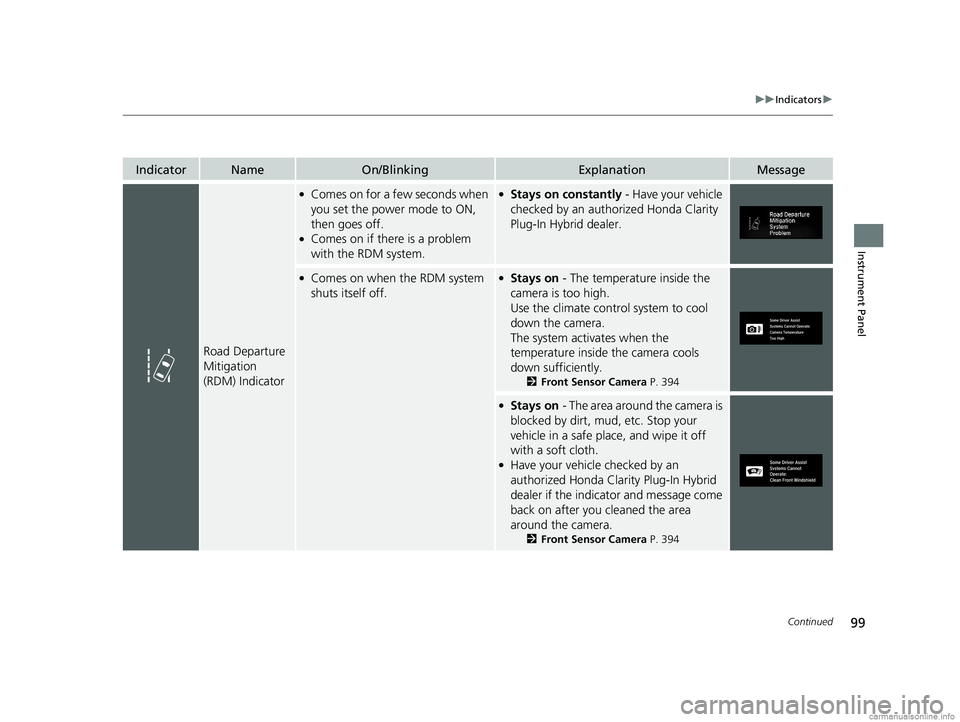
Road Departure
Mitigation
(RDM) Indicator
●Comes on for a fe w seconds when
you set the power mode to ON,
then goes off.
●Comes on if there is a problem
with the RDM system.
●Stays on constantly - Have your vehicle
checked by an authorized Honda Clarity
Plug-In Hybrid dealer.
●Comes on when the RDM system
shuts itself off.●Stays on - The temperature inside the
camera is too high.
Use the climate contro l system to cool
down the camera.
The system activates when the
temperature inside the camera cools
down sufficiently.
2 Front Sensor Camera P. 394
●Stays on - The area around the camera is
blocked by dirt, mud, etc. Stop your
vehicle in a safe place, and wipe it off
with a soft cloth.
●Have your vehicle checked by an
authorized Honda Clarity Plug-In Hybrid
dealer if the indicator and message come
back on after you cleaned the area
around the camera.
2 Front Sensor Camera P. 394
18 CLARITY PHEV CSS-31TRW6000.book 99 ページ 2017年12月25日 月曜日 午後2時22分
Page 104 of 591
102
uuIndicators u
Instrument Panel
IndicatorNameOn/BlinkingExplanationMessage
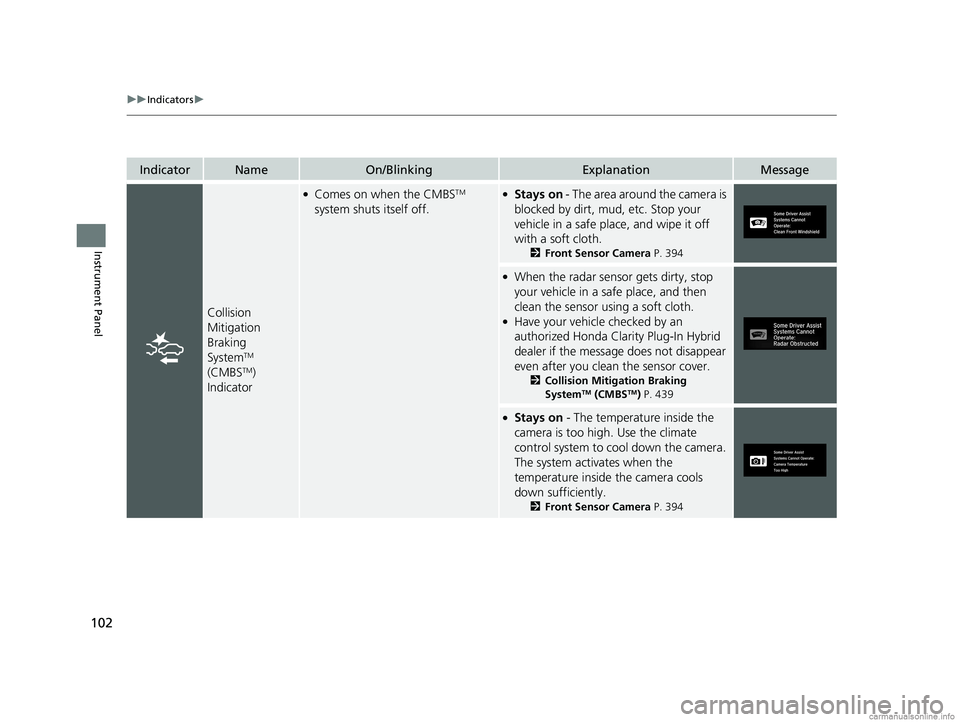
Collision
Mitigation
Braking
System
TM
(CMBSTM)
Indicator
●Comes on when the CMBSTM
system shuts itself off.●Stays on - The area around the camera is
blocked by dirt, mud, etc. Stop your
vehicle in a safe place, and wipe it off
with a soft cloth.
2 Front Sensor Camera P. 394
●When the radar sensor gets dirty, stop
your vehicle in a safe place, and then
clean the sensor using a soft cloth.
●Have your vehicle checked by an
authorized Honda Clarity Plug-In Hybrid
dealer if the message does not disappear
even after you clean the sensor cover.
2Collision Mitigation Braking
SystemTM (CMBSTM) P. 439
●Stays on - The temperature inside the
camera is too high . Use the climate
control system to cool down the camera.
The system acti vates when the
temperature inside the camera cools
down sufficiently.
2 Front Sensor Camera P. 394
18 CLARITY PHEV CSS-31TRW6000.book 102 ページ 2017年12月25日 月曜日 午後2時22分
Page 122 of 591
120
uuIndicators uDriver Information Interface Wa rning and Information Messages
Instrument Panel
MessageConditionExplanation
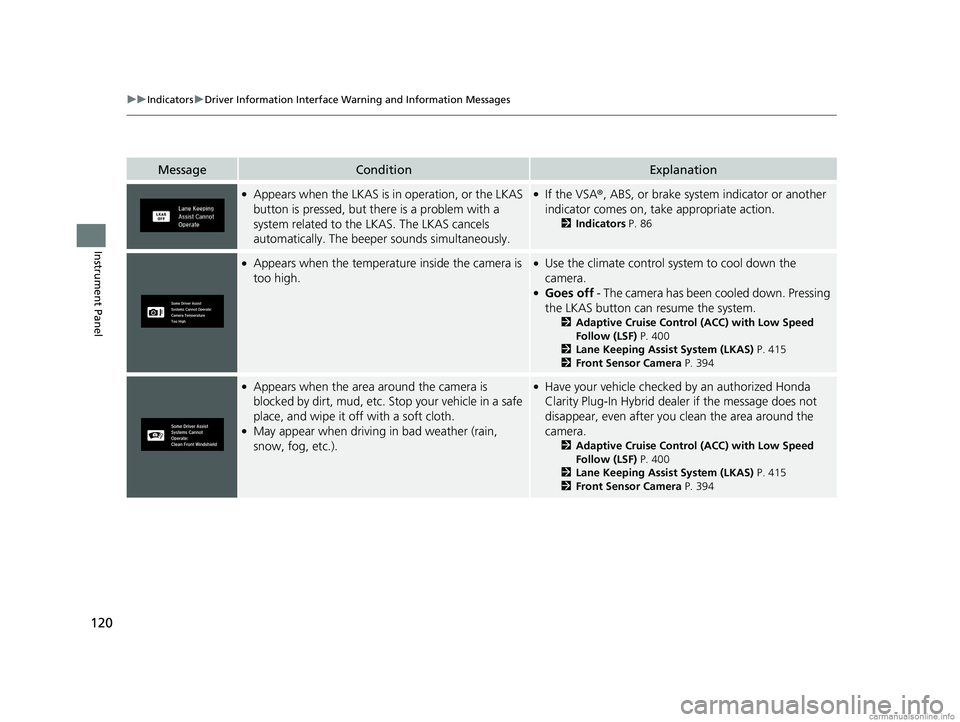
●Appears when the LKAS is in operation, or the LKAS
button is pressed, but there is a problem with a
system related to the LKAS. The LKAS cancels
automatically. The beeper sounds simultaneously.●If the VSA®, ABS, or brake system indicator or another
indicator comes on, take appropriate action.
2 Indicators P. 86
●Appears when the temperature inside the camera is
too high.●Use the climate control system to cool down the
camera.
●Goes off - The camera has been cooled down. Pressing
the LKAS button can resume the system.
2 Adaptive Cruise Control (ACC) with Low Speed
Follow (LSF) P. 400
2 Lane Keeping Assist System (LKAS) P. 415
2 Front Sensor Camera P. 394
●Appears when the area around the camera is
blocked by dirt, mud, etc. Stop your vehicle in a safe
place, and wipe it off with a soft cloth.
●May appear when driving in bad weather (rain,
snow, fog, etc.).
●Have your vehicle checked by an authorized Honda
Clarity Plug-In Hybrid dealer if the message does not
disappear, even after you clean the area around the
camera.
2 Adaptive Cruise Control (ACC) with Low Speed
Follow (LSF) P. 400
2 Lane Keeping Assist System (LKAS) P. 415
2 Front Sensor Camera P. 394
18 CLARITY PHEV CSS-31TRW6000.book 120 ページ 2017年12月25日 月曜日 午後2時22分
Page 310 of 591
308
uuCustomized Features u
Features
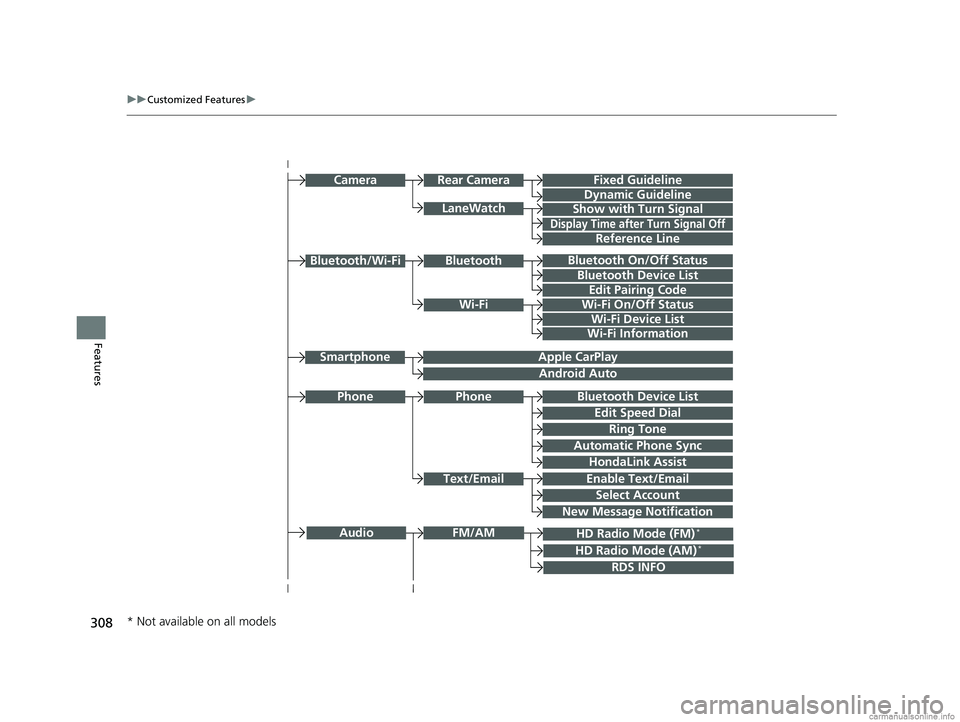
Bluetooth On/Off Status
Bluetooth Device List
Edit Pairing Code
Wi-Fi On/Off Status
Wi-Fi Device List
Wi-Fi
BluetoothBluetooth/Wi-Fi
Wi-Fi Information
Text/Email
Bluetooth Device List
Edit Speed Dial
Ring Tone
Phone
Automatic Phone Sync
HondaLink Assist
Enable Text/Email
Select Account
New Message Notification
Phone
LaneWatch
Fixed Guideline
Dynamic Guideline
Show with Turn Signal
Rear CameraCamera
Display Time after Turn Signal Off
Reference Line
HD Radio Mode (FM)*
RDS INFO
AudioFM/AM
HD Radio Mode (AM)*
Apple CarPlay
Android Auto
Smartphone
* Not available on all models
18 CLARITY PHEV CSS-31TRW6000.book 308 ページ 2017年12月25日 月曜日 午後2時22分
Page 319 of 591
317
uuCustomized Features u
Continued
Features
*1:Default SettingSetup
Group Customizable Features Descri
ption Selectable Settings
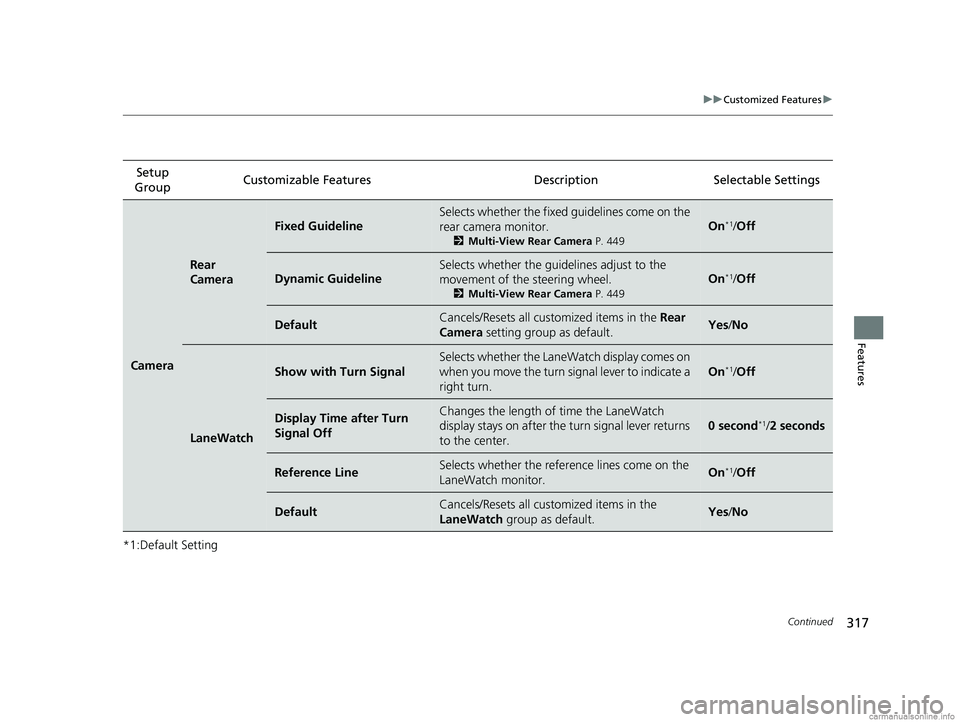
Camera
Rear
Camera
Fixed Guideline
Selects whether the fixed guidelines come on the
rear camera monitor.
2Multi-View Rear Camera P. 449
On*1/Off
Dynamic Guideline
Selects whether the guidelines adjust to the
movement of the steering wheel.
2 Multi-View Rear Camera P. 449
On*1/Off
DefaultCancels/Resets all cust omized items in the Rear
Camera setting group as default.Yes /No
LaneWatch
Show with Turn Signal
Selects whether the LaneWatch display comes on
when you move the turn signal lever to indicate a
right turn.
On*1/Off
Display Time after Turn
Signal OffChanges the length of time the LaneWatch
display stays on after the turn signal lever returns
to the center.
0 second*1/ 2 seconds
Reference LineSelects whether the refere nce lines come on the
LaneWatch monitor.On*1/ Off
DefaultCancels/Resets all cust omized items in the
LaneWatch group as default.Yes/No
18 CLARITY PHEV CSS-31TRW6000.book 317 ページ 2017年12月25日 月曜日 午後2時22分
Page 371 of 591
369
Driving
This chapter discusses driving and refueling.
Before Driving................................... 370
Towing a Trailer ................................ 375
When Driving Turning on the Power ...................... 376
Precautions While Driving................. 380
Transmission .................................... 381
Shifting ............................................ 382
ECON Mode .................................... 388
SPORT Mode.................................... 389
Deceleration Paddle Selector ............ 390
Acoustic Vehicle Al erting System ...... 393
Front Sensor Camera ....................... 394
Road Departure Mi tigation (RDM)
System ........................................ 396
Adaptive Cruise Control (ACC) with Low
Speed Follow (LSF) ......................... 400
Lane Keeping Assist System (LKAS) .. 415
Vehicle Stability Assist (VSA ®), aka
Electronic Stability Control (ESC),
System ....................................... 422
Agile Handling Assist ....................... 424Tire Pressure Monitoring System (TPMS) .. 425Tire Pressure Monitoring System (TPMS) -
Required Federal Explanation ......... 427
LaneWatch
TM................................... 429
Braking .............................................. 431
Parking Your Vehicle When Stopped................................. 447 Multi-View Rear Camera
.................. 449
Refueling
Fuel Information .............................. 451
How to Refuel ................................. 452
Charging
Before Charging .............................. 454
Charge the High Voltage battery using a Level 1 or 2 charger ....................... 455
Control Box ..................................... 461
High Voltage Battery........................ 466
Using a Timer .................................. 467
Fuel Economy and CO
2 Emissions
Improving Fuel Economy and Reducing CO
2 Emissions ................................ 469
18 CLARITY PHEV CSS-31TRW6000.book 369 ページ 2017年12月25日 月曜日 午後2時22分
Page 396 of 591
394
uuWhen Driving uFront Sensor Camera
Driving
Front Sensor Camera
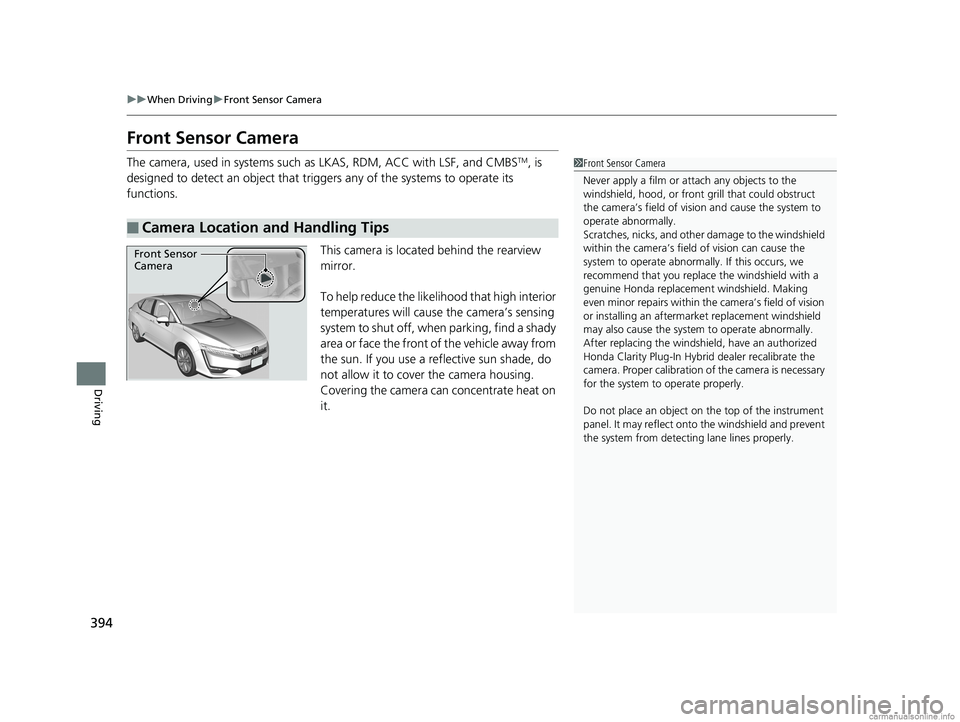
The camera, used in systems such as LKAS, RDM, ACC with LSF, and CMBSTM, is
designed to detect an object that triggers any of the systems to operate its
functions.
This camera is located behind the rearview
mirror.
To help reduce the likelihood that high interior
temperatures will cause the camera’s sensing
system to shut off, when parking, find a shady
area or face the front of the vehicle away from
the sun. If you use a reflective sun shade, do
not allow it to cover the camera housing.
Covering the camera can concentrate heat on
it.
■Camera Location and Handling Tips
1 Front Sensor Camera
Never apply a film or attach any objects to the
windshield, hood, or front grill that could obstruct
the camera’s field of vision and cause the system to
operate abnormally.
Scratches, nicks, and othe r damage to the windshield
within the camera’s fiel d of vision can cause the
system to operate abnormall y. If this occurs, we
recommend that you replac e the windshield with a
genuine Honda replacem ent windshield. Making
even minor repairs within th e camera’s field of vision
or installing an aftermarket replacement windshield
may also cause the system to operate abnormally.
After replacing th e windshield, have an authorized
Honda Clarity Plug-In Hybrid dealer recalibrate the
camera. Proper calibr ation of the camera is necessary
for the system to operate properly.
Do not place an object on the top of the instrument
panel. It may reflect onto the windshield and prevent
the system from detecting lane lines properly.
Front Sensor
Camera
18 CLARITY PHEV CSS-31TRW6000.book 394 ページ 2017年12月25日 月曜日 午後2時22分