park assist HONDA CLARITY PLUG-IN 2019 Owner's Manual (in English)
[x] Cancel search | Manufacturer: HONDA, Model Year: 2019, Model line: CLARITY PLUG-IN, Model: HONDA CLARITY PLUG-IN 2019Pages: 591, PDF Size: 29.98 MB
Page 25 of 591
23
Quick Reference Guide
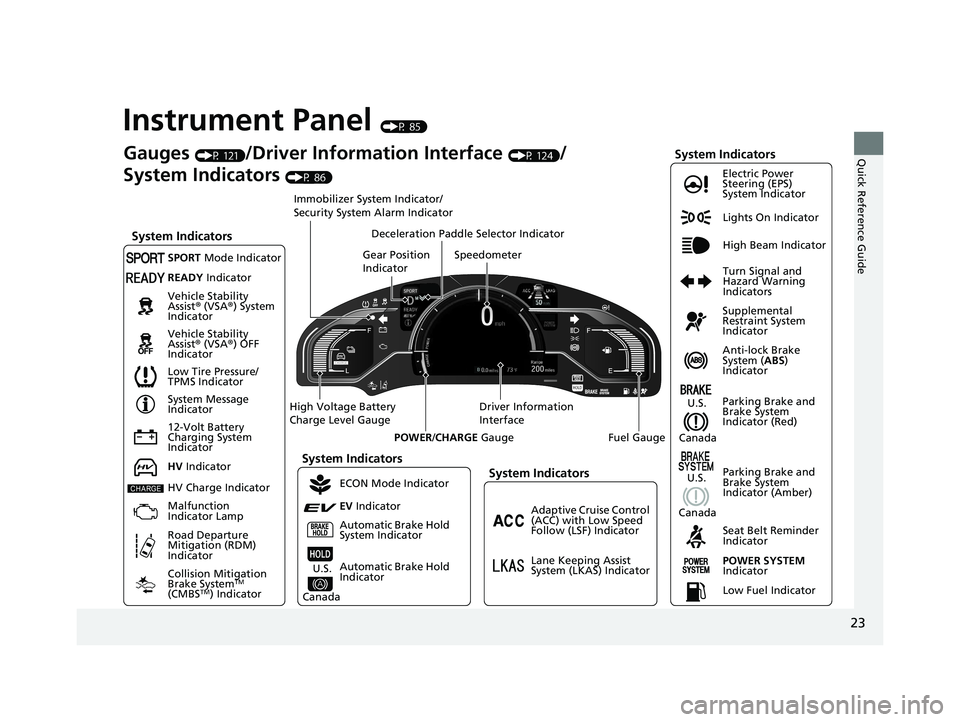
Instrument Panel (P 85)
Lights On Indicator
System Indicators
12-Volt Battery
Charging System
IndicatorAnti-lock Brake
System (
ABS)
Indicator
Vehicle Stability
Assist
® (VSA ®) System
Indicator
Vehicle Stability
Assist ® (VSA ®) OFF
Indicator Electric Power
Steering (EPS)
System Indicator
System Indicators
High Beam Indicator
Seat Belt Reminder
Indicator
System Indicators
System Message
Indicator
Parking Brake and
Brake System
Indicator (Red) Supplemental
Restraint System
Indicator
Gauges (P 121)/Driver Information Interface (P 124)/
System Indicators
(P 86)
Low Tire Pressure/
TPMS Indicator Turn Signal and
Hazard Warning
Indicators
Speedometer
Automatic Brake Hold
System Indicator Parking Brake and
Brake System
Indicator (Amber)SPORT
Mode Indicator
Collision Mitigation
Brake System
TM
(CMBSTM) Indicator
Road Departure
Mitigation (RDM)
Indicator
Immobilizer System Indicator/
Security System Alarm Indicator
Automatic Brake Hold
Indicator
READY Indicator
POWER SYSTEM
Indicator
Gear Position
Indicator
Fuel Gauge
Driver Information
Interface
High Voltage Battery
Charge Level Gauge
POWER/CHARGE Gauge
Low Fuel Indicator
Adaptive Cruise Control
(ACC) with Low Speed
Follow (LSF) Indicator
Lane Keeping Assist
System (LKAS) Indicator
Deceleration Paddle Selector Indicator
System Indicators
ECON Mode Indicator
EV
Indicator
U.S.
Canada
HV Indicator
HV Charge Indicator
Malfunction
Indicator Lamp U.S.
Canada
U.S.
Canada
19 CLARITY PHEV-31TRW6100.book 23 ページ 2018年10月25日 木曜日 午後2時29分
Page 90 of 591
88
uuIndicators u
Instrument Panel
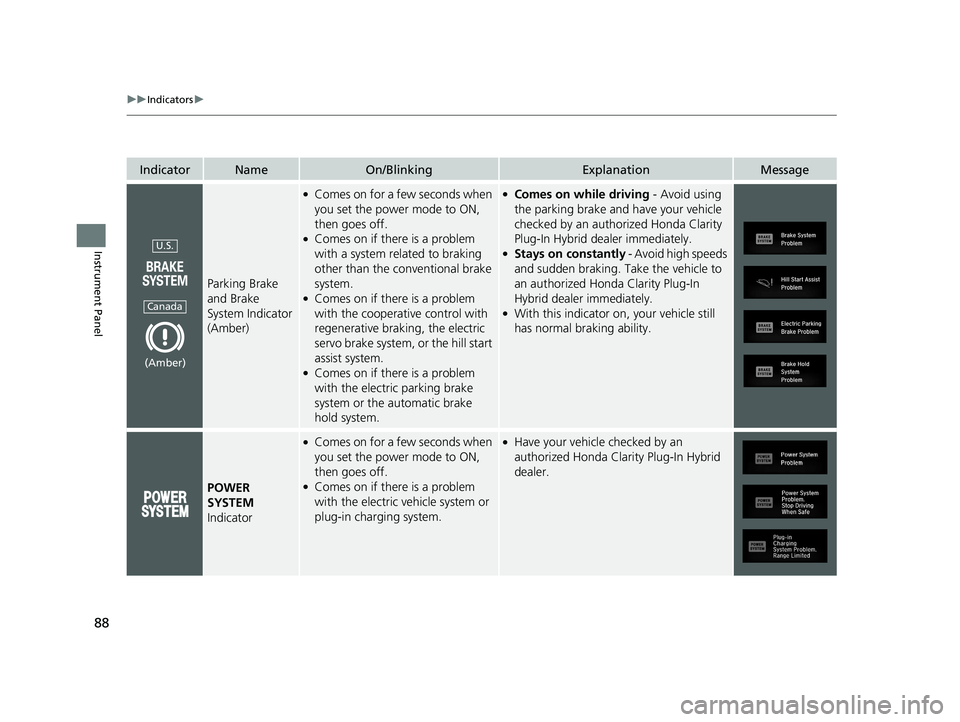
IndicatorNameOn/BlinkingExplanationMessage
Parking Brake
and Brake
System Indicator
(Amber)
●Comes on for a few seconds when
you set the power mode to ON,
then goes off.
●Comes on if there is a problem
with a system related to braking
other than the conventional brake
system.
●Comes on if there is a problem
with the cooperative control with
regenerative braking, the electric
servo brake system, or the hill start
assist system.
●Comes on if there is a problem
with the electric parking brake
system or the automatic brake
hold system.
●Comes on while driving - Avoid using
the parking brake and have your vehicle
checked by an author ized Honda Clarity
Plug-In Hybrid dealer immediately.
●Stays on constantly - Avoid high speeds
and sudden braking. Take the vehicle to
an authorized Honda Clarity Plug-In
Hybrid dealer immediately.
●With this indicator on, your vehicle still
has normal braking ability.
POWER
SYSTEM
Indicator
●Comes on for a few seconds when
you set the power mode to ON,
then goes off.
●Comes on if there is a problem
with the electric ve hicle system or
plug-in charging system.
●Have your vehicle checked by an
authorized Honda Clarity Plug-In Hybrid
dealer.
U.S.
Canada
(Amber)
19 CLARITY PHEV-31TRW6100.book 88 ページ 2018年10月25日 木曜日 午後2時29分
Page 373 of 591
371
Driving
This chapter discusses driving and refueling.
Before Driving................................... 372
Towing a Trailer ................................ 377
When Driving Turning on the Power ...................... 378
Precautions While Driving................. 382
Transmission .................................... 383
Shifting ............................................ 384
ECON Mode .................................... 390
SPORT Mode.................................... 391
Deceleration Paddle Selector ............ 392
Acoustic Vehicle Al erting System ...... 395
Front Sensor Camera ....................... 396
Road Departure Mi tigation (RDM)
System ........................................ 398
Adaptive Cruise Control (ACC) with Low
Speed Follow (LSF) ......................... 402
Lane Keeping Assist System (LKAS) .. 418
Vehicle Stability Assist ® (VSA ®), aka
Electronic Stability Control (ESC),
System ....................................... 425
Agile Handling Assist ....................... 427Tire Pressure Monitoring System (TPMS) .. 428Tire Pressure Monitoring System (TPMS) -
Required Federal Explanation ......... 430
LaneWatch
TM................................... 432
Braking .............................................. 434
Parking Your Vehicle When Stopped................................. 450 Multi-View Rear Camera
.................. 452
Refueling
Fuel Information .............................. 454
How to Refuel ................................. 455
Charging
Before Charging .............................. 457
Charge the High Voltage battery using a Level 1 or 2 charger ....................... 458
Control Box ..................................... 464
High Voltage Battery........................ 469
Using a Timer .................................. 470
Fuel Economy and CO
2 Emissions
Improving Fuel Economy and Reducing CO
2 Emissions ................................ 472
19 CLARITY PHEV-31TRW6100.book 371 ページ 2018年10月25日 木曜日 午後2時29分
Page 383 of 591
381
uuWhen Driving uTurning on the Power
Driving
1. Keeping your right foot on the brake pedal, press the (D button. Select (R when
reversing.
2. With the parking brake applied, release the brake pedal and gently depress the
accelerator pedal.
u Make sure the parking brake and brake system indicator (red) goes off.
2 Parking Brake P. 434
■Hill Start Assist System
Hill start assist keeps the brake engaged br iefly to help prevent the vehicle from
rolling on inclines as you move your foot from the brake pedal to the accelerator.
Change to
(D when facing uphill, or (R when facing downh ill, then release the
brake pedal.
■Starting to Drive1 Starting to Drive
You can also release the parking brake by pressing
the electric parking brake sw itch while depressing the
brake pedal.
When facing downhill, you can start your vehicle
more smoothly by manually releasing it with the
electric parking brake switch than by releasing it with
the accelerator pedal.
1 Hill Start Assist System
Hill start assist may not prevent the vehicle from
rolling downhill on a very steep or slippe ry slope, and
does not operate on small inclines.
Hill start assist is not a replacement for the parking
brake.
19 CLARITY PHEV-31TRW6100.book 381 ページ 2018年10月25日 木曜日 午後2時29分
Page 399 of 591
397
uuWhen Driving uFront Sensor Camera
Driving
1Front Sensor Camera
If the Some Driver Assist Systems Cannot
Operate: Camera Temperature Too High message
appears:
•Use the climate control system to cool down the
interior and, if necessary, also use defroster mode
with the airflow directed towards the camera.
•Start driving the vehicle to lower the windshield
temperature, which cool s down the area around
the camera.
If the Some Driver Assist Systems Cannot
Operate: Clean Front Windshield message
appears:
•Park your vehicle in a sa fe place, and clean the
windshield. If the message does not disappear after
you have cleaned the winds hield and driven for a
while, have your vehicle checked by an authorized
Honda Clarity Plug-In Hybrid dealer.
19 CLARITY PHEV-31TRW6100.book 397 ページ 2018年10月25日 木曜日 午後2時29分
Page 405 of 591
Continued403
uuWhen Driving uAdaptive Cruise Control (ACC) with Low Speed Follow (LSF)
Driving
■How to activate the system1Adaptive Cruise Control (ACC) with Low Speed Follow (LSF)
When the MAIN button is pressed, both ACC with
LSF and the Lane Keeping Assist System (LKAS) are
either turned on or off.
ACC with LSF may not work properly under certain
conditions. 2 ACC with LSF Conditions and Limitations
P. 408
When not using ACC with LSF: Turn off adaptive
cruise by pressing the MAIN button. This also will
turn off the Lane Keeping Assist System (LKAS).
Do not use ACC with LSF under the following
conditions:
•On roads with heavy traf fic or while driving in
continuous stop and go traffic.
•On roads with sharp turns.
•On roads with steep downhill sections, as the set
vehicle speed can be exceeded by coasting. In such
cases, ACC with LSF will not apply the brakes to
maintain the set speed.
•On roads with toll collection facilities or other
objects between lanes of traffic, or in parking
areas, or faci lities with driv e through access.
How to use
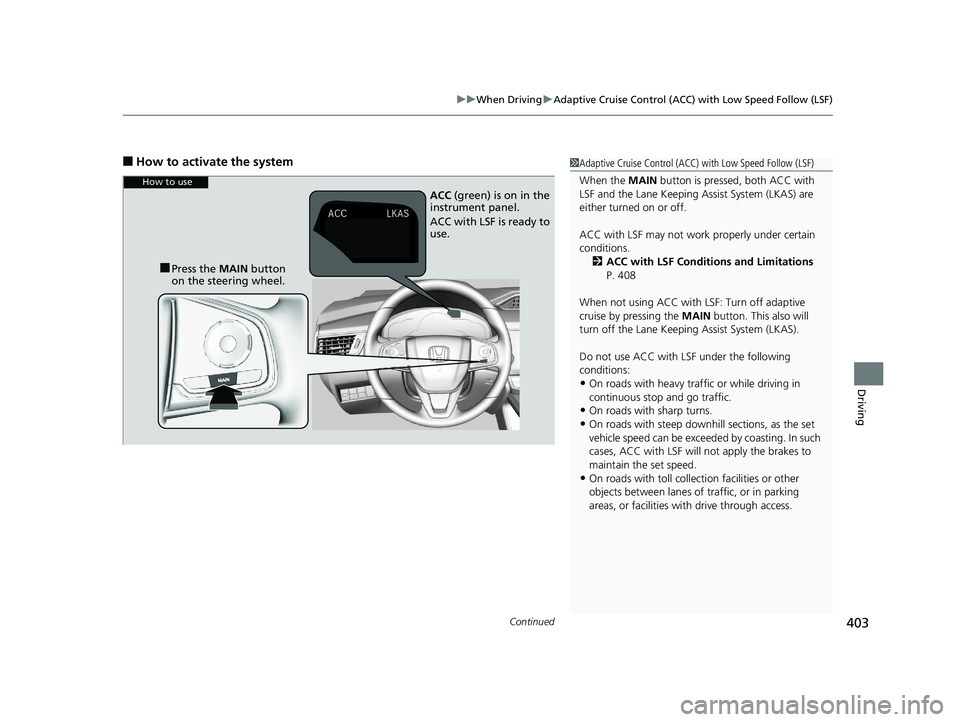
■Press the MAIN button
on the steering wheel. ACC
(green) is on in the
instrument panel.
ACC with LSF is ready to
use.
19 CLARITY PHEV-31TRW6100.book 403 ページ 2018年10月25日 木曜日 午後2時29分
Page 526 of 591
524
Handling the Unexpected
If a Tire Goes Flat
Temporarily Repairing a Flat Tire
If the tire has a large cut or is otherwise severely damaged, you will need to have the
vehicle towed. If the tire only has a smal l puncture, from a nail for instance, you can
use the temporary tire repair kit so that you can drive to the nearest service station
for a more permanent repair.
If a tire goes flat while driving, grasp the steering wheel firmly, and brake gradually
to reduce speed. Then stop in a safe place.
1. Park the vehicle on a firm, level, and non-slippery surface and apply the parking
brake.
2. Change the gear position to
(P.
3. Turn on the hazard warning lights an d set the power mode to VEHICLE OFF
(LOCK).
1 Temporarily Repairing a Flat Tire
The kit should not be used in the following situations.
Instead, contact an authorized Honda Clarity Plug-In
Hybrid dealer or roadside assistance to have the
vehicle towed.
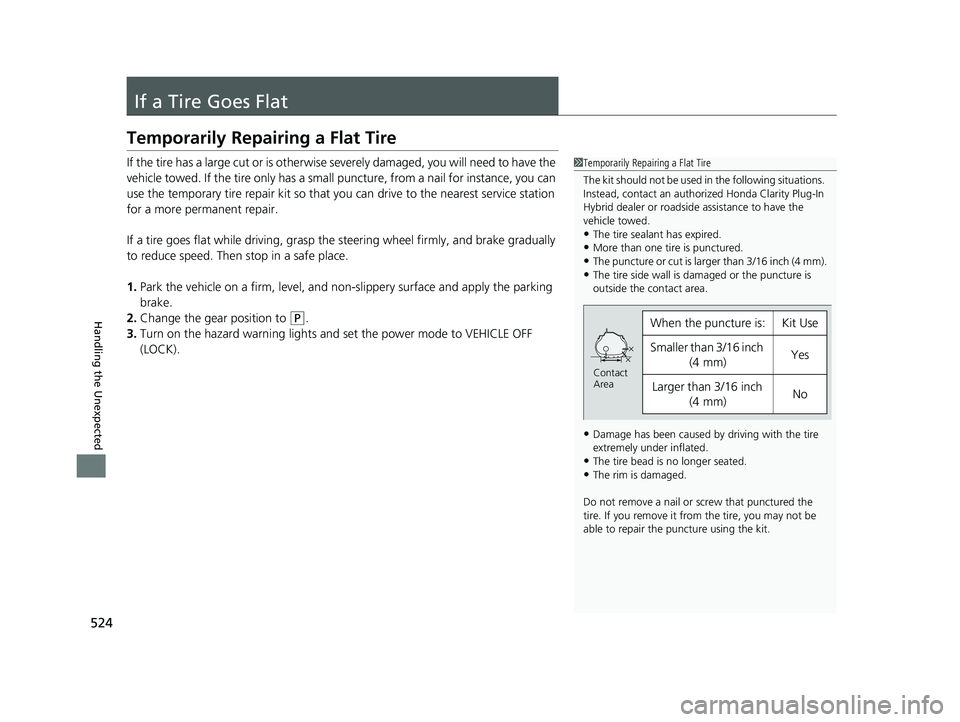
•The tire sealant has expired.•More than one tire is punctured.
•The puncture or cut is larger than 3/16 inch (4 mm).
•The tire side wall is da maged or the puncture is
outside the contact area.
•Damage has been caused by driving with the tire
extremely under inflated.
•The tire bead is no longer seated.•The rim is damaged.
Do not remove a nail or screw that punctured the
tire. If you remove it from the tire, you may not be
able to repair the puncture using the kit.
When the puncture is:Kit Use
Smaller than 3/16 inch (4 mm)Yes
Larger than 3/16 inch
(4 mm)No
Contact
Area
19 CLARITY PHEV-31TRW6100.book 524 ページ 2018年10月25日 木曜日 午後2時29分
Page 539 of 591
537Continued
Handling the Unexpected
Power System Won’t Start
Checking the Procedure
When the READY indicator does not come on and the Ready To Drive message
does not appear on the driver informatio n interface, check the following items and
take appropriate action.
ChecklistConditionWhat to Do
Check if the related
indicator or driver
information interface
messages come on.The Remove Charger Connector message appearsRemoving a charge connector. Set the power
mode to ACCESSORY, then to ON.
The Low Battery Charge . Power Reduced. message appearsCharge the High Voltage battery.
2Charging P. 457
The Temperature Is Too Cold For Vehicle To Operate
message appears.2 Driver Information Interface Warning and
Information Messages P. 103
The To Start, Hold Remote Near Start Button message
appears.
u Make sure the smart entry remote is in its operating range.
2 POWER Button Operating Range P. 158
2If the Smart Entry Remote Battery is Weak
P. 539
The POWER SYSTEM indicator comes on.Have your vehicle checked by an authorized
Honda Clarity Plug-In Hybrid dealer.
The transmission system indicator blinks and Transmission
Problem Apply Parking Brake When Parked message
appears.The power system can be activated as a
temporary measure.
2 If the Transmission System Indicator Blinks
along with the Warning Message P. 554
Check the brightness
of the interior lights. The interior lights are dim or do not come on at
all. Have the 12-volt battery checked by an
authorized Honda Clarity Plug-In Hybrid dealer.
The interior lights come on normally. Check all fuses, or have your vehicle checked by
an authorized Honda Clarity Plug-In Hybrid
dealer.
2 Inspecting and Changing Fuses P. 562
1Checking the Procedure
If you must start the vehi cle immediately, use an
assisting vehicle or booster battery to jump start it.
2 Jump Starting P. 541
19 CLARITY PHEV-31TRW6100.book 537 ページ 2018年10月25日 木曜日 午後2時29分
Page 553 of 591
551
uuIndicator, Coming On/Blinking uIf the Electric Power Steering (EPS) System Indicator Comes On
Handling the Unexpected
If the Electric Power Steeri ng (EPS) System Indicator
Comes On
■Reasons for the indicator to come on
• Comes on when there is a problem with the EPS system.
• If you depress the accelerator peda l repeatedly to increase the motor
speed while the motor is idling, the indicator comes on, and
sometimes the steering wheel becomes harder to operate.
• Comes on when the EPS steering angle center point memory is lost.
This could be due to a number of problems including: battery
disconnection, main fuse blow, low battery causing the reset of the
EPS system, wire damage to EPS harness. Vehicle Stability Assist®
(VSA ®), VSA ® OFF, Collision Mitigation Braking System
TM (CMBSTM),
and low tire pressure/TPMS indicato rs come on along with a message
in the driver information interface.
■What to do when th e indicator comes on
• Stop the vehicle in a safe place, turn off the power system, and turn
on the power system again.
If the indicator re-appears and stay s on, immediately have your vehicle
inspected by an authorized Honda Clarity Plug-In Hybrid dealer.
• If VSA ® indicator, VSA ® OFF indicator, CMBS
TM indicator, and low tire
pressure/TPMS indicator come on al ong with a message in the driver
information interface, you need to calibrate the VSA ® and EPS
systems.
Drive a short distance at more than 12 mph (20 km/h) to calibrate the
VSA ® and EPS systems.
If the indicators come on and stay on, park your vehicle in a safe
place, turn off and turn on the po wer system, then repeat the above
operation.
If the indicators still come on and stay on, immediately have your
vehicle inspected by an authorized Honda Clarity Plug-In Hybrid dealer.
19 CLARITY PHEV-31TRW6100.book 551 ページ 2018年10月25日 木曜日 午後2時29分
Page 583 of 591
581
Index
B
Battery...................................................... 469
12-Volt ................................................... 510
12-Volt Battery Charging System
Indicator ......................................... 90, 548
Charging (12-Volt Battery) ...................... 511
Charging (High Voltage Battery).............. 457
High Voltage........................................... 469
Jump Starting ......................................... 541
Maintenance (Checking the 12-Volt Battery) ................................................. 510
Maintenance (Replacing) ......................... 512
Belts (Seat) .................................................. 47
Beverage Holders ..................................... 187
Bluetooth ® Audio ..................................... 267
Bluetooth ® HandsFreeLink ®.................... 337
Booster Seats (For Children) ...................... 81
Brake System ............................................ 434
Anti-lock Brake System (ABS) .................. 440
Automatic Brake Hold ............................. 438
Brake Assist System................................. 441
Fluid ....................................................... 494
Foot Brake .............................................. 436
Indicator (Amber) .............................. 88, 552
Indicator (Red) .................... 86, 87, 550, 552
Parking Brake.......................................... 434
Brake System (Amber) Indicator ........................................... 88, 552
Brake System (Red) Indicator ............................. 86, 87, 550, 552 Bulb Replacement
.................................... 496
Front Turn Signal and Front Side Marker
Lights .................................................... 496
Headlights ............................................... 496
High-Mount Brake Light .......................... 497
Parking/Daytime Running Lights .............. 496
Rear License Plate Lights .......................... 497
Taillights and Back-Up Lights ................... 497
Taillights/Rear Side Marker, Brake and
Rear Turn Signal Lights .......................... 497
Bulb Specifications ................................... 568
C
Carbon Monoxide Gas ................................ 82
Carrying Cargo .................................. 373, 375
Certification Label .................................... 570
Changing Bulbs ......................................... 496
Charge Lid ......................................... 460, 463
Charge Lid Release Button ............... 459, 462
Charge Timer Setting ............................... 470
Charging (High Voltage Battery) ............. 457
120V AC (AC Level 1) .............................. 459
240V AC (AC Level 2) .............................. 462
Cannot Start Charging ............................ 466
Charge Indicator (vehicle side) ................. 468
Charge Lid ....................................... 460, 463
Charging Cable Bag ................................ 459
Charging Connector ........................ 460, 463
Control Box ............................................. 464
High Voltage Battery ............................... 469 Timer ...................................................... 470
Charging Cable Bag ................................. 459
Charging Connector ......................... 460, 463
Charging System Indicator ................. 90, 548
Child Safety ................................................. 69
Childproof Door Locks............................. 148
Child Seat .................................................... 69
Booster Seats ............................................ 81
Child Seat for Infants................................. 71
Child Seat for Small Children ..................... 72
Installing a Child Seat with a Lap/Shoulder
Seat Belt .................................................. 76
Larger Children ......................................... 80
Rear-facing Child Seat ............................... 71
Selecting a Child Seat ................................ 73
Using a Tether ........................................... 78
Childproof Door Locks ............................. 148
Cleaning the Exterior ............................... 517
Cleaning the Interior ................................ 515
Climate Control System ............................ 193
Changing the Mode ................................ 195
Defrosting the Windshield and
Windows ............................................... 197
Dust and Pollen Filter............................... 514
Sensors ................................................... 201
Using Automatic Climate Control ............ 193
Clock .......................................................... 136
CMBS
TM (Collision Mitigation Braking
SystemTM) ................................................. 442
Coat Hook ................................................. 190
19 CLARITY PHEV-31TRW6100.book 581 ページ 2018年10月25日 木曜日 午後2時29分