sport mode HONDA CLARITY PLUG-IN 2020 (in English) User Guide
[x] Cancel search | Manufacturer: HONDA, Model Year: 2020, Model line: CLARITY PLUG-IN, Model: HONDA CLARITY PLUG-IN 2020Pages: 595, PDF Size: 30.43 MB
Page 243 of 595
241
uuAudio System Basic Operation uVoice Control Operation
Continued
Features
■Voice Setting
The screen changes to the Voice Recog.
tab on the System Settings screen.
■Voice Help
You can see a list of the available
commands on the screen.
• Useful Commands
*1
•Phone Commands
• Audio Commands*1
•On Screen Commands
• Music Search Commands
• General Commands
*1
•Climate Control Commands*1
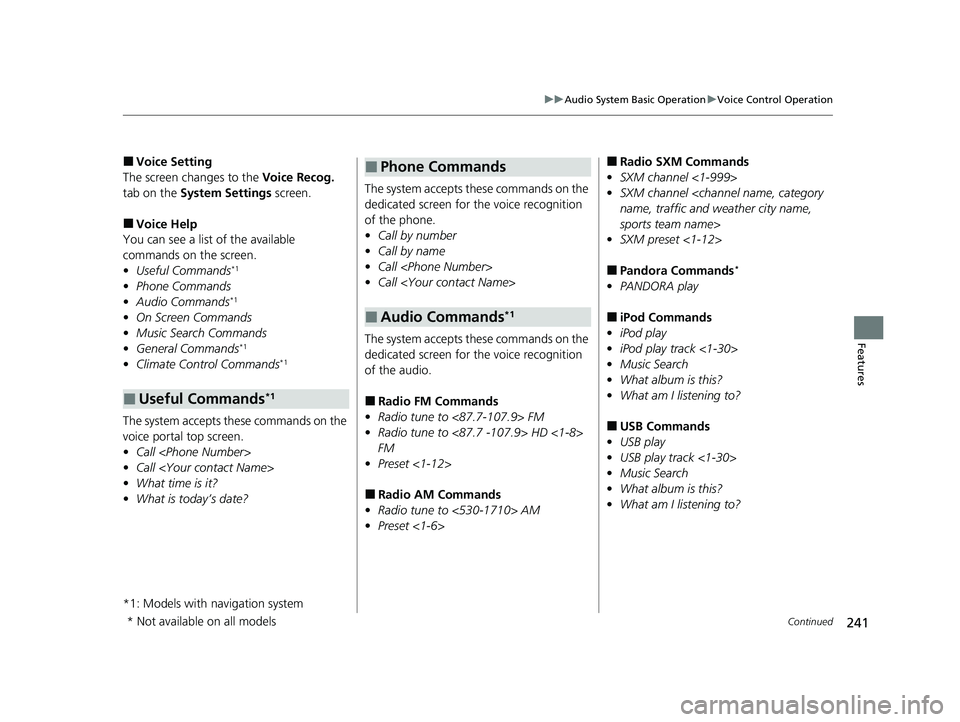
The system accepts th ese commands on the
voice portal top screen.
• Call
• Call
• What time is it?
• What is today’s date?
*1: Models with navigation system
■Useful Commands*1
The system accepts these commands on the
dedicated screen for the voice recognition
of the phone.
• Call by number
• Call by name
• Call
• Call
The system accepts these commands on the
dedicated screen for the voice recognition
of the audio.
■Radio FM Commands
• Radio tune to <87.7-107.9> FM
• Radio tune to <87.7 -107.9> HD <1-8>
FM
• Preset <1-12>
■Radio AM Commands
• Radio tune to <530-1710> AM
• Preset <1-6>
■Phone Commands
■Audio Commands*1
■Radio SXM Commands
• SXM channel <1-999>
• SXM channel
sports team name>
• SXM preset <1-12>
■Pandora Commands*
•PANDORA play
■iPod Commands
• iPod play
• iPod play track <1-30>
• Music Search
• What album is this?
• What am I listening to?
■USB Commands
• USB play
• USB play track <1-30>
• Music Search
• What album is this?
• What am I listening to?
* Not available on all models
20 CLARITY PHEV-31TRW6200.book 241 ページ 2019年9月24日 火曜日 午後12時9分
Page 254 of 595
uuAudio System Basic Operation uPlaying SiriusXM ® Radio*
252
Features
■Returning to real-time broadcast
1. Select .
2. Select Go to Live .
While listening to other channels, you can receive sports alerts such as scores from
the games of your favorite teams.
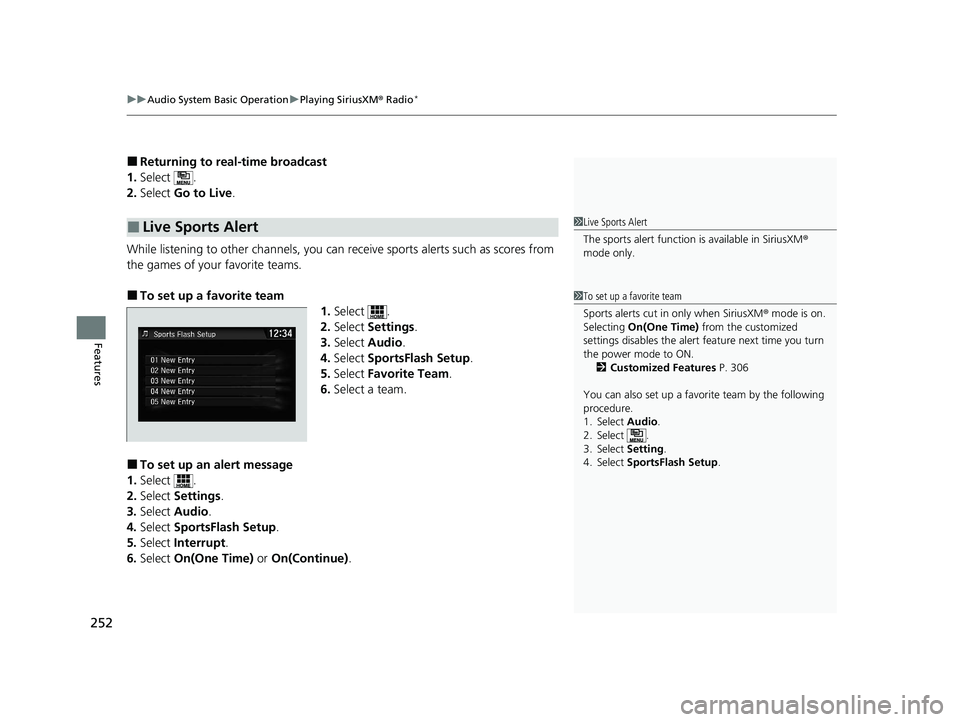
■To set up a favorite team 1.Select .
2. Select Settings .
3. Select Audio .
4. Select SportsFlash Setup .
5. Select Favorite Team .
6. Select a team.
■To set up an alert message
1. Select .
2. Select Settings .
3. Select Audio .
4. Select SportsFlash Setup .
5. Select Interrupt .
6. Select On(One Time) or On(Continue) .
■Live Sports Alert1Live Sports Alert
The sports alert function is available in SiriusXM®
mode only.
1 To set up a favorite team
Sports alerts cut in only when SiriusXM ® mode is on.
Selecting On(One Time) from the customized
settings disables the alert feature next time you turn
the power mode to ON. 2 Customized Features P. 306
You can also set up a favori te team by the following
procedure.
1. Select Audio.
2. Select .
3. Select Setting .
4. Select SportsFlash Setup .
20 CLARITY PHEV-31TRW6200.book 252 ページ 2019年9月24日 火曜日 午後12時9分
Page 255 of 595
Continued253
uuAudio System Basic Operation uPlaying SiriusXM ® Radio*
Features
■To set up an alert beep
1. Select .
2. Select Settings .
3. Select Audio .
4. Select SportsFlash Setup .
5. Select Interrupt Beep .
6. Select On.
■Receiving a sports alert
1. A pop-up appears and notifies you of a sports alert.
2. Select Listen.
u You can use the same items as the playback mode pop-up screen.
2 Replay Function P. 251
To go back to the previous screen, select Back.
■Listening to a missed sports alert
If you have missed a sports alert:
1. Select .
2. Select SportsFlash List .
3. Select alert.
1To set up an alert beep
You can also set up a alert beep by the following
procedure.
1. Select Audio .
2. Select .
3. Select Setting .
4. Select SportsFlash Setup .
20 CLARITY PHEV-31TRW6200.book 253 ページ 2019年9月24日 火曜日 午後12時9分
Page 311 of 595
309
uuCustomized Features u
Continued
Features
Audio Source Pop-Up
Cover Art
Tune Start
SportsFlash Setup
Traffic & Weather Setup
Other
SXM*
Default
Bluetooth Device ListBluetooth
Multiple Channel Mix Preset
Bluetooth Device List
Edit Speed Dial
Ring Tone
Automatic Phone Sync
HondaLink Assist
Enable Text/Email
Select Account
New Message Notification
Phone
HD Radio Mode (FM)*
RDS INFO
AudioFM/AM
HD Radio Mode (AM)*
Default
Phone
Text/Email
* Not available on all models
20 CLARITY PHEV-31TRW6200.book 309 ページ 2019年9月24日 火曜日 午後12時9分
Page 323 of 595
321
uuCustomized Features u
Continued
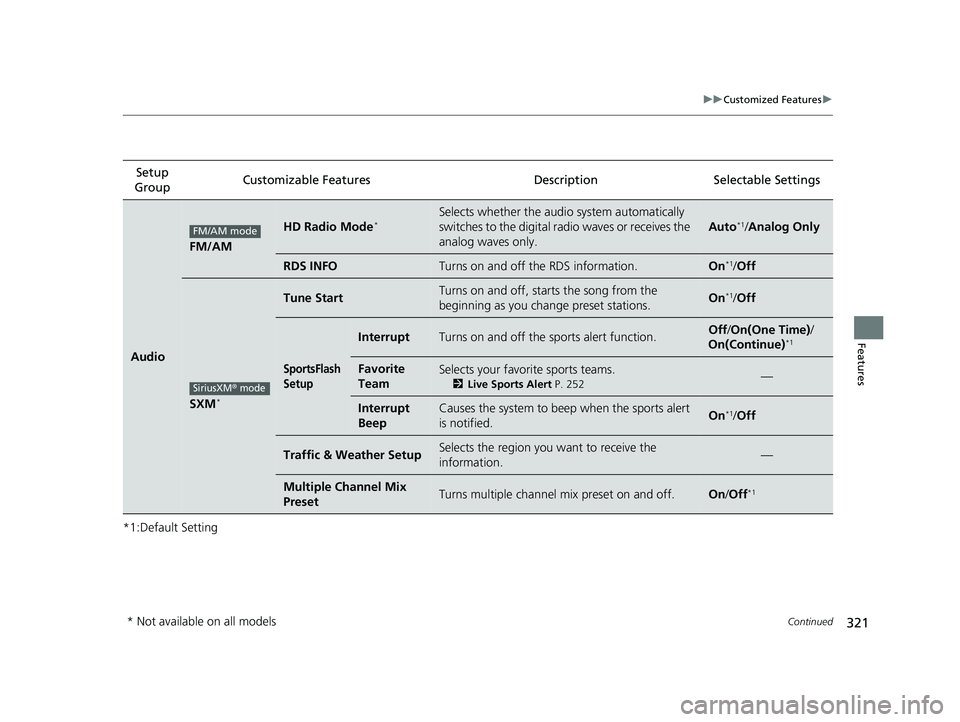
Features
*1:Default SettingSetup
Group Customizable Features Desc
ription Selectable Settings
Audio
FM/AM
HD Radio Mode*Selects whether the audio system automatically
switches to the digital radio waves or receives the
analog waves only.
Auto*1/Analog Only
RDS INFOTurns on and off the RDS information.On*1/Off
SXM*
Tune StartTurns on and off, starts the song from the
beginning as you change preset stations.On*1/Off
SportsFlash
Setup
InterruptTurns on and off the sports alert function.Off /On(One Time) /
On(Continue)*1
Favorite
TeamSelects your favori te sports teams.
2Live Sports Alert P. 252—
Interrupt
BeepCauses the system to beep when the sports alert
is notified.On*1/Off
Traffic & Weather SetupSelects the region you want to receive the
information.—
Multiple Channel Mix
PresetTurns multiple channel mix preset on and off.On /Off*1
FM/AM mode
SiriusXM® mode
* Not available on all models
20 CLARITY PHEV-31TRW6200.book 321 ページ 2019年9月24日 火曜日 午後12時9分
Page 373 of 595
371
Driving
This chapter discusses driving and refueling.
Before Driving................................... 372
Towing a Trailer ................................ 377
When Driving Turning on the Power ...................... 378
Precautions While Driving................. 382
Transmission .................................... 383
Shifting ............................................ 384
ECON Mode .................................... 390
SPORT Mode.................................... 391
Deceleration Paddle Selector ............ 392
Acoustic Vehicle Al erting System ...... 395
Front Sensor Camera ....................... 396
Road Departure Mi tigation (RDM)
System ........................................ 398
Adaptive Cruise Control (ACC) with Low
Speed Follow ................................. 402
Lane Keeping Assist System (LKAS) .. 419
Vehicle Stability AssistTM (VSA®), aka
Electronic Stability Control (ESC),
System ....................................... 426
Agile Handling Assist ....................... 428Tire Pressure Monitoring System (TPMS) .. 429Tire Pressure Monitoring System (TPMS) -
Required Federal Explanation ......... 431
LaneWatch
TM................................... 433
Braking .............................................. 435
Parking Your Vehicle When Stopped................................. 451 Multi-View Rear Camera
.................. 453
Refueling
Fuel Information .............................. 455
How to Refuel ................................. 456
Charging
Before Charging .............................. 458
Charge the High Voltage battery using a Level 1 or 2 charger ....................... 459
Control Box ..................................... 465
High Voltage Battery........................ 470
Using a Timer .................................. 471
Fuel Economy and CO
2 Emissions
Improving Fuel Economy and Reducing CO
2 Emissions ................................ 473
20 CLARITY PHEV-31TRW6200.book 371 ページ 2019年9月24日 火曜日 午後12時9分
Page 386 of 595
384
uuWhen Driving uShifting
Driving
Shifting
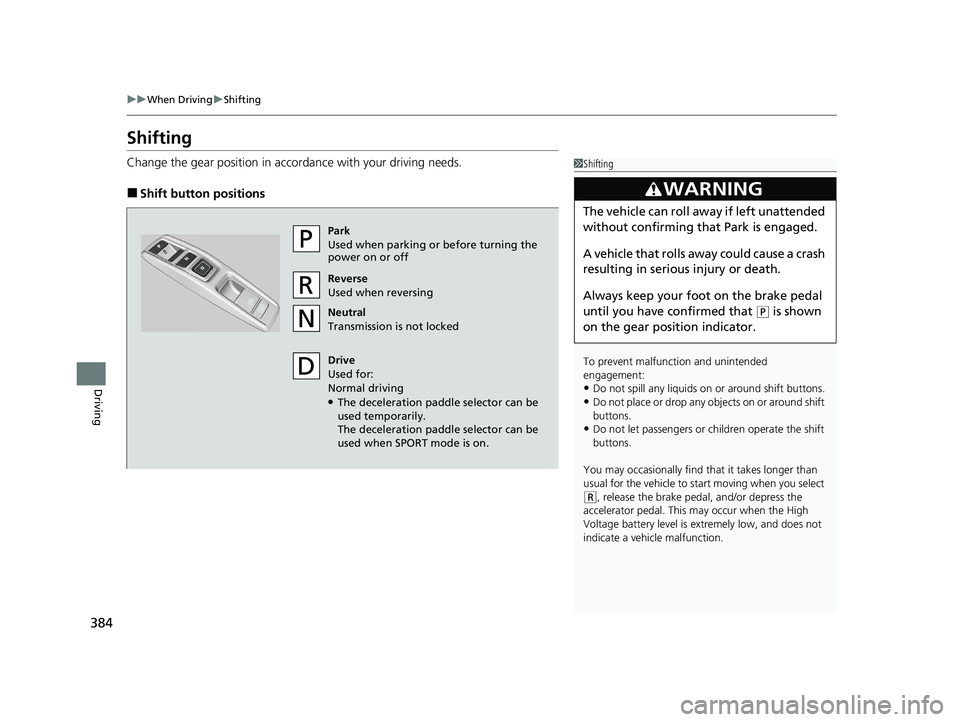
Change the gear position in acco rdance with your driving needs.
■Shift button positions
1Shifting
To prevent malfunc tion and unintended
engagement:
•Do not spill any liquids on or around shift buttons.
•Do not place or drop any objects on or around shift
buttons.
•Do not let passengers or ch ildren operate the shift
buttons.
You may occasionally find th at it takes longer than
usual for the vehicle to start moving when you select
( R, release the brake peda l, and/or depress the
accelerator pedal. This may occur when the High
Voltage battery level is extremely low, and does not
indicate a vehicle malfunction.
3WARNING
The vehicle can roll aw ay if left unattended
without confirming that Park is engaged.
A vehicle that rolls away could cause a crash
resulting in serious injury or death.
Always keep your foot on the brake pedal
until you have confirmed that
( P is shown
on the gear position indicator.
Park
Used when parking or before turning the
power on or off
Reverse
Used when reversing
Neutral
Transmission is not locked
Drive
Used for:
Normal driving
●The deceleration paddle selector can be
used temporarily.
The deceleration paddle selector can be
used when SPORT mode is on.
20 CLARITY PHEV-31TRW6200.book 384 ページ 2019年9月24日 火曜日 午後12時9分
Page 388 of 595
uuWhen Driving uShifting
386
Driving
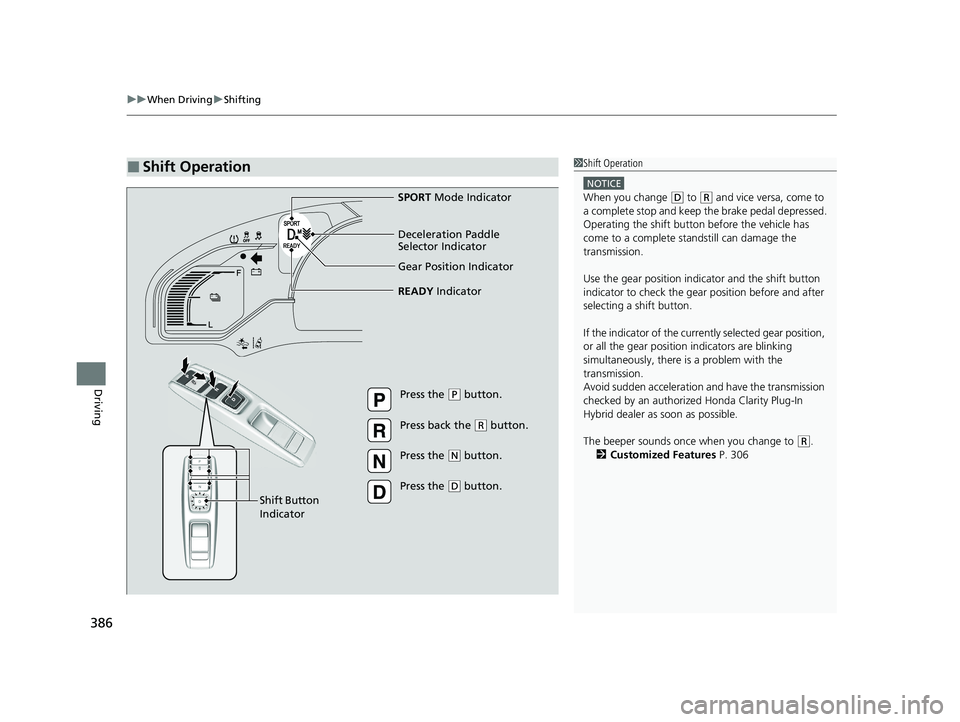
■Shift Operation1Shift Operation
NOTICE
When you change (D to (R and vice versa, come to
a complete stop and keep the brake pedal depressed.
Operating the shift button before the vehicle has
come to a complete standstill can damage the
transmission.
Use the gear position indicator and the shift button
indicator to check the gear position before and after
selecting a shift button.
If the indicator of the currently selected gear position,
or all the gear position indicators are blinking
simultaneously, there is a problem with the
transmission.
Avoid sudden acceleration and have the transmission
checked by an authorized Honda Clarity Plug-In
Hybrid dealer as soon as possible.
The beeper sounds once when you change to
( R.
2 Customized Features P. 306
Gear Position Indicator
READY Indicator
Press the (P button.
Press back the
( R button.
Press the
( N button.
Press the
( D button.
Shift Button
Indicator SPORT
Mode Indicator
Deceleration Paddle
Selector Indicator
20 CLARITY PHEV-31TRW6200.book 386 ページ 2019年9月24日 火曜日 午後12時9分
Page 393 of 595
391
uuWhen Driving uSPORT Mode
Driving
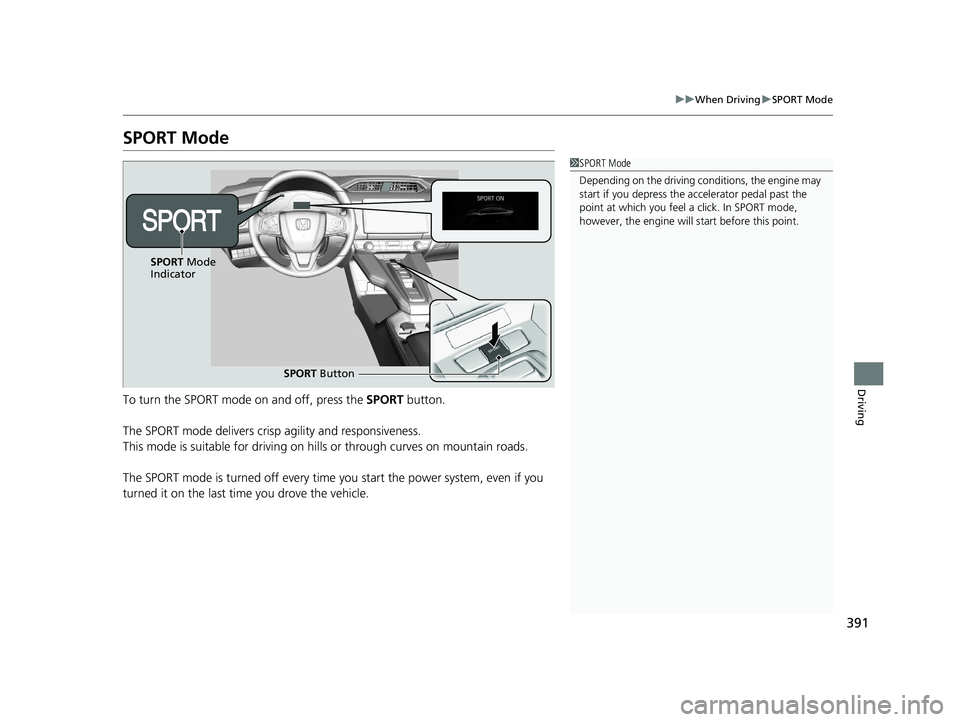
SPORT Mode
To turn the SPORT mode on and off, press the SPORT button.
The SPORT mode delivers crisp agility and responsiveness.
This mode is suitable for driving on hills or through curves on mountain roads.
The SPORT mode is turned off every time you start the power system, even if you
turned it on the last time you drove the vehicle.
1 SPORT Mode
Depending on the driving conditions, the engine may
start if you depress the ac celerator pedal past the
point at which you feel a click. In SPORT mode,
however, the engine will start before this point.
SPORT Button
SPORT
Mode
Indicator
20 CLARITY PHEV-31TRW6200.book 391 ページ 2019年9月24日 火曜日 午後12時9分
Page 395 of 595
Continued393
uuWhen Driving uDeceleration Paddle Selector
Driving
1Deceleration Paddle Selector
In the following situations , the stage may not change
and the stage icon will blink ev en if you pull back the
selector. The dece leration stage may decrease or
cancel automatically:
•The high voltage battery is fully charged or its
temperature is too cold or too hot.
•The speed of the vehicle is beyond the deceleration
range with SPORT mode off.
•Hybrid system protection is needed.
•The paddle selector is operated while your vehicle is
stopped automatically by ACC with Low Speed
Follow.
If either paddle selector is operated, ACC with Low
Speed Follow will ca ncel automatically.
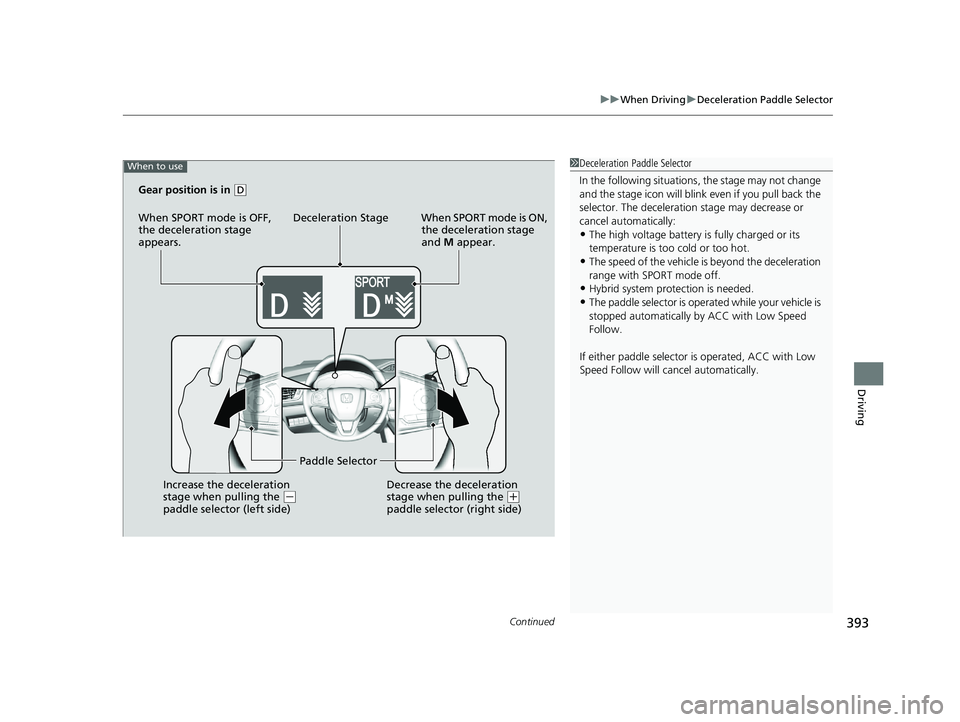
When to use
Gear position is in (D
When SPORT mode is OFF,
the deceleration stage
appears. Deceleration Stage When SPORT mode is ON,
the deceleration stage
and M appear.
Increase the deceleration
stage when pulling the
( -
paddle selector (left side) Paddle Selector
Decrease the deceleration
stage when pulling the (+
paddle selector (right side)
20 CLARITY PHEV-31TRW6200.book 393 ページ 2019年9月24日 火曜日 午後12時9分