reset HONDA CR-V 2012 RM1, RM3, RM4 / 4.G Owner's Manual
[x] Cancel search | Manufacturer: HONDA, Model Year: 2012, Model line: CR-V, Model: HONDA CR-V 2012 RM1, RM3, RM4 / 4.GPages: 361, PDF Size: 7.25 MB
Page 183 of 361
182
uuRear Entertainment System*uOperating the System
Features
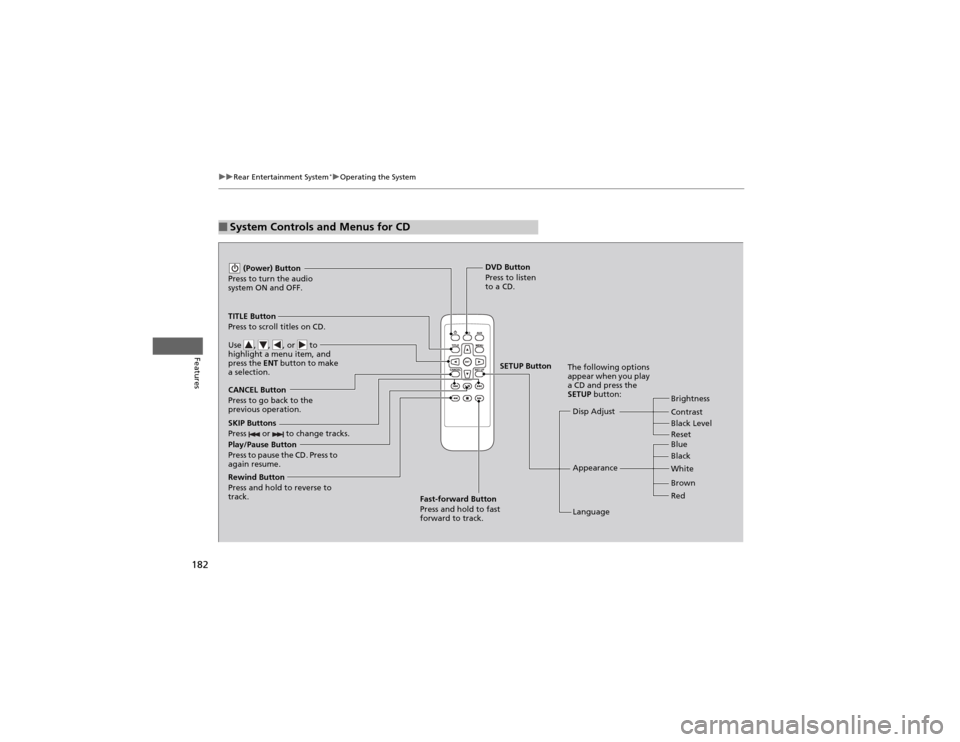
■System Controls and Menus for CD
Play/Pause Button
Press to pause the CD. Press to
again resume. (Power) Button
Press to turn the audio
system ON and OFF.
DVD Button
Press to listen
to a CD.
TITLE Button
Press to scroll titles on CD.
Use , , , or to
highlight a menu item, and
press the ENT button to make
a selection.
CANCEL Button
Press to go back to the
previous operation. Disp Adjust
LanguageBrightness
Contrast
Black Level
Appearance Black
Blue
Brown
White Red
The following options
appear when you play
a CD and press the SETUP
button:
SKIP Buttons
Press or to change tracks.
Rewind Button
Press and hold to reverse to
track. Fast-forward Button
Press and hold to fast forward to track.
SETUP Button
Reset
Page 184 of 361
183
uuRear Entertainment System*uOperating the System
Features
■
Playing a CD
Press the DVD button.
The available options appear on the overhead screen are Repeat, Random, and Scan.
These functions are the same as those of the playing a DVD. 2 Playing a DVD P. 177
To scroll your audio data title, press the TITLE button for five seconds.
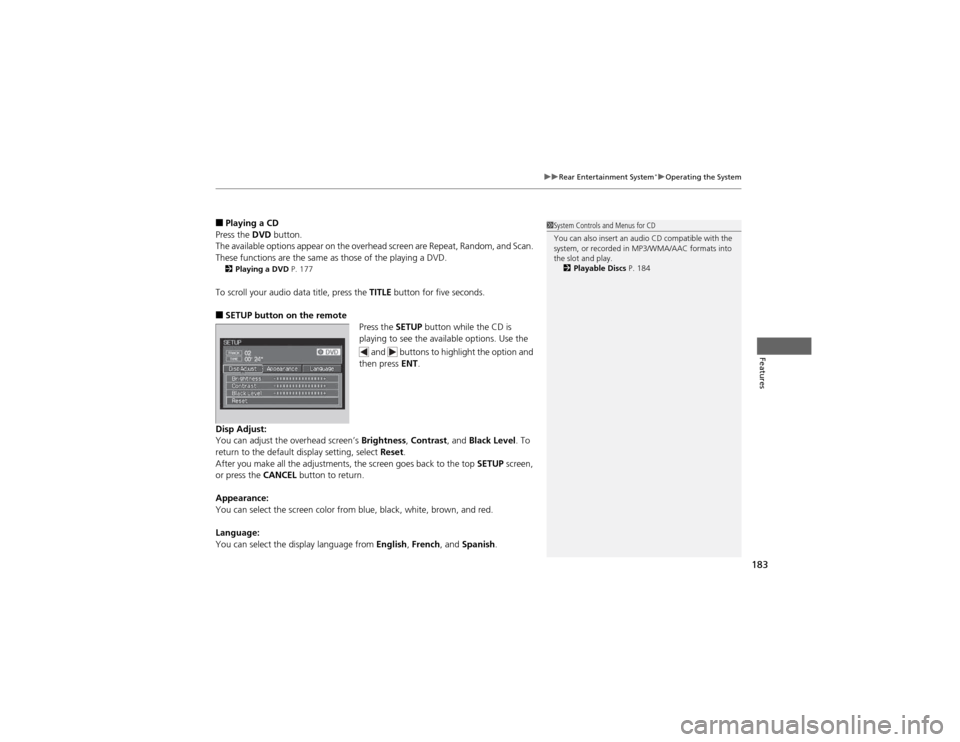
■ SETUP button on the remote
Press the SETUP button while the CD is
playing to see the available options. Use the
and buttons to highlight the option and
then press ENT.
Disp Adjust:
You can adjust the overhead screen’s Brightness, Contrast , and Black Level . To
return to the default display setting, select Reset.
After you make all the adjustments, the screen goes back to the top SETUP screen,
or press the CANCEL button to return.
Appearance:
You can select the screen color from blue, black, white, brown, and red.
Language:
You can select the display language from English, French , and Spanish .1System Controls and Menus for CD
You can also insert an audio CD compatible with the
system, or recorded in MP3/WMA/AAC formats into
the slot and play.
2 Playable Discs P. 184
Page 190 of 361
189
Features
Audio Remote Controls
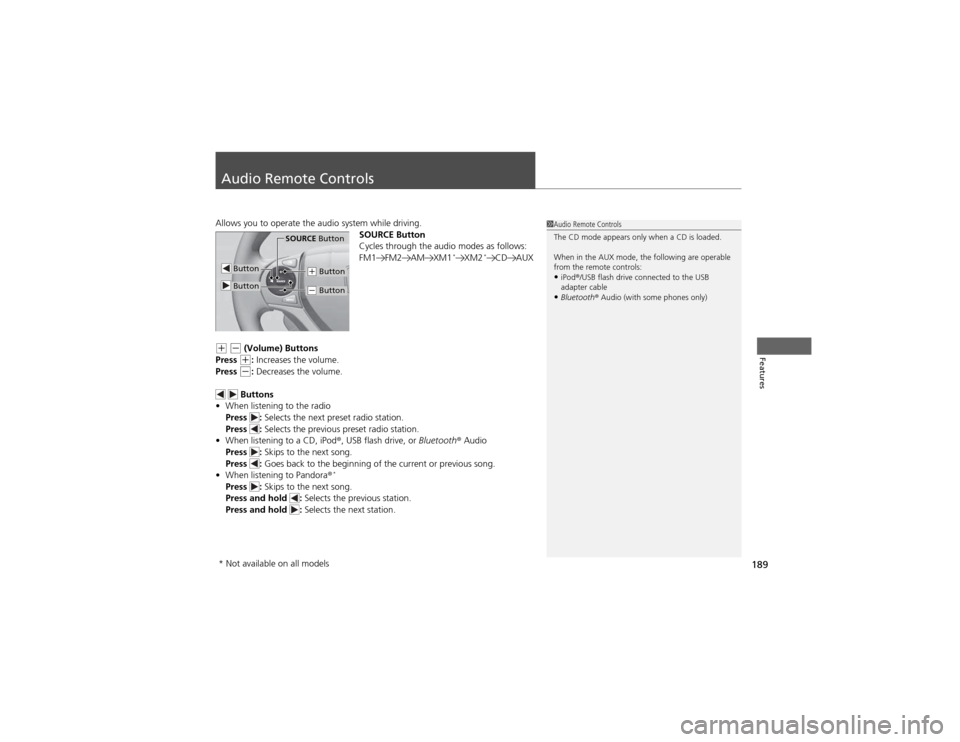
Allows you to operate the audio system while driving.SOURCE Button
Cycles through the audio modes as follows:
FM1 FM2 AM XM1*
XM2 *
CD AUX
(+ (- (Volume) Buttons
Press (+ : Increases the volume.
Press (- : Decreases the volume.
Buttons
• When listening to the radio
Press : Selects the next preset radio station.
Press : Selects the previous preset radio station.
• When listening to a CD, iPod ®, USB flash drive, or Bluetooth® Audio
Press : Skips to the next song.
Press : Goes back to the beginning of the current or previous song.
• When listening to Pandora ®*
Press : Skips to the next song.
Press and hold : Selects the previous station.
Press and hold : Selects the next station.
1Audio Remote Controls
The CD mode appears only when a CD is loaded.
When in the AUX mode, the following are operable
from the remote controls:
• iPod ®/USB flash drive connected to the USB
adapter cable
• Bluetooth ® Audio (with some phones only)
Button
SOURCE Button
Button
(+ Button
(- Button
* Not available on all models
Page 212 of 361
Continued211
uuBluetooth® HandsFreeLink ®uHFL Menus
Features
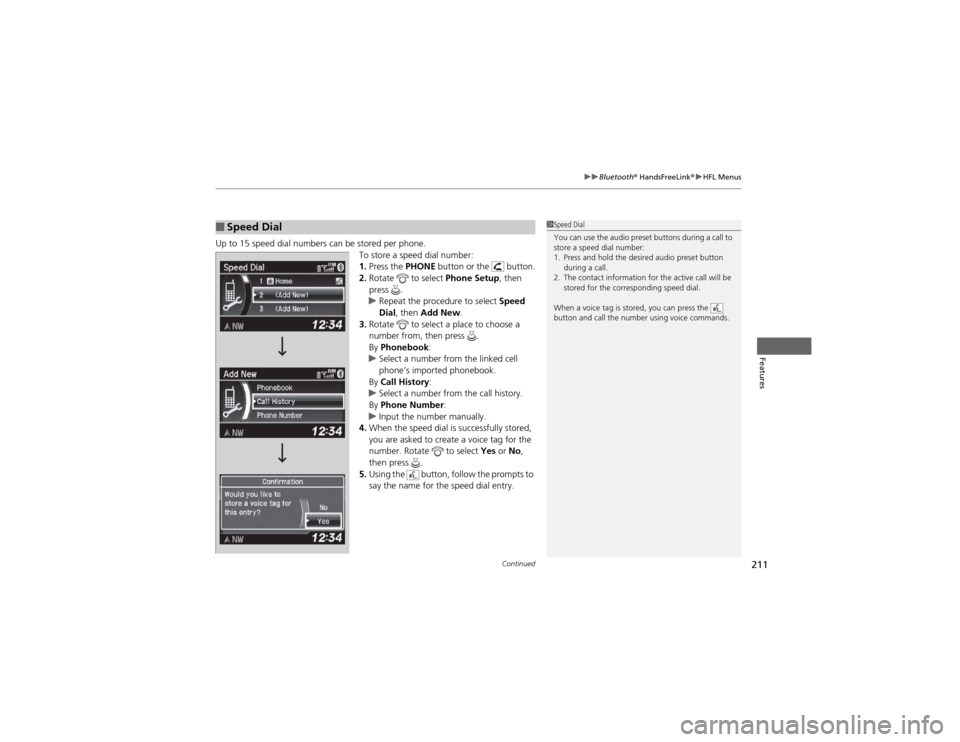
Up to 15 speed dial numbers can be stored per phone.
To store a speed dial number: 1.Press the PHONE button or the button.
2. Rotate to select Phone Setup, then
press .
uRepeat the procedure to select Speed
Dial , then Add New .
3. Rotate to select a place to choose a
number from, then press .
By Phonebook :
uSelect a number from the linked cell
phone’s imported phonebook.
By Call History :
uSelect a number from the call history.
By Phone Number :
uInput the number manually.
4. When the speed dial is successfully stored,
you are asked to create a voice tag for the
number. Rotate to select Yes or No,
then press .
5. Using the button, follow the prompts to
say the name for the speed dial entry.
■Speed Dial1Speed Dial
You can use the audio preset buttons during a call to
store a speed dial number:
1. Press and hold the desired audio preset button
during a call.
2. The contact information for the active call will be stored for the corresponding speed dial.
When a voice tag is stored, you can press the
button and call the number using voice commands.
Page 216 of 361
Continued215
uuBluetooth® HandsFreeLink ®uHFL Menus
Features
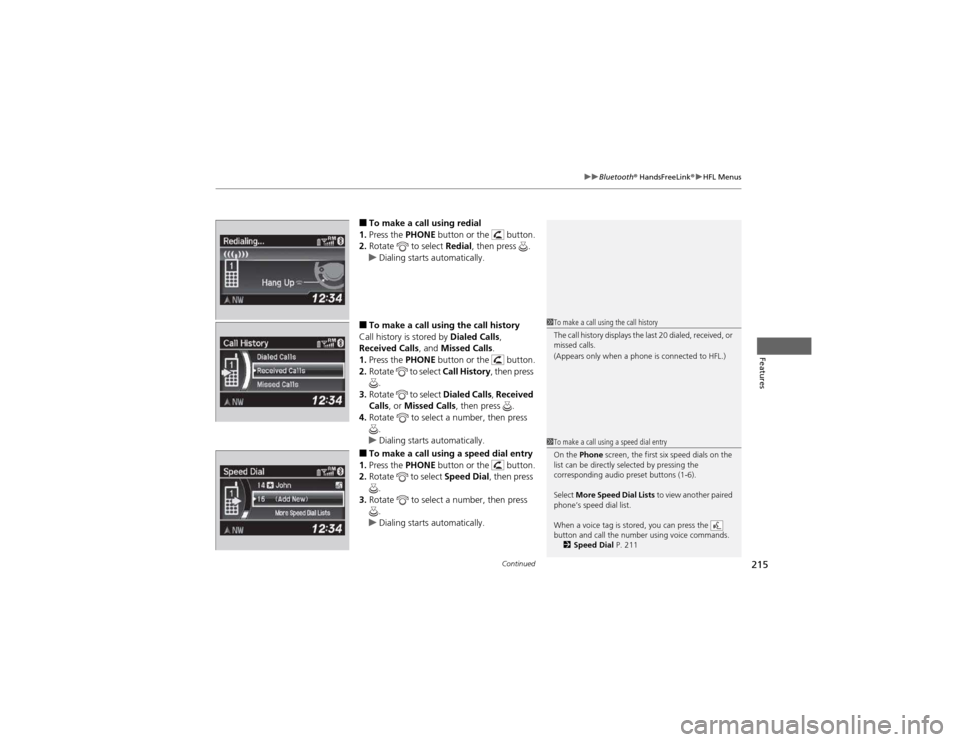
■To make a call using redial
1. Press the PHONE button or the button.
2. Rotate to select Redial, then press .
uDialing starts automatically.
■ To make a call using the call history
Call history is stored by Dialed Calls,
Received Calls , and Missed Calls .
1. Press the PHONE button or the button.
2. Rotate to select Call History, then press
.
3. Rotate to select Dialed Calls, Received
Calls , or Missed Calls , then press .
4. Rotate to select a number, then press
.
uDialing starts automatically.
■ To make a call using a speed dial entry
1. Press the PHONE button or the button.
2. Rotate to select Speed Dial, then press
.
3. Rotate to select a number, then press
.
uDialing starts automatically.
1To make a call using the call history
The call history displays the last 20 dialed, received, or
missed calls.
(Appears only when a phone is connected to HFL.)
1To make a call using a speed dial entry
On the Phone screen, the first six speed dials on the
list can be directly selected by pressing the
corresponding audio preset buttons (1-6).
Select More Speed Dial Lists to view another paired
phone’s speed dial list.
When a voice tag is stored, you can press the
button and call the number using voice commands. 2 Speed Dial P. 211
Page 306 of 361
305
Maintenance
Battery
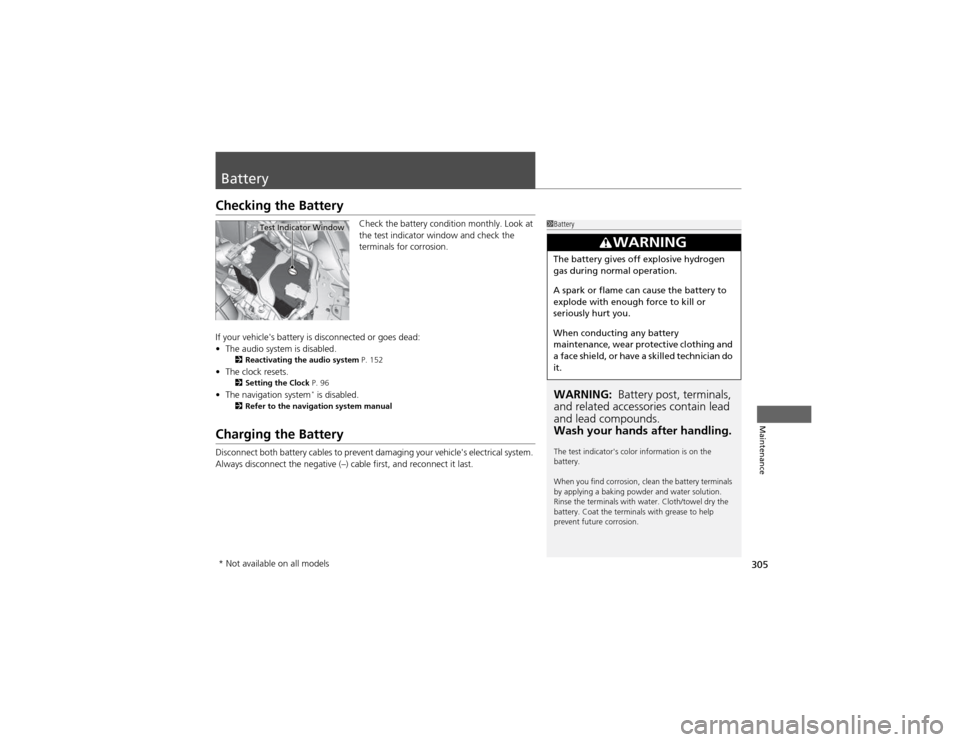
Checking the BatteryCheck the battery condition monthly. Look at
the test indicator window and check the
terminals for corrosion.
If your vehicle's battery is disconnected or goes dead: • The audio system is disabled.
2 Reactivating the audio system P. 152
• The clock resets.
2 Setting the Clock P. 96
• The navigation system *
is disabled.
2 Refer to the navigation system manual
Charging the Battery
Disconnect both battery cables to prevent damaging your vehicle's electrical system.
Always disconnect the negative (–) cable first, and reconnect it last.
1Battery
WARNING: Battery post, terminals,
and related accessories contain lead and lead compounds.
Wash your hands after handling.
The test indicator's color information is on the battery.
When you find corrosion, clean the battery terminals
by applying a baking powder and water solution.
Rinse the terminals with water. Cloth/towel dry the
battery. Coat the terminals with grease to help
prevent future corrosion.
3WARNING
The battery gives off explosive hydrogen
gas during normal operation.
A spark or flame can cause the battery to
explode with enough force to kill or
seriously hurt you.
When conducting any battery
maintenance, wear protective clothing and
a face shield, or have a skilled technician do it.
Test Indicator Window
* Not available on all models
Page 358 of 361

357
Index
Seats.......................................................... 122
Adjusting ................................................ 122
Driver’s Seat Lumbar Support .................. 122
Front Seats.............................................. 122
Rear Seats ............................................... 129
Seat Heaters ........................................... 139
Security System ........................................ 106
Immobilizer System Indicator..................... 75
Security System Alarm Indicator ................ 75
SEL/RESET Knob .................................... 78, 81
Select Lever ........................................ 15, 243
Operation ......................................... 15, 244
Releasing ................................................ 326
Won’t Move ........................................... 326
Selecting a Child Seat ................................ 56
Selector Knob (Audio) ............................. 153
Setting the Clock ........................................ 96
Shift Lever .......................................... 15, 243
Shift Lever Position Indicator ............ 69, 244
Shifting (Transmission) ............................ 243
Shoulder Anchor ........................................ 33
Side Airbags ............................................... 44
Cutoff System ........................................... 46
Off Indicator ............................................. 46
Side Curtain Airbags .................................. 47
SMS Text Message ............................ 206, 218
Snow Tires ................................................ 304
Spare Tire ......................................... 317, 341
Spark Plugs ............................................... 340
Specifications ........................................... 340
Specified Fuel ................................... 259, 340 Speedometer
.............................................. 77
SRS Airbags (Airbags) ................................. 40
Starting the Engine .................................. 239
Does Not Start ......................................... 323
Engine Switch Buzzer .............................. 111
Jump Starting .......................................... 324
Steering Wheel ......................................... 119
Adjusting................................................. 119
Stopping .................................................... 257
Summer Tires ............................................ 304
Sunglasses Holder ..................................... 138
Supplemental Restraint System (SRS) ........ 40
Switches (Around the Steering
Wheel) ............................................. 2, 3, 111
Synchronized Mode .................................. 147
T
Tachometer ................................................. 77
Tailgate ..................................................... 104
Unable to Open ....................................... 337
Temperature Gauge ................................... 77
Temperature Sensor ................................. 148
Text Message .................................... 206, 218
Time (Setting) ............................................. 96
Tire Pressure Monitoring System (TPMS) ..................................................... 250
Indicator ............................................ 73, 332
Tires ........................................................... 296
Air Pressure ..................................... 297, 341
Checking and Maintaining....................... 296 Inspection ............................................... 296
Labeling .................................................. 297
Puncture (Flat Tire) .................................. 317
Regulations ............................................. 299
Rotation .................................................. 303
Spare Tire ........................................ 317, 341
Summer .................................................. 304
Tire Chains .............................................. 304
Wear Indicators ....................................... 301
Winter..................................................... 304
Tonneau Cover ......................................... 140
Tools .......................................................... 316
Towing a Trailer ....................................... 231
Equipment and Accessories ..................... 232
Load Limits .............................................. 231
Towing Your Vehicle ................................ 235
Behind a Motorhome .............................. 235
Emergency .............................................. 336
TPMS (Tire Pressure Monitoring
System) .................................................... 250
Indicator............................................ 73, 332
Transmission ............................................. 243
Automatic ............................................... 243
Fluid ........................................................ 282
Number................................................... 342
Shift Lever Position Indicator.............. 69, 244
Trip Meter ................................................... 79
Troubleshooting ....................................... 315
Blown Fuse...................................... 333, 334
Brake Pedal Vibrates .................................. 19
Buzzer Sounds When Opening Door.......... 20