ad blue HONDA CR-V 2013 RM1, RM3, RM4 / 4.G User Guide
[x] Cancel search | Manufacturer: HONDA, Model Year: 2013, Model line: CR-V, Model: HONDA CR-V 2013 RM1, RM3, RM4 / 4.GPages: 361, PDF Size: 6.58 MB
Page 185 of 361
uuRear Entertainment System*uOperating the System
184
Features
■Playing a CD
Press the DVD button.
The available options that appear on the overhead screen are Repeat, Random, and
Scan. The fast-forward, rewind, , and buttons work similarly to operation a DVD.
2Playing a DVD P. 178
To scroll the audio data title, press the TITLE button for five seconds.
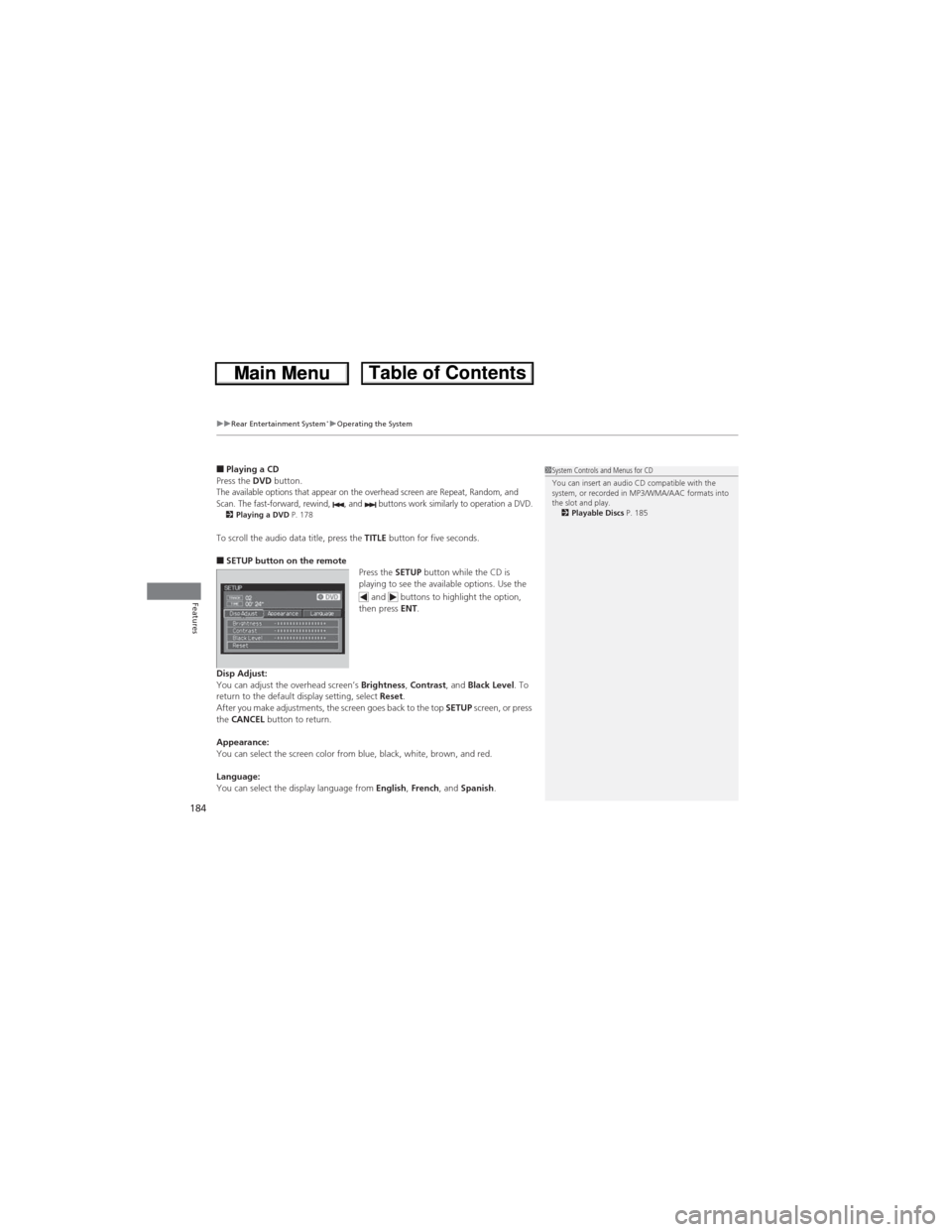
■SETUP button on the remote
Press the SETUP button while the CD is
playing to see the available options. Use the
and buttons to highlight the option,
then press ENT.
Disp Adjust:
You can adjust the overhead screen’s Brightness, Contrast, and Black Level. To
return to the default display setting, select Reset.
After you make adjustments, the screen goes back to the top SETUP screen, or press
the CANCEL button to return.
Appearance:
You can select the screen color from blue, black, white, brown, and red.
Language:
You can select the display language from English, French, and Spanish.
1System Controls and Menus for CD
You can insert an audio CD compatible with the
system, or recorded in MP3/WMA/AAC formats into
the slot and play.
2Playable Discs P. 185
Page 195 of 361
194
Features
Bluetooth® HandsFreeLink®
For models with the navigation system, see the Navigation System Manual for how
to operate the Bluetooth® HandsFreeLink®.
Bluetooth® HandsFreeLink® (HFL) allows you to place and receive phone calls using
your vehicle's audio system, without handling your cell phone.
Using HFL
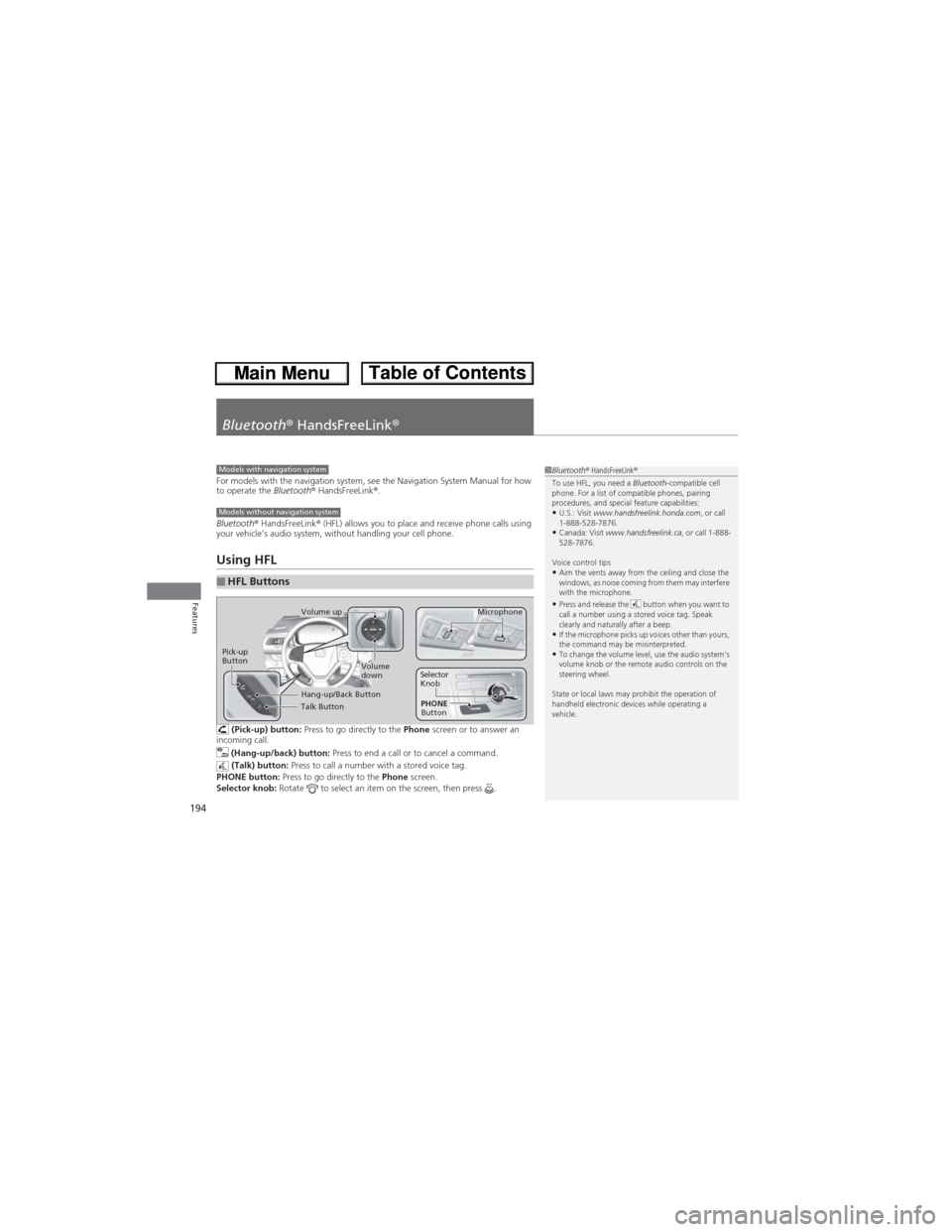
(Pick-up) button: Press to go directly to the Phone screen or to answer an
incoming call.
(Hang-up/back) button: Press to end a call or to cancel a command.
(Talk) button: Press to call a number with a stored voice tag.
PHONE button: Press to go directly to the Phone screen.
Selector knob: Rotate to select an item on the screen, then press .
■HFL Buttons
1Bluetooth® HandsFreeLink®
To use HFL, you need a Bluetooth-compatible cell
phone. For a list of compatible phones, pairing
procedures, and special feature capabilities:
•U.S.: Visit www.handsfreelink.honda.com, or call
1-888-528-7876.
•Canada: Visit www.handsfreelink.ca, or call 1-888-
528-7876.
Voice control tips
•Aim the vents away from the ceiling and close the
windows, as noise coming from them may interfere
with the microphone.
•Press and release the button when you want to
call a number using a stored voice tag. Speak
clearly and naturally after a beep.
•If the microphone picks up voices other than yours,
the command may be misinterpreted.
•To change the volume level, use the audio system's
volume knob or the remote audio controls on the
steering wheel.
State or local laws may prohibit the operation of
handheld electronic devices while operating a
vehicle.
Models with navigation system
Models without navigation system
Talk Button
Volume up
Microphone
Hang-up/Back Button
Pick-up
ButtonVolume
downSelector
Knob
PHONE
Button
Page 196 of 361
195
uuBluetooth® HandsFreeLink®uUsing HFL
Features
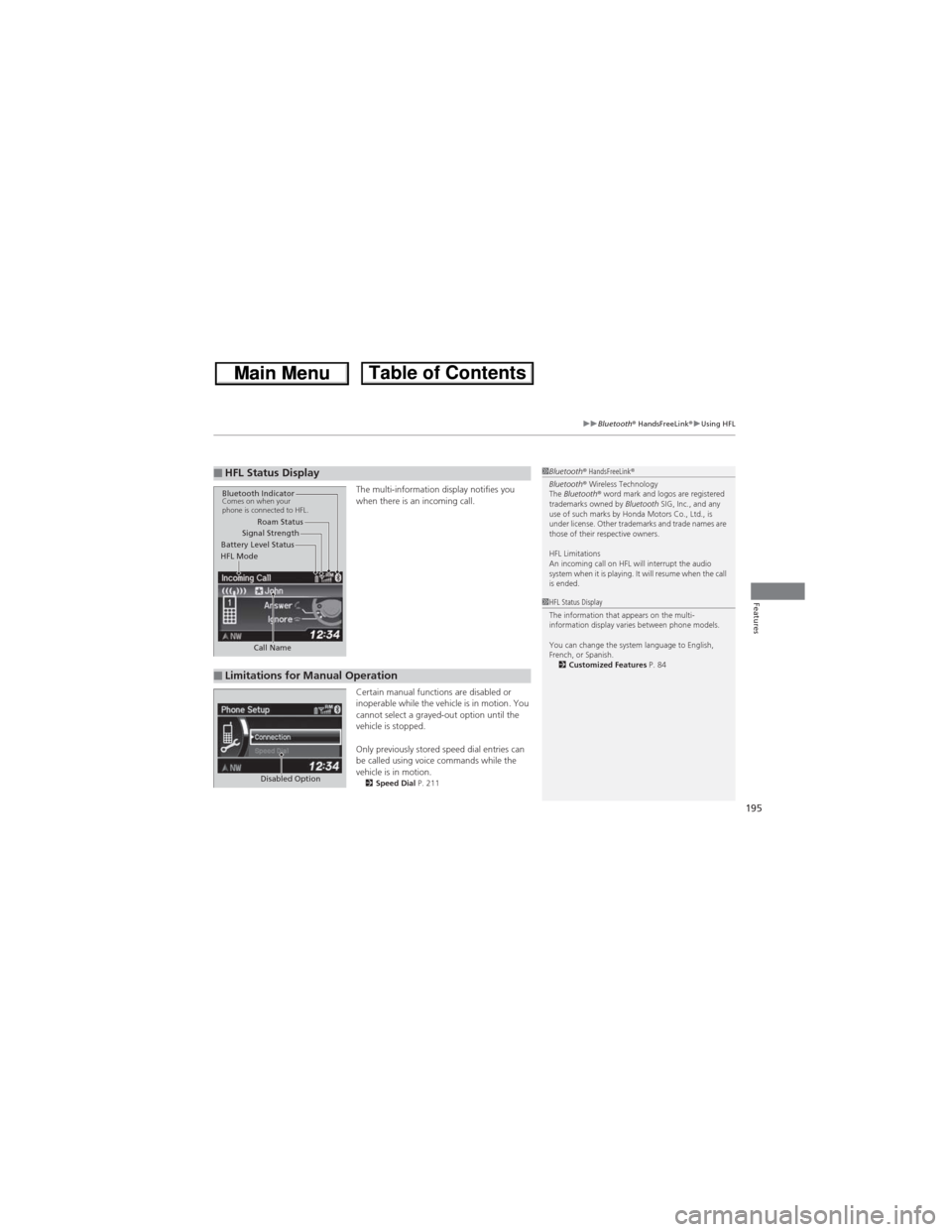
The multi-information display notifies you
when there is an incoming call.
Certain manual functions are disabled or
inoperable while the vehicle is in motion. You
cannot select a grayed-out option until the
vehicle is stopped.
Only previously stored speed dial entries can
be called using voice commands while the
vehicle is in motion.
2Speed Dial P. 211
■HFL Status Display1Bluetooth® HandsFreeLink®
Bluetooth® Wireless Technology
The Bluetooth® word mark and logos are registered
trademarks owned by Bluetooth SIG, Inc., and any
use of such marks by Honda Motors Co., Ltd., is
under license. Other trademarks and trade names are
those of their respective owners.
HFL Limitations
An incoming call on HFL will interrupt the audio
system when it is playing. It will resume when the call
is ended.
Signal Strength
HFL ModeBattery Level StatusRoam Status
Call Name
Bluetooth IndicatorComes on when your
phone is connected to HFL.
■Limitations for Manual Operation
1HFL Status Display
The information that appears on the multi-
information display varies between phone models.
You can change the system language to English,
French, or Spanish.
2Customized Features P. 84
Disabled Option
Page 197 of 361
196
uuBluetooth® HandsFreeLink®uHFL Menus
Features
HFL Menus
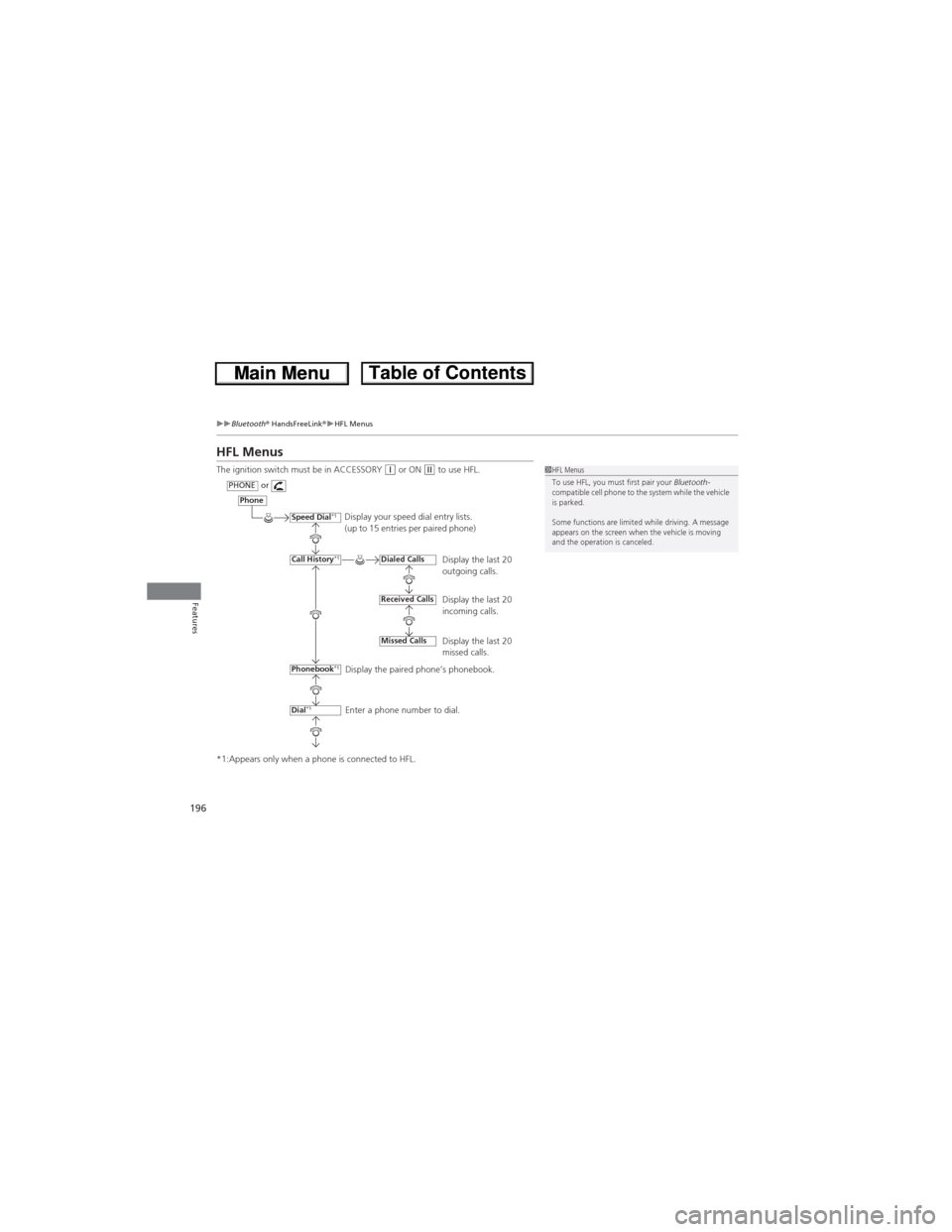
The ignition switch must be in ACCESSORY (q or ON (w to use HFL.
*1:Appears only when a phone is connected to HFL.1HFL Menus
To use HFL, you must first pair your Bluetooth-
compatible cell phone to the system while the vehicle
is parked.
Some functions are limited while driving. A message
appears on the screen when the vehicle is moving
and the operation is canceled.
Display your speed dial entry lists.
(up to 15 entries per paired phone)
Display the last 20
outgoing calls.
Display the last 20
incoming calls.
Display the last 20
missed calls.
Display the paired phone’s phonebook.
Enter a phone number to dial.
Phone
Speed Dial*1
Call History*1
PHONEor
Phonebook
*1
Dial*1
Dialed Calls
Received Calls
Missed Calls
Page 198 of 361
197
uuBluetooth® HandsFreeLink®uHFL Menus
Continued
Features
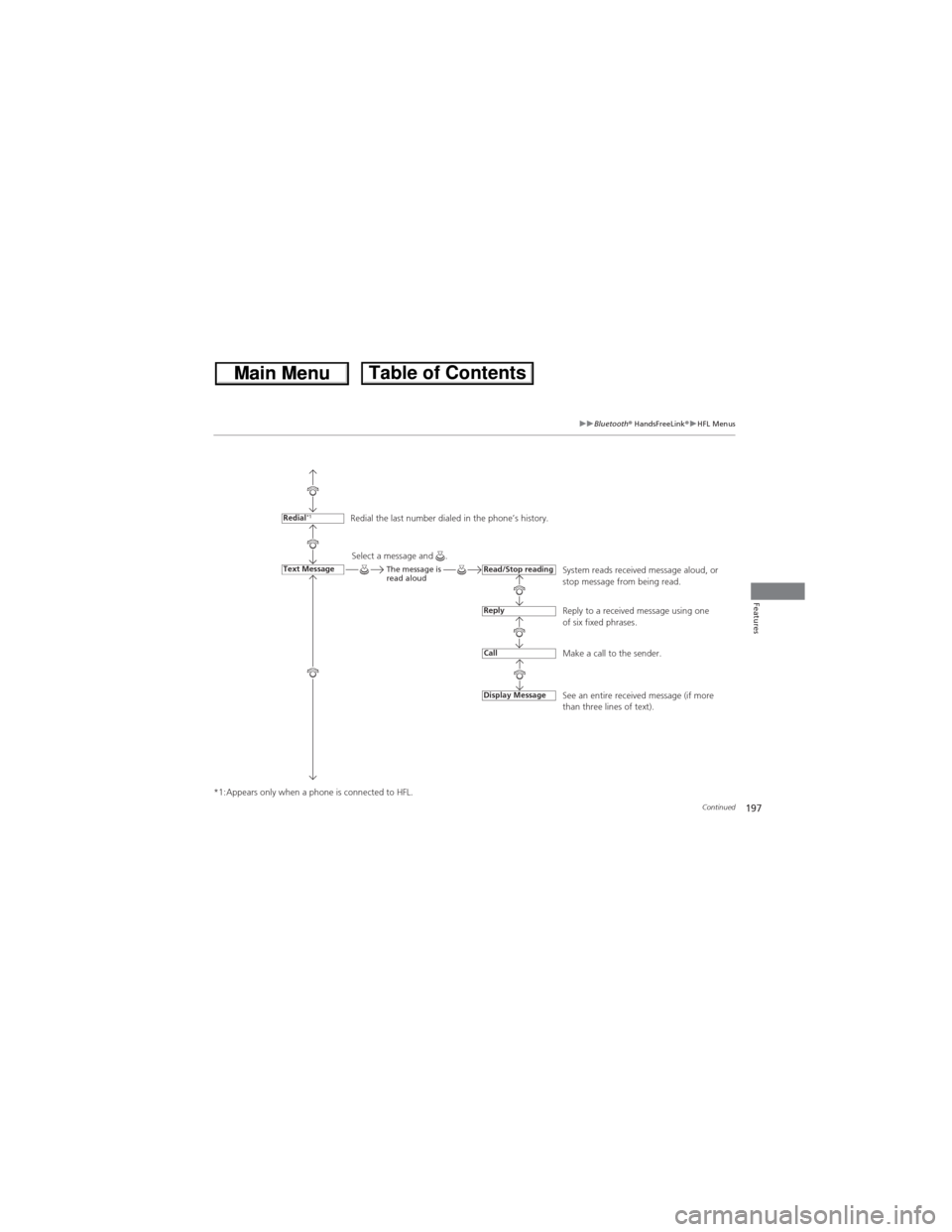
*1:Appears only when a phone is connected to HFL.Redial the last number dialed in the phone’s history.
System reads received message aloud, or
stop message from being read.
Reply to a received message using one
of six fixed phrases.
Make a call to the sender.
See an entire received message (if more
than three lines of text).
Redial*1
Text MessageRead/Stop reading
Reply
Call
Display Message
Select a message and .The message is
read aloud
Page 199 of 361
198
uuBluetooth® HandsFreeLink®uHFL Menus
Features
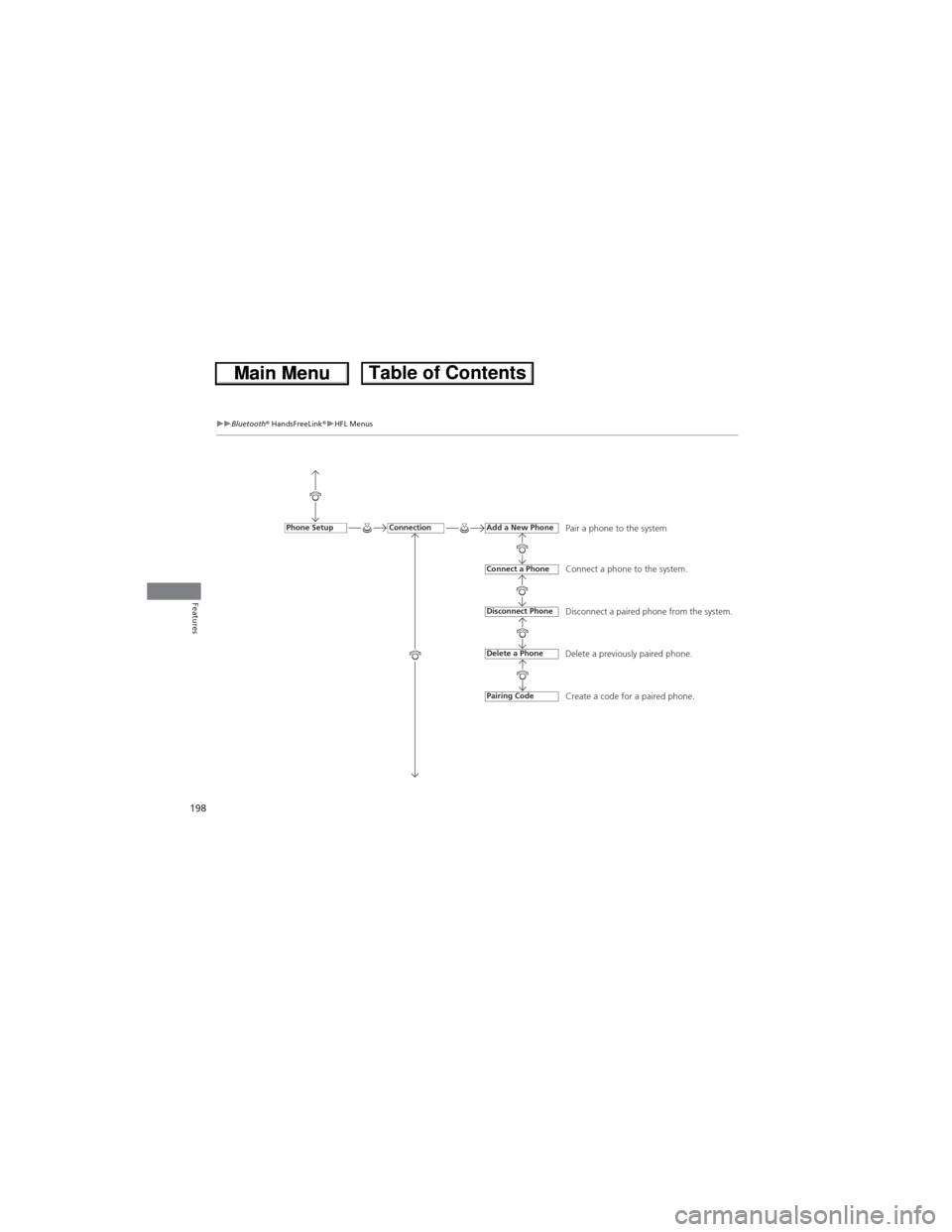
Pair a phone to the system
Connect a phone to the system.
Disconnect a paired phone from the system.
Delete a previously paired phone.
Create a code for a paired phone.ConnectionPhone SetupAdd a New Phone
Connect a Phone
Disconnect Phone
Delete a Phone
Pairing Code
Page 200 of 361
199
uuBluetooth® HandsFreeLink®uHFL Menus
Continued
Features
*1:Appears only when a phone is connected to HFL.
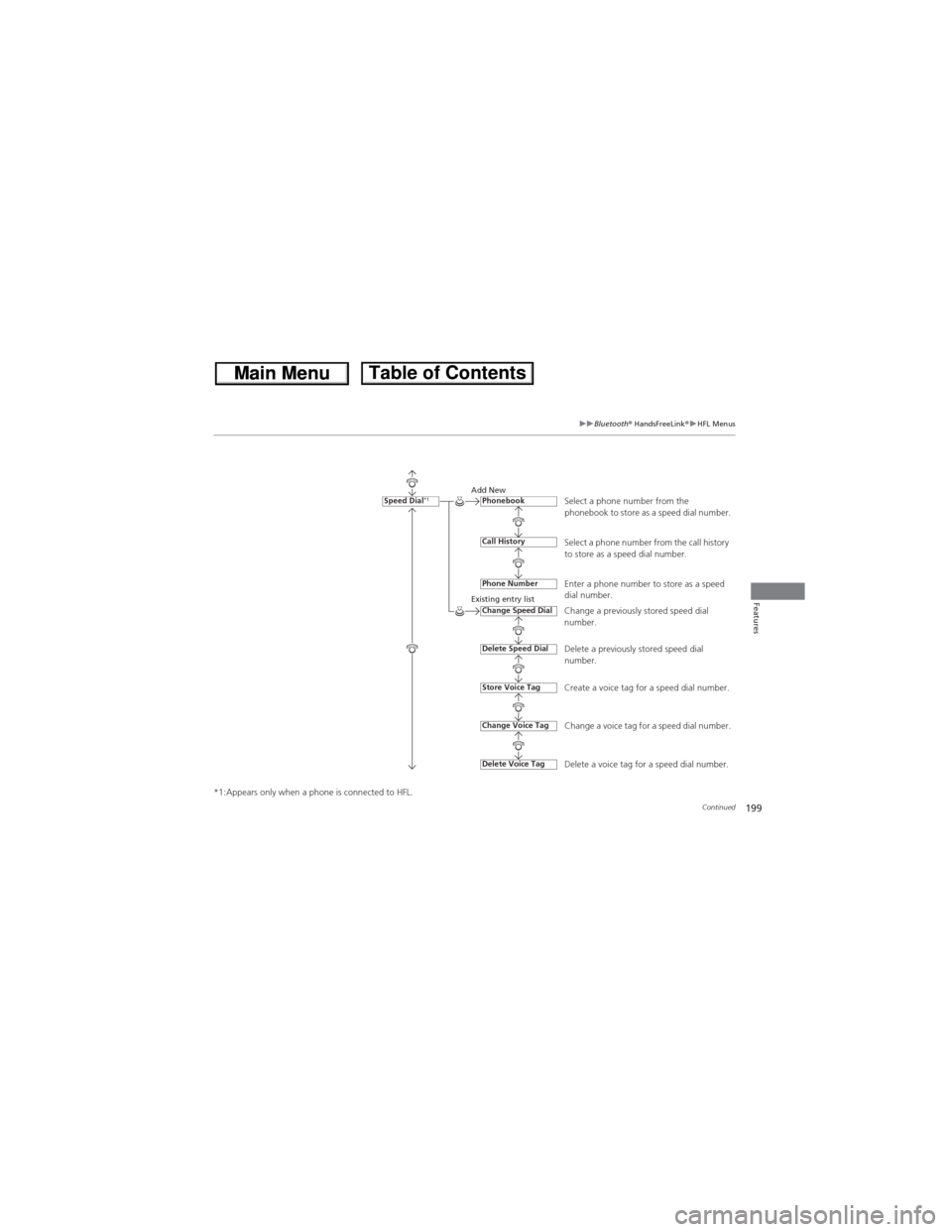
Select a phone number from the
phonebook to store as a speed dial number.Add New
Existing entry list
Select a phone number from the call history
to store as a speed dial number.
Enter a phone number to store as a speed
dial number.
Change a previously stored speed dial
number.
Delete a previously stored speed dial
number.
Create a voice tag for a speed dial number.
Change a voice tag for a speed dial number.
Delete a voice tag for a speed dial number.
Speed Dial*1Phonebook
Call History
Phone Number
Change Speed Dial
Delete Speed Dial
Store Voice Tag
Delete Voice Tag
Change Voice Tag
Page 201 of 361
200
uuBluetooth® HandsFreeLink®uHFL Menus
Features
*1:Appears only when a phone is connected to HFL.
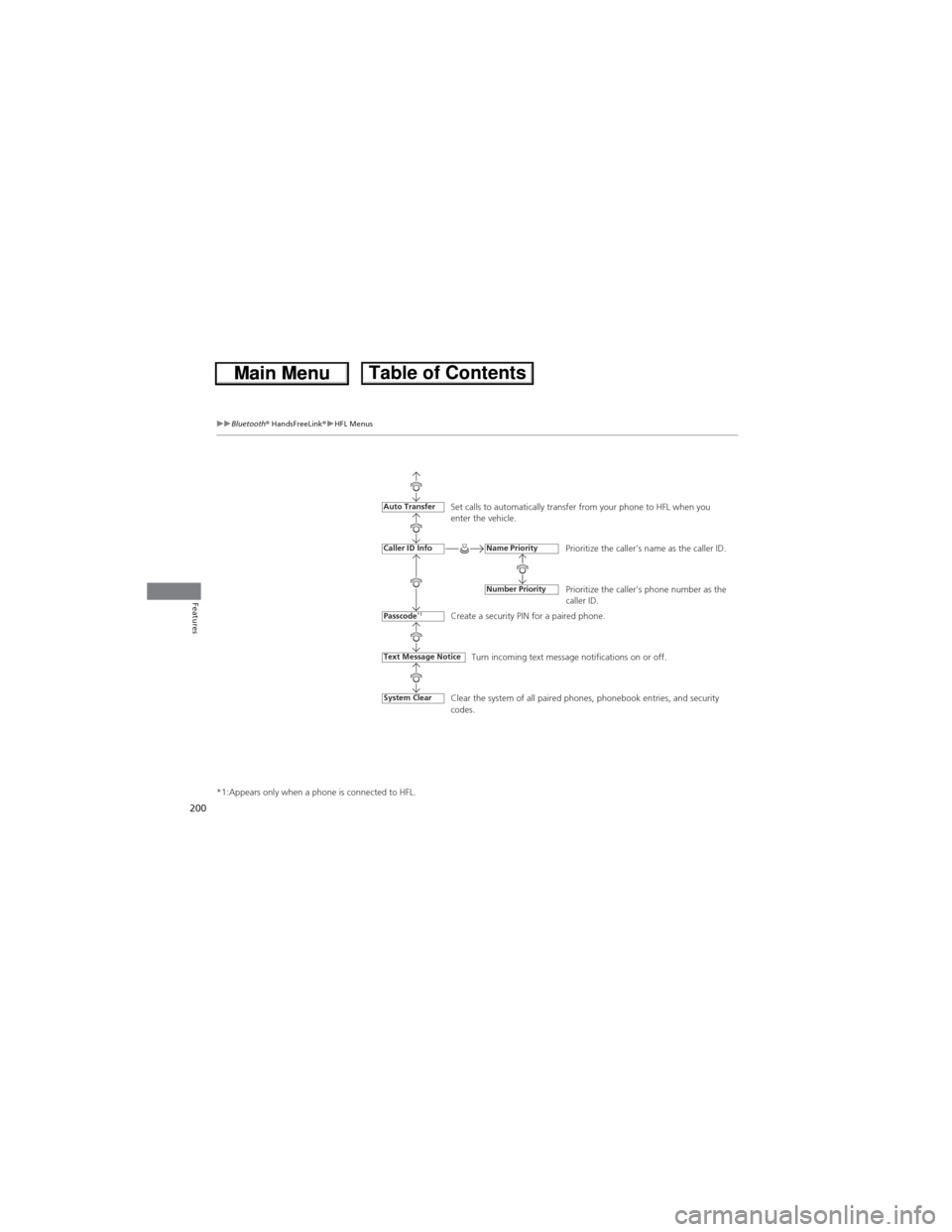
Set calls to automatically transfer from your phone to HFL when you
enter the vehicle.
Prioritize the caller’s name as the caller ID.
Prioritize the caller’s phone number as the
caller ID.
Create a security PIN for a paired phone.
Turn incoming text message notifications on or off.
Text Message Notice
Auto Transfer
Caller ID Info
Passcode*1
Name Priority
Number Priority
Clear the system of all paired phones, phonebook entries, and security
codes.System Clear
Page 202 of 361
Continued201
uuBluetooth® HandsFreeLink®uHFL Menus
Features
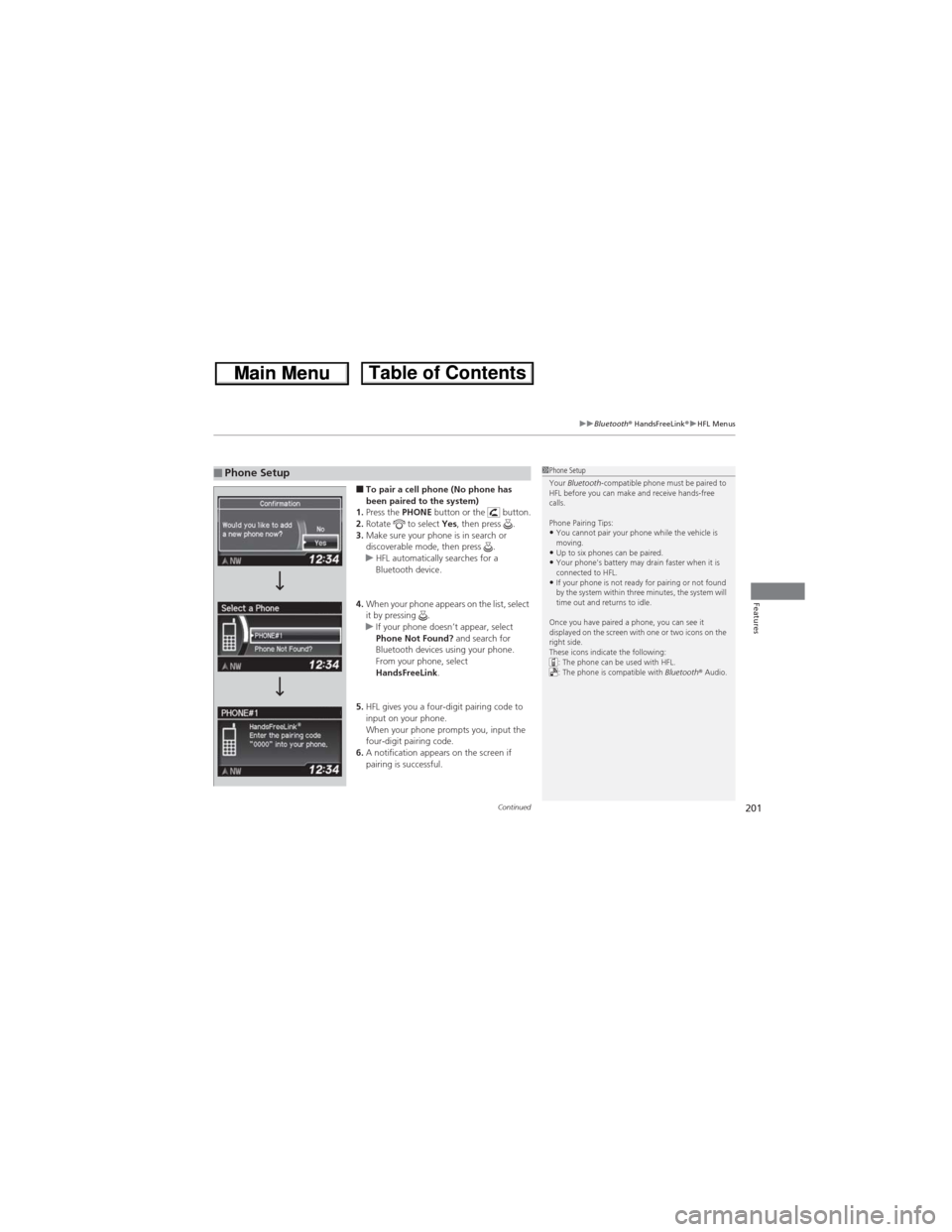
■To pair a cell phone (No phone has
been paired to the system)
1.Press the PHONE button or the button.
2.Rotate to select Yes, then press .
3.Make sure your phone is in search or
discoverable mode, then press .
uHFL automatically searches for a
Bluetooth device.
4.When your phone appears on the list, select
it by pressing .
uIf your phone doesn’t appear, select
Phone Not Found? and search for
Bluetooth devices using your phone.
From your phone, select
HandsFreeLink.
5.HFL gives you a four-digit pairing code to
input on your phone.
When your phone prompts you, input the
four-digit pairing code.
6.A notification appears on the screen if
pairing is successful.■Phone Setup1Phone Setup
Your Bluetooth-compatible phone must be paired to
HFL before you can make and receive hands-free
calls.
Phone Pairing Tips:
•You cannot pair your phone while the vehicle is
moving.
•Up to six phones can be paired.•Your phone's battery may drain faster when it is
connected to HFL.
•If your phone is not ready for pairing or not found
by the system within three minutes, the system will
time out and returns to idle.
Once you have paired a phone, you can see it
displayed on the screen with one or two icons on the
right side.
These icons indicate the following:
: The phone can be used with HFL.
: The phone is compatible with Bluetooth® Audio.
Page 203 of 361
202
uuBluetooth® HandsFreeLink®uHFL Menus
Features
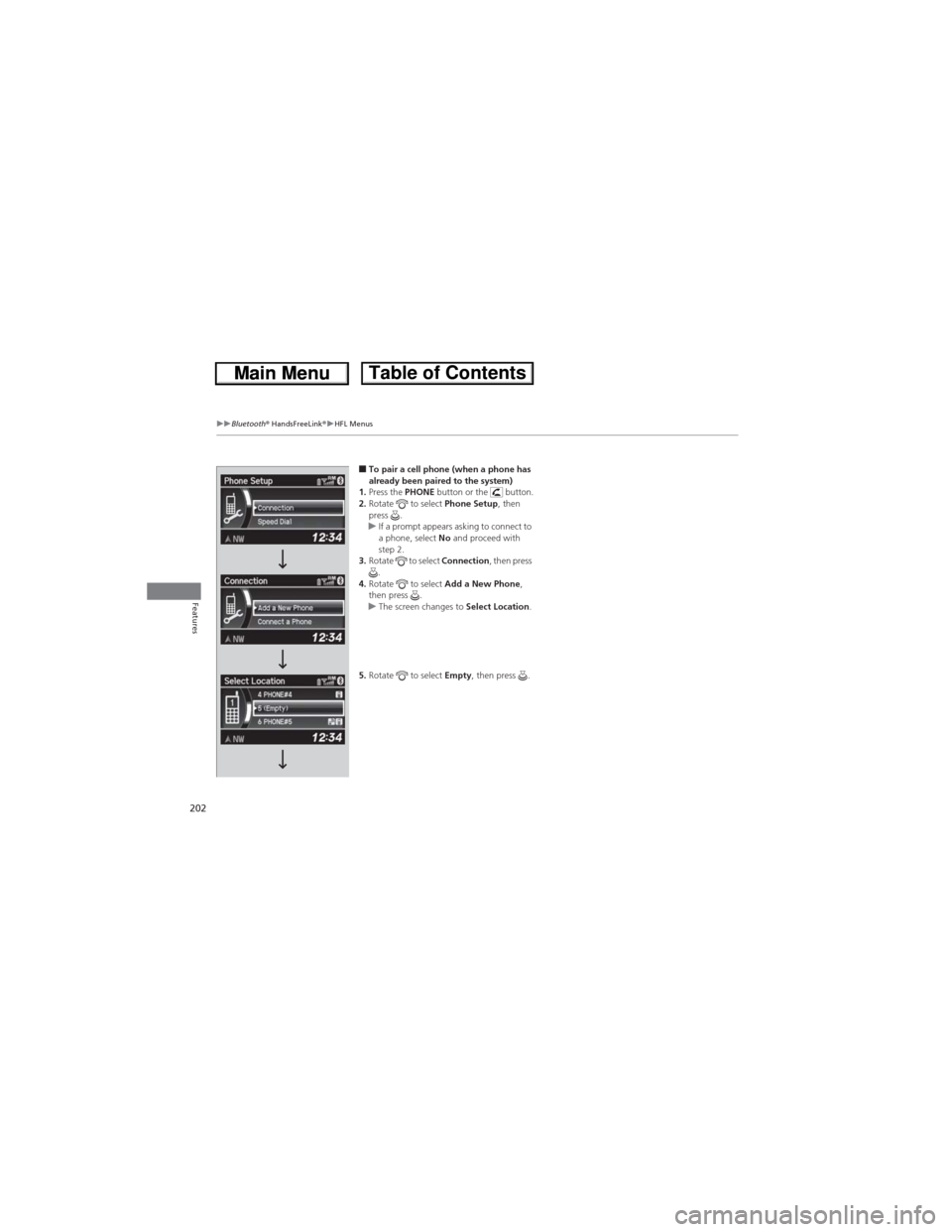
■To pair a cell phone (when a phone has
already been paired to the system)
1.Press the PHONE button or the button.
2.Rotate to select Phone Setup, then
press .
uIf a prompt appears asking to connect to
a phone, select No and proceed with
step 2.
3.Rotate to select Connection, then press
.
4.Rotate to select Add a New Phone,
then press .
uThe screen changes to Select Location.
5.Rotate to select Empty, then press .