lane assist HONDA CR-V 2015 RM1, RM3, RM4 / 4.G Owners Manual
[x] Cancel search | Manufacturer: HONDA, Model Year: 2015, Model line: CR-V, Model: HONDA CR-V 2015 RM1, RM3, RM4 / 4.GPages: 533, PDF Size: 24.82 MB
Page 5 of 533
4
Quick Reference Guide
Quick Reference Guide
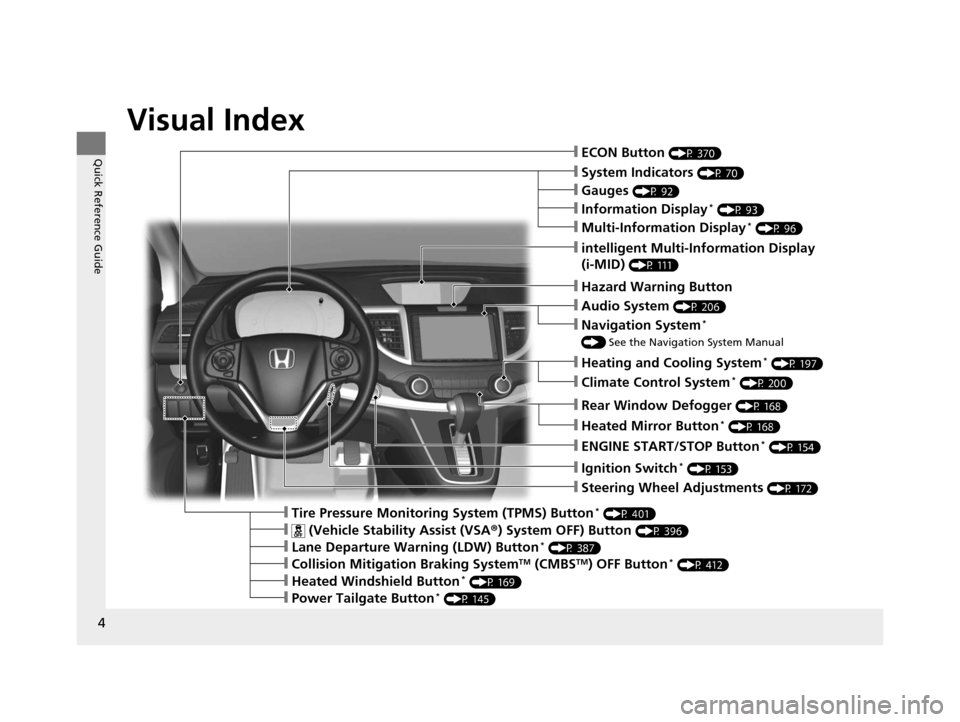
Visual Index
❙ECON Button (P 370)
❙Ignition Switch* (P 153)
❙Steering Wheel Adjustments (P 172)
❙Information Display* (P 93)
❙Tire Pressure Monitoring System (TPMS) Button* (P 401)
❙Hazard Warning Button
❙System Indicators (P 70)
❙Rear Window Defogger (P 168)
❙Heated Mirror Button* (P 168)
❙Gauges (P 92)
❙intelligent Multi-Information Display
(i-MID)
(P 111)
❙Multi-Information Display* (P 96)
❙ENGINE START/STOP Button* (P 154)
❙Heating and Cooling System* (P 197)
❙Audio System (P 206)
❙Navigation System*
() See the Navigation System Manual
❙ (Vehicle Stability Assist (VSA ®) System OFF) Button (P 396)
❙Lane Departure Warning (LDW) Button* (P 387)
❙Collision Mitigation Braking SystemTM (CMBSTM) OFF Button* (P 412)
❙Heated Windshield Button* (P 169)
❙Power Tailgate Button* (P 145)
❙Climate Control System* (P 200)
15 CR-V-31T0A6300.book 4 ページ 2015年2月2日 月曜日 午前10時35分
Page 6 of 533
5
Quick Reference Guide
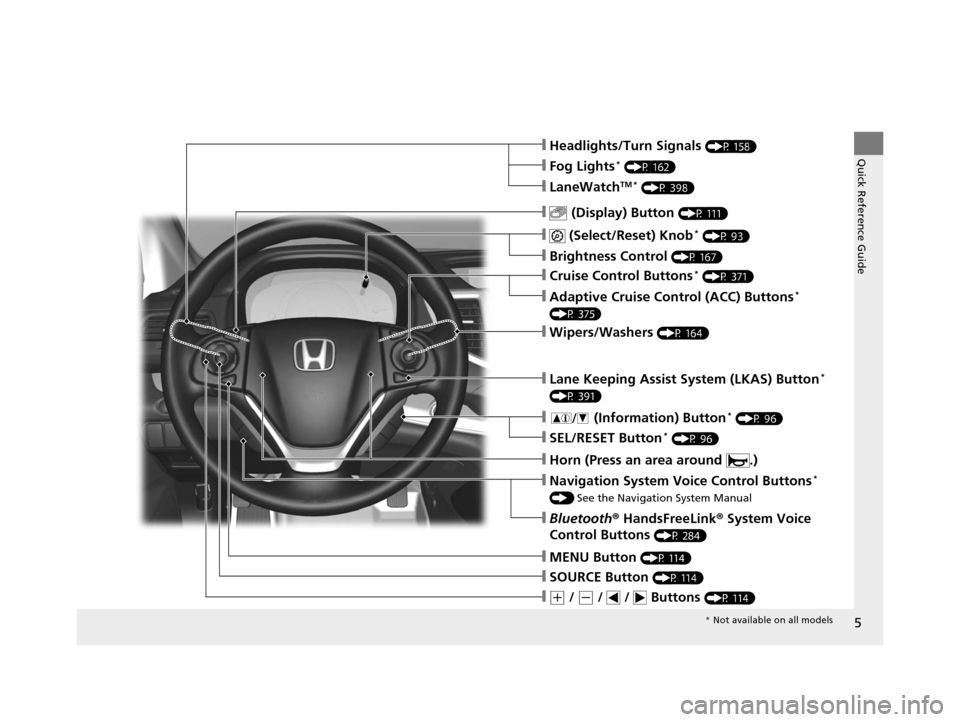
❙ (Select/Reset) Knob* (P 93)
❙MENU Button (P 114)
❙(+ / (- / / Buttons (P 114)
❙SOURCE Button (P 114)
❙ (Display) Button (P 111)
❙Headlights/Turn Signals (P 158)
❙Brightness Control (P 167)
❙Navigation System Voice Control Buttons*
() See the Navigation System Manual
❙Bluetooth ® HandsFreeLink ® System Voice
Control Buttons
(P 284)
❙LaneWatchTM * (P 398)
❙Fog Lights* (P 162)
❙Wipers/Washers (P 164)
❙Cruise Control Buttons* (P 371)
❙Adaptive Cruise Control (ACC) Buttons*
(P 375)
❙Lane Keeping Assist System (LKAS) Button*
(P 391)
❙ (Information) Button* (P 96)
❙SEL/RESET Button* (P 96)
❙Horn (Press an area around .)
* Not available on all models
15 CR-V-31T0A6300.book 5 ページ 2015年2月2日 月曜日 午前10時35分
Page 12 of 533
11
Quick Reference Guide
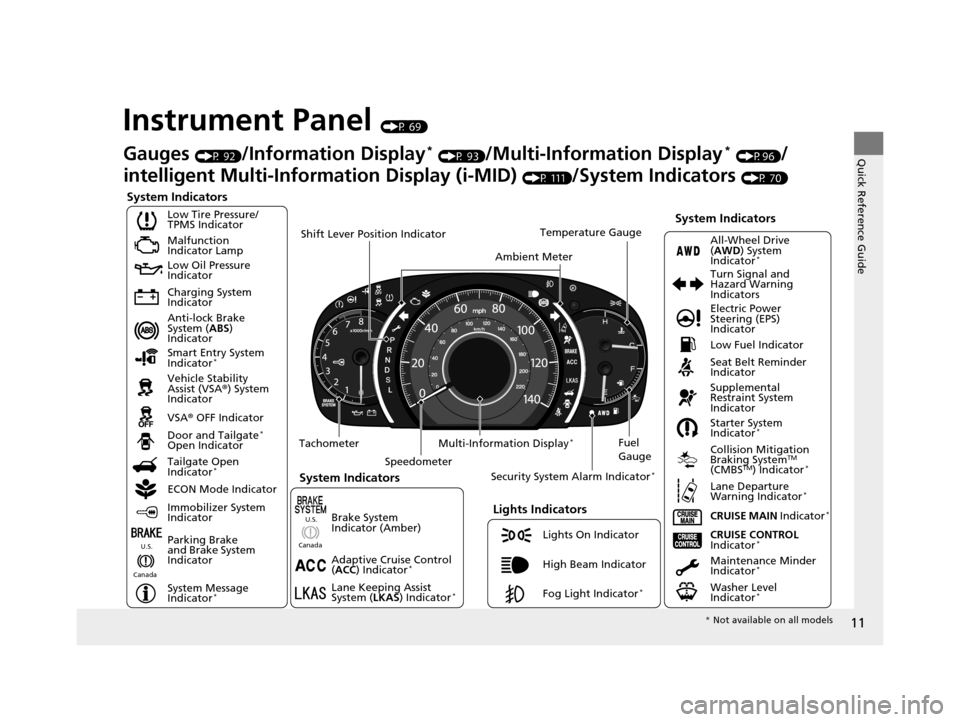
Instrument Panel (P 69)
System Indicators
Malfunction
Indicator Lamp
Low Oil Pressure
Indicator
Charging System
Indicator
Anti-lock Brake
System (ABS)
Indicator
Vehicle Stability
Assist (VSA ®) System
Indicator
VSA ® OFF Indicator
Low Tire Pressure/
TPMS Indicator
Lights Indicators
Lights On Indicator
High Beam Indicator
Fog Light Indicator
*
Immobilizer System
Indicator
Seat Belt Reminder
Indicator
System Indicators
CRUISE CONTROL
Indicator*Parking Brake
and Brake System
Indicator Supplemental
Restraint System
Indicator
Door and Tailgate
*
Open Indicator
CRUISE MAIN Indicator
*
Tachometer
Speedometer Fuel
Gauge
Security System Alarm Indicator
*
Shift Lever Position Indicator
Low Fuel Indicator
Gauges (P 92)/Information Display* (P 93)/Multi-Information Display* (P96)/
intelligent Multi-Inform ation Display (i-MID)
(P 111)/System Indicators (P 70)
Tailgate Open
Indicator
*
ECON Mode Indicator Maintenance Minder
Indicator
*
Washer Level
Indicator*
Ambient MeterTemperature Gauge
Electric Power
Steering (EPS)
Indicator Turn Signal and
Hazard Warning
Indicators
All-Wheel Drive
(
AWD ) System
Indicator
*
System Indicators
Canada U.S.
Smart Entry System
Indicator*
Lane Keeping Assist
System (
LKAS) Indicator*
Adaptive Cruise Control
(ACC ) Indicator*
Starter System
Indicator*
Collision Mitigation
Braking SystemTM
(CMBSTM) Indicator*
Lane Departure
Warning Indicator*
System Message
Indicator*
Multi-Information Display*
Canada U.S.
Brake System
Indicator (Amber)
*
Not available on all models
15 CR-V-31T0A6300.book 11 ページ 2015年2月2日 月曜日 午前10時35分
Page 83 of 533
82
uuIndicators u
Instrument Panel
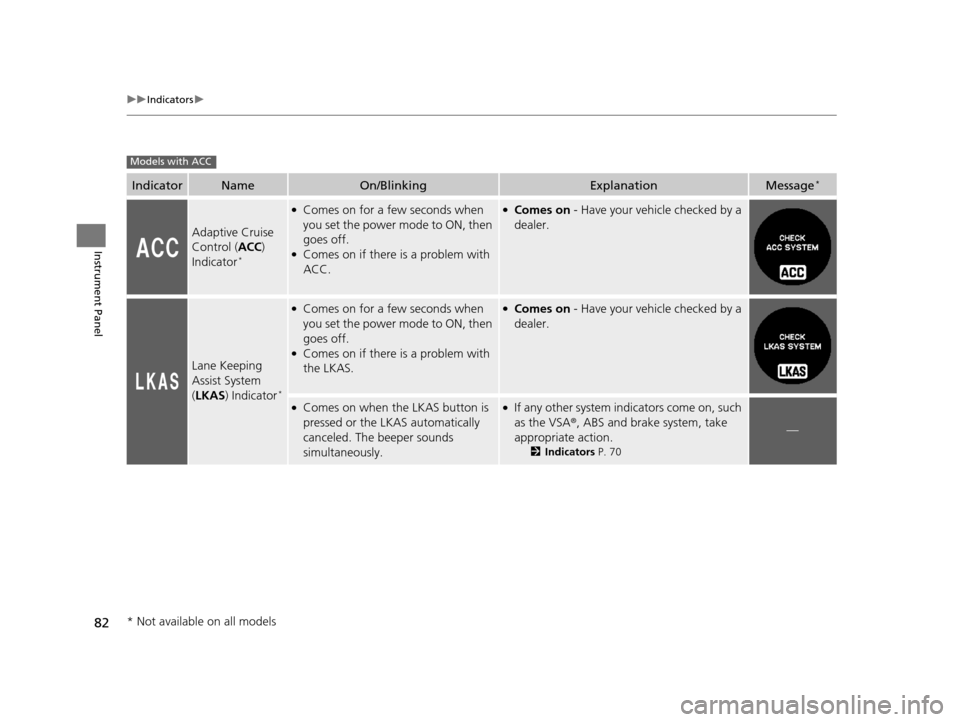
IndicatorNameOn/BlinkingExplanationMessage*
Adaptive Cruise
Control (ACC)
Indicator
*
●Comes on for a few seconds when
you set the power mode to ON, then
goes off.
●Comes on if there is a problem with
ACC.
●Comes on - Have your vehicle checked by a
dealer.
Lane Keeping
Assist System
( LKAS ) Indicator
*
●Comes on for a few seconds when
you set the power mode to ON, then
goes off.
●Comes on if there is a problem with
the LKAS.
●Comes on - Have your vehicle checked by a
dealer.
●Comes on when the LKAS button is
pressed or the LKAS automatically
canceled. The beeper sounds
simultaneously.●If any other system indicators come on, such
as the VSA ®, ABS and brake system, take
appropriate action.
2 Indicators P. 70
—
Models with ACC
* Not available on all models
15 CR-V-31T0A6300.book 82 ページ 2015年2月2日 月曜日 午前10時35分
Page 102 of 533
101
uuGauges and Displays uMulti-Information Display*
Continued
Instrument Panel
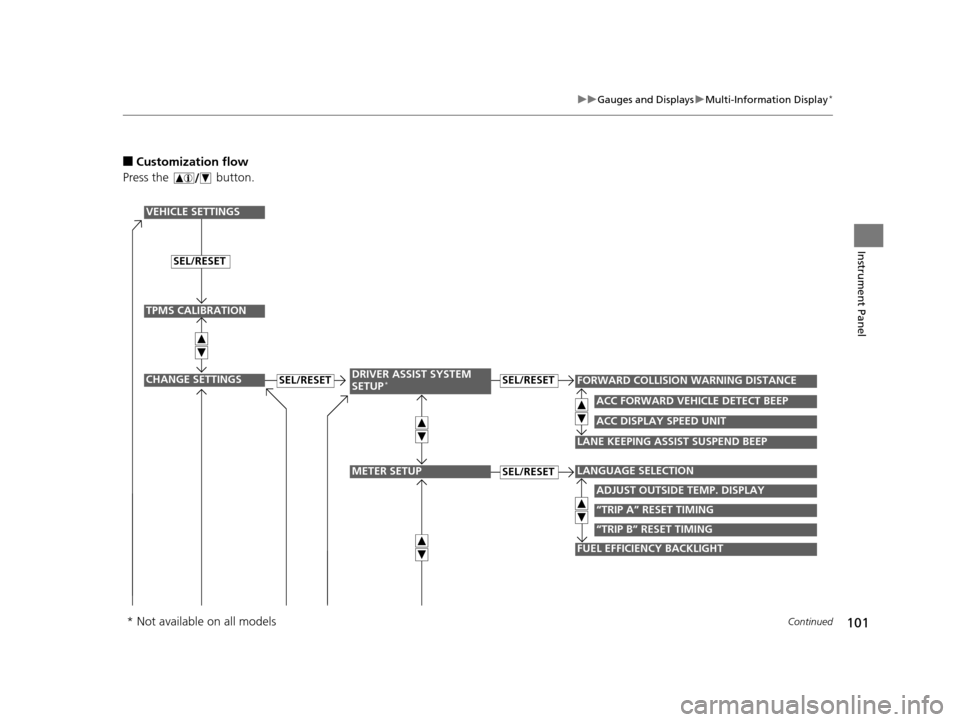
■Customization flow
Press the button.
“TRIP B” RESET TIMING
FUEL EFFICIENCY BACKLIGHT
“TRIP A” RESET TIMING
FORWARD COLLISION WARNING DISTANCESEL/RESET
VEHICLE SETTINGS
CHANGE SETTINGS
ADJUST OUTSIDE TEMP. DISPLAY
LANGUAGE SELECTION
SEL/RESETDRIVER ASSIST SYSTEM
SETUP*
METER SETUPSEL/RESET
LANE KEEPING ASSIST SUSPEND BEEP
TPMS CALIBRATION
ACC DISPLAY SPEED UNIT
ACC FORWARD VEHICLE DETECT BEEP
SEL/RESET
* Not available on all models
15 CR-V-31T0A6300.book 101 ページ 2015年2月2日 月曜日 午前10時35分
Page 105 of 533
104
uuGauges and Displays uMulti-Information Display*
Instrument Panel
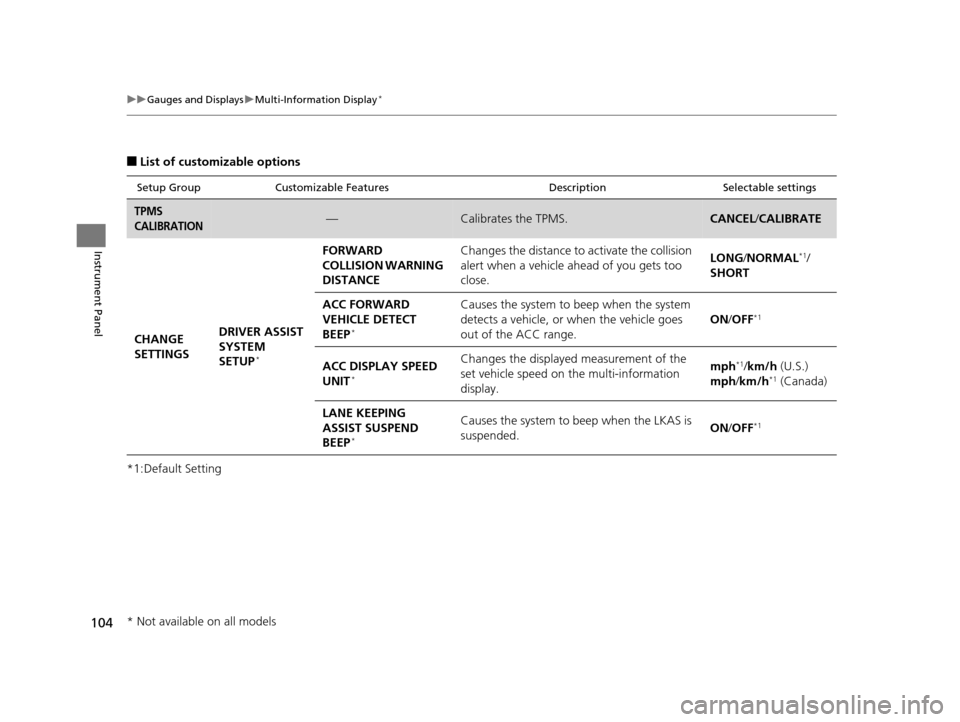
■List of customizable options
*1:Default Setting
Setup Group Customizable Features DescriptionSelectable settings
TPMS
CALIBRATION—Calibrates the TPMS.CANCEL/CALIBRATE
CHANGE
SETTINGS DRIVER ASSIST
SYSTEM
SETUP
*
FORWARD
COLLISION WARNING
DISTANCE Changes the distance to activate the collision
alert when a vehicle ah
ead of you gets too
close. LONG/
NORMAL*1/
SHORT
ACC FORWARD
VEHICLE DETECT
BEEP
*
Causes the system to beep when the system
detects a vehicle, or when the vehicle goes
out of the ACC range. ON
/OFF*1
ACC DISPLAY SPEED
UNIT*
Changes the displayed measurement of the
set vehicle speed on the multi-information
display. mph*1/
km/h (U.S.)
mph /km/h*1 (Canada)
LANE KEEPING
ASSIST SUSPEND
BEEP
*
Causes the system to beep when the LKAS is
suspended. ON
/OFF*1
* Not available on all models
15 CR-V-31T0A6300.book 104 ページ 2015年2月2日 月曜日 午前10時35分
Page 275 of 533
274
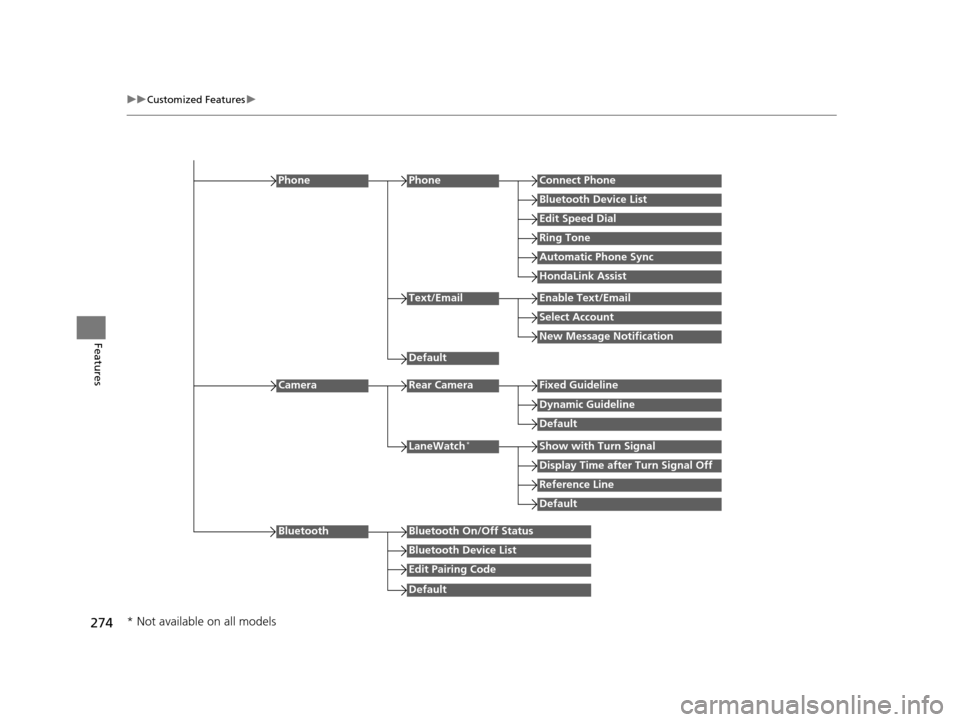
uuCustomized Features u
Features
Edit Speed Dial
PhoneConnect Phone
Bluetooth Device List
Ring Tone
Automatic Phone Sync
HondaLink Assist
Phone
Default
Text/EmailEnable Text/Email
Select Account
New Message Notification
Reference Line
LaneWatch*Show with Turn Signal
Display Time after Turn Signal Off
Default
Camera
Default
Rear CameraFixed Guideline
Dynamic Guideline
Default
Bluetooth On/Off Status
Bluetooth Device List
Edit Pairing Code
Bluetooth
* Not available on all models
15 CR-V-31T0A6300.book 274 ページ 2015年2月2日 月曜日 午前10時35分
Page 348 of 533
347
Driving
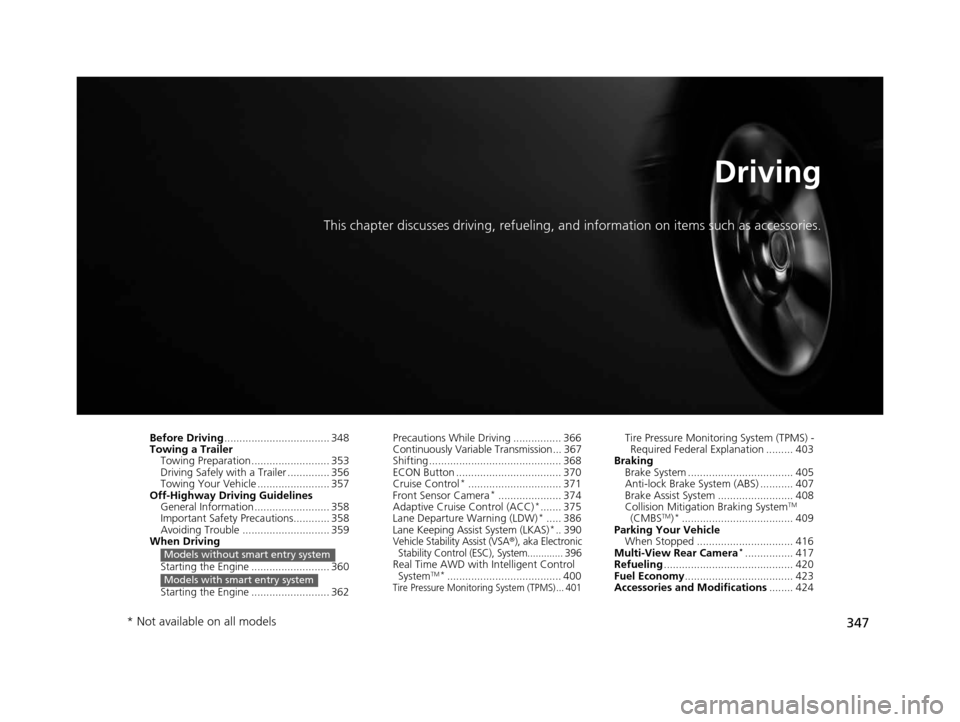
This chapter discusses driving, refueling, and information on items such as accessories.
Before Driving................................... 348
Towing a Trailer
Towing Preparation .......................... 353
Driving Safely with a Trailer .............. 356
Towing Your Vehicle ........................ 357
Off-Highway Driving Guidelines General Information ......................... 358
Important Safety Precautions............ 358
Avoiding Trouble ............................. 359
When Driving
Starting the Engine .......................... 360
Starting the Engine .......................... 362
Models without smart entry system
Models with smart entry system
Precautions While Driving ................ 366
Continuously Variable Transmission... 367
Shifting ............................................ 368
ECON Button ................................... 370
Cruise Control
*............................... 371
Front Sensor Camera*..................... 374
Adaptive Cruise Control (ACC)*....... 375
Lane Departure Warning (LDW)*..... 386
Lane Keeping Assist System (LKAS)*.. 390Vehicle Stability Assist (VSA®), aka Electronic
Stability Control (ESC), System............. 396
Real Time AWD with Intelligent Control
SystemTM*...................................... 400Tire Pressure Monitoring System (TPMS) ... 401
Tire Pressure Monitoring System (TPMS) - Required Federal Explanation ......... 403
Braking Brake System ................................... 405
Anti-lock Brake System (ABS) ........... 407
Brake Assist System ......................... 408
Collision Mitigation Braking System
TM
(CMBSTM)*..................................... 409
Parking Your Vehicle When Stopped ................................ 416
Multi-View Rear Camera
*................ 417
Refueling ........................................... 420
Fuel Economy .................................... 423
Accessories and Modifications ........ 424
* Not available on all models
15 CR-V-31T0A6300.book 347 ページ 2015年2月2日 月曜日 午前10時35分
Page 375 of 533
374
uuWhen Driving uFront Sensor Camera*
Driving
Front Sensor Camera*
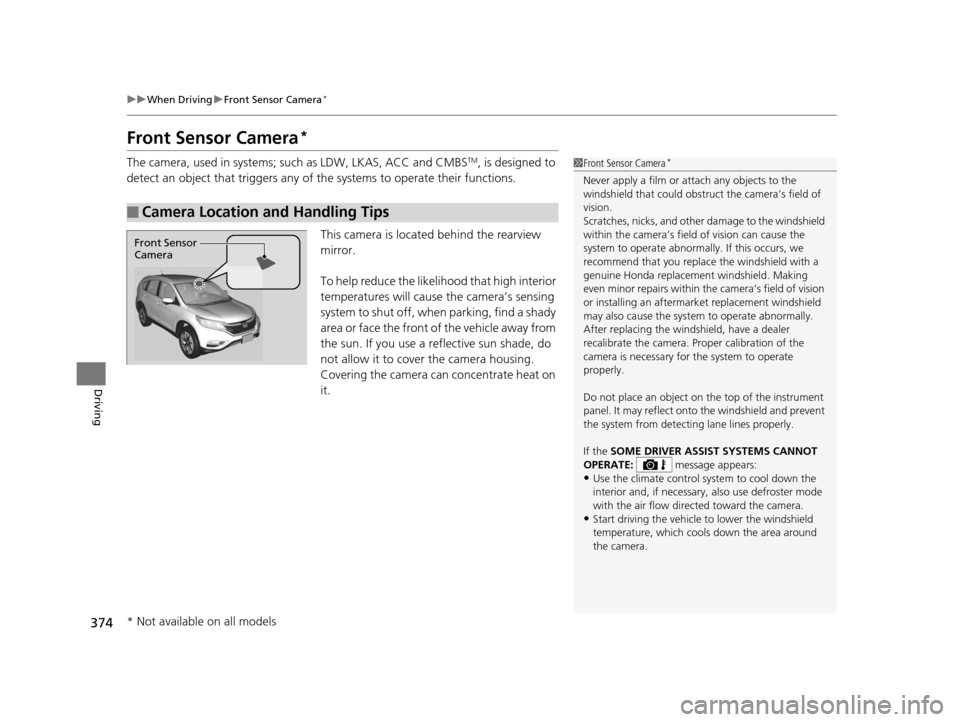
The camera, used in systems; such as LDW, LKAS, ACC and CMBSTM, is designed to
detect an object that triggers any of the systems to operate their functions.
This camera is located behind the rearview
mirror.
To help reduce the likelihood that high interior
temperatures will cause the camera’s sensing
system to shut off, when parking, find a shady
area or face the front of the vehicle away from
the sun. If you use a re flective sun shade, do
not allow it to cover the camera housing.
Covering the camera can concentrate heat on
it.
■Camera Location and Handling Tips
1 Front Sensor Camera*
Never apply a film or attach any objects to the
windshield that could obstruc t the camera’s field of
vision.
Scratches, nicks, and othe r damage to the windshield
within the camera’s fiel d of vision can cause the
system to operate abnormall y. If this occurs, we
recommend that you replac e the windshield with a
genuine Honda replacem ent windshield. Making
even minor repairs within th e camera’s field of vision
or installing an aftermarket replacement windshield
may also cause the system to operate abnormally.
After replacing the winds hield, have a dealer
recalibrate the camera. Pr oper calibration of the
camera is necessary for the system to operate
properly.
Do not place an object on the top of the instrument
panel. It may reflect onto the windshield and prevent
the system from detecting lane lines properly.
If the SOME DRIVER ASSIST SYSTEMS CANNOT
OPERATE: message appears:
•Use the climate control system to cool down the
interior and, if necessary, also use defroster mode
with the air flow directed toward the camera.
•Start driving the vehicle to lower the windshield
temperature, which cool s down the area around
the camera.
Front Sensor
Camera
* Not available on all models
15 CR-V-31T0A6300.book 374 ページ 2015年2月2日 月曜日 午前10時35分
Page 387 of 533
386
uuWhen Driving uLane Departure Warning (LDW)*
Driving
Lane Departure Warning (LDW)*
Alerts you when the system determines a po ssibility of your vehicle unintentionally
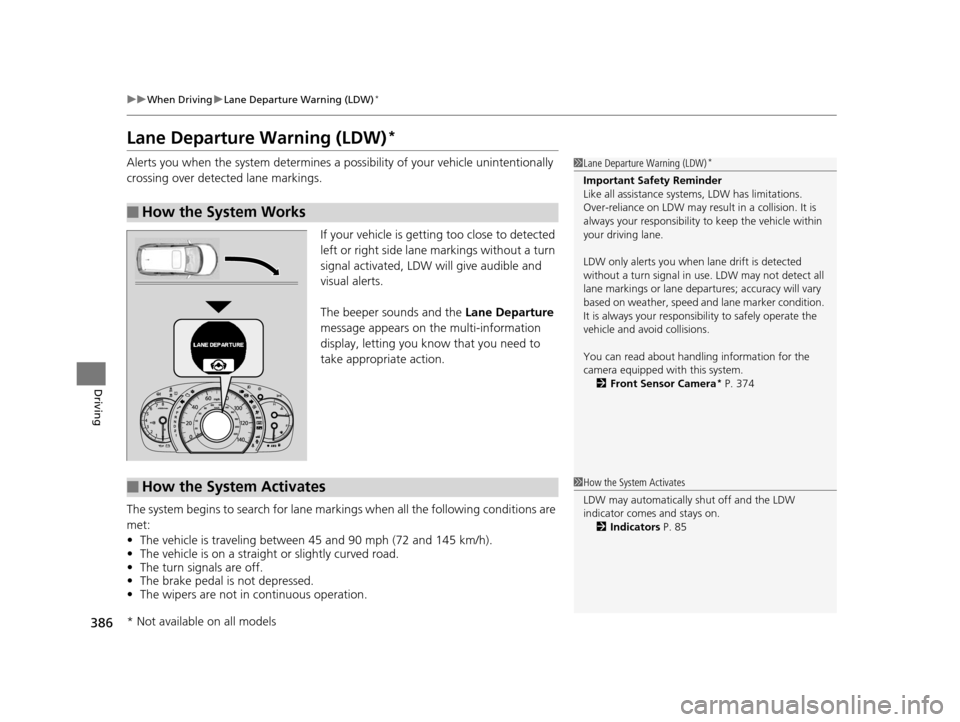
crossing over detected lane markings.
If your vehicle is getting too close to detected
left or right side lane markings without a turn
signal activated, LDW will give audible and
visual alerts.
The beeper sounds and the Lane Departure
message appears on the multi-information
display, letting you know that you need to
take appropriate action.
The system begins to search for lane mark ings when all the following conditions are
met:
• The vehicle is traveling between 45 and 90 mph (72 and 145 km/h).
• The vehicle is on a straight or slightly curved road.
• The turn signals are off.
• The brake pedal is not depressed.
• The wipers are not in continuous operation.
■How the System Works
1Lane Departure Warning (LDW)*
Important Safety Reminder
Like all assistance systems, LDW has limitations.
Over-reliance on LDW may result in a collision. It is
always your respons ibility to keep the vehicle within
your driving lane.
LDW only alerts you when lane drift is detected
without a turn signal in us e. LDW may not detect all
lane markings or lane departures; a ccuracy will vary
based on weather, speed and lane marker condition.
It is always your responsibility to safely operate the
vehicle and avoid collisions.
You can read about handling information for the
camera equipped with this system. 2 Front Sensor Camera
* P. 374
■How the System Activates1How the System Activates
LDW may automatically shut off and the LDW
indicator comes and stays on.
2 Indicators P. 85
* Not available on all models
15 CR-V-31T0A6300.book 386 ページ 2015年2月2日 月曜日 午前10時35分