turn signal HONDA CR-V 2015 RM1, RM3, RM4 / 4.G Owners Manual
[x] Cancel search | Manufacturer: HONDA, Model Year: 2015, Model line: CR-V, Model: HONDA CR-V 2015 RM1, RM3, RM4 / 4.GPages: 533, PDF Size: 24.82 MB
Page 6 of 533
5
Quick Reference Guide
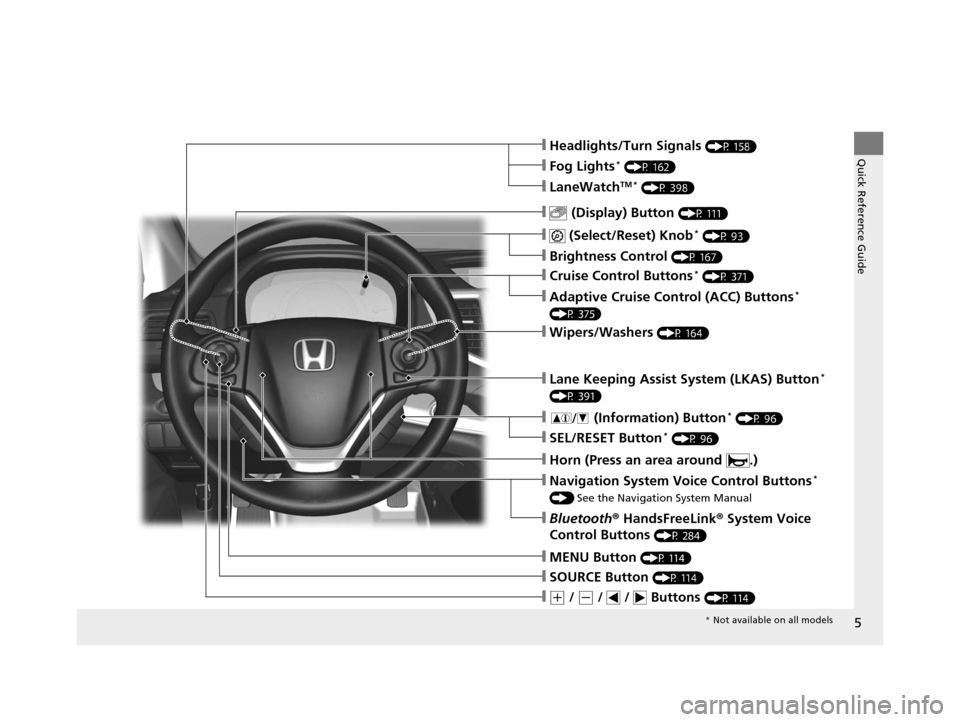
❙ (Select/Reset) Knob* (P 93)
❙MENU Button (P 114)
❙(+ / (- / / Buttons (P 114)
❙SOURCE Button (P 114)
❙ (Display) Button (P 111)
❙Headlights/Turn Signals (P 158)
❙Brightness Control (P 167)
❙Navigation System Voice Control Buttons*
() See the Navigation System Manual
❙Bluetooth ® HandsFreeLink ® System Voice
Control Buttons
(P 284)
❙LaneWatchTM * (P 398)
❙Fog Lights* (P 162)
❙Wipers/Washers (P 164)
❙Cruise Control Buttons* (P 371)
❙Adaptive Cruise Control (ACC) Buttons*
(P 375)
❙Lane Keeping Assist System (LKAS) Button*
(P 391)
❙ (Information) Button* (P 96)
❙SEL/RESET Button* (P 96)
❙Horn (Press an area around .)
* Not available on all models
15 CR-V-31T0A6300.book 5 ページ 2015年2月2日 月曜日 午前10時35分
Page 9 of 533
Visual Index
8
Quick Reference Guide
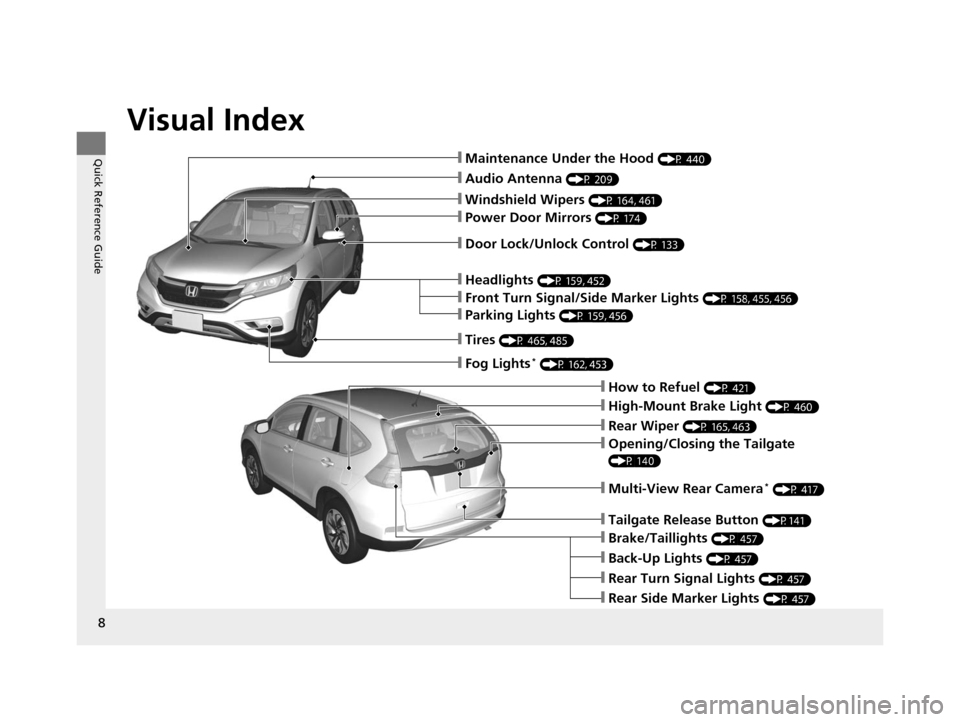
❙Audio Antenna (P 209)
❙Windshield Wipers (P 164, 461)
❙Door Lock/Unlock Control (P 133)
❙How to Refuel (P 421)
❙High-Mount Brake Light (P 460)
❙Rear Wiper (P 165, 463)
❙Back-Up Lights (P 457)
❙Brake/Taillights (P 457)
❙Rear Turn Signal Lights (P 457)
❙Rear Side Marker Lights (P 457)
❙Power Door Mirrors (P 174)
❙Maintenance Under the Hood (P 440)
❙Fog Lights* (P 162, 453)
❙Multi-View Rear Camera* (P 417)
❙Front Turn Signal/Side Marker Lights (P 158, 455, 456)
❙Parking Lights (P 159, 456)
❙Tires (P 465, 485)
❙Headlights (P 159, 452)
❙Opening/Closing the Tailgate
(P 140)
❙Tailgate Release Button (P141)
15 CR-V-31T0A6300.book 8 ページ 2015年2月2日 月曜日 午前10時35分
Page 12 of 533
11
Quick Reference Guide
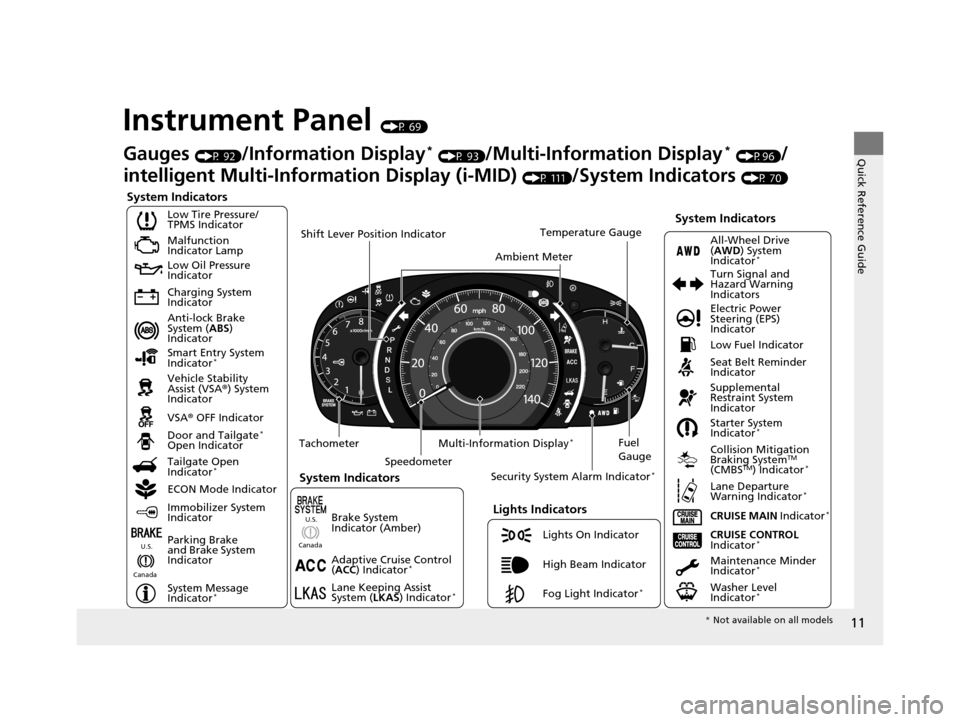
Instrument Panel (P 69)
System Indicators
Malfunction
Indicator Lamp
Low Oil Pressure
Indicator
Charging System
Indicator
Anti-lock Brake
System (ABS)
Indicator
Vehicle Stability
Assist (VSA ®) System
Indicator
VSA ® OFF Indicator
Low Tire Pressure/
TPMS Indicator
Lights Indicators
Lights On Indicator
High Beam Indicator
Fog Light Indicator
*
Immobilizer System
Indicator
Seat Belt Reminder
Indicator
System Indicators
CRUISE CONTROL
Indicator*Parking Brake
and Brake System
Indicator Supplemental
Restraint System
Indicator
Door and Tailgate
*
Open Indicator
CRUISE MAIN Indicator
*
Tachometer
Speedometer Fuel
Gauge
Security System Alarm Indicator
*
Shift Lever Position Indicator
Low Fuel Indicator
Gauges (P 92)/Information Display* (P 93)/Multi-Information Display* (P96)/
intelligent Multi-Inform ation Display (i-MID)
(P 111)/System Indicators (P 70)
Tailgate Open
Indicator
*
ECON Mode Indicator Maintenance Minder
Indicator
*
Washer Level
Indicator*
Ambient MeterTemperature Gauge
Electric Power
Steering (EPS)
Indicator Turn Signal and
Hazard Warning
Indicators
All-Wheel Drive
(
AWD ) System
Indicator
*
System Indicators
Canada U.S.
Smart Entry System
Indicator*
Lane Keeping Assist
System (
LKAS) Indicator*
Adaptive Cruise Control
(ACC ) Indicator*
Starter System
Indicator*
Collision Mitigation
Braking SystemTM
(CMBSTM) Indicator*
Lane Departure
Warning Indicator*
System Message
Indicator*
Multi-Information Display*
Canada U.S.
Brake System
Indicator (Amber)
*
Not available on all models
15 CR-V-31T0A6300.book 11 ページ 2015年2月2日 月曜日 午前10時35分
Page 14 of 533
13
Quick Reference Guide
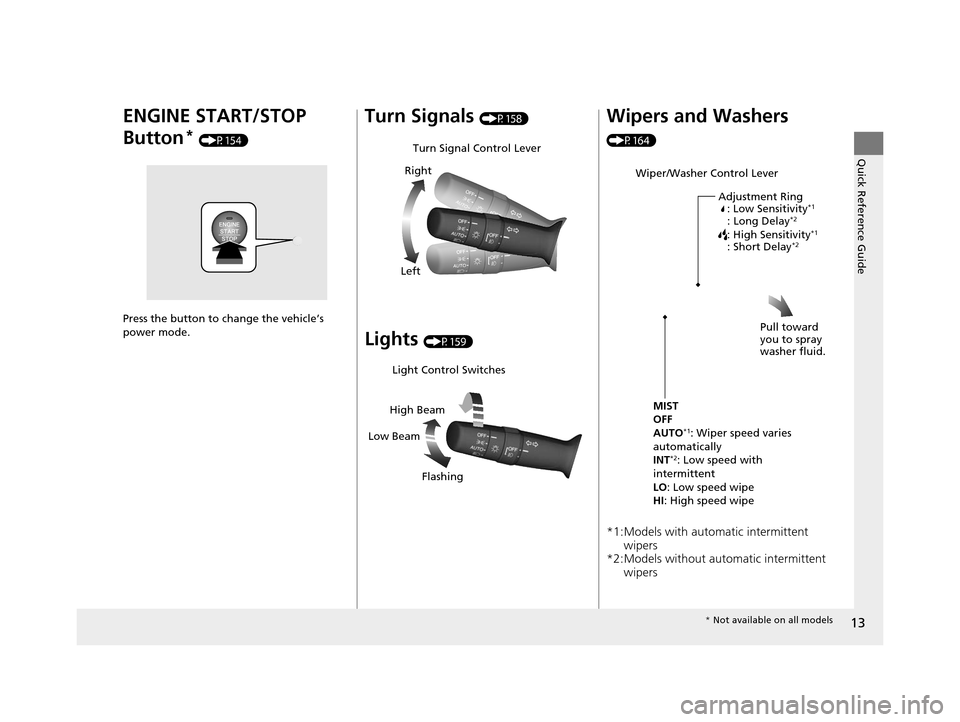
ENGINE START/STOP
Button
* (P154)
Press the button to change the vehicle’s
power mode.
Turn Signals (P158)
Lights (P159)
Turn Signal Control Lever
Right
Left
Light Control Switches
Low Beam High Beam
Flashing
Wipers and Washers
(P164)
*1:Models with automatic intermittent wipers
*2:Models without automatic intermittent
wipers
Wiper/Washer Control Lever
Adjustment Ring: Low Sensitivity
*1
: Long Delay*2
: High Sensitivity*1
: Short Delay*2
MIST
OFF
AUTO
*1: Wiper speed varies
automatically
INT
*2: Low speed with
intermittent
LO : Low speed wipe
HI: High speed wipe Pull toward
you to spray
washer fluid.
*
Not available on all models
15 CR-V-31T0A6300.book 13 ページ 2015年2月2日 月曜日 午前10時35分
Page 78 of 533
77
uuIndicators u
Continued
Instrument Panel
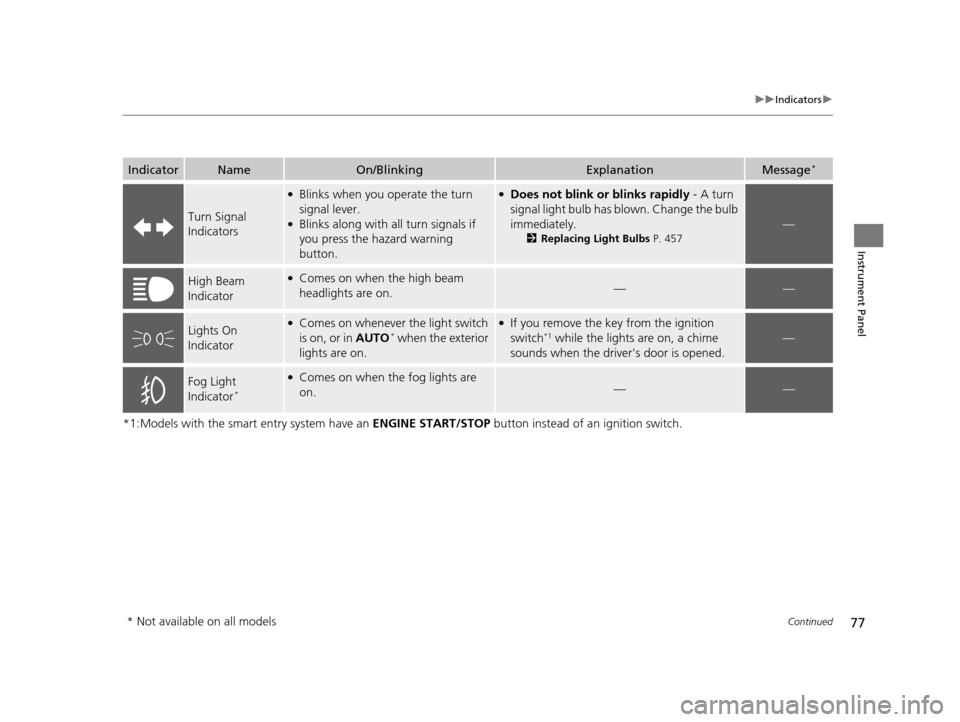
*1:Models with the smart entry system have an ENGINE START/STOP button instead of an ignition switch.
IndicatorNameOn/BlinkingExplanationMessage*
Turn Signal
Indicators
●Blinks when you operate the turn
signal lever.
●Blinks along with all turn signals if
you press the hazard warning
button.
●Does not blink or blinks rapidly - A turn
signal light bulb has blown. Change the bulb
immediately.
2 Replacing Light Bulbs P. 457
—
High Beam
Indicator●Comes on when the high beam
headlights are on.——
Lights On
Indicator●Comes on whenever the light switch
is on, or in AUTO* when the exterior
lights are on.
●If you remove the key from the ignition
switch*1 while the lights are on, a chime
sounds when the driv er's door is opened.—
Fog Light
Indicator*
●Comes on when the fog lights are
on.——
* Not available on all models
15 CR-V-31T0A6300.book 77 ページ 2015年2月2日 月曜日 午前10時35分
Page 128 of 533
127
Controls
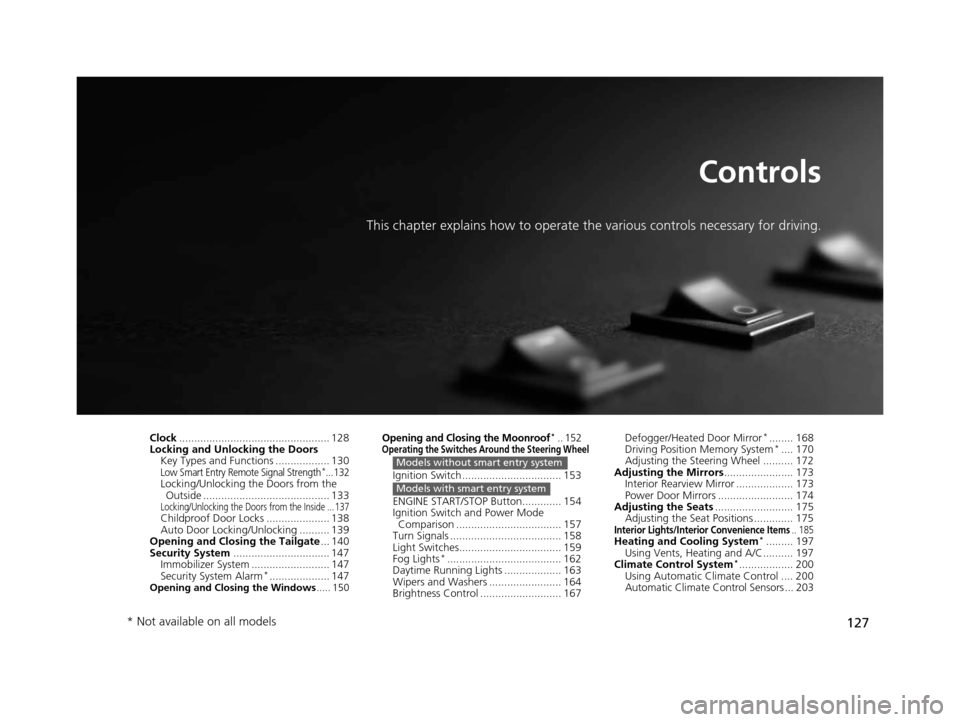
This chapter explains how to operate the various controls necessary for driving.
Clock.................................................. 128
Locking and Unlocking the Doors
Key Types and Functions .................. 130
Low Smart Entry Remote Signal Strength*...132Locking/Unlocking the Doors from the Outside .......................................... 133
Locking/Unlocking the Doors from the Inside ... 137Childproof Door Locks ..................... 138
Auto Door Locking/Unlocking .......... 139
Opening and Closing the Tailgate ... 140
Security System ................................ 147
Immobilizer System .......................... 147
Security System Alarm
*.................... 147Opening and Closing the Windows ..... 150
Opening and Closing the Moonroof*.. 152Operating the Switches Around the Steering Wheel
Ignition Switch ................................. 153
ENGINE START/STOP Button............. 154
Ignition Switch and Power Mode
Comparison ................................... 157
Turn Signals ..................................... 158
Light Switches.................................. 159
Fog Lights
*...................................... 162
Daytime Running Lights ................... 163
Wipers and Washers ........................ 164
Brightness Control ........................... 167
Models without smart entry system
Models with smart entry system
Defogger/Heated Door Mirror*........ 168
Driving Position Memory System*.... 170
Adjusting the Steering Wheel .......... 172
Adjusting the Mirrors ....................... 173
Interior Rearview Mirror ................... 173
Power Door Mirrors ......................... 174
Adjusting the Seats .......................... 175
Adjusting the Seat Positions ............. 175
Interior Lights/Interior Convenience Items.. 185Heating and Cooling System*......... 197
Using Vents, Heating and A/C.......... 197
Climate Control System
*.................. 200
Using Automatic Climate Control .... 200
Automatic Climate Control Sensors ... 203
* Not available on all models
15 CR-V-31T0A6300.book 127 ページ 2015年2月2日 月曜日 午前10時35分
Page 129 of 533
128
Controls
Clock
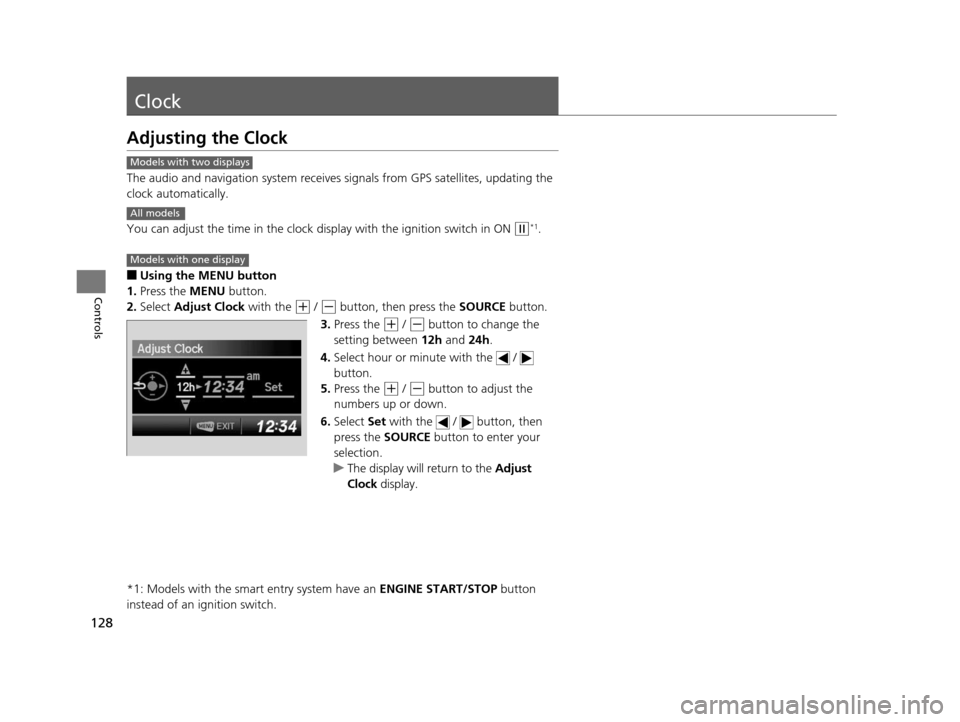
Adjusting the Clock
The audio and navigation system receives signals from GPS satellites, updating the
clock automatically.
You can adjust the time in the clock di splay with the ignition switch in ON
(w*1.
■Using the MENU button
1. Press the MENU button.
2. Select Adjust Clock with the
(+ / (- button, then press the SOURCE button.
3. Press the
(+ / (- button to change the
setting between 12h and 24h.
4. Select hour or minute with the /
button.
5. Press the
(+ / (- button to adjust the
numbers up or down.
6. Select Set with the / button, then
press the SOURCE button to enter your
selection.
u The display will return to the Adjust
Clock display.
*1: Models with the smart entry system have an ENGINE START/STOP button
instead of an ignition switch.
Models with two displays
All models
Models with one display
15 CR-V-31T0A6300.book 128 ページ 2015年2月2日 月曜日 午前10時35分
Page 159 of 533
158
uuOperating the Switches Around the Steering Wheel uTurn Signals
Controls
Turn Signals
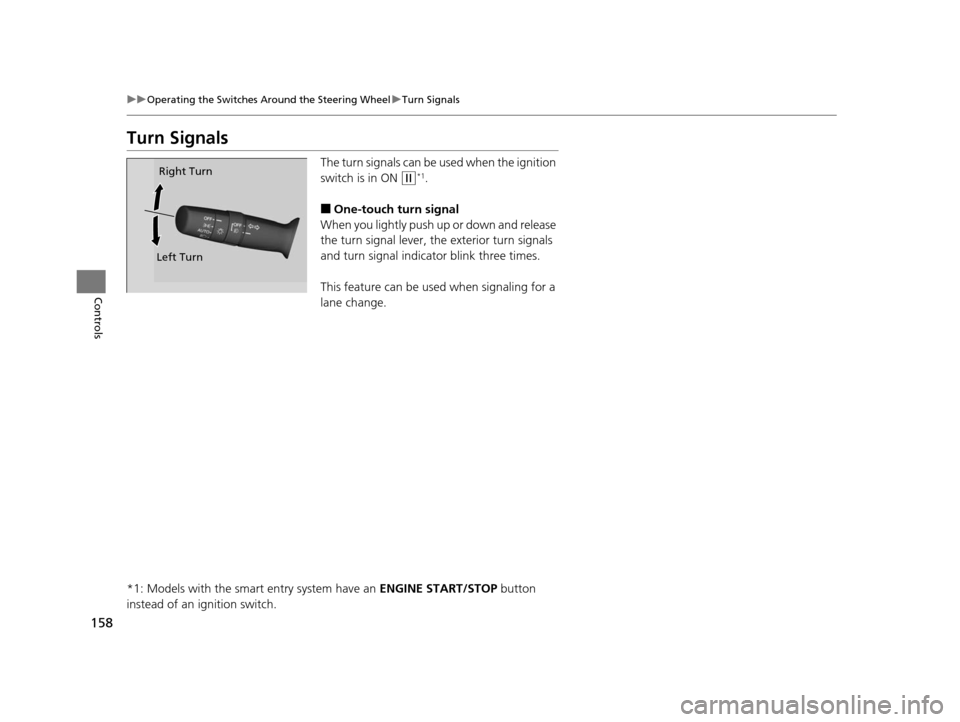
The turn signals can be used when the ignition
switch is in ON
(w*1.
■One-touch turn signal
When you lightly push up or down and release
the turn signal lever, th e exterior turn signals
and turn signal indica tor blink three times.
This feature can be used when signaling for a
lane change.
*1: Models with the smart entry system have an ENGINE START/STOP button
instead of an ignition switch.
Right Turn
Left Turn
15 CR-V-31T0A6300.book 158 ページ 2015年2月2日 月曜日 午前10時35分
Page 216 of 533
215
uuAudio System Basic Operation uPlaying AM/FM Radio
Continued
Features
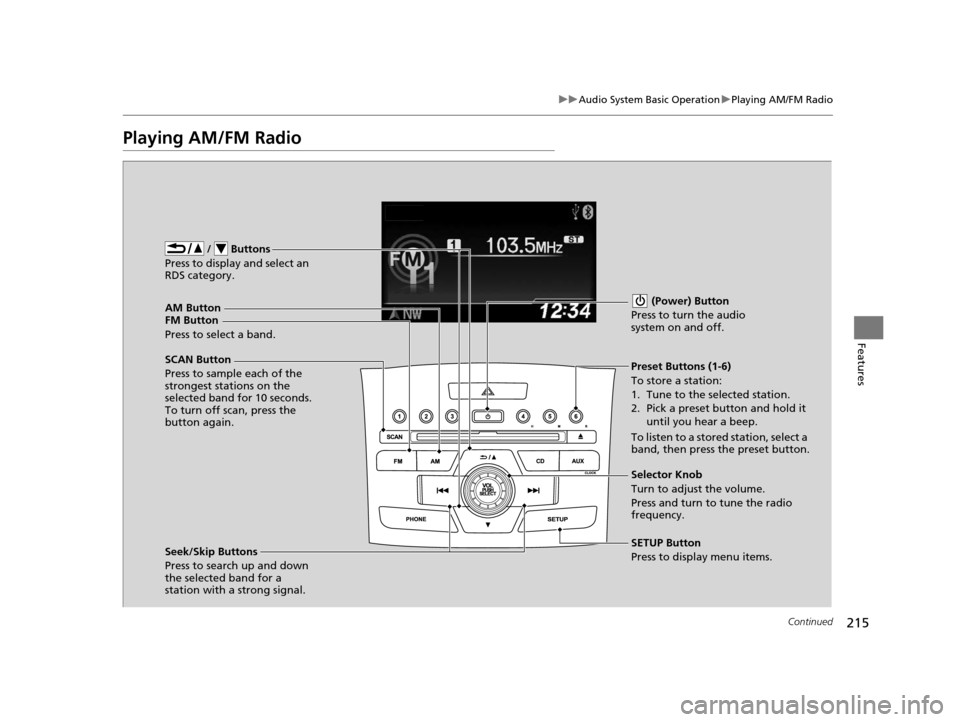
Playing AM/FM Radio
FM Button / Buttons
Press to display and select an
RDS category.
SCAN Button
Press to sample each of the
strongest stations on the
selected band for 10 seconds.
To turn off scan, press the
button again. (Power) Button
Press to turn the audio
system on and off.Preset Buttons (1-6)
To store a station:
1. Tune to the selected station.
2. Pick a preset button and hold it until you hear a beep.
To listen to a stored station, select a
band, then press the preset button.
Seek/Skip Buttons
Press to search up and down
the selected band for a
station with a strong signal. SETUP Button
Press to display menu items. Selector Knob
Turn to adjust the volume.
Press and turn to tune the radio
frequency.
AM Button
Press to select a band.
15 CR-V-31T0A6300.book 215 ページ 2015年2月2日 月曜日 午前10時35分
Page 217 of 533
uuAudio System Basic Operation uPlaying AM/FM Radio
216
Features
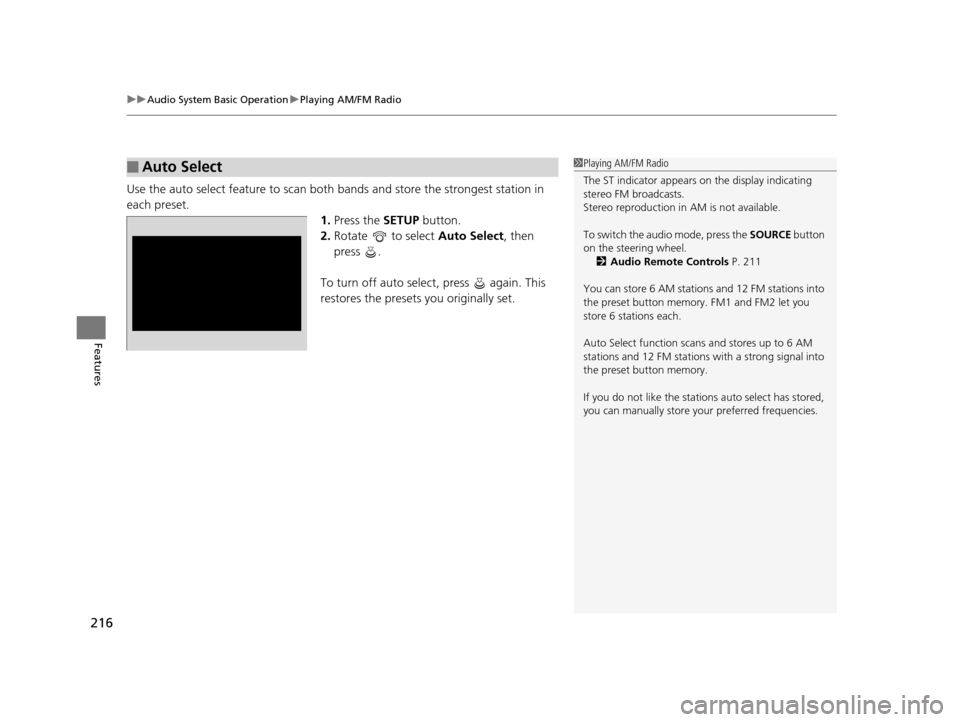
Use the auto select feature to scan both bands and store the strongest station in
each preset. 1.Press the SETUP button.
2. Rotate to select Auto Select, then
press .
To turn off auto select , press again. This
restores the presets you originally set.
■Auto Select1 Playing AM/FM Radio
The ST indicator appears on the display indicating
stereo FM broadcasts.
Stereo reproduction in AM is not available.
To switch the audio mode, press the SOURCE button
on the steering wheel. 2 Audio Remote Controls P. 211
You can store 6 AM stations and 12 FM stations into
the preset button memory. FM1 and FM2 let you
store 6 stations each.
Auto Select function scans and stores up to 6 AM
stations and 12 FM stations with a strong signal into
the preset button memory.
If you do not like the stati ons auto select has stored,
you can manually store your preferred frequencies.
15 CR-V-31T0A6300.book 216 ページ 2015年2月2日 月曜日 午前10時35分