overheating HONDA CR-V 2016 RM1, RM3, RM4 / 4.G Quick Guide
[x] Cancel search | Manufacturer: HONDA, Model Year: 2016, Model line: CR-V, Model: HONDA CR-V 2016 RM1, RM3, RM4 / 4.GPages: 80, PDF Size: 7.99 MB
Page 4 of 80
| 1
VISUAL INDEX
Quickly locate items in the vehicle’s interior.
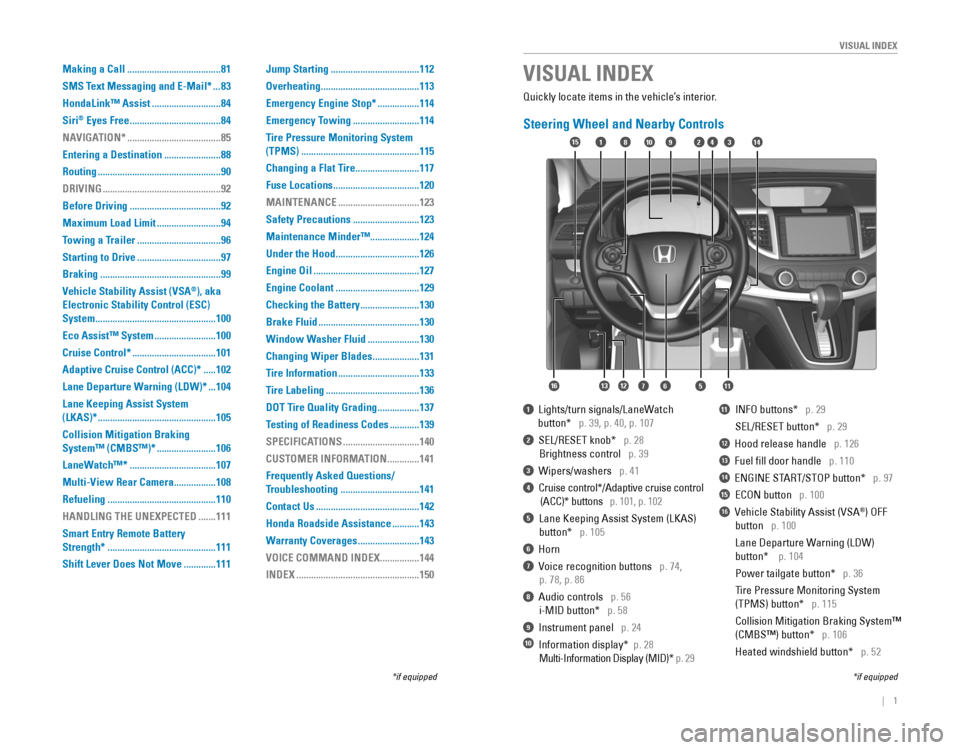
Steering Wheel and Nearby Controls
1 Lights/turn signals/LaneWatch
button* p. 39, p. 40, p. 107
2 SEL/RESET knob* p. 28
Brightness control p. 39
3 Wipers/washers p. 41
4 Cruise control*/Adaptive cruise control
(ACC)* buttons p. 101, p. 102
5 Lane Keeping Assist System (LKAS)
button* p. 105
6 Horn
7 Voice recognition buttons p. 74,
p. 78, p. 86
8 Audio controls p. 56
i-MID button* p. 58
9 Instrument panel p. 24
10 Information display* p. 28
Multi-Information Display (MID)* p. 29
11 INFO buttons* p. 29
SEL/RESET button* p. 29
12 Hood release handle p. 126
13 Fuel fill door handle p. 110
14 ENGINE START/STOP button* p. 97
15 ECON button p. 100
16 Vehicle Stability Assist (VSA®) OFF
button p. 100
Lane Departure Warning (LDW)
button* p. 104
Power tailgate button* p. 36
Tire Pressure Monitoring System
(TPMS) button* p. 115
Collision Mitigation Braking System™
(CMBS™) button* p. 106
Heated windshield button* p. 52
VISUAL INDEX
*if equipped*if equipped
92
567111213
1815341014
16
Making a Call ......................................81
SMS Text Messaging and E-Mail*
...83
HondaLink™ Assist
............................84
Siri
® Eyes Free .....................................84
NAVIGATION*
......................................85
Entering a Destination
.......................88
Routing
..................................................90
DRIVING
................................................92
Before Driving
.....................................92
Maximum Load Limit
..........................94
Towing a Trailer
..................................96
Starting to Drive
..................................97
Braking
.................................................99
Vehicle Stability Assist (VSA
®), aka
Electronic Stability Control (ESC)
System
.................................................100
Eco Assist™ System
.........................100
Cruise Control*
..................................101
Adaptive Cruise Control (ACC)*
.....102
Lane Departure Warning (LDW)*
...104
Lane Keeping Assist System
(LKAS)*
................................................105
Collision Mitigation Braking
System™ (CMBS™)*
........................106
LaneWatch™*
...................................107
Multi-View Rear Camera
.................108
Refueling
............................................110
HANDLING THE UNEXPECTED
.......111
Smart Entry Remote Battery
Strength*
............................................111
Shift Lever Does Not Move
.............111 Jump Starting
....................................112
Overheating
........................................113
Emergency Engine Stop*
.................114
Emergency Towing
...........................114
Tire Pressure Monitoring System
(TPMS)
................................................115
Changing a Flat Tire
..........................117
Fuse Locations
...................................120
MAINTENANCE
.................................123
Safety Precautions
...........................123
Maintenance Minder™ ....................124
Under the Hood
..................................126
Engine Oil
...........................................127
Engine Coolant
..................................129
Checking the Battery
........................130
Brake Fluid
.........................................130
Window Washer Fluid
.....................130
Changing Wiper Blades
...................131
Tire Information
.................................133
Tire Labeling
......................................136
DOT Tire Quality Grading
.................137
Testing of Readiness Codes
............139
SPECIFICATIONS
...............................140
CUSTOMER INFORMATION
.............141
Frequently Asked Questions/
Troubleshooting
................................141
Contact Us
..........................................142
Honda Roadside Assistance
...........143
Warranty Coverages
.........................143
VOICE COMMAND INDEX
................144
INDEX
..................................................150
Page 60 of 80
112 || 113
HANDLING THE UNEXPECTED
HANDLING THE UNEXPECTED
After the Engine Starts
Once your vehicle’s engine has started, remove the jumper cables in the following
order:
1. Disconnect the jumper cable from your vehicle’s ground.
2. Disconnect the other end of the jumper cable from the assisting vehicle’s (-)
terminal.
3. Disconnect the jumper cable from your vehicle’s (+) terminal.
4. Disconnect the other end of the jumper cable from the assisting vehicle’s (+)
terminal.
5. Have your vehicle inspected by a nearby service station or a dealer.
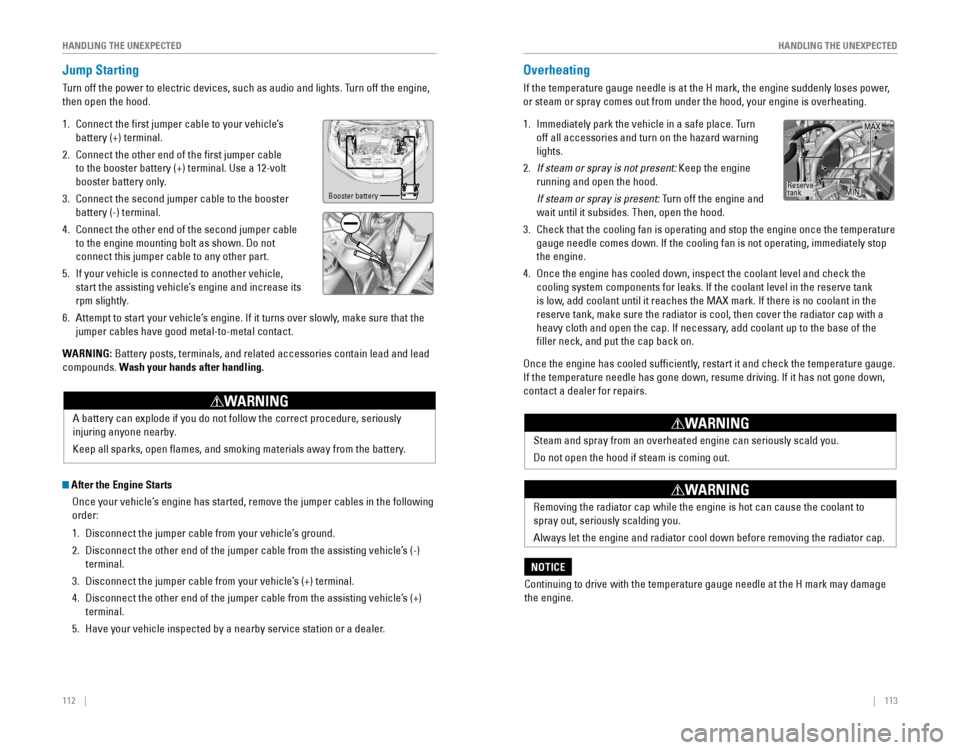
Overheating
If the temperature gauge needle is at the H mark, the engine suddenly loses power,
or steam or spray comes out from under the hood, your engine is overheat\
ing.
1. Immediately park the vehicle in a safe place. Turn
off all accessories and turn on the hazard warning
lights.
2. If steam or spray is not present: Keep the engine
running and open the hood.
If steam or spray is present: Turn off the engine and
wait until it subsides. Then, open the hood.
3. Check that the cooling fan is operating and stop the engine once the tem\
perature
gauge needle comes down. If the cooling fan is not operating, immediately stop
the engine.
4. Once the engine has cooled down, inspect the coolant level and check the
cooling system components for leaks. If the coolant level in the reserve tank
is low, add coolant until it reaches the MAX mark. If there is no coolant in the
reserve tank, make sure the radiator is cool, then cover the radiator ca\
p with a
heavy cloth and open the cap. If necessary, add coolant up to the base of the
filler neck, and put the cap back on.
Once the engine has cooled sufficiently, restart it and check the temperature gauge.
If the temperature needle has gone down, resume driving. If it has not gone down,
contact a dealer for repairs.
Reserve
tank MAX
MIN
A battery can explode if you do not follow the correct procedure, seriously
injuring anyone nearby.
Keep all sparks, open flames, and smoking materials away from the battery.
WARNING
Jump Starting
Turn off the power to electric devices, such as audio and lights. Turn off the engine,
then open the hood.
1. Connect the first jumper cable to your vehicle’s
battery (+) terminal.
2. Connect the other end of the first jumper cable
to the booster battery (+) terminal. Use a 12-volt
booster battery only.
3. Connect the second jumper cable to the booster
battery (-) terminal.
4. Connect the other end of the second jumper cable
to the engine mounting bolt as shown. Do not
connect this jumper cable to any other part.
5. If your vehicle is connected to another vehicle,
start the assisting vehicle’s engine and increase its
rpm slightly.
6. Attempt to start your vehicle’s engine. If it turns over slowly, make sure that the
jumper cables have good metal-to-metal contact.
WARNING: Battery posts, terminals, and related accessories contain lead and lead\
compounds. Wash your hands after handling.
Booster battery
Steam and spray from an overheated engine can seriously scald you.
Do not open the hood if steam is coming out.
WARNING
Removing the radiator cap while the engine is hot can cause the coolant \
to
spray out, seriously scalding you.
Always let the engine and radiator cool down before removing the radiator cap.
WARNING
Continuing to drive with the temperature gauge needle at the H mark may \
damage
the engine.
NOTICE
Page 70 of 80
132 || 133
MAINTENANCE
MAINTENANCE
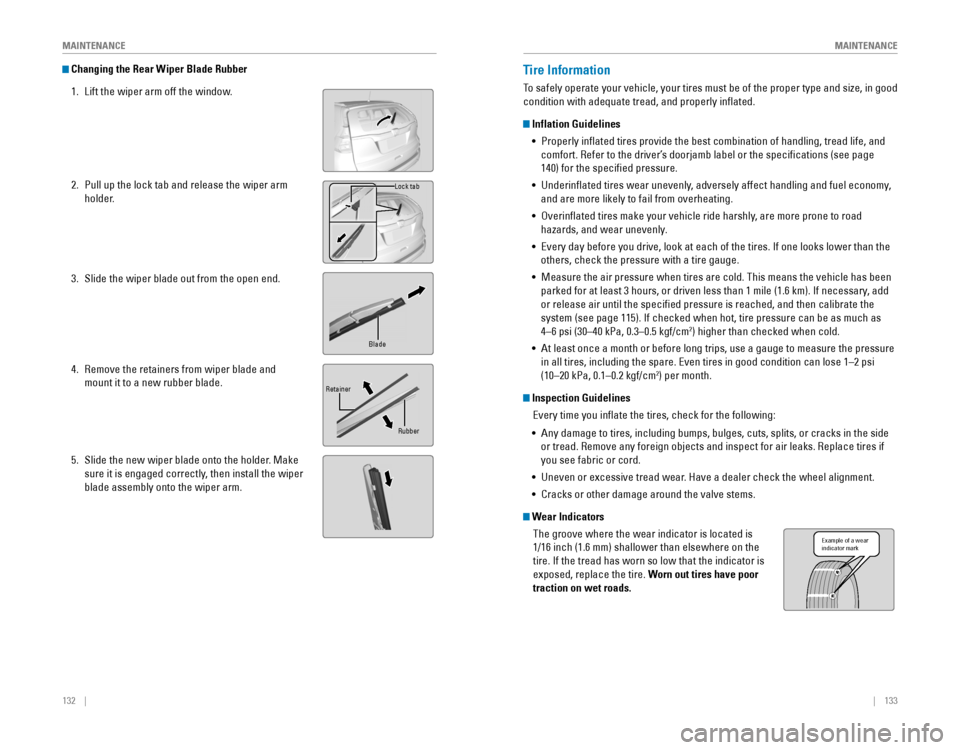
Changing the Rear Wiper Blade Rubber
1. Lift the wiper arm off the window.
2. Pull up the lock tab and release the wiper arm
holder.
3. Slide the wiper blade out from the open end.
4. Remove the retainers from wiper blade and
mount it to a new rubber blade.
5. Slide the new wiper blade onto the holder. Make
sure it is engaged correctly, then install the wiper
blade assembly onto the wiper arm.
Lock tab
Blade
Retainer Rubber
Tire Information
To safely operate your vehicle, your tires must be of the proper type and size, in good
condition with adequate tread, and properly inflated.
Inflation Guidelines•
Properly inflated tires provide the best combination of handling, tread life, and
comfort. Refer to the driver’s doorjamb label or the specifications (see page
140) for the specified pressure.
• Underinflated tires wear unevenly, adversely affect handling and fuel economy,
and are more likely to fail from overheating.
• Overinflated tires make your vehicle ride harshly, are more prone to road
hazards, and wear unevenly.
• Every day before you drive, look at each of the tires. If one looks lower than the
others, check the pressure with a tire gauge.
•
Measure the air pressure when tires are cold. This means the vehicle has been
parked for at least 3 hours, or driven less than 1 mile (1.6 km). If necessary, add
or release air until the specified pressure is reached, and then calibrate the
system (see page 115). If checked when hot, tire pressure can be as much as
4–6 psi (30–40 kPa, 0.3–0.5 kgf/cm2) higher than checked when cold.
•
At least once a month or before long trips, use a gauge to measure the pressure
in all tires, including the spare. Even tires in good condition can lose 1–2 psi
(10–20 kPa, 0.1–0.2 kgf/cm2) per month.
Inspection Guidelines
Every time you inflate the tires, check for the following:
• Any damage to tires, including bumps, bulges, cuts, splits, or cracks in the side
or tread. Remove any foreign objects and inspect for air leaks. Replace tires if
you see fabric or cord.
• Uneven or excessive tread wear. Have a dealer check the wheel alignment.
• Cracks or other damage around the valve stems.
Wear Indicators
The groove where the wear indicator is located is
1/16 inch (1.6 mm) shallower than elsewhere on the
tire. If the tread has worn so low that the indicator is
exposed, replace the tire. Worn out tires have poor
traction on wet roads.
Example of a wear
indicator mark
Page 80 of 80
152 || 153
INDEX
INDEX
Street Address ..............................................88Traffic .............................................................91Turn-by-Turn Directions ..............................90
Voice Prompt ................................................. 87
Voice Recognition Tips
................................87
Navigation Commands ..................................144
One-Touch Turn Signal ....................................40On/Off Indicators ..............................................27
On-screen Commands ...................................149
Opening the Hood
..........................................126
Overheating ..................................................... 113
Pairing a Phone
..........................................75, 80Pandora® .....................................................64, 73Pandora® Commands ....................................148
Parking Brake .............................................26, 99Passenger Airbag Off Indicator .....................12Phone .......................................................75, 80Phonebook ..................................................76, 81Phone Commands ..........................................149
Place Category .................................................89Power Door Mirrors......................................... 49
Power Mode .....................................................97
Power Moonroof ..............................................38
Power sliding doors .........................................25
Power tailgate ............................................25, 36
Power Windows ...............................................37Radio .......................................................59, 67Rain-Sensing Wipers ....................................... 42
Readiness Codes ............................................ 139
Rear Camera
...................................................108
Rear Seats .........................................................47
Rearview Mirror ...............................................49
Rear Wiper ........................................................42
Refueling .......................................................... 110
Remote Battery Strength
..............................111
Remote Transmitter .........................................32Reporting Safety Defects................................ 23
Roadside Assistance .....................................143
Route Commands ...........................................146Routing .............................................................90Safety Information .............................................3Carbon Monoxide Gas ...................................4
Child Safety ...................................................15Handling Information .....................................4Reporting Safety Defects ............................23Safety Label Locations ................................22
Safety Messages ...........................................3
Seat Belts ............................................................5
Fastening a Seat Belt ....................................7Lap/Shoulder Seat Belts ...............................5Seat Belt Inspection ......................................6Seat belt reminder .......................................26Seat Belt with Detachable Anchor .............8
Shoulder Anchor ............................................7
Seat Heaters .....................................................53
Seats .............................................................43Select/reset knob .............................................28SEL/RESET button ............................................29
Service Codes ................................................. 125
Settings .......................................................30, 31
Setting the Clock ..............................................54Shifting .............................................................98Shift Lever Does Not Move ..........................111
Shoulder Anchor ................................................7Side Airbags...................................................... 10Side Curtain Airbags........................................10
Siri® Eyes Free ..................................................84
SiriusXM® Radio .............................................68
SiriusXM® Radio Commands ......................148Smart Entry System ...................................25, 33
SMS Text Messaging ................................77, 83Sound .............................................................57
Specifications .................................................140Speed Dial ...................................................76, 82Starter system ..................................................25
Steering Wheel ................................................. 48
Steering Wheel and Nearby Controls ............1
Steering Wheel Controls ...........................56, 85
Street Address .................................................. 88
Supplemental Restraint System (SRS)
...11, 24System message ..............................................26Tailgate .......................................................33, 35
Tailgate open ....................................................26
Talk Button Tips ..........................................79, 87Text Messaging ..........................................77, 83Tire Information ..............................................133DOT Tire Quality Grading ..........................137Inflation Guidelines ....................................133Tire and Loading Information Label ........134
Tire and Wheel Replacement ...................134
Tire Chains ...................................................135Tire Identification Number (TIN) ..............136Tire Labeling ................................................136
Tire Service Life ..........................................135
Tire Terminology .........................................136Wear Indicators .........................................133
Winter Tires .................................................135
Tire Pressure Monitoring System (TPMS)
.......................................25, 115Tires ...........................................................140
Touchscreen Operation ..................................65Towing ...........................................................114
Towing a Trailer ................................................96Traffic .............................................................91
Troubleshooting ..............................................141Turn-by-Turn Directions ..................................90
Turn signal ...................................................27, 40Under the Hood ..............................................126USB Adapter Cable ..........................................55
USB Commands .............................................. 148
USB Flash Drive..........................................62, 71USB Port ............................................................55Vehicle ...........................................................140
Vehicle Controls ...............................................32Vehicle Stability Assist (VSA®) ........25, 27, 100Visual Index......................................................... 1Voice Command Index ..................................144
Voice Prompt ....................................................87
Warranty Coverages .....................................143Wear Indicators .............................................133
Window Washer Fluid ...................................130
Windows ............................................................ 37
Winter Tires
.....................................................135
Wiper Blades ..................................................131
Wiper Operation ...............................................41