lane assist HONDA CR-V 2016 RM1, RM3, RM4 / 4.G Quick Guide
[x] Cancel search | Manufacturer: HONDA, Model Year: 2016, Model line: CR-V, Model: HONDA CR-V 2016 RM1, RM3, RM4 / 4.GPages: 80, PDF Size: 7.99 MB
Page 4 of 80
| 1
VISUAL INDEX
Quickly locate items in the vehicle’s interior.
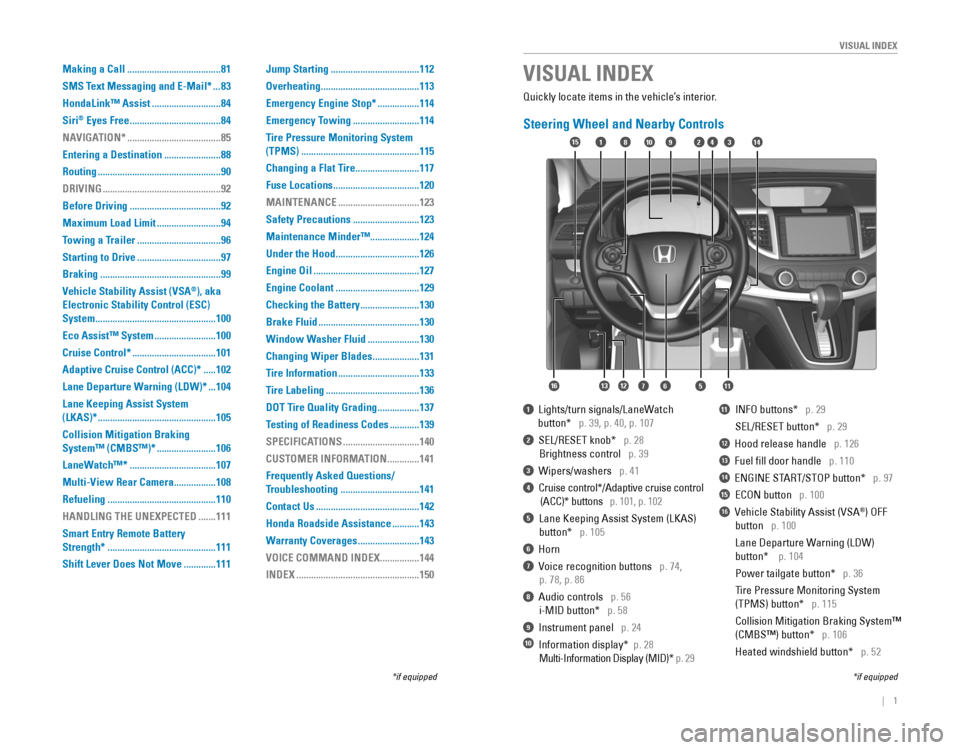
Steering Wheel and Nearby Controls
1 Lights/turn signals/LaneWatch
button* p. 39, p. 40, p. 107
2 SEL/RESET knob* p. 28
Brightness control p. 39
3 Wipers/washers p. 41
4 Cruise control*/Adaptive cruise control
(ACC)* buttons p. 101, p. 102
5 Lane Keeping Assist System (LKAS)
button* p. 105
6 Horn
7 Voice recognition buttons p. 74,
p. 78, p. 86
8 Audio controls p. 56
i-MID button* p. 58
9 Instrument panel p. 24
10 Information display* p. 28
Multi-Information Display (MID)* p. 29
11 INFO buttons* p. 29
SEL/RESET button* p. 29
12 Hood release handle p. 126
13 Fuel fill door handle p. 110
14 ENGINE START/STOP button* p. 97
15 ECON button p. 100
16 Vehicle Stability Assist (VSA®) OFF
button p. 100
Lane Departure Warning (LDW)
button* p. 104
Power tailgate button* p. 36
Tire Pressure Monitoring System
(TPMS) button* p. 115
Collision Mitigation Braking System™
(CMBS™) button* p. 106
Heated windshield button* p. 52
VISUAL INDEX
*if equipped*if equipped
92
567111213
1815341014
16
Making a Call ......................................81
SMS Text Messaging and E-Mail*
...83
HondaLink™ Assist
............................84
Siri
® Eyes Free .....................................84
NAVIGATION*
......................................85
Entering a Destination
.......................88
Routing
..................................................90
DRIVING
................................................92
Before Driving
.....................................92
Maximum Load Limit
..........................94
Towing a Trailer
..................................96
Starting to Drive
..................................97
Braking
.................................................99
Vehicle Stability Assist (VSA
®), aka
Electronic Stability Control (ESC)
System
.................................................100
Eco Assist™ System
.........................100
Cruise Control*
..................................101
Adaptive Cruise Control (ACC)*
.....102
Lane Departure Warning (LDW)*
...104
Lane Keeping Assist System
(LKAS)*
................................................105
Collision Mitigation Braking
System™ (CMBS™)*
........................106
LaneWatch™*
...................................107
Multi-View Rear Camera
.................108
Refueling
............................................110
HANDLING THE UNEXPECTED
.......111
Smart Entry Remote Battery
Strength*
............................................111
Shift Lever Does Not Move
.............111 Jump Starting
....................................112
Overheating
........................................113
Emergency Engine Stop*
.................114
Emergency Towing
...........................114
Tire Pressure Monitoring System
(TPMS)
................................................115
Changing a Flat Tire
..........................117
Fuse Locations
...................................120
MAINTENANCE
.................................123
Safety Precautions
...........................123
Maintenance Minder™ ....................124
Under the Hood
..................................126
Engine Oil
...........................................127
Engine Coolant
..................................129
Checking the Battery
........................130
Brake Fluid
.........................................130
Window Washer Fluid
.....................130
Changing Wiper Blades
...................131
Tire Information
.................................133
Tire Labeling
......................................136
DOT Tire Quality Grading
.................137
Testing of Readiness Codes
............139
SPECIFICATIONS
...............................140
CUSTOMER INFORMATION
.............141
Frequently Asked Questions/
Troubleshooting
................................141
Contact Us
..........................................142
Honda Roadside Assistance
...........143
Warranty Coverages
.........................143
VOICE COMMAND INDEX
................144
INDEX
..................................................150
Page 16 of 80
24 || 25
I
NSTRUMENT PANELINSTRUMENT PANEL
Smart Entry system*
There is a problem with the smart entry system.
Malfunction indicator lamp (check engine light)
• The emissions control system may have a problem, or the fuel cap is loose
or missing.
• (Blinks) A misfire in the engine’s cylinders is detected. Stop in a safe place,
and wait for the engine to cool down.
Anti-lock Brake System (ABS)
There is a problem with the anti-lock brake system. Your vehicle still has
normal braking ability, but no anti-lock function.
Tire Pressure Monitoring System (TPMS)*
There is a problem with the tire pressure monitoring system, or the vehicle is
fitted with the compact spare tire.
Collision Mitigation Braking System™ (CMBS™)*
There is a problem with system, the radar sensor is blocked, or the
temperature is too high.
Lane Departure Warning (LDW)*
There is a problem with the system, the camera is blocked, or the
temperature is too high.
Lane Keeping Assist System (LKAS)*
There is a problem with the system, the camera is blocked, or the
temperature is too high.
Vehicle Stability Assist (VSA
®)
There is a problem with the VSA system or hill start assist system.
Adaptive Cruise Control (ACC)*
There is a problem with the system, the radar sensor is blocked, or the
temperature is too high.
Electric Power Steering (EPS)
There is a problem with the EPS system. Stop in a safe place, and restart the
vehicle.
Starter system*
There is a problem with the starter system. Press and hold the ENGINE
START/STOP button for up to 15 seconds while pressing the brake pedal and
manually start the engine.
All Wheel Drive (AWD)*
There is a problem with the AWD system. If the indicator blinks, the system
is overheated and inactive. Stop in a safe place, and idle until the ind\
icator
goes off.
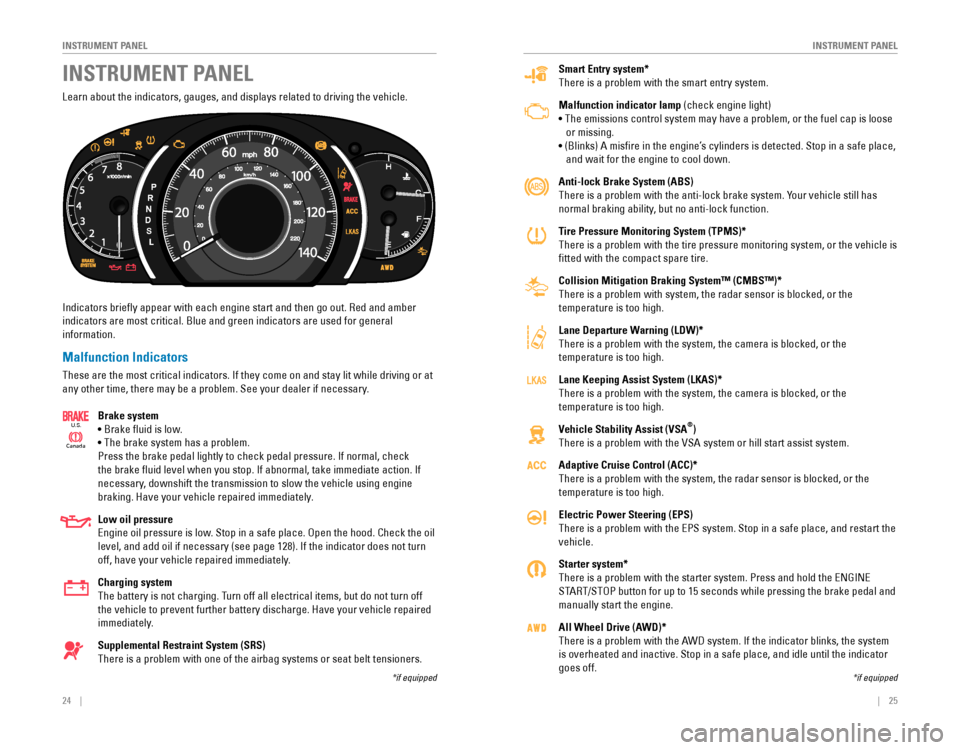
Learn about the indicators, gauges, and displays related to driving the vehicle.
Indicators briefly appear with each engine start and then go out. Red and amber
indicators are most critical. Blue and green indicators are used for general?
information.
Malfunction Indicators
These are the most critical indicators. If they come on and stay lit while driving or at
any other time, there may be a problem. See your dealer if necessary.
Brake system
• Brake fluid is low.
• The brake system has a problem.
Press the brake pedal lightly to check pedal pressure. If normal, check
the brake fluid level when you stop. If abnormal, take immediate action. If
necessary, downshift the transmission to slow the vehicle using engine
braking. Have your vehicle repaired immediately.
Low oil pressure
Engine oil pressure is low. Stop in a safe place. Open the hood. Check the oil
level, and add oil if necessary (see page 128). If the indicator does not turn
off, have your vehicle repaired immediately.
Charging system
The battery is not charging. Turn off all electrical items, but do not turn off
the vehicle to prevent further battery discharge. Have your vehicle repaired
immediately.
Supplemental Restraint System (SRS)
There is a problem with one of the airbag systems or seat belt tensioners.
Ca nada
U.S.
INSTRUMENT PANEL
*if equipped*if equipped
Page 56 of 80
104 || 105
DRIVING
DRIVING
Lane Departure Warning (LDW)*
A camera mounted between the windshield and the rearview mirror determines if
your vehicle begins to move away from the center of a detected lane while driving
between 45–90 mph (72–145 km/h).
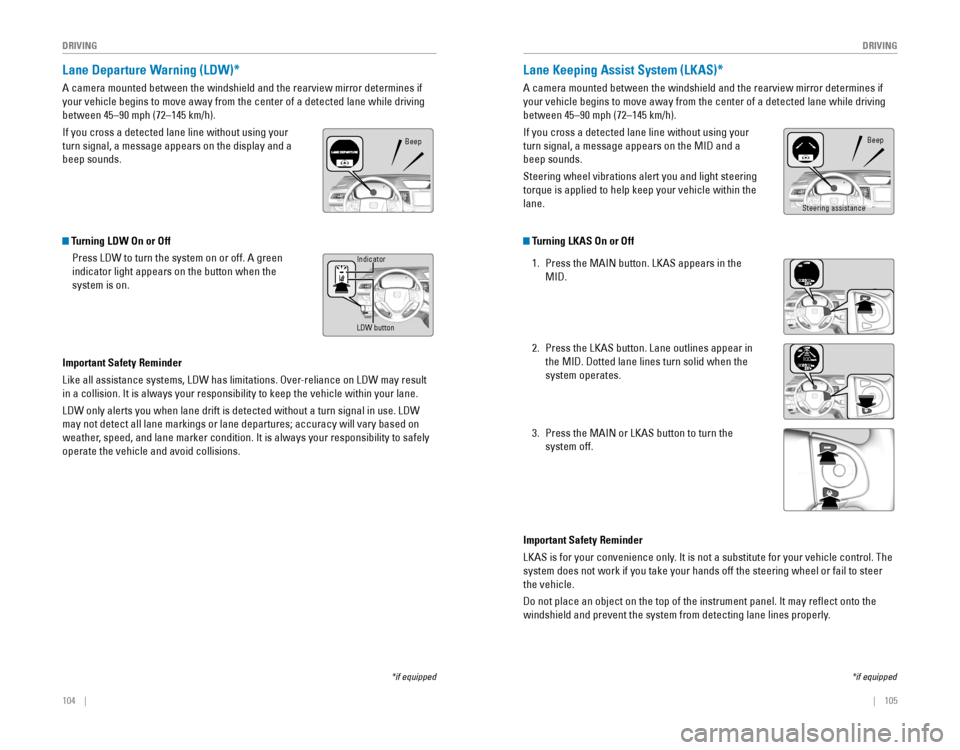
If you cross a detected lane line without using your
turn signal, a message appears on the display and a
beep sounds.
*if equipped
Beep
*if equipped
Lane Keeping Assist System (LKAS)*
A camera mounted between the windshield and the rearview mirror determines if
your vehicle begins to move away from the center of a detected lane while driving
between 45–90 mph (72–145 km/h).
If you cross a detected lane line without using your
turn signal, a message appears on the MID and a
beep sounds.
Steering wheel vibrations alert you and light steering
torque is applied to help keep your vehicle within the
lane.
Beep
Steering assistance
Turning LDW On or Off
Press LDW to turn the system on or off. A green
indicator light appears on the button when the
system is on.
Important Safety Reminder
Like all assistance systems, LDW has limitations. Over-reliance on LDW may result
in a collision. It is always your responsibility to keep the vehicle within your lane.
LDW only alerts you when lane drift is detected without a turn signal in use. LDW
may not detect all lane markings or lane departures; accuracy will vary based on
weather, speed, and lane marker condition. It is always your responsibility to safely
operate the vehicle and avoid collisions.
LDW button
Indicator
Turning LKAS On or Off
1. Press the MAIN button. LKAS appears in the
MID.
2. Press the LKAS button. Lane outlines appear in
the MID. Dotted lane lines turn solid when the
system operates.
3. Press the MAIN or LKAS button to turn the
system off.
Important Safety Reminder
LKAS is for your convenience only. It is not a substitute for your vehicle control. The
system does not work if you take your hands off the steering wheel or fa\
il to steer
the vehicle.
Do not place an object on the top of the instrument panel. It may reflect onto the
windshield and prevent the system from detecting lane lines properly.
Page 57 of 80
*
Can alert you when a potential frontal collision with a vehicle or pedes\
trian is
det")
106 || 107
DRIVING
DRIVING
*if equipped
Collision Mitigation Braking System™ (CMBS™)*
Can alert you when a potential frontal collision with a vehicle or pedes\
trian is
determined and reduce your vehicle speed when a collision is deemed unavoidable
to help minimize collision severity.
The system provides visual and audible alerts if you
do not take appropriate action to avoid a collision.
Alert Stages
The system has three alert stages for a possible
collision. Depending on the circumstances or
CMBS settings, CMBS may not go through all of
the stages before initiating the last stage.
Stage 1: Visual warnings and audible warning
Stage 2: Visual warnings, audible warning, and light brake application
Stage 3: Visual warnings, audible warning, and strong brake application
Beep
LaneWatch™*
Check the passenger-side rear areas in the upper display when the right turn signal
is activated.
LaneWatch display
Activating LaneWatch
Activate the right turn signal. The LaneWatch
display appears. Check the display for blind spots,
and visually confirm that it is safe to change lanes.
You can also press the LaneWatch button on the
end of the turn signal switch to view a constant
real-time display. Press it again to turn the display
off.
*if equipped
Turning CMBS On or Off
Press and hold the CMBS OFF button. A beep sounds
and a message appears in the MID. The CMBS
indicator appears when the system is off.
Changing Settings
Change the alert distance. Use the steering wheel buttons to make and enter
selections in the MID (see page 30).
1. Select the Customize Settings display.
2. Select Change Settings.
3. Select Driver Assist System Setup.
4. Select Forward Collision Warning Distance. Select Long, Normal, or Short.
5. Exit the menu.
Important Safety Reminder
CMBS is designed to reduce the severity of an unavoidable collision. It does not
prevent collision nor stop the vehicle automatically. It is still your responsibility to
operate the brake pedal and steering wheel appropriately according to the driving
conditions.
Failure to visually confirm that it is safe to change lanes before doing so may
result in a crash and serious injury or death.
Do not rely only on LaneWatch while driving. Always look in your mirrors, to
either side of your vehicle, and behind you for other vehicles before changing
lanes.
WARNING
Changing Settings
Customize the display and how and when the display appears.
1. From the HOME screen, select Settings.
2. Select Camera.
3. Select LaneWatch.
4. Select an option and make the preferred changes.
5. Press the BACK button to exit the menu.
Important Safety Reminder
Like all assistance systems, LaneWatch has limitations. Over-reliance on the system
may result in a collision.
Page 79 of 80
150 || 151
INDEX
INDEX
INDEX
ABS .............................................................25ACC ...........................................................102
Accessory Power Socket ...............................55
Adaptive Cruise Control (ACC) ...............25, 102Airbags ...............................................................9Advanced Airbags .........................................9Airbag Care ...................................................14Airbag System Components .......................13Airbag System Indicators ...........................11Front Airbags (SRS) .......................................9Passenger Airbag Off Indicator .................12Side Airbags ..................................................10Side Curtain Airbags ....................................10
Supplemental Restraint System indicator
.............................................11
Air Conditioning System ..................................51
All Wheel Drive (AWD) ....................................25Ambient Meter................................................ 100
Anti-Lock Brake System (ABS) ................25, 99
Audio Commands ...........................................148
Audio Operation ...............................................55
Accessory Power Socket ...........................55Auxiliary Input Jack .....................................56
Bluetooth® Audio ...................................63, 72Compact Disc (CD) .................................60, 69FM/AM Radio ..........................................59, 67HDMI Port ......................................................56
HondaLink™ ..................................................66Intelligent Multi-Information Display
(i-MID) ................................................58
iPod® .......................................................61, 70Pandora® .................................................64, 73SiriusXM® Radio ...........................................68Sound .............................................................57
Steering Wheel Controls .............................56
Touchscreen Operation ..............................65USB Adapter Cable ......................................55USB Flash Drive ......................................62, 71USB Port ........................................................55Automatic Dimming Rearview Mirror ...........49
Automatic Rain-Sensing Wipers ...................42
AUX Commands .............................................. 149
Auxiliary Input Jack .........................................56AWD .............................................................25Battery ...........................................................130
Bluetooth® Audio .......................................63, 72Bluetooth® Audio Commands ......................149
Bluetooth® HandsFreeLink® (HFL) .................74E-Mail .............................................................83
HFL Controls ............................................74, 78HondaLink™ Assist ......................................84
Making a Call ..........................................76, 81Pairing a Phone ......................................75, 80
Siri® Eyes Free ..............................................84
SMS Text Messaging ............................77, 83Speed Dial ...............................................76, 82Talk Button Tips ............................................79
Brake Assist System ........................................ 99
Brake Fluid
......................................................130
Brake system ..............................................24, 26Braking .............................................................99
Brightness Control ...........................................39Carbon Monoxide Gas....................................... 4
Cargo Area Lights ............................................39
Changing a Flat Tire .......................................117
Changing Settings ......................................30, 31
Changing Wiper Blades ................................131
Charging system ............................................... 24
Childproof Door Locks .....................................34
Child Safety .......................................................15
Child Seat ..........................................................17
Adding Security with a Tether ...................20LATCH-Compatible Child Seat ....................18
Selecting a Child Seat .................................17
Climate Control Commands ..........................147
Climate Control System ...................................52Clock .............................................................54
Collision Mitigation Braking System™ (CMBS™)
...................................25, 106Compact Disc (CD) .....................................60, 69Compact Disc (CD) Commands ....................148Condition Indicators ........................................26
Contact Us .......................................................142
Cruise Control ...........................................27, 101Customer Information.................................... 141Customized Features .......................................31Dashboard Controls .......................................... 2
Destination ........................................................88Detour .............................................................91Dialing a Number .......................................76, 81Door Mirrors .....................................................49Door Operation .................................................34Doors .............................................................33Door/tailgate open ...........................................26DOT Tire Quality Grading ..............................137Driving .............................................................92
Adaptive Cruise Control (ACC) .................102
Braking ...........................................................99
Collision Mitigation Braking System™ (CMBS™)
.........................................106
Cruise Control .............................................101ENGINE START/STOP button .....................97
Ignition ...........................................................97Lane Departure Warning (LDW) ..............104
Lane Keeping Assist System (LKAS) .......105
LaneWatch™ ..............................................107 Maximum Load Limit
....................................94
Multi-View Rear Camera ..........................108
Power Mode .................................................97
Refueling ......................................................110
Shifting ...........................................................98
Towing a Trailer ............................................96Vehicle Stability Assist (VSA®) ................100Driving Position Memory System ..................48Eco Assist™ System ......................................100ECON Button ...................................................100ECON mode .......................................................27Electric Power Steering (EPS) .......................25Electronic Stability Control (ESC) ................100E-Mail .............................................................83Emergency Engine Stop ................................114Emergency Towing ........................................114Engine and Fuel ..............................................140Engine Coolant................................................ 129Engine Oil......................................................... 127ENGINE START/STOP button .........................97Exterior lights ..............................................27, 40Fastening a Seat Belt ........................................7
Find Nearest Place ..........................................89
Find Place Commands ...................................145Flat Tire ...........................................................117
Floor Mats .........................................................46Fluids ...........................................................140FM/AM Radio ..............................................59, 67FM/AM Radio Commands .............................148
Fog lights .....................................................27, 40Foot Brake .........................................................99Frequently Asked Questions ........................141Front Airbags (SRS) ...........................................9Front Door Inner Handle .................................34
Front Seats ........................................................43
Front Wipers .....................................................41Fuel Information .............................................110
Fuse Locations ................................................ 120
Garage Opener
.................................................50HDMI Port.......................................................... 56Headlight-Wiper Integration ..........................41
Head Restraints ................................................45
Heated Windshield Button .............................52High beams .......................................................27
Home Address ..................................................88
HomeLink® Garage Opener ............................50
HondaLink™ ......................................................66
HondaLink™ Assist ..........................................84
Honda Roadside Assistance ........................143Hood ...........................................................126Ignition .............................................................97i-MID .............................................................58
Immobilizer ........................................................27Info buttons .......................................................29Info Commands............................................... 149
Information Display..........................................28Instrument Panel ..............................................24Intelligent Multi-Information Display
(i-MID) ................................................58Interior Lights.................................................... 39Intermittent Wipers..........................................41
iPod® .......................................................61, 70iPod® Commands ...........................................149
Jump Starting .................................................112Key .............................................................32Lane Departure Warning (LDW) ............25, 104Lane Keeping Assist System (LKAS) ....25, 105
LaneWatch™ ..................................................107Lap/Shoulder Seat Belts ...................................5LATCH-Compatible Child Seat ........................18Light Bulbs....................................................... 140Lights .............................................................39LKAS .....................................................27, 105Locking the Tailgate .........................................33Lock Tab .............................................................34Low fuel .............................................................26
Low oil pressure ...............................................24
Low tire pressure .............................................27
Maintenance ................................................... 123
Battery
.........................................................130
Brake Fluid ..................................................130Engine Coolant ............................................129Engine Oil .....................................................127
Maintenance Minder™ .......................26, 124Safety Precautions ....................................123
Service Codes .............................................125
Under the Hood ..........................................126
Window Washer Fluid ...............................130
Making a Call ..............................................76, 81Malfunction indicator lamp ............................25Malfunction Indicators.................................... 24Map Display Commands ...............................144
Map Legend ......................................................90
Map Lights ......................................................... 39
Master Door Lock Switch ...............................34
Maximum Load Limit ........................................ 94
Mirrors .............................................................49
Moonroof ...........................................................38Multi-Information Display ...............................29
Multi-View Rear Camera ..............................108
Navigation .........................................................85
Detour ............................................................91Display and Controls ....................................86Entering a Destination .................................88
Find Nearest Place ......................................89
Home Address ..............................................88
Map Legend ..................................................90
Place Category .............................................89
Routing ...........................................................90
Steering Wheel Controls .............................85